


 Video Converter Ultimate
 Screen Recorder
 Oprava videa
5 nejlepších nástrojů, které můžete použít k hladkému zrychlení videí na všech platformách
Zrychlení videí je velmi užitečné, zvlášť pokud chcete sledovat video v rychlejším tempu než obvykle. Také pokud chcete zrychlit video, zkrátí se jeho délka a často se zmenší i velikost souboru oproti původnímu nekomprimovanému videu. Zrychlování videa má však i své nevýhody – pokud rychlost příliš zvýšíte, video nemusí jít přehrát. Abychom se tomuto problému vyhnuli, představujeme různé nástroje, ze kterých si můžete vybrat. Všechny informace, které si níže přečtete, jsou ověřená fakta a byly prakticky vyzkoušeny ještě před napsáním tohoto článku. Nyní se tedy podívejme na různé nástroje níže a zjistěme, jaký je nejlepší software pro Windows, Mac a Linux.

Část 1. 3 Nejlepší software pro zrychlení videa v systému Windows
1.Video Converter Ultimate
Pokud je vaším problémem zrychlování nebo zpomalování videa, existuje jedno řešení: Video Converter Ultimate. Tento software dokáže vaše video výrazně zrychlit nebo naopak zpomalit podle vašich potřeb. Kvalita výstupu při exportu přitom nebude snížena ani degradována na nižší rozlišení. Pokud tedy do programu vložíte video v rozlišení 1080p nebo 4K UHD, můžete očekávat, že kvalita zůstane stejná i po změně rychlosti. Pokud se chcete dozvědět, jak zrychlit video pomocí Video Converter Ultimate, postupujte podle kroků uvedených níže. Navíc v náhledu sice nemůžete přehrávat rychlost 4× a 8×, ale po exportu lze těchto rychlostí dosáhnout bez zhoršení kvality.
Postup, jak zrychlit video pomocí Video Converter Ultimate:
Krok 1. Nejprve klikněte na tlačítko pro stažení níže a vyberte, zda používáte PC nebo Mac. Poté program nainstalujte, případně upravte nastavení instalace podle sebe a klikněte na Finish pro uložení změn.
Zdarma ke staženíPro Windows 7 nebo novějšíBezpečné stažení
Zdarma ke staženíPro MacOS 10.7 nebo novějšíBezpečné stažení
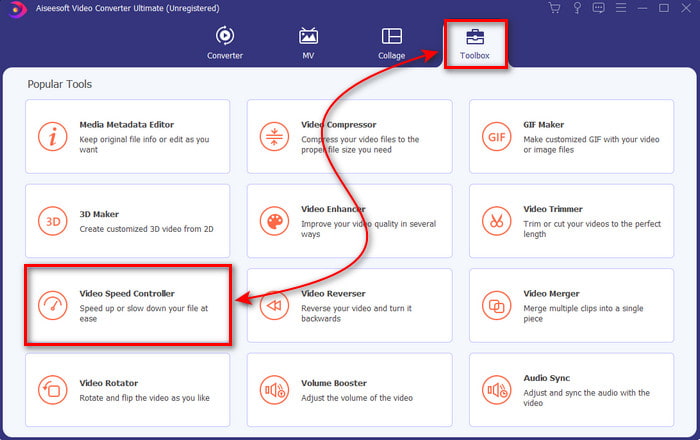
Krok 2. Přejděte do nabídky Toolbox a vyhledejte položku Video Speed Controller, poté na ni klikněte.
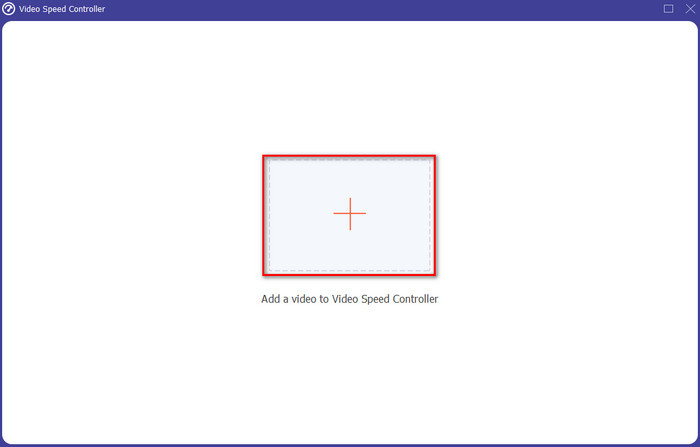
Krok 3. Kliknutím na symbol + vložte video, které chcete zrychlit, a klikněte na Open pro pokračování.
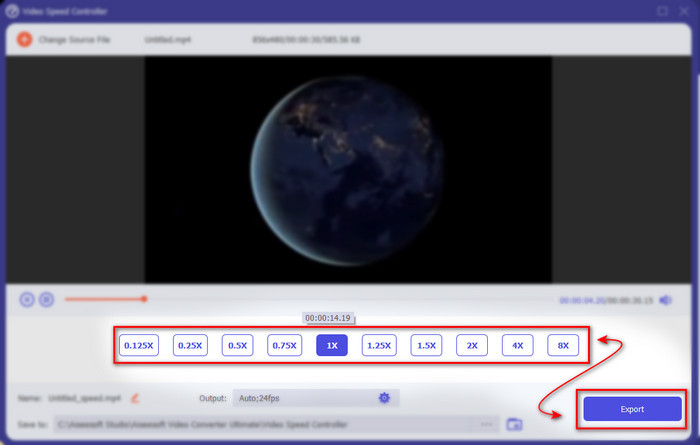
Krok 4. V rozhraní vyberte možnost rychlosti, tedy zda chcete video zpomalit nebo zrychlit video. Náhled je k dispozici pouze do rychlosti 2×. Pro uložení zrychleného videa klikněte na tlačítko Export.
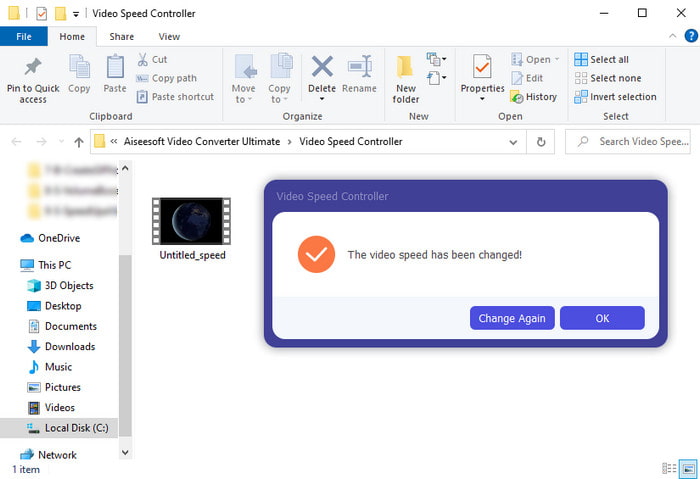
Krok 5. Počkejte několik minut, než se export dokončí. Jakmile je video hotové, zobrazí se složka se zrychleným videem. Kliknutím na soubor si můžete přehrát zrychlenou verzi svého videa.
Klady
- Pokročilé a futuristické editační funkce jsou již obsaženy ve Video Converter Ultimate.
- Nástroj se snadno používá, ale jeho výstup je působivý.
- Rozhraní nástroje je již působivější než ostatní zde prezentované nástroje.
Nevýhody
- Je to placené, ale není to tak drahé.
- Než budete moci tento nástroj používat, musíte si jej nejprve stáhnout.
2. Adobe Premiere Pro
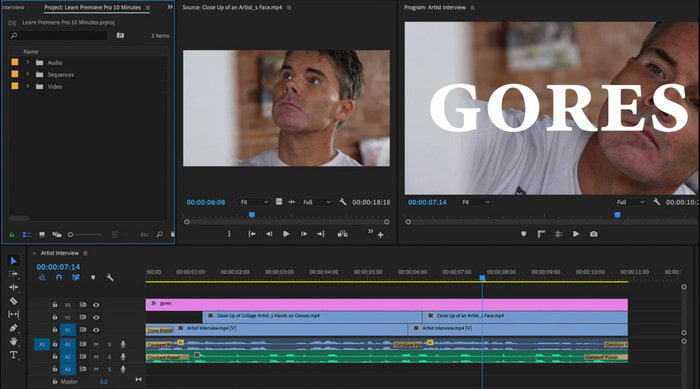
Adobe Premiere Pro je jedním z nejlepších videoeditorů, které můžete použít. Tento nástroj od Adobe patří k nejoblíbenějším, protože v něm můžete při úpravách a tvorbě profesionálních videí dělat prakticky cokoli. Tento program je však výrazně dražší než Video Converter Ultimate a navíc není příliš uživatelsky přívětivý. Místo toho, abyste mohli hned po spuštění začít stříhat, musíte si nejprve dohledat, jak v Premiere video zrychlit. Křivka učení je zde složitější, než byste čekali – často musíte sledovat návody na YouTube a číst manuály k tomuto nástroji.
Klady
- Jeden z nejlepších nástrojů, který profesionál používal.
- Tento nástroj dokáže provádět náročné úpravy videa.
- Rozhraní vypadá elegantněji a přehledněji než jiný nástroj.
Nevýhody
- Adobe Premier Pro je doslova předražený.
- Křivka učení tohoto nástroje bude nějakou dobu trvat, než jej budete moci plně používat.
3.FFmpeg
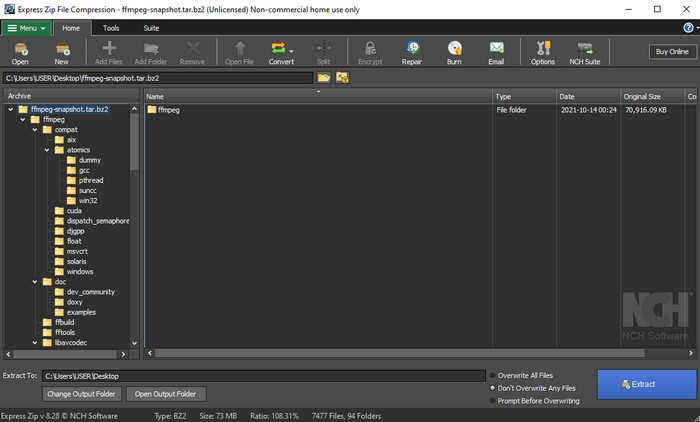
FFmpeg patří mezi nástroje známé jako špičkový multimediální framework. V podstatě jde o švýcarský nůž na práci s videem, zvukem, streamy a dalšími multimediálními soubory. Přestože je nástroj víceúčelový, existují oblasti, kde by se dal vylepšit. Například rozhraní FFmpeg by potřebovalo zjednodušit. Podobně jako Adobe Premiere je i tento nástroj pro začátečníky obtížně ovladatelný kvůli zahlcujícímu prostředí. Celkově lze funkci FFmpeg „speed up video“ zvládnout, pokud se naučíte s programem pracovat. Věnujete-li učení dostatek času, pravděpodobně se vám to vrátí, ale je to běh na delší trať.
Klady
- Jedná se o open-source softwarový projekt.
- Podporuje širokou škálu kodeků.
- Skvělá volba pro každého profesionála, který chce efektivní editační funkci.
Nevýhody
- Není to nejlepší volba pro začátečníky, aby je mohli provádět sami.
- Podporuje malý rozsah různých platforem.
- Rozhraní je obrovské, aby ho zvládli i neprofesionálové.
Část 2. 2 Nejlepšího softwaru pro Mac pro zrychlení videa
1. Přehrávač QuickTime
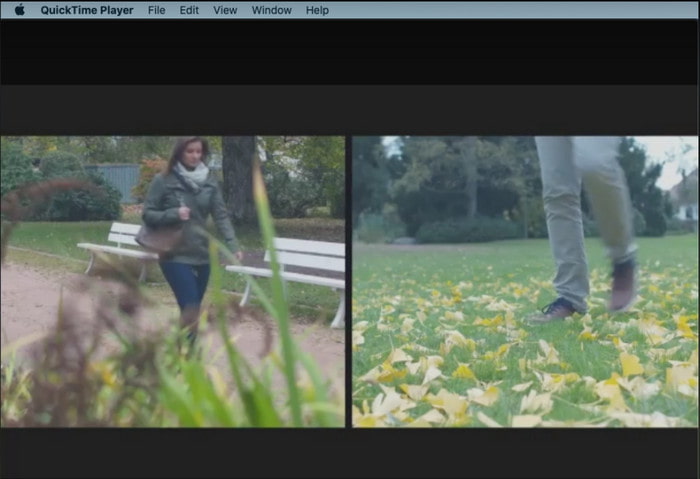
Naučit se, jak zrychlit video v QuickTime, je jednoduché jako jedna dvě tři. Nástroj totiž nemusíte stahovat – je předinstalovaný na každém počítači Mac. Víme, že QuickTime Player je vyvinut společností Apple Inc. jako nativní přehrávač médií pro všechny uživatele Macu. Přestože má vestavěnou funkci pro zrychlení i zpomalení přehrávání, musíte vše provádět ručně, což je trochu pracnější. Celkové prostředí je však přehledné a dobře navržené, ve srovnání s VLC působí upraveněji. Nevýhodou je, že QuickTime je dostupný pouze pro produkty Apple a pro Windows neexistuje QuickTime Player.
Klady
- Nástroj není třeba stahovat, protože je již předinstalovaný.
- Chcete-li nástroj používat, není potřeba připojení k internetu.
- Sledujte a přepošlete jej snadno pomocí tohoto nástroje.
Nevýhody
- Nejsou k dispozici žádné verze tohoto nástroje pro Windows.
- Ručně proveďte zrychlení a snížení rychlosti.
- Nepodporuje široký formát médií.
2. Otevřete snímek
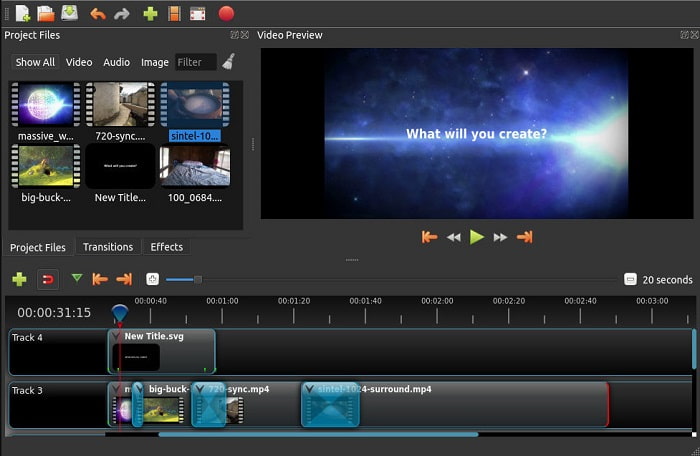
Open Shot je jedním z nejlepších editorů videa, které můžete použít zvláště na Macu. Ačkoliv tento nástroj podporuje i Windows, verze pro Mac je považována za nejlepší. Funkci Open Shot speed up video lze díky tomuto softwaru provádět velmi efektivně. Program je navíc zdarma, takže je vhodný pro uživatele, kteří si nejsou jisti v práci s komplikovanými nástroji s pokročilými funkcemi. V zásadě nabízí základní editační funkce, které byste mohli potřebovat. Některé funkcionality ale ještě vyžadují doplnění nebo aktualizaci.
Klady
- Má schopnost uložit konečný video výstup do jiných formátů, které se vám líbí.
- Videa lze jednoduše upravovat pomocí dostupných funkcí nástroje.
- Dodává se s velmi intuitivními pokyny pro začátečníky. Takže pokud se chcete naučit, jak na to zrychlení videa Windows 10, Mac nebo Linux je to skvělá volba.
Nevýhody
- Není to nejlepší volba pro uživatele, kteří chtějí mít neuvěřitelný výstup, protože postrádá některé pokročilé funkce.
- Někdy se nástroj zhroutí kvůli velkému množství úprav, které provedete, nebo někdy z neznámých důvodů.
- Není to nejlepší volba pro profesionála, který chce mít to nejlepší.
Část 3. Nejčastější dotazy o tom, jak zrychlit video Windows a Mac
Mohu zrychlit sekci svých videí?
Rozhodně ano. Vybraný úsek videa můžete vystřihnout, zrychlit a pak jej spojit s dalším videem a vytvořit tak nové, kompletně zrychlené video. Například pokud máte AVI soubor, který chcete zrychlit, můžete postupovat podle kroků výše a po dokončení jej sloučit pomocí nejlepšího AVI slučovače v tomto odkazu.
Jaká rychlost vám nejlépe vyhovuje; 2x, 4x nebo 8x?
Pokud sledujete film, bude přehrávání v rychlosti 4× a více velmi obtížné sledovat, protože obraz je příliš rychlý a lidské oko nestíhá. Ideální je tedy přehrávat film rychlostí 2×, pokud ho chcete vidět rychleji, ale přitom vše v pohodě sledovat. Kliknutím na tento odkaz přejdete na nový článek a naučíte se, jak zrychlit video až na 2× rychlost.
Jak zpomalit video tutoriál pro rychlý posun vpřed?
Pokud je video, které jste stáhli nebo konvertovali, příliš rychlé, můžete si ho pustit zpomaleně pomocí článku 5 nejlepších přehrávačů pro zpomalené video. Přejděte tedy na tento článek a zjistěte, jak videa zpomalit.
Závěr
Na závěr je pro nás nyní snazší pochopit, že můžete videa snadno zrychlit pomocí výše uvedeného nástroje. Všechny nástroje jsou schopny zvýšit rychlost videa nebo zpomalit. Navíc existuje jeden nástroj, který dokazuje, že není schopen mít zpožděné video, i když zvýšíte rychlost videí. A tím nástrojem je fenomenální editor Video Converter Ultimate, tento software se snadno používá, je nejlepší volbou pro profesionály a začátečníky, má spoustu pokročilých funkcí, ze kterých si můžete vybrat, a další. Takže se nespokojte s nástrojem v pořádku, pokud můžete mít ten nejlepší, jako je Video Converter Ultimate.
-
 Windows Media Player nehraje MP4? 5 efektivních způsobů, jak to opravit
 Nepodařilo se přehrát MP4 v programu Windows Media Player? Zjistěte více o důvodech a dokonalých řešeních přehrávání MP4 v programu Windows Media Player v počítači se systémem Windows 10.
-
 [Podrobný průvodce] Jak opravit, že se video na Disku Google nepřehrává na počítači
 Videa na Disku Google se nepřehrají s chybou „Při přehrávání tohoto videa došlo k problému“. Může to být způsobeno samotným Diskem Google nebo problémy s chromem. Tento článek podrobně představí 6 řešení.
-
 Jak opravit Windows Media Player nefunguje s videem nebo zvukem
 Windows Media Player najednou nefunguje s chybovou výzvou nebo bez ní? To je možná způsobeno mnoha důvody a v tomto článku jsou 4 způsoby, jak tento problém vyřešit.
