


 Video Converter Ultimate
 Screen Recorder
 Oprava videa
 Bezpečné stažení
Co je korekce barev a jak se provádí
Stalo se vám někdy, že jste nebyli spokojeni s mdlými nebo netónovými záběry, které neodpovídají vaší kreativitě? Rozlučte se se svými obavami! Barevná korekce poháněná umělou inteligencí byla precizně vyvinuta, aby oživila vaše videozáznamy nebo filmy a zajistila, že každá barva, odstín a tón bude vypadat tak, jak zamýšlíte. Tato inovativní technologie je špičková technologie, která vybavuje sílu umělé inteligence k vylepšení a doplnění barev ve vašich videích.
Ať už jde o úpravu barevných nedokonalostí, vytvoření určité atmosféry nebo jen vylepšení celkového vizuálního dojmu, AI korekce barev videa celý proces zjednodušuje a přináší výjimečné výsledky. Oživme váš videoobsah zářivými, realistickými barvami, které zaujmou publikum a zanechají trvalý dojem. Připravte se rozzářit svůj svět brilantními barvami, zatímco se v tomto článku ponoříme do detailů.
Část 1. Co je to korekce barev na videu?
Pochopení definice korekce barev ve videu je poměrně jednoduché. Vztahuje se na vylepšení a úpravu barev a tónů videa za účelem dosažení požadovaného vzhledu nebo zajištění přesnosti a konzistence. Je to jako jemné doladění barev na fotografii, ale pro pohyblivé obrázky. Představte si, že fotíte a barvy vypadají trochu nevýrazně, mdle nebo příliš zářivě. To se může stát i u videa, ale tam jsou často tisíce snímků. Korekce barev pomáhá tyto nekonzistence napravit a zajišťuje, že barvy v celém videu dobře ladí. Pokud byla například scéna natočena za zamračeného dne, barvy se mohou zdát klidné a namodralé. Korekce barev může zahřát tóny, aby vypadaly přirozeněji, nebo rozjasnit blues pro umělecký efekt. Umí také upravit kontrast, sytost, jas a další aspekty a vytvořit tak ve videu specifickou náladu nebo styl.
Část 2. Různé situace s korekcí barev
Korekce barev je klíčová v různých situacích při video produkci. To má za cíl dosáhnout požadovaného vizuálního účinku a zachovat konzistenci. Níže jsou uvedeny některé situace, které zahrnují korekci barev ve videu.
Smíšené světelné podmínky – korekce barev je užitečná při natáčení v prostředí s různými zdroji světla, jako je přirozené, zářivkové a žárovkové osvětlení. Korekce barev pomáhá vyvážit a sjednotit barvy tak, aby vypadaly přirozeně a konzistentně ve všech záběrech.
Problémy s vyvážením bílé – úprava vyvážení bílé zajišťuje, že bílá je skutečně bílá a není zabarvená nežádoucími odstíny, k čemuž často dochází kvůli nesprávnému nastavení kamery nebo rozdílným světelným podmínkám.
Problémy s expozicí – korekce barev videa dokáže napravit přeexponovaný (příliš světlý) nebo podexponovaný (příliš tmavý) záznam, vytáhnout detaily a udržet správnou rovnováhu mezi světlými a tmavými tóny.
Color grading pro estetiku – korekce barev zahrnuje také color grading, kdy jsou barvy videa upravovány tak, aby vytvořily specifickou náladu nebo styl. To zahrnuje zvýraznění kontrastu a sytosti nebo vytvoření retro či „vintage“ vzhledu videa.
Vytváření dojmu denní doby – úprava barev videa je užitečná pro simulaci určitého denního času, například aby denní scéna vypadala, jako by pršelo, byla pořízena při západu slunce, nebo pro změnu barev tak, aby vyvolávaly dojem ranního či večerního světla.
Část 3. Jak provést korekci barev na videu?
Korekce barev při střihu videa je zásadní proces, protože zvyšuje celkovou vizuální kvalitu vašeho záznamu. Jedním z nejlepších nástrojů, na který se můžete spolehnout, je Video Converter Ultimate. Tento výkonný nástroj s paletou pro korekci barev vám umožní rychle upravit barvy ve vašich videích a zvýšit jejich vizuální přitažlivost a kvalitu. Pomocí tohoto nástroje můžete zkoušet různé možnosti korekce barev, abyste dosáhli vzhledu, jaký si pro své video přejete. Jeho editační funkce uživatelům umožňují videa stříhat, upravovat, ořezávat a přidávat k nim efekty.
Kromě toho umožňuje bezproblémovou konverzi mezi různými formáty videa, což usnadňuje přizpůsobení obsahu videa pro různá zařízení. Další věcí chvályhodnou na tomto nástroji je, že je uživatelsky přívětivý. S Video Converter Ultimate můžete snadno upravit a opravit barvy, aby bylo vaše video atraktivnější. Zde je podrobný návod, jak tento nástroj používat:
Krok 1: Stáhněte a nainstalujte Video Converter Ultimate
Pokud tento nástroj ještě nemáte, stáhněte a nainstalujte si Video Converter Ultimate do svého počítače. Klikněte na jedno z tlačítek Free Download níže podle operačního systému vašeho počítače a postupujte podle pokynů k instalaci.
Stáhnout zdarmaPro Windows 7 nebo novějšíBezpečné stažení
Free DownloadPro macOS 10.7 nebo novějšíBezpečné stažení
Krok 2: Spusťte Video Converter Ultimate
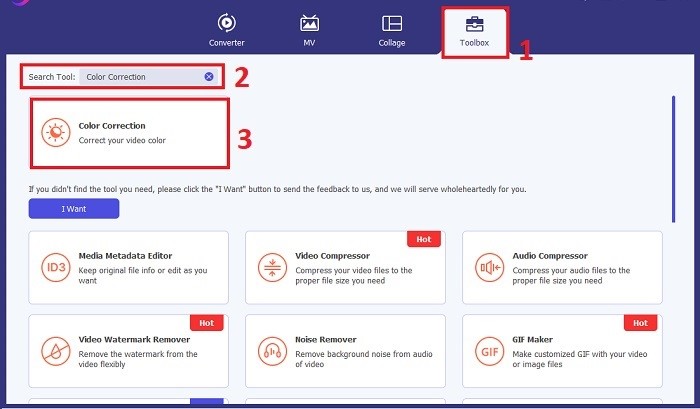
Po dokončení instalace spusťte aplikaci pro korekci videa na svém počítači, abyste se dostali do jejího hlavního rozhraní. V horní nabídce přejděte do části Toolbox. Zde najdete nebo vyhledáte funkci Color Correction daného nástroje a kliknete na ni.
Krok 3: Importujte video k barevné korekci
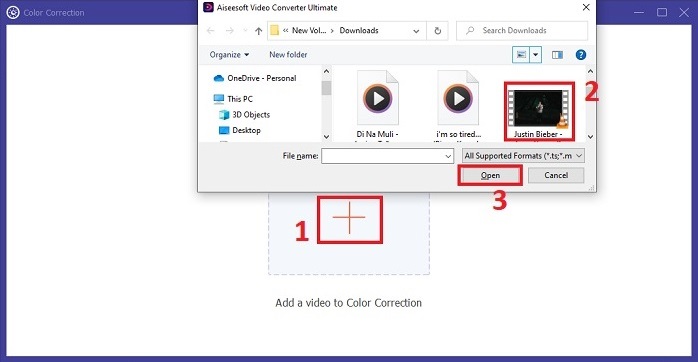
Klikněte na tlačítko Plus pro import videa, které chcete barevně upravit. Najděte příslušný videosoubor ve svém počítači a kliknutím na Open jej naimportujte do softwaru.
Krok 4: Upravte parametry barev videa
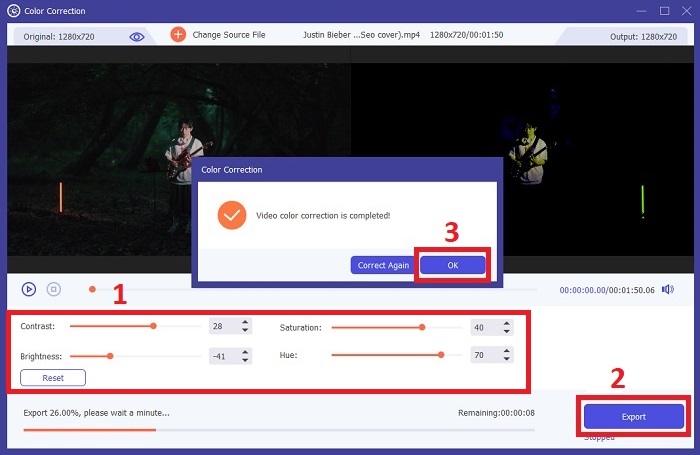
Jakmile je video naimportováno, upravte parametry, jako je jas, kontrast, sytost a odstín, abyste dosáhli požadované korekce barev. Během úprav nástroj umožňuje náhled změn v reálném čase v pravém panelu. Jakmile jste s barevnými úpravami spokojeni, klikněte na Export. Nechte nástroj video zpracovat a uložte výsledek do požadovaného umístění.
Další čtení:
Video filtr: Vylepšete své video pomocí filtrů a efektů na počítači
Co je 3D? Vše, co potřebujete vědět o 3D a jak jej vytvořit
Část 4. Často kladené otázky o korekci barev videa
Jak poznám, že potřebuji korekci barev?
Nejste si jisti, zda vaše video potřebuje korekci barev? Korekce barev je nezbytná, pokud barvy vypadají nerovnoměrně, neobvykle nebo neodpovídají požadované náladě nebo předmětu vašeho videozáznamu.
Je korekce barev opravdu nutná?
Absolutně! Korekce barev videa AI je při produkci videa nezbytná, aby bylo zaručeno, že barvy jsou přesné a vizuálně přitažlivé. Zlepšuje vizuální jednotnost a dokáže povýšit slušné video na mimořádné.
Co je to barevný korektor ve filmu?
Korektor barev ve filmu je nástroj, ať už hardwarový nebo softwarový, používaný v postprodukci k úpravě a vyvážení barev. Pomáhá filmařům dosáhnout konkrétního vzhledu, nálady nebo atmosféry, díky čemuž jsou vizuály poutavější a sjednocené v rámci příběhu.
Závěr
Na závěr lze říci, že korekce barev videa je klíčem k poutavému vizuálnímu zážitku. Jde o precizní doladění barev a tónů tak, aby odpovídaly vaší kreativní vizi a každý snímek vyjadřoval zamýšlený jas a brilanci. Využití korekce barev poháněné umělou inteligencí proměňuje vaše videa a dodává jim živé, realistické barvy, které zanechají trvalý dojem. Od nápravy smíšeného osvětlení až po vytváření specifických nálad – tato inovace pozvedá vaše vyprávění na vyšší úroveň. Video Converter Ultimate se stává silným spojencem, který proces korekce barev výrazně zjednodušuje a uvolňuje váš umělecký potenciál.
-
 Co je FPS? Vše, co o něm potřebujete vědět
 Co je FPS? Zjistěte všechny potřebné informace o počtu snímků za sekundu (FPS) a o tom, co dokáže v různých situacích. Přečtěte si tento článek pro úplné podrobnosti.
-
 Nejlepší aplikace Photo Color Enhancer pro váš Android a iOS zdarma
 Chcete mít v telefonu aplikaci pro vylepšení barev fotografií? Vyberte si, jaké zlepšováky si myslíte, že budou nejlépe vyhovovat vašim potřebám.
-
 Dokonalý průvodce změnou rozlišení videa dostupný na různých platformách
 Potřebujete změnit rozlišení videa? Pokud ano, naučte se různé způsoby, jak můžete snadno změnit rozlišení videa, které sledujete.
