


 Video Converter Ultimate
 Screen Recorder
 Oprava videa
Jaké jsou nejlepší editory značek WMV pro úpravu metadat WMV [spolehlivý]
WMV je původní formát souborů, na který narazíte, pokud používáte Windows. Do tohoto souboru můžete ukládat animace, videoklipy, díly televizních pořadů ve vysokém rozlišení s využitím jedné nebo více kompresí videa od Microsoftu. Přestože to vše zvládne, některé štítky (tagy) u WMV potřebují opravit. I když si můžete v přehrávači Windows Media Player zobrazit metadata souboru WMV, nemůžete je upravit tak, abyste je opravili. Jaký nástroj tedy použít ve Windows? V tomto článku představíme nezaujatou recenzi čtyř editorů tagů WMV, které můžete použít.

Část 1. Fenomenální editor značek WMV pro Windows a Mac [Doporučeno]
FVC Video Converter Ultimate je spolehlivý software, který vám nabízí špičkové funkce potřebné pro snadnou úpravu metadat WMV. Tento program je k dispozici pro všechny operační systémy Windows a Mac. Při používání tohoto nástroje zažijete novou úroveň odstraňování, úpravy a aktualizace tagů u více než 1000 formátů, které tento software podporuje. Začátečníkům nástroj nabízí intuitivní rozhraní, díky němuž snadno pochopí všechny jeho funkce. Je však ideální i pro profesionály pro pokročilé úpravy videí. Není to úžasné? Ať už nemáte s úpravou tagů žádné zkušenosti, nebo naopak máte, můžete se na tento nástroj spolehnout. Chcete s tímto softwarem provádět špičkové úpravy metadat? Pokud ano, následující podrobnosti se zaměří na používání tohoto skvělého editoru tagů WMV, ale nejprve si jej stáhněte do Windows nebo Macu a nainstalujte.
Výhody použití Ultimate WMV Tag Editor
- 1. Dokáže rychle upravit tagy pro WMV, AVI, MP4, MKV, MOV a dalších 1000+ dostupných formátů.
- 2. Podporuje all-in-one Toolbox, na kterém můžete ořezávat, stříhat, slučovat, stříhat, převracet video a další.
- 3. Je to nejlepší volba pro začátečníky a profesionály, kteří potřebují víceúčelový nástroj.
- 4. Stáhněte si ultimátní nástroj do svého systému Windows a Mac, přičemž budete mít stejné pokročilé funkce.
Zdarma ke staženíPro Windows 7 nebo novějšíBezpečné stažení
Zdarma ke staženíPro MacOS 10.7 nebo novějšíBezpečné stažení
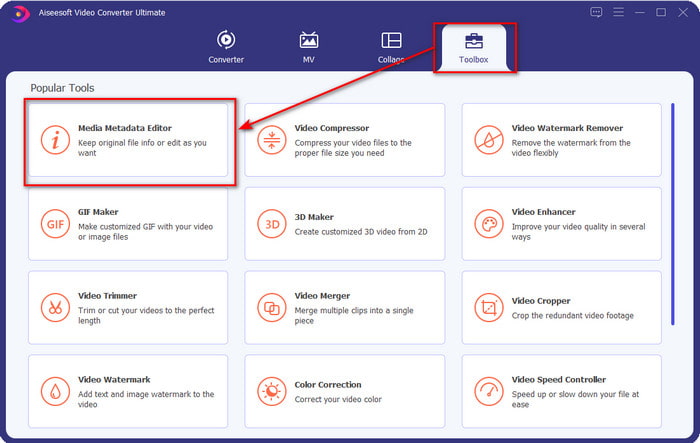
Krok 1. Po úspěšné instalaci nástroj ihned spusťte. V rozhraní nástroje přejděte do sekce Toolbox a vyhledejte Media Metadata Editor; kliknutím jej otevřete.
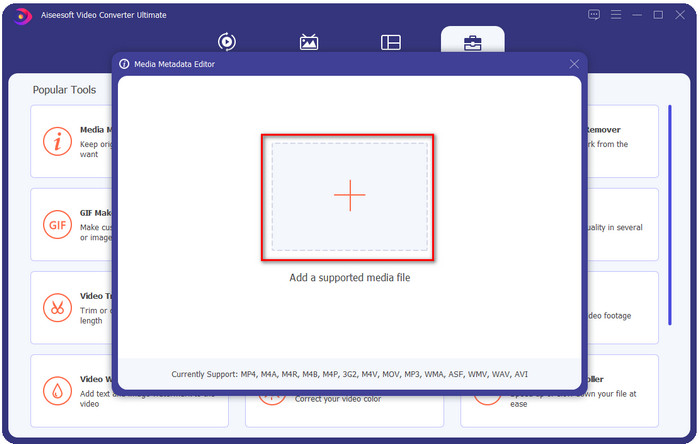
Krok 2. Po kliknutí na editor stiskněte ikonu +, vyberte soubor WMV ve složce, která se zobrazí na obrazovce. Jakmile se pro soubor rozhodnete, klikněte na Otevřít.
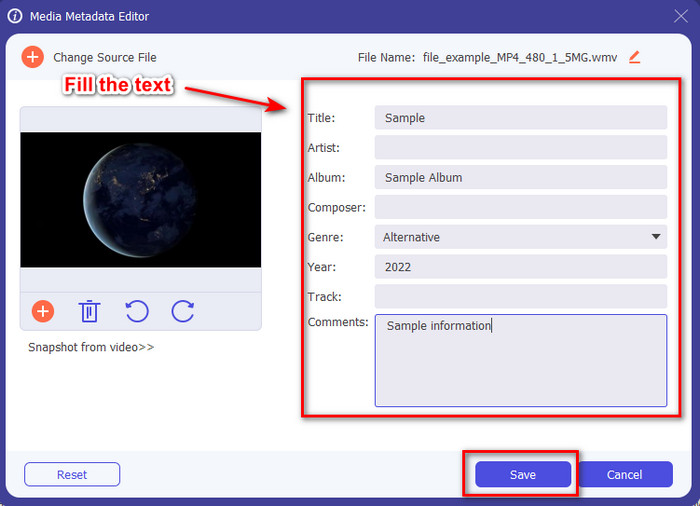
Krok 3. Vyplňte textové pole podle svých potřeb a poté klikněte na Uložit, abyste na soubor použili tagy, které jste přidali.
Související:
Část 2. Další 3 nejlepší editory značek ve Windows
Machete Video Editor Lite
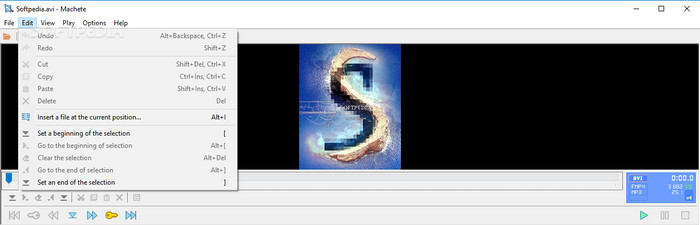
Machete Video Editor Lite je editor metadat WMV pro Windows, který si můžete stáhnout do svého počítače. Pomocí tohoto nástroje můžete upravovat tagy pouze u souborů AVI a MKV; jiné formáty než tyto dva nejsou podporovány. Jde o specializovaný editor metadat pro Windows, takže se nemusíte obávat, že by vám při daném úkolu nepomohl. Přestože je to dobrý editor metadat, jeho grafické rozhraní je zastaralé a potřebuje modernější vzhled, aby mohl konkurovat editorům metadat s lepším GUI na trhu. Kromě toho tento nástroj podporuje pouze dva formáty: AVI a MKV; to může být jeho největší nevýhoda, protože ostatní editory tagů podporují širokou škálu formátů a usnadňují tak nahrání souboru.
TigoTago
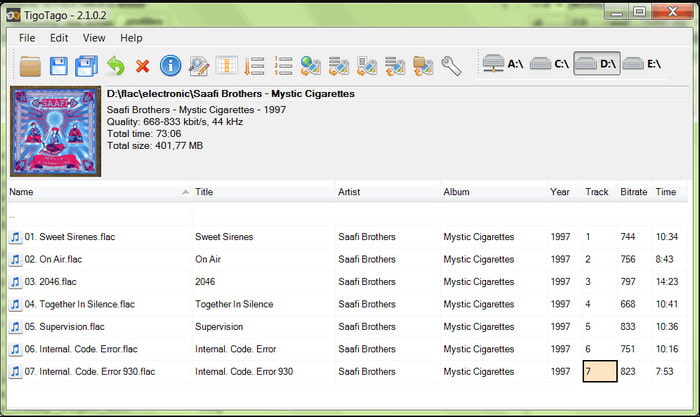
Dalším specializovaným editorem tagů WMV, který je k dispozici ve Windows, je TigoTago. Na rozdíl od Machete Video Editor Lite tento nástroj podporuje tři videoformáty, jako MP4, WMV a AVI. Pokud chcete upravovat tagy zvuku, můžete nahrát soubory MP3, WMA, WAV a mnoho dalších. GUI nástroje je velmi podobné tabulce, ve které vidíte různé sloupce pro různé tagy vašeho souboru. Bez ohledu na tabulkové rozhraní však stále potřebuje aktualizaci, protože to vypadá, jako by nástroj už dlouho nedostal žádný update. Při používání nástroje jsme narazili na několik matoucích funkcí, kvůli nimž nám úprava tagů zabrala více času, což je poněkud nepohodlné. Přestože se tyto problémy mohou objevit, stále si jej můžete zdarma stáhnout pro Windows.
Vlastnosti ve Windows
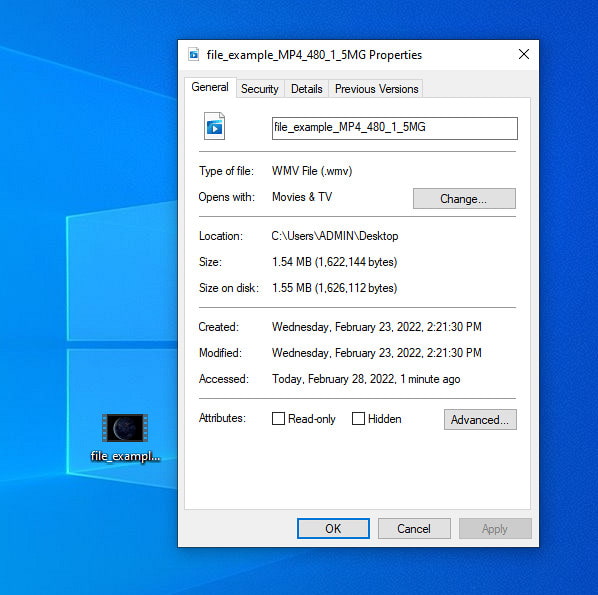
Vlastnosti ve Windows jsou jedinečná funkce, kterou můžete ve všech operačních systémech Windows používat zdarma. Tato funkce není ke stažení ani přístupná na webu, což je pro nás velká výhoda. Díky ní můžete několik kliknutími snadno aktualizovat tagy libovolného mediálního souboru, například WMV. V poslední době však někteří uživatelé, včetně nás, zjistili, že používání této funkce je nepohodlné. Když jsme se totiž pokusili aktualizovat metadata souboru v původním souboru, tagy se neuložily. Dá se to očekávat, protože nejde o profesionální editor metadat. Pokud ale chcete metadata WMV aktualizovat, můžete je i tak snadno upravit.
Část 3. Nejčastější dotazy o editoru značek WMV
Mohu upravit metadata WMV na Macu?
Zcela ano, můžete. S pomocí ultimátního nástroje, který uvádíme výše, je tato práce snadná. Pokud tedy používáte Mac, stáhněte si nástroj do svého zařízení kliknutím na tlačítko stahování pro Mac a postupujte podle stejného postupu. Obrázky se však mohou ve funkci na Macu trochu lišit, ale značka, kterou jste přidali, se úspěšně uloží, aniž byste se museli zapotit.
Zobrazí se metadata WMV při sledování na Windows Media Player?
Při přehrávání v přehrávači Windows Media Player, nativním přehrávači médií v systému Windows, se značky na obrazovce nezobrazí. Můžete k nim ale přistupovat tak, že kliknete pravým tlačítkem myši na soubor, kliknete na Vlastnosti a zobrazí se miniokno, kde můžete vidět značky ve vašem souboru WMV. Pamatujte, že je můžete prohlížet, ale nemůžete je upravovat podle svých potřeb.
Ztratí přenos WMV na webu metadata?
Tento problém se velmi přirozeně vyskytuje u většiny mediálních souborů. Metadata se cestou ztratí, protože typ aplikace, kterou jste použili, potřebuje odstranit metadata, aby se zmenšila velikost souboru, aby byl přenos plynulý. Je tedy lepší zkopírovat metadata a odeslat je samostatně, abyste se tomuto problému vyhnuli.
Závěr
Na závěr lze říci, že všechny námi vybrané nástroje jsou nejúčinnějšími editory metadat WMV, které si můžete stáhnout nebo volně používat v každém systému Windows, jenž umožňuje rychlé nahrávání WMV. Ačkoli vám tyto nástroje mohou pomoci, některé vás mohou také zklamat; výběr ideálního editoru tagů je proto zásadní, abyste předešli dalším problémům nebo poškození. Pokud stále přemýšlíte, o kterém nástroji mluvíme jako o tom, jenž má ideální editor tagů, multifunkční sadu nástrojů Toolbox a snadné ovládání, s hrdostí prohlašujeme, že všechny tyto požadavky splňuje FVC Video Converter Ultimate. Na rozdíl od konkurence na trhu je tento nástroj zaměřen na pomoc uživatelům s jejich každodenními video-problémy, jako je konverze, úprava tagů, editace videa atd. Neuvěřitelné, že? Přesně to vám však tento ultimátní nástroj může nabídnout.
-
 Co jsou metadata: Naučte se základní informace o metadatech
 Co jsou metadata? Je to důležité? Jaké jsou části metadat? Máte stejnou otázku? V tomto článku se dozvíte základní informace o metadatech.
-
 4 z nejlepších prohlížečů metadat online a offline [aktualizováno 2025]
 Mohu zkontrolovat metadata mého souboru? Ano, můžete, s pomocí tohoto příspěvku vám představíme různé prohlížeče metadat, které můžete použít.
-
 Rychlé a snadné tipy pro převod WMV na MOV [Osvědčeno]
 Chcete vědět, jaké jsou nejlepší a snadno použitelné převodníky, které převádějí WMV na MOV? Pokračujte ve čtení tohoto článku, protože pojednává o všech možných možnostech, které je třeba zvážit.
