


 Video Converter Ultimate
 Skærmoptager
 Video reparation
Kort analyse om den tilgængelige tekst på videoapps Windows/Mac/Android/iOS
At beskytte dit projekt er afgørende, især hvis du lægger det online for at undgå, at nogen stjæler dit arbejde. Men ikke alle websteder kan forhindre, at andre muligvis kopierer dit indhold. Så før du offentliggør dit projekt på nettet, er det en god idé at tilføje et vandmærke. Selvom et vandmærke ikke altid kan beskytte dit arbejde, kan man sige, at det er endnu en måde at sikre det mod potentiel tyveri. I dette indlæg præsenterer vi derfor de værktøjer, du kan bruge; de fleste er gratis, men nogle kræver køb for at låse værktøjets fulde potentiale op. Lad os i dette øjeblik tage et samlet kig på tekst‑på‑video‑appen i år 2022.

Del 1. 3 af den bedste tekst om videoapplikationer, du kan downloade på Windows og Mac
FVC Video Converter Ultimate
Pris: Gratis prøve tilgængelig, prisen starter ved $39,50 for ét år, $55,20 for livstid, og for 2‑5 stk. livstid $119,00.
Understøttede platforme: Windows og Mac.
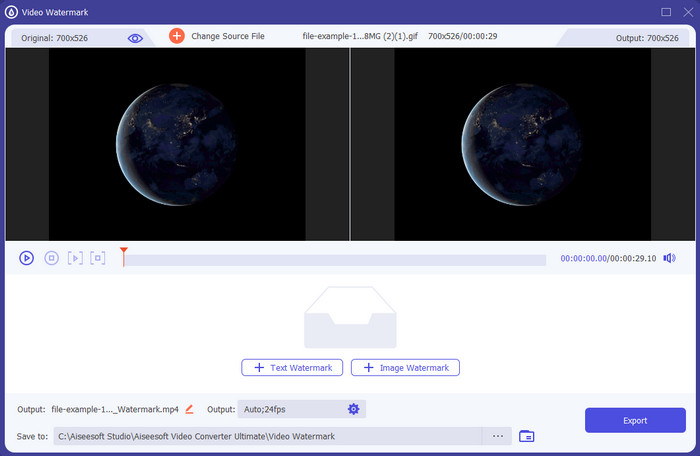
Hvis du vil have en app til at tilføje tekst til en video, bør du vælge det mest populære værktøj i 2022, FVC Video Converter Ultimate. Dette værktøj understøtter et bredt udvalg af formater, du kan uploade i, så det bliver ikke et problem at tilføje videofilen her; du kan også ændre formatet, hvis du har brug for det. Ved første øjekast på brugerfladen ser værktøjet både ryddeligt og professionelt ud. Selvom det er et professionelt værktøj, kan brugere med lidt eller ingen erfaring hurtigt lære at bruge det. Indlæringskurven er ikke nær så stejl som i Adobe Photoshop.
Desuden bringer værktøjet stolthed over sit navn som det ultimative værktøj, fordi det har den hurtigste proces med at uploade og downloade, hvad enten det er en, to eller flere filer. Kodning af filformatet med tab eller tab er hurtigt og nemt, hvis du bruger dette værktøj. Selvom værktøjet er lidt dyrt fra listen over videoteksteditoren, finder vi stadig dette værktøj som det nemmeste at bruge, men det mest effektive.
Gratis download til Windows 7 eller nyere Sikker download
Gratis download til MacOS 10.7 eller nyere Sikker download
Adobe Photoshop
Pris: Gratis 7 dages prøve og $20,99 hver måned.
Understøttede platforme: Windows, Mac og iPad.
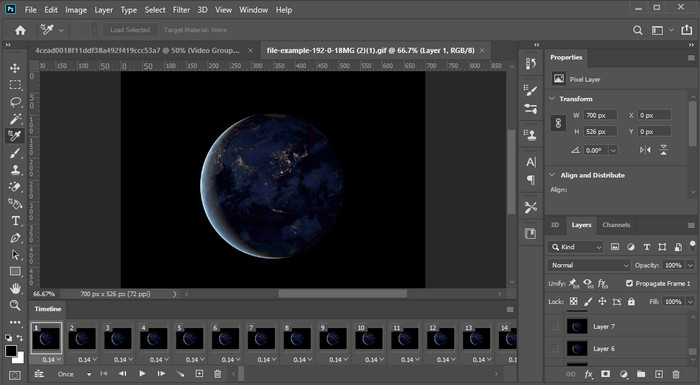
Har du brug for et professionelt værktøj til opgaven? Adobe Photoshop er det professionelle værktøj i denne sammenhæng. Dets komplette brugerflade og funktionssæt har gjort det til det foretrukne redigeringsprogram blandt professionelle, som de kan downloade til deres platform. Derudover tilbyder dette værktøj avancerede redigeringsfunktioner, du kan bruge til at få teksten på videoen til at se bedre ud end nogensinde før.
Dette værktøj er dog ikke det bedste valg, hvis du er nybegynder til redigering, fordi det er så teknisk, at selv nogle pro har brug for at læse nogle tutorials om, hvordan man udfører en bestemt opgave. Men hvis du vil bruge dette, skal du tilføje tekst til videoappen; du kan downloade det på Adobes officielle websted.
iMovie
Pris: Gratis, forudinstalleret.
Understøttede platforme: Mac og iOS.
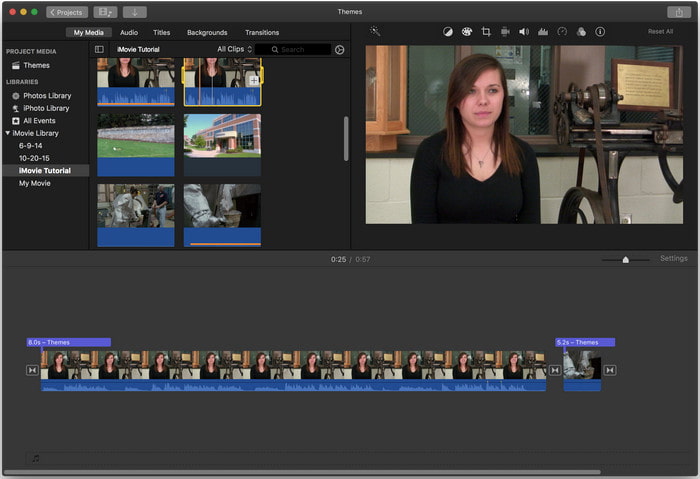
Hvis du har brug for et gratis værktøj på din Mac- eller iOS‑enhed til at tilføje et vandmærke på videoen, kan du bruge iMovie til denne opgave. Dette værktøj kan ikke downloades på Windows‑ eller Android‑enheder, fordi det kun er til Apple‑enheder. Selvom værktøjet har begrænset platformunderstøttelse, betragtes det stadig som et af de bedste vandmærke‑redigeringsprogrammer, du kan bruge på Mac og iOS. De fleste begyndere vil elske at bruge det på grund af dets gratis og fuldt udbyggede redigeringsmuligheder. Så hvis du har en Mac eller iOS, bør du først prøve denne tekst‑over‑video‑app og se, om den opfylder dine behov.
Del 2. 3 Bedste videotekstapplikation tilgængelig i alle Android og iOS
Alle de ovennævnte værktøjer er tilgængelige på Windows og Mac, mens nogle understøtter begrænsede mobile enheder. Hvad hvis du har en mobilenhed og vil tilføje tekst som et vandmærke på en video? Kan du stadig gøre det? Det kan du med det værktøj, vi præsenterer nedenfor. Læs det med forsigtighed for at vide, om dette værktøj vil opfylde dine behov.
Video Editor: Tekst på video
Pris: Gratis at downloade.
Understøttede platforme: Android.
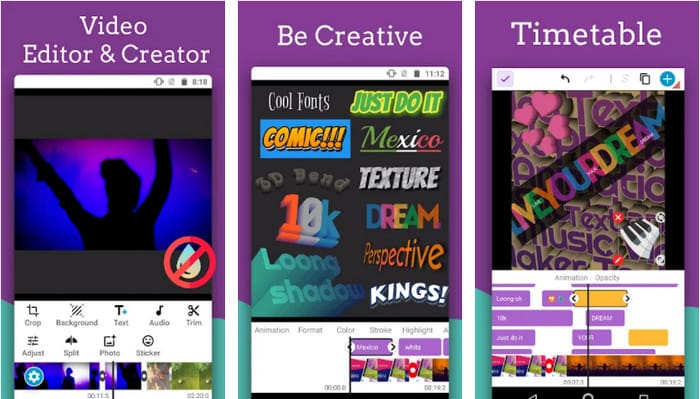
Selvom der findes mange gratis apps til Android til at tilføje tekst til video, mener vi stadig, at Video Editor: Text on Video er fremragende på mange områder. Denne Android‑app tilbyder brugerne mange avancerede redigeringsfunktioner, der kan få deres videoer til at se imponerende ud. Hvis du vil bruge den til at tilføje et vandmærke til din video, har den også tekstanimationer, så du kan indsætte animeret tekst på videoen.
Selvom værktøjet er gratis at downloade, er der stadig behov for meget forbedring og behov for at rette i dette værktøj, såsom fejl og fejl, som nogle brugere støder på. Nogle annoncer dukker også op, når du åbner appen på din telefon og bruger den. Ikke desto mindre bliver udvikleren ved med at opdatere værktøjet for at blive den bedste videoredigerer på Android for at nå sit fulde potentiale.
Vont - Tekst på videoer 4+
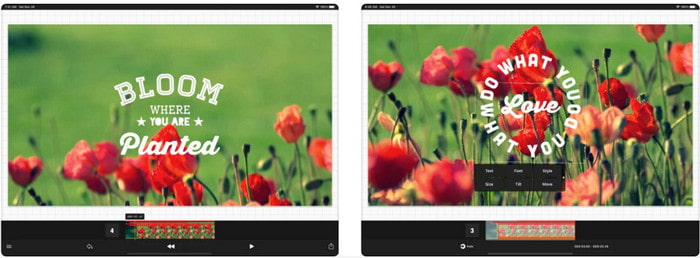
Pris: Gratis at downloade, $2,99 til $9,49 køb i appen.
Understøttede platforme: iPhone, iPad og Android.
Vont - Text on Videos 4+ er en af de bedste apps til at tilføje tekst til video på alle mobile enheder. Denne app understøtter både Android‑ og iOS‑enheder, så det er naturligt, at værktøjet har opnået ry og popularitet på begge sider. Men hvis vi sammenligner, hvor appen fungerer bedst, kan vi sige, at den er mere fordelagtig på iOS‑enheder, fordi den understøtter flere formater og har langt mere detaljerede redigeringsfunktioner, du kan bruge.
Selvom værktøjet er bedre på iOS, kan vi stadig blive enige om, at dette værktøj er fremragende at bruge selv på Android-enheder for hurtigt at tilføje vandmærket på nogle videoer.
Tekst på video: Easy Vid Editor 4+
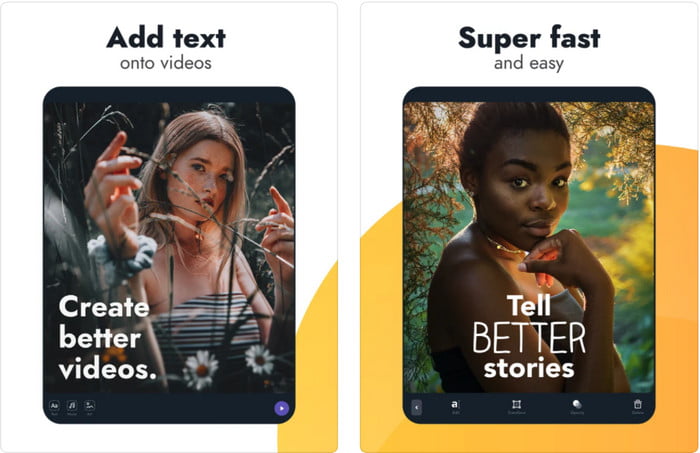
Pris: Gratis at downloade, $1,99 til $49,99 køb i appen
Understøttede platforme: iPhone og iPad.
Hvis du vil kende den bedste tekst‑på‑video‑app til iOS, er der ingen tvivl om, at det er Text On Video: Easy Vid Editor 4+. Dette værktøj understøtter en række redigeringsfunktioner, du kan bruge til nemt at tilføje et tekstvandmærke til din video med forskellige skrifttyper.
Ligesom Photoshop fremmer dette værktøj 3D-tekstvandmærkning for at hjælpe dig med at manipulere teksten og placere den hvor som helst, som om den var i, mens du tager videoen eller billedet. Selvom vi anser det for det bedste, mener vi stadig, at det ikke er det pro-værktøj, du skal bruge, hvis du er til meget detaljeret redigering, som en professionel har brug for.
Relateret:
Del 3. Ofte stillede spørgsmål om Tilføj tekstvandmærke-apps
Er det sikkert at downloade en tekstvandmærke-app?
Det er sikkert, hvis du har downloadet værktøjet på de officielle websteder eller downloader. Det vil ikke forårsage noget problem, hvis du downloader det på den officielle hjemmeside. Det er dog ikke alle hjemmesider, der er beskyttet, så du skal passe på med at downloade det sikreste for at bruge værktøjet på dit operativsystem for at undgå problemer.
Hvilken tekstvandmærke-app klarer sig bedre, på desktop eller telefoner?
Der er ingen tvivl om, at skrivebordstekstvandmærke-appen klarer sig bedre til heavy-duty, fordi skrivebordet har en højere CPU end telefonen. Men hvis du ønsker halvvægtet redigering, så er telefontekstvandmærke dit valg, for du kan tage det med overalt og bruge det når som helst uden at oprette et skrivebord.
Er det ideelt at købe til tekstvandmærke-appen?
Hvis du har et stramt budget, foreslår vi at bruge det gratis værktøj, men der er nogle begrænsninger, og forvent det, fordi det er gratis. Men hvis du vil have de bedste funktioner tilgængelige i premium-versionen, foreslår vi, at du køber den eller abonnerer på den, fordi du ikke kan få dem med den gratis version.
Konklusion
Nu hvor vi er færdige med at analysere værktøjerne, er det tid til at downloade det, der passer bedst til dig. Vi håber, at dette indlæg hjælper dig med at beslutte, hvilket du skal bruge, men hvis du stadig ikke kan vælge, foreslår vi, at du vælger FVC Video Converter Ultimate. Det er et alt‑i‑ét‑værktøj, du kan downloade til både Windows og Mac, og alle dets funktioner er veludformede til at hjælpe dig med specifikke opgaver. Uden tvivl er det derfor den bedste tekst‑vandmærke‑app, du kan downloade blandt de ovennævnte.
-
 Sådan tilføjes lyd og musik til video gratis på din computer / telefon
 Denne artikel viser 4 nemme måder at tilføje lyd til video gratis på. Uanset hvilket lydspor du vil tilføje til din video, kan du få tilfredsstillende resultater her.
-
 Vend GIF til videoformat: Konverter GIF-memes til video [2025]
 Bestem, hvordan du omdanner GIF til videoformat ved hjælp af værktøjerne nedenfor. Vælg hvilken, og lær hvordan du gør det, da vi samler nok bevis på dem.
-
 Fantastisk GIF til videoapps til Android og iOS -enheder
 Vidste du, at du kan konvertere GIF'er til et hvilket som helst videoformat, du vil bruge din telefon? Vælg de bedste apps på din Android eller iOS.
