


 Video Converter Ultimate
 Skærmoptager
 Video reparation
 Sikker download
Sådan gendannes gamle vintage-fotos på din computer
Leder du efter en løsning til restaurering af gamle fotos? Mange værktøjer kan hjælpe dig med at genskabe dine gamle billeder. Restaurering af gamle fotos er populært blandt mange, der prøver at forbedre deres gamle billeder. Derudover bruges denne proces også til at reparere beskadigede billeder og få dem til at se nye ud. Så hvis du også har et gammelt foto, du vil genskabe, kan du bruge metoderne, vi gennemgår nedenfor. Læs dette blogindlæg for at lære de bedste måder at genskabe et gammelt billede eller reparere et beskadiget foto ved hjælp af opskaleringsværktøjer.

Del 1. Gamle fotogendannelse online gratis
Har du et gammelt vintagebillede, som du vil lave nyt? Opskalering af dit billede gør det muligt at gendanne et gammelt foto og gøre det nyt og smukt. Og hvis du tror, at det er umuligt at gøre, så tager du fejl. Fordi ved at bruge denne fantastiske onlineapplikation, kan du nemt gendanne det gamle vintagebillede, du har.
FVC Free Image Upscaler
FVC Free Image Upscaler er en online billedopskaler, som er gratis og nem at bruge. Dette værktøj kan opskalere dit billede til 2x, 4x, 6x og 8x forstørrelse. Desuden kan begyndere nemt bruge denne billedforbedrer, fordi den har en enkel og overskuelig brugerflade. Derudover kan du bruge den i alle webbrowsere, inklusive Google, Firefox og Safari. Den understøtter også de mest almindelige billedformater, såsom JPG, JPEG, PNG og BMP. Det bedste ved denne applikation er, at den bruger AI‑teknologi (kunstig intelligens), som automatisk registrerer de dele af dine billeder, der er i lav kvalitet, og forbedrer dem. Og i modsætning til andre onlineapplikationer har FVC Free Image Upscaler en hurtig forbedringsproces, hvilket gør den praktisk.
Sådan forbedrer du gamle billeder ved hjælp af FVC Free Image Upscaler:
Trin 1. Gå ind i din webbrowser og søg efter FVC Free Image Upscaler i søgefeltet. Du kan også klikke på linket for at gå direkte til deres forside.
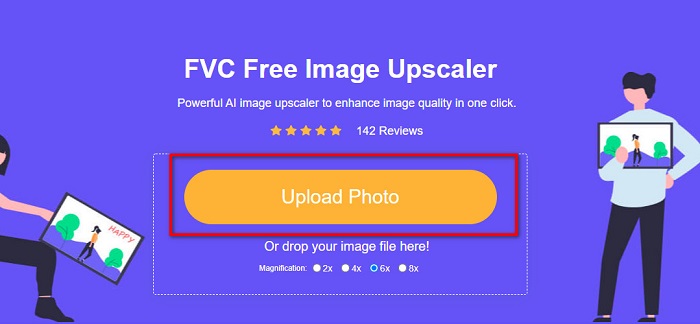
Trin 2. Klik på Upload Photo-knappen på hovedgrænsefladen for at importere det gamle billede, du vil forbedre eller opskalere.
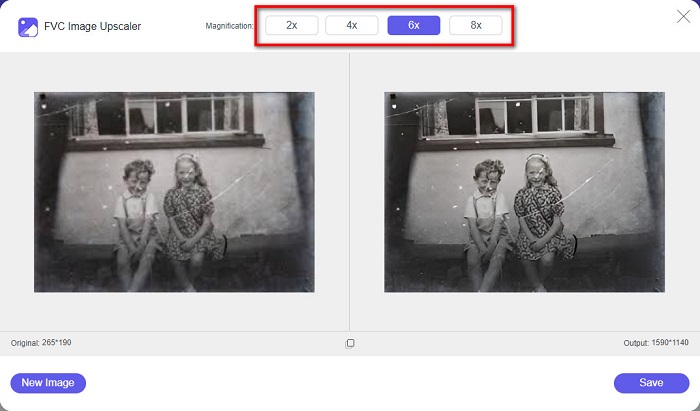
Trin 3. Når du har uploadet dit billede, skal du vælge den Magnification-indstilling, du ønsker til dit billede. Du kan vælge mellem 2x, 4x, 6x og 8x. Jo højere forstørrelse, desto bedre bliver kvaliteten af dit billede.
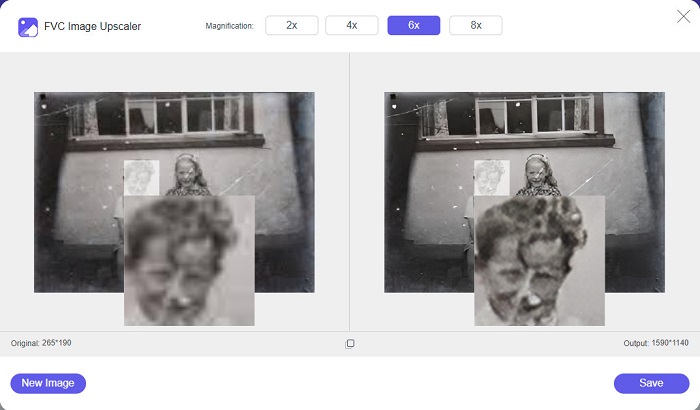
Trin 4. Før derefter musen hen over billedet for at se forskellen mellem dit forbedrede billede og originalen.
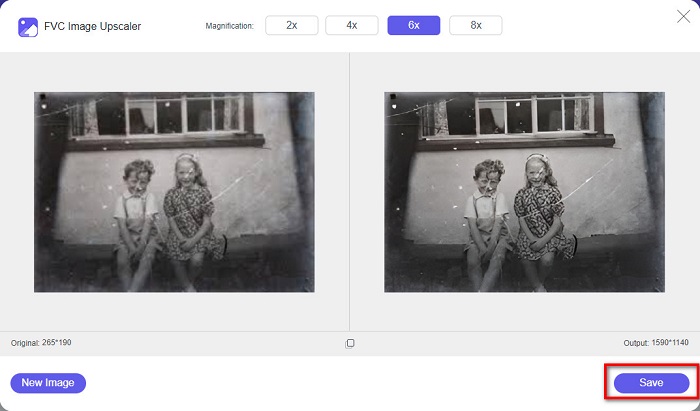
Trin 5. Når du er færdig med at forbedre dit billede, skal du klikke på Save-knappen for at gemme billedet på din enhed.
Og det er det! Så nemt som 1-2-3 kan du forbedre dit gamle vintagebillede for at få det til at se nyt og bedre ud.
Zyro
Zyro image upscaler er et af internettets mest kendte værktøjer til billedopskalering. Det har en brugervenlig softwaregrænseflade, hvilket gør det nemt at anvende. Desuden bruger det en AI‑billedretouchering, som automatisk opskalerer det gamle billede, du vil forbedre. Det er også tilgængeligt i alle webbrowsere, såsom Google og Firefox. Derudover understøtter det nogle af de mest almindelige billedformater, herunder JPG og PNG.
Desuden øger dette værktøj dit billedes opløsning, hvilket gør det bedre i kvalitet. Du vil dog bemærke, at det ikke opskalerer dit billede for meget. Det har også annoncer, der kan være distraherende for dig. Ikke desto mindre bruger mange begyndere stadig dette værktøj, fordi det har en enkel brugergrænseflade.
Online fotogendannelse online gratis ved hjælp af Zyro:
Trin 1. Søg efter den online billedforbedrer Zyro i din browser, og gå derefter direkte til deres forside. På den første grænseflade skal du klikke på Upload Image-knappen for at uploade det gamle foto, du vil forbedre.
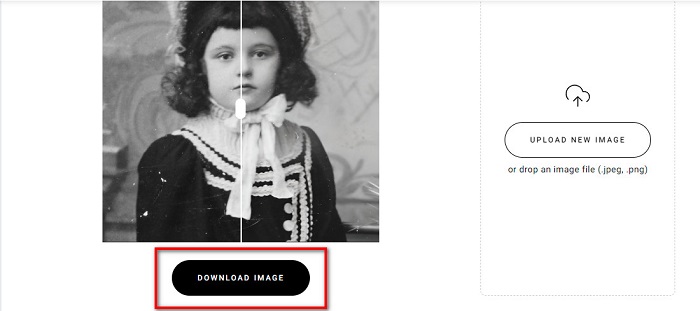
Trin 2. Da Zyro bruger en AI‑forbedringsproces, bliver dit billede automatisk forbedret. Derefter kan du se forskellen mellem dit originale billede og dit forbedrede, gamle billede.
Trin 3. Til sidst skal du klikke på Download-knappen for at downloade dit forbedrede billede til din enhed.
Del 2. Sådan forbedrer du gamle billeder offline
Hvis du ikke vil bruge en internetafhængig applikation til at forbedre et gammelt billede, så vil vi præsentere dig for et offlineværktøj, der er værd at prøve. Når du først bruger en offlineapplikation, behøver du ikke længere adgang til internettet for at forbedre et billede. Læs derfor dette afsnit grundigt for at lære, hvordan du forbedrer et gammelt foto offline.
HitPaw Photo Enhancer er en offline billedopskaler, som du kan downloade på næsten alle platforme, herunder Windows og Mac. Den bruger også en AI‑opskaleringsproces, der automatisk justerer dit fotos farvemætning, kontrast og lysstyrke og forbedrer din billedkvalitet. Derudover kan du skifte den AI‑model, du vil bruge. Du kan vælge mellem modellerne Denoise, Face og Colorize. Desuden kan du zoome ind på dit billede for at se den forbedrede del. Du kan også downloade denne app gratis, men med begrænsninger. Ulempen ved HitPaw Photo Enhancer er, at du skal købe premium‑versionen for at kunne eksportere dit forbedrede billede.
Sådan forbedrer du gamle billeder ved hjælp af HitPaw Photo Enhancer:
Trin 1. Download HitPaw Photo Enhancer på din enhed. Følg installationsprocessen, og start derefter appen.
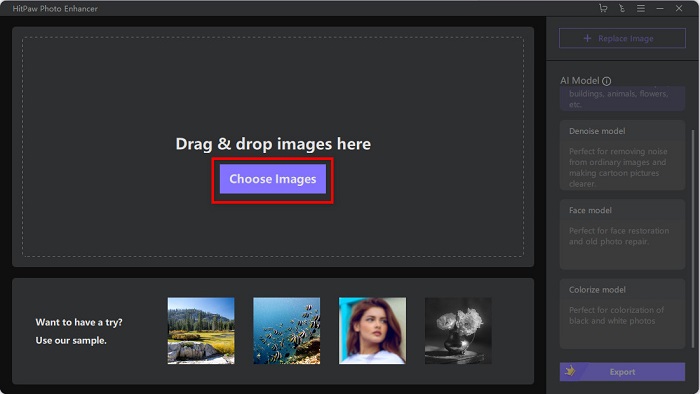
Trin 2. Klik på Choose Images-knappen på softwarens hovedgrænseflade for at finde det billede, du vil forbedre.
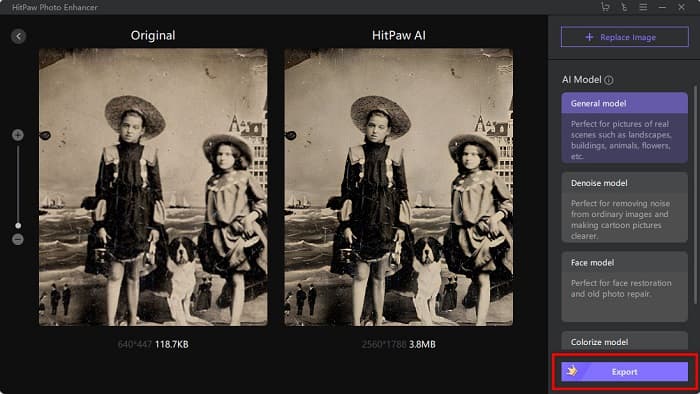
Trin 3. Klik derefter på AI‑modellens General Model og på Preview-knappen for at se resultatet.
Trin 4. Du vil nu kunne se, at dit billede er blevet forbedret. Klik på Export-knappen for at gemme billedet.
Del 3. Ofte stillede spørgsmål om, hvordan man forbedrer gamle billeder
Øger filstørrelsen, når du forbedrer dit billede?
Ja. Når kvaliteten af et billede øges, vil billedopløsningen højst sandsynligt også stige, hvilket gør filstørrelsen større end originalen.
Forbedrer en forøgelse af pixels billedkvaliteten?
Høj opløsning betyder flere pixels pr. tomme, hvilket betyder flere pixeloplysninger, hvilket gør dit billede af høj kvalitet og størrelse. I modsætning hertil, hvis du har et billede i lav opløsning, har dit billede få pixels. Derfor, hvis du øger pixels på dit billede, vil dit billede have bedre kvalitet.
Hvor mange pixels er et billede af god kvalitet?
Den bedste opløsning til udskrivning er 330 PPI (Pixels Per Inch). Ved 330 PPI vil dit billede fremstå skarpt og sprødt. Og hvis du har en 330 PPI, vil du have et billede i høj opløsning, hvilket får det til at ligne et billede i høj kvalitet.
Konklusion
Restaurering af gamle fotos er ikke svært, hvis du følger metoderne, der er præsenteret ovenfor. Og da alle de nævnte værktøjer vil hjælpe dig med at forbedre dine gamle billeder, vil det være let for dig at opskalere dine fotos. Dog vil ikke alle billedopskalere give resultater i høj kvalitet, så brug FVC Free Image Upscaler til billedkomprimering i høj kvalitet.
-
 Sådan konverteres lavopløsningsbillede til højopløsning online
 Hvis du vil lære at konvertere billeder i lav opløsning til billeder i høj opløsning online, så er denne artikel noget for dig. Læs helt for at lære hvordan.
-
 Hvordan man nemt kan forbedre billedkvaliteten på Windows og Mac
 Ønsker du at forbedre kvaliteten af dit billede? Lær, hvordan du øger billedkvaliteten online og offline på din computer eller iPhone ved at læse den enkle vejledning.
-
 Top 6 Blemish Photo Removers, du skal have nu [2022]
 Har du brug for en fotofjerner for at få glat hud? Bekymre dig ikke mere! Her vil vi introducere forskellige værktøjer, der kan hjælpe din enhed.
