


 Video Converter Ultimate
 Skærmoptager
 Video reparation
 Sikker download
Sådan komprimeres PDF-filer til e-mail 3 effektive måder at vælge på
Det kan virkelig være besværligt at sende store filer via mail. Det kan faktisk give dig problemer – i nogle tilfælde bliver filen slet ikke leveret. Derudover begrænser mange e-mailudbydere vedhæftede filer til en bestemt filstørrelse, som man hurtigt kan overskride med en kompleks PDF. Det gælder især PDF’er med mange billeder eller meget lange dokumenter. For at løse dette tyr de fleste i den situation til fildelingstjenester som Dropbox eller Google Drive. Men de glemmer næsten et smart trick, nemlig filkomprimering. Mange gratis onlinetjenester kan klare dette, og nogle af dem er ganske populære. Men hvordan komprimerer man en PDF til e-mail på en effektiv måde? Det er netop det, du er ved at lære, når du læser videre nedenfor.

Del 1. Hvad er den bedste PDF-størrelse til e-mail
Her er et faktum: der er ikke noget magisk tal for den ideelle PDF-størrelse til e-mails. Det, du skal være opmærksom på, er grænsen for vedhæftede filer på din e-mail-platform. Populære tjenester begrænser vedhæftede filer omkring 20 MB, hvilket kan være overraskende nemt at nå, især med PDF-filer, der indeholder mange billeder eller er meget lange dokumenter. Hvis din PDF-fil er større end den nævnte 20MB-grænse, vil din e-mail sandsynligvis ikke blive sendt, og du vil få en fejlmeddelelse. Når det er sagt, i stedet for at sigte efter en bestemt størrelse eller den bedste PDF-størrelse til e-mail, er det bedst at spille det sikkert og holde det under 20 MB. På den måde kan du være sikker på, at den vil vedhæfte og sende med succes.
Del 2. Et klik for at komprimere PDF-filer til e-mail
Her er en super nem og hurtig måde at komprimere filer til e-mail på. Gør dig klar til at prøve dette gratis værktøj kaldet FVC Free PDF Compressor, som kan gøre dine tunge PDF-filer meget mindre uden at ødelægge dem. Da de fleste e-mailtjenester kun tillader vedhæftninger på omkring 20 MB, kan PDF’er med billeder eller meget tekst nemlig hurtigt nå den grænse. Denne kompressor kan gøre din PDF meget mindre, endda helt ned under 100 kilobyte! Du behøver ikke bekymre dig om, hvordan den kan reducere PDF’er til e-mail så markant, for filernes kvalitet bliver stadig bevaret. Faktisk vil du sandsynligvis næsten ikke kunne se forskel på den originale og den komprimerede udgave.
Desuden er dette fantastiske værktøj super nemt at bruge, og alle med ethvert niveau af ekspertise kan bruge det. Alt du skal gøre er at trække og slippe PDF-filen ind i programmet, så krymper den automatisk ned. Derefter kan du med blot et klik gemme den mindre PDF på din computer. På denne måde kan du hurtigt komprimere PDF til e-mail-størrelse online til en størrelse, der er perfekt til at e-maile eller uploade det hele uden vandmærker på det endelige dokument. For at få en bedre forståelse af processen, se de detaljerede retningslinjer nedenfor.
Trin 1. Klik på fanen Add PDF File i hovedvinduet, og vælg den PDF-fil, du vil komprimere.
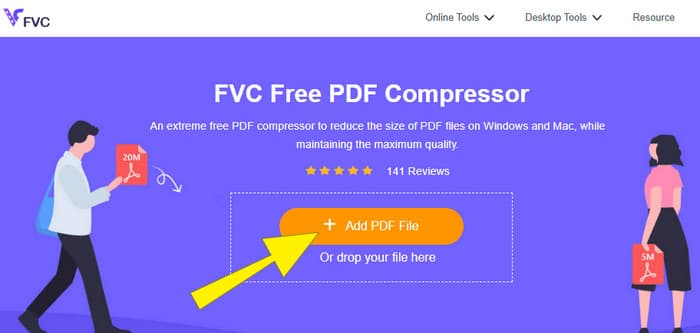
Trin 2. Mens PDF-filen uploades, arbejder værktøjet samtidig på at komprimere den.
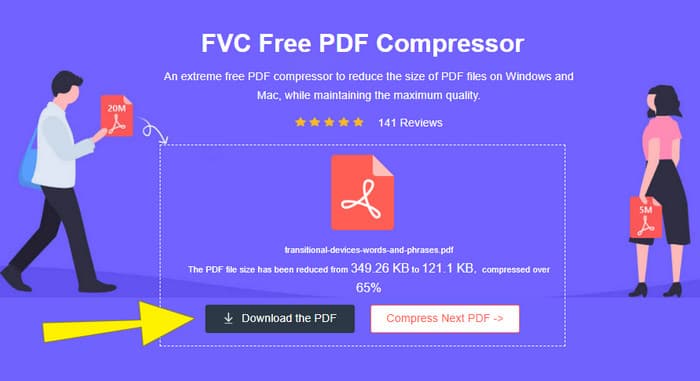
Trin 3. Når det er færdigt, skal du klikke på knappen Download the PDF.
Del 3. Komprimer PDF-filer til e-mail med redigeringsfunktioner
Hvis du foretrækker et værktøj, der også har redigeringsfunktioner, er Adobe Acrobat det rigtige valg til denne opgave. Adobe Acrobat er et program, der er kendt for at kunne oprette, redigere og håndtere PDF-filer. Det er som en kraftfuld værktøjskasse, der er udviklet specifikt til at arbejde med PDF’er. En af de praktiske funktioner er PDF-komprimering, som du kan bruge, når du har en stor PDF, der ikke kan sendes med e-mail på grund af størrelsesbegrænsninger. Adobe Acrobat, som findes både i en online- og en desktopversion, kan hjælpe dig med at komprimere store PDF-filer til e-mail uden at forringe kvaliteten væsentligt. Det gør den blandt andet ved at reducere billedstørrelserne i PDF’en eller ved at fjerne unødvendige skrifttyper. Men når man kender Adobe og deres programmer, bør man ikke blive overrasket over, at der kan være en stejl indlæringskurve. Derfor får du her trinnene, som gør processen lettere.
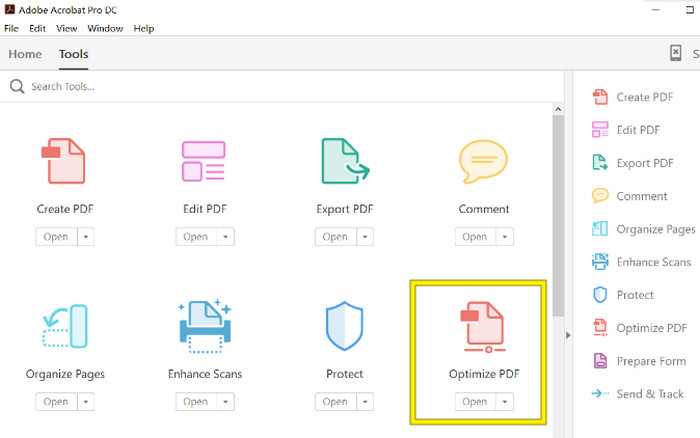
Trin 1. Start Acrobat, og åbn den PDF-fil, du vil arbejde med. Det gør du ved at gå til Tools-Optimize PDF-Open.
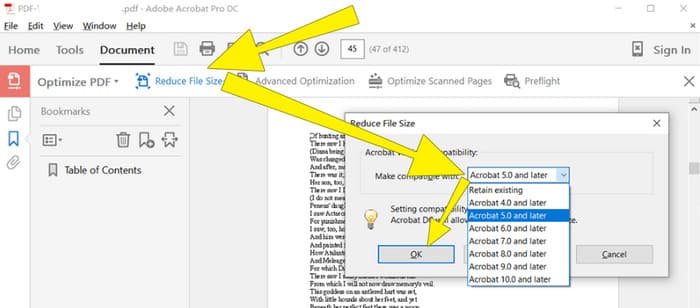
Trin 2. Når du har åbnet PDF-filen, klikker du på indstillingen Reduce File Size i den nye menu, der vises. Indstil eller brug derefter de tilgængelige redigeringsmuligheder for at opnå den ønskede komprimering og optimering.
Trin 3. Gem derefter den komprimerede PDF-fil.
Del 4. Komprimer PDF-filer til e-mail ved at konvertere
Vil du lære et nyt trick til, hvordan du komprimerer en PDF, så den kan sendes via e-mail? Lad os konvertere filen til JPG. Dette konverteringstrick kan udføres rigtig godt i PowerPoint. PowerPoint er et program, du sandsynligvis bruger til at lave præsentationer. Forestil dig et diasshow med tekst, billeder og måske endda video. PowerPoint lader dig bygge sådanne præsentationer med enkelte slides, som du klikker igennem for at vise dit publikum. Det er et populært værktøj for lærere, studerende, forretningsfolk og alle andre, der ønsker at formidle information visuelt.
Nu kan det være praktisk at indsætte en PDF i din PowerPoint-præsentation, men det er måske ikke den mest intuitive proces. Men når du først gør det, vil det være en leg at producere en JPG-fil. Bare rolig! Vi kan lede dig igennem det trin for trin, som du skal følge for at få din PDF indlejret på ingen tid.
Trin 1. Åbn PowerPoint på din computer, og vælg det slide, hvor du vil indsætte PDF-filen.
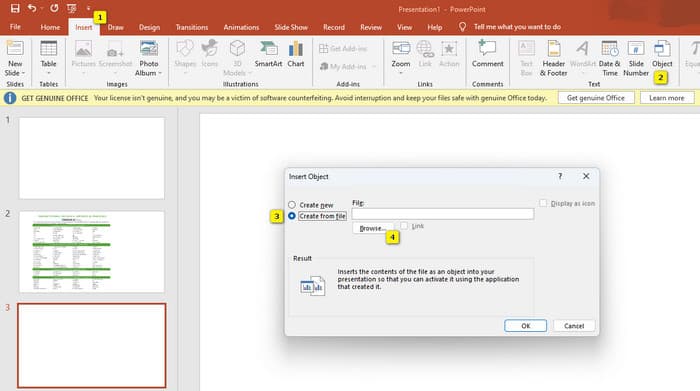
Trin 2. Gå nu til fanen Insert, og find indstillingen Object under gruppen Text. Klik på denne mulighed, og et nyt vindue dukker op. I vinduet markerer du Create from File, som findes i venstre side af vinduet. Klik derefter på knappen Browse, så du kan importere PDF-filen til sliden.
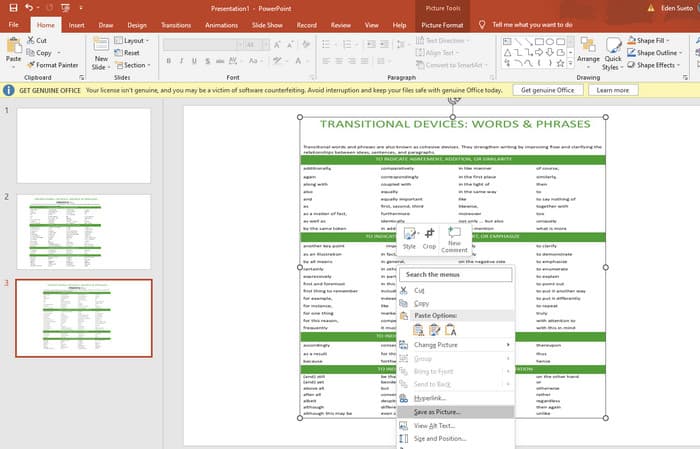
Trin 3. Når PDF-filen er indsat, kan du konvertere den til JPG. Det gør du ved at højreklikke på PDF’en på sliden, vælge Save As Picture og gemme den som JPEG.
Del 5. Ofte stillede spørgsmål om PDF og komprimering
Hvilken størrelse kan du e-maile en PDF-vedhæftet fil?
Det afhænger af din e-mail-udbyder, men de fleste begrænser vedhæftede filer til omkring 20 MB.
Hvad er den bedste gratis PDF-kompressor?
Der er gratis PDF-kompressorer til rådighed, men den bedste afhænger altid af brugernes præferencer. Indtil videre er FVC Free PDF Compressor det mest anbefalede gratis onlineværktøj.
Hvordan zipper man PDF-filer til e-mail?
I virkeligheden fungerer zipping for PDF-filer, fordi de allerede er komprimerede filer.
Konklusion
Denne artikel handler om hvordan man komprimerer PDF-filer til e-mail på de bedste måder. Du kan nu sikre en mere smidig og problemfri måde at sende dine PDF’er via e-mail på, så længe du reducerer dem korrekt for at overholde filstørrelsesgrænsen.
-
 3 bedste løsninger til, hvordan du nemt fjerner vandmærke fra videoer
 Vil du fjerne det irriterende vandmærke på videoen? Med denne blog kan du lære de forskellige ideer til at fjerne vandmærket på en video.
-
 4 bedste måder at tilføje vandmærke på alle videoer hurtigt
 Lad os lære, hvordan du tilføjer vandmærke til alle videoer på Windows, Mac, Online, iOS og Android med detaljerede trin, hvis du læser denne artikel.
-
 3 nemmeste måder at tilføje vandmærke til en GIF online og offline
 At tilføje et vandmærke til en GIF kan være så let som 1-2-3, hvis du bruger det rigtige værktøj korrekt. Værktøjerne på markedet er for brede, men vi vil præsentere de tre værktøjer, du kan stole på.
