


 Video Converter Ultimate
 Skærmoptager
 Video reparation
 Sikker download
Sådan konverteres MTS til FLV med 3 MTS til FLV Converter
Vil du konvertere MTS-filer til FLV? Videoerne, der optages med AVCHD-videokameraer, gemmes normalt i MTS- eller M2TS-format. MTS-filer understøttes ikke almindeligt af nogle medieafspillere og kan heller ikke uploades til YouTube eller Facebook. Hvis du har et AVCHD-videokamera som Sony, Panasonic eller Canon, vil du måske konvertere de optagede MTS-videoer til flash‑videoformat, så de kan afspilles på de fleste medieafspillere. Derfor bør du læse videre i vores indlæg, for vi giver 3 metoder til at konvertere MTS-filer til FLV på Windows og Mac.

Del 1. Professionel måde at konvertere MTS til FLV gratis
For at konvertere din MTS-fil til flash‑video til upload har du brug for et professionelt værktøj som FVC Free MTS Converter. Det er en MTS til FLV‑konverter, der kan batchkonvertere MTS-filer til FLV, MP4, WMV, MOV og andre video- og lydformater. Med de indbyggede videoredigeringsværktøjer kan du redigere MTS-filerne, før du konverterer dem.

FVC Free MTS Converter
1.286.400+ downloads- Konverter MTS til FLV på Windows 10/8/7 / Vista / XP og Mac OS X.
- Komprimer, flet og tilføj andre videoeffekter til MTS-filer.
- Føj specielle temaer til dine MTS-filer som ferie, familie, fødselsdag.
- Batch konvertere MTS til FLV, MP4, MKV osv. Med 50x hurtigere hastighed.
Gratis downloadTil Windows 7 eller nyereSikker download
Gratis downloadTil MacOS 10.7 eller nyereSikker download
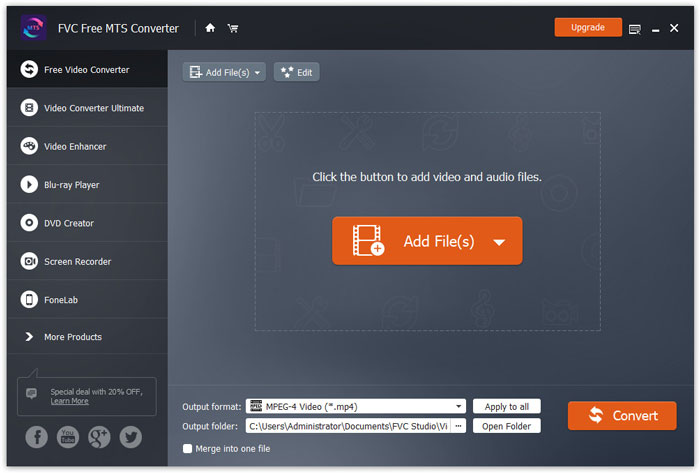
Trin 1. Tilføj MTS-fil
Download, installer og start FVC Free MTS Converter gratis. Klik på knappen Add File(s) for at importere din MTS-fil. Du kan også trække mere end én MTS-fil ind i programmet gratis.
Trin 2. Rediger MTS-fil
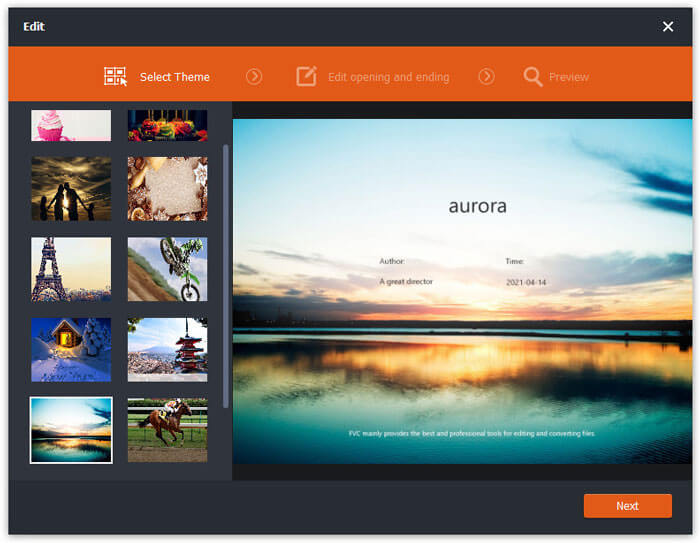
Klik på knappen Edit for at begynde at redigere din MTS-fil. Du kan vælge et bestemt tema, redigere titel, forfatter og tid ved begyndelsen og slutningen.
Trin 3. Vælg FLV som output
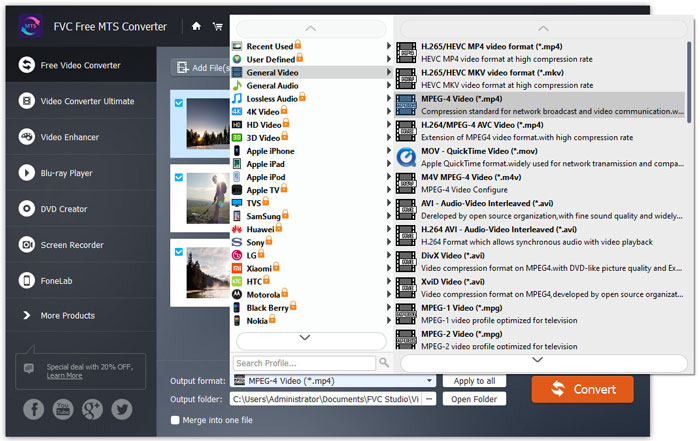
Gå derefter til området Output format og vælg kategorien General Video. Find FLV - Flash Video Format (.flv) og angiv det som outputformat. Dette format er et meget anvendt format til videostreaming på nettet.
Trin 4. Konverter MTS til FLV
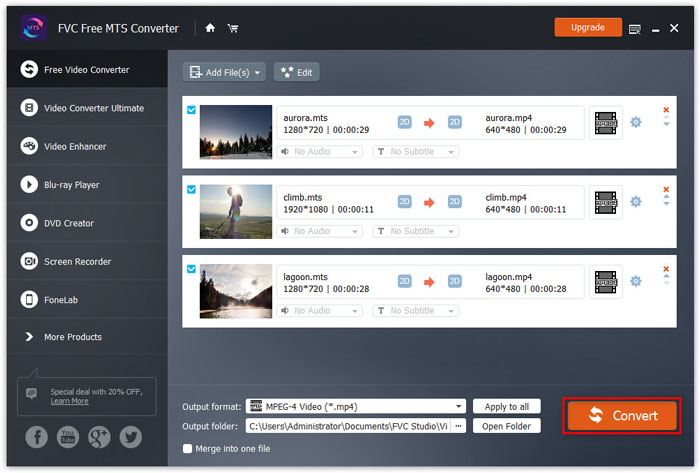
Gå til sidst til området Output folder og vælg den destination, hvor den konverterede FLV-fil skal gemmes. Du kan klikke på knappen Convert for at begynde at konvertere MTS til FLV-fil gratis.
Derefter kan du uploade den konverterede FLV-fil til YouTube, Vimeo, Facebook, Google-video eller andre medieplatforme.
Del 2. Sådan ændres MTS til FLV Free Online
Hvis du vil finde et onlineværktøj uden at downloade nogen software, kan du bruge FVC Free Online Video Converter. Det er en brugervenlig og gratis online MTS til FLV‑konverter, der hjælper med at konvertere alle populære video‑ og lydformater som MTS til FLV, MP4, WMV, AVI, MOV, MP3 osv. helt gratis på Windows og Mac. Du kan se de detaljerede trin til at ændre MTS til FLV med dette gratis onlineværktøj.
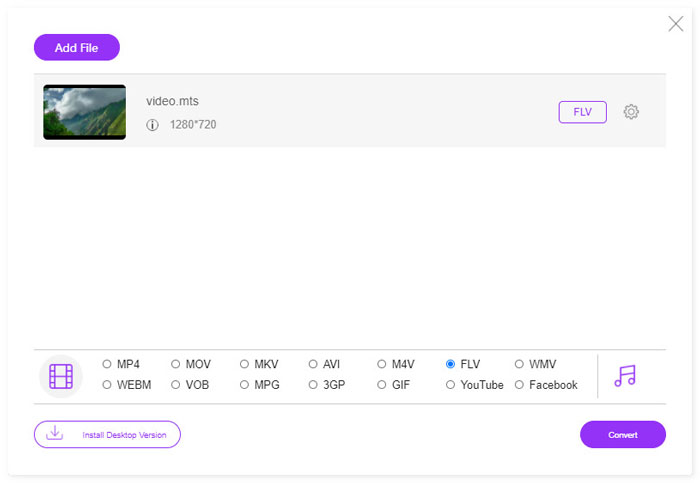
Trin 1. Gå til den officielle hjemmeside for FVC Free Online Video Converter (https://www.free-videoconverter.net/free-online-video-converter/). Klik på knappen Add Files to Convert for at downloade og installere starterprogrammet.

Trin 2. Vælg de MTS-filer, du vil konvertere, fra din computer.
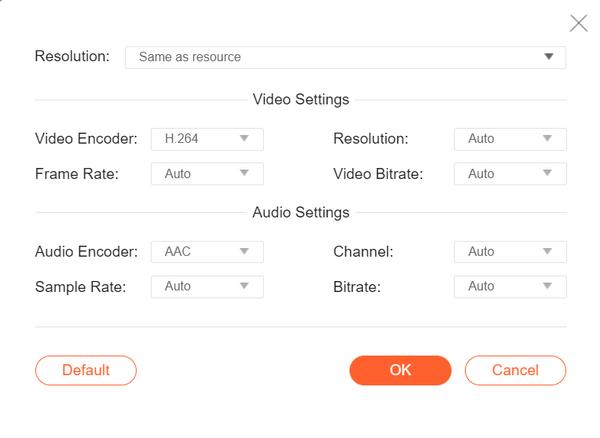
Trin 3. Angiv FLV som outputformat nederst. Hvis du vil justere flere indstillinger, kan du klikke på tandhjulsikonet for at justere videoencoder, opløsning, billedhastighed, bitrate og andre lydindstillinger som lydencoder, kanal, samplingsrate og bitrate.
Trin 4. Klik på knappen Covert for at begynde at konvertere din MTS-fil til FLV.
Del 3. Gratis eksport af Flash-video fra MTS-fil med VLC
VLC Media Player er ikke kun en simpel video- og lydafspiller, men også en videokonverter med mange nyttige funktioner. Den fungerer som en god MTS til FLV‑konverter, der håndterer en lang række understøttede filer til konvertering. Den er helt gratis uden begrænsninger. Med VLC kan du eksportere flash‑videoer fra MTS-filer på Windows eller Mac gratis. For at konvertere MTS-fil til FLV skal du downloade og installere VLC på din computer.
Trin 1. Start VLC Media Player, gå til Media og klik på knappen Convert / Save.
Trin 2. Klik på knappen Add for at tilføje MTS-filen, og klik på knappen Convert / Save for at fortsætte.
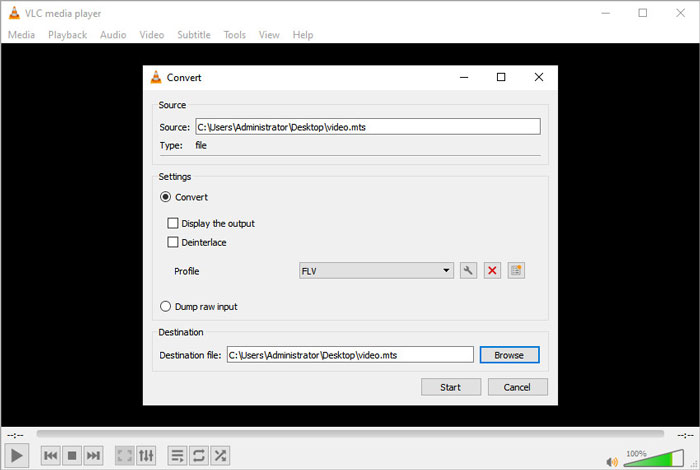
Trin 3. Markér Convert i området Settings, og klik på rullemenuen for at vælge FLV som outputformat. Hvis der ikke er noget FLV-output, kan du klikke på ikonet Create a new profile og oprette en ny FLV‑profil.
Trin 4. Gå derefter til området Destination og klik på knappen Browse for at angive outputmappen.
Trin 5. Sørg for, at du har foretaget alle indstillinger, og klik på knappen Start for at begynde at konvertere MTS til FLV i VLC.
Del 4. Ofte stillede spørgsmål om konvertering af MTS til FLV
Hvad er MTS-videoformatet?
En MTS -fil er en video, der er gemt i Advanced Video Coding Definition (AVCHD)-formatet. MTS-fil er standardvideoformatet, der bruges af mange Sony- og Panasonic HD‑videokameraer. Det bruges også til at gemme high-definition‑video på Blu-ray-diske.
Hvordan konverterer jeg MTS-filer til MP4?
Med FVC Free MTS Converter kan du også konvertere MTS-fil til MP4. Klik på knappen Add File(s) for at importere MTS-filerne. Gå derefter til Output format og vælg MP4 som outputformat. Derefter klikker du på knappen Convert for at begynde at konvertere MTS til MP4 gratis.
Kan Windows 10 afspille MTS-filer?
Ja. Du kan bruge Windows Media Player til at afspille dine MTS-filer. Hvis MTS-filen mislykkedes til afspilning, kan du prøve andre MTS-afspillere som VLC Media Player, 5K Player, FVC Free Video Player og mere.
Konklusion
I denne artikel talte vi hovedsageligt om 3 metoder til at konvertere MTS-filer til FLV gratis. Du kan prøve alle ovenstående MTS til FLV-konverter til at eksportere flash-videofiler til upload. Denne gratis MTS-konverter kan nemt ændre dine MTS-filer til FLV, MP4, WMV, VOB, MP3 og mere med hurtig hastighed.
-
 Top 10 FLV-afspillere til Windows, Mac, iOS og Android i 2021
 FLV-afspiller hjælper dig med let adgang til dine FLV-filer på din Windows-, Mac-, Android-, iOS-enhed. Se de bedste FLV-filafspillere, du kan downloade lige nu.
-
 Bedste måder at konvertere VOB til FLV
 Vil du konvertere en VOB-fil til en FLV-fil? Du kan nemt fuldføre opgaven med enten desktop- eller online-konvertere. Læs denne vejledning, og lær, hvordan du omdanner VOB til FLV nemt og hurtigt.
-
 MTS VS M2TS - Forskellen mellem MTS og M2TS
 Hvad er MTS eller M2TS fil? Hvad er forskellen mellem M2TS og MTS? Hvordan kan jeg se videokameraets optagede MTS- eller M2TS-fil? Find alle svarene i dette indlæg.
