


 Video Converter Ultimate
 Skærmoptager
 Video reparation
 Sikker download
Top 3 måder at konvertere FLV til MOV
Af hensyn til nogle ikke-understøttede formater eller andre årsager har du brug for at konvertere FLV til MOV, især når du bruger en Mac.
Du bør vide, at FLV-filer ikke understøttes direkte af QuickTime Player og iMovie. Derfor kan du ikke åbne eller redigere FLV direkte på en Mac. Uanset årsagen vil dette indlæg vise dig hvordan du konverterer FLV til MOV.

Heldigvis findes der mange videokonvertere, herunder mange gratis onlineværktøjer, som kan hjælpe dig med nemt at ændre dine FLV-filer til MOV. Dette indlæg vil introducere dig for 3 fremragende FLV‑til‑MOV‑konvertere. Når du har downloadet nogle FLV‑videoer fra videodelingssider, kan du bruge dem til at foretage videokonvertering fra FLV til MOV.
Del 1. Konverter FLV til MOV online gratis
Som nævnt ovenfor findes der et stort antal gratis online FLV‑til‑MOV‑konvertere på markedet. Hvis du er i tvivl om, hvilken du skal bruge, anbefaler vi her oprigtigt den populære FVC Free Online Video Converter til at konvertere FLV til QuickTime MOV.
Trin 1: Åbn din browser, og gå til denne online FLV‑til‑MOV‑konverteringsside. Du kan bruge den i enhver webbrowser, herunder Chrome, IE, Safari og Firefox.
Download skrivebordsversionen for at konvertere filer i batch.
Trin 2: Klik på knappen Add Files to Convert for hurtigt at installere et startprogram til FLV‑konverteringen. Derefter vises et pop op‑vindue, hvor du kan gennemse og uploade din FLV‑fil.

Trin 3: Når du kommer ind i selve konverteringsvinduet, kan du se nogle populære videoformater som MP4, MOV, AVI, FLV, M4V, MKV, VOB, MPG, WMV og flere vist der. Her skal du vælge MOV som outputformat.
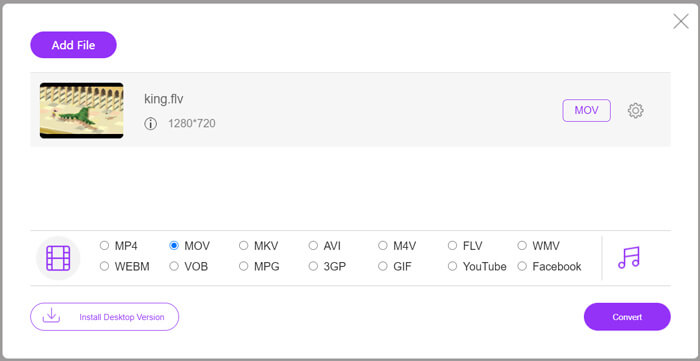
Trin 4: Før den endelige FLV‑til‑MOV‑konvertering kan du klikke på ikonet Settings for at tilpasse flere video‑ og lydindstillinger såsom videoopløsning, encoder, bitrate, billedhastighed, lydstyrke, lydkanal og mere. Derefter kan du klikke på knappen Convert for at begynde at konvertere FLV til MOV online.
Del 2. Skift FLV til MOV med VLC
VLC er en open source-medieafspiller, som også indeholder nogle grundlæggende konverteringsfunktioner. Hvis du har VLC Media Player installeret på din Mac eller Windows‑pc, kan du bruge den til at konvertere dine FLV‑filer.
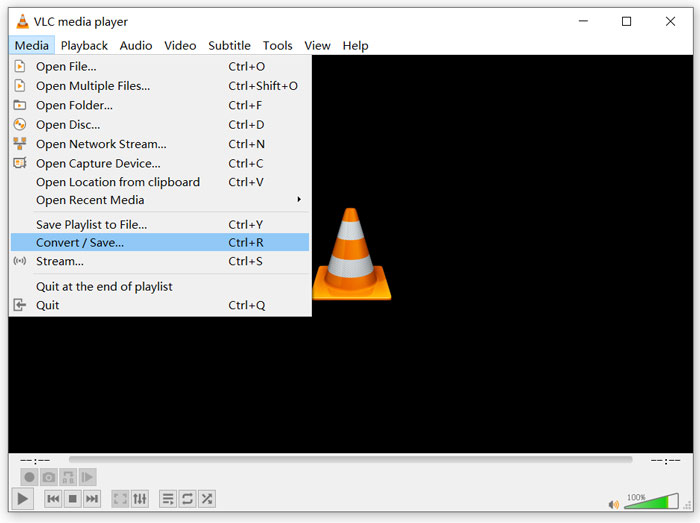
Trin 1: Åbn VLC Media Player på din computer, og klik på menuen Media. Vælg derefter indstillingen Convert/Save i rullemenuen. Hvis du bruger VLC på Mac, skal du her klikke på menuen File og derefter vælge indstillingen Convert/Stream.
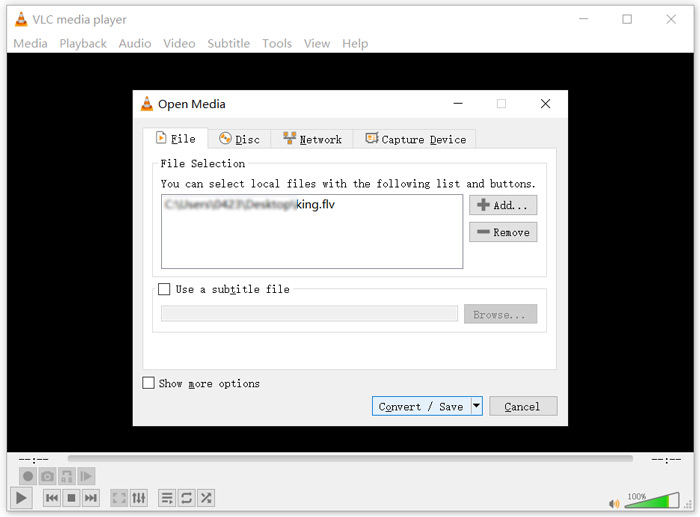
Trin 2: Nu er du i vinduet Open Media. Her kan du klikke på knappen Add for at importere den FLV‑fil, du vil konvertere. Klik derefter på knappen Convert/Save for at fortsætte.
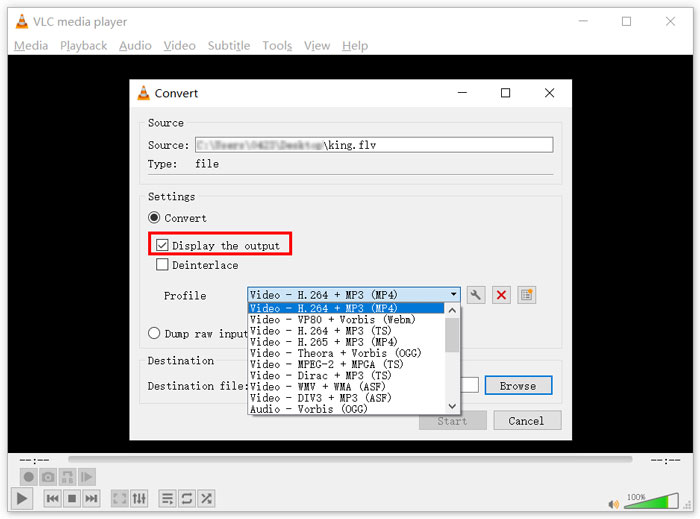
Trin 3: Vælg et passende outputformat i rullemenuen Profile. Her kan du konvertere FLV til MP4, TS, OGG, WebM, YouTube HD, MP3, FLAC og mere. Sæt flueben i feltet foran indstillingen Display the output. Klik på knappen Browse for at vælge en passende destinationsmappe til den konverterede FLV. Under dette trin kan du give outputvideoen filendelsen .mov.
Trin 4: Efter alle disse handlinger kan du klikke på knappen Start for at gennemføre FLV‑konverteringen.
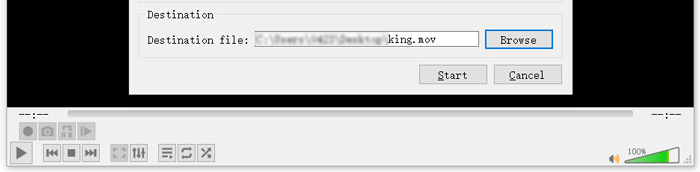
VLC Media Player begynder automatisk at afspille den konverterede video. Du kan se en meddelelse om Converting file øverst i VLC. Luk ikke VLC helt, før konverteringen er afsluttet.
Del 3. Bedste måde at konvertere FLV til MOV uden kvalitetstab
Når du vil konvertere FLV til MOV, kan du også vælge en professionel løsning. Her anbefaler vi på det kraftigste den fuldt udstyrede FLV‑til‑MOV‑konverteringssoftware Video Converter Ultimate. Sammenlignet med gratis online FLV‑til‑MOV‑konvertere og VLC indeholder den flere funktioner og understøtter flere formater. Endnu vigtigere er det, at den kan konvertere FLV til MOV, samtidig med at den oprindelige kvalitet bevares.
- 1. Konverter enhver video som MKV, AVI, MP4, WMV, FLV til MOV uden at miste kvalitet.
- 2. Konverter 8K / 5K / 4K, 1080p / 720p HD og SD-videoer til over 500 formater som MOV, MP4, AVI, MP3 og mere.
- 3. Rediger video som klip, roter, beskær, flet osv., Og tilføj filtre og effekter og forbedr kvaliteten.
- 4. Værktøjskasse kan komprimere FLV, redigere FLV-metadataoplysninger, oprette GIF'er fra FLV og mere.
Gratis download til Windows 7 eller nyere Sikker download
Gratis download til MacOS 10.7 eller nyere Sikker download
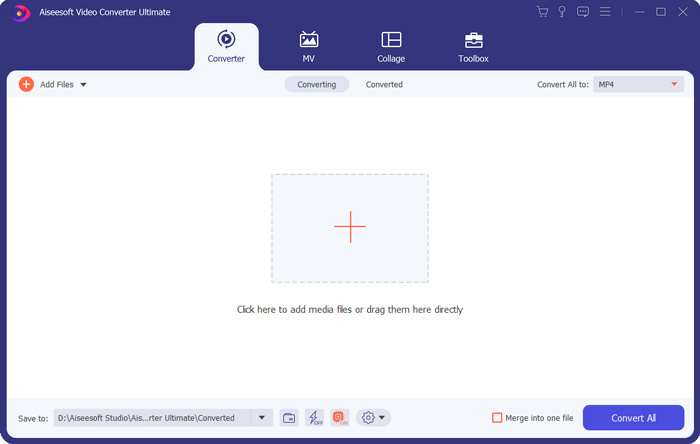
Trin 1: Installer og start gratis denne FLV‑til‑MOV‑konverter på din Mac eller Windows‑pc. Sørg for, at du bruger funktionen Converter. Klik derefter på det store plus-ikon for at tilføje din(e) FLV‑fil(er).
Trin 2: Klik på ikonet format på højre side af den importerede FLV‑fil. Vælg MOV som outputformat i rullemenuen.
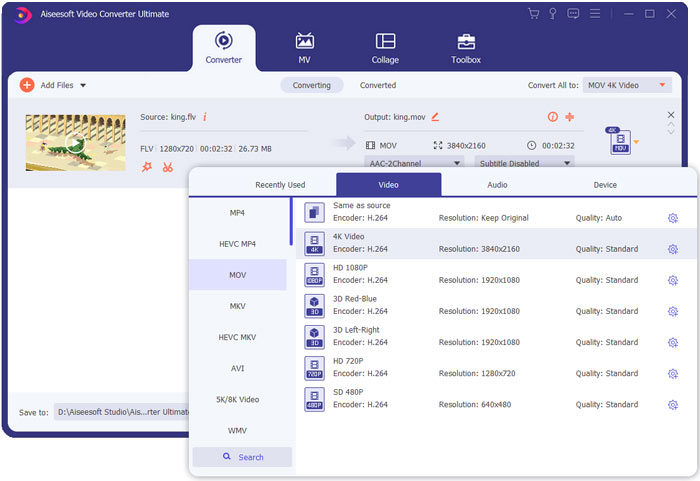
Trin 3: Som du kan se ovenfor, er denne FLV‑konverter udstyret med mange redigeringsfunktioner. Så før FLV‑til‑MOV‑konverteringen kan du redigere filen, tilføje filtre, effekter eller tilpasse andre indstillinger efter behov. Derefter kan du klikke på knappen Convert All for at starte konverteringsprocessen.
FLV vs. MOV
Adobe Flash Player brugte FLV til at levere videoindhold som film og tv-shows. I dag udvikler Adobe ikke længere afspilleren og anbefaler brugere at afinstallere den af sikkerhedsmæssige årsager. Du kan dog stadig bruge FLV-formatet på mange ikke-Adobe/Macromedia-programmer.
MOV-formatet kan bruges til at gemme en film, tv-show, kort videoklip eller hjemmefilm. Det er faktisk gemt i QuickTime File Format (QTFF), som blev introduceret af Apple i 1991. MOV-filer bruges ofte, når folk vil gemme en video med høj kvalitet.
Del 4. Ofte stillede spørgsmål om konvertering af FLV til MOV
FLV vs MOV, hvad er forskellen mellem FLV og MOV?
FLV, Flash Video File, er en Flash‑kompatibel videofil, der er udviklet af Adobe Systems. Den indeholder et kort header‑afsnit samt flettede video‑, lyd‑ og metadata‑pakker. FLV er oprindeligt designet til at integrere videostreams i Adobe‑programmer. En FLV‑fil indeholder typisk en videostream på 640x360 og en lydstream med 44,1 KHz, 2 kanaler, AAC.
MOV er standardvideoformatet for Apple‑enheder og relateret software som QuickTime Player og iMovie. Det danner grundlaget for MPEG‑4‑filformatet fra International Organization for Standardization. En MOV‑fil kan gemme videoer, lyd, tekst, undertekster, billeder og andre filer.
FLV‑formatet understøttes ikke af Apple‑enheder, herunder Mac, iPhone, iPad og iPod touch. Desuden giver FLV lavere videokvalitet sammenlignet med MOV.
Kan iMovie redigere FLV?
Nej. Som du kan lære ovenfra, kan FLV ikke understøttes af Apple-enheder og software. Som standardvideoeditor for Mac- og iOS-enheder er iMovie heller ikke kompatibel med FLV-filer.
Kan Windows Media Player åbne MOV-filer?
De fleste Windows Media Player-versioner understøtter ikke MOV-format. Men den nyeste Windows Media Player 12.0 kan åbne MOV-filer.
Konklusion
Dette indlæg deler 3 enkle måder at konvertere FLV til MOV på. Når dine FLV‑filer ikke kan afspilles eller redigeres, kan du bruge de anbefalede konvertere til at konvertere dem til MOV eller MP4.
-
 Sådan konverteres dine FLV-videoer til MP3-lydfiler på skrivebordet og online
 Sådan konverteres en FLV til en MP3-fil? Alt hvad du skal gøre er at læse denne artikel omhyggeligt, finde din yndlingsmetode og følge vores trin-for-trin guide for at få det, du ønsker.
-
 10 bedste FLV-videoafspillere til Windows 10/8/7, Mac, iOS og Android, du skal prøve (2021 senest)
 FLV-afspiller hjælper dig med let adgang til dine FLV-filer på din Windows-, Mac-, Android-, iOS-enhed. Se de bedste FLV-filafspillere, du kan downloade lige nu.
-
 Sådan konverteres MP4 gratis til FLV Online / Mac / Windows
 Dette indlæg er den detaljerede guide til MP4 til FLV-konvertering. Du kan tage de 3 bedste gratis konvertere til nemt at skifte MP4 til FLV online, på Windows eller Mac-computere.

