


 Video Converter Ultimate
 Skærmoptager
 Video reparation
Fotor Fjern baggrundsfunktioner og forbedringsgennemgang
Når man arbejder med fotoredigering, er baggrundsfjernelse og billedforbedring helt normalt i branchen; det kan hæve kvaliteten af dit output og få det til at skille sig ud. Det var her, tjenester som Fotor kom ind på scenen for fotoredigering med fokus på at fjerne baggrunde og forbedre fotos. Almindelige spørgsmål som: er Fotor sikkert? I denne anmeldelse undersøger vi indgående Fotors mangefacetterede funktioner og afdækker dets muligheder. Samtidig begiver vi os ud på en rejse for at finde et bemærkelsesværdigt alternativ, du også kan overveje at prøve. Læs videre i denne Fotor‑anmeldelse for at finde ud af, hvad Fotor kan inden for baggrundsfjernelse og billedforbedring, og afgør, om det faktisk er det rigtige værktøj til dine behov.

Del 1. Fotor Review - Background Remover & Photo Enhancer
Adgang til alsidige og kraftfulde redigeringsværktøjer er afgørende i den dynamiske verden af digital fotografering og kreativt design. Fotor, et omfattende fotoredigeringsprogram, udmærker sig ved at give brugerne de nødvendige værktøjer til at navigere i dette evigt udviklende område. Udforsk dens muligheder, især de iøjnefaldende funktioner som Background Remover og Photo Enhancer, for at forbedre din kreative rejse i dag!
Fotor
Fotor, et alsidigt fotoredigeringsværktøj, er kendt for sin brugervenlige grænseflade og imponerende funktioner til forbedring og fjernelse af baggrunde. Dets Background Remover gør det muligt for brugerne at fjerne baggrunde og løfte deres billeder uden besvær. I kombination med deres photo enhancer får du det perfekte, højtkvalitetsresultat, du leder efter. Dette værktøj er ikke kun udviklet til fotoredigering, men tilbyder også masser af skabeloner, så ikke‑professionelle nemt kan komme i gang eller arbejde videre på deres projekter. Hvis du leder efter software, der rummer stort set alle grundlæggende funktioner plus muligheder til baggrundsfjernelse og forbedring af dine fotos, kan du overveje Fotor som et af dine valg.
Bedst til
Fotor er ideel til enkeltpersoner og virksomheder, der leder efter en intuitiv platform til at forbedre deres billeder, især når præcis baggrundsfjernelse er afgørende for et poleret slutresultat. Nedenfor er nogle af, hvad Fotor faktisk har muligheder og bedst bruges til:
◆ Individuelle brugere og virksomheder. Denne brugervenlige software er udviklet både til professionelle og nybegyndere, hvilket gør den til en ideel løsning, der giver enkeltpersoner og virksomheder mulighed for at skabe og forbedre projekter uden besvær med sin enkle grænseflade og funktioner.
◆ Værktøjer til billedforbedring. Fotor er fyldt med skabeloner og filtre, der får dine billeder til at fremstå i den bedst mulige kvalitet. Derudover fjerner Fotor uskarpheder og fejl ved hjælp af sine billedforbedringsfunktioner, hvilket gør det til et ideelt værktøj, når man håndterer kvalitetsproblemer i fotos.
◆ Baggrundsfjerner. Fotors præcision i fjernelse af baggrunde er uden tvivl prisværdig, da det giver mere præcise resultater sammenlignet med anden software på nettet.
◆ Fotoredigering. Det indeholder de værktøjer, der er nødvendige, når man arbejder med fotoredigering og lignende opgaver. Som resultat bliver Fotor det foretrukne program, når man skal håndtere flere forskellige opgaver inden for fotoredigering.
Prissætning
Prisstruktur: Basic og Pro
Fotor Basic: Gratis
Fotor Pro: $8,99/måned
◆ Batch billedbehandling.
◆ Billedredigering og forstærker.
◆ Tilgængelighed på flere enheder.
◆ Forudbyggede skabeloner.
◆ Baggrundsfjerner.
◆ Fotocollageværktøj.
◆ RAW-filkonverter.
◆ Avanceret filtre og effekter.
◆ Designmager.
Trin til brug af Fotor Photo Enhancer
Trin 1. Gå til websiden for Fotor Photo Enhancer, og upload det foto, du vil forbedre, i feltet Enhance Photo Now.
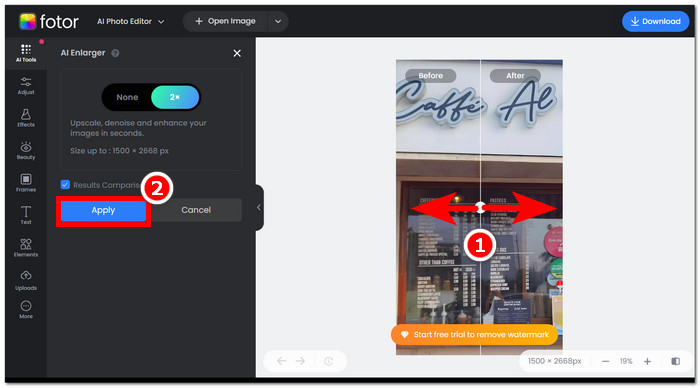
Trin 2. Fotor behandler automatisk dit billede. Alt, hvad du skal gøre, er at sammenligne før‑ og eftervisningen ved at trække pilemarkøren fra venstre mod højre.
Trin 3. Når du er tilfreds, skal du klikke på Apply for at gemme ændringerne på dit foto.
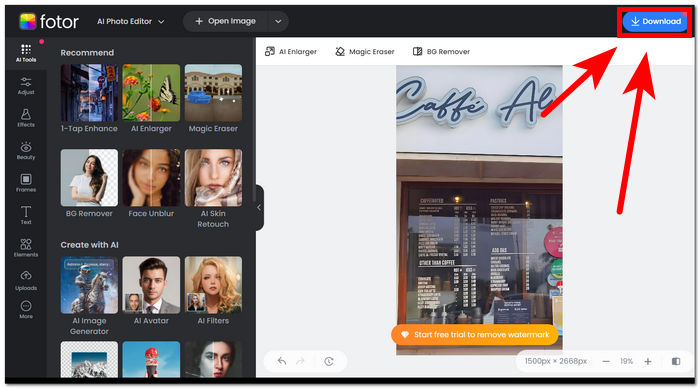
Trin 4. Når du vil gemme dit nu forbedrede billede, skal du klikke på Download øverst i højre hjørne af skærmen.,
Trin til brug af Fotor Background Remover
Trin 1. Gå til websiden for Fotor Background Remover, og upload det foto, hvor du vil fjerne baggrunden, i feltet Upload Image.
Trin 2. Når dit foto er indlæst i softwaren, fjerner den automatisk baggrunden fra dit uploadede billede.
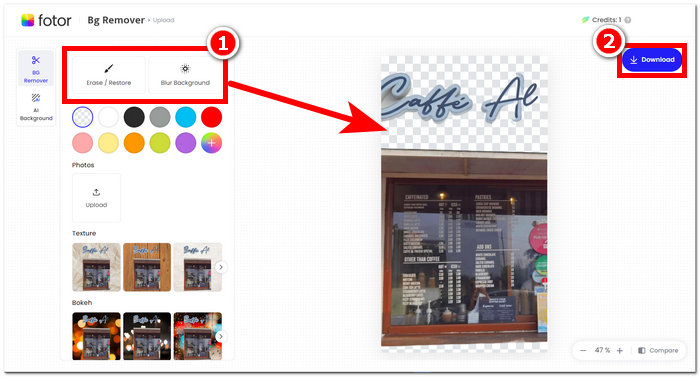
Trin 3. Du kan manuelt slette/gendanne baggrunden ved at eksperimentere med værktøjet Erase/Restore, som findes i den øverste venstre navigation, indtil det passer til dine ønsker.
Trin 4. Når du er tilfreds med resultatet, skal du klikke på Download øverst til højre på skærmen for at gemme billedet på din computer.
For at opsummere anmeldelsen på Fotor er dens funktioner væsentligt for gode inden for fotoredigering. Derfor vil dette lade dig skabe vidunderlige projekter med lethed. Udover at det er sammensat af alle de grundlæggende værktøjer, når man beskæftiger sig med fotomanipulation, er vægten på fotoforbedring og baggrundsfjerner problemfri, for det er bekvemt nemt at navigere i dens grænseflade. Men ud af alle dets funktioner, der bringes på bordet, kan du kun fuldt ud nyde Fotor-funktionerne og funktionaliteten, når du abonnerer på dens månedlige plan.
Del 2. Fotor Alternativ til at fjerne baggrundsbilleder og opskalere billeder
FVC har udvidet sig til at skabe værktøjer og software, der imødekommer behovene hos skabere i den visuelle redigeringsbranche. To af disse værktøjer er FVC Free Background Remover og FVC Free Image Upscaler; disse to har hver deres webbaserede domæne for at adskille dem og undgå at forvirre brugerne om deres formål. I modsætning hertil samler softwarebaserede værktøjer ofte alle funktioner til forskellige opgaver i ét program, hvilket kan gøre det tidskrævende at blive fortrolig med softwaren. Derudover hjælper disse FVC‑værktøjer skabere med frit at bruge deres funktioner og med mindre besvær i forhold til download‑ og installationsprocessen. Nedenfor er trinnene til at bruge FVC‑værktøjerne til baggrundsfjernelse og billedopskalering.
Trin til brug af FVC Free Background Remover:
Trin 1. Gå ind på websiden for FVC Free Background Remover, og Upload det foto, hvor du vil fjerne baggrunden.
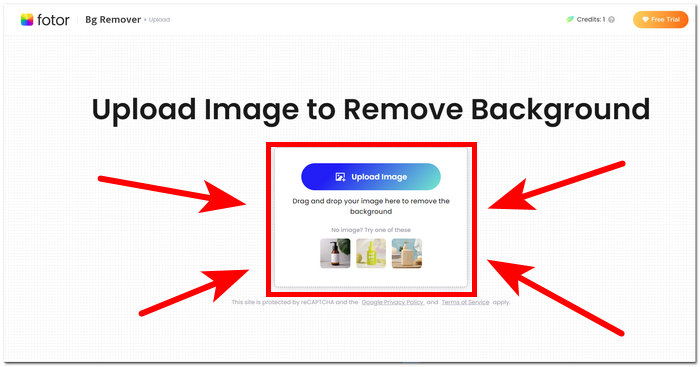
Trin 2. FVC AI registrerer og fjerner automatisk baggrunden fra dit foto.
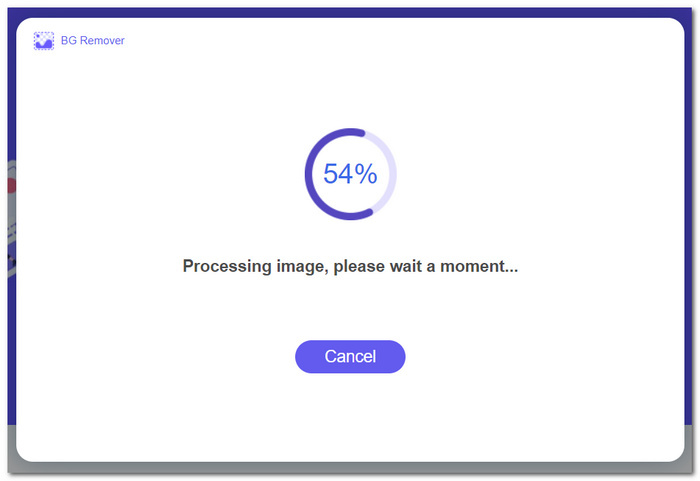
Trin 3. Når processen er færdig, kan du nu Download dit foto.
Trin til at bruge funktionerne i FVC Free Image Upscaler:
Trin 1. Upload dit foto til websiden for FVC Image Upscaler.
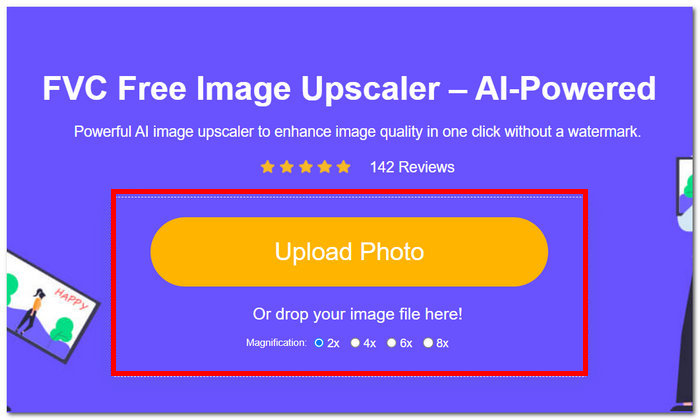
Trin 2. Vælg den ønskede Magnification, og klik blot på den.
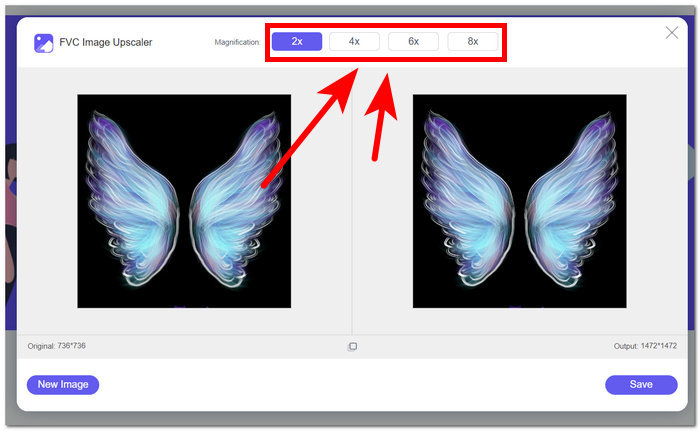
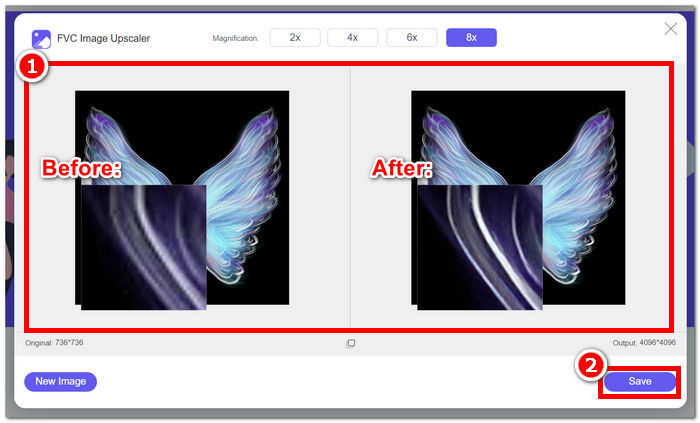
Trin 3. Værktøjet behandler automatisk fotoet, og du kan se forskellen baseret på den valgte forstørrelse.
Trin 4. Dit nu opskalerede foto er klar til at blive gemt. Klik blot på Download.
Fotor- og FVC-værktøjer kan give samme kvalitet og nøjagtige resultater, når det kommer til håndtering af baggrundsfjernelse og billedopskalering. De adskiller sig dog i deres tilgængelighed, når FVC-værktøjer er gratis at bruge i enhver lokal browser, mens Fotor kan have grundlæggende gratis funktioner, men er begrænsede. Sørg for at tjekke funktionaliteten og bekvemmeligheden, de giver dig først, og lad dig fordybe dig i at bruge onlineværktøjer, der er hurtige, effektive og sikre. FVC har din ryg for at spare tid og komme tilbage til at afslutte dine ventende projekter til tiden.
Del 3. Ofte stillede spørgsmål Om Fotor
Er Fotor gratis at bruge?
Ja, Fotor tilbyder en gratis version af sin fotoredigeringsplatform, der giver brugerne adgang til grundlæggende værktøjer uden omkostninger. Dette giver enkeltpersoner mulighed for at bruge væsentlige funktioner uden at pådrage sig nogen gebyrer.
Hvor meget koster Fotor om måneden?
Fotor tilbyder forskellige prisplaner, der omfatter både månedlige og årlige abonnementer, med variationer i omkostninger afhængigt af inkluderede funktioner. For at se opdaterede og nøjagtige prisoplysninger opfordres brugerne til at henvise til Fotors officielle hjemmeside for detaljer om deres aktuelle tilbud.
Hvor lang er Fotors gratis prøveperiode?
Fotor kan tilbyde en gratis prøveperiode for dets premium-funktioner, selvom prøveperioden kan ændres. For at få de seneste oplysninger om den gratis prøveperiode, anbefales det at tjekke Fotors officielle hjemmeside.
Fotor virker ikke?
Hvis du oplever problemer med, at Fotor ikke fungerer, kan du overveje at tjekke din internetforbindelse, rydde din browsers cache eller opdatere appen, hvis du bruger en desktopversion. Hvis problemerne fortsætter, anbefales det at kontakte Fotors kundesupport for at få hjælp. De kan vejlede dig i at løse tekniske problemer eller tilbyde indsigt i eventuelle systemopdateringer.
Er Fotor et godt program?
Ja, Fotor anses for at være et godt program til fotoredigering, der tilbyder en brugervenlig grænseflade, der passer til både begyndere og mere erfarne brugere. Dens forskellige funktioner, herunder Background Remover, gør den alsidig til forskellige redigeringsbehov. Men egnetheden af Fotor afhænger af individuelle præferencer og specifikke krav til fotoforbedring.
Konklusion
Fotor står som en bemærkelsesværdig kandidat, især på grund af sine funktioner til baggrundsfjernelse og billedforbedring. Det er blevet et af standardværktøjerne til fotoredigering på grund af sin mangfoldighed af funktioner og en grænseflade, der rummer stort set alle de grundlæggende værktøjer, der er nødvendige på området. Men i erkendelse af brugernes forskellige behov giver det et bredere perspektiv at undersøge alternativer som FVC. Uanset om du vælger Fotor eller dets alternativer, er det afgørende at styrke din kreative rejse med værktøjer, der stemmer overens med din vision. Sørg for at afprøve og udnytte hvert værktøj fuldt ud, så du kan finde det bedste værktøj til dine projekter med baggrundsfjernelse og billedforbedring.
-
 Sådan fjerner du baggrund fra billede ved hjælp af GIMP
 Kom godt i gang med GIMP og trin-for-trin-processen med at fjerne baggrunde fra billeder. Opdag effektive måder at skabe gennemsigtige billeder ved hjælp af GIMP i dag!
-
 Sådan øger du billedstørrelsen online og offline
 Opdag den nemmeste måde at øge billedstørrelsen på uden at miste kvalitet. Se vores værktøjer og software til tilpasning af størrelse for at sikre optimal kvalitet til dine billeder.
-
 Sådan ændrer du størrelsen på et billede i Photoshop: Must-Know Guide
 Lær trin-for-trin-processen til, hvordan du ændrer størrelsen på et billede i Photoshop. Følg denne guide for effektivt at ændre størrelsen på dine billeder med lethed og kvalitet!
