


 Video Converter Ultimate
 Skærmoptager
 Video reparation
 Sikker download
Sådan fjerner du nemt vandmærke fra PDF ved hjælp af de fantastiske værktøjer
Har du nogensinde læst en PDF‑fil, der indeholder et vandmærke, som distraherer dig på hver eneste side? Vandmærker på PDF‑filer er en måde at beskytte dokumenter mod at blive kopieret på. Men de er en stor distraktion for folk, der blot vil læse artiklerne med vandmærker. Denne artikel gennemgår, hvordan du kan fjerne vandmærker i PDF‑filer. Hvis du også leder efter, hvordan du kan fjerne vandmærker fra PDF‑filer, så læs denne artikel.

Del 1. Sådan fjerner du vandmærke fra PDF [Easy Ways]
Hvordan fjerner man vandmærket fra PDF? I denne del vil du lære de fem nemme måder, du kan fjerne de forstyrrende vandmærker på fra hver side i din PDF-fil.
Microsoft Word
Microsoft Word er et program til at oprette avancerede dokumenter. Det har også en indbygget funktion til at fjerne vandmærker. Det er meget let at fjerne vandmærket ved hjælp af Microsoft Word. Du kan fjerne det forstyrrende vandmærke i din PDF‑fil med nogle få, enkle trin. Så hvis du allerede har Microsoft Word installeret på din computer, er dette sandsynligvis den bedste løsning at bruge.
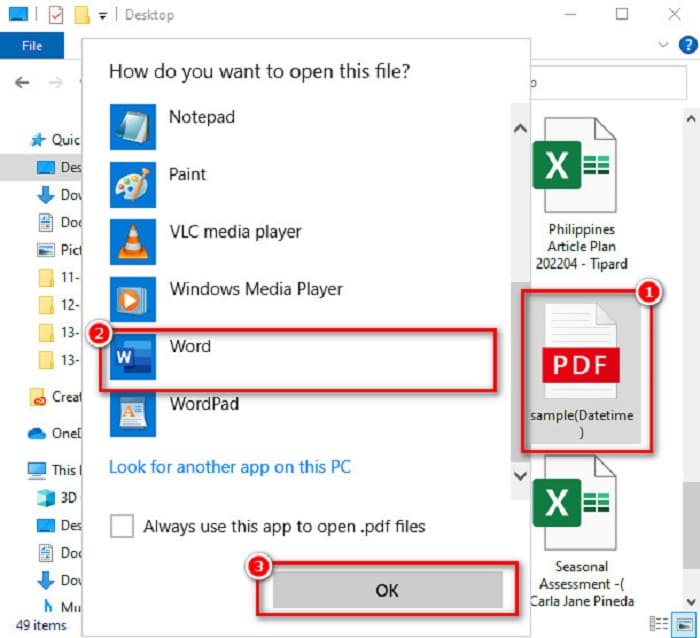
Trin 1. Find din PDF‑fil i dine computerfiler, og højreklik på den. Klik derefter på Åbn med > Microsoft Word > OK.
Trin 2. En advarselsmeddelelse vises, hvor der står, at det resulterende Word‑dokument vil blive optimeret, så du kan redigere teksten. Og din PDF‑fil kommer muligvis ikke til at se helt ud som originalen. Klik på knappen OK.

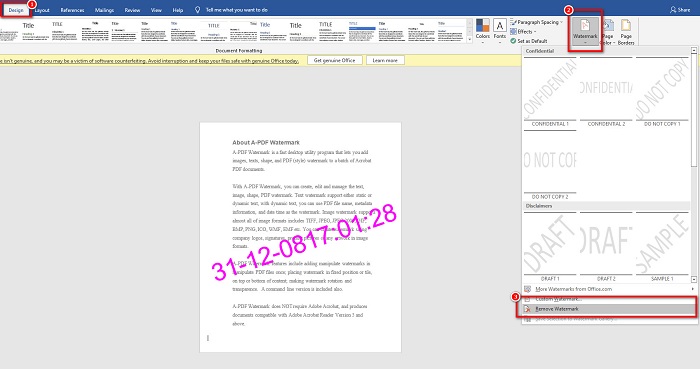
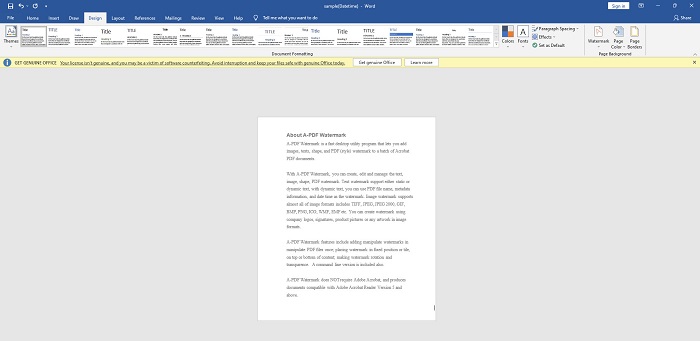
Trin 3. Nu åbnes din PDF‑fil i Word; derefter kan du fjerne vandmærket ved at klikke på Design > Vandmærke > Fjern vandmærke. Så kan du fjerne vandmærket, der er indlejret i din PDF‑fil.
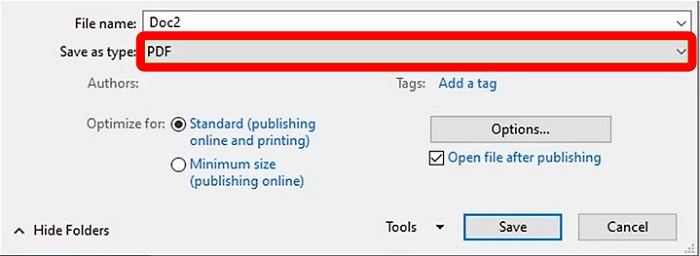
Trin 4. Til sidst skal du klikke på Filer > Gem som. Vælg derefter PDF som filformat, og klik på Gem.
Adobe Acrobat Pro
Hvis du er en bruger, der spørger, hvordan fjerner jeg vandmærket fra PDF gratis, så skal du bruge dette værktøj.
Adobe Acrobat Pro er et program, der bruges til at konvertere, underskrive og sende meddelelser og PDF‑dokumenter på enhver enhed. Derudover kan du også læse, redigere og – vigtigst af alt – fjerne vandmærket i din PDF‑fil. Med Adobe Acrobat Pro kan du fjerne vandmærket i din PDF‑fil med nogle få enkle trin.
Her er en guide til at fjerne vandmærket ved hjælp af Adobe Acrobat Pro:
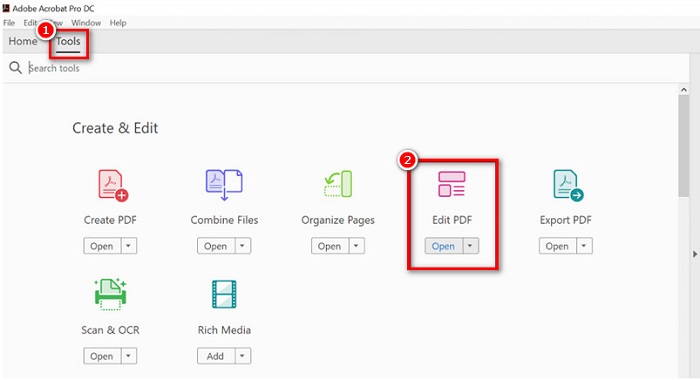
Trin 1. Installer Adobe Acrobat Pro på din enhed, og åbn derefter programmet.
Trin 2. Gå derefter til Værktøjer, og klik på Rediger PDF.
Trin 3. Klik derefter på indstillingen Vandmærke på redigeringsværktøjslinjen, og klik derefter på Fjern.
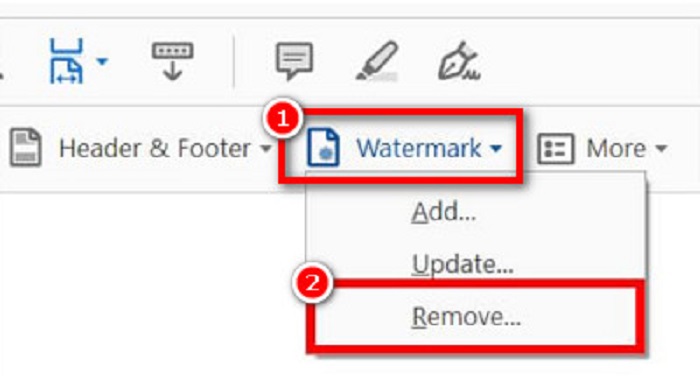
Der vises en advarselsboks, hvor der står: 'Er du sikker på, at du vil fjerne vandmærket permanent?' Klik blot på knappen Ja, så fjernes alle vandmærker i din PDF‑fil. Klik her for at lære, hvordan du kan fjerne vandmærket fra en GIF.
pdfFiller
Vi har løsningen, hvis du spørger, hvordan du fjerner vandmærke fra PDF online. pdfFiller er en online app, der lader dig redigere, udfylde og signere PDF-dokumenter gratis. Det har også en enkel brugergrænseflade, hvilket gør det til et brugervenligt værktøj. Desuden kan dette værktøj også fjerne vandmærket på din PDF-fil. Hvis du er fascineret af denne professionelle redigeringsapp, så læs nedenstående trin.
Trin 1. Download først pdfFiller via din app‑butik. Følg installationsprocessen, og åbn derefter programmet.
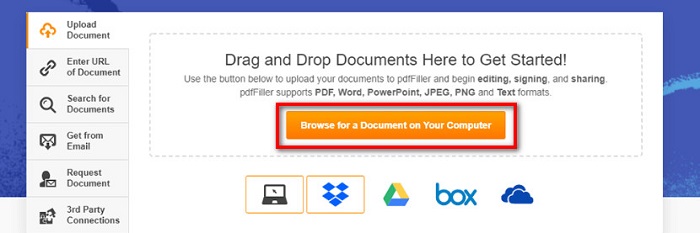
Trin 2. Klik derefter på Browse for a Document on Your Computer i programmets hovedgrænseflade for at uploade din PDF‑fil. Du kan også vælge filer fra din Dropbox, Google Drev eller din cloud.
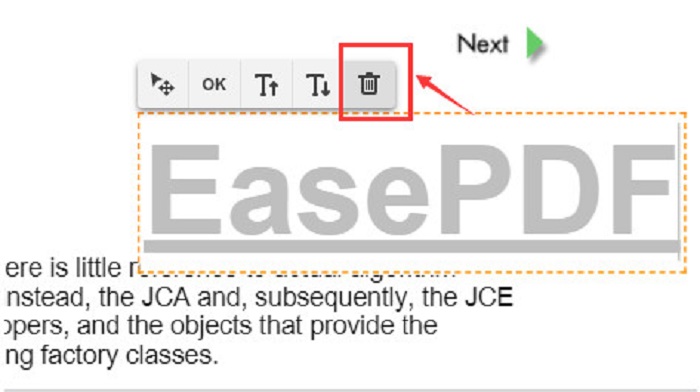
Trin 3. For at fjerne vandmærket i din PDF‑fil skal du klikke på fanen Watermark i højre side. Dobbeltklik derefter på vandmærket, og klik på ikonet Slet.
PDF2Alt
PDF2Everything er et brugervenligt onlineværktøj til at fjerne vandmærker i PDF, fordi det har en let anvendelig brugerflade. Dette online værktøj kan ikke kun fjerne vandmærker; det kan også flette, opdele, kryptere, ændre adgangskoder og låse PDF‑filer op. Desuden understøtter det forskellige dokumentformater. PDF2Everything er gratis og sikkert at bruge. Dog kan du opleve, at arbejdet går langsomt, hvis din internetforbindelse er langsom. Ikke desto mindre bruger mange stadig dette værktøj til at fjerne vandmærker i PDF‑filer online.
Trin 1. Søg efter PDF2Everything i din browser. Klik derefter på knappen Click to Select File i programmets hovedgrænseflade.
Trin 2. Klik derefter på knappen Start Deleting for automatisk at fjerne vandmærket i din PDF‑fil.
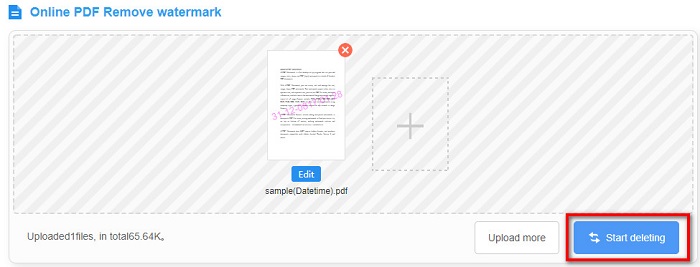
Trin 3. Vent til filen er færdigbehandlet, og så vil du se, at din PDF‑fil ikke længere har noget indlejret vandmærke.
Heroku
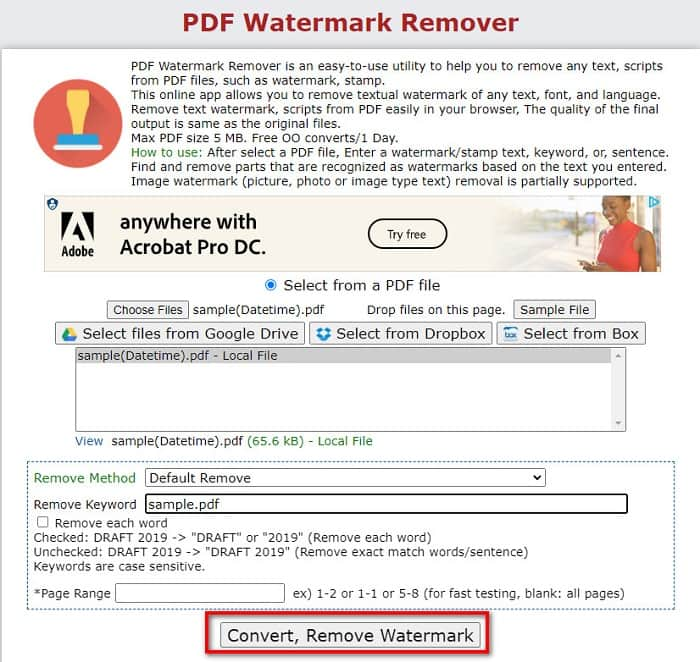
Heroku er et andet onlineværktøj til at fjerne vandmærker i PDF, der er populært på internettet. Det er også sikkert og gratis at bruge ligesom onlinekonverteren ovenfor. Dette onlineværktøj giver dig mulighed for at fjerne alle vandmærker, tekster, scripts og stempler i din PDF‑fil. Derudover kan det håndtere filer på op til 5 MB. Ulempen er, at du kun kan fjerne vandmærker med dette værktøj én gang om dagen, og at det indeholder reklamer, som kan virke forstyrrende. Det er stadig et godt værktøj til at fjerne vandmærker i din PDF‑fil. Her er trinnene til at fjerne vandmærker i din PDF‑fil med Heroku.
Trin 1. Søg efter Heroku watermark remover i din browser. Klik derefter på knappen Choose Files i programmets hovedgrænseflade for at uploade din PDF‑fil.
Trin 2. Skriv derefter det vandmærke‑nøgleord, der findes i din PDF‑fil, i feltet Remove Keyword.
Trin 3. Klik på knappen Convert, Remove Watermark for at fuldføre processen. Vent derefter et par minutter.
Del 2. Anbefaling: Ultimativ vandmærkefjerner til billeder
I denne del af artiklen lærer du, hvordan du fjerner vandmærker fra dine billeder og lærer det bedste værktøj at bruge.
FVC gratis vandmærkefjerner
FVC Free Watermark Remover er et onlineværktøj, der kan fjerne alle slags vandmærker, tekster, billeder, logoer og meget mere fra dit billede. Dette værktøj understøtter de mest almindelige billedformater som JPEG, JPG, PNG, BMP osv. Derudover er dette onlineværktøj sikkert at bruge og har en meget enkel brugerflade, hvilket gør det velegnet til begyndere. Og i modsætning til andre onlineværktøjer indeholder denne vandmærkefjerner ingen reklamer, der kan forstyrre dig. Det mest imponerende ved dette værktøj er, at det eksporterer filer i deres originale kvalitet. FVC Free Watermark Remover kan desuden tilgås i alle webbrowsere, herunder Google, Mozilla Firefox, Safari osv. Så hvis du vil bruge dette ultimative værktøj til at fjerne vandmærker, skal du følge de enkle trin nedenfor.
Trin 1. Søg efter FVC Free Watermark Remover i din browser, eller klik på det angivne link for at gå direkte til deres hovedside.
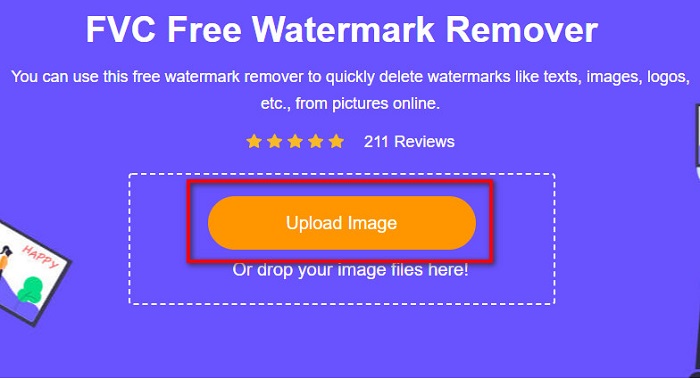
Trin 2. Klik på knappen Upload Image i programmets hovedgrænseflade for at uploade det billede, hvor du vil fjerne vandmærket.
Trin 3. Vælg derefter det værktøj, du vil bruge (polygon, lasso, pensel) for at markere det vandmærkeområde, du vil fjerne. Tegn derefter hen over selve vandmærket.
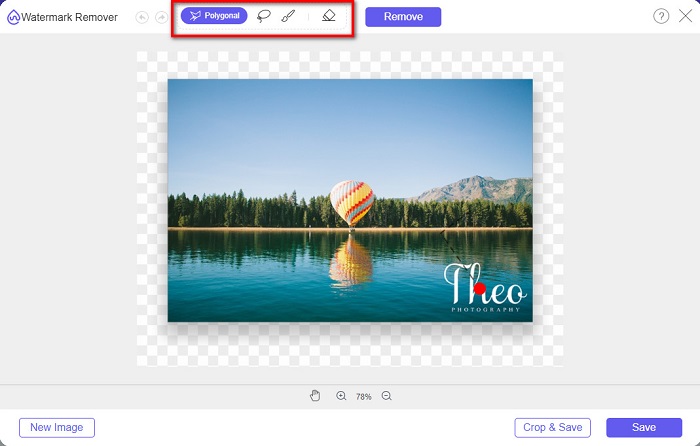
Trin 4. Når du har markeret vandmærkeområdet, skal du klikke på knappen Remove og derefter klikke på knappen Save.
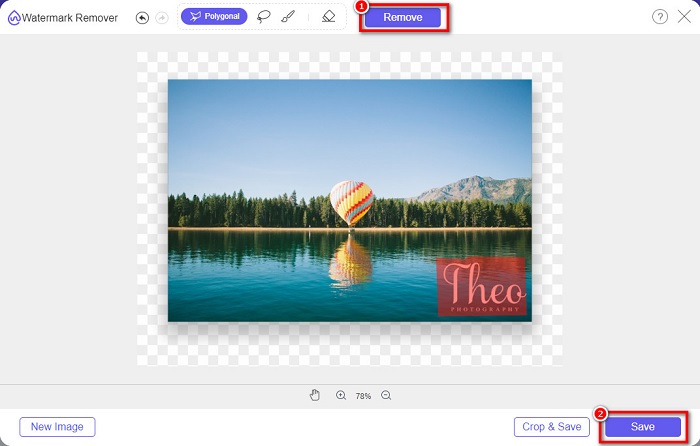
Trin 5. Til sidst bliver din fil automatisk gemt i dine computerfiler. Og det var det! Vandmærket på dit billede er nu fjernet ved at følge de enkle trin ovenfor. Du kan også bruge denne metode til at fjerne TikTok‑vandmærket.
Del 3. Ofte stillede spørgsmål om fjernelse af vandmærke fra PDF
Kan du fjerne et vandmærke fra PDF på Mac?
Hvis du spørger, hvordan man fjerner et vandmærke fra en PDF på Mac, kan du bruge et onlineværktøj til at fjerne vandmærker, som er tilgængeligt i Safari‑browseren, f.eks. FVC Free Watermark Remover.
Kan du fjerne logoer fra dit billede?
Ja. Du kan fjerne logoer, vandmærker og tekster fra dit billede.
Vil det påvirke kvaliteten, hvis jeg fjerner vandmærket på mit billede?
Nej. Fjernelse af vandmærket på billeder vil ikke nødvendigvis påvirke kvaliteten af din billedfil. Nogle værktøjer kan dog ødelægge kvaliteten af din fil. Så du bør vælge det rigtige værktøj til at bruge.
Konklusion
Med alt dette in mente findes der mange værktøjer, du kan bruge til at fjerne vandmærker fra PDF‑filer. Men ikke alle værktøjer giver samme outputkvalitet eller lige så mange funktioner. Alle de vandmærkefjernere, der er præsenteret ovenfor, vil helt sikkert hjælpe dig med nemt at fjerne vandmærker i dine PDF‑filer. Men hvis du leder efter et værktøj, der kan fjerne vandmærker i billedfiler, så brug den fantastiske billed‑vandmærkefjerner FVC Free Watermark Remover.
-
 3 bedste løsninger til, hvordan du nemt fjerner vandmærke fra videoer
 Vil du fjerne det irriterende vandmærke på videoen? Med denne blog kan du lære de forskellige ideer til at fjerne vandmærket på en video.
-
 4 bedste måder at tilføje vandmærke på alle videoer hurtigt
 Lad os lære, hvordan du tilføjer vandmærke til alle videoer på Windows, Mac, Online, iOS og Android med detaljerede trin, hvis du læser denne artikel.
-
 3 nemmeste måder at tilføje vandmærke til en GIF online og offline
 At tilføje et vandmærke til en GIF kan være så let som 1-2-3, hvis du bruger det rigtige værktøj korrekt. Værktøjerne på markedet er for brede, men vi vil præsentere de tre værktøjer, du kan stole på.
