


 Video Converter Ultimate
 Skærmoptager
 Video reparation
 Sikker download
Sådan repareres lyd på iPhone, der ikke fungerer [3 nemme måder]
Har du prøvet utallige måder at få lyden tilbage i dine iPhone‑videoer på, men lyden virker stadig ikke? Det er ikke, fordi der ikke findes en løsning på problemet med lyd i videoer på din iPhone. Det er bare, at du har forsøgt at løse det på en måde, som ikke er den rigtige. I denne artikel ser vi derfor på 3 nemmeste måder at løse problemet min iPhone har ingen lyd på video. Vi forstår, at dette problem er virkelig irriterende og frustrerende. Så hvis du står i denne situation og ikke kan vente med at få løst lydproblemet på dine iPhone‑videoer, så læs denne artikel, forstå hvorfor lyden ikke afspilles på dine videoer, og ret derefter problemet.

Del 1. Hvorfor har min iPhone ingen lyd på videoer
Hvorfor min iPhone ikke har nogen lyd på videoer er virkelig et spørgsmål og et problem, som mange står over for. Nå, der er forskellige grunde til, at dette sker, men forstår du virkelig, hvorfor dette normalt sker? Følgende er årsagerne til, at iPhone ikke har nogen lyd, når den afspiller videoer:
iPhone-video har ingen lyd i billeder
Fotos er et almindeligt kendt fotostyrings- og redigeringsprogram lavet af Apple. Det er her brugerne kan gemme deres billeder og videoer, se og redigere dem og meget mere! Mens Fotos er en velrenommeret platform til at se og afspille videoer, har afspilning af videoer på denne applikation i nogle tilfælde ingen lyd. Følgende er nogle af årsagerne til, at iPhone-video ikke har nogen lyd i Fotos:
• Lyden kan være slået fra eller være for lav. Sørg for, at iPhone‑lydstyrken er skruet op, og at ringekontakten ikke står på lydløs.
• Videofilen kan være beskadiget, hvilket kan få lydsporet til at fungere forkert eller slet ikke blive afspillet.
• Der kan være et softwareproblem eller en fejl i Fotos‑appen, som forhindrer lyden i at blive afspillet.
• Fotos‑appen kan have svært ved at læse videoens lydcodec, især hvis formatet ikke er fuldt understøttet.
• iPhonen kan være forbundet til en Bluetooth‑enhed, såsom et headset eller en højttaler, som ikke er i brug, så lyden i stedet sendes dertil.
iPhone-video har ingen lyd i kamerarullen
Når du filmer direkte på din iPhone, kan du forhåndsvise din video ved at afspille den fra din kamerarulle. Nogle iPhone-brugere oplever dog ingen lyd, når de afspiller deres videoer fra deres kamerarulle, hvilket får dem til at føle sig irriterede og forvirrede over, hvorfor deres videoer ikke har lyd. Følgende er nogle af årsagerne til, at lyden på iPhone ikke fungerer, når den afspilles i kamerarullen:
• Mikrofonen kan have været blokeret eller være blevet defekt under optagelsen, så der ikke er blevet optaget nogen lyd.
• Hvis din iPhone er i Forstyr ikke‑tilstand, kan det forhindre lyde i at blive afspillet, når videoer forhåndsvises i Kamerarullen.
• iPhonen kan stå på lydløs, hvilket kan få videoen til at blive afspillet uden lyd.
iPhone har ingen lyd, der afspiller videoer i IG
Afspilning af videoer på Instagram kan nogle gange udgøre et problem. Nogle oplever en manglende evne til at afspille videoen; der er nogle tilfælde, hvor kun lyden ikke afspilles, når videoer afspilles på IG. For bedre at forstå, hvorfor dette sker, er nedenfor grundene til, at iPhone ikke har nogen lyd, der afspiller videoer i IG:
• Instagram kan have slået lyden fra på videoen som standard, så brugeren skal trykke på højttalerikonet for at slå lyden til.
• Lydstyrken inde i Instagram‑appen kan være skruet ned eller slået fra, uafhængigt af iPhonens systemlydstyrke.
• Der kan være en midlertidig fejl eller bug i Instagram‑appen, som kræver, at den genstartes eller opdateres.
• En dårlig eller ustabil netværksforbindelse kan få videoen til at indlæse forkert, så der ikke kommer nogen lyd.
• iPhonen kan være sat på lydløs eller vibration, hvilket kan påvirke lydafspilningen i Instagram‑appen.
Del 2. Løsninger til at løse ingen lyd på iPhone virker ikke
Nu hvor du forstår nogle af grundene til, at din iPhone ikke har nogen lyd på videoer, er det tid til at lære, hvordan du løser dette problem.
Metode 1: Brug af FVC Video Repair
Når din iPhone ikke har lyd på videoer, fordi du afspiller en beskadiget video, er den perfekte løsning at bruge FVC Video Repair‑værktøjet. Vi ved alle, at når en video er beskadiget, påvirker det ikke kun muligheden for at afspille videoen, men også lyden, hvilket kan føre til problemer som manglende lyd. Korruption i en videofil kan forstyrre synkroniseringen mellem lyd‑ og videosporene eller endda helt fjerne eller ødelægge lydsporet, så videoen bliver afspillet uden lyd. Derfor er FVC Video Repair‑værktøjet udviklet til at løse disse problemer ved at genskabe både videoens visuelle kvalitet og den tilhørende lyd, så du får en jævn afspilning med lyd.
Trin 1. Gå først til deres officielle hjemmeside. Derefter skal du downloade værktøjet og installere det på din enhed.
Gratis downloadTil Windows 7 eller nyereSikker download
Gratis downloadTil macOS 10.7 eller nyereSikker download
Trin 2. Tilføj derefter den beskadigede video ved at klikke på den røde plusknap, på samme måde som du klikkede på den blå plusknap for at tilføje eksempelvideoen. Klik derefter på knappen Repair for at begynde at reparere lydproblemet.
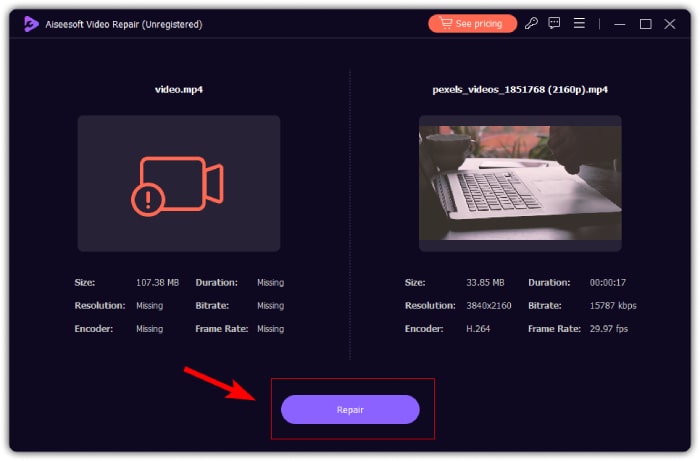
Trin 3. Til sidst skal du klikke på knappen Preview for at forhåndsvise den reparerede video og kontrollere, om lyden nu er gendannet. Når reparationsprocessen er gennemført med succes, kan du gemme den ved at klikke på knappen Save.
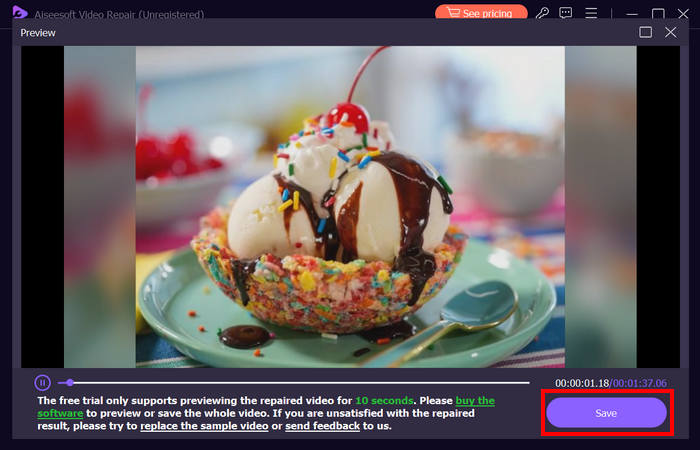
FVC Video Repair kan virkelig nemt reparere iPhone har ingen lyd på videoer problem. Med sin nyeste AI-algoritme og dens automatiske registrering af vital information og rettelse af dem direkte, kan den effektivt gendanne videolyden på din iPhone.
Metode 2: Brug af FVC Picked Video Converter Ultimate
Hvis dit problem derimod skyldes et manglende lydspor – hvilket betyder, at lydkomponenten i din video er gået tabt, beskadiget eller ikke er kodet korrekt – kan du bruge det af FVC udvalgte Video Converter Ultimate. Dette værktøj kan hjælpe dig med at rette det manglende lydspor ved at konvertere din video til et kompatibelt format. For at løse problemet med, at iPhonen ikke afspiller lyd på grund af et manglende lydspor, skal du følge trinene nedenfor:
Trin 1. Hvis du ikke har værktøjet installeret på din computer, skal du først downloade og installere det på computeren.
Free DownloadTil Windows 7 eller nyereSikker download
Gratis downloadTil macOS 10.7 eller nyereSikker download
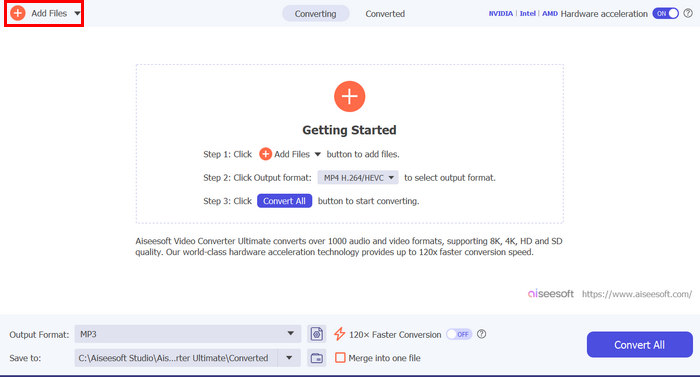
Trin 2. Tilføj derefter den video, hvor lyden ikke bliver afspillet på din iPhone, ved at klikke på knappen Add Files.
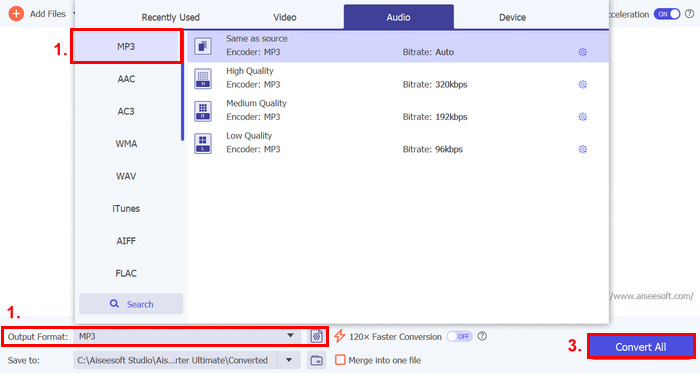
Trin 3. Klik nu på Output Format, vælg MP3, og vælg i menuen det lydformat, du ønsker til din video. Til sidst skal du klikke på knappen Convert All for at gemme din fil.
Dette FVC udvalgte Video Converter Ultimate-værktøj med alle funktioner er virkelig et gå-til-værktøj til ethvert video- og lydrelateret problem. Uanset problemet, enten det er en korrupt fil, forkert codec eller ikke-understøttet format, kan dette værktøj virkelig hjælpe.
Metode 3: Genstart iPhone
Hvis din iPhone har et systemproblem, der påvirker lyden, når du afspiller videoer, kan du blot genstarte din iPhone. På denne måde kan du opdatere enhedens operativsystem, hvilket kan fjerne midlertidige fejl eller fejl, der kan forårsage lydproblemet. Sådan kan du simpelthen genstarte din iPhone for at løse problemet med iPhone uden lyd på video:
Til iPhone X og nyere
Trin 1. For at genstarte din iPhone skal du holde sideknappen og en af lydstyrkeknapperne nede, indtil skyderen til at slukke vises på skærmen.
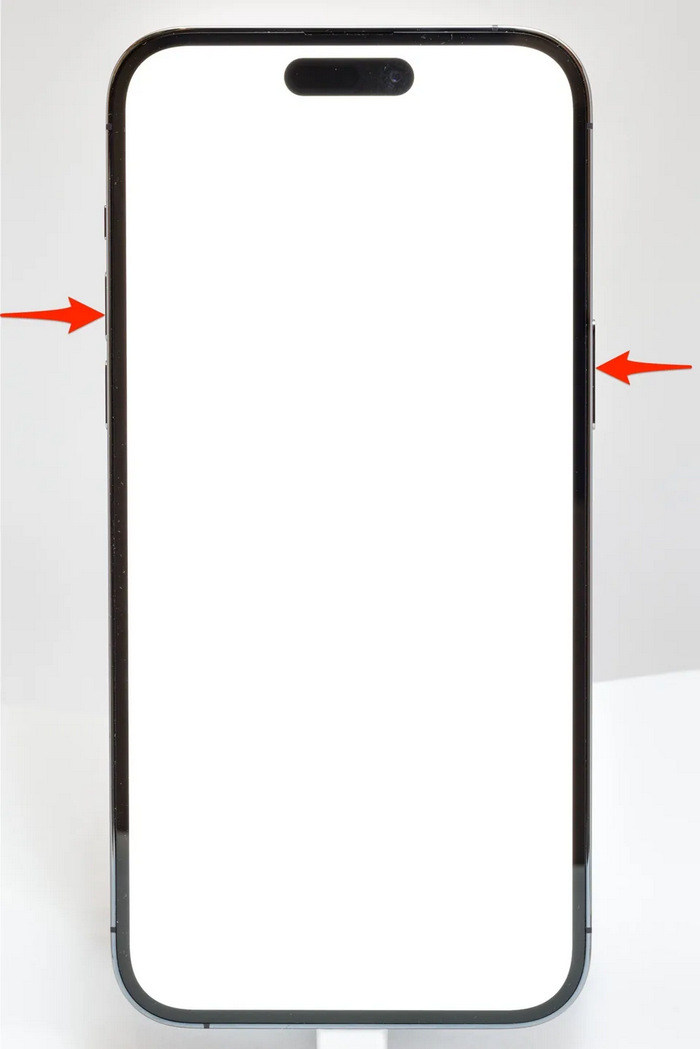
Trin 2. Skub skyderen, så din iPhone slukker.
Trin 3. For at tænde den igen skal du nu trykke på sideknappen.
Til iPhone 6, 7, 8 og SE
Trin 1. Først skal du trykke på og holde sideknappen nede.
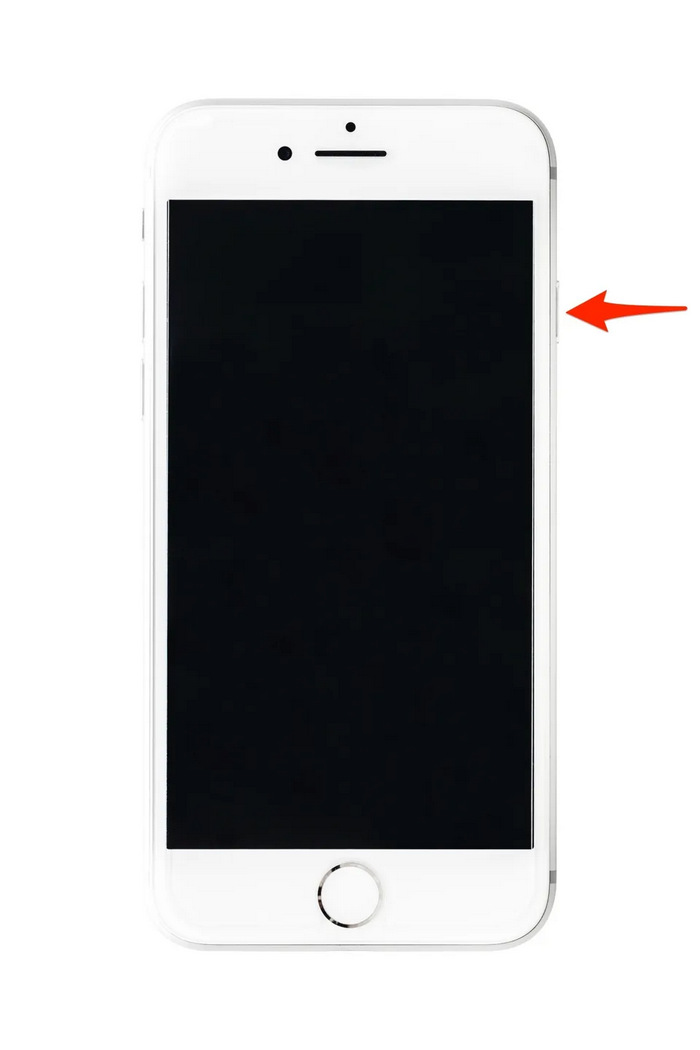
Trin 2. Vent, til skyderen til at slukke vises, og skub derefter skyderen for at slukke enheden.
Trin 3. For at tænde den igen skal du nu trykke på sideknappen.
Disse metoder er enkle at udføre og kræver ikke, at du bruger noget tredjepartsværktøj. Dette er dog en meget grundlæggende og almindelig løsning, og de garanterer ikke en fuld reparation for denne iphone har ingen lyd på video problem.
Del 3. Ofte stillede spørgsmål om Stellar Repair for Video
Hvilke iPhones understøtter Dolby Vision- eller DTS-lyd?
iPhones fra iPhone 12-serien og nyere understøtter Dolby Vision, som forbedrer videokvaliteten med bedre farver og kontrast. iPhones understøtter dog ikke direkte DTS-lyd, da de bruger andre lydteknologier som Dolby Atmos.
Kan du spille FLAC auan dio på iPhone?
Ja, du kan afspille FLAC-lyd på din iPhone, men du skal bruge en tredjepartsapp som VLC eller en specialiseret lydafspiller, da iPhones indbyggede Music-app ikke naturligt understøtter FLAC.
Vil videoer afspille lyd i lydløs tilstand på iPhone?
Nej, videoer afspiller ikke lyd, hvis din iPhone er i lydløs tilstand. For at høre lyd skal du slå lydløs tilstand fra ved at dreje på kontakten på siden af din iPhone.
Konklusion
Årsagerne til problemet iPhone har ingen lyd på video varierer, og det samme gør løsningerne til at rette det. Nu hvor du ved, hvordan du løser dette, håber vi, at du ikke lader dig slå ud, hvis du skulle støde på det igen. Men lige nu, hvis du har det samme problem, kan du prøve en hvilken som helst af metoderne, der er beskrevet i denne artikel.
-
 Top 2 metoder til at konvertere FLV til iPhone Video gratis
 Denne konkrete guide deler to to nemme måder at hjælpe dig med at lære at konvertere FLV-filer til iPhone-video eller mange andre formater uden at betale en krone.
-
 [Løst] Sådan repareres videoer, der ikke afspilles på iPhone, med detaljerede trin
 Lokale videoer i galleriet kan ikke afspilles på din iPhone via standardvideoafspilleren? Online YouTube -videoer, der ikke afspilles på iPhone, sker altid? Her er 5 løsninger til at hjælpe dig i denne artikel.
-
 Konkret guide til upload af dine FLV-videoer til YouTube
 Upload FLV til YouTube, men mislykkedes? Du kan løse dette problem alene og konvertere FLV til YouTube-understøttede codecs ved at følge vores trin-for-trin vejledning.
