


 Video Converter Ultimate
 Skærmoptager
 Video reparation
Lær om, hvordan du udpakker lyd fra videofil med Top Extractor
Alle elsker at se deres yndlings‑anime, k‑dramaer, serier, film og meget mere, lige så meget som hjertet begærer. Vi ser dem for at leve os ind i en fantasi, som verden ikke kan give os. De har givet os de bedste catchphrases og musikken, der får det, vi ser, til at føles som en rutsjebanetur. Så gem disse lydfiler på din drev og lyt til dem igen og igen. Og nu vil vi lære dig, hvordan du kan udtrække lyd fra video, samtidig med at du bevarer høj lydkvalitet. Hvis du synes, at det er svært at udtrække lyd, så læs videre nedenfor, hvor vi præsenterer forskellige muligheder og trin, du kan vælge og følge.

Del 1. Lær at udtrække lyd fra video med Top Extractor [PC og Mac]
Top 1. Video Converter Ultimate
Den fænomenale konverter i byen er her for at lære dig, hvordan du udtrækker lyd fra video. Video Converter Ultimate er allerede blevet downloadet af millioner af brugere verden over. Den er kendt for at være den sikreste og mest effektive måde at udtrække lyd fra din video på. Derudover er funktionerne i dette værktøj langt mere avancerede end i andre værktøjer, du kan bruge. Men dette værktøj skal købes og downloades, før du kan få adgang til det. Det er dog billigere og fylder mindre end andre ekstraktionsværktøjer, du kan finde. For at lære, hvordan du bruger dette værktøj, skal du først downloade det til din computer, og så går vi videre til trinene nedenfor. Desuden, hvis du køber dette værktøj, giver vi dig et ekstra trin kun til dig, om hvordan du bruger Volume Booster for at få lyd i høj kvalitet efter trinnene.
Trin til, hvordan man udtrækker lyd fra video Windows 10 og Mac ved hjælp af Video Converter Ultimate
Trin 1. Når du har downloadet værktøjet, skal du installere det og foretage en hurtig opsætning. Start det derefter med det samme på din computer.
Gratis download til Windows 7 eller nyere Sikker download
Gratis download til MacOS 10.7 eller nyere Sikker download
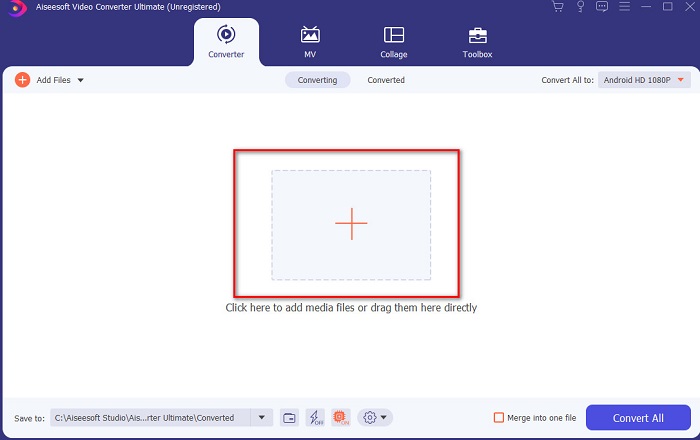
Trin 2. For at tilføje videofilen skal du klikke på +-knappen, finde den i din mappe og klikke på Åbn for at fortsætte.
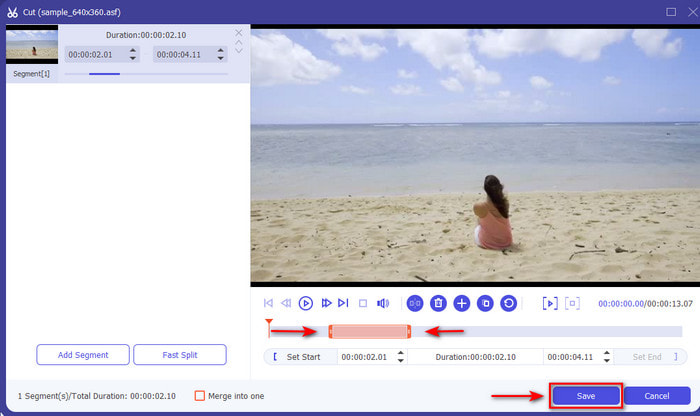
Trin 3. For at klippe videofilen skal du klikke på sakseformet knap. Indstil derefter start og slut for den del af lyden, du vil udtrække, og klik på Gem for at bevare de justeringer, du lavede før.
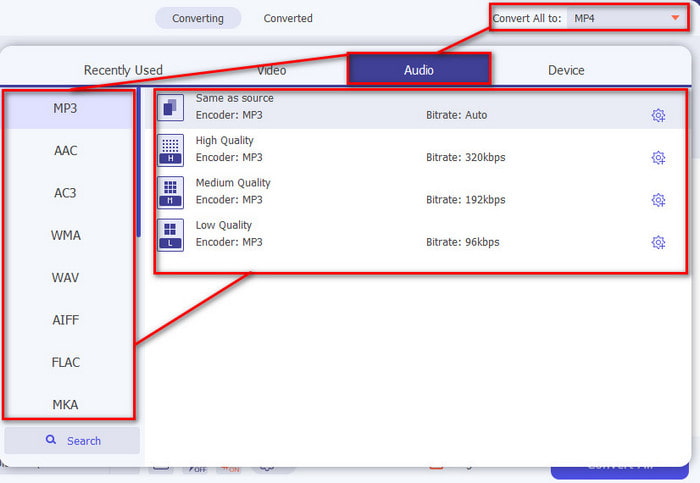
Trin 4. Skift videoformatet til et lydformat ved at klikke på Konvertér alle-indstillingen og vælge det ønskede lydformat.
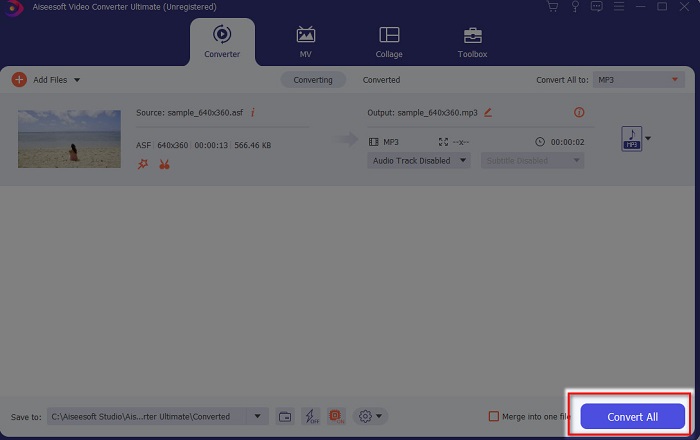
Trin 5. Klik på Konvertér alle for at fortsætte, og konverteringen starter med det samme. Når udtrækningen er færdig, kan du finde den udtrukne lydfil i mappen og afspille lyden med det samme.
Bonustrin til hvordan man bruger Volume Booster af Video Converter Ultimate
En af de bedste funktioner, den ultimative konverter tilbyder, er Volume Booster. Med hjælp af denne funktion kan du nu justere lyden, så den lyder bedre end nogensinde. Følg trinene nedenfor for at få det lyrløft, du altid har ønsket. Derudover fungerer dette værktøj ikke kun på lydfiler, så før du udtrækker lyd fra video på Mac eller pc, kan du bruge dette først til at tilføje forstærkning til din lyd.
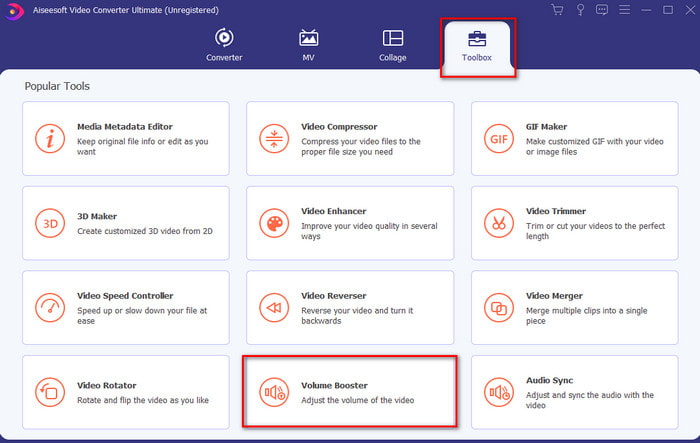
Trin 1. Gå til Værktøjskasse i programmet, find Volume Booster og klik på den.
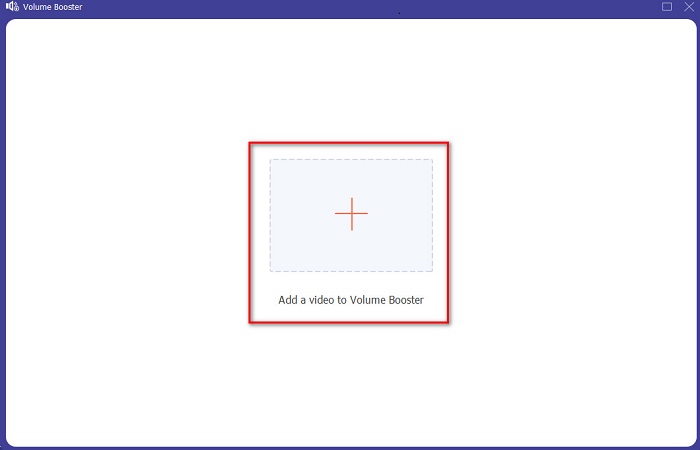
Trin 2. Tryk på Plus-knappen for at vælge den videofil, du vil forstærke, og Åbn den.
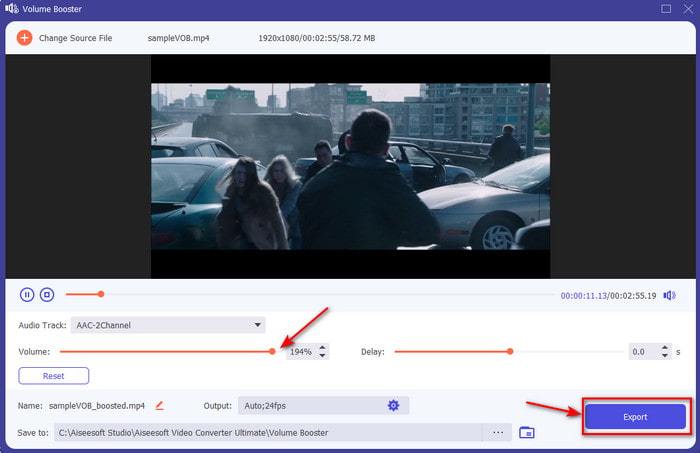
Trin 3. Flyt lydstyrke‑skyderne til højre eller venstre, som du ønsker, og klik derefter på Eksportér for at gemme den nu bedste video med forbedret lyd.
Fordele
- Nem at bruge, der giver et professionelt præg.
- Du kan lære det uden at svede.
- Det giver mange flere funktioner, du kan bruge til at udtrække.
Ulemper
- Det er ikke gratis, men det er det værd at blive købt.
- Kan downloades, hvilket betyder, at selvom du ikke har internet, kan du bruge det.
Top 2. Audacity
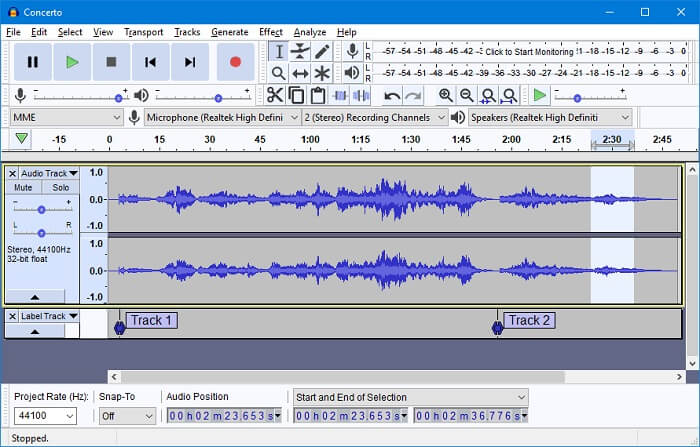
Audacity er udviklet af en gruppe frivillige, og det er også gratis, fordi det er udgivet under GPL. Når brugere udtrækker lyd fra video i Audacity, kan det være en stor udfordring for begyndere, der ikke har praktisk erfaring med programmet. Alligevel er det godt at bruge både på Windows 10 og Mac OS. Men der er stadig en del ulemper ved dette værktøj. For eksempel er programmet ikke komplet, når du downloader det – du skal i praksis downloade installationsprogram og encodere separat. Alt i alt er værktøjet godt, men det er ikke brugervenligt for nye brugere, der vil prøve at udtrække lyd.
Fordele
- Giver detaljeret udtræk.
- Funktionerne på dette værktøj er fantastiske til udsugning på professionelt niveau.
Ulemper
- Værktøjsgrænsefladen er ufuldstændig. Det har den dårligste grænseflade sammenlignet med det værktøj, der præsenteres her.
- Det er ikke det bedste valg for begyndere.
Top 3. iMovie
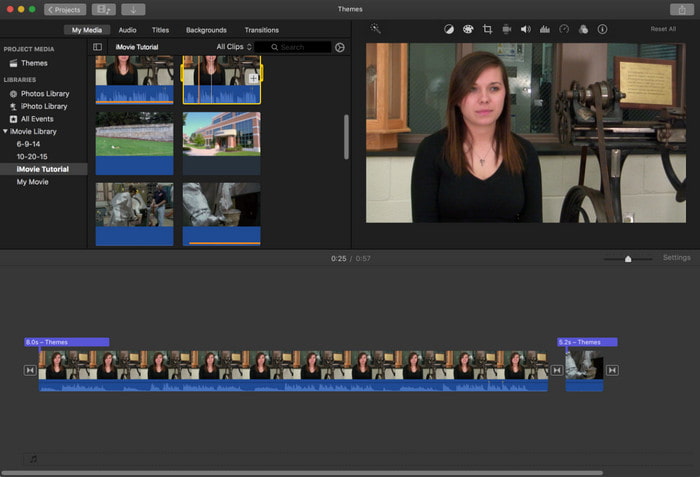
Du kan nemt lære, hvordan du udtrækker lyd fra video i iMovie, hvis du er Mac‑bruger. Mange af os ved, at iMovie er en medieafspiller, der er udviklet af Apple Inc. som deres standardafspiller. Men den har også en udtræksfunktion, som Apple‑brugere kan benytte. Dette værktøj understøtter dog kun begrænsede udtræksfunktioner. Desuden er processen langsommere end med de to andre værktøjer ovenfor. Så hvis du har et stramt budget, kan du prøve dette værktøj på Mac, men hvis du er Windows‑bruger, har du ikke adgang til det.
Fordele
- Ingen download nødvendig.
- Brugervenlig.
Ulemper
- Den har ingen filmappe, hvor den udpakkede fil er opført.
- Mangler fleksibilitet til professionel redigering.
Del 2. Sådan udpakkes lyd fra video på iPhone/Android
1. Readdle-dokumenter (til iOS)
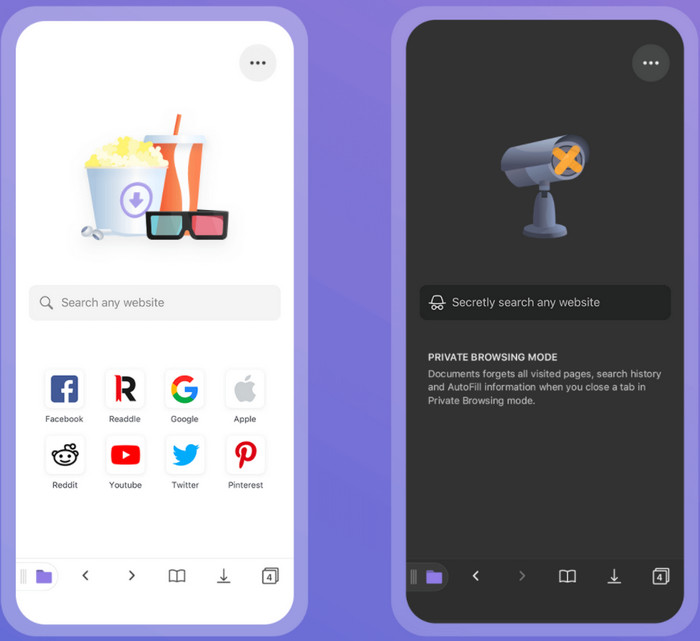
Det er kendt som et af de kraftige værktøjer til at udtrække lyd fra video på iPhone, Readdle Documents. Dette værktøj er gratis og nemt at bruge med en meget interaktiv brugerflade. Det har dog stadig brug for mange forbedringer, f.eks. ved at tilføje grundlæggende redigeringsfunktioner som klipning og trimning. Men ydelsen er bedre end Android‑ekstraktoren nedenfor. Der er også stadig nogle mindre og større fejl, så vær forsigtig, når du bruger det. Selvom du kan konvertere, sporer det dig ikke for at indsamle oplysninger om dig eller lække dine data.
2. Video til MP3-konverter (til Android)
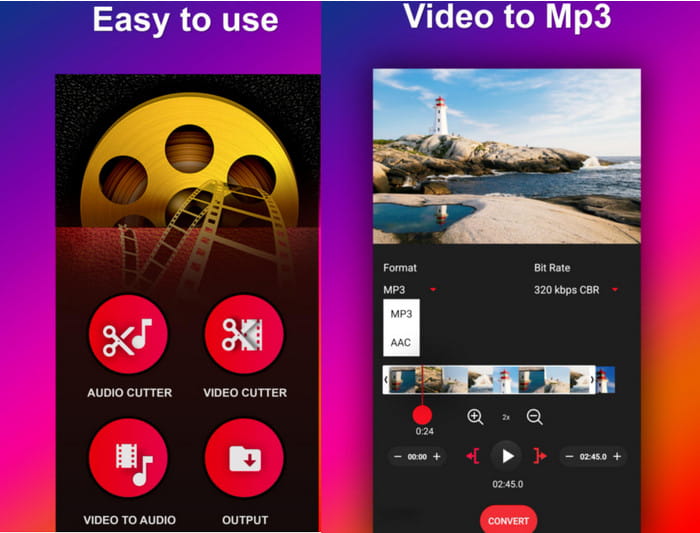
Et stabilt og meget nemt værktøj at bruge til at udtrække lyd fra video på Android. Video To MP3 Converter har fået gode anmeldelser fra sine brugere. Det har også en brugervenlig grænseflade, så selv en nybegynder kan bruge det uden problemer. Men der er en del ulemper ved at bruge dette værktøj, f.eks. at når du konverterer en 4‑minutters video til lyd, bliver længden 20 minutter længere end originalen. I sådan en situation er det lidt mærkeligt, fordi den bliver meget længere end den rå video med en større filstørrelse. Det er altså en slags fejl, der kun optræder i dette værktøj, men alt i alt er det godt at bruge og gratis.
Del 3. Ofte stillede spørgsmål om udtræk lyd fra video
Hvor kan jeg afspille min udpakkede MP3-fil?
Selv om du kan afspille MP3‑filer i din medieafspiller, har du stadig ikke mulighed for at få dem til at lyde bedre. I denne artikel kan du derfor læse om hvad der er den bedste MP3‑afspiller, du kan bruge til at afspille dine .mp3‑filer med bedre lyd.
Hvilket er det bedste format; MP3 eller MP4?
Det kommer an på, hvad du skal bruge det til. For eksempel er MP3 meget bedre end MP4 til at gemme lyd, fordi det er bredt anerkendt som det universelle lydformat. MP4 kan derimod gemme både video og lyd i høj kvalitet, fordi MP3 ikke kan indeholde video. Hvis du vil vide mere om, hvad forskellen er mellem MP3 og MP4, så klik på dette link for at gå til en ny side, der giver mere detaljeret information om de to formater.
Hvordan reparerer jeg mine afspillede videoer på min mobilenhed?
Der er mange grunde til, at videoer ikke kan afspilles på dine mobiltelefoner. For at finde ud af, hvad årsagerne er, skal du klikke på dette link, hvis du har problemer med videoer, der ikke afspilles på Android. Men hvis de ikke afspilles på din iPhone, så klik her for at finde problemet og løse det med det samme.
Konklusion
Vi er nu nået til slutningen; vi har præsenteret forskellige værktøjer, du kan bruge til at udtrække lyd fra video. Men der er ét værktøj, der imponerer os langt mere end de andre på listen. Og det værktøj er ingen ringere end Video Ultimate Converter, da det tilbyder mange funktioner, du kan bruge, uanset om du er nybegynder eller øvet. Vi har også præsenteret detaljerede og letforståelige trin, så du kan følge med. Så hvis udtrækning er problemet, er den eneste løsning det enestående, fænomenale Video Ultimate Converter.
-
 4 bedste MP4 til M4V-konvertere til at gøre MP4-videoer til M4V med lethed
 Når du har brug for at ændre MP4 til M4V-filer, skal du lære flere detaljer om forskellene mellem de to formater samt de bedste MP4 til M4V-konvertere fra artiklen.
-
 AMV Converter - 3 bedste metoder til at konvertere MP4 til AMV på Win / Mac
 Hvad er de bedste MP4 til AMV-konvertere til at gøre videoerne til Amine Music Video, du kan lære mere om 3 mest effektive metoder til let at få de ønskede videoer fra artiklen.
-
 De 4 bedste metoder til nemt at konvertere MOV til MP3 på Windows og Mac
 Når du vil udtrække MP3-lydfiler fra MOV-filer, kan du lære mere om de 4 mest effektive MOV til MP3-konvertere for at få de ønskede filer fra artiklen.
