


 Video Converter Ultimate
 Skærmoptager
 Video reparation
6 bedste videohastighedscontrollere til Windows/Mac/Android/iOS
At gøre en video hurtigere eller langsommere kan skabe en fantastisk illusion, hvis du er træt af at bruge almindelige effekter. Denne videoredigeringsteknik er simpel, men effektiv. Når du søger på internettet, findes der mange forskellige hastighedskontrollere på markedet, og vi ved, at det kan være svært at vælge. Men hvis du læser denne artikel, gennemgår vi de apps til hastighedskontrol, du kan bruge til at ændre afspilningshastigheden. Er du interesseret i de bedste apps til hastighedskontrol? I så fald skal du bare fortsætte for at lære mere om den video-hastighedskontroller, der er tilgængelig på dine platforme.

Del 1. Top 6 videohastighedscontrollere til Windows, Mac, Chrome, iOS og Android
Top 1. Video Converter Ultimate (Windows & Mac)
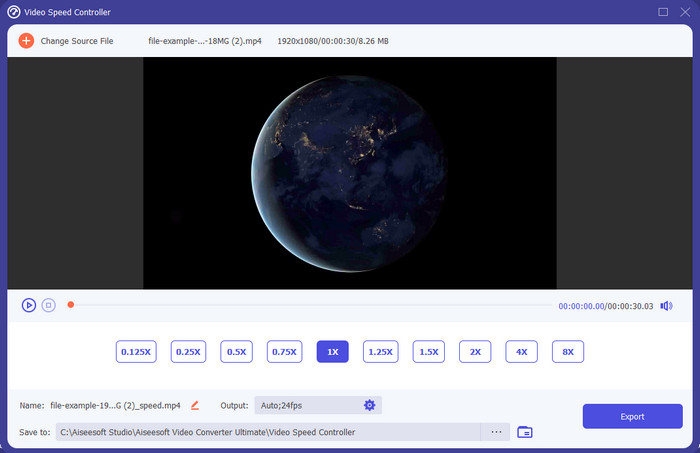
Har du brug for en video-hastighedskontroller, der er meget effektiv og effektiv til at gøre videoen hurtigere eller langsommere? I så fald er Video Converter Ultimate hjælpen til denne type problem. Det er det mest tilgængelige værktøj, du kan bruge til ubesværet at ændre videoens hastighed, uanset om du har brug for høj hastighed eller slowmotion. Selvom du ændrer hastigheden, vil den oprindelige videokvalitet forblive den samme, men bevægelsen i videoen vil ikke, fordi du ændrer hastigheden.
Bortset fra det kan du gøre mange ting som at konvertere, flette, skære og mere; dybest set er det et alt-i-et værktøj. Vil du vide de andre tilbud, du kan have med denne fremskyndede video-app? Hvis ja, læs værktøjets funktioner for at lære mere, eller du kan downloade softwaren på dit skrivebord lige nu for at teste det.

Video Converter Ultimate
5.689.200+ downloads- Det kan præcist ændre videoframes op eller ned hurtigt i ethvert videoformat, såsom MP4.
- Masser af videoredigeringsfunktioner og effekter er tilgængelige.
- Det er fleksibelt på alle platforme som Windows eller macOS.
- Den ultrahurtige proces gør, at du downloader eller eksporterer på et øjeblik.
- Eksport eller download af videoen, du redigerer, vil ikke have et vandmærke.
Gratis download til Windows 7 eller nyere Sikker download
Gratis download til MacOS 10.7 eller nyere Sikker download
Fordele
- Skift frame per frame af videoen, selvom du er en professionel eller ej.
- Let at forstå videoafspilningsmuligheder.
- En enestående evne til at dele sociale medier.
- Det er gratis at downloade, men det tilbyder køb i appen.
Ulemper
- Skal købes, hvis du vil have den fulde kapacitet af værktøjet.
Top 2. Clipchamp (Windows)
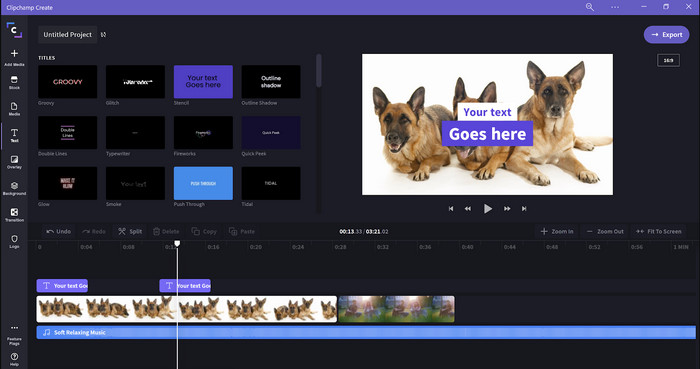
Clipchamp er en video-hastighedseditor, du kan bruge på Windows. Dette værktøj har en mindre stejl læringskurve, så du vil måske tjekke det ud, hvis du er ny inden for redigering. Det understøtter også flere funktioner, du sikkert gerne vil bruge. En stor ulempe ved dette værktøj er dog videokvaliteten på outputtet. Du kan kun eksportere filen i 480 videokvalitet, hvilket er lavt sammenlignet med andre gratis værktøjer. Men hvis du har brug for at eksportere i 720 eller 1080, kan du abonnere ved at betale abonnementsgebyret. Alt i alt er værktøjet glimrende, men stadig ikke så godt som den første editor.
Fordele
- Enkel GUI og nem at bruge.
- Det tilbyder yderligere funktioner til redigering.
- Styr videoafspilningen nemt.
Ulemper
- For den gratis version er det endelige output 480.
- Nogle gange blev værktøjet ufleksibelt med opgaven.
Top 3. Videohastighedscontroller (Chrome)

Vil du bruge en udvidelse som video-hastighedskontroller i Chrome? Så kan du bruge Video Speed Controller. Dette værktøj er tilgængeligt i enhver Chrome-browser til at gøre den video, du ser, hurtigere eller langsommere. Det er nemt at bruge for alle, og det er også sikkert at tilgå, da det er en udvidelse til Chrome. Men hvis du eksporterer videoen, forbliver afspilningen den samme, selvom du ændrer den. Det skyldes, at værktøjet kun virker på den video, du aktuelt ser i din Chrome, og ikke udenfor. Yderligere information: Når du først har gjort videoen hurtigere med denne udvidelse, vil alle dine videoer, der afspilles i Chrome, have den samme hastighed.
Fordele
- On-point hastighedsregulator, du kan bruge på Chrome.
- Nemt at spole tilbage eller nulstille videoafspilningshastigheden på Chrome.
- Den understøtter kommandoen genvejstaster.
Ulemper
- Videocontrollerpanelet er ikke synligt.
- Du kan ikke ændre hastigheden på videoen uden for Chrome.
Top 4. Accelerate til Safari (iOS og Mac)
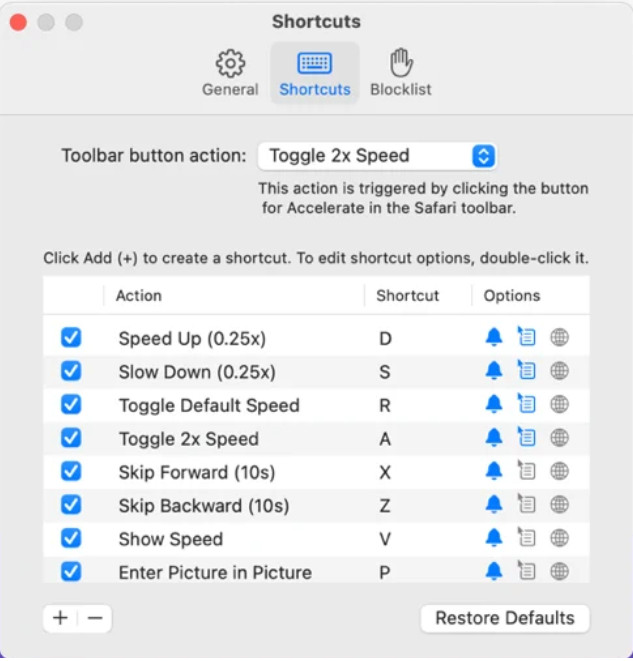
Har du brug for en video-hastighedskontroller i Safari? Accelerate for Safari er tilgængelig i enhver Safari på Apple-enheder. Dette værktøj kan ændre videoafspilningen af enhver HTML5-video i Safari. Ligesom Chrome-udvidelsen ovenfor er dette begrænset til Apple-enheder. Så hvis du er Apple-bruger, vil du måske gerne bruge denne udvidelse til hastighedskontrol til at gøre videoen hurtigere eller langsommere. Derudover kan du bruge tasterne på tastaturet til at styre værktøjet og ændre videoafspilningen.
Fordele
- Det er sikkert at bruge i alle Safari.
- Det understøtter også Picture-in-Picture og AirPlay.
- Genvejstaster er tilgængelige for at tage kontrol over værktøjet.
Ulemper
- Den understøtter ikke en anden webbrowser end Safari.
- Begrænset til HTML 5-videoer.
Top 5. Langsomt Hurtigt Langsomt - Styr hastigheden på dine videoer (iOS)
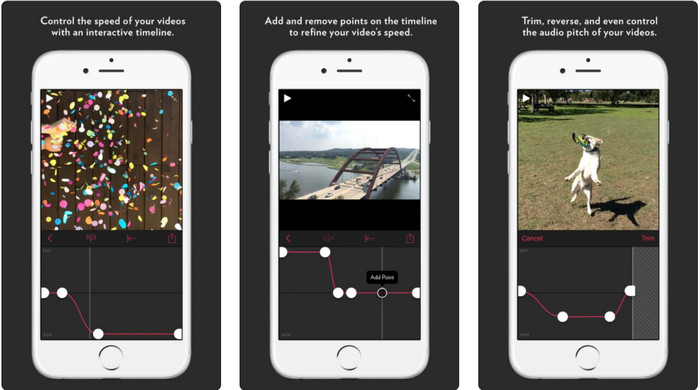
Til en video-hastighedskontroller på iPhone kan du bruge Slow Fast Slow. Dette værktøj hjælper iOS-brugere med øjeblikkeligt at manipulere videoens afspilningshastighed; det fungerer bedst til slowmotion. Derudover har det en meget interaktiv indbygget tidslinje til at justere hastigheden. Det understøtter også andre funktioner som pitch-bending og omvendt afspilning af klippet. Dette værktøj kræver dog iOS 10, så du kan ikke bruge det, hvis dit system ikke er version 10.
Fordele
- Det understøtter andre funktioner til din video.
- Brugervenlig.
- Kan bremse videoer op til 1/16 hastighed.
Ulemper
- Det understøtter ikke 4k-output og valg af FPS.
- Det virker ikke på nogle af de nye iOS-enheder.
Top 6. Video Speed Controller Pro (Android)
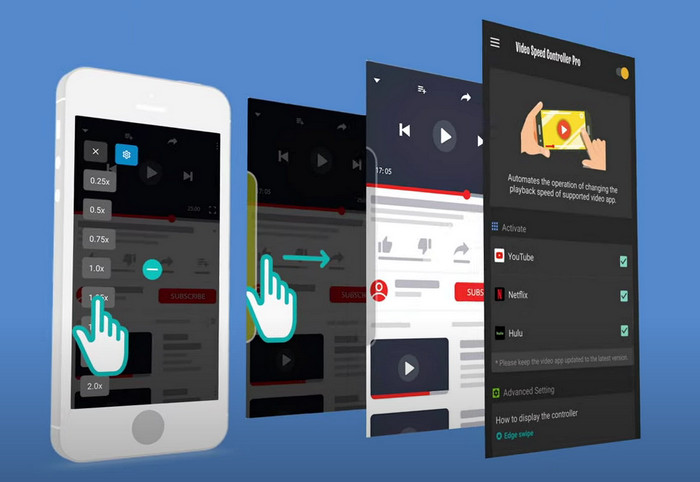
Hvis du har brug for en video-hastighedskontroller på Android, så gæt hvad? Du kan bruge Video Speed Controller Pro ved at installere den fra Playstore. Med hjælp fra dette værktøj kan du nemt gøre alle videoer, der afspilles på din Android, hurtigere. Derudover fungerer dette værktøj som en udvidelse til hastighedskontrol på Android. Selvom værktøjet kan gøre din video hurtigere, er den maksimale hastighed kun 2x. Hvis du har brug for at se videoer hurtigere, kan du dog bruge det på YouTube, Netflix og andre videoplatforme på Android.
Fordele
- Det er nemt at bruge.
- Selve værktøjet er på punkt.
- En menulinje er tilgængelig for at afsløre mulighederne på din afspilning.
Ulemper
- Mulighederne for afspilningshastighed er begrænsede.
- Nogle gange fungerer det ikke godt.
Del 2. Sammenligningstabel
| Funktioner | Video Converter Ultimate (Windows og Mac) | Clipchamp (Windows) | Videohastighedscontroller (Chrome) | Accelerate til Safari (iOS og Mac) | Langsomt Hurtigt Langsomt – Styr hastigheden på dine videoer (iOS) | Video Speed Controller Pro (Android) |
| Hastighedskontrol |  | | | | | |
| Videooutput af høj kvalitet | |  | | | | |
| Redigeringsfunktioner | | | | | | |
| Ultrahurtig eksportproces | | | | | | |
Del 3. Ofte stillede spørgsmål om Video Speed Controller
Hvorfor skal jeg bruge en hastighedsregulator?
I nogle tilfælde bliver du nødt til at se en video ved høj hastighed eller sætte farten ned. Et godt eksempel på at se en speed-up video er at afslutte den video, du ser med det samme, eller ens. Fremskyndelse af videoer er en stor hjælp for disse brugere. Mens det er slow-mo, bruges dette normalt til en øjeblikkelig gentagelse af de hurtige sportsgrene såsom væddeløb, basketball, volleyball og mere. Uanset om af de to, skal du bruge en effektiv hastighedsregulator til at tilsidesætte den normale hastighed til dine behov manuelt.
Kan jeg fremskynde videoer på Tiktok?
Ja, du kan optage videoer i høj hastighed på Tiktok. Men du kan ikke se videoer på Tiktok i høj hastighed. Så hvis du har brug for hjælp fra et passende værktøj til at gøre hastigheden højere, kan du klikke og læse denne artikel for at vide, hvordan man gør en video hurtigere på Tiktok.
Hvordan sænker man videoer?
I modsætning til at gøre videoer hurtigere kan du lave slowmotion på dine videoer ved hjælp af de redigeringsprogrammer, der findes på markedet. Hvilket værktøj skal du bruge? Ingen grund til bekymring, for vi præsenterer det bedste slowmotion-videoprogram, du kan bruge til at skabe en slowmotion-effekt. Hvis du har brug for at vide mere, kan du klikke på dette link.
Konklusion
I dag er du nu fuldt ud informeret om de betalte og gratis apps til at gøre video hurtigere på forskellige platforme. Hastighedskontrollerne giver et unikt sæt funktioner, der hjælper forskellige brugere med at øge videohastigheden. Hvis vi læser det grundigt, kan vi se, at FVC Video Converter Ultimate giver alt, hvad brugerne har brug for. Så hvis du vil downloade det ultimative værktøj på din computer, kan du klikke på download-knappen og nyde en fuldendt oplevelse med værktøjet.
-
 Sådan fremskyndes en video med de 5 bedste tilgængelige software [Windows/Mac/Linux]
 Vil du vide, hvordan du nemt kan fremskynde video? Læs derefter denne skrivning, mens vi forklarer, hvordan du kan øge hastigheden effektivt på Windows, Mac og Linux.
-
 Nemmeste måder til at fremskynde en video på dine Android-enheder [2021]
 Vidste du, at du kan fremskynde en video på din Android? Så hvis du vil vide, hvordan du fremskynder en video på din Android-telefon, så læs denne skrivning.
-
 Fremragende tip fra 2021: Sådan gør du en video hurtigere på iMovie
 Din ven foreslår iMovie for at hjælpe dig med dit problem med, hvordan du kan fremskynde en video ved hjælp af iOS-operativsystemet, men du ved ikke, hvad du skal gøre? Se mere om dette, når du læser mere gennem denne artikel.
