


 Video Converter Ultimate
 Skærmoptager
 Video reparation
Lær de 7 bedste Volume Booster-apps at kende, du kan bruge på dit skrivebord og din telefon
Er det ikke irriterende, hvis lydstyrken på videoen er så lav, at selv når du skruer din egen lyd helt op, sker der ingenting? Der er flere grunde til, at lydstyrken kan blive lav. I stedet for at blive frustreret over videoen, hvorfor så ikke prøve at bruge en booster til at gøre lyden højere og klarere? Så i dag er din heldige dag, for vi præsenterer forskellige lydforstærkere, du kan vælge imellem. Alle de værktøjer, der præsenteres her, er blevet brugt af forfatteren til denne artikel for at kunne gengive fakta om værktøjerne alt efter, hvilken platform du bruger. Lad os nu gå videre og starte vores gennemgang af de forskellige lydboostere, du kan bruge på Windows, Mac, iPhones og Android.

Del 1. 4 af de bedste volumenforstærkere til Windows PC, Mac & Online
1. Video Converter Ultimate
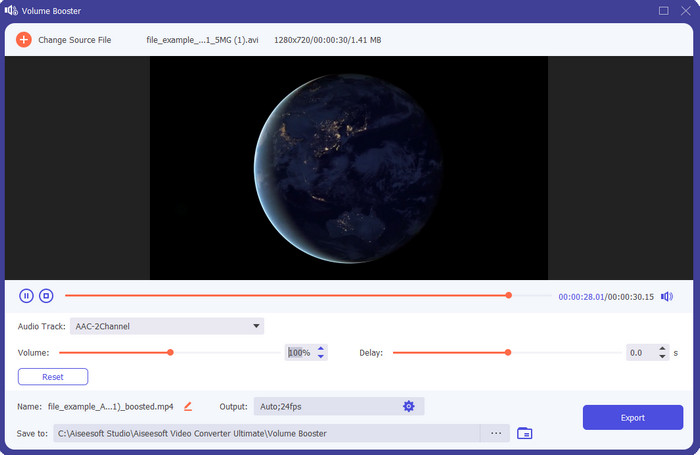
Hvis du er på udkig efter den bedste volume booster-app, så er Video Converter Ultimate sandsynligvis det rette valg. Dette værktøj kan forbedre lydkvaliteten uden at skade dine højttalere. Så hvis du justerer lydstyrken med dette værktøj, skal du ikke forvente mislyde eller knas i højttalerne. Desuden, hvis du har problemer med lyd i lav kvalitet, kan du bruge dette værktøj til at forbedre den. Selv hvis du ikke er professionel, kan du stadig uden problemer lave et lydboost med dette værktøj. Og ikke nok med det, softwaren har en masse funktioner, du sikkert vil kunne lide, når du først har downloadet den. I modsætning til andre lydboostere på listen tilbyder dette værktøj mange forbedringsfunktioner, der gør din lyd bedre. Har du også problemer med lydforsinkelse, kan du bruge det til dét også. Det er uden overdrivelse det mest imponerende værktøj på denne liste, hvis vi sammenligner dem alle. Så hvis du vil opleve kraftfuld 8- eller 16D-lyd, så download dette værktøj med det samme.
Gratis download til Windows 7 eller nyere Sikker download
Gratis download til MacOS 10.7 eller nyere Sikker download
Fordele
- Udfør automatisk justering af equalizere og forudindstillinger for at gøre dit arbejde nemmere og bedre.
- Det endelige output af lyden blev meget bedre end før og uden at ødelægge din hørelse eller endda højttalerne.
- Det er meget intuitivt, at selv brugere, der ikke har erfaring med at booste, kan gøre det.
Ulemper
- Den er kun tilgængelig på desktop og ingen telefonversion.
- Køb før du kan få adgang til det, men det er ikke så dyrt.
2.VLC Media Player
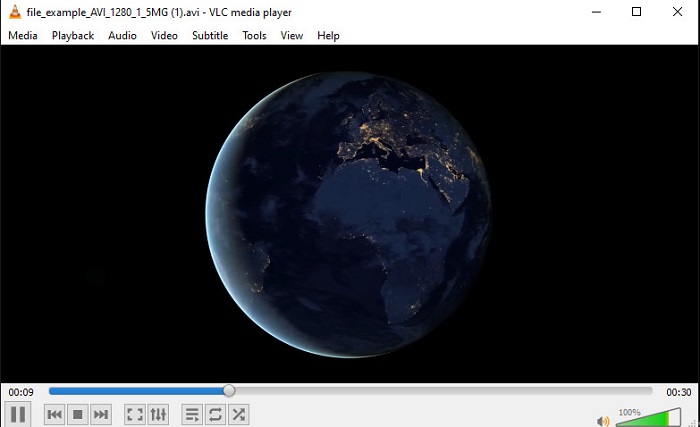
VLC Media Player er en af de bedste medieafspillere, du kan downloade på nettet. Dette værktøj har allerede en indbygget, gratis lydbooster i sin brugerflade, og lydstyrken kan hæves op til 125% procent, hvis du vil. Dog overvåger dette skrivebordsværktøj ikke, hvor meget dine højttalere kan holde til. Det betyder, at hvis du misbruger den maksimale lydstyrke, er der risiko for, at højttalerne med tiden begynder at knase, især de indbyggede højttalere. Men dette værktøj er den eneste app her, der både er en booster og en afspiller i ét. Så hvis du vil se video og booste lyden på samme tid, så prøv dette værktøj. Selvom det hæver lydstyrken, er der dog ingen garanti for, at lydkvaliteten bliver god – du øger kun styrken på den eksisterende lyd.
Fordele
- Indbygget lydforstærker.
- Boost din lyd op til 125% for at få den til at lyde højere.
- Gratis at downloade på pc eller Mac.
Ulemper
- Værktøjet har ingen indbygget equalizer for at forbedre kvaliteten af lyden.
- Den overvåger ikke, hvor høj din lyd skal være.
Relateret:
Sådan løser du, at VLC ikke afspiller MKV-filer
Sådan løser du, at VLC ikke afspiller dvd
3. Bom 3D
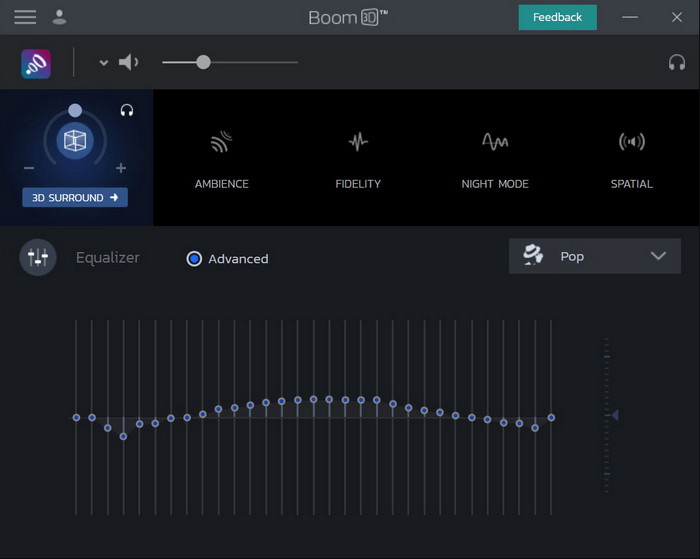
Boom 3D er det mest avancerede værktøj i rækken af lydforbedringsprogrammer. Denne volume booster til Windows 10 og Mac tilbyder mange forskellige forbedringsmuligheder, du kan bruge. Du kan også justere equalizeren og forudindstillingerne manuelt; i modsætning til Video Converter Ultimate er disse ting her allerede sat automatisk op for dig. Selvom værktøjet ser imponerende ud, er der stadig nogle ulemper ved at bruge det. Især for begyndere, da det kræver opsætning – med andre ord kan værktøjet virke lidt omfattende at gå til. Ikke desto mindre vil det være tiden værd at lære at bruge det, selvom det tager noget tid.
Fordele
- Tilsidesæt equalizeren og forudindstillingen manuelt.
- Intet internet nødvendigt for at få adgang til værktøjet.
- Det er fantastisk at blive brugt af den professionelle, der gerne vil have lyd i god kvalitet.
Ulemper
- Det er ikke det bedste valg for begyndere, der ikke har en idé om, hvad equalizere og forudindstillinger er.
- Brug for meget tid til at studere, hvordan man bruger dette værktøj.
4. Volume Booster
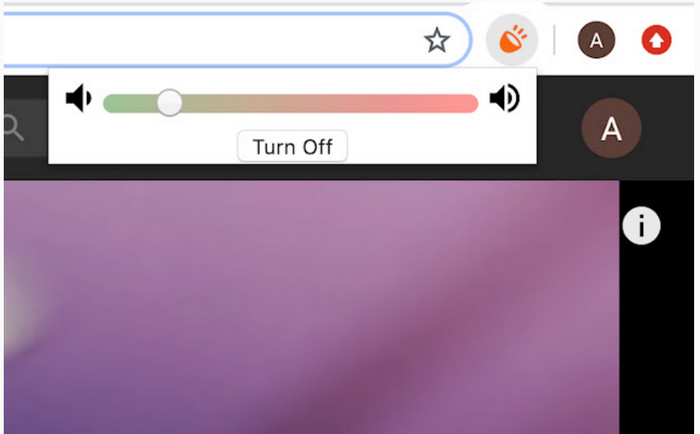
Volume Booster er en volume booster Chrome-udvidelse, du nemt kan få adgang til, når du har internet. Dette værktøj kan bruges af alle gratis, og det er også sikkert, da det kommer fra Chrome Webshop. Hvis du bruger dette værktøj, kan du forvente et markant lydboost på det, du lytter til. Du kan dog ikke bruge denne Chrome-udvidelse uden for selve Chrome. Så hvis du vil lytte til lyd, der er gemt lokalt på din enhed, kan du ikke bruge den til at forbedre lyden. Derudover oplevede vi, at når vi satte lyden helt på maks, opstod der en del knas. For at undgå det bør du kun skrue lyden op til et moderat niveau.
Fordele
- Værktøjet er sikkert, fordi det er en forlængelse af krom.
- Brugervenlig.
Ulemper
- Kan ikke bruges uden for krom.
- Nogle knækkende lyd vil kunne høres, hvis du drejer den til maksimum.
- Det understøtter ikke equalizere.
Del 2. Top 3 Volume Booster Apps til iPhone & Android
1. Volume Booster – Equalizer FX
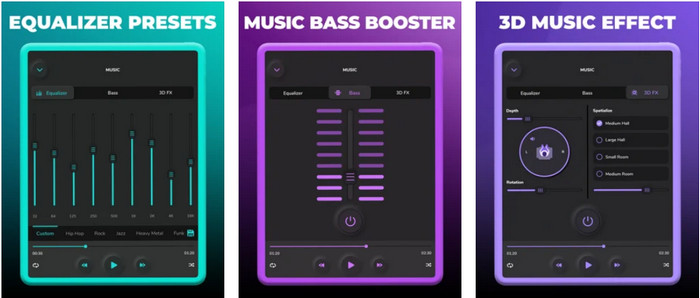
Volume Booster – Equalizer FX presser din iPhones maksimale lydgrænse for at gøre lyden højere og bedre. Denne iPhone-volume booster er blevet brugt af mange iOS-brugere til at lave deres egen tilpasning af lyden. Appen har allerede fået en pæn bedømmelse på 3,9 stjerner. Det er hverken dårligt eller helt i top. Dette værktøj kan heller ikke booste lyd ved online streaming, og reklamerne ødelægger oplevelsen en del. Derudover forekommer der stadig nedbrud, bugs og lignende problemer. Men hvis du vil have en kraftigere bas på din iPhone, er dette bestemt værd at prøve.
Fordele
- Det er en god booster for iPhone-brugere.
- Du kan udføre grundlæggende udligning og lydjustering.
Ulemper
- Det meste af tiden går værktøjet ned.
- Det har en begrænsning på, hvor du kan bruge lydforstærkningen.
2.AmpMe – Højttaler & musiksynkronisering
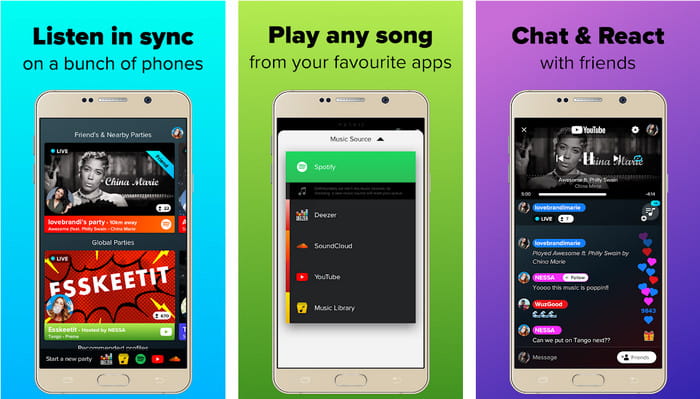
AmpMe - Speaker & Music Sync er en rigtig god downloadbar lydforstærker til Android-enheder. Den er mere end bare en booster, da du kan være vært og afspille din egen playliste eller deltage i en livefest via appen. Kort sagt giver appen dig mulighed for at interagere med andre, mens I lytter og chatter samtidig. Selvom værktøjet er imponerende, vil du dog stadig kunne opleve nogle bugs og nedbrud, mens du bruger det. Nogle brugere har også svært ved at tilføje musik til deres playlister, hvilket er irriterende. Og appen kan være lidt svær at håndtere, især hvis du ikke kender dens funktioner. Men alt i alt er den et godt valg for Android-brugere.
Fordele
- Du kan være din egen DJ med AmpMe og dele den med de andre mennesker i nærheden med den samme app.
- Lyt og chat på samme tid.
- Den producerer lyd af høj kvalitet.
Ulemper
- Abonnementsgebyret er for meget at betale for, hvis du vil gå billigere.
- Det er svært at opsige abonnementet, selv når du har slettet kontoen.
- Nogle gange vil appen automatisk blive afbrudt, når du deltager i en livefest.
3.Volume Booster GOODEV
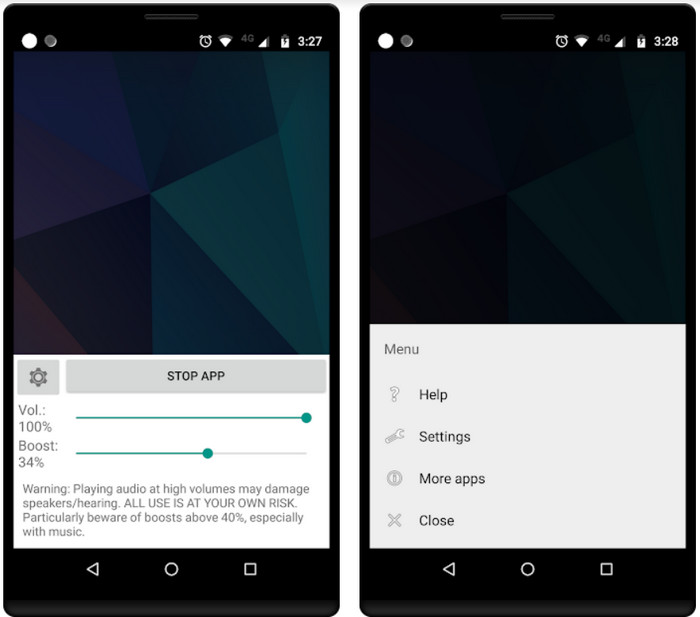
Volume Booster GOODEV har en enkel og let overskuelig brugerflade. Denne volume booster har allerede fået en flot bedømmelse på 4,4 stjerner fra brugerne. Mange anmeldelser nævner, at dette værktøj er det bedste til formålet. Men nu opleves der nogle nedbrud, når du bruger appen, og ofte booster den slet ikke lyden længere, selvom du åbner den. For at få den til at virke igen skal du genstarte din telefon eller lukke og genåbne appen for at løse problemet.
Fordele
- Letforståelig lydforstærker, der nemt kan downloades på din Android-mobiltelefon.
- Brugervenlig.
Ulemper
- Annoncer vises ud af ingenting.
- Det meste af tiden går appen ned af sig selv uden ukendt årsag.
- Den gamle version af denne app er meget bedre end den opdaterede version.
Del 3. Hvilken er den bedste volumenbooster
Her er et sammenligningsdiagram præsenteret for dig for at sammenligne, hvilke værktøjsfunktioner du kan bruge med det værktøj, som det andet værktøj ikke har.
| Værktøjsfunktion / s | Video Converter Ultimate | VLC Media Player | Bom 3D | Volume Booster | Volume Booster – Equalizer FX | AmpMe – Højttaler & musiksynkronisering | Volume Booster GOODEV |
| Lydforstærkere |  | | | | | | |
| Audio Enhancer | |  | | | | | |
| Lyd- og videosynkroniseringsfunktion | | | | | | | |
| Brugervenlig | | | | | | | |
| Understøttede platforme | Desktop baseret værktøj | Desktop baseret værktøj | Desktop baseret værktøj | Chrome Extension Tool | iOS-downloadbart værktøj | Android-baseret værktøj til download | Android-baseret værktøj til download |
| Prisklasse | 1 måned: $25.00 Livstidslicens: $55.20 Flerbrugerlicens levetid/5 pc'er: $119.00 | Gratis at downloade | $11.99 og $23.99 | Ledig | 3 til 20 $ | $0,99 – $99,99 pr | Ledig |
Del 4. Ofte stillede spørgsmål om Volume Booster
Skader det at øge lydstyrken hørelsen?
Faktisk, ja. Især hvis du bruger høretelefoner eller headset og sætter lydstyrken på max, så tilføj lydstyrkeforstærker. Forvent så, at din hørelse på sigt langsomt vil ødelægge i det lange løb. Så for at undgå dette kan du. Det er vores forslag, at du skal begrænse det til medium eller lavt og ikke gå efter maksimum.
Hvad er de andre ulemper ved lydforstærkning på højttalere?
Vi bruger en lydforstærker til at høre lyden meget bedre, hvis lydene er lave. Men lidt vidste du, at højttalere også har en Hertz-grænse, som de er i stand til. Jo højere hertz jo højere kan du være, men på nogle indbyggede højttalere kan de ikke klare en super høj lyd. Så der er chancer for, at højttaleren krakelerer, hvilket betyder, at lyden ikke kan håndteres af højttaleren.
Hvad er forskellen på bas og diskant på højttalere?
Disse to er de mest kendte højttalere indbygget, men de har deres eget formål, hvorfor de er i højttalere. For bas kan den håndtere en lav frekvens af lyd og kan ikke håndtere høj frekvens, også den har specialiseret sig i at få os til at mærke musikkens boom. Mens diskant fokuserer på høje frekvenser, som bas ikke kan håndtere.
Konklusion
Afslutningsvis behøver du ikke længere finde dig i lyd af dårlig kvalitet, hvis du booster den ved hjælp af en volume booster på pc, Mac, online og mobile enheder. De værktøjer, der præsenteres her, er gode valg for alle, der vil opleve musik på et nyt niveau. Men der er især ét værktøj, der hjælper sine brugere med at gøre lydboosting enklere og bedre. I stedet for selv at lære at justere equalizer og forudindstillinger, har Video Converter Ultimate allerede gjort det for dig. For at finde ud af, hvor godt dette værktøj er, bør du prøve det selv og downloade det til din enhed.
-
 Sådan tilføjes lyd og musik til video gratis på din computer / telefon
 Denne artikel viser 4 nemme måder at tilføje lyd til video gratis på. Uanset hvilket lydspor du vil tilføje til din video, kan du få tilfredsstillende resultater her.
-
 The Unbiased Cinch Review Audio Recorder og det bedste alternativ
 Cinch Audio Recorder er den bedste måde at downloade musik fra streaming-sider. Lær mere om den upartiske gennemgang og det bedste alternativ fra artiklen.
-
 Gennemførlige måder til, hvordan du kan optage lyd med VLC -afspiller
 Lær de bedste måder at optage lyd med VLC -afspiller og andre praktiske værktøjer ved at læse artiklen igennem.
