


 Video Converter Ultimate
 Skærmoptager
 Video reparation
 Sikker download
Hvad er en farvekorrektion, og hvordan udføres den
Har du nogensinde været utilfreds med kedelige eller off-tone optagelser, der ikke yder din kreativitet retfærdighed? Sig farvel til dine bekymringer! En AI-drevet farvekorrektion er blevet præcist udviklet til at bringe dine videooptagelser eller film til live og sikre, at hver farve, nuance og tone popper, som du har tænkt dig. Denne innovative teknologi er en banebrydende teknologi, der udstyrer kraften fra kunstig intelligens til at forbedre og give farveperfektioner i dine videoer.
Uanset om du vil rette farvefejl, skabe en bestemt stemning eller blot forfine den overordnede visuelle appel, gør en AI‑videofarvekorrektion processen mere strømlinet og leverer enestående resultater. Lad os give dit videoindhold liv med levende, naturtro farver, der fanger dit publikum og efterlader et varigt indtryk. Gør dig klar til at male din verden med glans, mens vi dykker dybt ned i denne artikel.
Del 1. Hvad er en farvekorrektion på video?
Det er ret simpelt at forstå, hvad farvekorrektionsdefinitionen er i video. Det refererer til at forbedre og ændre en videos farver og toner for at opnå et ønsket udseende eller for at sikre nøjagtighed og konsistens. Det er som at finjustere farverne i et fotografi, men for levende billeder. Forestil dig, at du tager et billede, og farverne ser en smule off, kedelige eller alt for levende ud. Dette kan også ske i en video, men der er ofte tusindvis af frames. Farvekorrektion hjælper med at rette op på disse uoverensstemmelser og sikrer, at farverne matcher godt gennem hele videoen. For eksempel, hvis en scene blev optaget på en overskyet dag, kan farverne virke rolige og blålige. Farvekorrektion kan varme tonerne op for at få dem til at se mere naturlige ud eller få bluesen til at poppe for kunstnerisk effekt. Den kan også justere kontrast, mætning, lysstyrke og andre aspekter for at skabe en bestemt stemning eller stil i en video.
Del 2. Forskellige situationer med farvekorrektion
Farvekorrektion er afgørende i en række forskellige situationer inden for videoproduktion. Dette er for at opnå den ønskede visuelle effekt og bevare konsistensen. Nedenfor er nogle situationer, der involverer farvekorrektion i en video.
Blandede lysmiljøer – farvekorrektion er nyttig, når du optager steder med forskellige lyskilder, såsom naturligt lys, lysstofrør og glødepærer. Farvekorrektion hjælper med at balancere og ensrette farverne, så det ser naturligt og ensartet ud på alle optagelser.
Problemer med hvidbalance – korrektion af hvidbalancen sikrer, at hvide toner fremstår som rene hvide og ikke er farvet af uønskede nuancer, hvilket ofte sker på grund af forkerte kameraindstillinger eller varierende lysforhold.
Eksponeringsproblemer – videofarvekorrektion kan afhjælpe overeksponeret (for lyst) eller undereksponeret (for mørkt) materiale ved at fremhæve detaljer og bevare en korrekt balance mellem lyse og mørke toner.
Color grading for æstetik – farvekorrektion omfatter også color grading, hvor videoens farver justeres for at skabe en bestemt stemning eller stil. Det kan indebære at øge kontrast og mætning eller give videoen et vintage‑udseende.
Genskabelse af tidspunkt på dagen – justering af videofarver er nyttigt til at simulere et bestemt tidspunkt, f.eks. at få en dagscene til at se ud, som om det regner, den er optaget ved solnedgang, eller ændre farverne for at formidle morgen- eller aftenlys.
Del 3. Hvordan laver man farvekorrektion på video?
Farvekorrektion i videoredigering er en afgørende proces, da den forbedrer den samlede visuelle kvalitet af din video. Et af de bedste værktøjer, du kan stole på, er Video Converter Ultimate. Dette kraftfulde værktøj til farvejustering giver dig mulighed for hurtigt at korrigere farverne i dine videoer og forbedre deres visuelle appel og kvalitet. Med dette værktøj kan du eksperimentere med forskellige farvekorrektionsmuligheder for at opnå det udtryk, du ønsker i din video. Dets redigeringsfunktioner gør det muligt for brugerne at klippe, redigere, beskære og tilføje effekter til deres videoer.
Desuden muliggør det problemfri konvertering mellem forskellige videoformater, hvilket gør det nemt at tilpasse dit videoindhold til forskellige enheder. En anden ting, der er prisværdig ved dette værktøj, er, at det er brugervenligt. Med Video Converter Ultimate kan du nemt justere og korrigere farver for at gøre din video mere tiltalende. Her er en trin-for-trin guide til at vide, hvordan du bruger dette værktøj:
Trin 1: Download og installer Video Converter Ultimate
Hvis du endnu ikke har værktøjet, kan du downloade og installere Video Converter Ultimate på din computer. Klik på en af knapperne til Gratis download nedenfor, alt efter dit computers operativsystem, og følg installationsvejledningen.
Free DownloadTil Windows 7 eller nyereSikker download
Free DownloadTil macOS 10.7 eller nyereSikker download
Trin 2: Start Video Converter Ultimate
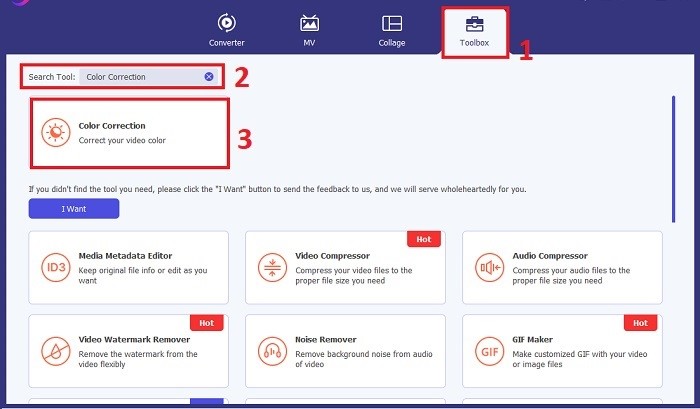
Når installationen er fuldført, skal du starte videokorrektionsprogrammet på din computer for at få adgang til hovedgrænsefladen. Gå i den globale menu til Værktøjskasse. Herfra kan du finde eller søge efter værktøjets funktionen Farvekorrektion og klikke på den.
Trin 3: Importér videoen til farvekorrektion
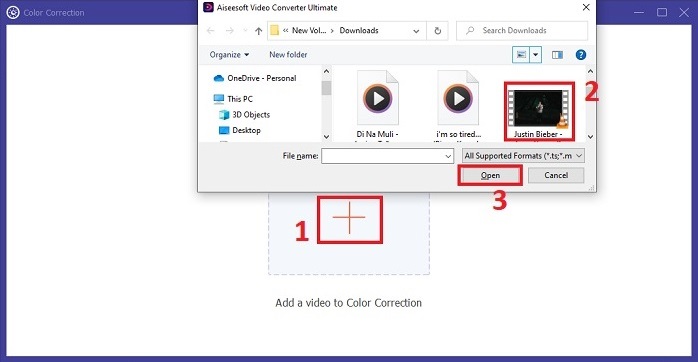
Klik på Plus-knappen for at importere den video, du vil farvekorrektere. Find videofilen på din computer, og klik på Åbn for at importere den i softwaren.
Trin 4: Justér videoens farveparametre
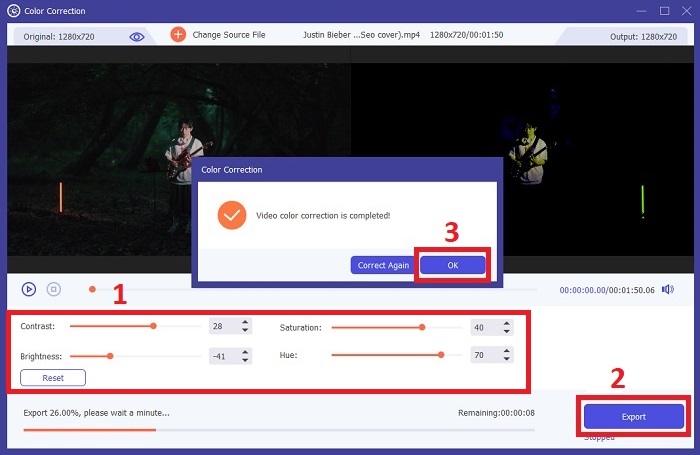
Når videoen er importeret, skal du justere parametre som lysstyrke, kontrast, mætning og farvetone for at opnå den ønskede farvekorrektion. Mens du redigerer videoen i værktøjet, kan du få vist ændringerne i realtid i ruden til højre. Når du er tilfreds med farvejusteringerne, skal du klikke på Eksportér. Lad værktøjet behandle videoen og gemme resultatet på den placering, du ønsker.
Yderligere læsning:
Videofilter: Forbedr din video med filtre og effekter på computer
Hvad er 3D? Alt hvad du behøver at vide om 3D, og hvordan du laver det
Del 4. Ofte stillede spørgsmål om videofarvekorrektion
Hvordan ved jeg, om jeg har brug for en farvekorrektion?
Er du ikke sikker på, om din video har brug for farvekorrektion? Farvekorrektion er nødvendig, hvis farverne ser ujævne, ulige ud eller ikke matcher din videooptagelses ønskede stemning eller motiv.
Er farvekorrektion virkelig nødvendig?
Absolut! En AI-videofarvekorrektion er afgørende i videoproduktion for at garantere, at farverne er nøjagtige og visuelt tiltalende. Det forbedrer den visuelle ensartethed og kan løfte en anstændig video til en ekstraordinær.
Hvad er en farvekorrektor i film?
En farvekorrektor i film er et værktøj, enten hardware eller software, der bruges i post-produktion til at modificere og afbalancere farver. Det hjælper filmskabere med at opnå et bestemt udseende, stemning eller atmosfære, hvilket gør det visuelle mere engagerende og samlet i historien.
Konklusion
Afslutningsvis er videofarvekorrektion nøglen til en fængslende visuel oplevelse. Det handler om at finjustere farver og toner, så de matcher din kreative vision og sikrer, at hver enkelt frame gengiver den tilsigtede glans. Brug af AI‑drevet farvekorrektion forvandler dine videoer med levende, naturtro farver, der skaber et mindeværdigt indtryk. Fra korrektion af blandet belysning til skabelse af specifikke stemninger løfter denne innovation din historiefortælling. Video Converter Ultimate viser sig som en stærk allieret, der forenkler farvekorrektionsprocessen og frigør dit kunstneriske potentiale.
-
 Hvad er FPS? Alt hvad du behøver at vide om det
 Hvad er FPS? Lær alle de oplysninger, du har brug for, om Frame Per Seconds (FPS), og hvad det kan gøre i forskellige situationer. Læs denne artikel for alle detaljer.
-
 Top Photo Color Enhancer-app på din Android og iOS gratis
 Vil du have en fotofarveforstærker-app på din telefon? Nå, vælg hvilke forstærkere, du tror, der passer bedst til dit behov.
-
 Ultimativ guide til ændring af videoopløsning tilgængelig på tværs af platforme
 Skal du ændre videoens videoopløsning? Hvis det er tilfældet, kan du lære de forskellige måder, du nemt kan gøre for at ændre videoopløsningen for den video, du ser.
