


 Video Converter Ultimate
 Εγγραφή οθόνης
 Επισκευή βίντεο
Ποια είναι η καλύτερη εναλλακτική λύση iMovie για Windows που μπορείτε να βρείτε στον Ιστό
Το iMovie είναι ένας γνωστός δωρεάν πρόγραμμα επεξεργασίας βίντεο σε Mac, επειδή είναι ο προεπιλεγμένος τους επεξεργαστής και, ακόμη κι αν βρίσκεστε ανάμεσα στο επίπεδο αρχάριου και επαγγελματία, μπορείτε εύκολα να το χρησιμοποιήσετε. Αν και αυτό το εργαλείο είναι εξαιρετικό στην επεξεργασία, δεν είναι ακόμη διαθέσιμο για χρήση σε Windows. Έτσι, παρακάτω παρατίθεται η λίστα με τα καλύτερα προγράμματα επεξεργασίας βίντεο σαν το iMovie για Windows και η περιγραφή τους. Αυτό θα σας βοηθήσει να αποφασίσετε ευκολότερα ποιο εργαλείο προσφέρει τα καλύτερα χαρακτηριστικά επεξεργασίας και το καλύτερο τελικό αποτέλεσμα.

Μέρος 1. Καλύτερες εναλλακτικές λύσεις iMovie για υπολογιστή με γράφημα σύγκρισης
| Δυνατότητες επεξεργασίας | Video Converter Ultimate | VSDC Δωρεάν πρόγραμμα επεξεργασίας βίντεο | Davinci Resolve | Hit Film Express | Windows Movie Maker |
| Επεξεργασία χαρακτηριστικών/ών |  | | | | |
| Φιλικό προς το χρήστη | |  | | | |
| Συνολική εμπειρία | Παρέχει ολοκληρωμένη πρόοδο και επαγγελματική απόδοση και ωστόσο είναι εύκολο στη χρήση. | Το καλύτερο εργαλείο για χρήση στην επεξεργασία για πιο λεπτομερή βίντεο με επαγγελματική εμπειρία. | Το εργαλείο είναι κατασκευασμένο για χρήση σε βαριά επεξεργασία | Παρέχει πολλές δυνατότητες επεξεργασίας από το VSDC Free Video Editor. | Διαθέτει βασική επεξεργασία και τίποτα περισσότερο. |
| Μέγεθος αρχείου | 2,4 mb | 99,2 mb | 1,5 GB | 1,2 GB ή περισσότερο | 15,1 mb |
| Εύρος τιμών | Για 1 μήνα: $25.00 Για ένα έτος: $31.20 Για άδεια ζωής: $55.20 | $19.99 για την έκδοση Pro | $357,01 ανά χαρακτηριστικό | $299 (χωρίς συνδρομή) | Δωρεάν για λήψη |
| Απαιτήσεις συστήματος: Υποστηριζόμενες πλατφόρμες, επεξεργαστές και μνήμη RAM | Υποστηριζόμενο λειτουργικό σύστημα: Windows 10, Windows 8, Windows 7, Windows Vista, Windows XP (SP2 ή μεταγενέστερη έκδοση) macOS 10.7 ή νεότερη έκδοση Επεξεργαστής: 1GHz Intel / AMD CPU or above RAM: 1G RAM ή περισσότερο | Microsoft Windows 2000/XP/2003/Vista/ Win7/Win8 Επεξεργαστής: Intel ή AMD ή συμβατοί επεξεργαστές στα 800 MHz ελάχιστη ανάλυση γραφικών οθόνης 800x600x16-bit χρώματος RAM: 128 megabyte (MB) Microsoft DirectX 8.1b | Windows 10 Creators Update ή Blackmagic Design Desktop Video 10.4.1 ή νεότερη έκδοση Επεξεργαστής: Έκδοση προγράμματος οδήγησης NVIDIA/AMD/Intel GPU RAM: τουλάχιστον 2 GB VRAM | Windows: Microsoft Windows 10 (64-bit) Επεξεργαστής: Επεξεργαστές Intel® Core™ 4ης γενιάς ή ισοδύναμο AMD. RAM: 4 GB (Συνιστάται 8 GB) | Microsoft Windows XP (SP2 ή νεότερο), Windows Vista, Windows 7, Windows 8, Windows 8.1, Windows 10 Επεξεργαστής: Επεξεργαστής Intel/AMD 1GHz ή παραπάνω RAM: 256MB RAM (συνιστάται 512MB ή παραπάνω) |
1. Video Converter Ultimate
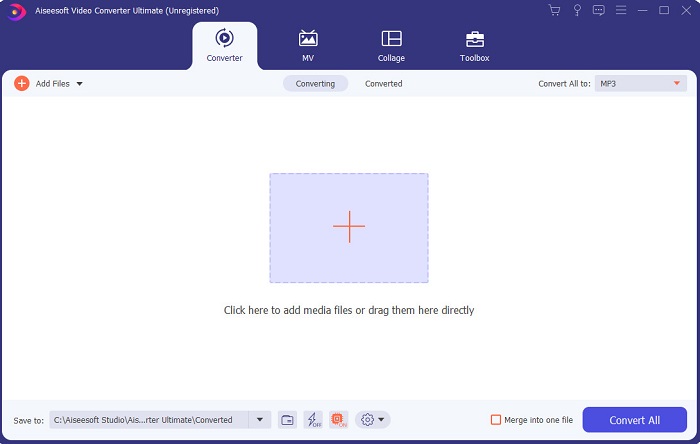
Αν η επεξεργασία είναι το πρόβλημά σας, τότε το Video Converter Ultimate το αντισταθμίζει. Προσφέρει περισσότερες δυνατότητες από το iMovie στην επεξεργασία, αλλά και από τα άλλα εργαλεία αυτής της λίστας. Επιπλέον, αυτό είναι η καλύτερη εναλλακτική λύση του iMovie για Windows αλλά και για Mac. Επιτρέπει στον χρήστη να απολαμβάνει επεξεργασία υψηλής ποιότητας με ελάχιστη προσπάθεια εκμάθησης. Αυτό σημαίνει ότι ακόμη κι αν είστε αρχάριος στην επεξεργασία βίντεο, μπορείτε να καταφέρετε εξαιρετικά αποτελέσματα χρησιμοποιώντας αυτό το λογισμικό, με πιο εύκολους τρόπους επεξεργασίας αλλά με επαγγελματικό άγγιγμα. Παρουσιάζει επίσης μόνο εύκολες και κατανοητές οδηγίες, ώστε να βοηθά τον χρήστη να κάνει την ακριβή επεξεργασία που επιθυμεί. Αν και η διεπαφή του εργαλείου είναι καλή, χρειάζεται ακόμη αναβάθμιση ώστε να γίνει πολύ καλύτερη. Όπως λένε, πάντα υπάρχει περιθώριο βελτίωσης.
Δωρεάν ΛήψηΓια Windows 7 ή νεότεραΑσφαλής λήψη
Δωρεάν ΛήψηΓια MacOS 10.7 ή νεότεροΑσφαλής λήψη
2. VSDC Δωρεάν πρόγραμμα επεξεργασίας βίντεο
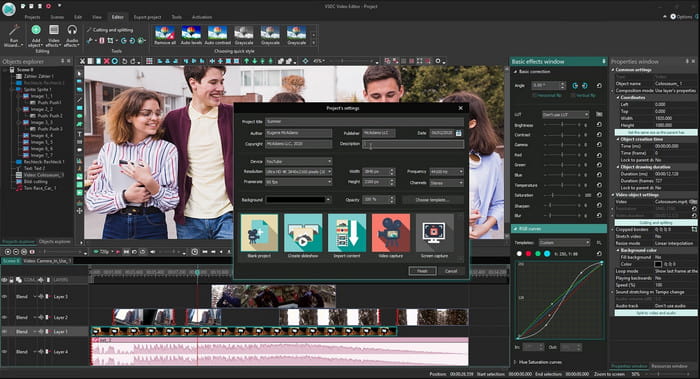
Το VSDC Free Video Editor είναι ένας από τους αξιόλογους επεξεργαστές που μπορείτε να χρησιμοποιήσετε δωρεάν σε Windows. Η διεπαφή χρήστη του λογισμικού γίνεται όλο και καλύτερη κάθε φορά που ο προγραμματιστής την αναβαθμίζει. Ωστόσο, χρειάζεται ακόμη βελτιώσεις για να γίνει καλύτερη από ποτέ. Επίσης, ορισμένες από τις δυνατότητες επεξεργασίας αυτού του iMovie για Windows 10 είναι κρυμμένες στα υπομενού του εργαλείου. Εξαιτίας αυτού θα δυσκολευτείτε να βρείτε τη λειτουργία επεξεργασίας που θέλετε. Ωστόσο, η τιμή της pro έκδοσης είναι πολύ φθηνή σε σύγκριση με τα άλλα εργαλεία που παρουσιάζονται. Παρ’ όλα αυτά, οι δυνατότητες επεξεργασίας φαίνονται ανάλογες με την τιμή. Επιπλέον, συναντήσαμε μερικά σφάλματα και «κρασαρίσματα» όταν δοκιμάσαμε αυτό το εργαλείο.
3. Davinci Resolve
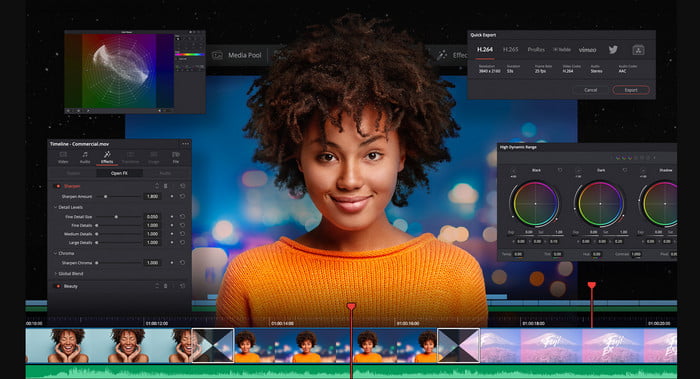
Το Davinci Resolve προσφέρει πολλές δυνατότητες επεξεργασίας που θα χρειαστείτε για να βελτιώσετε το βίντεό σας. Λέγεται ότι συνδυάζει τα χαρακτηριστικά επεξεργασίας του Adobe Premiere και του Apple Final Cut. Λόγω αυτού του συνδυασμού, μπορείτε να περιμένετε πολλές προηγμένες λειτουργίες για να κάνετε το βίντεό σας καλύτερο από ποτέ. Ωστόσο, η εκμάθηση του τρόπου χρήσης του εργαλείου είναι κουραστική για όλους τους αρχάριους και για κάποιους προχωρημένους που δεν έχουν προηγούμενη εμπειρία στην επεξεργασία. Επιπλέον, αυτό το iMovie για PC είναι η καλύτερη εναλλακτική με πληθώρα προηγμένων λειτουργιών, αλλά δεν είναι φιλικό προς τον προϋπολογισμό. Θα σας κοστίσει πάνω από 300 $, γεγονός που το καθιστά το πιο ακριβό πρόγραμμα επεξεργασίας σε αυτή τη λίστα.
4. HitFilm Express
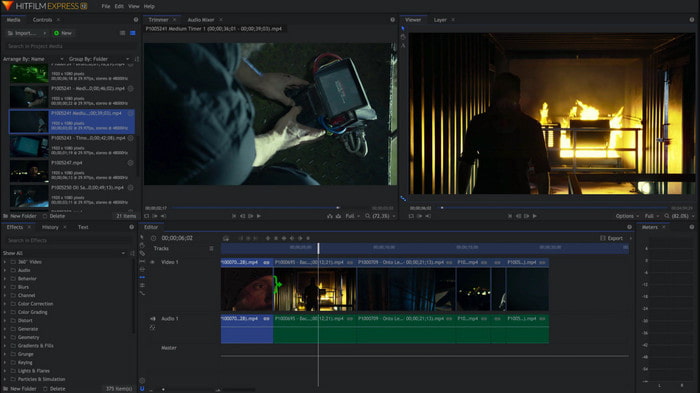
Το HitFilm Express εκτιμάται ιδιαίτερα από πολλούς χρήστες λόγω των επιδόσεών του. Αν και υπάρχουν ορισμένα διαθέσιμα tutorials, δεν επαρκούν για να εξηγήσουν πλήρως τον τρόπο χρήσης του επεξεργαστή. Επίσης, του λείπουν ορισμένα εφέ κινούμενων μεταβάσεων που θα χρειαστείτε για να κάνετε το βίντεό σας πραγματικά ξεχωριστό. Ωστόσο, αν θέλετε να κάνετε μόνο απλή επεξεργασία, δοκιμάστε το, γιατί μοιάζει με iMovie που είναι διαθέσιμο σε PC. Επίσης, να περιμένετε μικρά αλλά και σοβαρά προβλήματα σφαλμάτων κατά τη χρήση του και να προσέχετε τυχόν απροσδόκητα «κρασαρίσματα».
5. Windows Movie Maker
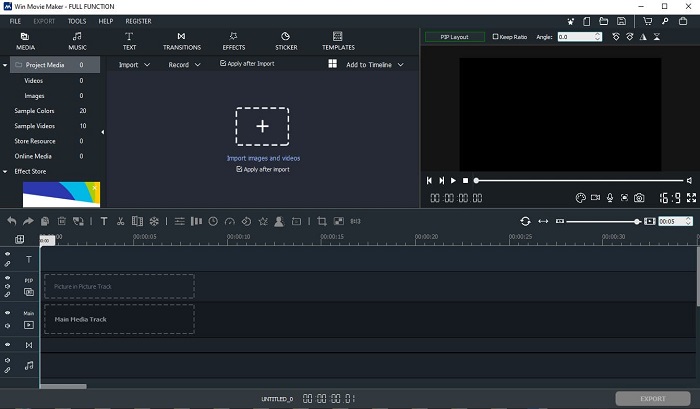
Το Windows Movie Maker έγινε πολύ δημοφιλές στα τέλη του 2016, επειδή διέθετε κάποιες προηγμένες λειτουργίες που μπορούσατε να χρησιμοποιήσετε. Αν και πλέον έχει αφαιρεθεί ως εγγενής media player των Windows, εξακολουθεί να αποτελεί μία από τις εναλλακτικές του iMovie για λήψη σε PC. Επιπλέον, να είστε προσεκτικοί από πού θα το κατεβάσετε, γιατί πολλοί χρήστες προσπάθησαν να το κατεβάσουν από τον ιστό και μολύνθηκαν με ιούς από άγνωστες πηγές. Προσφέρει επίσης βασικές δυνατότητες επεξεργασίας που θα χρειαστείτε. Άρα, αν θέλετε εντυπωσιακό, επαγγελματικού επιπέδου αποτέλεσμα, δεν θα χρειαστεί να κατεβάσετε αυτό το εργαλείο. Όμως, αν επιθυμείτε απλή επεξεργασία, τότε δοκιμάστε να το κατεβάσετε και να το χρησιμοποιήσετε.
Μέρος 2. Συχνές ερωτήσεις σχετικά με το iMovie για Windows
Ποιο είναι το καλύτερο εργαλείο για την επεξεργασία GIF;
Καθώς τα GIF έχουν γίνει τάση σήμερα, πολλοί χρήστες αγαπούν να δημιουργούν τα δικά τους GIF. Επίσης, τα GIF έχουν πολύ μικρότερο μέγεθος από άλλες μορφές βίντεο. Αν τώρα κάνετε κλικ σε αυτόν τον σύνδεσμο, θα ανοίξει μια νέα ιστοσελίδα σχετικά με το ποιος είναι ο καλύτερος επεξεργαστής GIF για PC, Mac, iOS και Android.
Πώς να προσθέσετε μουσική υπόκρουση σε ένα βίντεο;
Η επεξεργασία βίντεο είναι υπέροχη, αλλά γνωρίζατε ότι η προσθήκη μουσικής υπόκρουσης είναι επίσης μέρος του σταδίου επεξεργασίας; Για να μάθετε περισσότερα σχετικά με το πώς να προσθέσετε μουσική σε βίντεο, κάντε κλικ σε αυτόν τον σύνδεσμο για να συνεχίσετε.
Γιατί επεξεργαζόμαστε τα βίντεο;
Επειδή είναι μέρος της μετα-παραγωγής, αυτό θα γυαλίσει το βίντεό σας συγχωνεύοντας, κόβοντας περιττά βίντεο, προσθέτοντας μουσική υπόκρουση και πολλά άλλα. Λόγω αυτού του λογισμικού επεξεργασίας μπορούμε να εκφραστούμε τόσο πολύ απλά κάνοντας την επεξεργασία.
συμπέρασμα
Συμπερασματικά, η επεξεργασία βίντεο είναι ένα πολύ σημαντικό στάδιο που πρέπει να παίρνουμε στα σοβαρά. Ακόμη κι αν δεν έχετε το πλήρες πακέτο ενός επεξεργαστή, μπορείτε και πάλι να καταφέρετε να κάνετε την επεξεργασία. Με τη βοήθεια των 5 εργαλείων που αναφέρονται εδώ, θα βρείτε σχεδόν τις ίδιες βασικές ιδέες και λειτουργίες με το iMovie. Επιπλέον, το Video Converter Ultimate είναι ο εξαιρετικός επεξεργαστής που θα χρειαστείτε για να δημιουργήσετε ένα εντυπωσιακό βίντεο, που κανείς δεν θα περιμένει ότι μπορείτε να κάνετε. Λοιπόν, τι περιμένετε; Αν θέλετε να ζήσετε μια ολοκληρωμένη εμπειρία προηγμένης επεξεργασίας, με πολύ χαμηλό κόστος και εύκολη χρήση, τότε κατεβάστε τον απόλυτο converter στον υπολογιστή σας.
-
 Τρόπος συμπίεσης αρχείων MPEG-4 στο Διαδίκτυο - Χωρίς λήψη, Χωρίς υδατογράφημα
 Δεν έχετε αρκετό χώρο αποθήκευσης αρχείων για να διατηρήσετε όλα τα αρχεία MPEG-4 σας; Ακολουθούν ορισμένες λύσεις που θα μπορούσαν να σας βοηθήσουν να κάνετε τα αρχεία βίντεο μικρότερα.
-
 Τρόπος συμπίεσης αρχείων VOB Online & Δωρεάν [Χωρίς λήψη]
 Ψάχνετε μεθόδους για συμπίεση αρχείων VOB; Μάθετε τον καλύτερο τρόπο για να μειώσετε το μέγεθος των αρχείων VOB σε αυτό το άρθρο.
-
 Πώς να συμπιέσετε ένα αρχείο OGV χωρίς να χάσετε την ποιότητα
 Δεν μπορείτε να στείλετε μεγάλα αρχεία OGV σε άλλους; Λοιπόν, αυτό το άρθρο θα σας παρουσιάσει 2 εύκολους τρόπους για να σας βοηθήσει να συμπιέσετε εύκολα αρχεία OGV.
