


 Video Converter Ultimate
 Εγγραφή οθόνης
 Επισκευή βίντεο
Λεπτομέρειες που πρέπει να διαφωτιστείτε στη μετατροπή MPG σε AVI
Γενικά μιλώντας, ένα αρχείο MPG είναι ένα τυπικό αρχείο βίντεο που χρησιμοποιεί μια ψηφιακή μορφή βίντεο, η οποία έχει τυποποιηθεί από την ομάδα Moving Picture Experts Group (MPEG). Αποθηκεύει βίντεο, ήχο και μεταδεδομένα σε ένα και μόνο, διεμπλεκόμενο αρχείο. Είναι συνηθισμένη πρακτική να χρησιμοποιούνται αρχεία MPG για τη δημιουργία ταινιών που διανέμονται μέσω διαδικτύου. Αυτό το είδος μορφής βίντεο δεν είναι εύκολο να μετατραπεί, αν δεν έχετε καμία γνώση ή εμπειρία σε κάποιον μετατροπέα που υποστηρίζει ή μετατρέπει MPG σε AVI. Συνεχίστε να διαβάζετε αυτό το άρθρο για να ενημερωθείτε αναλυτικά σχετικά με τις λεπτομέρειες και τις επιλογές που πρέπει να λάβετε υπόψη, ώστε να πετύχετε τη διαδικασία μετατροπής που επιθυμείτε.
Μέρος 1. MPG και AVI - Μια επισκόπηση
Το MPEG είναι μια μορφή αρχείου βίντεο που αναπτύχθηκε από την ομάδα Moving Picture Experts Group, τους ίδιους ανθρώπους που σας έδωσαν μορφές όπως MP3 και MP4. Ανάλογα με το πώς θα χρησιμοποιηθεί, το MPEG χρησιμοποιεί είτε συμπίεση αρχείων MPEG‑1 είτε MPEG‑2.
Για να συμπιεστεί βίντεο ακατέργαστης ποιότητας VHS και μουσική CD σε 1,5 megabits ανά δευτερόλεπτο χωρίς μεγάλη απώλεια ποιότητας, δημιουργήθηκε το MPEG-1. Ως αποτέλεσμα, έχει γίνει μία από τις πιο δημοφιλείς και ευρέως συμβατές μορφές βίντεο/ήχου στον κόσμο. Τα δεδομένα βίντεο για το MPEG‑1 μεταδίδονται συνήθως με 30 καρέ ανά δευτερόλεπτο (frames per second), με ανάλυση περίπου 352×240 εικονοστοιχεία.
Ωστόσο, οι υπολογιστές με Windows χρησιμοποιούν το AVI ως προεπιλεγμένη μορφή βίντεο. Σε μια μορφή πολυμεσικού δοχείου, όπως το DivX ή το XviD, ήχος και βίντεο μπορούν να αποθηκευτούν χρησιμοποιώντας διάφορα codecs. Πολλές εναλλακτικές μορφές βίντεο, όπως MPEG και MOV, χρησιμοποιούν λιγότερη συμπίεση και περισσότερο χώρο αποθήκευσης από ένα αρχείο AVI. Είναι επίσης δυνατό να παραχθούν αρχεία AVI χωρίς συμπίεση. Αυτό έχει ως αποτέλεσμα τεράστια μεγέθη αρχείων — περίπου 2–3 GB για κάθε λεπτό βίντεο — επειδή τα αρχεία είναι πλέον lossless (χωρίς απώλειες). Ανεξάρτητα από το πόσες φορές ανοίγετε ή αποθηκεύετε το αρχείο, ένα αρχείο χωρίς απώλειες διατηρεί την ποιότητά του. Πρόσθετο πλεονέκτημα είναι η αναπαραγωγή χωρίς να απαιτούνται codecs.
Μέρος 2. Το πιο αποτελεσματικό λογισμικό για τη μετατροπή MPG σε AVI
Αν αναρωτηθήκατε ποτέ πώς να μετατρέψετε ένα αρχείο βίντεο MPG σε AVI δωρεάν, αυτό το νέο και κορυφαίο λογισμικό είναι αυτό που σας προτείνει το παρόν άρθρο. Το Video Converter Ultimate είναι ένα λογισμικό που διατίθεται δωρεάν για λήψη σε Windows και Mac και μπορεί να μετατρέψει το αρχείο MPG σε AVI πολύ πιο γρήγορα από ό,τι οι διαδικτυακές υπηρεσίες μετατροπής. Πέρα από αυτά τα δύο αρχεία βίντεο, αυτό το λογισμικό υποστηρίζει επίσης διάφορες άλλες μορφές για να επιλέξετε. Θεωρείται το καλύτερο χάρη στην ποιοτική έξοδο βίντεο που θα έχετε αν το χρησιμοποιήσετε. Τώρα που έχετε μια πρώτη εικόνα για το τι μπορεί να κάνει αυτό το λογισμικό, ετοιμαστείτε να δούμε πώς λειτουργεί στην πράξη:
Βήμα 1. Για να ξεκινήσετε, απλώς κάντε κλικ στο κουμπί Free Download που παρέχεται παρακάτω. Μόλις ολοκληρωθεί η λήψη, μπορείτε να επιλέξετε να εγκαταστήσετε το λογισμικό είτε σε Windows είτε σε Mac. Αφού εγκατασταθεί το λογισμικό στην επιφάνεια εργασίας του υπολογιστή σας, μπορείτε να αρχίσετε να το χρησιμοποιείτε κάνοντας κλικ στο κουμπί Start Now.
Δωρεάν ΛήψηΓια Windows 7 ή νεότεραΑσφαλής λήψη
Δωρεάν ΛήψηΓια MacOS 10.7 ή νεότεροΑσφαλής λήψη
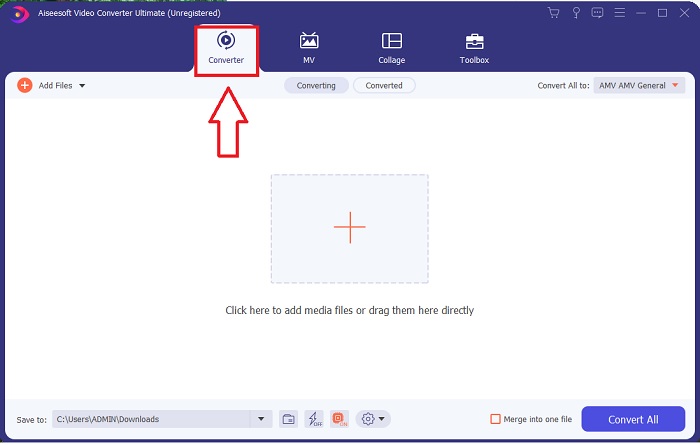
Βήμα 2. Ανοίξτε το λογισμικό που μόλις κατεβάσατε. Όταν το ανοίξετε για πρώτη φορά, θα δείτε ένα παράθυρο με την καρτέλα Converter. Εδώ θα ξεκινήσετε τη διαδικασία μετατροπής του βίντεό σας.
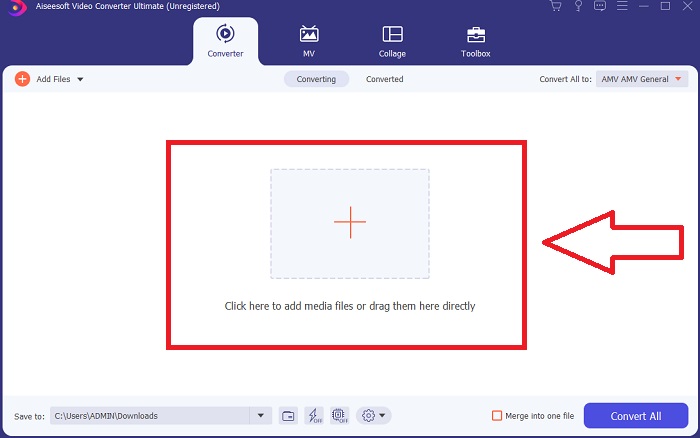
Βήμα 3. Μπορείτε να αρχίσετε τη διαδικασία μετατροπής, εισάγοντας τα αρχεία σας στο λογισμικό. Η μετατροπή ενός βίντεο είναι τόσο απλή όσο το να το σύρετε επάνω στο σύμβολο Plus.
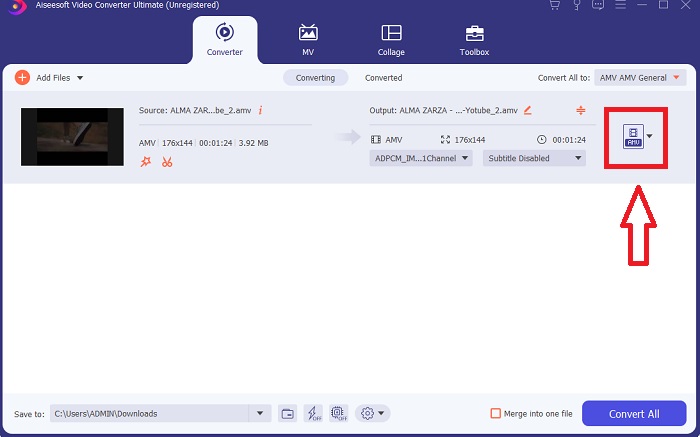
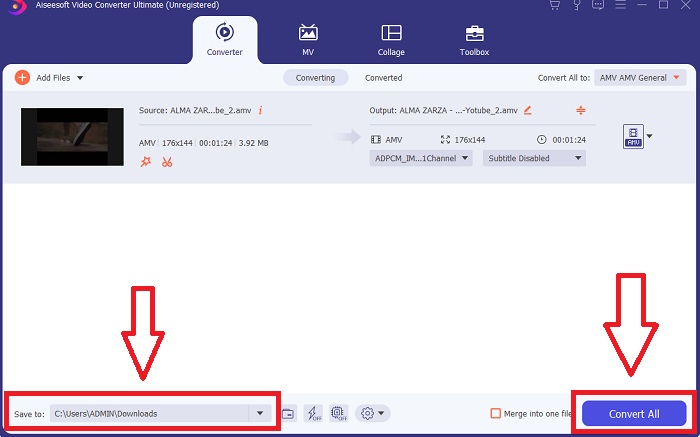
Βήμα 4. Κάντε δεξί κλικ σε μια μορφή βίντεο και επιλέξτε Save to ή Save to external storage. Αναζητήστε και στη συνέχεια επιλέξτε τύπο αρχείου AVI από το αναπτυσσόμενο μενού. Οι ρυθμίσεις ποιότητας βίντεο είναι πολλές, μόλις επιλέξετε τύπο αρχείου βίντεο AVI. Μπορείτε να τροποποιήσετε τις ρυθμίσεις ποιότητας αν δεν αναφέρεται η επιθυμητή έξοδος βίντεο. Το εικονίδιο με το γρανάζι σάς επιτρέπει να αλλάξετε την ανάλυση της εικόνας, τον ρυθμό καρέ και την ποιότητα ήχου. Για να αποθηκεύσετε τις αλλαγές σας, κάντε κλικ στο κουμπί Create New.
Βήμα 5. Κάντε κλικ στο Convert All όταν έχετε επεξεργαστεί το επιλεγμένο βίντεο και είναι έτοιμο να μεταφερθεί στον υπολογιστή σας.
Μέρος 3. Γρήγορες συμβουλές: Άλλα αποτελεσματικά εργαλεία που πρέπει να λάβετε υπόψη
Μέθοδος 1. Χρησιμοποιήστε το CloudConvert
Το CloudConvert είναι ένας διαδικτυακός μετατροπέας βίντεο. Αυτός ο διαδικτυακός μετατροπέας υποστηρίζει επίσης MP4, WEBM και AVI, μεταξύ άλλων μορφών. Μπορείτε να επιλέξετε την ποιότητα, την ανάλυση και το μέγεθος αρχείου του βίντεο. Εάν σκέφτεστε πώς να μετατρέψετε MPG σε AVI σε αυτό το διαδικτυακό εργαλείο, ακολουθεί η διαδικασία για τον τρόπο χρήσης του:
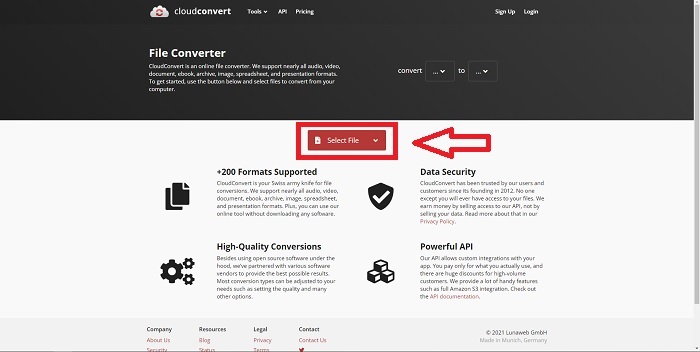
Βήμα 1. Ανεβάστε ένα αρχείο από τον υπολογιστή σας κάνοντας κλικ στο Select the File.
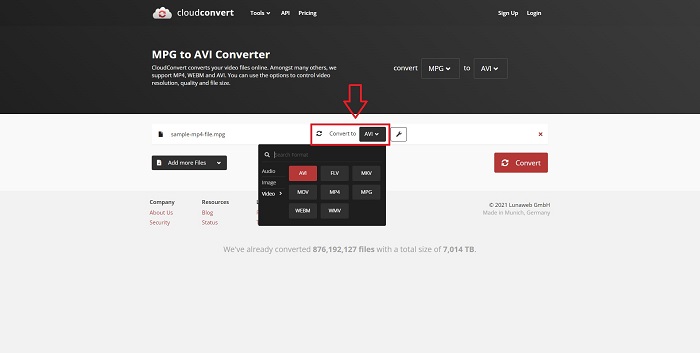
Βήμα 2. Στη συνέχεια, συνεχίστε επιλέγοντας σε ποια μορφή θα μετατραπεί το αρχείο σας, κάνοντας κλικ στην ενότητα μορφής δίπλα στο εικονίδιο με το γαλλικό κλειδί (wrench). Έχετε επίσης τη δυνατότητα να προσθέσετε περισσότερα αρχεία για μετατροπή.
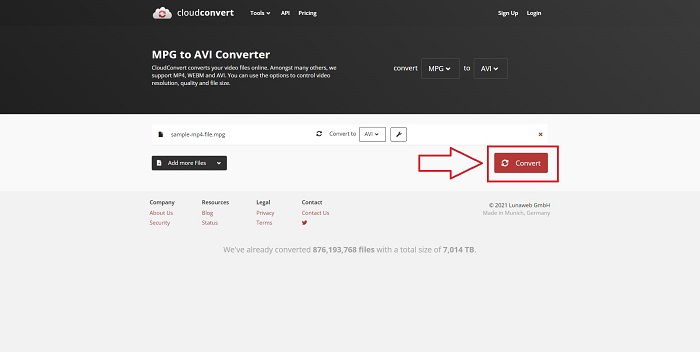
Βήμα 3. Κάντε κλικ στο Convert για να μετατρέψετε όλα τα αρχεία που ανεβάσατε.
Μέθοδος 2. Χρησιμοποιήστε το Zamzar
Το Zamzar είναι ένα διαδικτυακό εργαλείο για τη μετατροπή αρχείων. Οι μετατροπές μπορούν να πραγματοποιηθούν σε διάφορες μορφές χωρίς να απαιτείται λήψη οποιουδήποτε λογισμικού. Το Zamzar μπορεί να μετατρέψει ένα αρχείο από μια μορφή σε άλλη, όπως ένα Adobe PDF σε έγγραφο του Microsoft Word, πληκτρολογώντας μια διεύθυνση URL ή ανεβάζοντας ένα ή περισσότερα αρχεία (εφόσον είναι όλα στην ίδια μορφή). Για να αποκτήσετε γνώσεις σχετικά με αυτό το διαδικτυακό εργαλείο, ακολουθούν τα βήματα που παρέχονται για εσάς:
Βήμα 1. Αναζητήστε το Zamzar σε οποιαδήποτε μηχανή αναζήτησης. Αφού κάνετε κλικ στον ιστότοπο, μπορείτε πλέον να ανεβάσετε ένα αρχείο στη διεπαφή του κάνοντας κλικ στο Add Files.
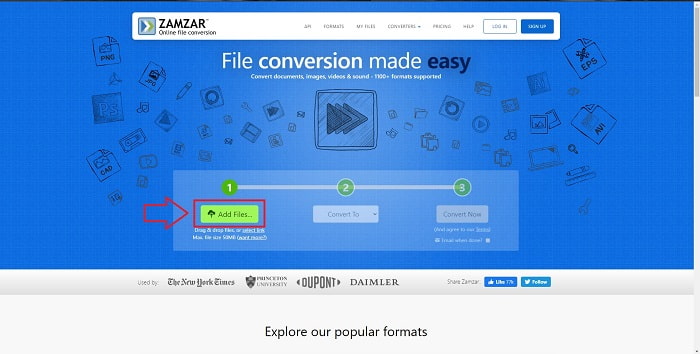
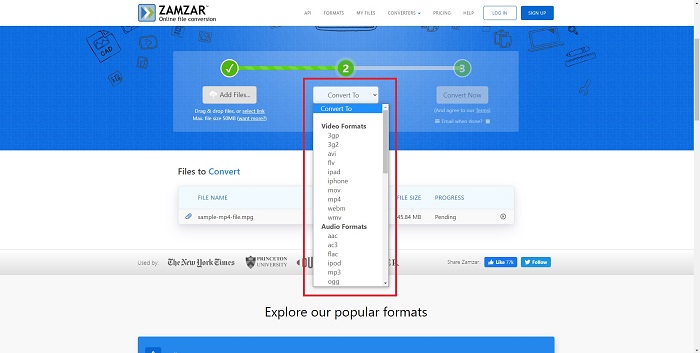
Βήμα 2. Στη συνέχεια, μπορείτε να προχωρήσετε στη μετατροπή του αρχείου επιλέγοντας το αρχείο που θέλετε. Κάντε κλικ στο Convert To για να δείτε όλες τις μορφές που υποστηρίζει αυτό το online εργαλείο.
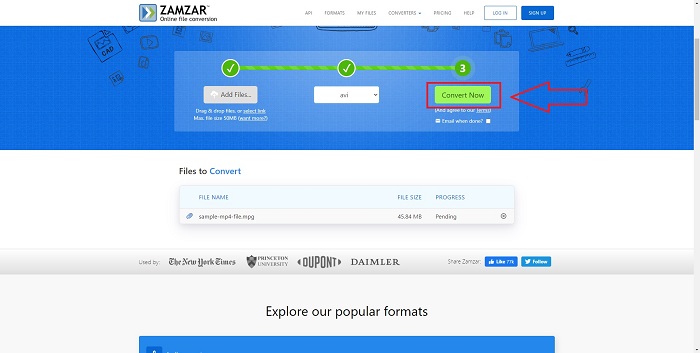
Βήμα 3. Για να μετατρέψετε το αρχείο, κάντε κλικ στο Convert Now.
Μέρος 4. Συχνές ερωτήσεις σχετικά με τα MPG και AVI
Είναι καλύτερο το AVI ή το MPG;
Η αποθήκευση είναι δυνατή με αρχεία AVI, ενώ η εγγραφή βίντεο πραγματοποιείται με αρχεία MPEG. Το AVI είναι ελαφρώς ανώτερο από το MPEG. Ωστόσο, εάν το MPEG είναι η μορφή που πρέπει να χρησιμοποιήσετε, θέλετε να εγγράψετε βίντεο DVD. Τα Microsoft Windows ανέπτυξαν τη μορφή αρχείου AVI ως απόκριση στη μορφή αρχείου MOV της Apple, ενώ το Moving Picture Group ανέπτυξε τη μορφή MPG.
Ποια είναι τα πλεονεκτήματα και τα μειονεκτήματα του AVI;
Σε σύγκριση με τις άλλες μορφές αρχείων, τα αρχεία AVI μπορεί να είναι εξαιρετικά μεγάλα εάν δεν είναι συμπιεσμένα. Πρέπει να είστε διατεθειμένοι να αφήσετε λίγο χώρο στο δίσκο με αντάλλαγμα τα πλεονεκτήματα του αρχείου AVI, καθώς δεν θα μπορείτε να αποθηκεύσετε τόσα αρχεία όσα θα κάνατε διαφορετικά. Εάν συμπιέσετε ένα αρχείο AVI στο διαδίκτυο πέρα από ένα ορισμένο σημείο, η ποιότητα του βίντεο θα μειωθεί ως αποτέλεσμα.
Ποιο είναι μικρότερο μέγεθος AVI ή MPG;
Όταν μιλάμε για το διαδίκτυο, τα μεγαλύτερα αρχεία χρειάζονται περισσότερο χρόνο για να κατέβουν. Είναι λογικό να κωδικοποιούνται τα βίντεο σε μικρότερα μεγέθη αρχείων, ακόμη κι αν αυτό συνεπάγεται κάποια απώλεια ποιότητας. Όσον αφορά την αναπαραγωγή, το AVI εξακολουθεί να προτιμάται από το MPG, επειδή περισσότερες συσκευές αναπαραγωγής (set‑top boxes) μπορούν να παίξουν αρχεία AVI παρά MPG. Αν θέλετε να αναπαράγετε τα αρχεία MPG στον υπολογιστή σας, κάντε κλικ εδώ για να μάθετε περισσότερα.
συμπέρασμα
Για να συνοψίσουμε όσα έχουμε συζητήσει, το Video Converter Ultimate είναι ο καλύτερος μετατροπέας που θα πρέπει να σκεφτείτε να χρησιμοποιήσετε, σε σύγκριση με όλους τους online μετατροπείς MPG σε AVI που αναφέρθηκαν παραπάνω. Αυτό το λογισμικό είναι δωρεάν και διαθέτει την ταχύτερη διαδικασία μετατροπής σε σχέση με το online εργαλείο μετατροπής. Υποστηρίζει επίσης πολλές μορφές και σας προσφέρει υψηλή ποιότητα στην έξοδο βίντεο. Πέρα από αυτά, δεν υπάρχει λόγος να μην χρησιμοποιήσετε αυτό το λογισμικό.
-
 Πώς να μετατρέψετε αρχεία MPEG σε MP4 δωρεάν σε Windows, Mac, Online
 Διαβάστε και λάβετε 3 δωρεάν τρόπους μετατροπής αρχείων MPEG σε αρχεία MP4 στον υπολογιστή σας. Μπορείτε να χρησιμοποιήσετε διαδικτυακούς και επιτραπέζιους μετατροπείς βίντεο για να μετατρέψετε MPEG σε μορφή MP4 με ευκολία.
-
 [2025] Τα καλύτερα εργαλεία και εύκολοι τρόποι για τη μετατροπή MPEG σε MP3
 Αυτό το άρθρο μιλάει κυρίως για το πώς μπορείτε να μετατρέψετε τα βίντεό σας MPEG σε MP3 με τη χρήση των πιο αξιόπιστων εργαλείων της λίστας.
-
 4 αποτελεσματικοί τρόποι μετατροπής MOV σε AVI σε PC και Mac [2025]
 Θέλετε να μάθετε ποιος είναι ο καλύτερος μετατροπέας MOV σε AVI στον Ιστό; Και γιατί το FVC Ultimate Video Converter μπορεί να είναι το κατάλληλο για εσάς.
