


 Video Converter Ultimate
 Εγγραφή οθόνης
 Επισκευή βίντεο
Μάθετε ποιοι είναι οι 2 καλύτεροι μετατροπείς για δωρεάν μετατροπή RMVB σε AVI
Εάν αναζητάτε πιο αποδοτική συμπίεση, χρησιμοποιήστε τη μορφή RMVB, επειδή αυτή η μορφή χρησιμοποιεί μεταβλητούς ρυθμούς bit για την κωδικοποίηση ήχου και βίντεο. Αυτή η μορφή είναι το καλύτερο «container» για την αποθήκευση streaming πολυμέσων που έχουν κωδικοποιηθεί με σταθερό ρυθμό bit. Αν και η μορφή είναι η καλύτερη επιλογή για online streaming, θα χρειαστείτε πάλι ένα πρόγραμμα αναπαραγωγής πολυμέσων ή ένα codec πολυμέσων για να παρακολουθήσετε το βίντεο με κατάληξη αρχείου .rmvb. Εφόσον λοιπόν συμβαίνει αυτό, ας κάνουμε τη ζωή σας ευκολότερη βρίσκοντας ποιον μετατροπέα αρχείων RMVB σε AVI μπορείτε να χρησιμοποιήσετε για να μετατρέψετε τα αρχεία RMVB σας.
Μέρος 1. Ο καλύτερος μετατροπέας RMVB σε AVI εκτός σύνδεσης για Windows και Mac [Ταχύτερος και πιο αποτελεσματικός τρόπος]
Πρώτο σε αυτή τη λίστα είναι το καταπληκτικό πρόγραμμα μετατροπής που θα αγαπήσετε· το FVC Video Converter Ultimate προσφέρει τον πιο γρήγορο και ασφαλή τρόπο να μετατρέψετε RMVB σε AVI δωρεάν. Όλες οι λειτουργίες που προσφέρει αυτό το εργαλείο είναι απαραίτητες για όλους όσοι μετατρέπουν μορφές συχνά. Επίσης, αν θέλετε να επεξεργαστείτε το βίντεό σας, να ενισχύσετε τον ήχο σας, να δημιουργήσετε ένα μοναδικό GIF και να κάνετε ακόμα περισσότερα, αυτό το εργαλείο είναι εξαιρετική επιλογή για όλους. Αν και μπορείτε να μετατρέψετε εδώ τη μορφή σας δωρεάν, το ίδιο το εργαλείο δεν είναι δωρεάν. Ωστόσο, δεν πρόκειται να ξοδέψετε εκατοντάδες δολάρια για να το κατεβάσετε, να το αποκτήσετε και να βιώσετε όλες τις δυνατότητες αυτού του μετατροπέα. Αν υποθέσουμε ότι αγοράζετε και κατεβάζετε αυτό το εργαλείο, τώρα είναι η κατάλληλη στιγμή να χρησιμοποιήσετε τη φαντασία σας για να πετύχετε το καλύτερο αποτέλεσμα με τη βοήθειά του. Και τώρα, τα παρακάτω στοιχεία είναι τα βήματα για το πώς να μετατρέψετε τα αρχεία RMVB σας σε μια νέα μορφή.
Βήματα για το πώς να μετατρέψετε RMVB σε AVI με το FVC Video Converter Ultimate:
Βήμα 1. Κατεβάστε αυτόν τον μετατροπέα RMVB σε AVI στον υπολογιστή PC ή Mac σας, εγκαταστήστε τον, κάντε τις αρχικές ρυθμίσεις και κάντε κλικ στο Start Now.
Δωρεάν ΛήψηΓια Windows 7 ή νεότεραΑσφαλής λήψη
Δωρεάν ΛήψηΓια MacOS 10.7 ή νεότεροΑσφαλής λήψη
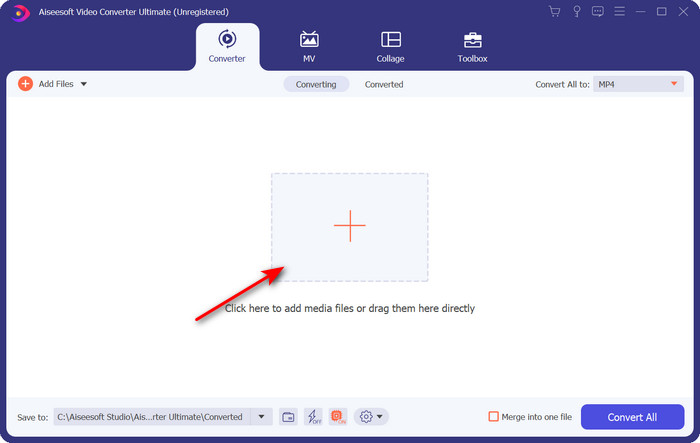
Βήμα 2. Εκτελέστε το πρόγραμμα και ανεβάστε το αρχείο .rmvb στη διεπαφή κάνοντας κλικ στο κουμπί + στη μέση. Εντοπίστε το αρχείο στο φάκελο και κάντε κλικ στο Open.
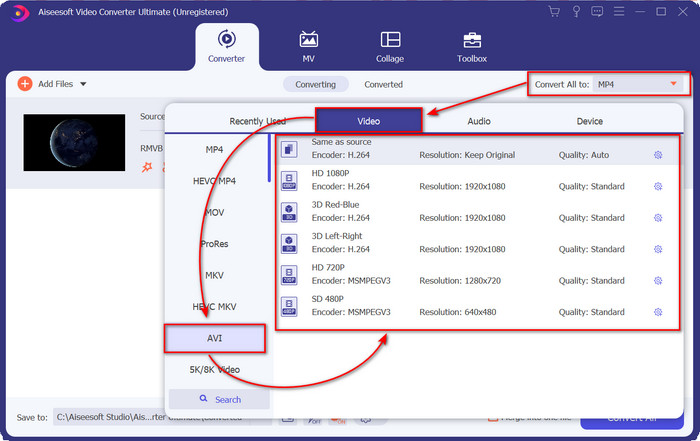
Βήμα 3. Πηγαίνετε στο Convert All to: και εντοπίστε τη μορφή AVI, έπειτα κάντε κλικ σε αυτήν.
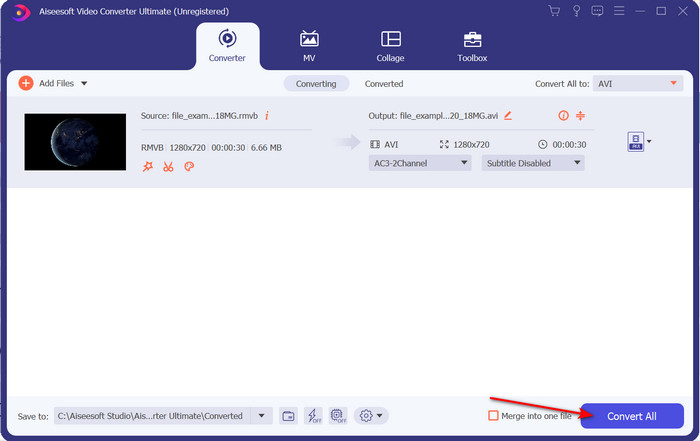
Βήμα 4. Αφού ολοκληρωθεί η επιλογή της μορφής, ας ξεκινήσουμε τη μετατροπή του αρχείου κάνοντας κλικ στο Convert All.
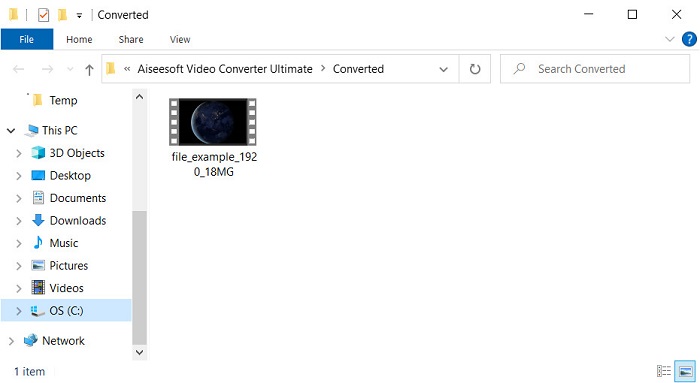
Βήμα 5. Ένας φάκελος με το νέο αρχείο .rmvb θα εμφανιστεί στην οθόνη σας· κάντε κλικ στο αρχείο για να παρακολουθήσετε το βίντεο και απολαύστε το.
Πλεονεκτήματα
- Η εργαλειοθήκη προσφέρει πολλά δημοφιλή βοηθητικά προγράμματα που θα σας βοηθήσουν με διαφορετικά προβλήματα που θα συναντούσατε.
- Παρέχει 30 φορές ταχύτερη μετατροπή του αρχείου σε σύγκριση με τους άλλους μετατροπείς online και offline.
- Είναι αλάνθαστο ότι οποιοσδήποτε με ή χωρίς εμπειρία στη μετατροπή μπορεί να μετατρέψει εύκολα.
- Η μαζική μετατροπή γίνεται γρήγορα με διαφορετικές μορφές.
Μειονεκτήματα
- Για να αποκτήσετε πρόσβαση στο εργαλείο, θα χρειαστεί να πληρώσετε για αυτό, αλλά δεν υπερβαίνει τα εκατό δολάρια.
- Απαιτείται λήψη στον υπολογιστή ή στο Mac σας.
Μέρος 2. Καλύτερος διαδικτυακός μετατροπέας RMVB σε AVI για πρόγραμμα περιήγησης Ιστού [Δωρεάν]
Ψάχνετε για έναν online μετατροπέα RMVB σε AVI; Τότε, το FVC Free Video Converter Online είναι μία από τις επιλογές. Αυτό το διαδικτυακό εργαλείο σάς επιτρέπει να μετατρέπετε χωρίς να κατεβάζετε λογισμικό. Είναι προσβάσιμο για όσους έχουν σύνδεση στο διαδίκτυο. Επίσης, είναι δωρεάν, ασφαλές και δεν έχει διαφημίσεις στην ιστοσελίδα κατά τη διάρκεια της μετατροπής. Επιπλέον, μπορείτε να μετατρέπετε αρχεία εδώ χωρίς κανέναν περιορισμό. Μπορείτε να επιλέξετε ανάμεσα σε πολλές διαθέσιμες μορφές. Ωστόσο, αυτό το web εργαλείο δεν διαθέτει τα ίδια προηγμένα χαρακτηριστικά που προσφέρει το FVC Video Converter Ultimate. Επιπλέον, δεν μπορείτε να έχετε πρόσβαση σε αυτό το εργαλείο αν δεν έχετε σύνδεση στο διαδίκτυο, όπως συμβαίνει και με άλλα online εργαλεία. Οπότε τώρα, αν θέλετε να δοκιμάσετε και να μετατρέψετε χωρίς να ξοδέψετε χρήματα, ακολουθήστε τα βήματα που αναφέρονται παρακάτω.
Βήματα για το πώς να μετατρέψετε RMVB σε AVI online με το FVC Free Video Converter Online:
Βήμα 1. Για να αποκτήσετε πρόσβαση σε αυτόν τον online μετατροπέα RMVB σε AVI, πρέπει να κάνετε κλικ σε αυτό το link.
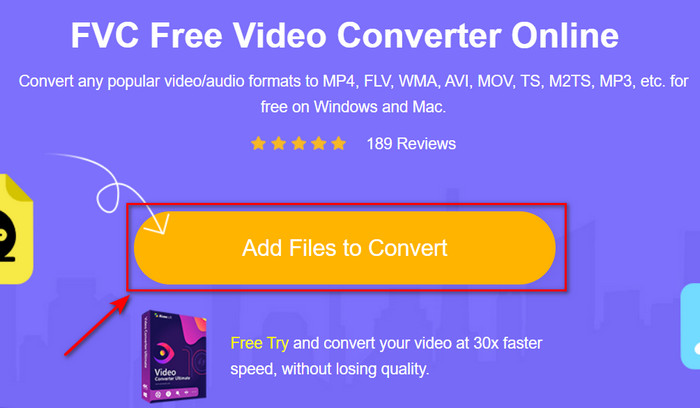
Βήμα 2. Πατήστε το Add Files to Convert, και αν είναι η πρώτη φορά που χρησιμοποιείτε αυτό το εργαλείο, ένας εκκινητής θα κατέβει αυτόματα· κάντε ξανά κλικ στο Add Files to Convert και θα εμφανιστεί ένας φάκελος. Αναζητήστε το αρχείο .rmvb στο φάκελο και κάντε κλικ στο Open.
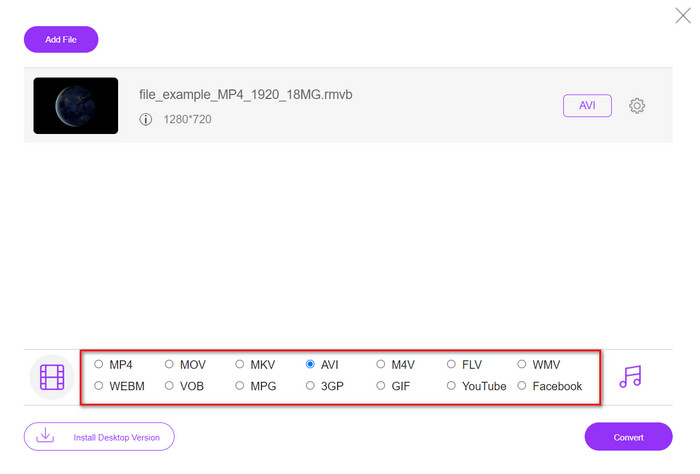
Βήμα 3. Μόλις το αρχείο βρεθεί στη web διεπαφή, κάντε κλικ στο AVI από τις διαθέσιμες επιλογές παρακάτω.
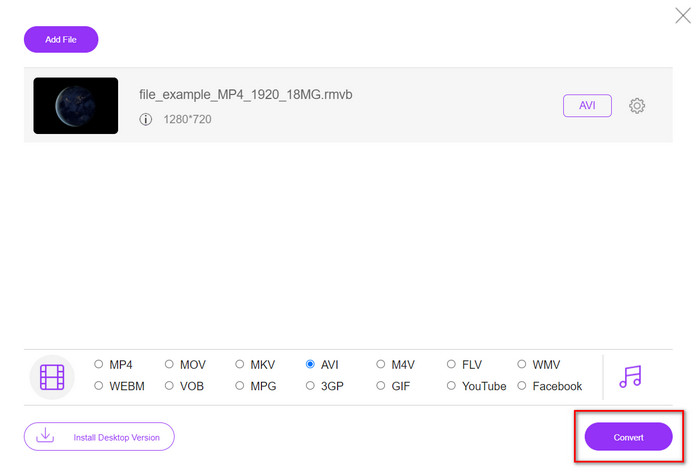
Βήμα 4. Αφού επιλέξετε το AVI, ας ξεκινήσουμε τη μετατροπή πατώντας Convert.
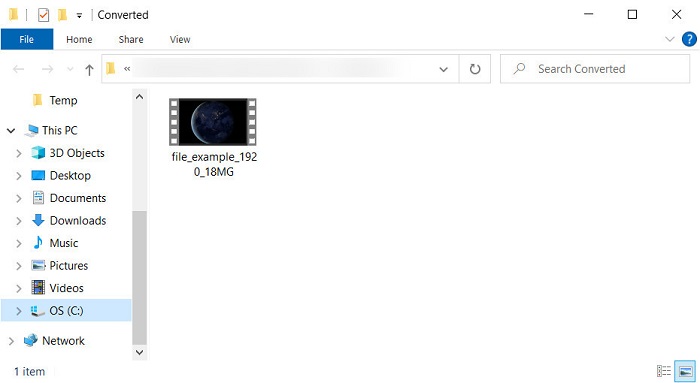
Βήμα 5. Όταν ολοκληρωθεί η μετατροπή του αρχείου, θα εμφανιστεί στην οθόνη σας ένας φάκελος με το αρχείο· αν θέλετε να το παρακολουθήσετε, κάντε κλικ σε αυτό.
Πλεονεκτήματα
- Δεν απαιτείται λήψη για πρόσβαση εκτός από το πρόγραμμα εγκατάστασης.
- Δωρεάν και δεν έχει διαφημίσεις στη διεπαφή ιστού.
- Ανοίξτε το εργαλείο Ιστού σε διαφορετικό πρόγραμμα περιήγησης επειδή είναι διαθέσιμο σε όλα.
Μειονεκτήματα
- Εξαρτάται από το Διαδίκτυο, που σημαίνει ότι αν δεν έχετε internet, δεν μπορείτε να το χρησιμοποιήσετε.
- Δεν διαθέτει δυνατότητες επεξεργασίας όπως το FVC Video Converter Ultimate.
Μέρος 3. Συχνές ερωτήσεις σχετικά με το RMVB και το AVI
Μπορώ να παίξω το αρχείο RMVB στο Quicktime;
Το Quicktime μπορεί να αναπαράγει διάφορες μορφές και αυτό το πρόγραμμα αναπαραγωγής πολυμέσων υποστηρίζει διαφορετικούς codecs που έχουν κωδικοποιηθεί στο βίντεο ή το ηχητικό σας κομμάτι. Ωστόσο, το .rmvb δεν είναι μία από τις υποστηριζόμενες μορφές, οπότε για να αναπαράγετε το αρχείο .rmvb στο Quicktime, πρέπει να το μετατρέψετε σε μια υποστηριζόμενη μορφή όπως MOV, MPEG-4, AVI και άλλες υποστηριζόμενες μορφές. Εναλλακτικά, μπορείτε να στραφείτε σε προγράμματα αναπαραγωγής RMVB για να απολαμβάνετε τα βίντεο RMVB σας ομαλά.
Γιατί δεν μπορώ να ανοίξω αρχεία .rmvb στο Windows Media Player;
Επειδή ο κωδικοποιητής των αρχείων σας .rmvb δεν υποστηρίζεται σε αυτό το πρόγραμμα αναπαραγωγής πολυμέσων, ας υποθέσουμε ότι θέλετε να παρακολουθήσετε ένα βίντεο κάτω από την επέκταση αρχείου του .rmvb. Σε αυτήν την περίπτωση, είναι απαραίτητο να εγκαταστήσετε έναν κωδικοποιητή βίντεο στον υπολογιστή σας πριν το παίξετε. Αλλά για να αποφύγετε αυτό το πρόβλημα, προσπαθήστε να μετατρέψετε τη μορφή σε μια εύλογη μορφή που υποστηρίζει αυτό το πρόγραμμα αναπαραγωγής πολυμέσων.
Μπορώ να αποθηκεύσω ένα βίντεο σε μορφή RMVB στο τηλέφωνό μου;
Ναι, μπορείτε να το αποθηκεύσετε, αλλά δεν μπορείτε να το παίξετε στο προεπιλεγμένο πρόγραμμα αναπαραγωγής βίντεο και για να αναπαράγετε το αρχείο, πρέπει να κάνετε λήψη ενός προγράμματος αναπαραγωγής βίντεο τρίτου κατασκευαστή που υποστηρίζει αυτήν τη μορφή.
συμπέρασμα
Συνοψίζοντας, τώρα καταλαβαίνουμε τι είναι η μορφή RMVB και τι είδους κωδικοποίηση υποστηρίζει αυτή η μορφή. Αν και η μορφή είναι εξαιρετική για τη μετάδοση του αρχείου online, ορισμένα προγράμματα αναπαραγωγής πολυμέσων εξακολουθούν να μην την υποστηρίζουν λόγω της πολυπλοκότητας της δομής της. Γι' αυτό παρουσιάζουμε τώρα δύο λύσεις που μπορείτε να επιλέξετε και να μάθετε πώς να μετατρέπετε αρχεία RMVB σε AVI· το ένα εργαλείο είναι προσβάσιμο online χωρίς χρέωση κατά τη χρήση του. Και το άλλο είναι ο καταπληκτικός μετατροπέας που εκτελεί όλες τις εργασίες σε χρόνο μηδέν. Αν επιλέξετε το FVC Free Video Converter Online, τότε να περιμένετε την καλύτερη online μετατροπή. Ωστόσο, αν αποφασίσετε να κατεβάσετε μια πολύ καλύτερη έκδοση, τότε να περιμένετε την απόλυτη απόδοση.
-
 Οδηγός για το πώς να μετατρέψετε το RMVB σε MP4 σε Windows / Mac (3 δωρεάν τρόποι)
 Θέλετε να μετατρέψετε το RMVB σε MP4 για εύκολη αναπαραγωγή στον υπολογιστή σας ή στο κινητό τηλέφωνο; Θα βρείτε απλούς τρόπους για να μετατρέψετε τα αρχεία RMVB σε MP4 σε αυτόν τον οδηγό.
-
 Κορυφαίες 4 δωρεάν εφαρμογές μετατροπής RMVB σε FLV σε επιτραπέζιο υπολογιστή ή σε απευθείας σύνδεση
 Αυτό το άρθρο θα σας πει τα καλύτερα προγράμματα μετατροπής RMVB σε FLV και εφαρμογές ιστού που μπορούν να μετατρέψουν αρχεία RMVB (RealMedia Variable Bitrate) σε βίντεο FLV.
-
 Η καλύτερη μέθοδος χρήσης για τη μετατροπή AMV σε AVI [Εγκρίθηκε]
 Δυσκολεύεστε να μετατρέψετε το αρχείο βίντεο σε μορφή AMV σε AVI; Ακολουθούν ορισμένες συμβουλές που μπορείτε να βρείτε μόνο σε αυτό το άρθρο.
