


 Video Converter Ultimate
 Εγγραφή οθόνης
 Επισκευή βίντεο
Εκτός σύνδεσης και ηλεκτρονικά εργαλεία για τη μετατροπή TRP σε FLV που πρέπει να γνωρίζετε
Το TRP είναι μια μορφή αρχείου για την αποθήκευση εγγεγραμμένων τηλεοπτικών αρχείων. Επειδή λίγοι αναπαραγωγείς μπορούν να χειριστούν αυτόν τον τύπο αρχείου στην αρχική του μορφή, ίσως χρειαστεί να μετατρέψετε το αρχείο σας σε άλλη μορφή πριν το προβάλετε. Για να υποστηρίξετε τη μετατροπή αρχείων TRP σε αρχεία FLV, θα χρειαστεί να χρησιμοποιήσετε το κατάλληλο λογισμικό. Ευτυχώς, αυτό γίνεται πολύ πιο εύκολα με τη χρήση του λογισμικού μας ή της αντίστοιχης online έκδοσής του, που δεν θα σας δημιουργήσει καμία ενόχληση σε όλη τη διαδικασία μετατροπής. Ακολουθήστε τα βήματα που θα σας δώσουμε για να μετατρέψετε τα βίντεο TRP σας σε μορφή FLV με επιτυχία.

Μέρος 1. Μέθοδος εκτός σύνδεσης για τη μετατροπή TRP σε FLV
Η μορφή αρχείου TRP είναι σε μεγάλο βαθμό άγνωστη στους περισσότερους καταναλωτές βίντεο και δεν χρησιμοποιείται συχνά από δημιουργούς. Με αυτό ως δεδομένο, τα περισσότερα λογισμικά και online εργαλεία δεν υποστηρίζουν αυτόν τον τύπο αρχείου βίντεο. Γι’ αυτό το Video Converter Ultimate είναι ένα εργαλείο που αξίζει να σκεφτείτε όποτε χρειάζεται να μετατρέψετε βίντεο από μια μορφή σε άλλη. Αυτό το λογισμικό μπορεί να μετατρέψει το αρχείο TRP σας σε οποιαδήποτε μορφή επιλέξετε με ένα μόνο κλικ.
Αυτό το εργαλείο μετατροπής βίντεο παρέχει προηγμένες δυνατότητες επεξεργασίας και έχει μια γραφική διεπαφή που είναι απλή στη χρήση ακόμα κι αν δεν έχετε τεχνικές γνώσεις ή δεξιότητες. Με τη βοήθεια αυτής της εφαρμογής, μπορείτε να μετατρέψετε αρχεία και να επωφεληθείτε από τους εξαιρετικά γρήγορους χρόνους μετατροπής και την παραγωγή υψηλής ποιότητας. Εδώ σας παρέχουμε τα απλά βήματα που πρέπει να ακολουθήσετε:
Βήμα 1: Κατεβάστε το αρχείο .exe κάνοντας κλικ στο κουμπί Free Download παρακάτω, ανάλογα με το λειτουργικό σύστημα που χρησιμοποιείτε. Όταν ολοκληρώσετε τη λήψη, ανοίξτε το αρχείο και ξεκινήστε τη διαδικασία εγκατάστασης. Περιμένετε να ολοκληρωθεί η εγκατάσταση και, στη συνέχεια, εκκινήστε το λογισμικό.
Δωρεάν ΛήψηΓια Windows 7 ή νεότεραΑσφαλής λήψη
Δωρεάν ΛήψηΓια MacOS 10.7 ή νεότεροΑσφαλής λήψη
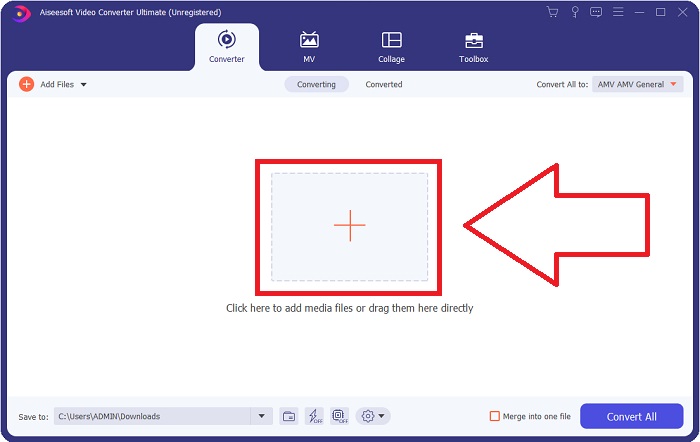
Βήμα 2. Μόλις ξεκινήσει το λογισμικό, θα εμφανιστεί μια διεπαφή. Από εκεί, κάντε κλικ στο κουμπί + στο κέντρο και αρχίστε να εισάγετε το αρχείο βίντεο που θέλετε να μετατρέψετε ή απλώς σύρετε και αφήστε το αρχείο.
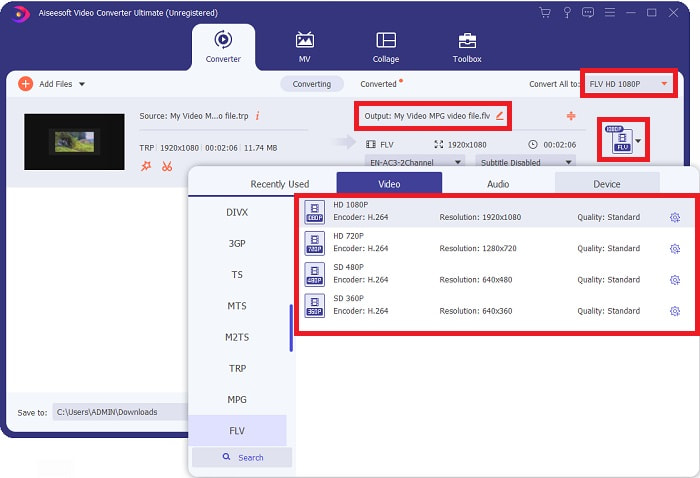
Βήμα 3: Θα δείτε τη τρέχουσα μορφή του βίντεό σας στη δεξιά πλευρά του αρχείου. Για να επιλέξετε σε ποια μορφή θα μετατραπεί το βίντεο, κάντε κλικ πάνω της και θα εμφανιστούν όλες οι διαθέσιμες μορφές. Βρείτε το FLV ή απλώς πληκτρολογήστε το στη γραμμή αναζήτησης. Υπάρχουν επίσης ποιότητες βίντεο στα δεξιά για εσάς.
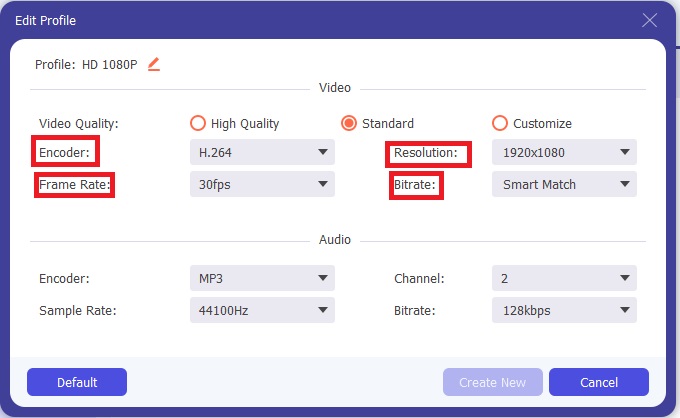
Βήμα 4: Για τις πρόσθετες λειτουργίες που αναφέραμε, κάντε κλικ στο εικονίδιο με το γρανάζι στα δεξιά της ποιότητας βίντεο που επιλέξατε και θα εμφανιστεί ένα νέο παράθυρο. Από εκεί, μπορείτε να επεξεργαστείτε μια σειρά από ρυθμίσεις βίντεο και ήχου σύμφωνα με τις ανάγκες σας. Κάντε κλικ στο κουμπί Create New για να διατηρήσετε τις αλλαγές.
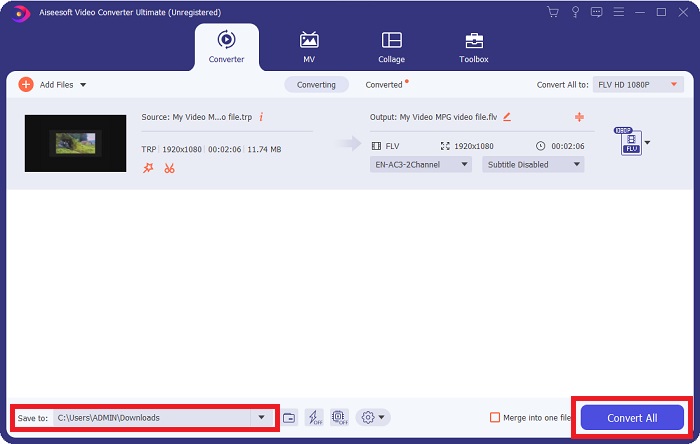
Βήμα 5: Μόλις ολοκληρώσετε όλες τις ρυθμίσεις και επεξεργασίες, κάντε κλικ στο κουμπί Convert All στην κάτω δεξιά γωνία της διεπαφής για να ξεκινήσει η διαδικασία μετατροπής και περιμένετε μέχρι να ολοκληρωθεί.
Μέρος 2. Διαδικτυακή μέθοδος μετατροπής TRP σε FLV
Η μετατροπή αρχείων βίντεο είναι μια ακόμη επιλογή που αξίζει να σκεφτείτε, αν θέλετε να κάνετε τη δουλειά μέσω ενός web εργαλείου χωρίς να εγκαταστήσετε ολόκληρο το λογισμικό. Σε αυτή την περίπτωση, διαθέτουμε επίσης την online εκδοχή του λογισμικού – το FVC Free Video Converter Online. Προσφέρει πάλι τις πρόσθετες επιλογές του λογισμικού, αλλά όχι όλα τα χαρακτηριστικά. Παρ’ όλα αυτά, επιτελεί τον σκοπό του μέσα σε λογικό χρονικό διάστημα. Για να χρησιμοποιήσετε αυτό το web εργαλείο, ακολουθήστε τα παρακάτω βήματα:
Βήμα 1: Μεταβείτε σωστά στον μετατροπέα κάνοντας κλικ σε αυτόν τον σύνδεσμο. Από εκεί, μπορείτε να ξεκινήσετε κατεβάζοντας το launcher που χρειάζεστε για να εισάγετε τα αρχεία σας. Κάντε κλικ στο κουμπί Add Files to Convert στο κέντρο της σελίδας για να ξεκινήσει η διαδικασία.
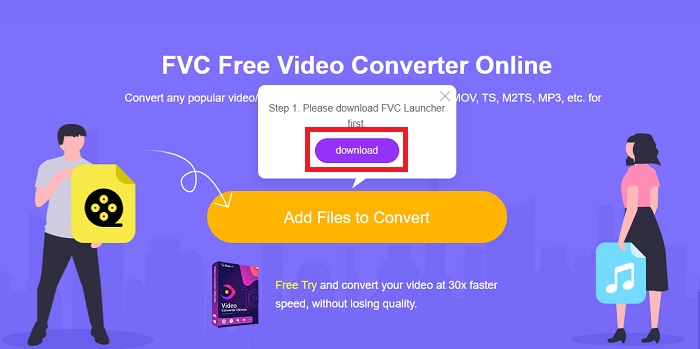
Βήμα 2: Κάντε ξανά κλικ στο συγκεκριμένο κουμπί και μεταφορτώστε το αρχείο βίντεο που θέλετε να μετατρέψετε. Αφού εισαγάγετε ένα αρχείο, θα εμφανιστεί μια νέα διεπαφή που δείχνει όλες τις διαθέσιμες μορφές για να επιλέξετε. Σε αυτή την περίπτωση, επιλέξτε FLV.
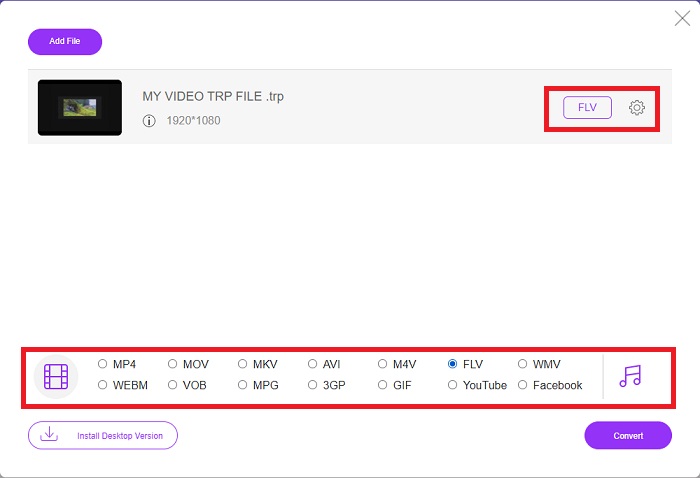
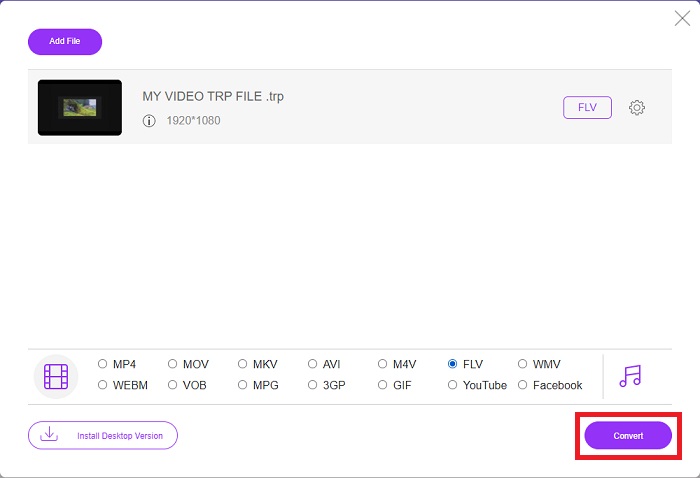
Βήμα 3: Για τις πρόσθετες επιλογές, όπως ακριβώς και στο ίδιο το λογισμικό, κάντε κλικ στο εικονίδιο με το γρανάζι στα δεξιά. Θα εμφανιστούν οι ρυθμίσεις βίντεο και ήχου ώστε να επεξεργαστείτε περαιτέρω το βίντεό σας ως προς την ανάλυση, τον ρυθμό καρέ και πολλά άλλα. Όταν τελειώσετε, κάντε κλικ στο OK για να αποθηκεύσετε τις αλλαγές. Τέλος, ξεκινήστε τη διαδικασία μετατροπής κάνοντας κλικ στο κουμπί Convert στην κάτω δεξιά γωνία.
Σχετικά:
Μέρος 3. Εκτεταμένη γνώση TRP και FLV
Για να μάθετε περισσότερα σχετικά με τις δύο μορφές που αναφέρονται, σας παρέχουμε σύντομες πληροφορίες καθώς και σύγκριση των δύο.
Τα αρχεία TRP συνήθως συνδέονται με το VLC του VideoLAN. Η επέκταση ονόματος αρχείου TRP μπορεί να συλλεχθεί με το MPEG-2 Part 1 που περιέχει φιλμ υψηλής ευκρίνειας. Τα αρχεία TRP μπορούν να περιέχουν και να αποθηκεύουν πακέτα δεδομένων που αποστέλλονται ως ψηφιακό βίντεο και ήχο σε δίκτυα εκπομπής ψηφιακών βίντεο, ραδιοσυχνότητες ή γραμμικές συσκευές εγγραφής όπως συσκευές εγγραφής βίντεο. Πολλαπλές ροές ήχου και βίντεο, καθώς και κώδικας διόρθωσης σφαλμάτων, περιλαμβάνονται σε ένα αρχείο TRP. Οι χρήστες μπορούν επίσης να περιλαμβάνουν μεταδεδομένα όπως ο χρόνος λήψης, το αναγνωριστικό κάμερας και η πηγή στα περιεχόμενα του αρχείου.
Από την άλλη πλευρά, ένα αρχείο με την κατάληξη .flv σημαίνει Flash Video. Η επέκταση αρχείου FLV αναφέρεται σε ένα αρχείο βίντεο ή ήχου που αποστέλλεται μέσω του Διαδικτύου χρησιμοποιώντας το Adobe Flash Player ή το Adobe Air. Το Flash Video είναι εδώ και καιρό η κύρια μορφή βίντεο για σχεδόν όλα τα ενσωματωμένα βίντεο στο διαδίκτυο, συμπεριλαμβανομένων των βίντεο στο YouTube, στο Hulu και σε διάφορους άλλους ιστότοπους. Οι πάροχοι ροής και οι προγραμματιστές λογισμικού, από την άλλη πλευρά, έχουν εγκαταλείψει το Flash υπέρ της HTML5 και άλλων μορφών μετά την επίσημη διακοπή της Adobe.
| TRP | FLV | |
| Επέκταση αρχείου | .trp | .flv |
| Προγραμματιστής | Ομάδα Έργου VideoLAN | Adobe Systems Incorporated |
| Υποστηρικτικά Προγράμματα | ◆ SMPlayer ◆ VLC Media Player ◆ Apple QuickTime Player | ◆ RealPlayer ◆ Apple QuickTime Player ◆ Mplayer ◆ VLC Media Player |
Μέρος 4. Συχνές ερωτήσεις σχετικά με τη μετατροπή TRP σε FLV
Πώς να ανοίξετε τη μορφή βίντεο TRP χρησιμοποιώντας VLC;
Μόλις εγκατασταθεί το VLC Media Player στον υπολογιστή σας, εντοπίστε το αρχείο βίντεο TRP στον σκληρό σας δίσκο και επιλέξτε το με το δεξί κουμπί του ποντικιού. Επιλέξτε «VLC media player» από το αναπτυσσόμενο μενού «Άνοιγμα με». Το σύστημα θα ανοίξει το αρχείο βίντεο που θα αναπαραχθεί από αυτό το πρόγραμμα μόλις εκκινηθεί.
Πώς μπορώ να μετατρέψω ένα αρχείο FLV σε Windows Media Player;
Πρέπει πρώτα να επιλέξετε το αρχείο FLV που θέλετε να μετατρέψετε. Μπορείτε να επιλέξετε WMV ως τη μορφή στην οποία θέλετε να μετατρέψετε το αρχείο FLV. Για να μετατρέψετε το αρχείο FLV, επιλέξτε «Μετατροπή» από το αναπτυσσόμενο μενού.
Μπορώ να παίξω TRP οπουδήποτε;
Η μετατροπή TRP σε ευρέως γνωστές μορφές MP4, AVI, MOV, MKV, FLV, WMV και άλλες μορφές είναι μια προτεινόμενη επιλογή εάν θέλετε να αναπαράγετε αρχεία TRP παντού και σε ή σε οποιαδήποτε συσκευή ή συσκευή αναπαραγωγής πολυμέσων.
συμπέρασμα
Συνολικά, το Video Converter Ultimate και το αντίστοιχο διαδικτυακό εργαλείο είναι αυτό που ψάχνετε για να ολοκληρώσετε ολόκληρη τη διαδικασία μετατροπής παρέχοντας παράλληλα όλες τις απαραίτητες δυνατότητες που χρειάζεστε. Δεν προκαλεί καμία ταλαιπωρία, καθώς είναι διαθέσιμο οποιαδήποτε στιγμή της ημέρας εάν έχετε εγκατεστημένο το λογισμικό στον υπολογιστή σας. Δεν θα μάθετε ποτέ πότε θα χρειαστείτε έναν μετατροπέα σαν αυτόν, γι' αυτό σας συνιστούμε να χρησιμοποιήσετε αυτό το λογισμικό για ευκολία.
-
 Ο ευκολότερος οδηγός για το πώς να μετατρέψετε το TRP σε AVI σε Windows & Mac
 Ίσως δεν είστε εξοικειωμένοι με τη μορφή βίντεο TRP και αναρωτιέστε πώς θα μετατρέψετε το TRP σε AVI; Διαβάστε αυτό το άρθρο περαιτέρω για να μάθετε τις λεπτομέρειες που αφορούν το ζήτημα.
-
 3 Λύσεις για τη μετατροπή MTS σε FLV Δωρεάν & Διαδικτυακά
 Θέλετε να μετατρέψετε MTS σε FLV; Εδώ είναι 3 δωρεάν λογισμικό μετατροπής MTS σε FLV που μπορείτε να δοκιμάσετε να μετατρέψετε το MTS σε FLV σε Mac OS X και Windows 10/8/7.
-
 Οι καλύτεροι τρόποι μετατροπής VOB σε FLV [Περιλαμβάνεται δωρεάν και διαδικτυακά]
 Θέλετε να μετατρέψετε ένα αρχείο VOB σε ένα αρχείο FLV; Μπορείτε να ολοκληρώσετε εύκολα την εργασία είτε με επιτραπέζιο είτε σε απευθείας σύνδεση μετατροπείς. Διαβάστε αυτόν τον οδηγό και μάθετε πώς μπορείτε να μετατρέψετε VOB σε FLV εύκολα και γρήγορα.
