


 Video Converter Ultimate
 Εγγραφή οθόνης
 Επισκευή βίντεο
Μάθετε τους 4 καλύτερους μετατροπείς SWF σε FLV εκτός σύνδεσης και διαδικτύου σε Windows και Mac
Αυτήν τη στιγμή αναζητώ μια λύση για να ανεβάσω τα αρχεία μου SWF σε ιστότοπους κοινής χρήσης βίντεο όπως το YouTube, το Facebook, το MySpace και άλλα. Μπορείτε να με βοηθήσετε να βρω τον πιο γρήγορο τρόπο για να λύσω αυτό το πρόβλημα;
Αυτό το πρόβλημα είναι συνηθισμένο, ειδικά αν το βίντεό σας έχει την επέκταση αρχείου .swf. Ωστόσο, αυτή η μορφή είναι συνηθισμένη στον ιστό, αλλά το να μοιραστείτε το αρχείο σε πλατφόρμα διαμοιρασμού βίντεο δεν λειτουργεί. Επιπλέον, αν θέλετε να μοιραστείτε τα αρχεία SWF σας, πρέπει να μετατρέψετε τη μορφή σε μία που υποστηρίζεται ευρύτερα, όπως η FLV. Με αυτό κατά νου, ας δούμε τα τέσσερα κρυμμένα διαμάντια, offline και online μετατροπείς SWF σε FLV, που μπορείτε να χρησιμοποιήσετε διαβάζοντας αυτό το άρθρο.

Μέρος 1. Μετατροπή SWF σε FLV Online δωρεάν με το FVC Free Video Converter Online
Το FVC Free Video Converter Online είναι ο απαράμιλλος μετατροπέας βίντεο που μπορείτε να χρησιμοποιήσετε για να μετατρέψετε SWF σε FLV online και δωρεάν. Αυτό το διαδικτυακό εργαλείο ειδικεύεται στη μετατροπή του αρχείου σε νέα μορφή χωρίς να χρειάζεται να κατεβάσετε το εργαλείο στον υπολογιστή σας. Εκτός από τη δυνατότητα μετατροπής, μπορείτε επίσης να αλλάξετε τις προδιαγραφές βίντεο και ήχου σύμφωνα με τις ανάγκες σας. Θέλετε να μάθετε πώς να χρησιμοποιείτε αυτόν τον ελαφρύ online μετατροπέα; Τότε αντιγράψτε τα βήματα που είναι γραμμένα παρακάτω.
Βήμα 1. Κάντε κλικ σε αυτόν τον σύνδεσμο για να ανοίξετε μια νέα καρτέλα που θα σας μεταφέρει στην επίσημη ιστοσελίδα του FVC Free Video Converter Online.
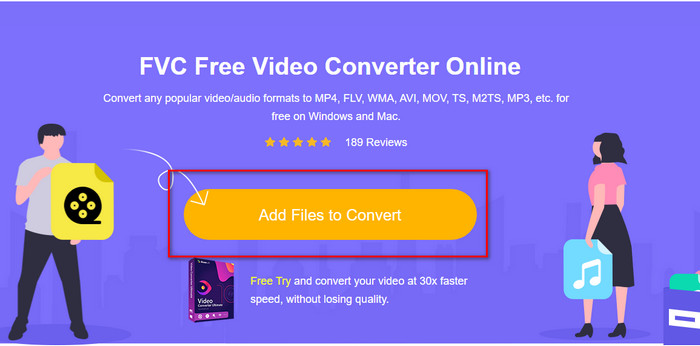
Βήμα 2. Στον ιστότοπο, κάντε κλικ στο Add Files to Convert, στη συνέχεια θα εμφανιστεί ένας φάκελος του υπολογιστή· επιλέξτε το αρχείο .swf και πατήστε Open.
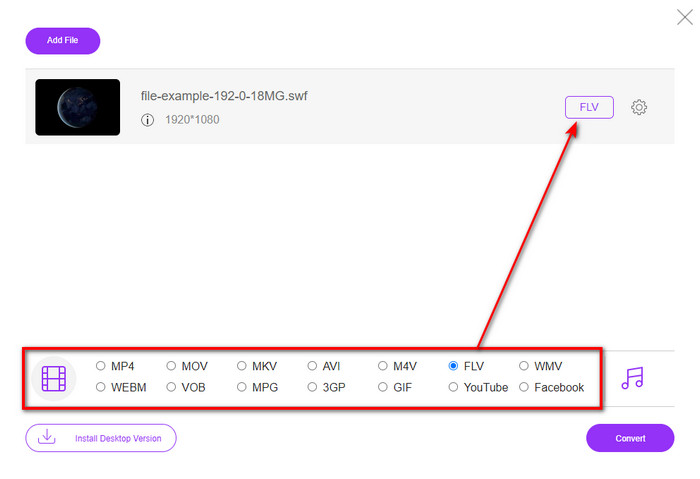
Βήμα 3. Αφού εισαγάγετε το αρχείο, κάτω από τη λίστα ρυθμίσεων, επιλέξτε τη μορφή FLV.
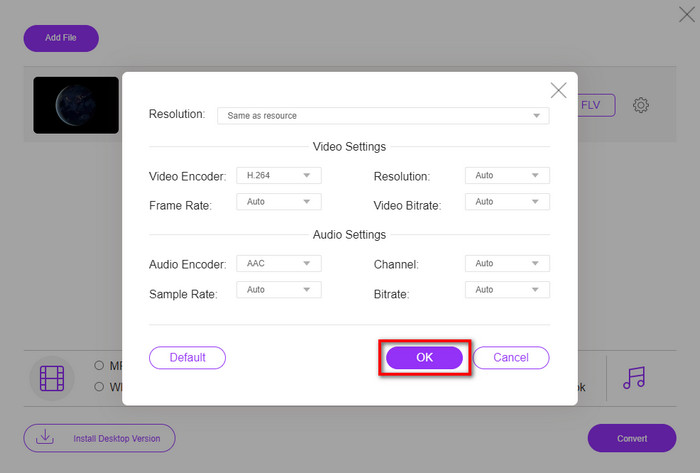
Για να αλλάξετε τις προδιαγραφές βίντεο και ήχου, κάντε κλικ στο κουμπί με το γρανάζι.
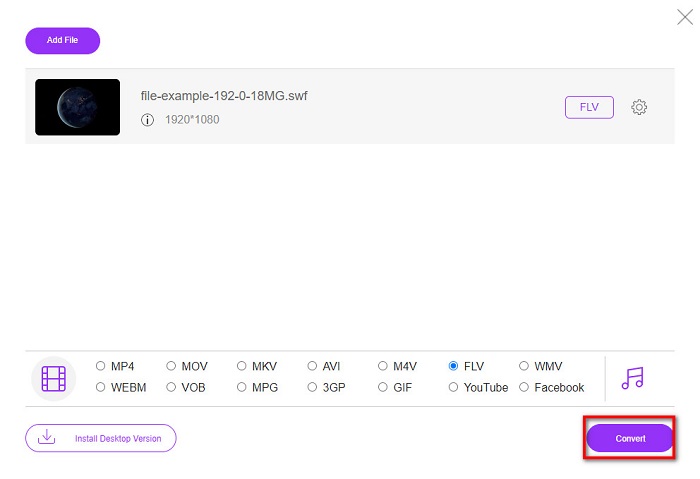
Βήμα 4. Για να ξεκινήσει η διαδικασία μετατροπής, κάντε κλικ στο κουμπί Convert.
Μέρος 2. Μετατροπή SWF σε FLV με FFmpeg
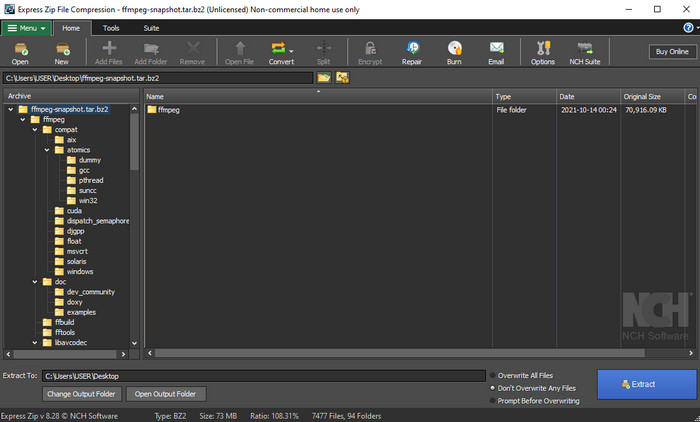
Το FFmpeg έχει μια μοναδική διεπαφή και εντολές για να μετατρέψετε SWF σε FLV δωρεάν. Αν γνωρίζετε αυτόν τον μετατροπέα, ήδη ξέρετε πώς να τον χρησιμοποιήσετε· ωστόσο, δεν τον γνωρίζουν όλοι. Εν συντομία, αυτός ο μετατροπέας δεν είναι ο τυπικός μετατροπέας βίντεο που έχει ήδη χρησιμοποιηθεί στο διαδίκτυο ή κατεβαστεί. Αντί να χρησιμοποιείτε κουμπιά για να δίνετε εντολές, θα χρειαστεί να χρησιμοποιήσετε γραμμή εντολών για να τον χειριστείτε.
Βήμα 1. Κατεβάστε τον μετατροπέα FFmpeg στον δίσκο σας και ανοίξτε τον.
Βήμα 2. Στον υπολογιστή σας, ανοίξτε τη γραμμή εντολών (command prompt).
Βήμα 3. Περιηγηθείτε στον φάκελο όπου βρίσκεται το αρχείο SWF μέσα από το CMD και εισαγάγετέ τον. Αντιγράψτε αυτήν την εντολή και επικολλήστε την στη γραμμή εντολών ffmpeg -i input.swf -vn -ar 44100 -ac 2 -b:a 192k output.flv και πατήστε Enter για να ξεκινήσει η διαδικασία.
Μέρος 3. Μετατροπή SWF σε FLV σε Flash
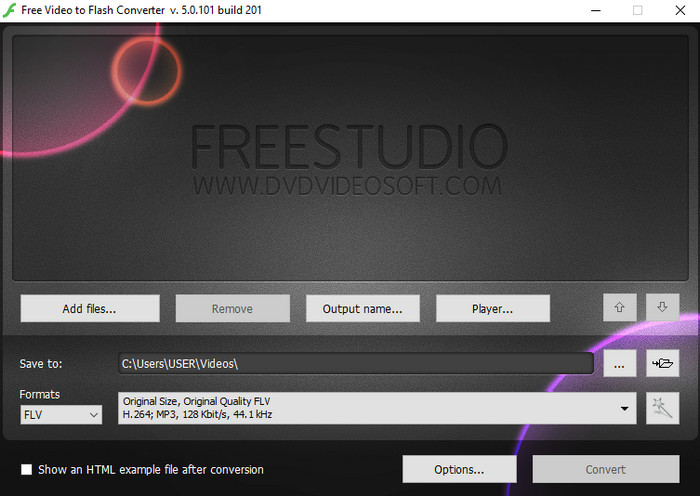
Το Free Video to Flash Converter είναι ένας δωρεάν μετατροπέας που μπορείτε να κατεβάσετε στα Windows. Αυτός ο μετατροπέας προσφέρει δύο μορφές για να επιλέξετε. Είναι ειδικά σχεδιασμένος μόνο για τη μετατροπή αρχείων σε μορφή FLV ή SWF. Άρα, αν θέλετε να μετατρέψετε τα αρχεία SWF σε AVI, MP4, MOV, MKV και άλλα, δεν μπορείτε να το κάνετε εδώ. Ας μάθουμε πώς να μετατρέψετε SWF σε FLV στο Flash χωρίς άλλη καθυστέρηση.
Βήμα 1. Κατεβάστε το επίσημο λογισμικό του Flash Converter στα Windows σας και εκτελέστε την εφαρμογή.
Βήμα 2. Πατήστε Add Files για να ανεβάσετε το αρχείο στον μετατροπέα. Στη συνέχεια πατήστε Formats, βρείτε το FLV και μπορείτε επίσης να επιλέξετε την ποιότητα.
Βήμα 3. Ξεκινήστε τη μετατροπή κάνοντας κλικ στο κουμπί Convert στο κάτω δεξί μέρος της διεπαφής.
Μέρος 4. Πώς να μετατρέψετε SWF σε FLV με τη βοήθεια του καλύτερου μετατροπέα SWF σε Windows & Mac
Ακόμα δεν είστε ικανοποιημένοι με τους τρεις πρώτους μετατροπείς SWF σε FLV online και offline που παρουσιάστηκαν παραπάνω; Αν ναι, δοκιμάστε να χρησιμοποιήσετε το FVC Video Converter Ultimate. Αυτός ο μετατροπέας ξεπερνά τις προσδοκίες κάθε χρήστη, ειδικά ως προς την ταχύτητα με την οποία πραγματοποιεί τη μετατροπή. Εκτός από την εντυπωσιακή μετατροπή, διαθέτει επίσης προηγμένες λειτουργίες επεξεργασίας για να βελτιώσετε το βίντεό σας και ένα Toolbox για άλλες χρήσεις. Επιπλέον, τα βήματα-οδηγός που παρατίθενται παρακάτω σας υπόσχονται 101% επιτυχία στη μετατροπή του αρχείου σας.
Βήμα 1. Πριν χρησιμοποιήσετε το εργαλείο, πρέπει να το κατεβάσετε στον δίσκο των Windows ή του Mac σας, να ακολουθήσετε τη διαδικασία εγκατάστασης του εργαλείου και να το εκτελέσετε.
Δωρεάν ΛήψηΓια Windows 7 ή νεότεραΑσφαλής λήψη
Δωρεάν ΛήψηΓια MacOS 10.7 ή νεότεροΑσφαλής λήψη
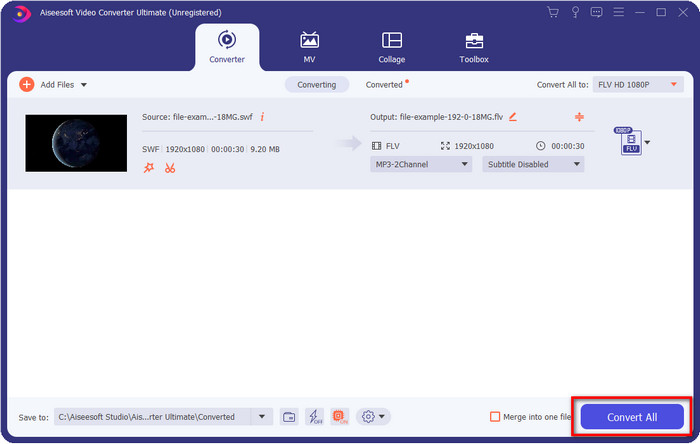
Βήμα 2. Μόλις εκτελείται στο σύστημά σας, κάντε κλικ στο Add Files για να ανεβάσετε τα αρχεία SWF που θέλετε να μετατρέψετε.
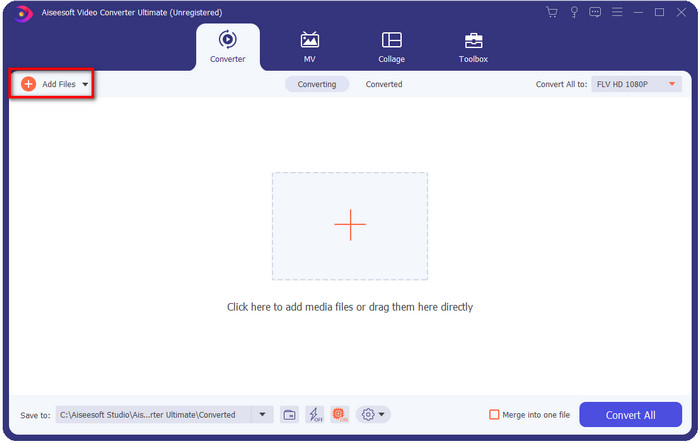
Βήμα 3. Κάντε κλικ στην επιλογή Convert All to και επιλέξτε τη μορφή FLV. Μπορείτε επίσης να επιλέξετε την ποιότητα για υψηλή ευκρίνεια ή να διατηρήσετε την αρχική έκδοση.

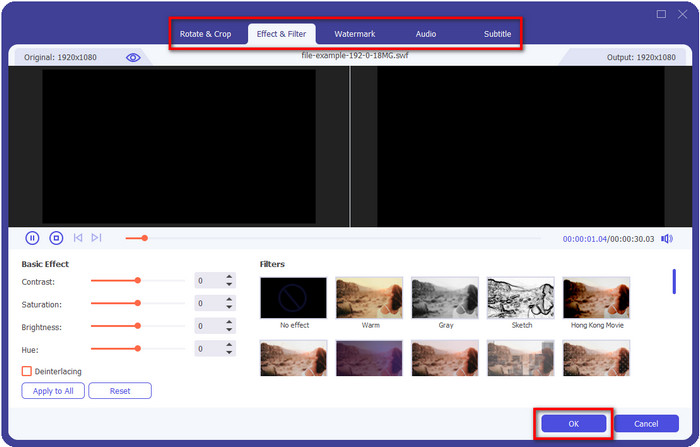
Αν θέλετε να βελτιώσετε ακόμη περισσότερο το τελικό βίντεο, κάντε κλικ στο κουμπί με το ραβδί. Θα σας οδηγήσει σε διάφορες επιλογές επεξεργασίας που μπορείτε να κάνετε, όπως Crop, Rotate, Add Effects, Subtitle, Audio, και Watermark. Για να αποθηκεύσετε τις αλλαγές που κάνατε, κάντε κλικ στο OK.
Βήμα 4. Κάντε κλικ στο Convert All και η διαδικασία θα ξεκινήσει. Θα χρειαστεί μόνο λίγο χρόνο για να μετατρέψετε SWF σε FLV· μετά τη μετατροπή, θα εμφανιστεί ένας φάκελος στην οθόνη σας με το αρχείο FLV.
Μέρος 5. Εκτεταμένη γνώση SWF και FLV
Το αρχείο ShockWave ή SWF είναι μορφή Adobe, αλλά το δημιούργησε η Macromedia. Είναι γνωστό για τη διατήρηση κινούμενων εικόνων και ήχων που βασίζονται σε διανύσματα που χρησιμοποιούνται στον Ιστό. Επιπλέον, επειδή είναι διανυσματική βάση, μπορείτε εύκολα να προσαρμόσετε την κλίμακα γραφικών ώστε να ταιριάζει ή να κάνετε μεγέθυνση. Εκτός από το διανυσματικό κινούμενο σχέδιο, το μέγεθος του αρχείου είναι τόσο μικρό για να φορτώνει το βίντεο πιο γρήγορα, παρόλο που έχετε αργή σύνδεση στο Διαδίκτυο. Ωστόσο, η μορφή δεν υποστηρίζεται εάν θέλετε να τα μοιραστείτε στις πλατφόρμες κοινής χρήσης βίντεο.
Αν και το FLV είναι επίσης υπό την Adobe, αυτή η μορφή είναι καλύτερη από το SWF. Το FLV ή το FlashVideo Format είναι η τυπική μορφή βίντεο στους περισσότερους ιστότοπους. Αυτή η μορφή μπορεί να περιέχει δύο διαφορετικούς κωδικοποιητές που προορίζονται για βίντεο και ήχο. Και ακριβώς όπως το αρχείο SWF, αυτή η μορφή είναι μικρή για να φορτώνει το αρχείο πιο γρήγορα στον Ιστό. Μόλις κάνετε λήψη του αρχείου FLV στη μονάδα δίσκου σας, μπορείτε να το παίξετε στη συσκευή αναπαραγωγής πολυμέσων, ακόμα κι αν δεν έχει ολοκληρωθεί ακόμα.
Θα βοηθούσε αν μετατρέψατε το SWF σε FLV επειδή το SWF έχει πολλές ατέλειες που μπορείτε να βρείτε στη μορφή FLV. Ειδικά αν το αρχείο βίντεο είναι μεγάλο, καθώς μόνο το .swf μπορεί να περιέχει περιορισμένο καρέ ανά δευτερόλεπτο, υπάρχει πιθανότητα να μην μπορείτε να το χρησιμοποιήσετε. Αλλά το FLV μπορεί να κρατήσει μεγάλα βίντεο με ευκολία. Επιπλέον, εάν θέλετε να εστιάσετε στην ποιότητα, το FLV έχει καλύτερη ποιότητα από το SWF.
Μέρος 6. Συχνές ερωτήσεις σχετικά με τη μετατροπή SWF σε FLV
Το αρχείο SWF υποστηρίζει τη διαφάνεια;
Όπως το PNG και το GIF, αυτή η μορφή υποστηρίζει επίσης κλίμακα του γκρι με αληθινά χρώματα ή εκχωρήστε ένα χρώμα για να γίνει διαφανές.
Πού μπορώ να παρακολουθήσω βίντεο SWF;
Προς το παρόν, δεν μπορείτε να παρακολουθήσετε αρχεία SWF στο προεπιλεγμένο πρόγραμμα αναπαραγωγής πολυμέσων σας, επειδή δεν υποστηρίζονται. Ωστόσο, μπορείτε να κάνετε κλικ σε αυτόν τον σύνδεσμο και να μάθετε περισσότερα για τους 4 καλύτερους SWF Media Player σε Windows ή Mac.
Μπορώ να αποθηκεύσω το .swf του τηλεφώνου μου;
Η αποθήκευση αρχείων SWF στο τηλέφωνό σας είναι δυνατή, αλλά η αναπαραγωγή του στην τοπική σας συσκευή αναπαραγωγής πολυμέσων δεν είναι δυνατή. Επειδή αυτή η μορφή δεν προορίζεται για συμβατότητα τηλεφώνου, αλλά για τον Ιστό. Επομένως, εάν κάνετε λήψη ενός αρχείου με αυτήν την επέκταση, τότε περιμένετε ότι δεν μπορείτε να το χρησιμοποιήσετε. Ωστόσο, μπορείτε να το μετατρέψετε σε μορφή αναπαραγωγής όπως MP4 στο τηλέφωνό σας.
συμπέρασμα
Αυτό το άρθρο αποκαλύπτει τα διαμαντάκια-μετατροπείς που μπορείτε να χρησιμοποιήσετε για να μετατρέψετε SWF σε FLV χωρίς να υποβαθμίζεται η ποιότητα του SWF. Καθώς συγκεντρώναμε όλους αυτούς τους μετατροπείς, διαπιστώσαμε ότι το FVC Video Converter Ultimate είναι το κρυφό διαμάντι που αναζητάτε γι’ αυτό το πρόβλημα. Προσφέρει το πιο εντυπωσιακό αποτέλεσμα και την ταχύτερη διαδικασία μετατροπής σε σύγκριση με όλα τα εργαλεία που αναφέρθηκαν. Και τώρα, πρέπει να επιλέξετε τον «θησαυρό» που θέλετε να χρησιμοποιήσετε για το πρόβλημα της μετατροπής σας, κατεβάζοντας ή αποκτώντας πρόσβαση στο εργαλείο μέσω του ιστού.
-
 Χρήσιμοι μετατροπείς DV σε FLV για μετατροπή DV σε FLV [2022]
 Αν ψάχνετε για τα καλύτερα και εύκολα εργαλεία για τη μετατροπή DV σε FLV, εδώ είναι το καλύτερο άρθρο για να διαβάσετε. Έχετε μια εξαιρετική εικόνα, ανατρέχοντας σε όλες τις πληροφορίες αυτού του άρθρου.
-
 Πώς να μετατρέψετε MPG σε FLV χωρίς απώλεια ποιότητας [Αποδεδειγμένη]
 Πρέπει να παρακολουθήσετε την αγαπημένη σας ταινία σε αυτό το πρόγραμμα αναπαραγωγής πολυμέσων, αλλά δεν υποστηρίζει MPG. Προσπαθήστε να μετατρέψετε το αρχείο MPG σε FLV χρησιμοποιώντας αυτούς τους μετατροπείς που παρουσιάζει αυτό το άρθρο.
-
 Μετατρέψτε το TRP σε FLV με τις ευκολότερες μεθόδους εκτός σύνδεσης και μέσω διαδικτύου
 Θέλετε να μετατρέψετε το αρχείο βίντεο TRP σε FLV γρήγορα και χωρίς καμία ταλαιπωρία; Διαβάστε αυτό το άρθρο για να σας παρέχουμε το καλύτερο λογισμικό και την καλύτερη ηλεκτρονική υπηρεσία που ταιριάζει καλύτερα στην κατάσταση.
