


 Video Converter Ultimate
 Εγγραφή οθόνης
 Επισκευή βίντεο
3 αποτελεσματικοί τρόποι για να μετατρέψετε το M4V σε MKV σε Mac/Windows/Linux χωρίς απώλεια ποιότητας
Πρέπει να γυρίσω τα βίντεο M4V που κατέβασα στο iTunes. Έχετε ιδέα πώς να μετατρέψω το M4V σε MKV σε Mac και αργότερα να το χρησιμοποιήσω στην τηλεόρασή μου;
Αυτό το πρόβλημα είναι πολύ διαδεδομένο, ειδικά στα βίντεο M4V που έχουν ληφθεί από το iTunes, επειδή αυτή η μορφή υπάγεται στην πολιτική Fair Play της Apple και είναι προστατευμένη. Επομένως, δεν μπορείτε να αναπαράγετε άμεσα τα βίντεο .m4v σε άλλες συσκευές χωρίς να τα μετατρέψετε. Αυτό το άρθρο θα παρουσιάσει πληροφορίες για τους μετατροπείς που μπορείτε να χρησιμοποιήσετε και να καταφέρετε να μετατρέψετε τη μορφή M4V. Χωρίς άλλη καθυστέρηση, ας αρχίσουμε να μαθαίνουμε την αποτελεσματική μέθοδο μετατροπής M4V σε MKV σε Mac ή Windows.

Μέρος 1. Μετατροπή iTunes M4V σε MKV σε Mac και Windows [Most Picked]
Υπάρχουν πολλοί δωρεάν μετατροπείς M4V σε MKV στην αγορά που μπορείτε να κατεβάσετε και ένας από αυτούς είναι το FVC Video Converter Ultimate. Ωστόσο, αυτό το απόλυτο εργαλείο προσφέρει πιο αποτελεσματική μετατροπή από τους άλλους μετατροπείς, χάρη στην αστραπιαία ταχύτητα μετατροπής, το απεριόριστο ανέβασμα αρχείων προς μετατροπή και το διαισθητικό περιβάλλον εργασίας. Εντυπωσιαστήκατε από τους απόλυτους μετατροπείς; Ή θέλετε να μάθετε περισσότερα για τον μετατροπέα; Σε αυτή την περίπτωση, παρακάτω βρίσκονται τα βασικά χαρακτηριστικά που θα δείτε αν αποκτήσετε αυτόν τον μετατροπέα.

FVC Video Converter Ultimate
2.999.368+ λήψεις- Μπορεί να μετατρέψει πολλαπλά iTunes M4V σε MKV ή σε 200+ μορφές πολυμέσων όπως MOV, AVI, MP4 κ.λπ.
- Με την εξαιρετικά γρήγορη μετατροπή, η διαδικασία μετατροπής του M4V σας στη στιγμή
- Προηγμένες λειτουργίες επεξεργασίας είναι διαθέσιμες για να κάνουν το βίντεό σας ακόμα καλύτερο.
- Ορίστε εκπληκτικές λειτουργίες για συμπίεση, αλλαγή μεγέθους, δημιουργία GIF κ.λπ., κάτω από την Εργαλειοθήκη.
Δωρεάν ΛήψηΓια Windows 7 ή νεότεραΑσφαλής λήψη
Δωρεάν ΛήψηΓια MacOS 10.7 ή νεότεροΑσφαλής λήψη
Δεν είναι εκπληκτικό πώς μπορούν να βρίσκονται όλες αυτές οι δυνατότητες σε ένα εργαλείο; Ας μην χάνουμε άλλο χρόνο και ας προσδιορίσουμε πώς αυτό το εργαλείο μετατρέπει αποτελεσματικά το iTunes M4V σας σε MKV ακολουθώντας τα παρακάτω βήματα.
Βήμα 1. Αρχικά, κατεβάστε τον απόλυτο μετατροπέα στον δίσκο σας κάνοντας κλικ στο κουμπί λήψης παρακάτω. Επιλέξτε την πλατφόρμα που χρησιμοποιείτε αυτή τη στιγμή, ακολουθήστε τη διαδικασία εγκατάστασης και πατήστε Start Now για να προχωρήσετε. Θυμηθείτε, θα χρειαστεί να εξοικειωθείτε καλύτερα με το περιβάλλον εργασίας του εργαλείου για να αποφύγετε δυσκολίες.
Δωρεάν ΛήψηΓια Windows 7 ή νεότεραΑσφαλής λήψη
Δωρεάν ΛήψηΓια MacOS 10.7 ή νεότεροΑσφαλής λήψη
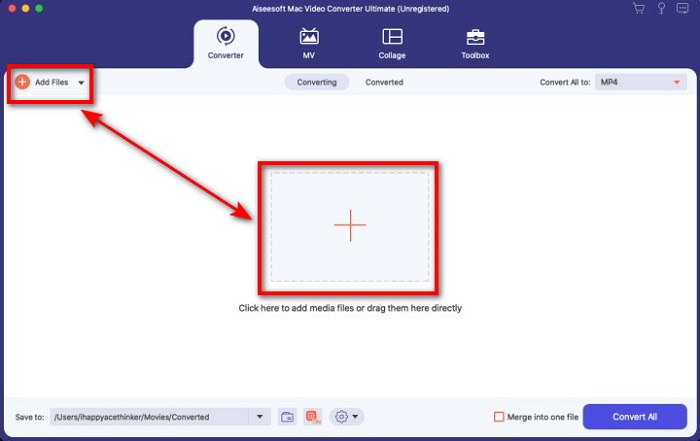
Βήμα 2. Ανεβάστε το αρχείο M4V στο περιβάλλον εργασίας κάνοντας κλικ στο Add Files ή στο κουμπί +. Στη συνέχεια, ένας φάκελος του υπολογιστή θα ανοίξει στην οθόνη σας, περιηγηθείτε στο αρχείο .m4v και πατήστε Open.
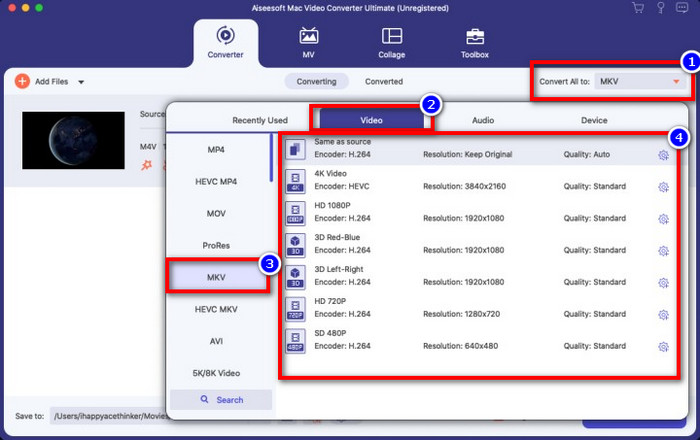
Βήμα 3. Επιλέξτε τη μορφή MKV κάτω από το Convert All to και κάντε κλικ σε αυτήν.
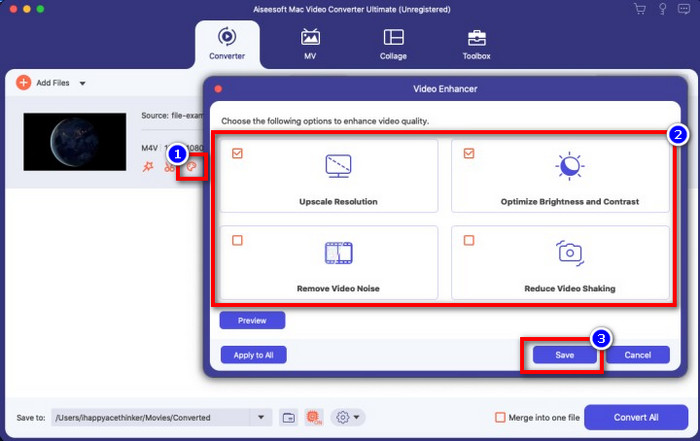
Προαιρετικό. Η αποτελεσματικότητα μέχρι στιγμής είναι, χωρίς αμφιβολία, εξαιρετική. Αλλά γνωρίζατε ότι αυτό το εργαλείο προσφέρει επίσης βελτιωτές βίντεο; Αν κάνετε κλικ στην επιλογή enhance video, θα εμφανιστεί ένα παράθυρο διαλόγου· επιλέξτε το κουτί που αντιστοιχεί στο στοιχείο του βίντεο που θέλετε να βελτιώσετε και για να το εφαρμόσετε κάντε κλικ στο Save.
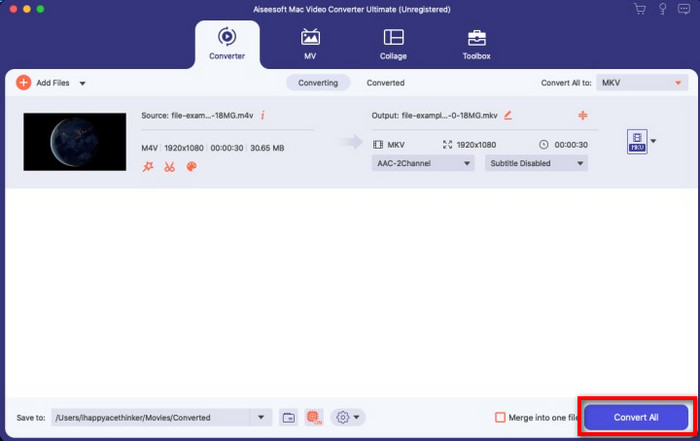
Βήμα 4. Κάνοντας κλικ στο κουμπί Convert All, η μετατροπή θα ξεκινήσει μέσα σε σύντομο χρονικό διάστημα. Έτοιμο· έτσι, η κατάληξη αρχείου του βίντεό σας είναι πλέον .mkv.
Μέρος 2. Μετατροπή M4V σε MKV Online
Δεν θέλετε να πληρώσετε για να μετατρέψετε αρχεία M4V και προτιμάτε να μετατρέψετε M4V σε MKV online; Αν ναι, το FVC Free Video Converter Online είναι ένας online μετατροπέας που εγγυάται την αποδοτικότητα της διαδικασίας μετατροπής ακόμα και στο διαδίκτυο. Ο μετατροπέας μπορεί να ολοκληρώσει τη δουλειά χωρίς να αγοράσετε το ίδιο το λογισμικό ή ακόμη και να το κατεβάσετε. Επίσης, δεν υπάρχουν διαφημίσεις ούτε απαιτείται εγγραφή για να τον χρησιμοποιήσετε. Παρόλο που ο μετατροπέας είναι δωρεάν, τα χαρακτηριστικά που παρουσιάζονται εδώ εστιάζουν αποκλειστικά στη μετατροπή. Σε αντίθεση με το απόλυτο εργαλείο, το οποίο παρέχει ευρείας κλίμακας και εντυπωσιακές δυνατότητες. Επιπλέον, αν χρειαστεί να μετατρέψετε τα αρχεία M4V online, χρησιμοποιήστε αυτόν τον μετατροπέα και αντιγράψτε τα παρακάτω βήματα.
Βήμα 1. Κάντε κλικ σε αυτόν τον σύνδεσμο για να ανοίξετε το FVC Free Video Converter Online.
Βήμα 2. Πατήστε την επιλογή Add Files to Convert για να εκκινήσετε και να ανεβάσετε το αρχείο M4V που χρειάζεται να μετατρέψετε.
Κατεβάστε την έκδοση για υπολογιστή για μαζική μετατροπή αρχείων.
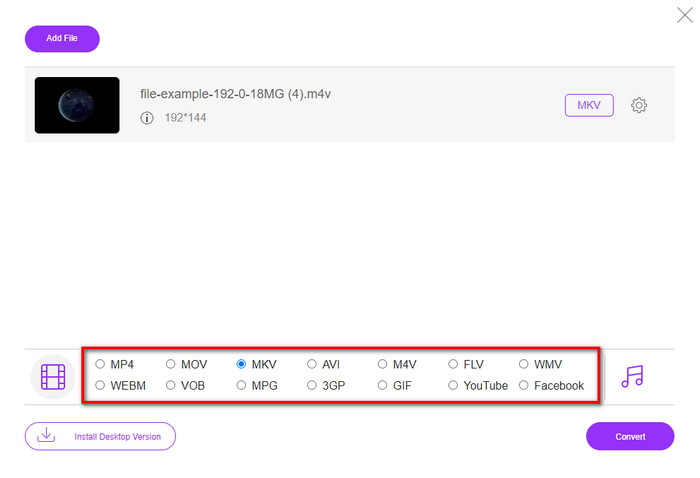
Βήμα 3. Επιλέξτε τη μορφή MKV από κάτω ή άλλη μορφή που θέλετε να έχετε.
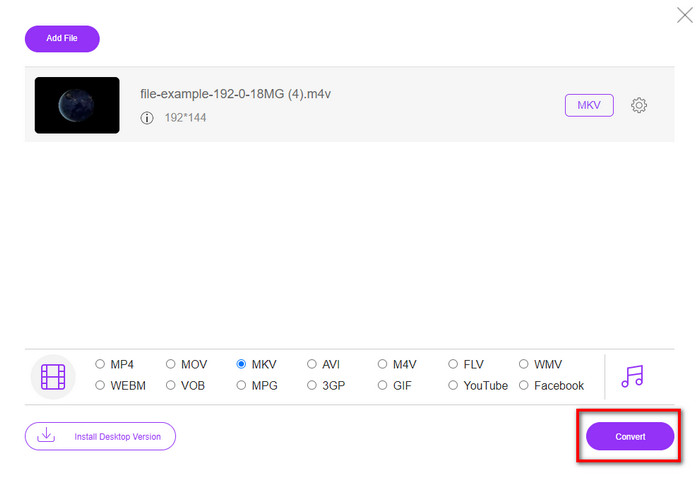
Βήμα 4. Πατήστε Convert για να ξεκινήσει η διαδικασία.
Μέρος 3. Μετατρέψτε το M4V σε MKV δωρεάν
Το Handbrake προσφέρει μια γρήγορη και αποτελεσματική διαδικασία μετατροπής, όπως και ο άλλος μετατροπέας που παρουσιάστηκε εδώ. Ωστόσο, οι μορφές που υποστηρίζει αυτό το εργαλείο είναι περιορισμένες, πράγμα που σημαίνει ότι έχετε λιγότερες επιλογές σχετικά με τη μορφή που θέλετε να επιλέξετε. Αν όμως θέλετε να χρησιμοποιήσετε και να μετατρέψετε M4V σε MKV στο Handbrake, ακολουθήστε τα παρακάτω βήματα.
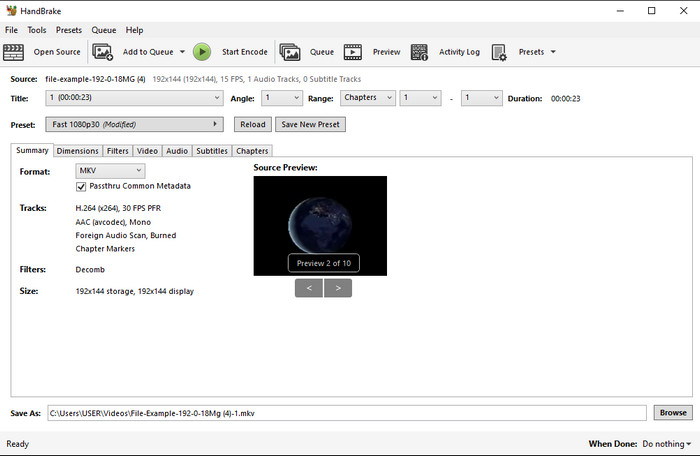
Βήμα 1. Κατεβάστε το Handbrake στην επιφάνεια εργασίας σας. Ανεβάστε το αρχείο .m4v με drag and drop στο περιβάλλον εργασίας. Μπορείτε επίσης να κάνετε κλικ στο File, να εντοπίσετε το αρχείο στον φάκελο του υπολογιστή και να πατήσετε Open.
Βήμα 2. Κάντε κλικ στο Format και επιλέξτε MKV.
Βήμα 3. Κάντε κλικ στο Start Encode για να ξεκινήσει η διαδικασία μετατροπής.
Μέρος 4. Ποιες είναι οι ομοιότητες και οι διαφορές μεταξύ M4V και MKV
Πριν συγκρίνουμε το M4V και το MKV, ας καταλάβουμε τις ομοιότητες μεταξύ αυτών των δύο μορφών. Τα M4V και MKV είναι και τα δύο δοχεία για περιεχόμενο και στοιχεία πολυμέσων. Επίσης, αυτές οι δύο μορφές είναι γνωστό ότι αποθηκεύουν μία από τις καλύτερες ποιότητες βίντεο, όπως βίντεο HD ή 4k. Και είναι επίσης μεγάλα για να περιέχουν στοιχεία όπως μεταδεδομένα. Επιπλέον, οι επόμενες λεπτομέρειες παρακάτω είναι η διαφορά μεταξύ των δύο μορφών.
Το M4V είναι πολύ παρόμοιο με τη μορφή MP4. Ωστόσο, αυτή η μορφή είναι υπό προστασία αντιγραφής DRM που σημαίνει ότι δεν μπορείτε να τη χρησιμοποιήσετε ελεύθερα. Ωστόσο, δεν έχουν όλα τα αρχεία M4V προστασία Apple επειδή ορισμένα από τα M4V με δυνατότητα λήψης διαθέτουν μη εξουσιοδοτημένη άδεια χρήσης, επομένως βεβαιωθείτε ότι έχετε κατεβάσει το αρχείο .m4v στο iTunes για να αποφύγετε τον κακόβουλο ιό που θα μολύνει το σύστημά σας. Αν και η μορφή έχει έναν περιορισμό, μπορείτε να χρησιμοποιήσετε αυτήν τη μορφή σε πολλές συσκευές αναπαραγωγής πολυμέσων για να παρακολουθήσετε το βίντεο που κατεβάζετε στο iTunes. Επιπλέον, εάν χρειάζεστε ένα προστατευμένο σχέδιο σε Mac, αυτή η μορφή είναι η καλύτερη επιλογή.
Αντίθετα, το MKV είναι συγκεκριμένο για να περιέχει πολλαπλό περιεχόμενο πολυμέσων και στοιχεία σε ένα αρχείο. Αυτή η δυνατότητα είναι διαθέσιμη μόνο στο MKV, καθώς αυτή η μορφή είναι δωρεάν στη χρήση και είναι πιο ευέλικτη από το M4V. Επιπλέον, υπάρχουν πολλοί λόγοι για να αλλάξετε το M4V σε MKV σε Mac ή Windows, και ένας από αυτούς είναι να κάνετε το αρχείο βίντεο απεριόριστο.
M4V εναντίον MKV
Το M4V έχει αναπτυχθεί από την Apple, η οποία χρησιμοποιεί επίσης MPEG 4. Τα αρχεία M4V χρησιμοποιούνται συχνά για την αποθήκευση των βίντεο που έχουν ληφθεί από το Apple iTunes store, όπως μουσικά βίντεο, τηλεοπτικά επεισόδια κ.λπ. Μπορεί να βρείτε ορισμένα αρχεία M4V με προστασία αντιγραφής, καθώς χρησιμοποιεί Προστασία πνευματικών δικαιωμάτων FairPlay DRM της Apple.
Η μορφή κοντέινερ πολυμέσων Matroska, που κυκλοφόρησε το 2002, είναι μια μορφή ανοιχτού κώδικα που μπορεί να περιλαμβάνει έναν αριθμό κομματιών βίντεο, ήχου, εικόνας και υπότιτλων. Έτσι, μπορείτε να το χρησιμοποιήσετε για να αποθηκεύετε εύκολα σύντομα βίντεο κλιπ, τηλεοπτικές εκπομπές και ταινίες. Είναι αρκετά δημοφιλές για την υπογραφή των θαυμαστών anime.
Μέρος 5. Συχνές ερωτήσεις σχετικά με τη μετατροπή M4V σε MKV
Τι είναι καλύτερο για επεξεργασία, M4V ή MOV;
Οι δύο προαναφερόμενες μορφές είναι από τις μορφές της Apple, οπότε θα παρατηρήσετε ότι δεν υπάρχει σημαντική διαφορά μεταξύ M4V και MOV. Ωστόσο, το MOV είναι πολύ καλύτερο για επεξεργασία, επειδή αυτή η μορφή συχνά περιέχει μια σειρά από αναπαραγωγές βίντεο, γεγονός που την καθιστά την καλύτερη επιλογή για επαγγελματικό μοντάζ. Ίσως σκέφτεστε ότι πρέπει να κάνετε το M4V σας MOV για λόγους επεξεργασίας. Αν ναι, κάντε κλικ σε αυτόν τον σύνδεσμο για να μάθετε περισσότερα σχετικά με τη μετατροπή M4V σε MOV με μια ολοκληρωμένη κατανόηση του θέματος.
Τα M4V και MP4 είναι ίδια;
Τα M4V και MP4 είναι πανομοιότυπα ως προς τη δομή και την ποιότητα του βίντεο. Ωστόσο, λόγω της προστασίας του Apple Plays, το M4V διαθέτει ένα μικρό εύρος υποστήριξης και δεν μπορείτε απλώς να αναπαράγετε ένα βίντεο ή να επεξεργαστείτε στην επέκταση .m4v.
Ποιες είναι οι συσκευές αναπαραγωγής πολυμέσων που υποστηρίζουν M4V;
Δεν υποστηρίζουν πολλοί media players αυτού του τύπου τη μορφή, λόγω της προστασίας DRM. Άρα αν αναζητάτε έναν player για MKV, θα ξοδέψετε πολύ χρόνο δοκιμάζοντάς τους, κάτι που καταναλώνει πολύ χρόνο. Αν όμως διαβάσετε αυτό το άρθρο, μπορείτε να κατεβάσετε ή να χρησιμοποιήσετε τους 5 κορυφαίους media players για MKV που είναι διαθέσιμοι σε όλες τις πλατφόρμες.
συμπέρασμα
Τα τρία εργαλεία που παρουσιάζονται σε αυτό το άρθρο θα σας προσφέρουν σίγουρα την αποτελεσματική μετατροπή που θέλετε, ακολουθώντας τα βήματα. Αν και οι μετατροπείς έχουν πολλά κοινά, έχουν και πολλές διαφορές μεταξύ τους. Αν διαβάσετε τις λεπτομέρειες που παρουσιάσαμε παραπάνω, θα μάθετε πολλά για τα τρία εργαλεία. Αν θέλετε να έχετε μια εξαιρετική μετατροπή με μία κίνηση και να διατηρήσετε παράλληλα την αποδοτικότητα της διαδικασίας, θα προτείναμε το FVC Video Converter Ultimate. Ακούγεται απίστευτο; Πράγματι είναι, οπότε κατεβάστε το στην επιφάνεια εργασίας σας για να το δοκιμάσετε μόνοι σας.
-
 Μετατροπέας M4V σε MP3 - 4 καλύτερες μέθοδοι εξαγωγής MP3 από αρχεία M4V
 Όταν θέλετε να εξαγάγετε τον ήχο MP3 από βίντεο M4V με ευκολία, μπορείτε να μάθετε περισσότερα σχετικά με τους 4 καλύτερους μετατροπείς M4V σε MP3 για να λάβετε τα επιθυμητά αρχεία ήχου από το άρθρο.
-
 [Οδηγός] Πώς να μετατρέψετε βίντεο M4V σε κινούμενα GIF σε Windows/Mac
 Εάν θέλετε να δημιουργήσετε κινούμενα αρχεία GIF από τα αγαπημένα σας βίντεο M4V, μπορείτε να μάθετε για 2 εύκολους και αποτελεσματικούς τρόπους μετατροπής βίντεο M4V σε GIF με προσαρμοσμένες ρυθμίσεις.
-
 3 Πρόγραμμα μετατροπέα βίντεο που χρησιμοποιείται για τη μετατροπή του iTunes M4V σε AVI σε Mac
 Δεν έχετε ιδέα πώς να μετατρέψετε το MKV σε μορφή AVI; Καθώς συνεχίζουμε να διαβάζουμε αυτό το άρθρο, θα γνωρίζουμε τα 3 εργαλεία που μπορούν να σας βοηθήσουν να μετατρέψετε αυτήν τη μορφή αρχείου.

