


 Video Converter Ultimate
 Εγγραφή οθόνης
 Επισκευή βίντεο
 Μετατρέψτε το MOD σε οποιαδήποτε μορφή όπως MP4, MOV, AVI, MP3 κ.λπ.
7 δωρεάν μετατροπείς MOD διαθέσιμοι στην πλατφόρμα σας για να μετατρέψετε εύκολα τη μορφή MOD
Χρειάζεται να αλλάξετε το αρχείο MOD σας; Αν ισχύει αυτό, δεν χρειάζεται πια να ανησυχείτε και να παιδεύεστε δοκιμάζοντας διαφορετικούς μετατροπείς. Μην αγχώνεστε, γιατί σήμερα σας καλύπτουμε πλήρως. Αμέσως θα σας δώσουμε τους καλύτερους τρόπους για να μετατρέψετε MOD σε MP4, MOV, MPEG2, DVD ή σε οποιαδήποτε μορφή βίντεο θέλετε, με βήματα που θα σας βοηθήσουν να τα ακολουθήσετε.

Μέρος 1. Κορυφαίοι 7 δωρεάν μετατροπείς MOD για μετατροπή αρχείων MOD σε απευθείας σύνδεση και εκτός σύνδεσης
1. FVC Video Converter Ultimate – Καλύτερος μετατροπέας MOD σε Windows & Mac
Πρώτο στη λίστα μας είναι ο πιο δημοφιλής μετατροπέας MOD που είναι διαθέσιμος σε όλες τις πλατφόρμες, το FVC Video Converter Ultimate. Αυτός ο μετατροπέας προσφέρει εξαιρετικά επιταχυνόμενη διαδικασία μετατροπής στους χρήστες του και, όπως πάντα, δεν τους απογοητεύει. Παρόλο που η μετατροπή με το εργαλείο είναι γρήγορη, η ποιότητα δεν αλλάζει, επειδή προστατεύεται κατά την αλλαγή μορφής.
Τι περισσότερο από τη διαδικασία της αστραπιαίας ταχύτητας; Υποστηρίζει επίσης τις μαζικές μορφές που μπορείτε να εισαγάγετε ή να εξαγάγετε, όπως MOD, MP4, MOV, MKV, FLV, WMV και πολλά άλλα. Λόγω της υποστηριζόμενης μορφής, οι πελάτες λάτρεψαν το εργαλείο και πολλοί από αυτούς το συνιστούν σε άλλους συναδέλφους χρήστες που πρέπει να μετατρέψουν τη μορφή τους. Επομένως, εάν χρειάζεστε βοήθεια για να μετατρέψετε το MOD σε MP4 ή σε όποια μορφή βίντεο θέλετε, αυτό το εργαλείο είναι μια εξαιρετική βοήθεια ακολουθώντας τα παρακάτω βήματα.
Βήμα 1. Για να κατεβάσετε τον μετατροπέα στην επιφάνεια εργασίας, κάντε κλικ στο κουμπί λήψης παρακάτω και επιλέξτε σε ποια πλατφόρμα βρίσκεστε. Στη συνέχεια, ακολουθήστε γρήγορα τη διαδικασία εγκατάστασης και εκτελέστε το λογισμικό. Αν είστε καινούργιοι στις μετατροπές, μην φοβάστε, γιατί τα βήματα που παρέχονται εδώ θα σας εξασφαλίσουν ότι θα μετατρέψετε σωστά το αρχείο MOD.
Δωρεάν ΛήψηΓια Windows 7 ή νεότεραΑσφαλής λήψη
Δωρεάν ΛήψηΓια MacOS 10.7 ή νεότεροΑσφαλής λήψη
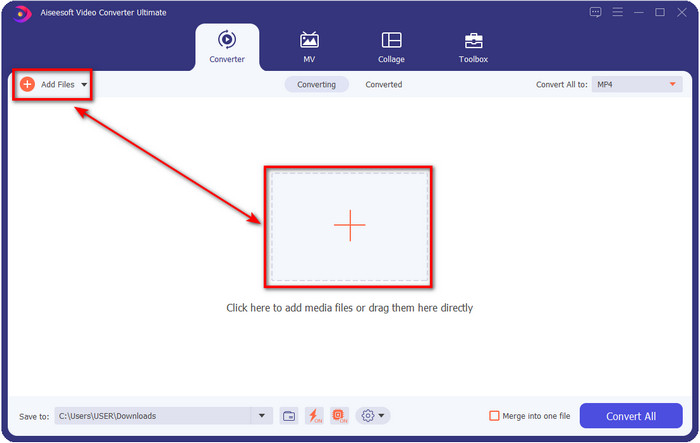
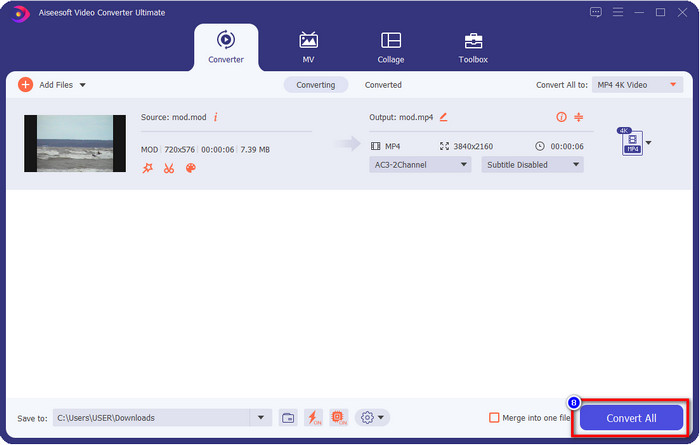
Βήμα 2. Ανεβάστε το αρχείο MOD κάνοντας κλικ στο Add Files ή πατώντας το μεγάλο κουμπί + στο κέντρο της διεπαφής. Μετά από αυτό, ένας φάκελος του υπολογιστή θα εμφανιστεί στην οθόνη σας· αυτή τη φορά εντοπίστε και κάντε κλικ στο αρχείο MOD και πατήστε Open για να προχωρήσετε στο επόμενο βήμα.
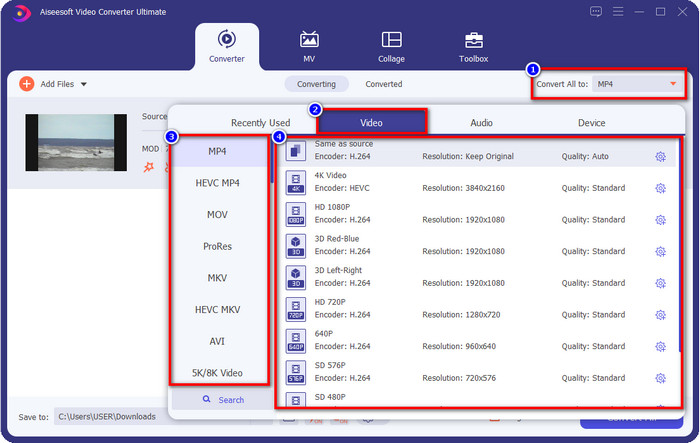
Βήμα 3. Για να αλλάξετε τη μορφή σε MP4, MOV, MKV ή σε οποιαδήποτε άλλη μορφή χρειάζεστε, πατήστε το Convert All to και επιλέξτε.
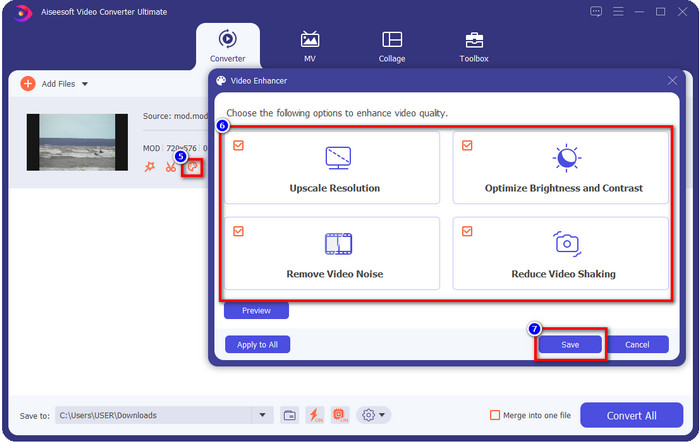
Προαιρετικό. Ένα από τα φανταστικά χαρακτηριστικά που παρέχει αυτό το εργαλείο είναι το enhancer. Αν κάνετε κλικ στο paint tray, θα εμφανιστεί μια νέα μικρή διεπαφή· τώρα μπορείτε να κάνετε σημαντικές ρυθμίσεις στο βίντεό σας τσεκάροντας τα κουτιά. Κάντε κλικ στο Save για να εφαρμόσετε τις αλλαγές που κάνατε στο MOD βίντεό σας.
Βήμα 4. Αφού ολοκληρώσετε όλες τις διαδικασίες, ήρθε η ώρα να μετατρέψετε το MOD κάνοντας κλικ στο Convert All. Τόσο απλά όσο 1-2-3, μόλις μάθατε να μετατρέπετε τη μορφή MOD σε μια νέα μορφή.
Πλεονεκτήματα
- Μετατρέψτε το MOD σε MP4, MOV, MKV, FLV, AVI ή σε μορφή 200+ που είναι διαθέσιμη αποτελεσματικά.
- Οι προηγμένες δυνατότητες επεξεργασίας περιλαμβάνουν περικοπή, κοπή, περικοπή και άλλα.
- Είναι ασφαλές και χωρίς κακόβουλο λογισμικό για λήψη.
- Διαθέσιμο για λήψη σε όλες τις πλατφόρμες επιτραπέζιων υπολογιστών όπως Windows και Mac.
Μειονεκτήματα
- Για να επωφεληθείτε από όλες τις προηγμένες δυνατότητες, θα χρειαστεί να αγοράσετε το εργαλείο.
2. Δωρεάν μετατροπέας TOD iMovieSoft
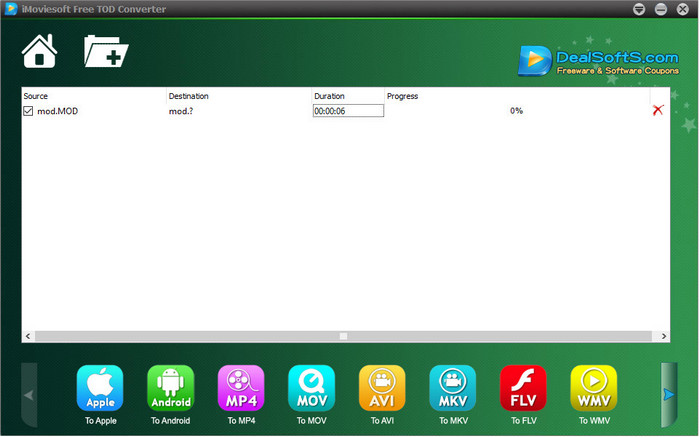
Ένας ακόμη μετατροπέας που μπορείτε να κατεβάσετε στην επιφάνεια εργασίας είναι το iMoiveSoft Free TOD Converter. Με αυτό μπορείτε εύκολα να μετατρέψετε τη μορφή MOD στις διαθέσιμες μορφές. Ωστόσο, οι μορφές που υποστηρίζει αυτό το εργαλείο δεν είναι πολλές, αλλά οι πιο γνωστές είναι διαθέσιμες. Επιπλέον, η κύρια ιστοσελίδα του εργαλείου δεν έχει ασφαλή σύνδεση· παρότι εμφανίζεται προειδοποίηση, το κατεβάσαμε στο σύστημά μας για να μπορέσουμε να σας δώσουμε βήματα για να μετατρέψετε αρχεία MOD σε MOV, MP4, AVI κ.λπ.
Βήμα 1. Κατεβάστε τον μετατροπέα στην επιφάνεια εργασίας και ανοίξτε τον.
Βήμα 2. Κάντε κλικ στο Folder και αναζητήστε τα αρχεία MOD για να τα εισαγάγετε.
Βήμα 3. Πατήστε τη μορφή στο κάτω μέρος και μετά το Convert.
Πλεονεκτήματα
- Είναι δωρεάν για λήψη σε Windows και Mac.
- Εύχρηστος.
- Διατίθενται βασικές λειτουργίες επεξεργασίας.
Μειονεκτήματα
- Ο κύριος ιστότοπος δεν είναι ασφαλής σύνδεση.
- Έχει μια επιλογή μορφής που μπορείτε να επιλέξετε.
- Η διεπαφή χρήστη χρειάζεται βελτίωση.
3. Μετατροπέας iOrgSoft
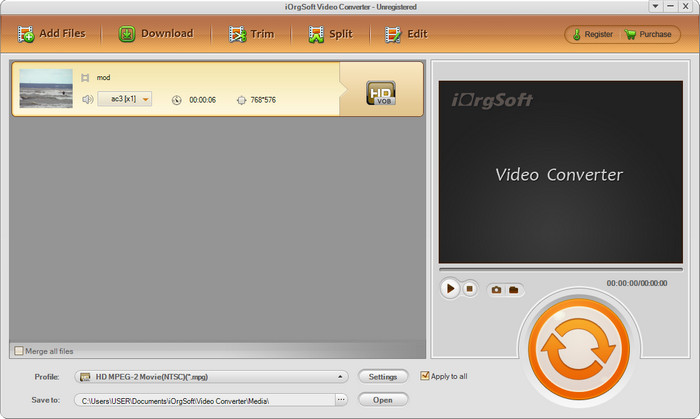
Το iOrgSoft Converter είναι μια επιλογή αν χρειάζεται να μετατρέψετε MOD σε MPEG2 εύκολα. Η κύρια ιστοσελίδα αυτού του μετατροπέα επίσης έχει μη προστατευμένη σύνδεση, όπως και το iMovieSoft. Μπορείτε επίσης να χρησιμοποιήσετε έναν εξωτερικό σύνδεσμο για να κατεβάσετε το βίντεο εδώ. Αν και το εργαλείο προσφέρει κάποιες επιλογές, η διεπαφή χρήστη του έχει χαμηλότερη προτεραιότητα, πράγμα που σημαίνει ότι δεν θα πρέπει να περιμένετε ιδιαίτερα καλαίσθητο UI. Επίσης, συμβαίνουν κρασαρίσματα και σφάλματα τη στιγμή που πάτε να κάνετε τη μετατροπή.
Βήμα 1. Αναζητήστε την κύρια ιστοσελίδα του μετατροπέα και κατεβάστε τον από εκεί.
Βήμα 2. Ανοίξτε τον μετατροπέα, κάντε κλικ στο Add Files για να εισαγάγετε αρχεία MOD, κάντε κλικ στο format tray και επιλέξτε τη μορφή που θέλετε.
Βήμα 3. Πατήστε το κουμπί convert για να ξεκινήσει η μετατροπή.
Πλεονεκτήματα
- Υποστηρίζει περισσότερες μορφές από το iMovieSoft.
- Απλό στη χρήση και εύκολο στην κατανόηση.
- Κατεβάστε το σε Windows και Mac.
Μειονεκτήματα
- Μη ασφαλής σύνδεση με τον κύριο ιστότοπο του.
- Η διεπαφή των χρηστών είναι τρομερή.
4. FFmpeg
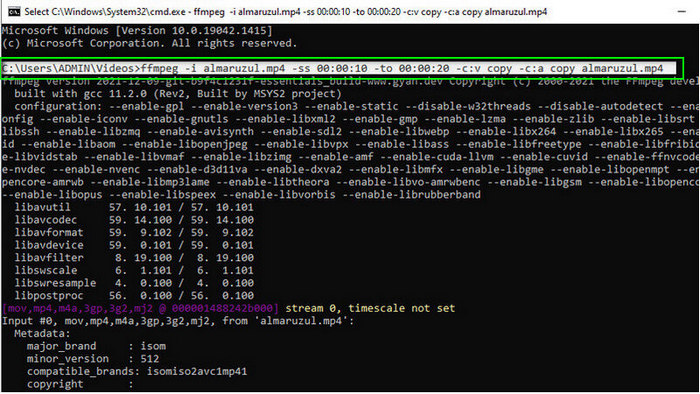
Αν χρειάζεστε έναν δωρεάν μετατροπέα MOD σε MOV, τότε το FFmpeg είναι εδώ για να σας βοηθήσει. Σε αντίθεση με άλλους μετατροπείς αυτής της λίστας, χρησιμοποιεί διεπαφή γραμμής εντολών (CLI) ώστε να επικοινωνείτε με το εργαλείο μέσω κειμένου. Παρόλο που δεν μας είναι τόσο οικείο, κάποιοι χρήστες εξακολουθούν να το χρησιμοποιούν ως μετατροπέα τους. Αν λοιπόν ο μετατροπέας κέντρισε το ενδιαφέρον σας, ακολουθήστε τα βήματα παρακάτω.
Βήμα 1. Κατεβάστε το FFmpeg και εκτελέστε το αρχείο exe.
Βήμα 2. Ανοίξτε το CMD· τώρα μπορείτε να επικοινωνήσετε με το εργαλείο μέσα από αυτό.
Βήμα 3. Βρείτε τη θέση του αρχείου χρησιμοποιώντας τη γραμμή εντολών. Έπειτα αντιγράψτε και επικολλήστε αυτό το κείμενο, ffmpeg -i input.mod -vn -ar 44100 -ac 2 -b:a 192k output.mp4 για MP4. Μπορείτε επίσης να αλλάξετε τη μορφή σε MOV, MKV, AVI και άλλες. Για να ξεκινήσει η διαδικασία, πατήστε Enter στο πληκτρολόγιό σας.
Πλεονεκτήματα
- Μοναδικός μετατροπέας βίντεο διαθέσιμος στις περισσότερες πλατφόρμες.
- Ασφαλές στη χρήση.
- Είναι αξιόπιστο στη μετατροπή της μορφής σας.
Μειονεκτήματα
- Δεν είναι πολύ εύκολο στη χρήση.
- Δεν είναι η καλύτερη επιλογή για αρχάριους ή αρχάριους να μετατρέψουν μορφή.
5. CloudConvert
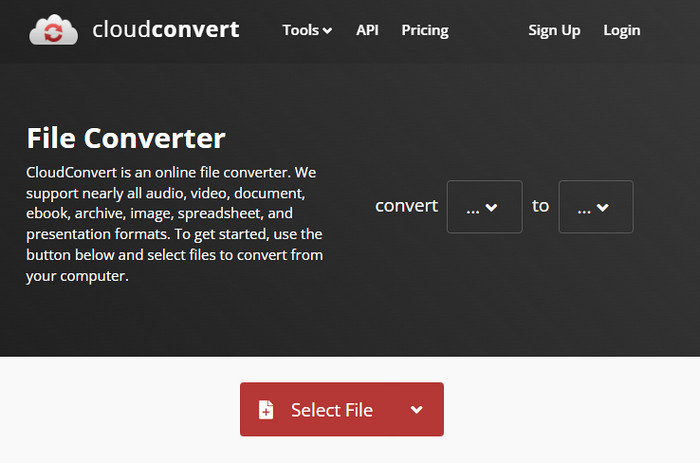
Δεν θέλετε να κατεβάσετε μετατροπέα στην επιφάνεια εργασίας; Αν ναι, μπορείτε ακόμη να μετατρέψετε μορφή MOD με το CloudConvert online. Αυτό το διαδικτυακό εργαλείο προσφέρει μια απλή αλλά αποτελεσματική διαδικασία μετατροπής στους χρήστες του. Υποστηρίζει επίσης τη μετατροπή και άλλων τύπων αρχείων, όπως PDF, αρχεία Archive, ηλεκτρονικά βιβλία και άλλα, σε νέα μορφή.
Βήμα 1. Αναζητήστε το CloudConvert στο αγαπημένο σας πρόγραμμα περιήγησης.
Βήμα 2. Κάντε κλικ στο Select File και ανεβάστε το αρχείο MOD. Πατήστε το κουμπί drop-down και επιλέξτε την ιδανική μορφή. Έπειτα κάντε κλικ στο Convert.
Βήμα 3. Μετά το ανέβασμα, κάντε κλικ στο Download για να αποθηκεύσετε τη νέα μορφή αρχείου στον δίσκο σας.
Πλεονεκτήματα
- Δεν απαιτείται λήψη του εργαλείου.
- Δωρεάν διαδικτυακό εργαλείο web.
- Φιλικό προς το χρήστη.
Μειονεκτήματα
- Εξαρτάται από το δίκτυο.
- Η πορεία της διαδικασίας θα εξαρτηθεί από την ταχύτητα του διαδικτύου σας.
6. Μετατροπέας365
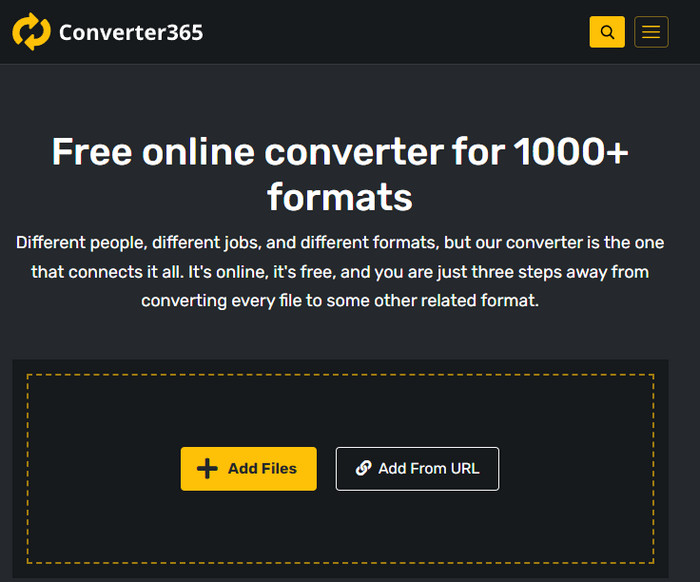
Ένας ακόμη δωρεάν online μετατροπέας MOD σε MP4 που μπορείτε να χρησιμοποιήσετε είναι το Converter365. Είναι ένα από τα διαδικτυακά εργαλεία που θα λέγαμε ότι έχει κομψή διεπαφή. Εξαιτίας αυτού, η χρήση του εργαλείου φαίνεται επαγγελματική· ωστόσο, αντιμετωπίσαμε προβλήματα κατά τη μετατροπή αρχείων βίντεο εδώ, επειδή κρασάρει. Παρ’ όλα αυτά, αν χρειάζεστε να μετατρέψετε το αρχείο MOD σας εύκολα, αυτό μπορεί να σας βοηθήσει.
Βήμα 1. Ανοίξτε το πρόγραμμα περιήγησής σας και αναζητήστε το Converter365.
Βήμα 2. Τσεκάρετε το Add Files, έπειτα βρείτε το αρχείο .mod. Μόλις βρείτε το αρχείο, επιλέξτε τη μορφή κάνοντας κλικ στο κουμπί drop-down.
Βήμα 3. Πατήστε Start Conversion και η μετατροπή θα ξεκινήσει.
Πλεονεκτήματα
- Ο μετατροπέας είναι προσβάσιμος μέσω του διαδικτύου.
- Παρέχει μια απλή αλλά αποτελεσματική μετατροπή.
- Η διεπαφή χρήστη φαίνεται επαγγελματική.
Μειονεκτήματα
- Χρειάζεται σύνδεση στο Διαδίκτυο για χρήση.
- Μερικές φορές συμβαίνουν σφάλματα κατά τη μετατροπή της μορφής.
7. Ζαμζάρ
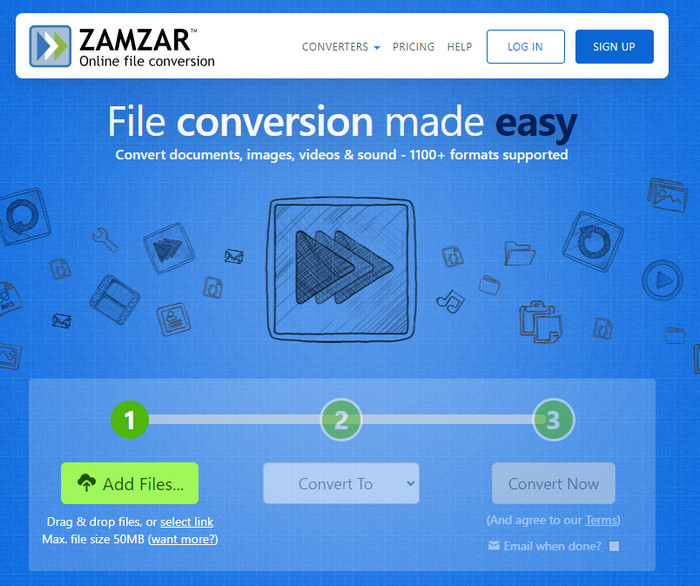
Αν χρειάζεστε έναν εύκολο και πρακτικό online μετατροπέα MOD, τότε το Zamzar είναι βοήθεια. Αυτό το εργαλείο προσφέρει μια σαφή και άμεση διαδικασία μετατροπής των αρχείων .mod σας. Επιπλέον, είναι αναμφίβολα ένας από τους πιο ασφαλείς μετατροπείς που είναι διαθέσιμοι στο διαδίκτυο. Αν λοιπόν θέλετε να δοκιμάσετε αυτό το εργαλείο, μπορείτε να ακολουθήσετε τα βήματα παρακάτω.
Βήμα 1. Αποκτήστε πρόσβαση στο Zamzar αναζητώντας το στο αγαπημένο σας πρόγραμμα περιήγησης.
Βήμα 2. Πατήστε Add File για να εισαγάγετε το αρχείο MOD που χρειάζεται να μετατρέψετε. Κάντε κλικ στο Convert To και επιλέξτε τη μορφή που χρειάζεστε.
Βήμα 3. Κάντε κλικ στο Convert Now και περιμένετε τη διαδικασία. Έπειτα, πατήστε Download για να το αποθηκεύσετε στον δίσκο του υπολογιστή σας.
Πλεονεκτήματα
- Μία από τις καλύτερες επιλογές εάν θέλετε να μετατρέψετε μια μορφή.
- Παρέχει μια απλή διαδικασία μετατροπής.
- Διαθέσιμο σε όλα τα προγράμματα περιήγησης ιστού.
Μειονεκτήματα
- Εξαρτάται από το Διαδίκτυο, χωρίς Διαδίκτυο δεν μπορείτε να το χρησιμοποιήσετε.
- Υποστηρίζει λιγότερες επιλογές μορφής.
Σχετικά:
Μέρος 2. Συχνές ερωτήσεις σχετικά με τους μετατροπείς MOD
Τι είναι το MOD;
Το MOD είναι μια αμφίδρομη μορφή που θα μπορούσε να χρησιμοποιηθεί ως ήχος για τυπικές εφαρμογές παρακολούθησης ψηφιακής μουσικής. Περιέχει μοτίβα σημειώσεων, αριθμούς οργάνων και ελεγκτές μηνυμάτων με διαφορετικά κομμάτια για δείγματα ήχων. Όπως αναφέρεται είναι αμφίδρομη? μπορείτε επίσης να το χρησιμοποιήσετε ως μορφή βίντεο για ψηφιακές βιντεοκάμερες που κατασκευάζονται από την Panasonic και την JVC. Παρόλο που αυτή η μορφή υποστηρίζεται από γνωστές επωνυμίες, είναι λίγο ξεπερασμένη αν επρόκειτο να τη συγκρίνουμε με το άλλο κοντέινερ βίντεο.
Οι συσκευές αναπαραγωγής πολυμέσων υποστηρίζουν την επέκταση .mod;
Δεν υποστηρίζουν όλες οι συσκευές αναπαραγωγής πολυμέσων αυτήν τη μορφή, ειδικά εάν η συσκευή αναπαραγωγής σας δεν διαθέτει κωδικοποιητή βίντεο MPEG-2 μέσα. Είναι αρκετά πρόβλημα για όλους. μπορείτε να κατεβάσετε μια επέκταση βίντεο MPEG-2 εάν τη χρειάζεστε για αναπαραγωγή. Αλλά μπορείτε επίσης να μετατρέψετε το αρχείο σε υποστηριζόμενη μορφή στις πλατφόρμες σας, αυτός είναι μέχρι στιγμής ο ευκολότερος και ασφαλέστερος τρόπος. Τώρα λοιπόν, εάν πρέπει να μετατρέψετε το αρχείο MOD σας, ίσως θέλετε να χρησιμοποιήσετε το FVC Video Converter Ultimate. Δεν έχετε ιδέα για το εργαλείο; Σε αυτή την περίπτωση, διαβάστε τις λεπτομέρειες παραπάνω.
Το MOD είναι συμβατό με το DVD player;
Δεν είναι συμβατό με τη συσκευή αναπαραγωγής DVD. Ωστόσο, μπορείτε να το εγγράψετε σε DVD για να το κάνετε συμβατό με το DVD player.
συμπέρασμα
Αυτά τα επτά εργαλεία είναι η καλύτερη επιλογή αν χρειάζεστε μετατροπέα MOD, χάρη στην απόδοση και την αποδοτικότητά τους. Δοκιμάσαμε προσεκτικά όλο το λογισμικό και διαπιστώσαμε ότι το FVC Video Converter Ultimate προσφέρει εξαιρετικό αποτέλεσμα και λειτουργίες που τα άλλα εργαλεία δεν μπορούν να ξεπεράσουν. Αν λοιπόν θέλετε να ζήσετε από πρώτο χέρι τις δυνατότητες αυτού του εργαλείου, μπορείτε πρώτα να το κατεβάσετε στην επιφάνεια εργασίας σας και να το χρησιμοποιήσετε όπως θέλετε.

FVC Video Converter Ultimate
2.999.368+ λήψεις- Μετατρέψτε το MOD σε οποιαδήποτε δημοφιλή μορφή.
- Βελτιώστε την ποιότητα του βίντεο φυσικά
- Δημιουργήστε ομαλά κολάζ βίντεο με έξοδο υψηλής ποιότητας
- Επεξεργαστείτε βίντεο σαν επαγγελματίας, συμπεριλαμβανομένης της περικοπής, της περιστροφής, της προσθήκης φίλτρου κ.λπ.
Δωρεάν ΛήψηΓια Windows 7 ή νεότεραΑσφαλής λήψη
Δωρεάν ΛήψηΓια MacOS 10.7 ή νεότεροΑσφαλής λήψη
-
 2 απόλυτοι μετατροπείς MPG για δωρεάν μετατροπή MPG σε WMV
 Θέλετε να μετατρέψετε MPG σε WMV δωρεάν; Σε αυτήν την περίπτωση, είστε τυχεροί γιατί ανακαλύψαμε ότι υπάρχουν δύο εργαλεία που μπορείτε να χρησιμοποιήσετε για να μετατρέψετε τα αρχεία MPG σας.
-
 Πώς να αλλάξετε το iTunes M4V σε MKV σε Mac & Windows Ο ταχύτερος τρόπος
 Εάν πρέπει να μετατρέψετε το M4V σε MKV σε Mac, πρέπει να διαβάσετε αυτό το άρθρο. Καθώς παρέχουμε στοιχεία σχετικά με τους μετατροπείς που θα σας βοηθήσουν στη διαδικασία μετατροπής.
-
 Κορυφαίοι 5 δωρεάν μετατροπείς MPEG σε MKV που διατίθενται σε όλες τις πλατφόρμες
 Ποιοι είναι οι διαθέσιμοι μετατροπείς MPEG σε MKV; Θέλετε να μάθετε περισσότερα για τους μετατροπείς MPEG που διατίθενται στην πλατφόρμα σας; Τότε αυτό το άρθρο είναι για εσάς.
