


 Video Converter Ultimate
 Εγγραφή οθόνης
 Επισκευή βίντεο
Μάθετε ποιοι είναι οι 7 δημοφιλείς συντάκτες ετικετών μουσικής που είναι διαθέσιμοι στο Reach
Ένας πρόγραμμα αναπαραγωγής πολυμέσων διαθέτει ενσωματωμένο επεξεργαστή μεταδεδομένων για να επεξεργάζεστε ή να προσθέτετε ετικέτες μουσικής συμπληρώνοντας το όνομα του καλλιτέχνη, τον τίτλο και το είδος. Ωστόσο, τα περισσότερα από αυτά περιορίζουν το τι μπορούν να προσφέρουν για να βοηθήσουν τους χρήστες να προσθέτουν ετικέτες ή μεταδεδομένα. Δεν είναι απογοητευτικό; Ευτυχώς, ο καλύτερος τρόπος για να διαχειριστείτε την επεξεργασία των μεταδεδομένων είναι να χρησιμοποιήσετε έναν επεξεργαστή μεταδεδομένων στο κινητό σας. Αλλά το ερώτημα είναι, ποια εφαρμογή πρέπει να χρησιμοποιήσετε; Ποια εφαρμογή είναι κατάλληλη για τις ανάγκες σας όσον αφορά την επεξεργασία των μεταδεδομένων; Αν κάνετε στον εαυτό σας την ίδια ερώτηση, δεν χρειάζεται να ανησυχείτε. Γιατί σήμερα παρουσιάζουμε τις έξι καλύτερες εφαρμογές που μπορείτε να χρησιμοποιήσετε για να τα επεξεργαστείτε στις συσκευές σας, γι’ αυτό διαβάστε προσεκτικά για να γνωρίσετε καλύτερα τις εφαρμογές επεξεργασίας μουσικών μεταδεδομένων που μπορείτε να κατεβάσετε και να χρησιμοποιήσετε.

Μέρος 1. Το απόλυτο πρόγραμμα επεξεργασίας ετικετών μουσικής διαθέσιμο για χρήση σε Windows και Mac
Αν έχετε Windows ή Mac για να επεξεργάζεστε μεταδεδομένα, τότε ποιο εργαλείο πρέπει να χρησιμοποιήσετε; Σας προτείνουμε να βασιστείτε στο FVC Video Converter Ultimate. Σε αντίθεση με τους απλούς επεξεργαστές ετικετών, αυτό το εργαλείο καλύπτει όλες τις ανάγκες που θέλετε να έχετε ή να προσθέσετε στα μεταδεδομένα σας με λίγα μόνο κλικ. Φανταστείτε το εξής: όλες οι λειτουργίες που προσφέρουν οι υπόλοιπες εφαρμογές βρίσκονται μέσα σε αυτό το εργαλείο, εκτός από τις αυτόματες ετικέτες. Το πιο σημαντικό είναι ότι μπορείτε να επεξεργαστείτε, να αφαιρέσετε και να ενημερώσετε όλες τις ετικέτες στο αρχείο ήχου σας ακολουθώντας τα παρακάτω βήματα. Έτσι, για να επεξεργαστείτε ετικέτες μουσικής σε Windows 10/11 ή Mac, το παρακάτω σεμινάριο θα σας βοηθήσει να το κάνετε.
Βήμα 1. Για να κατεβάσετε τον επεξεργαστή μεταδεδομένων στα Windows ή στο Mac σας, πατήστε το κατάλληλο κουμπί παρακάτω. Μόλις ολοκληρωθεί η λήψη, κάντε κλικ στο αρχείο για να εγκαταστήσετε την εφαρμογή, ακολουθήστε τη διαδικασία και έπειτα ανοίξτε το εργαλείο.
Δωρεάν ΛήψηΓια Windows 7 ή νεότεραΑσφαλής λήψη
Δωρεάν ΛήψηΓια MacOS 10.7 ή νεότεροΑσφαλής λήψη
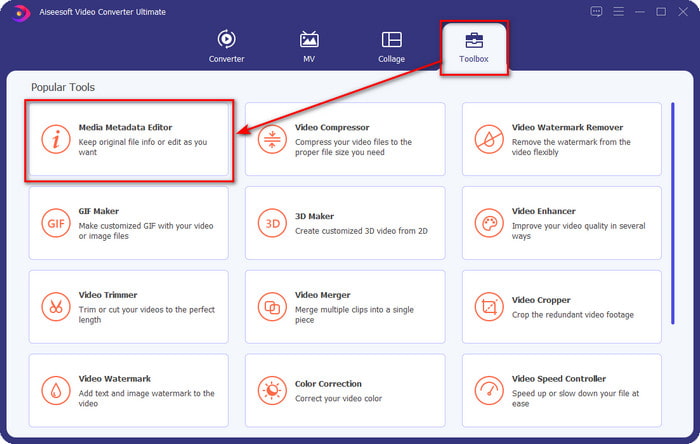
Βήμα 2. Πατήστε την ενότητα Εργαλειοθήκη, εντοπίστε και κάντε κλικ στο Media Metadata Editor στη λίστα που θα εμφανιστεί.
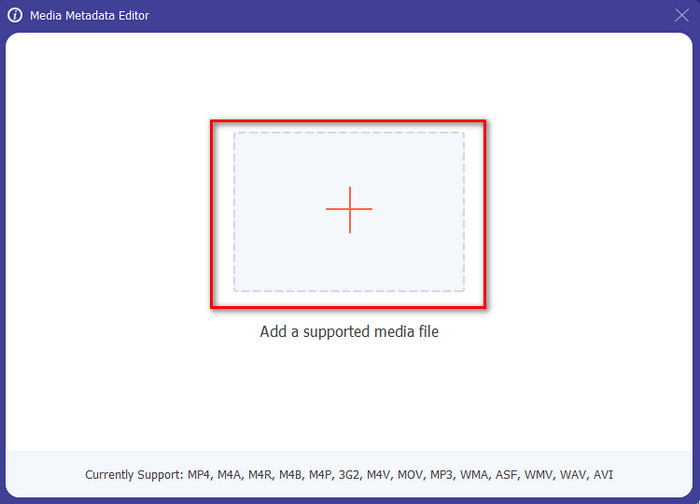
Βήμα 3. Πατώντας το εικονίδιο +, θα εμφανιστεί ο φάκελος στην οθόνη σας· βρείτε το αρχείο ήχου που θέλετε να επεξεργαστείτε και πατήστε Άνοιγμα για να περάσετε στο επόμενο βήμα.
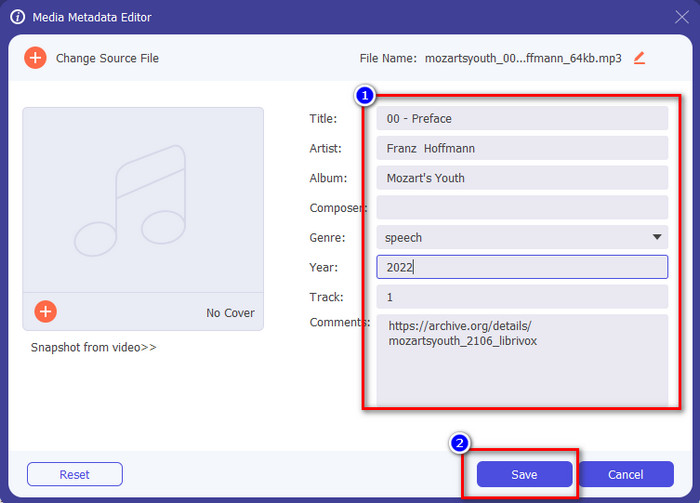
Βήμα 4. Ενημερώστε την ετικέτα του αρχείου ήχου πληκτρολογώντας την στο πλαίσιο κειμένου. Στη συνέχεια, πρέπει να κάνετε κλικ στο Αποθήκευση και όλες οι ετικέτες που αλλάξατε θα ενημερωθούν. Ακόμα κι αν μεταφέρετε το αρχείο στο κινητό σας, οι ετικέτες παραμένουν ενσωματωμένες στο αρχείο ήχου.
Σχετικά:
Καλύτερο πρόγραμμα προβολής μεταδεδομένων
Πώς να αφαιρέσετε μεταδεδομένα
Μέρος 2. 6 από τις καλύτερες εφαρμογές επεξεργασίας ετικετών μουσικής σε συσκευές Android και iOS
Αυτόματος επεξεργαστής ετικετών
Υποστηριζόμενη συσκευή: Android
Βαθμολογία στο Playstore: 4,4 αστέρια
Κριτικές ή αξιολογήσεις: 81.332 άτομα
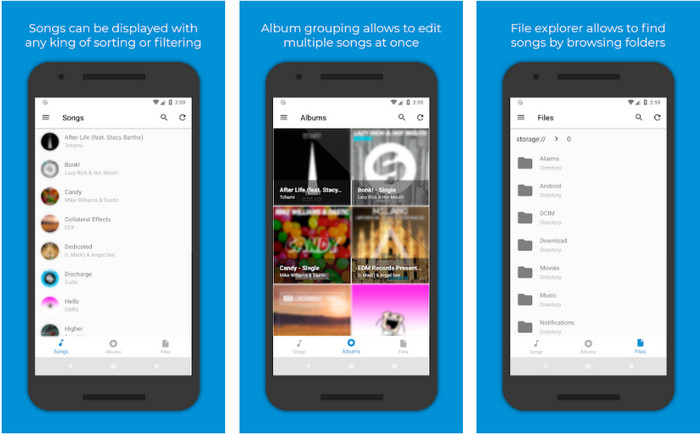
Μπορείτε να χρησιμοποιήσετε το Automatic Tag Editor, τον καλύτερο επεξεργαστή μουσικών μεταδεδομένων, αν είστε χρήστης Android. Αυτή η εφαρμογή είναι ιδανική για επεξεργασία ετικετών στα αρχεία ήχου σας σε λιγότερο από ένα λεπτό. Ένα ακόμη καλό στοιχείο είναι ότι διαθέτει αυτόματο επεξεργαστή μεταδεδομένων για τη συμπλήρωση ή ενημέρωση των δεδομένων στα αρχεία σας, ειδικά αν αγοράσατε το ψηφιακό αντίγραφο. Υποστηρίζει πολλές ετικέτες που μπορεί να συμπληρώσει, όπως τίτλο, είδος, έτος και πολλά άλλα, ώστε να αναγνωρίζετε το αρχείο ακόμη καλύτερα. Στην πρόσφατη ενημέρωση, πολλοί χρήστες διαπίστωσαν ότι προκύπτουν ορισμένα σφάλματα και «κολλήματα» κατά τη χρήση της εφαρμογής στο Android. Επίσης, υποστηρίζει τους πιο συνηθισμένους τύπους μουσικών αρχείων που μπορείτε να ανεβάσετε, όπως MP3, M4A, OGG, FLAC, WMA και WAV.
Επεξεργαστής ετικετών μουσικής Star
Υποστηριζόμενη συσκευή: Android
Βαθμολογία στο Playstore: 4,0 αστέρια
Κριτικές ή αξιολογήσεις: 293.598 άτομα
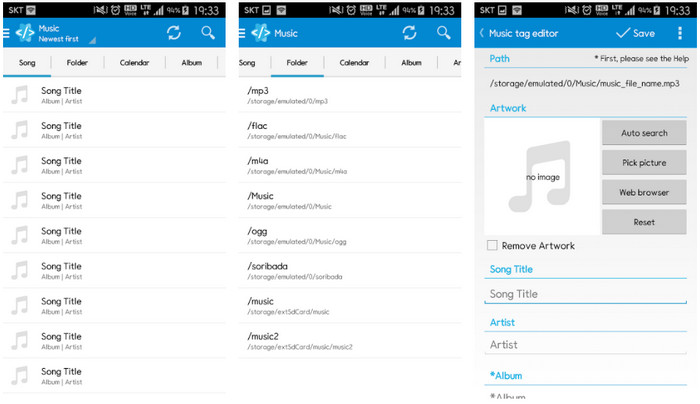
Το Star Music Tag Editor είναι ένας ακόμη επεξεργαστής ετικετών μουσικής που μπορείτε να κατεβάσετε από το Playstore. Αυτή η εφαρμογή είναι εξαιρετική επειδή προσφέρει ένα απλό γραφικό περιβάλλον, ώστε να είναι πιο κατανοητή σε σχέση με άλλες εφαρμογές. Όπως και το πρώτο εργαλείο, υποστηρίζει επίσης αυτόματη αναζήτηση που συμπληρώνει αποτελεσματικά τις μουσικές σας ετικέτες. Αν και η εφαρμογή είναι εύκολη στη χρήση και έχει πολλά να προσφέρει, υπάρχουν περιπτώσεις στις οποίες δεν είναι τόσο αποτελεσματική όσο λένε κάποιοι. Όταν δοκιμάσαμε να επεξεργαστούμε τα μεταδεδομένα σε αυτή την εφαρμογή, υπήρχαν φορές που δεν τα αποθήκευε. Επίσης, όταν πρόκειται να αποθηκεύσετε τα μεταδεδομένα, εμφανίζεται ένα αναδυόμενο μήνυμα στην οθόνη σας που αναφέρει «invalid audio frame exception» με τη νέα μουσική, λόγω κατεστραμμένου αρχείου. Ωστόσο, κάποιοι χρήστες δεν αντιμετωπίζουν αυτό το πρόβλημα, οπότε αν θέλετε να χρησιμοποιήσετε την εφαρμογή, μπορείτε να την κατεβάσετε από το Playstore.
Music Tag Editor - Mp3 Tagger | Δωρεάν πρόγραμμα επεξεργασίας μουσικής
Υποστηριζόμενη συσκευή: Android
Βαθμολογία στο Playstore: 3,8 αστέρια
Κριτικές ή αξιολογήσεις: 11.378 άτομα
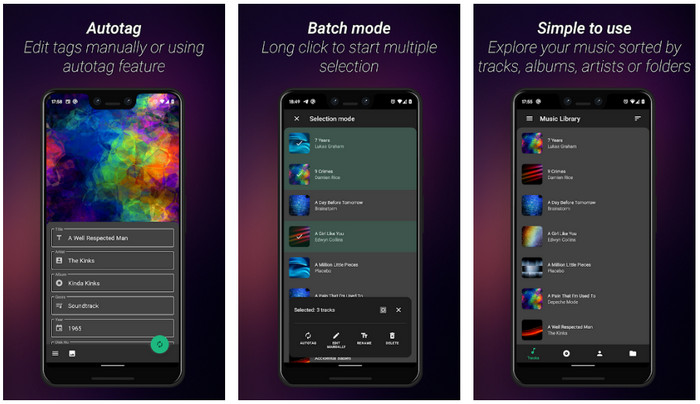
Αν έχετε πρόβλημα με λάθος ετικέτες, χρησιμοποιήστε το Music Tag Editor - Mp3 Tagger | Free Music Editor για να διορθώσετε γρήγορα τα μουσικά μεταδεδομένα. Αυτό το εργαλείο μπορεί να συμπληρώσει τα υπόλοιπα δεδομένα αν εισαγάγετε πρώτα το όνομα του τραγουδιού και του καλλιτέχνη, ώστε να βρει σωστά τις κατάλληλες ετικέτες. Με αυτή την εφαρμογή μπορείτε εύκολα να προσθέσετε ετικέτες σε διαφορετικά αρχεία ήχου ταυτόχρονα. Ωστόσο, η αυτόματη αναζήτηση ετικετών που προσφέρει χρειάζεται αρκετό χρόνο για να συλλέξει τις πληροφορίες και μερικές φορές περιλαμβάνει άσχετες ετικέτες. Επίσης, όταν πάτε να προσθέσετε μια εικόνα στο κομμάτι ήχου, δεν την επισυνάπτει στο συγκεκριμένο κομμάτι που έχετε επεξεργαστεί.
Ever Tag: Music Tag Editor 4+
Υποστηριζόμενη συσκευή: iOS
Βαθμολογία στο Playstore: 4,7 αστέρια
Κριτικές ή αξιολογήσεις: 1,1k άτομα
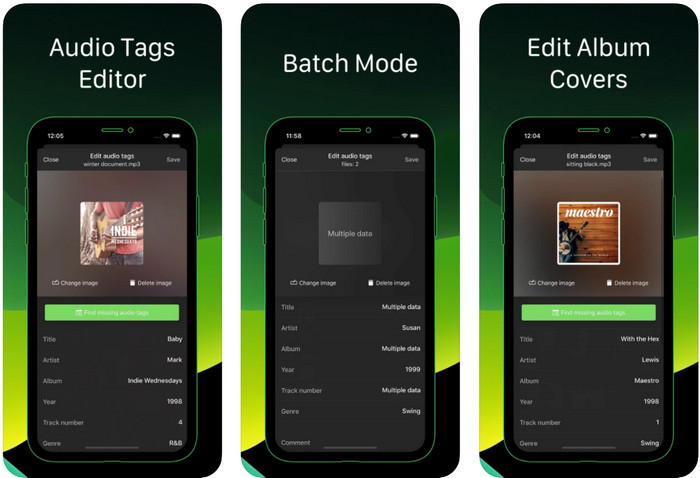
Μάθετε πώς να επεξεργάζεστε ετικέτες μουσικής σε iPhone με τη βοήθεια της εφαρμογής Ever Tag: Music Tag Editor 4+. Αυτή η εφαρμογή στο iOS υποστηρίζει πολλαπλές μορφές ήχου, οπότε η προσθήκη μεταδεδομένων είναι πιο εύκολη από ποτέ· το ίδιο ισχύει και για την επεξεργασία τους. Επιπλέον, η εφαρμογή σάς προσφέρει διαφορετικά σετ ετικετών μεταδεδομένων που μπορείτε να προσθέσετε στο αρχείο ήχου, συμπληρώνοντάς τες μία-μία, ξεκινώντας από τον τίτλο μέχρι και τις αξιολογήσεις. Το μειονέκτημα της εφαρμογής είναι ότι δεν μπορεί να συμπληρώσει αυτόματα τις ετικέτες με αυτόματη αναζήτηση, όπως κάνουν κάποια εργαλεία στο Android. Παρόλο που η εφαρμογή αναφέρει ότι προσφέρει ομαδική επεξεργασία μεταδεδομένων (batch process), στην πράξη δεν μπορείτε να το κάνετε. Αν όμως θέλετε να τη δοκιμάσετε, κατεβάστε την τώρα από το App Store.
Γεννήτρια ετικετών μουσικής
Υποστηριζόμενη συσκευή: iOS
Βαθμολογία στο Playstore: 4,5 αστέρια
Κριτικές ή αξιολογήσεις: 55 άτομα
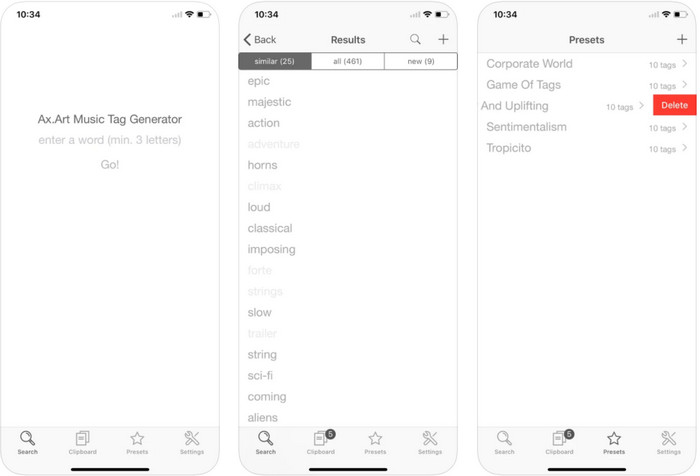
Παρόλο που η δημοτικότητα του Music Tag Generator δεν είναι τόσο μεγάλη όσο των άλλων επεξεργαστών, εξακολουθείτε να μπορείτε να δείτε και να επεξεργαστείτε τι είναι μια ετικέτα στη μουσική. Αυτό το εργαλείο είναι μια μικρή βοηθητική εφαρμογή για να βρίσκετε και να οργανώνετε τα μουσικά σας κομμάτια με βάση τις ετικέτες. Εκτός από την ταξινόμηση μέσω ετικετών, μπορείτε επίσης να χρησιμοποιήσετε την εφαρμογή για να αλλάξετε τα μεταδεδομένα ανάλογα με τις ανάγκες σας και να τα οργανώσετε. Αν και η εφαρμογή μπορεί να σας βοηθήσει στην επεξεργασία, δεν είναι τόσο καλή όσο οι υπόλοιποι επεξεργαστές σε αυτό το άρθρο. Έχει ένα απλό περιβάλλον, αλλά οι λειτουργίες της δεν είναι τόσο πλήρεις όσο ίσως περιμένατε.
iTunes
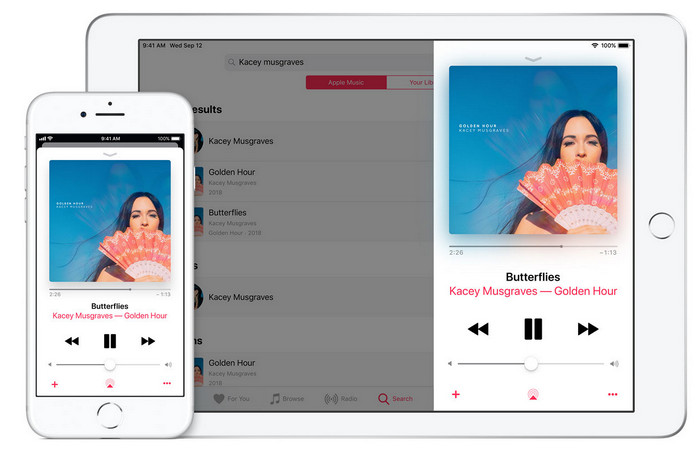
Υποστηριζόμενη συσκευή: iOS
Βαθμολογία στο Playstore: 4,9 αστέρια
Κριτικές ή αξιολογήσεις: 1,4k άτομα
Αυτή η εφαρμογή διαθέτει μια ενσωματωμένη μουσική βιβλιοθήκη την οποία μπορείτε να αγοράσετε, να κατεβάσετε και να χρησιμοποιήσετε. Το iTunes δεν είναι η τυπική εφαρμογή επεξεργασίας μεταδεδομένων που μπορείτε να χρησιμοποιήσετε στο iOS σας, επειδή αυτή η εφαρμογή είναι γνωστή για την αποθήκευση μουσικής όπως αυτό που μπορεί να προσφέρει το Spotify. Παρόλο που η μουσική που μπορείτε να βρείτε σε αυτήν την εφαρμογή έχει μεταδεδομένα και ετικέτες, μπορείτε ακόμα να αλλάξετε ή να ενημερώσετε τις ετικέτες σύμφωνα με τις επιθυμίες σας. Ωστόσο, δεν μπορείτε εύκολα να επεξεργαστείτε ή να ενημερώσετε τις ετικέτες με αυτήν την εφαρμογή, επειδή υπάρχει μια απαίτηση που θα χρειαστείτε πριν μάθετε πώς να προσθέτετε ετικέτες στη μουσική στο iTunes.
Οι περισσότερες από τις αναφερόμενες εφαρμογές εδώ έχουν μια αυτόματη ετικέτα, η οποία μπορεί να σας βοηθήσει να προσθέσετε αυτόματα ετικέτες ή μεταδεδομένα στο αρχείο ήχου που έχετε. Ωστόσο, αυτή η δυνατότητα έχει ελαττώματα, σε αντίθεση με τη μη αυτόματη προσθήκη άσχετων ετικετών στο αρχείο σας. Αν θέλετε να αποφύγετε αυτά τα λάθη, ας προχωρήσουμε στο καλύτερο πρόγραμμα επεξεργασίας ετικετών μουσικής στον υπολογιστή διαβάζοντας το μέρος 2.
Μέρος 3. Συχνές ερωτήσεις σχετικά με το πρόγραμμα επεξεργασίας ετικετών μουσικής
Τι είναι η ετικέτα ID3;
Μπορείτε να δείτε αυτές τις ετικέτες ID3 συχνά στη μουσική, επειδή περιέχουν τα δεδομένα σχετικά με το αρχείο πολυμέσων, ειδικά τον ήχο. Προσθέτοντας ετικέτες ID3 στο αρχείο ήχου σας, μπορείτε να τακτοποιήσετε το αρχείο με βάση το πρόγραμμα αναπαραγωγής πολυμέσων που χρησιμοποιείτε.
Η εγγραφή ήχου σε τηλέφωνα έχει ετικέτες;
Ναι, έχει ετικέτες και μεταδεδομένα. Ωστόσο, οι ετικέτες δεν είναι ολοκληρωμένες όπως έχουν τα άλλα αρχεία πολυμέσων.
Γιατί το αρχείο ήχου μου καταστρέφεται μετά την προσθήκη μεταδεδομένων;
Ο λόγος για τον οποίο ο ήχος σας είναι κατεστραμμένος δεν σχετίζεται με τα μεταδεδομένα που προσθέτετε ή αφαιρείτε, αλλά αφορά το εργαλείο που χρησιμοποιήσατε για να επεξεργαστείτε τις ετικέτες του αρχείου σας. Επομένως, εάν θέλετε να αποφύγετε αυτήν την περίσταση, πρέπει να επιλέξετε το τέλειο εργαλείο που θα σας βοηθήσει να προσθέσετε ή να αφαιρέσετε μεταδεδομένα εύκολα. Και να θυμάστε, εάν ξεκινήσει η διαδικασία, βεβαιωθείτε ότι δεν θα ακυρώσετε τη διαδικασία επεξεργασίας των μεταδεδομένων,
συμπέρασμα
Τώρα πρέπει να επιλέξετε ποια εφαρμογή μπορείτε να χρησιμοποιήσετε για να επεξεργαστείτε τα μουσικά μεταδεδομένα σας· βεβαιωθείτε ότι επιλέγετε την εφαρμογή που αντιστοιχεί στην πλατφόρμα σας, ώστε να τη κατεβάσετε εύκολα από το Play Store ή το App Store. Αλλά αν πιστεύετε ότι χρειάζεστε ένα εργαλείο που αποδίδει στο μέγιστο, τότε πρέπει να χρησιμοποιήσετε το απόλυτο εργαλείο σε υπολογιστή. Το FVC Video Converter Ultimate προσφέρει τον καλύτερο τρόπο για να προσθέσετε ετικέτες στη μουσική σας με ευκολία. Πριν όμως μπορέσετε να χρησιμοποιήσετε αυτό το εργαλείο, πρέπει πρώτα να το κατεβάσετε και να ακολουθήσετε τις οδηγίες που παρουσιάζουμε στο μέρος 2. Για να μάθετε περισσότερα, διαβάστε προσεκτικά.
-
 5 ευκολότεροι τρόποι για να αφαιρέσετε μεταδεδομένα σε οποιαδήποτε αρχεία πολυμέσων
 Πώς να αφαιρέσετε τα μεταδεδομένα; Είναι δύσκολο να το κάνεις; Χρειάζεται να αγοράσω ή να χρησιμοποιήσω ένα δωρεάν εργαλείο για να αφαιρέσω ετικέτες; Όλες αυτές οι ερωτήσεις έχουν απαντήσεις σε αυτό το άρθρο.
-
 Οι κορυφαίοι 5 εξαγωγείς μεταδεδομένων που είναι διαθέσιμοι στο διαδίκτυο και εκτός σύνδεσης [2022]
 Μπορείτε να βρείτε πολλαπλούς εξαγωγείς μεταδεδομένων στην αγορά, αλλά σήμερα επιλέγουμε μόνο τους πέντε πιο επιλεγμένους εξαγωγείς ετικετών ανάλογα με το κοινό.
-
 Οι 5 κορυφαίοι επεξεργαστές μεταδεδομένων βίντεο για το 2022 [Αμερόληπτη κριτική]
 Θέλετε να δείτε τα μεταδεδομένα του βίντεό σας; Αν ναι, διαβάστε τις παρακάτω λεπτομέρειες για να κατανοήσετε πλήρως το θέμα και να μάθετε ποιο εργαλείο σας ταιριάζει καλύτερα.
