


 Video Converter Ultimate
 Εγγραφή οθόνης
 Επισκευή βίντεο
Τα 5 πιο επιλεγμένα προγράμματα επεξεργασίας ετικετών βίντεο AVI σε σύστημα Windows και Mac [Εύκολο στη χρήση]
Η ετικέτα AVI μπορεί να σας βοηθήσει να προσδιορίσετε τι περιέχει αυτό το αρχείο, ελέγχοντάς το. Ωστόσο, δεν είναι όλες οι ετικέτες στα AVI αρχεία σας σωστές, οπότε θα χρειαστείτε ένα εργαλείο για να τις διορθώσετε μόνοι σας. Αλλά η αγορά των επεξεργαστών ετικετών στο διαδίκτυο είναι υπερβολικά μεγάλη· δεν είναι λυπηρό; Γνωρίζουμε πώς είναι να ψάχνεις το ιδανικό εργαλείο που πρέπει να χρησιμοποιήσεις. Ευτυχώς, επιλέξαμε τον καλύτερο επεξεργαστή μεταδεδομένων που μπορείτε να χρησιμοποιήσετε για να επεξεργαστείτε, να προσθέσετε ή να αφαιρέσετε τις ετικέτες στα AVI αρχεία σας. Στη σημερινή παρουσίαση, θα φροντίσουμε να δείτε τον ιδανικό επεξεργαστή ετικετών βίντεο AVI που μπορείτε να έχετε στον υπολογιστή σας.

Μέρος 1. Κορυφαίοι 5 επεξεργαστές ετικετών AVI που είναι διαθέσιμοι σε Windows & Mac
Video Converter Ultimate [Καλύτερος Επεξεργαστής Μεταδεδομένων AVI για το 2023]
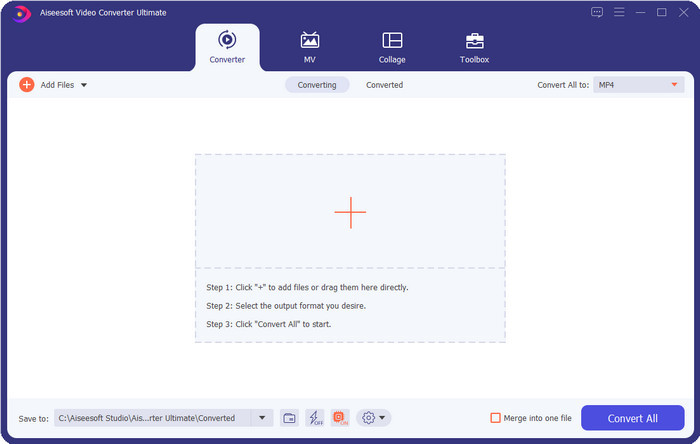
Είναι ο καλύτερος επεξεργαστής ετικετών βίντεο AVI που μπορείτε να χρησιμοποιήσετε για να αλλάξετε ή να αφαιρέσετε εύκολα τις ετικέτες στα AVI αρχεία σας. Αν θέλετε τις πιο προηγμένες αλλά ταυτόχρονα απλές λειτουργίες λογισμικού που να σας συναρπάζουν, τότε το Video Converter Ultimate είναι η σωστή επιλογή. Επιπλέον, εδώ μπορείτε να χρησιμοποιήσετε πολλαπλές λειτουργίες επεξεργασίας μεταδεδομένων για να οργανώσετε, να διορθώσετε ή να ενημερώσετε σωστά την ετικέτα σας. Πριν κατεβάσετε και δοκιμάσετε κάποιον άλλο πρόγραμμα επεξεργασίας για υπολογιστή, θα σας το προτείναμε ιδιαίτερα, γιατί κατεβάζοντάς το αποκτάτε ένα πολυεργαλείο «όλα‑σε‑ένα». Θέλετε να μάθετε γιατί πρέπει να χρησιμοποιήσετε αυτό το εργαλείο; Παρακάτω παραθέτουμε τους 5 λόγους που μπορείτε να διαβάσετε για να αποφασίσετε γιατί αξίζει να το κατεβάσετε.

FVC Video Converter Ultimate
5.689.200+ λήψεις- Είναι το καλύτερο λογισμικό που μπορείτε να χρησιμοποιήσετε και υποστηρίζει πληθώρα μορφών όπως MP4, MOV.
- Για τη γρήγορη διαδικασία επεξεργασίας μεταδεδομένων, αυτό το εργαλείο λειτουργεί τέλεια.
- Μάθετε να προσθέτετε τις βασικές ετικέτες στα αρχεία σας ή να τις αφαιρείτε με λίγα μόνο κλικ μακριά.
- Υποστηρίζει όλες τις πλατφόρμες επιτραπέζιων υπολογιστών όπως Windows και Mac.
Δωρεάν ΛήψηΓια Windows 7 ή νεότεραΑσφαλής λήψη
Δωρεάν ΛήψηΓια MacOS 10.7 ή νεότεροΑσφαλής λήψη
AVI MetaEdit
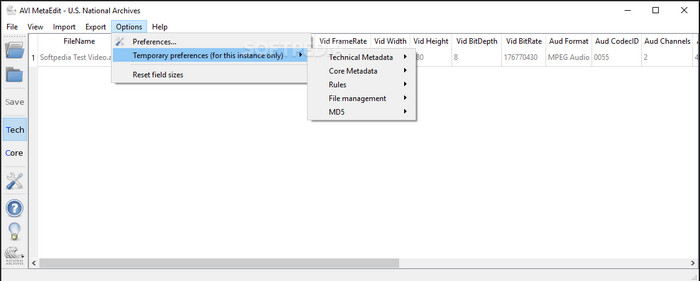
Αν αναζητάτε έναν επεξεργαστή μεταδεδομένων AVI για Mac και Windows, τότε το AVI Meta Edit ίσως είναι το εργαλείο σας. Αυτό το εργαλείο επιτρέπει στους χρήστες να επεξεργάζονται τις ετικέτες ή τις πληροφορίες μέσα στο πολυμεσικό αρχείο, και ειδικότερα στα AVI. Με αυτό το εργαλείο, μπορείτε να επεξεργαστείτε ξεχωριστά τα Τεχνικά Μεταδεδομένα και τα Βασικά Μεταδεδομένα των αρχείων σας, που και τα δύο περιλαμβάνουν διαφορετικά είδη πληροφοριών για το αρχείο. Παρόλο που το εργαλείο διαθέτει σε βάθος λειτουργίες επεξεργασίας που μπορεί να σας προσφέρει, εξακολουθεί να είναι μπερδεμένο στη χρήση, λόγω των συντομογραφιών που περιλαμβάνονται στο περιβάλλον εργασίας.
Machete Video Editor Lite
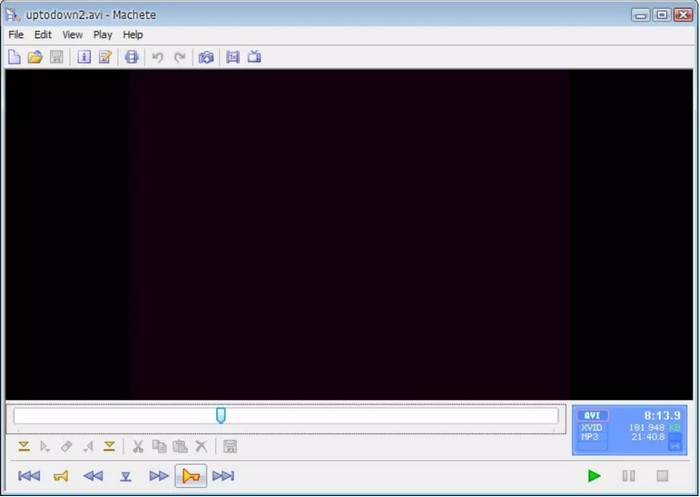
Αν θέλετε να επεξεργαστείτε μεταδεδομένα AVI στα Windows 10, τότε πρέπει οπωσδήποτε να δοκιμάσετε το Machete Video Editor Lite. Με αυτό το εργαλείο μπορείτε εύκολα να επεξεργαστείτε τις ετικέτες στα αρχεία AVI και WMV σας. Επιπλέον, προσφέρει ένα απλό, δομημένο περιβάλλον εργασίας ώστε οι χρήστες να καταλαβαίνουν ποιες λειτουργίες είναι διαθέσιμες σε αυτό το εργαλείο. Εξαιτίας αυτής της απλής διεπαφής, μερικοί χρήστες το θεωρούν λύση μόνο όταν δεν υπάρχει άλλη επιλογή για επεξεργασία των μεταδεδομένων τους. Επιπρόσθετα, οι πληροφορίες μεταδεδομένων που μπορείτε να συμπληρώσετε εδώ είναι περιορισμένες, όπως και οι υποστηριζόμενες μορφές αρχείων.
Πρόγραμμα επεξεργασίας ετικετών abcAVI
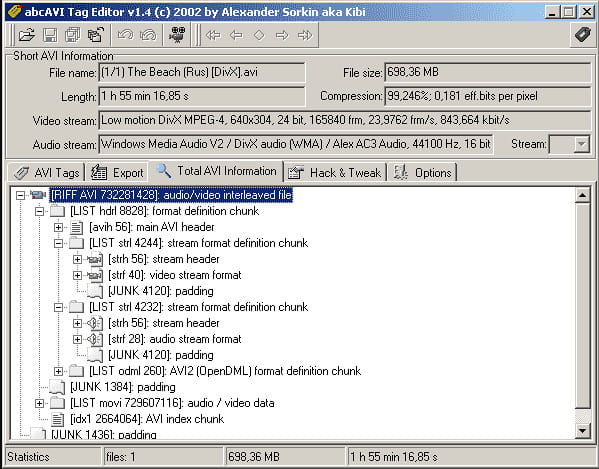
Μπορείτε να κατεβάσετε έναν ακόμη ανοικτού κώδικα επεξεργαστή ετικετών AVI για Windows, τον abcAVI Tag Editor. Με αυτό το εργαλείο μπορείτε εύκολα να προσαρμόσετε τα μεταδεδομένα στα AVI αρχεία σας, αλλά υποστηρίζει μόνο τη μορφή AVI. Επιπλέον, μπορείτε να προσθέσετε ή να ενημερώσετε τις ετικέτες που χρειάζεστε στα AVI αρχεία σας με μόλις μερικά κλικ. Αν και το εργαλείο αποδίδει καλά, μπορούμε να δούμε ότι το GUI του είναι πραγματικά κακό· η διάταξή του απέχει πολύ από αυτό που προσφέρουν άλλα εργαλεία. Επιπλέον, δεν υποστηρίζει άλλες μορφές εισαγωγής, εκτός από τη μορφή AVI μόνο.
FFmpeg
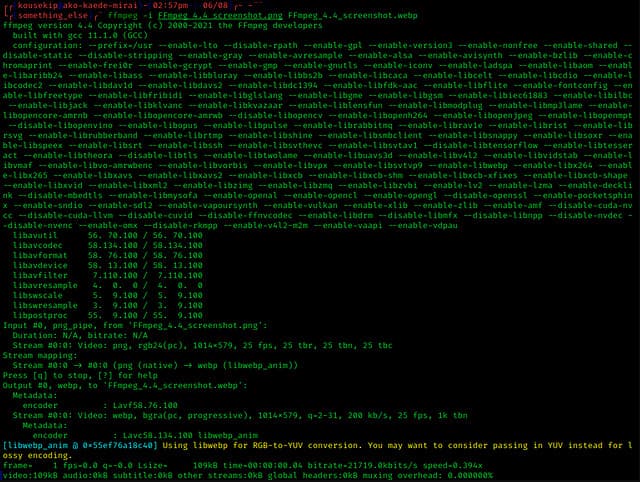
Τελευταίο στη λίστα είναι το FFmpeg, το λογισμικό βασισμένο σε εντολές που μπορείτε να χρησιμοποιήσετε για να επεξεργαστείτε τις ιδιότητες αρχείων AVI σε Windows και Mac. Αυτό το εργαλείο προορίζεται για μετατροπή, επεξεργασία και αναπαραγωγή πολυμεσικών αρχείων, αλλά σήμερα μπορείτε επίσης να επεξεργαστείτε τα μεταδεδομένα οποιουδήποτε πολυμεσικού αρχείου. Σε αντίθεση με τα άλλα εργαλεία, αυτό δεν έχει κουμπιά για να το χρησιμοποιείτε και να του δίνετε εντολές, αλλά χρησιμοποιεί γλώσσα υπολογιστή για να εκτελέσει την εργασία. Και για να «επικοινωνήσετε» με το εργαλείο, θα πρέπει να ανοίξετε τη γραμμή εντολών και να εισαγάγετε έναν συγκεκριμένο κώδικα ώστε να ολοκληρώσετε την επεξεργασία που χρειάζεστε. Είναι δύσχρηστο, αλλά είναι ένα επαγγελματικό εργαλείο που μπορείτε να εγκαταστήσετε στον υπολογιστή σας.
Σχετικά:
Καλύτερος επεξεργαστής ετικετών MP4
Μέρος 2. Γράφημα σύγκρισης στον κορυφαίο 5 επεξεργαστή μεταδεδομένων AVI
| Χαρακτηριστικά | Video Converter Ultimate [Καλύτερος Επεξεργαστής Μεταδεδομένων AVI για το 2022] | AVI MetaEdit | Machete Video Editor Lite | Πρόγραμμα επεξεργασίας ετικετών abcAVI | FFmpeg |
| Φιλικό προς το χρήστη |  | | | |  |
| Ασφαλές στη χρήση | | | | | |
| Διατίθεται και στα δύο λειτουργικά συστήματα | | | | | |
| Διαισθητική διεπαφή | | | | | |
| Υποστηριζόμενες μορφές | Ξεκινά από AVI, MP4, MKV, FLV, MOV και τις άλλες 1000+ μορφές αρχείων | AVI | AVI και WMV | AVI | AVI, MOV, MP4, FLV και πολλά άλλα |
Μέρος 3. Συχνές ερωτήσεις σχετικά με τον επεξεργαστή μεταδεδομένων AVI
Είναι ασφαλές να χρησιμοποιήσετε ένα πρόγραμμα επεξεργασίας μεταδεδομένων AVI στο διαδίκτυο;
Ας υποθέσουμε ότι δεν έχετε αρκετό χώρο στην επιφάνεια εργασίας που χρησιμοποιείτε αυτήν τη στιγμή. συνιστούμε να χρησιμοποιήσετε ένα διαδικτυακό εργαλείο για να εκτελέσετε την εργασία. Ωστόσο, δεν είναι όλα τα εργαλεία στα οποία μπορείτε να έχετε δωρεάν πρόσβαση στο Διαδίκτυο αξιόπιστα ή αξιόπιστα. Αλλά αν θέλετε να χρησιμοποιήσετε ένα διαδικτυακό εργαλείο, πρέπει να τηρήσετε τις τρεις οδηγίες που αναζητούμε πάντα στον ιστότοπο που επισκεπτόμαστε. Πρώτα και κύρια, θα συνιστούσαμε ιδιαίτερα να κοιτάξετε στην κορυφή κοντά στη γραμμή αναζήτησής σας. υπάρχει ένα εικονίδιο κλειδαριάς, που σημαίνει ότι είναι ασφαλές στη χρήση, επομένως εάν αυτή η κλειδαριά είναι σπασμένη, σημαίνει ότι η σύνδεσή σας δεν προστατεύεται. Ελέγξτε τη διαφημιστική δραστηριότητα των διαφημίσεων. Μερικές φορές, οι διαφημίσεις μπορεί να μεταφέρουν κακόβουλο λογισμικό στον υπολογιστή σας, οδηγώντας σε καταστροφή των αρχείων σας στη μονάδα δίσκου σας. Να μην επιτρέπονται τα cookies. Μερικές φορές τα cookie είναι ένας πολύ καλός τρόπος για να γνωρίζετε πόσοι χρήστες επισκέπτονται τον ιστότοπο, αλλά η τοποθεσία σας είναι συχνά ορατή με cookies. Κρατήστε αυτό στο μυαλό σας για να αποφύγετε την επιλογή του λάθος επεξεργαστή στο διαδίκτυο.
Ποιο εργαλείο έχει την καλύτερη απόδοση στην επεξεργασία ετικετών AVI;
Σύμφωνα με την έρευνά μας, μπορούμε να δούμε ότι το Video Converter Ultimate αποδίδει πολύ καλά σε όλες τις πτυχές χωρίς να ιδρώνει κατά τη χρήση του. Εάν χρειάζεστε περισσότερες πληροφορίες σχετικά με το πρόγραμμα επεξεργασίας, μπορείτε να διαβάσετε τις παρακάτω πληροφορίες παραπάνω για να μάθετε περισσότερα και να το κατεβάσετε.
Υπάρχει κάποιος περιορισμός στην προσθήκη μεταδεδομένων στο AVI;
Μέχρι στιγμής, δεν μπορούμε να δούμε περιορισμούς στις πληροφορίες που μπορείτε να προσθέσετε στα αρχεία AVI σας ή σε αρχεία πολυμέσων. Ωστόσο, ορισμένοι επεξεργαστές μεταδεδομένων δεν μπορούν να εισαγάγουν τις πληροφορίες που χρειάζεστε στο αρχείο. Η προσθήκη μεταδεδομένων στο AVI σας δεν έχει περιορισμούς, αλλά είναι το εργαλείο που περιορίζει τις πληροφορίες που μπορείτε να προσθέσετε σε ένα μόνο αρχείο.
συμπέρασμα
Δεν είναι εντυπωσιακό ότι έχουμε διαφορετικές επιλογές όσον αφορά την επεξεργασία των μεταδεδομένων των AVI αρχείων μας; Πράγματι, οι πέντε επεξεργαστές μεταδεδομένων AVI που παραθέτουμε σε αυτό το άρθρο μπορούν να αποτελέσουν το ιδανικό εργαλείο που θα χρειαστείτε για να επεξεργαστείτε τις ετικέτες ή τα μεταδεδομένα των AVI αρχείων σας. Παρόλο που παραθέτουμε πέντε επιλογές, μπορούμε εύκολα να διακρίνουμε ποιο εργαλείο έχει το πλεονέκτημα στην επεξεργασία των μεταδεδομένων των AVI σας, και αυτό είναι το Video Converter Ultimate. Με αυτόν τον επεξεργαστή μπορείτε να κάνετε πολύ περισσότερα από το να επεξεργάζεστε, να προσθέτετε ή να αφαιρείτε μεταδεδομένα στα AVI αρχεία σας. Θέλετε να μάθετε τι άλλο μπορείτε να κάνετε εδώ; Τότε κάντε κλικ στο κουμπί λήψης και δείτε το μόνοι σας.
-
 5 ευκολότεροι τρόποι για να αφαιρέσετε μεταδεδομένα σε οποιαδήποτε αρχεία πολυμέσων
 Πώς να αφαιρέσετε τα μεταδεδομένα; Είναι δύσκολο να το κάνεις; Χρειάζεται να αγοράσω ή να χρησιμοποιήσω ένα δωρεάν εργαλείο για να αφαιρέσω ετικέτες; Όλες αυτές οι ερωτήσεις έχουν απαντήσεις σε αυτό το άρθρο.
-
 Οι κορυφαίοι 5 εξαγωγείς μεταδεδομένων που είναι διαθέσιμοι στο διαδίκτυο και εκτός σύνδεσης [2025]
 Μπορείτε να βρείτε πολλαπλούς εξαγωγείς μεταδεδομένων στην αγορά, αλλά σήμερα επιλέγουμε μόνο τους πέντε πιο επιλεγμένους εξαγωγείς ετικετών ανάλογα με το κοινό.
-
 Οι 5 κορυφαίοι επεξεργαστές μεταδεδομένων βίντεο για το 2025 [Αμερόληπτη κριτική]
 Θέλετε να δείτε τα μεταδεδομένα του βίντεό σας; Αν ναι, διαβάστε τις παρακάτω λεπτομέρειες για να κατανοήσετε πλήρως το θέμα και να μάθετε ποιο εργαλείο σας ταιριάζει καλύτερα.
