


 Video Converter Ultimate
 Εγγραφή οθόνης
 Επισκευή βίντεο
 Ασφαλές κατέβασμα
3 από τους καλύτερους επεξεργαστές μεταδεδομένων FLAC που πρέπει να γνωρίζετε αυτό το 2025
Γνωρίζουμε ότι το FLAC είναι η καλύτερη μορφή μουσικού αρχείου χωρίς απώλειες και αποτελεί ιδανική μορφή για την αντιγραφή του ήχου από CD, επειδή δεν χάνει τον ακατέργαστο ήχο, εφόσον επιλέξετε αυτή τη μορφή. Ανάμεσα στα αρχεία ήχου χωρίς απώλειες, είναι η καλύτερη επιλογή, καθώς είναι συμβατή με οποιαδήποτε συσκευή. Παρέχει λόγο συμπίεσης 30 έως 50 τοις εκατό χωρίς απώλεια της αρχικής ποιότητας. Με αυτή τη μορφή ήχου μπορείτε να έχετε ταυτόχρονα μεταδεδομένα, εξώφυλλο άλμπουμ και γρήγορη αναζήτηση. Μπορεί να προκύψουν περιπτώσεις, όπως λανθασμένες ετικέτες στο αρχείο FLAC, επειδή η μορφή δεν είναι τέλεια, όπως και οι άλλες μορφές. Σε λιγότερο από πέντε λεπτά θα γνωρίσετε τους διαφορετικούς επεξεργαστές μεταδεδομένων FLAC σε Mac και Windows που μπορείτε να χρησιμοποιήσετε για να διορθώσετε το πρόβλημα.

Μέρος 1. Καλύτερος επεξεργαστής μεταδεδομένων FLAC για Mac και Windows – FVC Video Converter Ultimate
Το FVC Video Converter Ultimate είναι το πιο αποτελεσματικό λογισμικό που πρέπει να έχετε σχετικά με αυτό το ζήτημα επεξεργασίας μεταδεδομένων. Αυτό το εργαλείο προσφέρει ένα επαγγελματικό και εύκολα κατανοητό περιβάλλον εργασίας, ώστε κάθε χρήστης να έχει μια ομαλή διαδικασία αλλαγής ή διόρθωσης μεταδεδομένων με άνεση. Επίσης, μπορείτε να προσθέσετε πολλαπλές πληροφορίες ή ετικέτες στο FLAC σας, όπως τίτλο, όνομα δημιουργού, ημερομηνία, εξώφυλλο άλμπουμ και πολλά ακόμη. Οι ανταγωνιστές του στην επεξεργασία μεταδεδομένων εστιάζουν στην αλλαγή μεταδεδομένων σε λίγες μορφές ήχου και βίντεο. Αλλά με αυτό το λογισμικό μπορείτε εύκολα να ανεβάσετε οποιαδήποτε μορφή FLAC, MP3, WMA, WMV και πάνω από 1000 ακόμη μορφές και να επεξεργαστείτε τα μεταδεδομένα τους τόσο γρήγορα όσο 1-2-3.
Επιπλέον, αυτό το εργαλείο δεν είναι μόνο ικανό να αλλάξει, να διορθώσει ή να διαγράψει τα μεταδεδομένα. μπορεί επίσης να χρησιμοποιηθεί ως λύση σε οποιοδήποτε πρόβλημα που σχετίζεται με το βίντεο. Και με αυτό, μπορούμε να σας διαβεβαιώσουμε ότι από τη στιγμή που χρησιμοποιείτε το εργαλείο, δεν χρειάζεται να ανησυχείτε ότι θα αντιμετωπίσετε ξανά το ίδιο πρόβλημα, επειδή έχετε την καλύτερη λύση. Θέλετε να χρησιμοποιήσετε το κορυφαίο πρόγραμμα επεξεργασίας μεταδεδομένων FLAC σε Mac και Windows; Αν ναι, συνεχίστε να διαβάζετε τα παρακάτω βήματα καθώς σας δίνουμε τον εύκολο να ακολουθήσετε τον οδηγό και ολοκληρώστε την εργασία αποτελεσματικά.
Βήμα 1. Μπορείτε να αποκτήσετε το απόλυτο λογισμικό στον υπολογιστή σας· κάντε κλικ στο κατάλληλο λειτουργικό σύστημα για να κατεβάσετε το σωστό εργαλείο. Συνεχίστε τη διαδικασία εγκατάστασης ανοίγοντας το αρχείο που κατεβάσατε και πατήστε Start Now για να συνεχίσετε.
Δωρεάν ΛήψηΓια Windows 7 ή νεότεραΑσφαλής λήψη
Δωρεάν ΛήψηΓια MacOS 10.7 ή νεότεροΑσφαλής λήψη
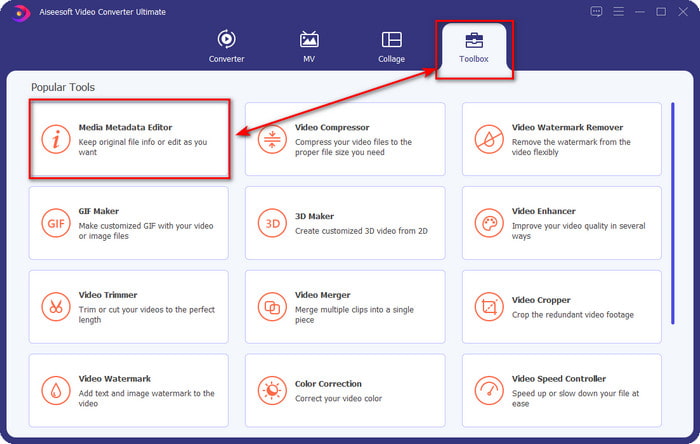
Βήμα 2. Κάντε κλικ στο Media Metadata Editor για να ανοίξετε τη λειτουργία επεξεργασίας ετικετών στην ενότητα Toolbox.
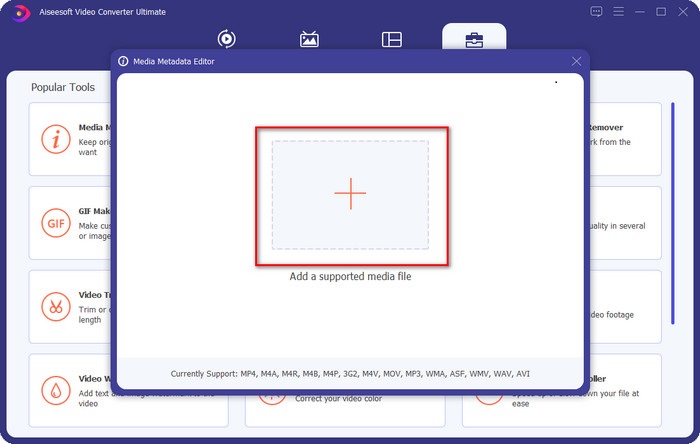
Βήμα 3. Πρέπει να κάνετε κλικ στο κουμπί + για να προσθέσετε το αρχείο, να το εντοπίσετε στο φάκελο που θα εμφανιστεί και να κάνετε κλικ στο Open για να προσθέσετε με επιτυχία το αρχείο FLAC.
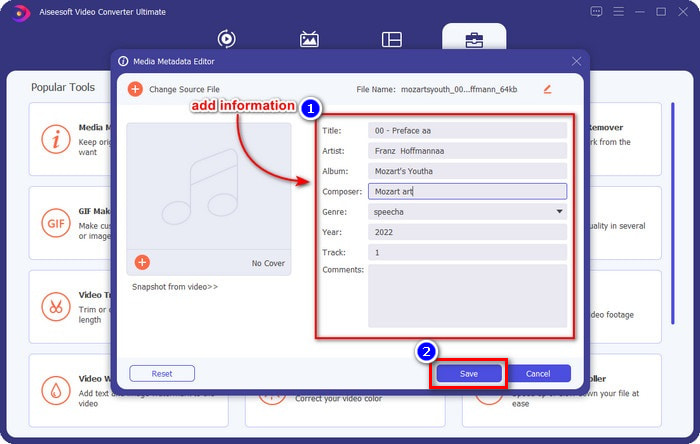
Βήμα 4. Σε αυτό το πάνελ μπορείτε πλέον να αλλάξετε τα μεταδεδομένα του FLAC σας σε κάθε textbox. Έπειτα κάντε κλικ στο Save για να αποθηκεύσετε την ενημέρωση που κάνατε με το λογισμικό. Τόσο απλά, έχετε προσθέσει ετικέτες στο FLAC σας και τις έχετε διορθώσει αποτελεσματικά με τη βοήθεια ενός κορυφαίου εργαλείου.
Πλεονεκτήματα
- Είναι η καλύτερη επιλογή για επεξεργασία μεταδεδομένων σε FLAC, MP4, WMA, WAV, TTA, OGG και 1000+ ακόμη μορφές.
- Υποστηρίζει πολλαπλές λειτουργίες επεξεργασίας που μπορείτε να χρησιμοποιήσετε στην ενότητα Εργαλειοθήκη.
- Διαισθητικό γραφικό περιβάλλον χρήστη και είναι εύκολο στη χρήση.
- Δυνατότητα λήψης σε λειτουργικά συστήματα Windows και Mac.
Μειονεκτήματα
- Η αγορά του εργαλείου είναι απαραίτητη για να επωφεληθείτε από τις απίστευτες δυνατότητες με χαμηλό κόστος.
Μέρος 2. Άλλα 2 καλύτερα δωρεάν προγράμματα επεξεργασίας μεταδεδομένων FLAC για Windows
Φρεγάτα3
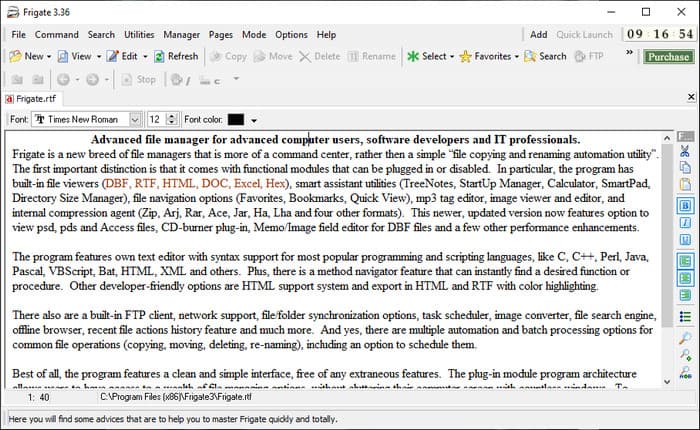
Το Frigate3 είναι ένας επεξεργαστής μεταδεδομένων FLAC που θα σας αρέσει να χρησιμοποιείτε στα Windows. Με αυτό το εργαλείο μπορείτε εύκολα να προσαρμόσετε τις ετικέτες που έχετε στον υπολογιστή σας. Αλλά πριν κατεβάσετε το εργαλείο, πρέπει να ελέγξετε τις δύο επιλογές που προσφέρει, την απλή (standard) και την επαγγελματική (pro) έκδοση. Η standard έκδοση του εργαλείου περιλαμβάνει μόνο τις βασικές λειτουργίες που θα έχετε κατά τη χρήση του. Αν κατεβάσετε τη standard έκδοση, το μέγεθος του αρχείου είναι μικρότερο από αυτό της pro.
Ενώ, αν αντ' αυτού έχετε κατεβάσει την επαγγελματική έκδοση του, θα έχετε όλες τις δυνατότητες που παρέχει αυτό το λογισμικό που δεν περιλαμβάνονται στο τυπικό, αλλά το μέγεθος του αρχείου είναι πολύ μεγαλύτερο από το τυπικό. Παρά το γεγονός ότι είναι ένα δωρεάν λογισμικό Windows, μπορούμε ακόμα να δούμε ότι το εργαλείο είναι λίγο δύσκολο να κατανοηθεί και το γραφικό περιβάλλον του δεν είναι τόσο καλό όπως το άλλο λογισμικό της αγοράς. Παρόλο που αυτό είναι ένα πρόβλημα, εξακολουθεί να θεωρείται αποτελεσματικό εργαλείο για την αντιμετώπιση αυτής της εργασίας.
Πλεονεκτήματα
- Δωρεάν λήψη στα Windows.
- Υποστηρίζει τις τυπικές και επαγγελματικές εκδόσεις του εργαλείου.
- Δυνατότητα προσθήκης προσθηκών.
Μειονεκτήματα
- Το GUI δεν είναι καλό όπως το άλλο πρόγραμμα επεξεργασίας μεταδεδομένων.
- Μερικές φορές το εργαλείο είναι δύσκολο να ξεκινήσει.
- Το δίκτυο δεν είναι ασφαλές όταν αποκτάτε πρόσβαση στον επίσημο ιστότοπο του εργαλείου.
MusicBrainz PiCard
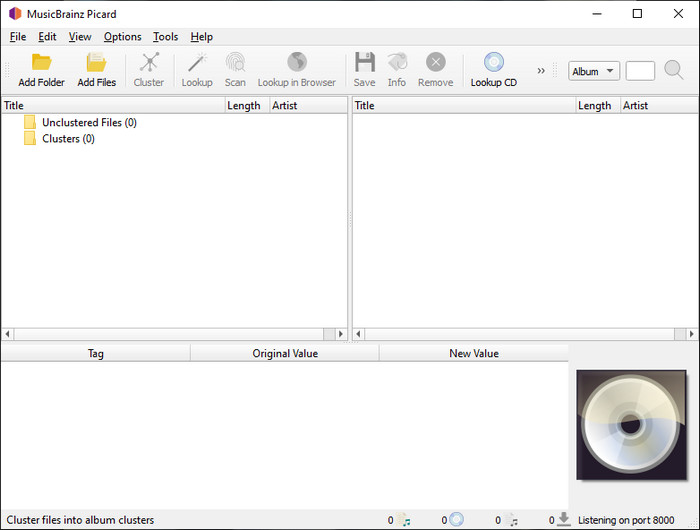
Το MusicBrainz PiCard είναι ένας επεξεργαστής μεταδεδομένων FLAC για Windows που μπορείτε να κατεβάσετε δωρεάν στον υπολογιστή σας για να ολοκληρώσετε την προσθήκη μεταδεδομένων. Αν το αρχείο ήχου έχει καταχώριση στη βάση δεδομένων, μπορείτε να ανακτήσετε τις ετικέτες ή να τις ενημερώσετε με τη βοήθεια αυτού του εργαλείου. Σε αντίθεση με άλλα εργαλεία, αυτό το λογισμικό μπορεί να προσθέσει πολλαπλές και σε βάθος πληροφορίες, όπως τους εκτελεστές και τα όργανα που χρησιμοποιούνται στη μουσική. Αλλά θυμηθείτε ότι οι ετικέτες στο MusicBrainz συγκεντρώνονται από εθελοντές.
Επιπλέον, αυτό το λογισμικό είναι ένας αποκλειστικός επεξεργαστής ετικετών ήχου, πράγμα που σημαίνει ότι υποστηρίζει απλώς τις περισσότερες μορφές ήχου, είτε είναι χωρίς απώλειες, είτε και οι δύο. Παρόλο που είναι μια ολοκληρωμένη εγκυκλοπαίδεια ετικετών μουσικής και την καθιστά χρησιμοποιήσιμη στο κοινό, ορισμένες ετικέτες που παρέχει είναι αναξιόπιστες, επομένως θα χρειαστεί να τις προσθέσετε με μη αυτόματο τρόπο. Παρ 'όλα αυτά, το εργαλείο είναι φιλικό προς το χρήστη και καλύτερο από το Frigate3, αλλά δεν είναι τόσο καλό όσο το απόλυτο εργαλείο.
Πλεονεκτήματα
- Διαθέτει ενσωματωμένη βάση δεδομένων για ετικέτες ήχου.
- Απλή διεπαφή χρήστη.
- Το να μάθετε πώς να το χρησιμοποιείτε είναι εύκολο.
Μειονεκτήματα
- Μερικές φορές τα μεταδεδομένα που συγκεντρώνονται στη βάση δεδομένων είναι αναξιόπιστα.
- Περιορίζεται μόνο σε αρχεία ήχου.
Μέρος 3. Συχνές ερωτήσεις σχετικά με τον Επεξεργαστή Μεταδεδομένων FLAC
Μπορώ να εγγράψω FLAC υψηλής ποιότητας;
Φυσικά, ναι, μπορείτε να ηχογραφήσετε ήχο σε αυτή τη μορφή, αλλά να θυμάστε ότι δεν υποστηρίζουν όλοι οι ηχογράφοι ήχου αυτή τη μορφή και δεν μπορούν όλοι να καταγράψουν ηχητικό αποτέλεσμα υψηλής ποιότητας. Άρα, αν δεν ξέρετε πώς να ηχογραφήσετε με έναν FLAC recorder υψηλής ποιότητας χωρίς απώλειες, πρέπει να κάνετε κλικ σε αυτόν τον σύνδεσμο για να μάθετε περισσότερα για αυτό το θέμα.
Ποιο είναι το καλύτερο λογισμικό για μετατροπή FLAC;
Χωρίς καμία αμφιβολία, ο μετατροπέας βίντεο FVC είναι ο καλύτερος μετατροπέας FLAC που μπορείτε να χρησιμοποιήσετε για να κάνετε το FLAC συμβατό με άλλες συσκευές χωρίς να χάσετε την αρχική ποιότητα. Με αυτό το εργαλείο, μπορείτε να μετατρέψετε πολλά FLAC ταυτόχρονα, αλλά να θυμάστε, εάν θέλετε κάτι περισσότερο από μια λήψη μετατροπέα, το απόλυτο εργαλείο είναι απαραίτητο.
Το φωνητικό σημείωμα υποστηρίζει το FLAC ως έξοδο ήχου;
Το Voice Memo χρησιμοποιεί M4A αντί για FLAC για την αποθήκευση των ηχογραφήσεων ήχου. Αν θέλετε να μάθετε περισσότερα για τα voice memos, μπορείτε να διαβάσετε την πλήρη και λεπτομερή ανάλυση που κάναμε για την ενσωματωμένη εφαρμογή· διαβάστε την προσεκτικά για να δείτε αν είναι ο καλύτερος ηχογράφος ήχου σε συσκευές iOS κάνοντας κλικ σε αυτόν τον σύνδεσμο.
συμπέρασμα
Το FLAC δεν είναι απλώς μια μορφή ήχου, αλλά είναι μία από τις καλύτερες μορφές ήχου που πρέπει να χρησιμοποιείτε για να αποθηκεύετε ήχο υψηλής ποιότητας στις συσκευές σας. Άρα, αν θέλετε να οργανώσετε τα .flac στη βιβλιοθήκη σας, τότε η βοήθεια των εργαλείων που παρουσιάσαμε μπορεί να σας βοηθήσει να χειριστείτε την εργασία αποτελεσματικά. Αν είστε χρήστης Windows, προτείνουμε να διαβάσετε για το λογισμικό που βρήκαμε για προσθήκη μεταδεδομένων στα Windows στο μέρος 2. Αλλά αν θέλετε ένα πιο αξιόπιστο και επαγγελματικό εργαλείο για την προσθήκη μεταδεδομένων σε FLAC, προτείνουμε να χρησιμοποιήσετε το FVC Video Converter Ultimate. Με ένα τέτοιο εργαλείο μπορείτε να κάνετε επαγγελματική επεξεργασία ετικετών που τα άλλα εργαλεία Windows που παρουσιάσαμε δεν μπορούν να προσφέρουν. Επομένως, αν θέλετε να μάθετε περισσότερα για τον καλύτερο επεξεργαστή μεταδεδομένων FLAC σε Mac και Windows, πρέπει να το κατεβάσετε για να ανακαλύψετε και τις υπόλοιπες λειτουργίες.
-
 Οι 5 κορυφαίοι επεξεργαστές μεταδεδομένων βίντεο για το 2025 [Αμερόληπτη κριτική]
 Θέλετε να δείτε τα μεταδεδομένα του βίντεό σας; Αν ναι, διαβάστε τις παρακάτω λεπτομέρειες για να κατανοήσετε πλήρως το θέμα και να μάθετε ποιο εργαλείο σας ταιριάζει καλύτερα.
-
 7 Δημοφιλή προγράμματα επεξεργασίας ετικετών μουσικής σε Windows, Mac και φορητές συσκευές
 Οι ετικέτες μουσικής είναι δημοφιλείς στη χρήση για τη διάταξη της μουσικής στη βιβλιοθήκη σας σύμφωνα με τα δεδομένα μέσα. Τι γίνεται αν θέλετε να το αλλάξετε; Διαβάστε τις παρακάτω λεπτομέρειες για να μάθετε περισσότερα.
-
 5 κορυφαίοι επεξεργαστές μεταδεδομένων MP4 [Ενημερώθηκε 2025]
 Πώς μπορώ να αλλάξω τα μεταδεδομένα MP4 μου; Ο καλύτερος τρόπος για να αλλάξετε τα μεταδεδομένα του MP4 σας είναι να χρησιμοποιήσετε ένα πρόγραμμα επεξεργασίας ετικετών που υποστηρίζει μορφή MP4 όπως το δείγμα που παραθέτουμε παρακάτω.
