


 Video Converter Ultimate
 Εγγραφή οθόνης
 Επισκευή βίντεο
 Ασφαλές κατέβασμα
Μάθετε πώς να αφαιρείτε τους τουρίστες από τις φωτογραφίες χωρίς κόπο
Όταν ταξιδεύουν, οι άνθρωποι θέλουν πάντα να βγάζουν φωτογραφίες σε όμορφα τοπία, να φωτογραφίζονται με την οικογένειά τους και να βγάζουν μόνοι τους φωτογραφίες με υπέροχη θέα. Όμως, επειδή το τοπίο είναι τόσο όμορφο, πολλοί άνθρωποι βγάζουν ταυτόχρονα φωτογραφίες μαζί με εσάς. Έτσι, στις φωτογραφίες σας εμφανίζονται κι άλλοι τουρίστες. Αν λοιπόν θέλετε να αφαιρέσετε αυτούς τους ανεπιθύμητους τουρίστες από την καταπληκτική σας φωτογραφία, χρειάζεστε ένα εργαλείο που θα σας βοηθήσει να το κάνετε. Ευτυχώς, βρήκαμε τα απόλυτα εργαλεία για να αφαιρείτε ανεπιθύμητα αντικείμενα από τις φωτογραφίες σας. Διαβάστε αυτό το άρθρο για να μάθετε πώς να αφαιρείτε τουρίστες από φωτογραφίες χωρίς κόπο.

Μέρος 1. Πώς να αφαιρέσετε τουρίστες από φωτογραφίες χρησιμοποιώντας ένα δωρεάν εργαλείο αφαίρεσης υδατογραφημάτων
Η αναζήτηση για ένα δωρεάν εργαλείο αφαίρεσης υδατογραφήματος στο διαδίκτυο είναι αρκετά δύσκολη, επειδή μόνο μερικά εργαλεία αφαίρεσης υδατογραφημάτων είναι δωρεάν. Ευτυχώς, βρήκαμε ένα δωρεάν διαδικτυακό εργαλείο στο οποίο μπορείτε εύκολα να έχετε πρόσβαση. Επίσης, σε αυτό το μέρος, παρέχουμε βήματα σχετικά με τον τρόπο χρήσης του εργαλείου για την αφαίρεση τουριστών από τη φωτογραφία σας.
Το FVC Free Watermark Remover είναι ένα από τα πιο χρησιμοποιημένα διαδικτυακά εργαλεία για αφαίρεση υδατογραφημάτων. Αυτό το online εργαλείο δεν αφαιρεί μόνο υδατογραφήματα· σας επιτρέπει επίσης να αφαιρείτε ανεπιθύμητα αντικείμενα από τη φωτογραφία σας. Άρα, αν θέλετε να αφαιρέσετε κάποιον που σας «χαλάει» τη φωτογραφία, αυτό το εργαλείο θα σας βοηθήσει να το κάνετε εύκολα. Επιπλέον, το FVC Free Watermark Remover υποστηρίζει τις πιο συνηθισμένες μορφές εικόνας, όπως PNG, JPG, JPEG, BMP κ.ά. Επίσης, χάρη στη λιτή διεπαφή και τα απλά κουμπιά του, μπορείτε εύκολα να αφαιρέσετε οποιαδήποτε υδατογραφήματα ή αντικείμενα που χαλούν τη φωτογραφία σας. Οι χρήστες εκτιμούν επίσης ότι δεν απαιτεί εγγραφή και είναι ασφαλές.
Πλεονεκτήματα
- Είναι ένα φιλικό προς το χρήστη εργαλείο.
- Διαθέτει επιλογές αφαίρεσης υδατογραφήματος (Polygonal, Lasso, Brush)
- Διαθέτει δυνατότητα διαγραφής.
- Μπορείτε να έχετε πρόσβαση σε όλα σχεδόν τα προγράμματα περιήγησης ιστού, όπως το Google, το Mozilla Firefox και το Safari.
Μειονεκτήματα
- Εξαρτάται από το Διαδίκτυο.
Πώς να αφαιρέσετε τουρίστες από φωτογραφίες στο διαδίκτυο χρησιμοποιώντας το FVC Free Watermark Remover:
Βήμα 1. Στον φυλλομετρητή που χρησιμοποιείτε, αναζητήστε το FVC Free Watermark Remover. Ή μπορείτε να κάνετε κλικ στον σύνδεσμο για να μεταβείτε απευθείας στον ιστότοπό τους.
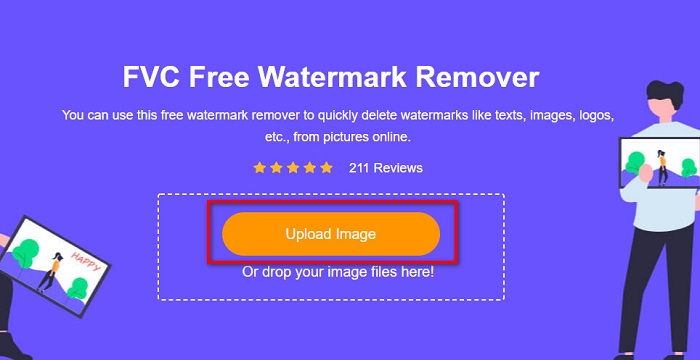
Βήμα 2. Στη συνέχεια, κάντε κλικ στο κουμπί Upload Image στην κύρια διεπαφή του λογισμικού. Θα εμφανιστούν οι φάκελοι του υπολογιστή σας, από όπου θα επιλέξετε και θα ανεβάσετε τη φωτογραφία σας.
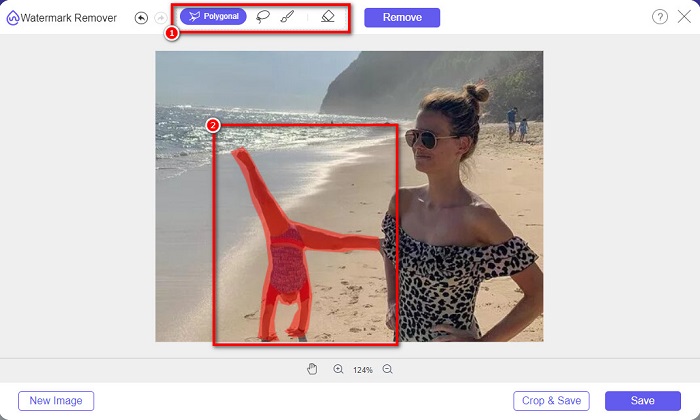
Βήμα 3. Αφού ανεβάσετε την εικόνα σας, επιλέξτε ένα εργαλείο αφαίρεσης που σας αρέσει. Μπορείτε να διαλέξετε ανάμεσα σε Polygonal, Lasso ή Brush. Έπειτα, επιλέξτε την περιοχή με τους τουρίστες χρησιμοποιώντας το εργαλείο αφαίρεσης.
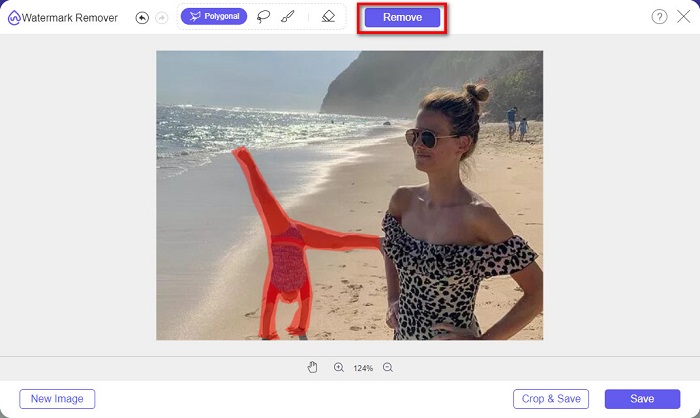
Βήμα 4. Έπειτα, κάντε κλικ στο κουμπί Remove για να αφαιρέσετε την περιοχή με τον ανεπιθύμητο τουρίστα από τη φωτογραφία σας.
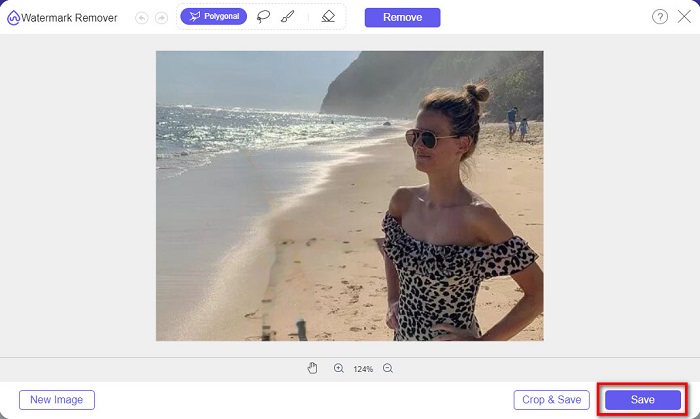
Βήμα 5. Στη συνέχεια θα δείτε ότι ο τουρίστας έχει εξαφανιστεί από τη φωτογραφία σας. Κάντε κλικ στο κουμπί Save για να αποθηκεύσετε την εικόνα στη συσκευή σας. Κι αυτό ήταν!
Μέρος 2. Πώς να αφαιρέσετε τουρίστες από φωτογραφίες στο Photoshop
Ας υποθέσουμε ότι θέλετε να τραβήξετε μια φωτογραφία από ένα μεγάλο τουριστικό αξιοθέατο, αλλά υπάρχουν πολλοί άνθρωποι. Θα σας μάθουμε τι να κάνετε ώστε η φωτογραφία σας να φαίνεται σαν να μην υπάρχει τουρίστας στην εικόνα σας. Διαβάστε αναλυτικά αυτό το μέρος για να μάθετε πώς.
Το Adobe Photoshop είναι η πιο γνωστή εφαρμογή επεξεργασίας εικόνας που χρησιμοποιούν πολλοί επαγγελματίες. Από ρετούς φωτογραφιών, δημιουργία λογοτύπων, εντυπωσιακών banners για τον ιστότοπό σας, μέχρι και βελτίωση της φωτογραφίας σας, όλα αυτά μπορείτε να τα κάνετε με το Photoshop. Επιπλέον, διαθέτει πολλά εργαλεία για ολοκληρωμένη επεξεργασία εικόνας. Παρόλο που η διεπαφή του είναι δύσκολη στην εκμάθηση, εξακολουθεί να προσφέρει πολλές λειτουργίες και δυνατότητες για επαγγελματική επεξεργασία εικόνων. Επιπλέον, μπορείτε να αφαιρέσετε οποιαδήποτε υδατογραφήματα και ανεπιθύμητα αντικείμενα από την εικόνα σας.
Πώς να αφαιρέσετε τουρίστες από φωτογραφίες Photoshop:
Βήμα 1. Κατεβάστε το Adobe Photoshop στη συσκευή σας και εκκινήστε την εφαρμογή.
Βήμα 2. Πρέπει να φωτογραφίσετε το ίδιο σκηνικό αρκετές φορές· ρυθμίστε τη μηχανή σας στη χειροκίνητη λειτουργία (Manual) και τραβήξτε φωτογραφίες από το ίδιο σημείο. Χρειάζεστε 10–20 λήψεις.
Βήμα 3. Στη συνέχεια, πρέπει να εφαρμόσετε τις διορθώσεις σας στα αρχεία RAW. Έπειτα, συγχρονίστε τα ώστε οι εικόνες να είναι πανομοιότυπες. Χρησιμοποιώντας το Lightroom, ακολουθήστε τα παρακάτω βήματα:
1. Επιλέξτε όλες τις φωτογραφίες που τραβήξατε μέσα από το Library.
2. Χρησιμοποιήστε το πάνελ Quick Develop για να κάνετε τις διορθώσεις στα RAW αρχεία. Οποιεσδήποτε αλλαγές στο πάνελ Quick Develop θα εφαρμοστούν σε όλες τις επιλεγμένες εικόνες.
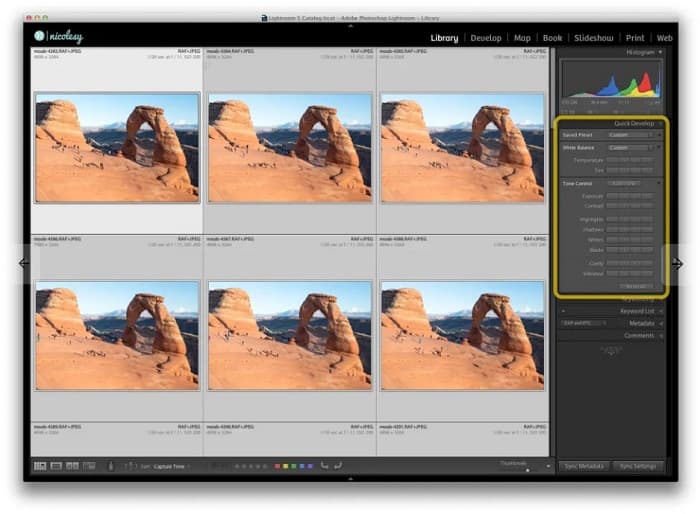
Βήμα 4. Έπειτα, Export τις εικόνες από το Lightroom στους φακέλους του υπολογιστή σας.
Βήμα 5. Τώρα θα αφαιρέσουμε τον τουρίστα από τις φωτογραφίες σας. Πηγαίνετε στο File>Scripts>Statistics.
1. Επιλέξτε Median από το αναπτυσσόμενο μενού στο επάνω μέρος του παραθύρου.
2. Χρησιμοποιήστε το κουμπί Browse για να επιλέξετε τις φωτογραφίες.
3. Έπειτα, τσεκάρετε το πλαίσιο Attempt to Automatically Align Source Images.
4. Κάντε κλικ στο OK. Τότε το Photoshop θα ευθυγραμμίσει και θα εκτελέσει τη διαδικασία «εξαφάνισης» στις φωτογραφίες σας.
Μέρος 3. Πώς να αφαιρέσετε τουρίστες από φωτογραφίες χρησιμοποιώντας το Apowersoft Online Watermark Remover
Το Apowersoft Online Watermark Remover είναι ένα ακόμη λογισμικό για να αφαιρείτε τουρίστες από φωτογραφίες. Είναι πρακτικό για την αφαίρεση κάθε είδους υδατογραφημάτων, όπως λογότυπα, κείμενα ή ανεπιθύμητα αντικείμενα από τις φωτογραφίες σας. Μπορείτε επίσης να κάνετε μαζική επεξεργασία για να αφαιρέσετε ταυτόχρονα υδατογραφήματα από πολλές εικόνες. Ακόμη πιο εντυπωσιακό είναι ότι διαθέτει και εργαλείο αφαίρεσης υδατογραφημάτων από βίντεο. Επιπλέον, έχει απλή διεπαφή, γεγονός που το καθιστά ιδανικό για αρχάριους.
Και αν θέλετε να έχετε πρόσβαση εκτός σύνδεσης, το Apowersoft Online Watermark Remover διαθέτει μια εφαρμογή με δυνατότητα λήψης. Ωστόσο, είναι ένα εργαλείο που εξαρτάται από το Διαδίκτυο, επομένως μπορεί να αντιμετωπίσετε μια αργή διαδικασία φόρτωσης.
Πώς να αφαιρέσετε τουρίστες από τη φωτογραφία σας χρησιμοποιώντας το Apowersoft Online Watermark Remover:
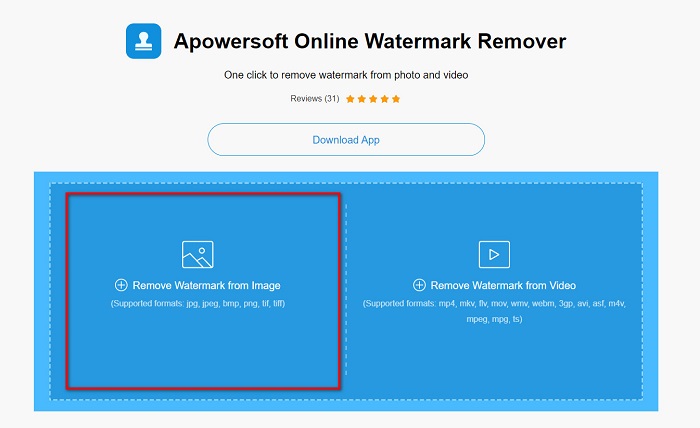
Βήμα 1. Αναζητήστε το Apowersoft Online Watermark Remover στον φυλλομετρητή σας και μεταβείτε στην ιστοσελίδα του. Στην κύρια διεπαφή του λογισμικού θα δείτε δύο επιλογές. Κάντε κλικ στο Remove Watermark from Image.
Βήμα 2. Στην επόμενη οθόνη θα δείτε το remover box. Σύρετέ το και τοποθετήστε το πάνω από τον τουρίστα που θέλετε να αφαιρέσετε.
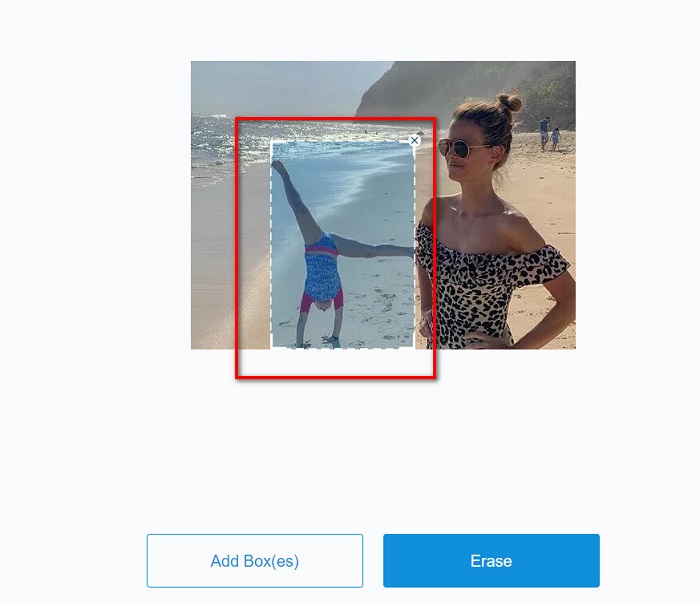
Προαιρετικό. Αν υπάρχουν δύο ή περισσότεροι τουρίστες στη φωτογραφία σας, κάντε κλικ στο κουμπί Add Box(es) για να προσθέσετε επιπλέον πλαίσια αφαίρεσης.
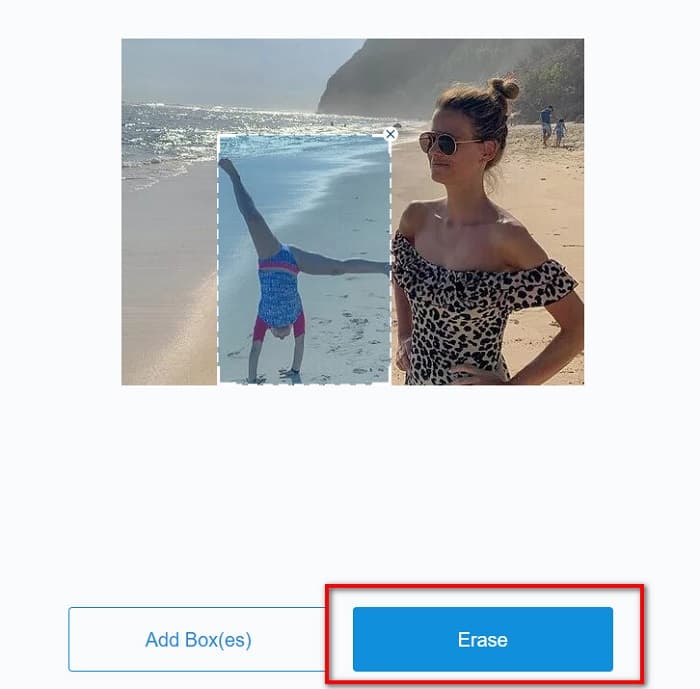
Βήμα 3. Αφού επιλέξετε την περιοχή με το ανεπιθύμητο αντικείμενο που θέλετε να αφαιρέσετε, κάντε κλικ στο κουμπί Erase.
Σχετικά με:
Πώς να αφαιρέσετε εύκολα το υδατογράφημα του Weibo από βίντεο και εικόνες
Μάθετε πώς να αφαιρέσετε δωρεάν το υδατογράφημα του Movavi [Must Have!]
Μέρος 4. Συχνές ερωτήσεις σχετικά με την κατάργηση τουριστών από φωτογραφίες
Μπορείτε να αφαιρέσετε υδατογραφήματα κειμένου από τη φωτογραφία σας;
Ναί. Χρησιμοποιώντας τα προαναφερθέντα εργαλεία, μπορείτε να αφαιρέσετε τυχόν υδατογραφήματα, όπως λογότυπα, κείμενα και εικόνες στη φωτογραφία σας.
Υπάρχει κάποια εφαρμογή από το κατάστημα εφαρμογών που μπορεί να αφαιρέσει ανεπιθύμητα αντικείμενα από τη φωτογραφία σας;
Μία από τις καλύτερες εφαρμογές από το κατάστημα εφαρμογών που μπορεί να αφαιρέσει υδατογραφήματα στην εικόνα σας είναι το Photo Retouch. Αυτή η εφαρμογή σάς επιτρέπει να εξαφανίζετε αντικείμενα, να αφαιρείτε ανεπιθύμητα αντικείμενα ή άτομα και πολλά άλλα.
Μπορείτε να αφαιρέσετε υδατογραφήματα από το Photoshop δωρεάν;
Το Adobe Photoshop δεν είναι μια δωρεάν εφαρμογή. Επομένως, πρέπει να αγοράσετε πρώτα την εφαρμογή πριν τη χρησιμοποιήσετε. Παρόλο που μπορείτε να το κατεβάσετε χρησιμοποιώντας ένα κρακ, δεν συνιστάται επειδή δεν είναι ασφαλές.
συμπέρασμα
Τώρα που ξέρετε πώς να αφαιρείτε τουρίστες από φωτογραφίες χρησιμοποιώντας αυτά τα διαφορετικά εργαλεία, η επιλογή του εργαλείου που θα χρησιμοποιήσετε είναι στο χέρι σας. Παρότι έχουν διαφορετικές λειτουργίες και διαφορετικές διεπαφές, είναι όλα αποτελεσματικά για την αφαίρεση υδατογραφημάτων ή ανεπιθύμητων αντικειμένων από τις φωτογραφίες σας. Αν όμως θέλετε μια εύχρηστη διεπαφή λογισμικού και ένα εργαλείο με εύκολη πρόσβαση, χρησιμοποιήστε το FVC Free Watermark Remover.
-
 Πώς να αφαιρέσετε το υδατογράφημα Coub με απλά βήματα
 Μάθετε πώς να αφαιρείτε το υδατογράφημα coub στα βίντεό σας χρησιμοποιώντας αυτά τα δημοφιλή εργαλεία αφαίρεσης υδατογραφήματος. Διαβάστε αυτό το άρθρο για να μάθετε αυτά τα καταπληκτικά εργαλεία και πώς να τα χρησιμοποιήσετε.
-
 Εύκολοι τρόποι για να αφαιρέσετε το υδατογράφημα από τις φωτογραφίες αποφοίτησης
 Θέλετε να μάθετε τους καλύτερους τρόπους για να αφαιρέσετε τα υδατογραφήματα από τις φωτογραφίες αποφοίτησης; Διαβάζοντας αυτό το άρθρο, θα μπορείτε να μάθετε πώς να αφαιρείτε εύκολα τα υδατογραφήματα στις φωτογραφίες grad.
-
 Πώς να αφαιρέσετε εύκολα το υδατογράφημα Lumion σε Windows & Mac
 Χρειάζεται να αφαιρέσετε το υδατογράφημα Lumion για να το παρουσιάσετε επαγγελματικά; Λοιπόν, υπάρχουν εργαλεία που μπορείτε να χρησιμοποιήσετε για να σας βοηθήσουν να απαλλαγείτε από το υδατογράφημα που αφήνει.
