


 Video Converter Ultimate
 Εγγραφή οθόνης
 Επισκευή βίντεο
 Ασφαλές κατέβασμα
Πώς να αφαιρέσετε γρήγορα τα εικονοστοιχεία μιας εικόνας με 3 καλύτερες λύσεις για χρήση
Το Unpixelate image είναι η λύση που χρειάζεστε για να ανανεώσετε μια εικόνα που έχει γίνει θολή και «τετραγωνισμένη» (pixelated) ή αν η εικόνα σας έχει μετατραπεί σε bitmap με μικρά τετραγωνάκια. Πολλοί χρήστες θεωρούν πως είναι μπελάς να τροποποιούν, να ρυθμίζουν, να αλλάζουν και να βελτιώνουν μια εικόνα· στην πραγματικότητα έτσι ήταν, αλλά αυτό ανήκει στο παρελθόν. Με την προηγμένη τεχνολογία που έχουμε πλέον στη διάθεσή μας, αυτή η εργασία μπορεί να επιλυθεί εύκολα, αρκεί να χρησιμοποιήσετε το σωστό εργαλείο.
Δεν έχετε το κατάλληλο εργαλείο για να αφαιρέσετε το pixelation στη φωτογραφία σας; Ευτυχώς, αυτό το άρθρο θα σας φέρει τα τρία καλύτερα λογισμικά που βρήκαμε που θα μπορούσαν να σας βοηθήσουν να επεξεργαστείτε το pixelation της φωτογραφίας και έναν οδηγό για το καθένα για να λύσετε το πρόβλημα.

Μέρος 1. Πώς να αφαιρέσετε τα εικονοστοιχεία μιας εικόνας στο διαδίκτυο με το πρόγραμμα επεξεργασίας φωτογραφιών με την καλύτερη επιλογή [Συνιστάται]
Το FVC Free Image Upscaler είναι ένα πλήρως αυτοματοποιημένο online εργαλείο που μπορείτε να χρησιμοποιήσετε για να «ξεπιξελιάσετε» (unpixelate) εικόνες δωρεάν, απευθείας στο διαδίκτυο. Μπορείτε να το ανοίξετε σε οποιονδήποτε φυλλομετρητή ιστού έχετε στη διάθεσή σας – δεν χρειάζεται να κατεβάσετε κάποιο launcher για να το εκκινήσετε, επομένως μπορείτε να το χρησιμοποιήσετε αμέσως μόλις το ανοίξετε. Παρόλο που αυτό το λογισμικό είναι διαθέσιμο μέσω web, η ισχύς και η απόδοσή του στην απο-πιξελοποίηση εικόνων είναι αντίστοιχη με εκείνη ενός επαγγελματικού προγράμματος επεξεργασίας εικόνας, είτε online είτε offline. Ίσως νομίζετε ότι θα δυσκολευτείτε να το χρησιμοποιήσετε, αλλά δεν θα συμβεί αυτό. Ακόμη δεν έχετε πειστεί; Αν όχι, μπορείτε να διαβάσετε ή να ακολουθήσετε το παρακάτω αναλυτικό tutorial, που θα σας καθοδηγήσει βήμα προς βήμα ώστε να χρησιμοποιήσετε το εργαλείο με ευκολία.
Βήμα 1. Μπορείτε να αποκτήσετε πρόσβαση σε αυτό το διαδικτυακό εργαλείο από οποιονδήποτε φυλλομετρητή έχετε στη συσκευή σας, αναζητώντας το με το όνομά του ή κάνοντας κλικ σε αυτό το link για να ανοίξετε την κεντρική του σελίδα.
Βήμα 2. Μόλις μπείτε στο web εργαλείο, κάντε κλικ στο Add Image για να ανεβάσετε την pixelated εικόνα. Ένας φάκελος αρχείων θα εμφανιστεί στην οθόνη σας· βρείτε εκεί την εικόνα που είναι αποθηκευμένη στον τοπικό σας δίσκο και στη συνέχεια πατήστε Open για να την ανεβάσετε.
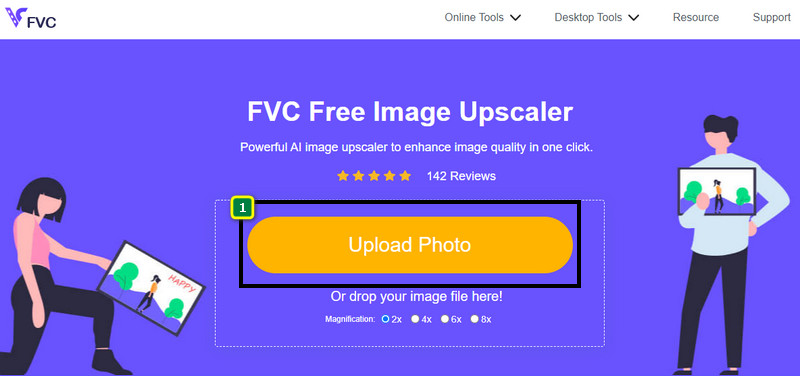
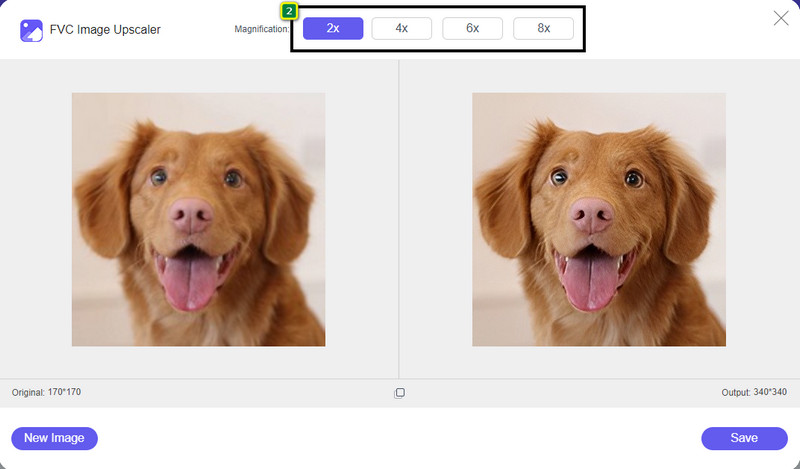
Βήμα 3. Έπειτα, επιλέξτε την επιλογή μεγέθυνσης που θέλετε να εφαρμόσετε στην εικόνα σας, ώστε να εξομαλύνετε την εμφάνισή της και να μην φαίνεται πλέον ως bitmap με μικρά τετραγωνάκια.
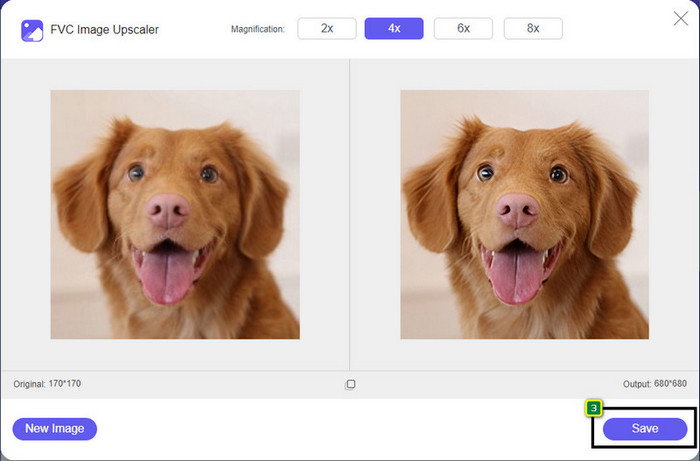
Βήμα 4. Τόσο απλά· κάντε κλικ στο Save για να κατεβάσετε την «ξεπιξελιασμένη» έκδοση στον τοπικό σας δίσκο.
Μέρος 2. Πώς να αφαιρέσετε τα εικονοστοιχεία μιας εικόνας εκτός σύνδεσης χρησιμοποιώντας 2 τρόπους σε Windows & Mac [Easy]
Pixbim - Ξεπιξελώστε τις φωτογραφίες στα Windows
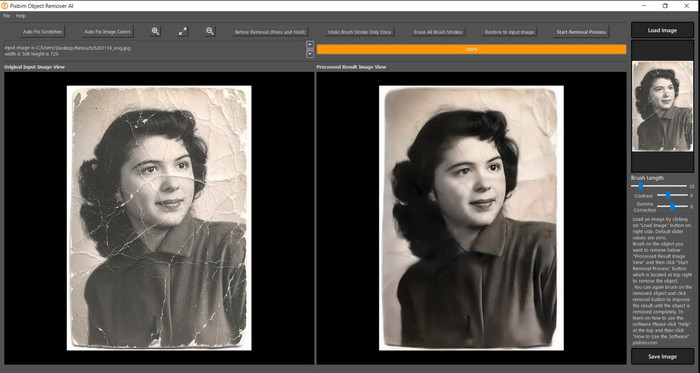
Το Pixbim είναι ένα από τα πιο ισχυρά και υποστηριζόμενα από AI προγράμματα unpixelator εικόνων που μπορείτε να κατεβάσετε στα Windows για να διορθώσετε αυτό το πρόβλημα. Ο επεξεργαστής αυτός αξίζει να αναφερθεί σε αυτό το άρθρο επειδή επιδιορθώνει pixelated εικόνες γρήγορα και αποτελεσματικά. Με αυτό, η τεχνητή νοημοσύνη ρυθμίζει αυτόματα τις παραμέτρους για εσάς, ώστε να μην δυσκολεύεστε στη χρήση του λογισμικού. Λόγω των δυνατοτήτων και των λειτουργιών του, θα χρειαστεί να αγοράσετε κλειδί άδειας χρήσης για να συνεχίσετε να το χρησιμοποιείτε μετά τη δωρεάν δοκιμαστική περίοδο. Αυτό μπορεί να είναι ακριβό για πολλούς που θα ήθελαν να το έχουν στον υπολογιστή τους.
Βήμα 1. Αφού κατεβάσετε το λογισμικό, πρέπει να το εκκινήσετε για να μπορέσουμε να προχωρήσουμε στο επόμενο βήμα.
Βήμα 2. Πατήστε Load Image για να προσθέσετε εδώ την pixelated εικόνα που θέλετε να βελτιωθεί.
Βήμα 3. Στη συνέχεια, ρυθμίστε τις παραμέτρους σύροντας τα sliders σύμφωνα με τις τιμές που θέλετε να επιτύχετε.
Βήμα 4. Αφού ολοκληρώσετε τις ρυθμίσεις της εικόνας, αποθηκεύστε τώρα το αποτέλεσμα για να το κάνετε export.
Movavi Photo Editor [Windows & Mac]
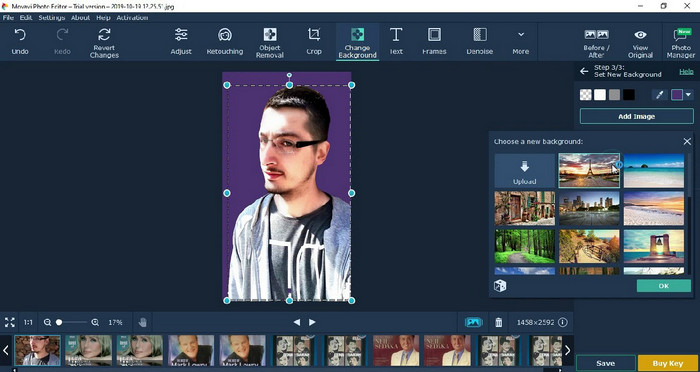
Πολλοί χρήστες έχουν ήδη δοκιμάσει το Movavi Photo Editor λόγω της ευελιξίας του στην επεξεργασία εικόνων. Όπως και το Pixbim, μπορεί να αποκαταστήσει τα χαμένα pixel της εικόνας με την υποστήριξη των νευρωνικών δικτύων της τεχνητής του νοημοσύνης. Με αυτόν τον επεξεργαστή στα χέρια σας, μπορείτε να κάνετε βασική αλλά και προχωρημένη επεξεργασία στην εμφάνιση, όπως περικοπή, περιστροφή, προσθήκη φίλτρων, διόρθωση pixel και πολλά άλλα. Ωστόσο, δεν μπορείτε να τα αξιοποιήσετε όλα αν δεν αγοράσετε την premium έκδοσή του για τον υπολογιστή σας.
Έχει σχεδόν παρόμοια τιμή με το Pixbim, το οποίο είναι αρκετά ακριβό για πολλούς. Αλλά αν έχετε έναν προϋπολογισμό για να αγοράσετε ένα πρόγραμμα επεξεργασίας, αυτός μπορεί να είναι αυτός που χρειάζεστε. Μάθετε πώς να αφαιρείτε τα εικονοστοιχεία των εικόνων με αυτήν την εφαρμογή ακολουθώντας τα βήματα.
Βήμα 1. Κατεβάστε την εφαρμογή σε Windows ή Mac OS.
Βήμα 2. Εκκινήστε το λογισμικό και στη συνέχεια ανεβάστε εδώ τη φωτογραφία που θέλετε να «ξεπιξελιάσετε».
Βήμα 3. Τώρα που έχετε ανεβάσει την εικόνα, κάντε κλικ στο Magic Enhance για να την τροποποιήσετε αυτόματα με τη βοήθεια της τεχνητής νοημοσύνης.
Βήμα 4. Κάντε export την εικόνα και απολαύστε το αποτέλεσμα.
Μέρος 3. Συχνές ερωτήσεις σχετικά με το πώς να κάνετε Upixelate μια εικόνα
Γιατί υπάρχει υδατογράφημα στην εξαγόμενη εικόνα χωρίς εικονοστοιχεία;
Όταν χρησιμοποιείτε μια δωρεάν δοκιμαστική έκδοση της εφαρμογής, υπάρχει πιθανότητα να αφήσει ένα υδατογράφημα κατά την εξαγωγή. Έτσι, εάν θέλετε να εξαγάγετε μια εικόνα χωρίς το υδατογράφημα, μπορείτε να αγοράσετε την άδεια χρήσης της εφαρμογής ή να χρησιμοποιήσετε το FVC Free Image Upscaler, γιατί δεν θα αφήσει υδατογράφημα στην εξαγόμενη εικόνα.
Ποια είναι η διαφορά μεταξύ θολού και εικονοστοιχείου;
Πολλά άρθρα έχουν αποδείξει ότι το θολό και το εικονοστοιχείο δεν είναι το ίδιο λόγω ορισμένων παραγόντων. Οι θολές εικόνες είναι ο λόγος για τον οποίο τραβάτε μια κίνηση υψηλής ταχύτητας ή τραβάτε μια φωτογραφία με μια ασταμάτητη κάμερα. Ενώ είναι pixelized, όταν μεγεθύνετε ένα στιγμιότυπο, θα ξεκινήσει μια pixelation και θα δείτε ένα bitmap με ένα μικροσκοπικό τετράγωνο.
Ποιος είναι ο παράγοντας που κάνει την εικόνα pixelated;
Μερικοί λόγοι μετατρέπουν τις εικόνες σε pixel. μια κοινή αιτία είναι όταν μεγεθύνετε μια εικόνα ράστερ. Οι μορφές ράστερ, όπως PNG, JPG, GIF και άλλα, αποτελούνται από μικρά τετράγωνα που δημιουργούν την εμφάνιση του αντικειμένου που είναι αποθηκευμένο σε αυτά τα κοντέινερ. Συνήθως, όταν μεγεθύνετε την εικόνα, θα δείτε ότι υπάρχουν τετράγωνα, γνωστά ως pixel, που περιέχουν δεδομένα χρώματος που παρουσιάζονται οπτικά. Μπορεί να είναι πρόβλημα για πολλούς συντάκτες, ειδικά όταν συμβαίνει pixelation.
Πώς μπορώ να διορθώσω το θόρυβο της εικόνας;
Πρόκειται για ένα ακόμη συνηθισμένο πρόβλημα που μπορεί να συναντήσετε στις φωτογραφίες που τραβάτε, και η λύση που ίσως χρειάζεστε βρίσκεται σε αυτό το άρθρο. Κάντε κλικ σε αυτόν τον σύνδεσμο για να διαβάσετε εύκολα, να λύσετε και να μάθετε πώς να αφαιρέσετε τον θόρυβο από τις εικόνες.
συμπέρασμα
Τόσο απλά, μπορείτε πλέον να «ξεπιξελιάζετε» μια εικόνα με τη βοήθεια των καλύτερων προγραμμάτων επεξεργασίας εικόνας που μπορείτε να κατεβάσετε ή να χρησιμοποιήσετε online. Η υπόθεση αυτή λύθηκε! Αν λοιπόν συναντήσετε ποτέ πρόβλημα με pixelation, μπορείτε να βασιστείτε σε αυτό το άρθρο για να σας βοηθήσει. Το καλύτερο εργαλείο που ίσως χρειαστείτε βρίσκεται εδώ και είναι έτοιμο να σας εξυπηρετήσει, όπως το FVC Free Image Upscaler. Είναι προτιμότερο να βελτιώσετε την εμφάνιση διορθώνοντας την pixelation, ώστε να μην είναι οπτικά ενοχλητική για όσους βλέπουν την εικόνα. Πείτε αντίο στην pixelation όταν χρησιμοποιείτε αυτόν τον online επεξεργαστή εικόνων.
-
 7 Image Upscaler που μπορείτε να χρησιμοποιήσετε για να βελτιώσετε και να βελτιώσετε κάθε εικόνα [2022]
 Χρειάζεστε την αναβάθμιση εικόνας; Ευτυχώς, αυτό το άρθρο καλύπτει το καλύτερο λογισμικό στο οποίο μπορείτε να έχετε πρόσβαση και να κατεβάσετε στον υπολογιστή σας.
-
 5 βελτιωτικά ανάλυσης εικόνας που πρέπει να χρησιμοποιήσετε αυτό το 2022 [Τελευταίες επιλογές]
 Δεν ξέρετε ποιο βελτιωτικό ανάλυσης εικόνας πρέπει να χρησιμοποιήσετε; Διαβάστε αυτό το άρθρο καθώς εξετάζουμε πέντε εργαλεία για χρήση και βελτίωση της ανάλυσης των εικόνων.
-
 4 εφαρμογές για να αυξήσετε την ανάλυση εικόνας στις φορητές συσκευές σας [Καλύτερη επιλογή]
 Θα χρειαστείτε εφαρμογές για να αυξήσετε την ανάλυση της φωτογραφίας σας εάν θέλετε να επιτύχετε 1080p, 4k ή κάτι τέτοιο. Με την παρακάτω λίστα μπορείς να το κάνεις εύκολα!
