


 Video Converter Ultimate
 Εγγραφή οθόνης
 Επισκευή βίντεο
 Ασφαλές κατέβασμα
Υπέροχοι τρόποι για να αφαιρέσετε το λογότυπο από ένα βίντεο χρησιμοποιώντας τις συσκευές σας
Το να παρακολουθείτε τα αγαπημένα σας βίντεο είναι ικανοποιητικό, μέχρι τη στιγμή που στο βίντεο εμφανίζεται ένα περιττό αντικείμενο, όπως λογότυπα, υδατογραφήματα, κείμενα κ.λπ. Αν αναζητάτε τις πιο αποτελεσματικές και χρήσιμες μεθόδους, τότε πρέπει να διαβάσετε αυτό το άρθρο για να πάρετε μια ιδέα. Χρησιμοποιώντας εξαιρετικές εφαρμογές, μπορείτε να δοκιμάσετε πολλούς τρόπους για να αφαιρέσετε λογότυπα από βίντεο, τόσο εκτός σύνδεσης όσο και διαδικτυακά. Με τη βοήθεια αυτών των εργαλείων αφαίρεσης λογοτύπων, μπορείτε να απολαύσετε την παρακολούθηση των αγαπημένων σας ταινιών, βίντεο κλιπ, παρουσιάσεων διαφανειών και άλλων. Έτσι, δεν θα ξανασυναντήσετε το ίδιο πρόβλημα. Αν θέλετε να μάθετε αποτελεσματικούς τρόπους για να αφαιρέσετε ένα λογότυπο από τα βίντεό σας, μην παραλείψετε να διαβάσετε αυτό το ενημερωτικό άρθρο.

Μέρος 1: Καλύτερη μέθοδος για να αφαιρέσετε το λογότυπο από ένα βίντεο
Αν υποθέσουμε ότι αναζητάτε ένα δωρεάν εργαλείο αφαίρεσης λογότυπων. Η καλύτερη εφαρμογή που μπορείτε να χρησιμοποιήσετε είναι το Video Converter Ultimate. Αυτή η εφαρμογή μπορεί να σας βοηθήσει να αφαιρέσετε ένα λογότυπο από το βίντεό σας. Όχι μόνο το λογότυπο, αλλά και κάθε άλλο περιττό αντικείμενο στα βίντεό σας, όπως υδατογραφήματα, κείμενα, εικόνες κ.λπ. Επίσης, μπορείτε να αφαιρέσετε εύκολα το λογότυπο, επειδή διαθέτει απλά βήματα που μπορεί να ακολουθήσει ακόμη και ένας αρχάριος.
Επιπλέον, το Video Converter Ultimate έχει μια γρήγορη διαδικασία αφαίρεσης, σε αντίθεση με τις άλλες εφαρμογές που καταναλώνουν πολύ χρόνο για να αφαιρέσουν λογότυπα από ένα βίντεο. Χρησιμοποιώντας αυτήν την εφαρμογή, μπορείτε να αφαιρέσετε το λογότυπο με δύο εύκολα εργαλεία, το εργαλείο αφαίρεσης υδατογραφήματος βίντεο και το πρόγραμμα περικοπής βίντεο. Επιπλέον, διαθέτει λειτουργίες που μπορείτε να απολαύσετε, όπως μετατροπέας βίντεο, ελεγκτής ταχύτητας βίντεο, συμπιεστής βίντεο, διόρθωση χρωμάτων, περικοπή βίντεο, δημιουργία κολάζ και πολλά άλλα. Εάν θέλετε να μάθετε αυτούς τους δύο τρόπους για να αφαιρέσετε τα λογότυπα χρησιμοποιώντας το Video Converter Ultimate, ακολουθήστε τα παρακάτω βήματα.
1. Χρήση της λειτουργίας Αφαίρεσης υδατογραφήματος βίντεο
Βήμα 1: Για το πρώτο βήμα, μεταβείτε στον ιστότοπο του Video Converter Ultimate και κατεβάστε το λογισμικό. Αφού ολοκληρωθεί η λήψη, προχωρήστε στη διαδικασία εγκατάστασης και εκκινήστε το Video Converter Ultimate στον υπολογιστή σας.
Δωρεάν ΛήψηΓια Windows 7 ή νεότεραΑσφαλής λήψη
Δωρεάν ΛήψηΓια MacOS 10.7 ή νεότεροΑσφαλής λήψη
Βήμα 2: Αφού εκκινήσετε το λογισμικό, μεταβείτε στον πίνακα Toolbox. Στη συνέχεια, βρείτε το Video Watermark Remover και κάντε κλικ σε αυτό.
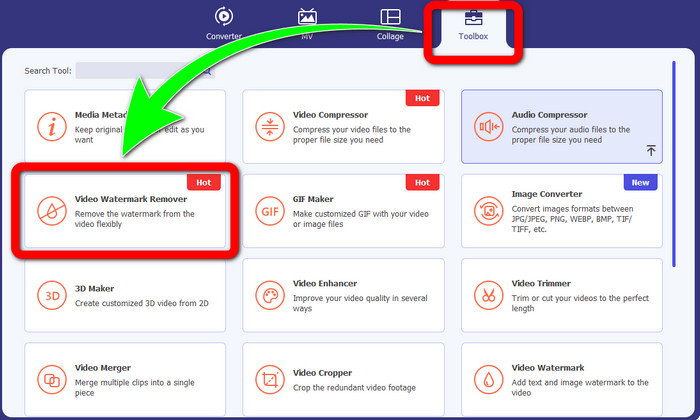
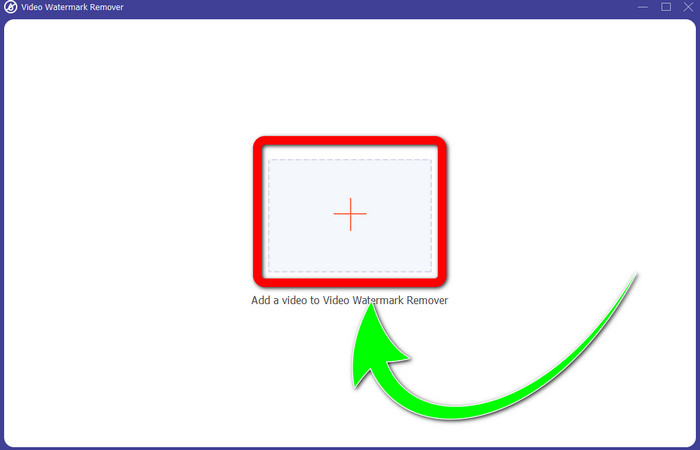
Βήμα 3: Όταν ολοκληρώσετε το κλικ στο Video Watermark Remover, ένα νέο παράθυρο θα εμφανιστεί στην επιφάνεια εργασίας σας. Επιλέξτε το κουμπί με το σύμβολο συν και εισαγάγετε το βίντεό σας με το λογότυπο.
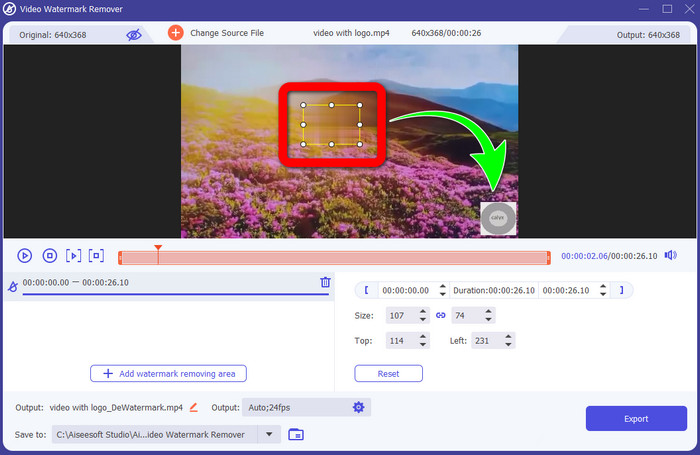
Βήμα 4: Επιλέξτε το κουμπί Add Watermark Removing Area. Ένα μικρό πλαίσιο θα εμφανιστεί πάνω στο βίντεό σας. Μετακινήστε το πλαίσιο πάνω στο λογότυπο ώστε να το καλύψετε.
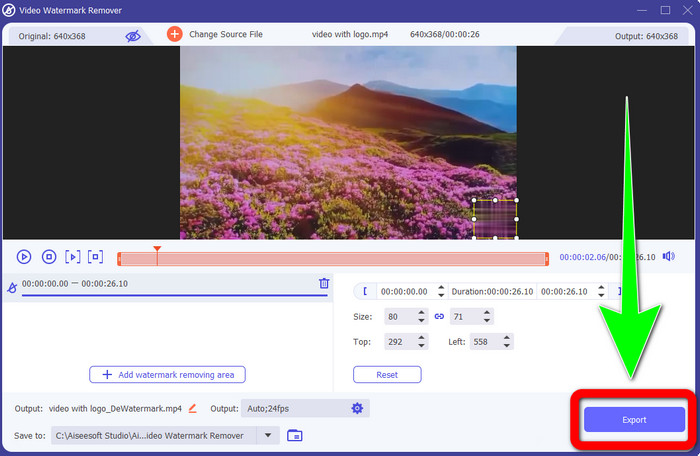
Βήμα 5: Όταν τελειώσετε με τη μετακίνηση του πλαισίου ώστε να καλύψει το λογότυπο, επιλέξτε το κουμπί Export για να αποθηκεύσετε το τελικό βίντεο.
1. Χρήση της λειτουργίας Video Cropper
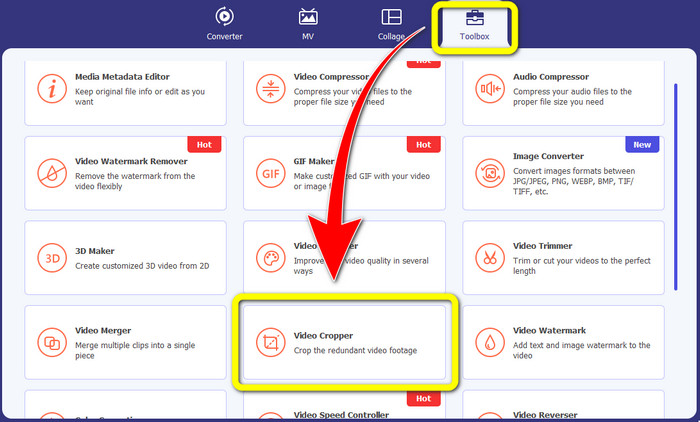
Βήμα 1: Ανοίξτε το Video Converter Ultimate, μεταβείτε στο Toolbox και κάντε κλικ στο κουμπί Video Cropper. Στη συνέχεια, ένα νέο παράθυρο θα εμφανιστεί στην οθόνη σας.
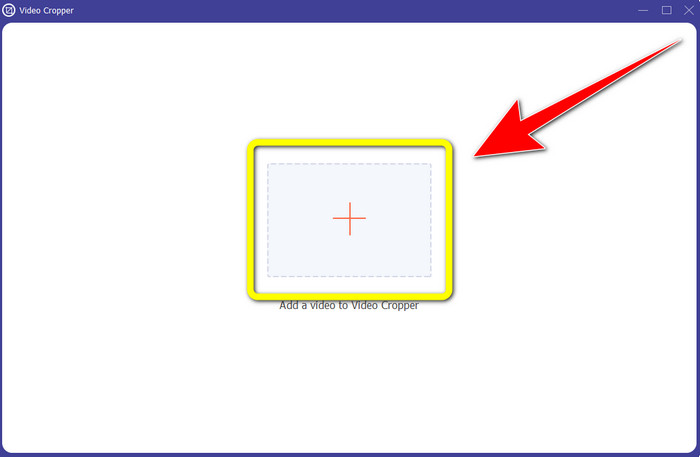
Βήμα 2: Όταν το νέο παράθυρο εμφανιστεί ήδη στην οθόνη σας, επιλέξτε το κουμπί με το σύμβολο συν και εισαγάγετε το βίντεό σας με το λογότυπο.
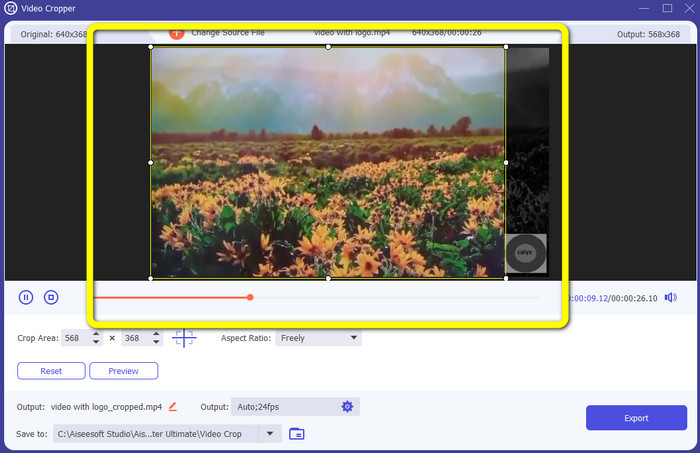
Βήμα 3: Αφού εισαγάγετε το βίντεο, μπορείτε να το περικόψετε για να εξαλείψετε το λογότυπο.
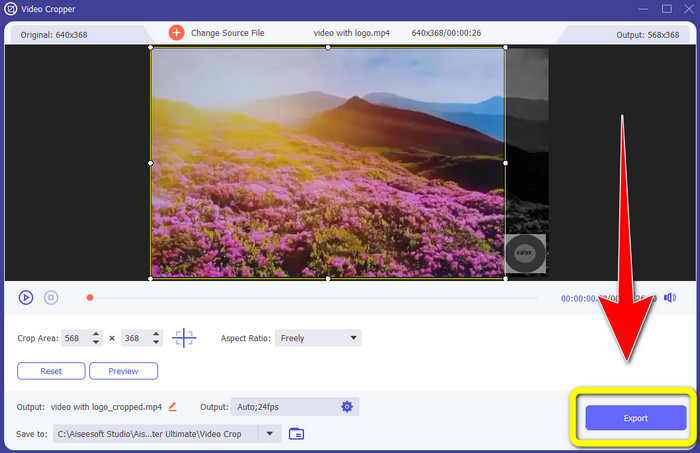
Βήμα 4: Κάντε κλικ στο κουμπί Export μετά την περικοπή του βίντεο.
Μέρος 2: Πώς να αφαιρέσετε το λογότυπο από το βίντεο στο Διαδίκτυο
Αν αναζητάτε μια εξαιρετική εφαρμογή που μπορείτε να χρησιμοποιήσετε για να σας βοηθήσει στο πώς να αφαιρέσετε το λογότυπο από το βίντεο, μπορείτε να χρησιμοποιήσετε το 123APPS. Αυτή η εφαρμογή μπορεί να σας βοηθήσει να αφαιρέσετε ένα λογότυπο από το βίντεό σας γρήγορα και χωρίς κόπο, κάτι που είναι ιδανικό και κατάλληλο για αρχάριους. Επιπλέον, αυτό το ηλεκτρονικό εργαλείο είναι δωρεάν, επομένως δεν χρειάζεται να ανησυχείτε αν πρέπει να το αγοράσετε ή όχι. Επίσης, σε αυτή την εφαρμογή, μία από τις καλές λειτουργίες της είναι η εξάλειψη ενοχλητικών αντικειμένων στα βίντεό σας, όπως υδατογραφήματα, κείμενα, εικόνες κ.λπ. Επιπλέον, υποστηρίζει διάφορες μορφές αρχείων, όπως MOV, WMV, AVI, MP4 και άλλες. Ωστόσο, κάθε φορά που ανεβάζετε ένα αρχείο, χρειάζεται πολύ χρόνο για να ολοκληρωθεί το ανέβασμα. Επίσης, η διαδικασία αφαίρεσης είναι πολύ αργή. Αν θέλετε να αφαιρέσετε ένα λογότυπο από τα βίντεό σας, ακολουθήστε αυτά τα απλά βήματα.
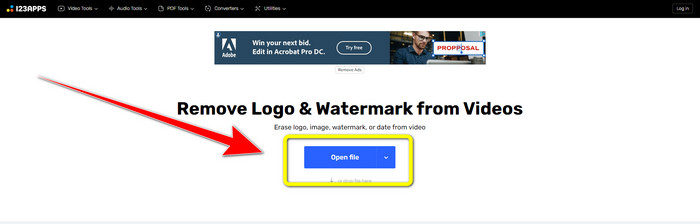
Βήμα 1: Μεταβείτε στον ιστότοπο του 123APPS. Κάντε κλικ στο κουμπί Open file και προσθέστε το βίντεό σας με το λογότυπο του TikTok.
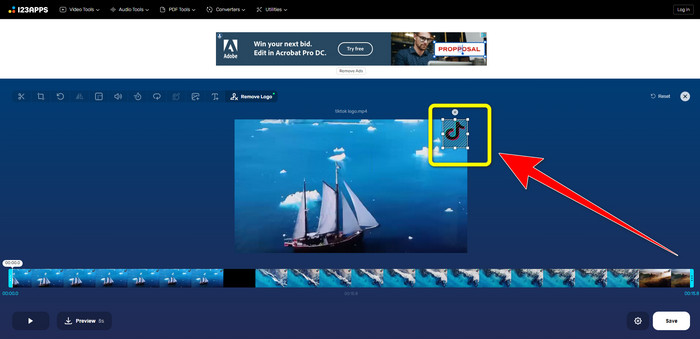
Βήμα 2: Αφού επισυνάψετε το βίντεό σας, δημιουργήστε ένα πλαίσιο με το ποντίκι σας πάνω στην οθόνη και καλύψτε το λογότυπο για να το αφαιρέσετε.
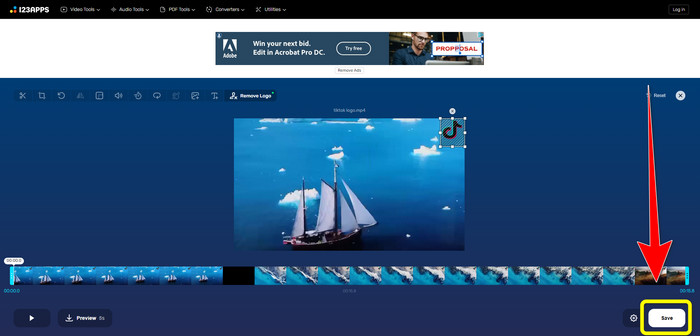
Βήμα 3: Αφού καλύψετε το λογότυπο, μπορείτε πλέον να κάνετε κλικ στο κουμπί Save για να αποθηκεύσετε το τελικό βίντεο χωρίς λογότυπο.
Μέρος 3: Πώς να αφαιρέσετε το λογότυπο από το βίντεο σε iPhone και Android
Πώς να διαγράψετε το λογότυπο από το βίντεο στο Android
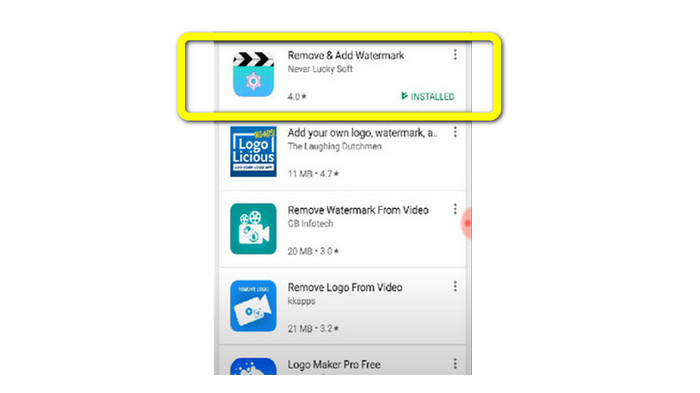
Αν θέλετε να μάθετε πώς να αφαιρέσετε το λογότυπο από ένα βίντεο χρησιμοποιώντας Android, το Remove and Add Watermark είναι η εφαρμογή που μπορείτε να χρησιμοποιήσετε. Αυτό το λογισμικό μπορεί να σας βοηθήσει να αφαιρέσετε ένα λογότυπο από τα βίντεό σας άμεσα. Επίσης, δεν είναι αξιόπιστο μόνο για την αφαίρεση περιττών αντικειμένων από τα βίντεό σας. Μπορείτε επίσης να αφαιρέσετε ή να εξαλείψετε λογότυπα από τις εικόνες σας, κάτι που είναι βολικό για τους χρήστες. Επιπλέον, αυτό το εργαλείο αφαίρεσης είναι απλό και εύκολο στη χρήση. Τέλος, είναι γρήγορο στην αποθήκευση των βίντεό σας. Αν θέλετε να εξαλείψετε το λογότυπο από τα βίντεό σας, ακολουθήστε τα παρακάτω απλά βήματα.
Βήμα 1: Κατεβάστε το Remove and Add Watermark στη συσκευή Android σας.
Βήμα 2: Αφού κατεβάσετε την εφαρμογή, κάντε κλικ στο κουμπί Select Video > Remove Logo για να προσθέσετε το βίντεό σας με το λογότυπο.
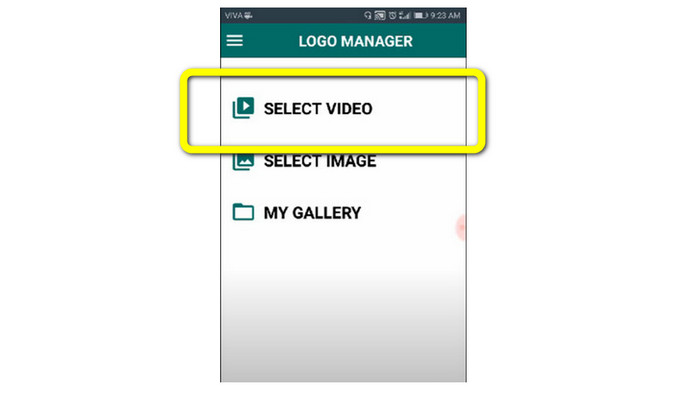
Βήμα 3: Ένα μικρό πλαίσιο θα εμφανιστεί στην οθόνη σας όταν έχετε ήδη προσθέσει το βίντεο. Χρησιμοποιήστε το πλαίσιο για να αφαιρέσετε το λογότυπο.
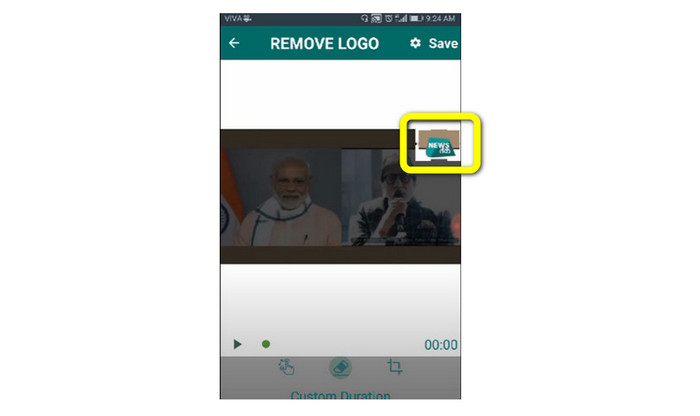
Βήμα 4: Όταν τελειώσετε με την κάλυψη του λογότυπου, κάντε κλικ στο κουμπί Save για να αποθηκεύσετε το βίντεό σας χωρίς λογότυπο.
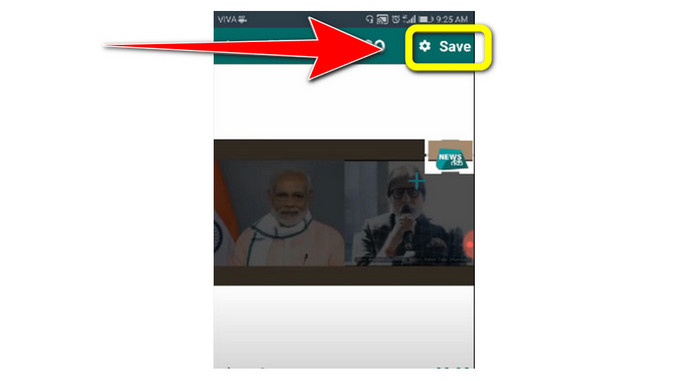
Πώς να διαγράψετε το λογότυπο από το βίντεο στο iPhone
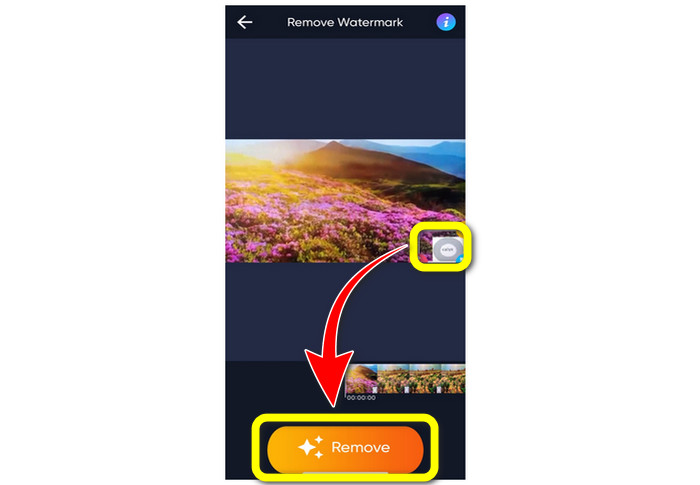
Αν θέλετε να σβήσετε ένα λογότυπο από τα βίντεό σας χρησιμοποιώντας το iPhone σας, η καλύτερη εφαρμογή που μπορείτε να χρησιμοποιήσετε είναι το Watermark Remover Retouch. Αυτή η εφαρμογή σάς επιτρέπει να αφαιρείτε περιττά αντικείμενα από τα βίντεό σας, όπως λογότυπα, υδατογραφήματα, κείμενα, εικόνες κ.λπ. Επίσης, μπορείτε να τα αφαιρείτε γρήγορα, κάτι που είναι κατάλληλο για νέους χρήστες. Επιπλέον, διαθέτει απλό περιβάλλον εργασίας, ώστε να μπορείτε να τη χρησιμοποιείτε εύκολα. Αν θέλετε να χρησιμοποιήσετε αυτή την εφαρμογή για να αφαιρέσετε λογότυπα από βίντεο στο iPhone σας, ακολουθήστε τα παρακάτω απλά βήματα.
Βήμα 1: Κατεβάστε το Watermark Remover Retouch στο iPhone σας. Στη συνέχεια, εκκινήστε την εφαρμογή και προσθέστε το βίντεο με το λογότυπο.
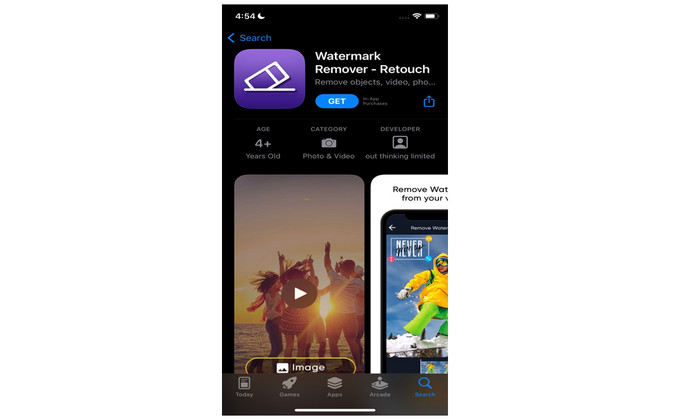
Βήμα 2: Ένα μικρό πλαίσιο θα εμφανιστεί στο βίντεο όταν αυτό προστεθεί. Χρησιμοποιήστε αυτό το πλαίσιο για να καλύψετε το λογότυπο. Έπειτα, κάντε κλικ στο κουμπί Remove και αποθηκεύστε το βίντεό σας χωρίς υδατογράφημα.
Σχετικά με:
Πώς να αφαιρέσετε το υδατογράφημα του Filmora από τα βίντεο ή τα έργα σας δωρεάν
Η πιο γρήγορη μέθοδος για να αφαιρέσετε το υδατογράφημα του Adobe Stock από ένα βίντεο [Οδηγός]
Μέρος 4: Συχνές ερωτήσεις σχετικά με την κατάργηση λογότυπου από βίντεο
Είναι ασφαλές να αφαιρέσετε το λογότυπο στο διαδίκτυο;
Ναι είναι! Οι διαδικτυακές εφαρμογές είναι ασφαλείς και ασφαλείς στη χρήση. Το καλύτερο που έχετε να κάνετε είναι να αναζητήσετε μια εφαρμογή που θα σας βοηθήσει να αφαιρέσετε λογότυπα και να τα χρησιμοποιήσετε.
Είναι δυνατόν να αφαιρέσω υπογραφές από τα βίντεό μου;
Ναι, φυσικά. Μπορείτε να αφαιρέσετε τις υπογραφές από τα βίντεό σας χρησιμοποιώντας το Video Converter Ultimate. Υπογραφές, υδατογραφήματα, λογότυπα και κείμενα μπορούν να αφαιρεθούν εύκολα με αυτή την εξαιρετική εφαρμογή.
Ποια είναι η καλύτερη εφαρμογή που μπορώ να χρησιμοποιήσω για να αφαιρέσω λογότυπα χρησιμοποιώντας το Mac μου;
Η καλύτερη εφαρμογή που μπορείτε να χρησιμοποιήσετε για να αφαιρέσετε λογότυπα σε Mac είναι το Video Converter Ultimate. Αυτή η εφαρμογή είναι διαθέσιμη όχι μόνο για Windows αλλά και για Mac, κάτι που είναι βολικό για τους χρήστες.
συμπέρασμα
Αυτό το άρθρο σάς παρείχε έναν αποτελεσματικό και αξιόπιστο τρόπο για να αφαιρέσετε λογότυπα από τα βίντεό σας. Έτσι, μπορείτε να απολαμβάνετε την παρακολούθηση των αγαπημένων σας βίντεο χωρίς λογότυπο. Τέλος, αν θέλετε την πιο απλή και χωρίς κόπο μέθοδο για να αφαιρέσετε λογότυπα από τα βίντεό σας, πρέπει να χρησιμοποιήσετε το Video Converter Ultimate.
-
 Πώς να αφαιρέσετε το υδατογράφημα του Animaker χωρίς κόστος [αποδεδειγμένοι τρόποι]
 Πώς να αφαιρέσετε το υδατογράφημα του Animaker; Με τα καλύτερα εργαλεία που χρησιμοποιούμε σε αυτό το ιστολόγιο, μπορείτε να τα χρησιμοποιήσετε για να απαλλαγείτε από το υδατογράφημα.
-
 Οδηγός για την αφαίρεση του υδατογραφήματος από το γράφημα προέλευσης [100% Working]
 Για να αφαιρέσετε το υδατογράφημα από το Origin Graph θα χρειαστείτε βοήθεια. Η βοήθεια που χρειάζεστε περιλαμβάνεται σε αυτό το άρθρο, μπορείτε να το διαβάσετε για να μάθετε.
-
 Πώς να αφαιρέσετε εύκολα το υδατογράφημα στο SmartDraw [2 αποδεδειγμένοι τρόποι]
 Πώς να αφαιρέσετε το υδατογράφημα στο Smart Draw; Εάν έχετε την ίδια ερώτηση, μπορείτε να βασιστείτε σε αυτό το άρθρο καθώς σας καλύψαμε!
