


 Video Converter Ultimate
 Εγγραφή οθόνης
 Επισκευή βίντεο
 Ασφαλές κατέβασμα
Τα καλύτερα κόλπα για το πώς να αφαιρέσετε το κείμενο Snapchat από το στιγμιότυπο οθόνης
Do you want to know how to remove Snapchat text from the screenshot? You are in the right place. This post will give you the easiest methods you can do to remove Snapchat text from your photos and videos. These methods are straightforward to follow, perfect, and suitable for non-professional users. If you are interested in these easy methods, you must stop what you are doing right now and focus on reading this informative article.

Μέρος 1: Πώς να αφαιρέσετε το κείμενο και τους υπότιτλους του Snapchat από τις εικόνες
The best thing you must do to remove a Snapchat text from a photo is to use a watermark remover. This way, you can remove any elements from your photos, such as texts, logos, watermarks, etc. If you are looking for an excellent and reliable tool, then you can use the FVC Free Watermark Remover. It can help you delete Snapchat text from pictures online instantly. You can understand this application easily with a friendly user interface, detailed guide, and simple buttons.
Επιπλέον, το FVC Free Watermark Remover υποστηρίζει μορφές αρχείων εικόνας εισόδου και εξόδου που χρησιμοποιούνται συνήθως, όπως PNG, JPG, JPEG, BMP και άλλα. Επιπλέον, αυτό το εργαλείο είναι διαθέσιμο στα Windows 7,8,10,11 και macOS 10.7 παραπάνω. Τέλος, αυτή η εφαρμογή υπόσχεται να εγγυηθεί το απόρρητο κάθε χρήστη, επομένως δεν χρειάζεται να ανησυχείτε για τις φωτογραφίες ή τις πληροφορίες σας. Εάν θέλετε να αφαιρέσετε ένα κείμενο Snapchat από τις φωτογραφίες σας, ακολουθήστε τον παρακάτω απλό οδηγό.
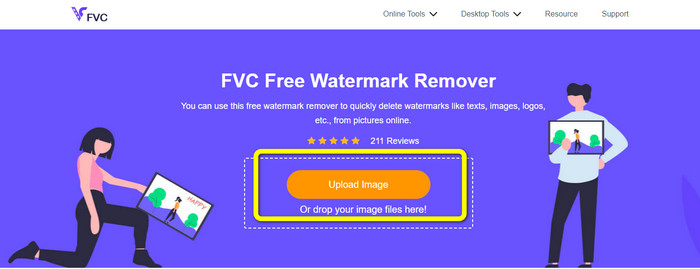
Step 1: You must go to the FVC Free Watermark Remover Website. Click the Upload Image button and add your photo with a Snapchat text you want to remove.
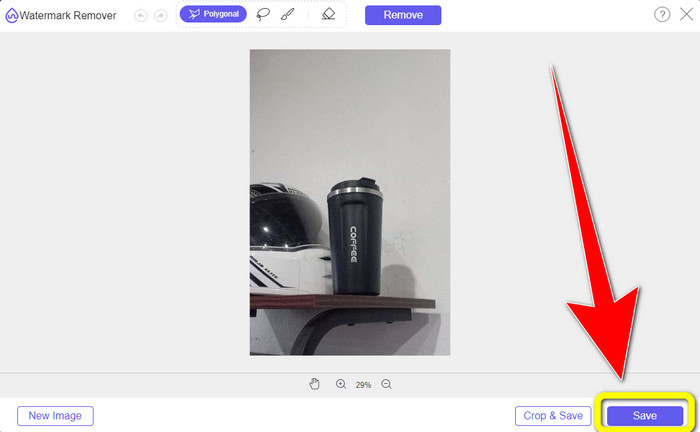
Step 2: After you attach your photo, you can use the watermark remover options: the polygonal tools, the lasso tool, and the brush tool.
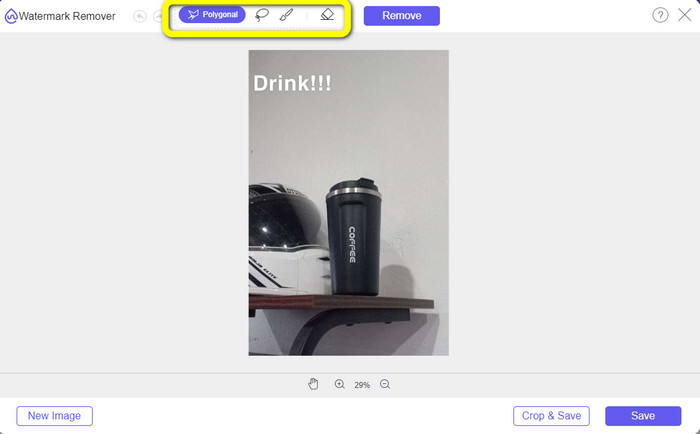
Step 3: Using these tools, you can highlight the text you want to remove.
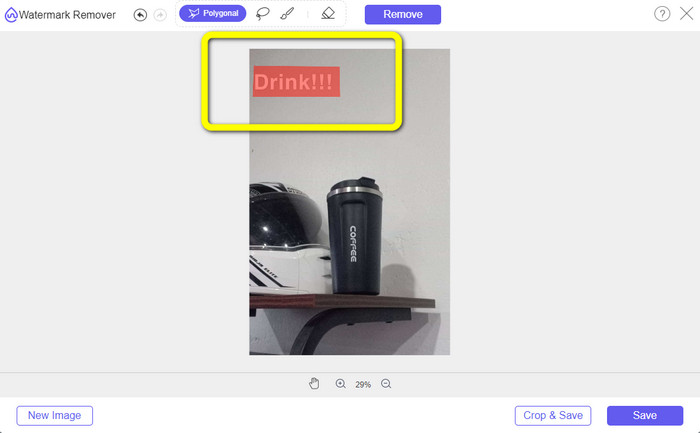
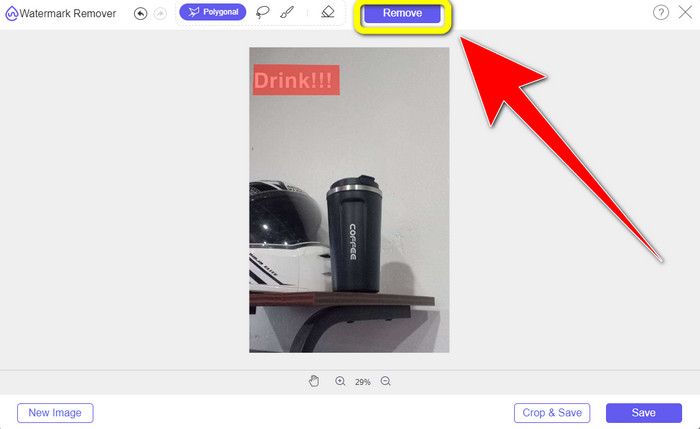
Step 4: When you are done highlighting the text from your photo, you can click the Remove button to eliminate the text from your photo. After that, wait for the removal process.
Step 5: After removing the text from your photo, you can now click the Save button to download your photo without text.
Μέρος 2: Πώς να αφαιρέσετε το κείμενο Snapchat από το βίντεο
After removing a Snapchat text from your photo, we can also help you to learn how to remove a Snapchat text from your video. In this part, the best application you must use is the Video Converter Ultimate. This application can help remove unnecessary objects from your videos, such as text, watermarks, logos, etc. You can also use it to remove the text in two easy ways: using the video watermark remover tool and using the video cropper tool. If the Snapchat text is on the corner or edge of your video, then you can use the video cropper tool. And if the text is in the middle part of the video, then you can use the video watermark remover tool.
Επιπλέον, αυτή η εφαρμογή διαθέτει διάφορα εργαλεία επεξεργασίας που μπορείτε να απολαύσετε, όπως ενισχυτή βίντεο, συμπιεστή βίντεο, αντιστροφέα βίντεο, προσθήκη και αφαίρεση υδατογραφήματος, περικοπή βίντεο, κοπής, περιστροφέα, δημιουργό GIF και πολλά άλλα. Υποστηρίζει επίσης πολλές μορφές αρχείων βίντεο, όπως MP4, FLV, MKV, MOV, κ.λπ. Επίσης, μπορείτε να χρησιμοποιήσετε αυτήν την εφαρμογή σε Mac και Windows, κάτι που είναι βολικό για τους χρήστες. Αν θέλετε να αφαιρέσετε το κείμενο Snapchat από τα βίντεό σας χρησιμοποιώντας τους δύο εύκολους τρόπους, πρέπει να ακολουθήσετε τα παρακάτω απλά βήματα.
Χρήση της λειτουργίας Αφαίρεσης υδατογραφήματος βίντεο
Step 1: Download the Video Converter Ultimate on your Windows or Mac computer. Run the application after the installation process.
Δωρεάν ΛήψηΓια Windows 7 ή νεότεραΑσφαλής λήψη
Δωρεάν ΛήψηΓια MacOS 10.7 ή νεότεροΑσφαλής λήψη
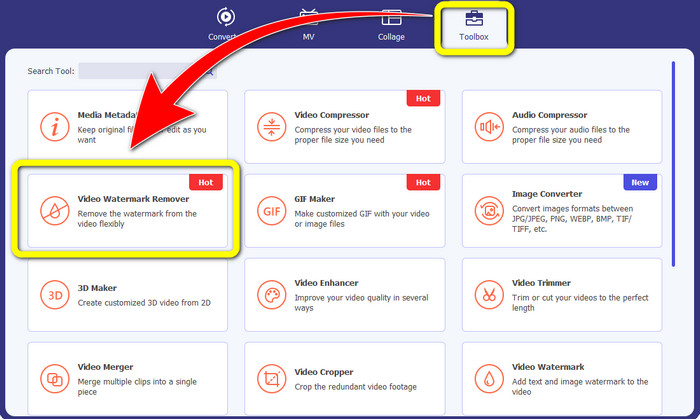
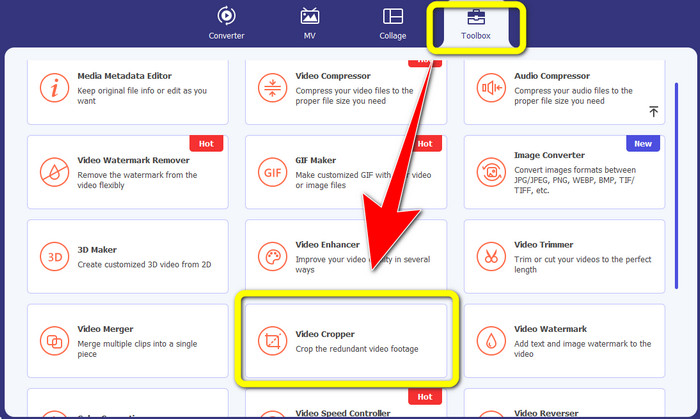
Step 2: After that, there are four options on the upper part of the interface. Click the Toolbox panel and select the Video Watermark Remover tool.
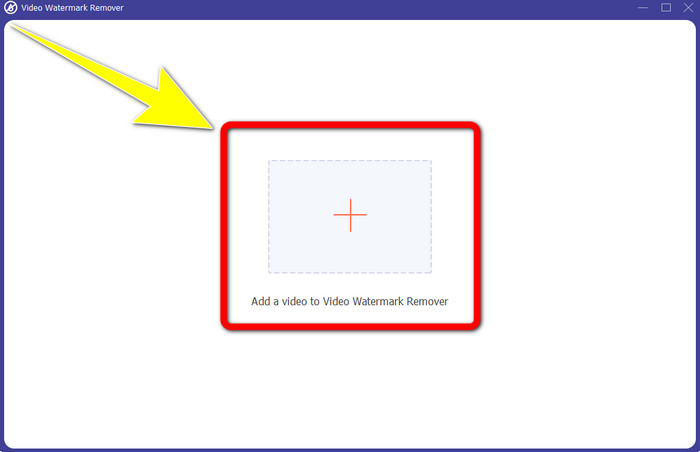
Step 3: After that, another window will pop up on your screen. Click the + icon and insert your video with Snapchat text..
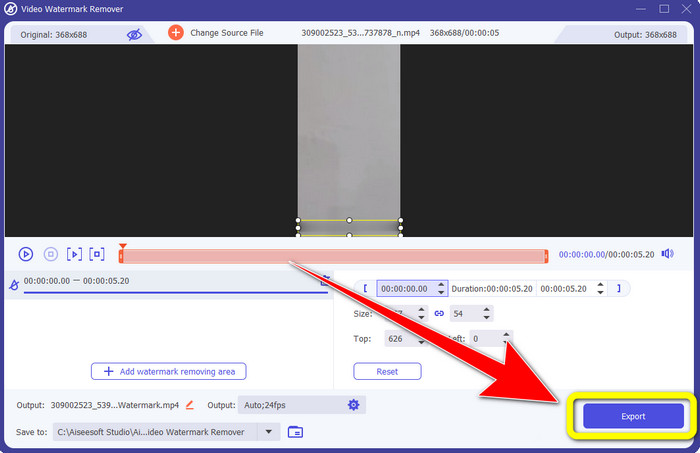
Step 4: When you are done inserting your video, click the Add Watermark Removing Area function. A mini box will appear on your video, then drag it to cover the Snapchat text.
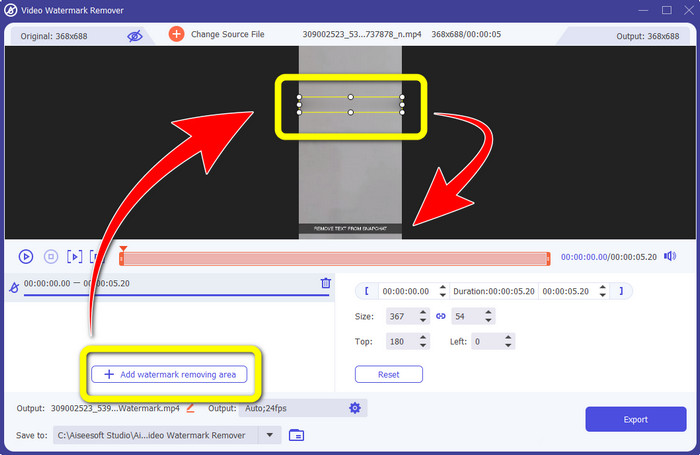
Step 5: After dragging the mini box into the Snapchat text, you can see that the text is already gone. Click the Export button to save your video entirely.
Χρήση της λειτουργίας Video Cropper
Step 1: Launch the Video Converter Ultimate on your computer. Select the Toolbox panel and go to the Video Cropper tool.
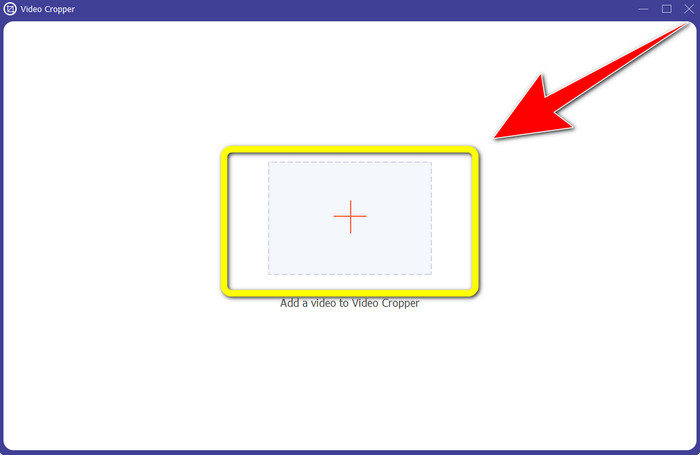
Step 2: After clicking the Video Cropper tool, expect another interface to appear on your screen. Click the + button to import your video with a Snapchat text you want to remove.
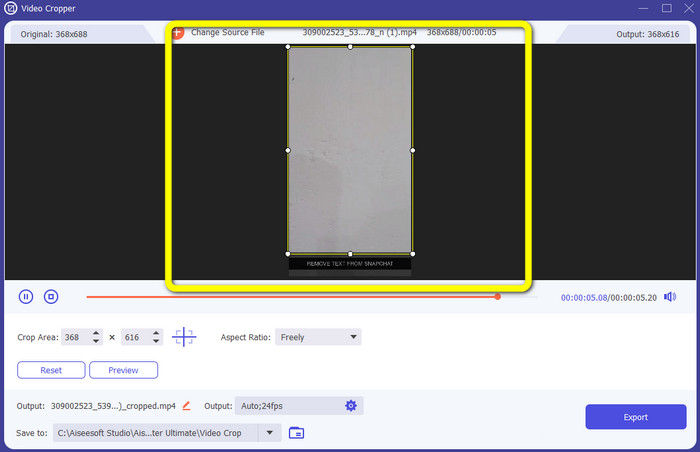
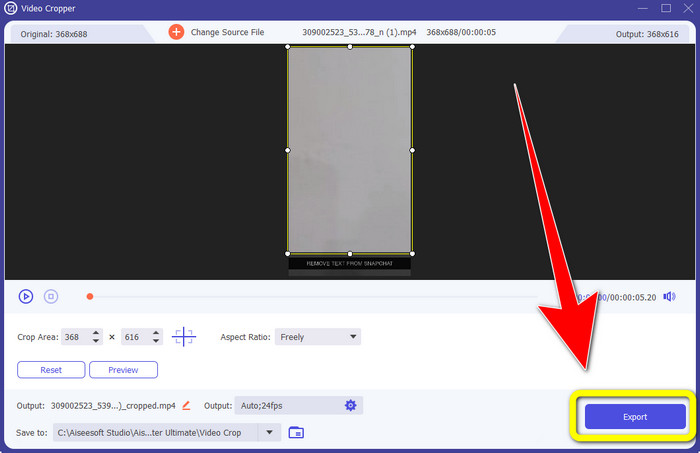
Step 3: In this part, you can crop your video to remove the Snapchat text by using your mouse to drag the border line. You can cut the edges of your video.
Step 4: You can already click the Export button to save your video without a Snapchat text for your last and final step.
Μέρος 3: Συχνές ερωτήσεις σχετικά με την κατάργηση κειμένου Snapchat από φωτογραφίες και βίντεο
Μπορώ επίσης να αφαιρέσω το κείμενο Snapchat από φωτογραφίες χρησιμοποιώντας το τηλέφωνό μου;
Ναι μπορείς. Μπορείτε να χρησιμοποιήσετε πολλές εφαρμογές με εργαλείο αφαίρεσης υδατογραφήματος, όπως PicLab, Photo Retouch-Object Removal, Airbrush και άλλα.
Μπορώ να αφαιρέσω ένα κείμενο Snapchat από τη φωτογραφία μου χωρίς να χάσω την ποιότητα της εικόνας μου;
If you don’t want to lose the quality of your photo after removing the Snapchat text, then you must use the FVC Free Watermark Remover. After the removal process, you can still get the original quality of your images.
Πώς μπορώ να απενεργοποιήσω τους υπότιτλους του Snapchat;
Οι υπότιτλοι του Snapchat μεταφορτώνονται με μη αυτόματο τρόπο από τον εκδότη, επιτρέποντας βελτιωμένη ακρίβεια υπότιτλων. Η εναλλαγή συννεφάκι ομιλίας στο κάτω μέρος της οθόνης μπορεί να χρησιμοποιηθεί για την ενεργοποίηση ή απενεργοποίηση των υπότιτλων.
Ποια είναι η καλύτερη εφαρμογή με εργαλείο αφαίρεσης υδατογραφήματος που μπορώ να χρησιμοποιήσω για την επιφάνεια εργασίας μου;
If you are looking for an application, you can use the Video Converter Ultimate. This application lets you remove watermarks from your videos effortlessly. In addition, it has many features you can enjoy.
Ποιο είναι το υδατογράφημα στη φωτογραφία ή το βίντεο;
Τα υδατογραφήματα είναι οι υπογραφές, τα λογότυπα και τα κείμενα που μπορείτε να δείτε στη φωτογραφία ή το βίντεο. Λέει μόνο σε άλλα άτομα ποιος είναι ο πραγματικός κάτοχος των εικόνων ή των βίντεο. Το υδατογράφημα είναι ένας από τους καλύτερους τρόπους για να ασφαλίσετε τη φωτογραφία και να προωθήσετε κάποιο όνομα προϊόντος.
συμπέρασμα
As you can see, the best way to remove the Snapchat text from your photos and videos is to use an excellent application with a watermark remover. This article shows you how to remove Snapchat text from photos by utilizing the FVC Free Watermark Remover. Also, it shows how to remove Snapchat text from videos using the Video Converter Ultimate, which has two remarkable ways, such as using a video watermark remover tool and a video cropper tool.
-
 Πώς να αφαιρέσετε το λογότυπο από το βίντεο χρησιμοποιώντας το Windows Movie Maker
 Εάν θέλετε να μάθετε σχετικά με την κατάργηση λογότυπων από βίντεο χρησιμοποιώντας το Windows Movie Maker και άλλους εναλλακτικούς τρόπους, διαβάστε αυτό το άρθρο. Έχουμε εύκολους τρόπους για εσάς.
-
 Πώς να αφαιρέσετε το λογότυπο VideoScribe από το βίντεο χωρίς κόπο
 Δεν χρειάζεται πλέον να ανησυχείτε για την κατάργηση του λογότυπου VideoScribe από τα βίντεό σας. Αυτό το άρθρο θα δώσει μεθόδους χωρίς προβλήματα. Διαβάστε αυτήν την ανάρτηση για να μάθετε περισσότερα
-
 Ο πιο γρήγορος τρόπος για να αφαιρέσετε το λογότυπο από το βίντεο στο Adobe Premiere Pro
 Δοκιμάστε αυτούς τους εύκολους και γρήγορους τρόπους για να αφαιρέσετε λογότυπα από ένα βίντεο στο Adobe Premiere Pro. Αυτό το άρθρο θα σας προσφέρει τους καλύτερους τρόπους που μπορείτε να δοκιμάσετε να χρησιμοποιήσετε τη συσκευή σας.
