


 Video Converter Ultimate
 Εγγραφή οθόνης
 Επισκευή βίντεο
 Ασφαλές κατέβασμα
100% δωρεάν τρόποι συμπίεσης μεγέθους αρχείου M4V από GB σε MB
Η μορφή αρχείου M4V, παρόμοια με το MP4, είναι ένα εξαιρετικό κοντέινερ βίντεο που παράγεται από την Apple. Μπορείτε να αναπαράγετε αρχεία M4V σε σχεδόν όλα τα δημοφιλή προγράμματα αναπαραγωγής, όπως iTunes, QuickTime, VLC Media Player, RealPlayer και άλλα. Αλλά μερικές φορές, μπορεί να διαπιστώσετε ότι το βίντεό σας M4V είναι πολύ μεγάλο για αποθήκευση ή κοινή χρήση. Σε αυτήν την περίπτωση, πρέπει να μειώσετε το μέγεθος του αρχείου.
Αν δεν ξέρετε πώς να συμπιέσετε αρχεία M4V, μπορείτε να δοκιμάσετε τις παρακάτω επιλογές.

Μέρος 1. Πώς να συμπιέσετε M4V on-line δωρεάν
Όπως αναφέραμε, μπορεί να είναι λίγο δύσκολο να επεξεργαστείτε και να μοιραστείτε ένα μεγάλο αρχείο βίντεο στο YouTube, στο Facebook, στο Instagram ή σε άλλους ιστότοπους ροής. Επειδή αυτοί οι ιστότοποι έχουν συνήθως αυστηρό περιορισμό μεγέθους στο βίντεο που ανεβάζετε. Εκτός αυτού, τα μεγάλα αρχεία μπορούν να καταλαμβάνουν πολύ χώρο στον υπολογιστή σας, στη μονάδα δίσκου, στο τηλέφωνο, στη μονάδα flash, στην κάρτα μνήμης κ.λπ.
Επομένως, όταν έχετε ένα μεγάλο αρχείο M4V, είναι καλύτερα να μειώσετε το μέγεθός του με ένα επαγγελματικό εργαλείο συμπίεσης βίντεο. Αν ψάχνετε για ένα δωρεάν πρόγραμμα, γιατί να μη δοκιμάσετε το FVC Free Video Compressor; Είναι εντελώς δωρεάν στη χρήση. Επιπλέον, είναι ένα online εργαλείο συμπίεσης, που σημαίνει ότι μπορείτε να συμπιέσετε οποιοδήποτε βίντεο στο επιθυμητό μέγεθος χωρίς να εγκαταστήσετε ογκώδες λογισμικό στον υπολογιστή σας.
Μπορείτε να το χρησιμοποιήσετε σε οποιοδήποτε κύριο πρόγραμμα περιήγησης όπως το Google Chrome, το Mozilla Firefox και το Microsoft Edge. Και δεν θα προστεθεί υδατογράφημα στο συμπιεσμένο βίντεο. Μπορείτε ακόμη και να απολαύσετε το βίντεο με υψηλή ποιότητα εικόνας.
Ακολουθούν τα βήματα σχετικά με τον τρόπο συμπίεσης μεγάλων αρχείων M4V στο διαδίκτυο.
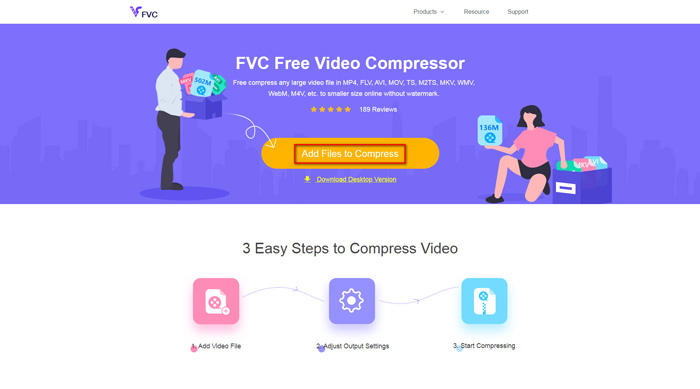
Βήμα 1. Μεταβείτε στον ιστότοπο του FVC Free Video Compressor από τον browser σας. Θα δείτε ένα κουμπί Add Files to Compress στο banner. Κάντε κλικ σε αυτό και ακολουθήστε τις οδηγίες για να κατεβάσετε και να εγκαταστήσετε τον launcher του FVC στον υπολογιστή σας.
Βήμα 2. Στη συνέχεια, πρέπει να επιλέξετε το αρχείο M4V που θέλετε να συμπιέσετε. Έπειτα μπορείτε να μετακινήσετε το ρυθμιστικό πίσω από το πλαίσιο Size για να προσαρμόσετε και να βρείτε εύκολα το ακριβές μέγεθος αρχείου που θέλετε. Μπορείτε επίσης να αλλάξετε ξεχωριστά την ανάλυση και το bitrate ανάλογα με τις ανάγκες σας.
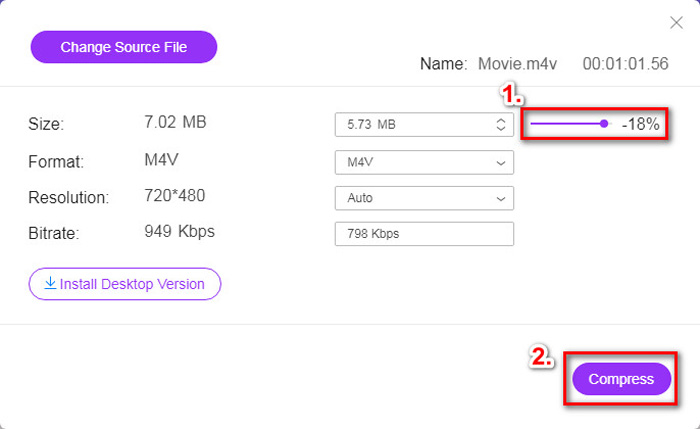
Βήμα 3. Αν θέλετε να συμπιέσετε M4V σε MP4, τότε θα πρέπει εδώ να επιλέξετε MP4 ως μορφή εξόδου. Διαφορετικά, μπορείτε να κάνετε κλικ στο Compress στη δεξιά γωνία απευθείας. Επιλέξτε έναν φάκελο για να αποθηκεύσετε το συμπιεσμένο βίντεο και περιμένετε μερικά δευτερόλεπτα για να λάβετε το επιθυμητό βίντεο.
Μέρος 2. Πώς να μειώσετε το μέγεθος αρχείου M4V σε Mac / Windows
Εφόσον το M4V είναι μια μορφή που αναπτύχθηκε από την Apple, μπορείτε επίσης να χρησιμοποιήσετε το προεπιλεγμένο πρόγραμμα αναπαραγωγής της Apple, το QuickTime Player, για να συμπιέσετε αρχεία M4V σε Mac. Επίσης, το QuickTime Player προσφέρει έκδοση για Windows για χρήστες PC. Ωστόσο, θα πρέπει να σημειώσετε ότι η πιο πρόσφατη έκδοση για Windows είναι το QuickTime 7.7.9 που κυκλοφόρησε το 2016. Άρα, αν αυτό που θέλετε είναι ένα πιο πρόσφατο πρόγραμμα, μπορείτε να δοκιμάσετε το FVC Free Video Compressor, το οποίο μπορεί να χειριστεί ακόμη και βίντεο 4K.
Τέλος πάντων, ακολουθήστε τα παρακάτω βήματα για να μειώσετε το μέγεθος αρχείου M4V στο QuickTime.
Βήμα 1. Ανοίξτε με το QuickTime το αρχείο M4V που περιμένει να συμπιεστεί.
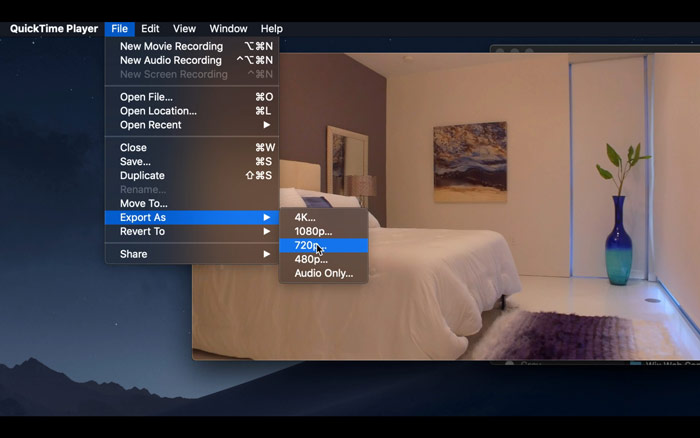
Βήμα 2. Εντοπίστε το μενού File στην επάνω αριστερή γωνία. Κάντε κλικ σε αυτό και βρείτε την επιλογή Export As από τη λίστα. Έπειτα επιλέξτε μια ανάλυση χαμηλότερη από αυτή του αρχικού βίντεο για να συμπιέσετε το βίντεο. Σε τελική ανάλυση, δεν θέλουμε να αυξήσουμε το μέγεθος εδώ.
Βήμα 3. Αν δεν θέλετε να αλλάξετε τη διαδρομή αποθήκευσης, μπορείτε απλώς να κάνετε κλικ στο Save. Περιμένετε με υπομονή να εξαχθεί το βίντεο.
Μέρος 3. Συχνές ερωτήσεις για τη συμπίεση M4V
1. Μπορώ απλώς να μετονομάσω το M4V σε MP4;
Όχι, αν εννοείτε ότι θέλετε να μετατρέψετε M4V σε MP4 απλώς μετονομάζοντας την κατάληξη σε .mp4. Επειδή η κωδικοποίησή τους δεν είναι η ίδια. Θα πρέπει να βασιστείτε σε ένα πιο επαγγελματικό εργαλείο για να μετατρέψετε M4V σε MP4.
2. Αποδέχεται το YouTube τη μορφή M4V;
Δυστυχώς, το YouTube υποστηρίζει μόνο περιορισμένο αριθμό μορφών αρχείων που δεν περιλαμβάνουν M4V. Επομένως, εάν θέλετε να ανεβάσετε το βίντεό σας M4V στο YouTube, θα πρέπει να το μετατρέψετε σε μορφή που υποστηρίζεται από το YouTube, όπως το MP4.
3. Πώς να συγχωνεύσετε πολλά βίντεο M4V σε ένα;
Αν έχετε πολλά αρχεία βίντεο M4V που πρέπει να συνδυαστούν σε ένα, μπορείτε να δοκιμάσετε το FVC Free Online Video Merger για να συγχωνεύσετε διάφορα αρχεία βίντεο.
συμπέρασμα
Τώρα έχετε 2 απλούς και δωρεάν τρόπους για να συμπιέσετε αρχεία M4V. Αν είστε χρήστης Mac, μπορείτε να χρησιμοποιήσετε το QuickTime Player για να μειώσετε το μέγεθος του βίντεο. Αν όμως δεν είστε ικανοποιημένοι με τις προκαθορισμένες αναλύσεις που προσφέρει το QuickTime ή χρησιμοποιείτε υπολογιστή με Windows, μπορείτε να δώσετε μια ευκαιρία στο FVC Free Video Compressor.
-
 Μετατροπέας M4V σε MP3 - 4 καλύτερες μέθοδοι εξαγωγής MP3 από αρχεία M4V
 Όταν θέλετε να εξαγάγετε τον ήχο MP3 από βίντεο M4V με ευκολία, μπορείτε να μάθετε περισσότερα σχετικά με τους 4 καλύτερους μετατροπείς M4V σε MP3 για να λάβετε τα επιθυμητά αρχεία ήχου από το άρθρο.
-
 4 τρόποι μετατροπής ταινιών QuickTime σε MP4 δωρεάν σε τηλέφωνο / υπολογιστή
 Διαβάστε και λάβετε 4 τρόπους μετατροπής του QuickTime σε βίντεο MP4 δωρεάν στο τηλέφωνο ή τον υπολογιστή σας. Μπορείτε να αλλάξετε τη μορφή αρχείου από MOV σε MP4 σε Windows / Mac / iPhone / Android / online με ευκολία.
-
 4 καλύτεροι μετατροπείς MP4 σε M4V για να μετατρέψετε τα βίντεο MP4 σε M4V με ευκολία
 Όταν πρέπει να αλλάξετε αρχεία MP4 σε M4V, θα πρέπει να μάθετε περισσότερες λεπτομέρειες σχετικά με τις διαφορές μεταξύ των δύο μορφών, καθώς και τους καλύτερους μετατροπείς MP4 σε M4V από το άρθρο.
