


 Video Converter Ultimate
 Εγγραφή οθόνης
 Επισκευή βίντεο
 Ασφαλές κατέβασμα
4 Απλές μέθοδοι για τη μετατροπή WEBM σε DIVX
Converting video files is the best procedure to do when the video is not supported in a certain program. In this post, you will learn the easiest methods you can do to transform your WEMB file to DIVX format. You can find many WEBM to DIVX converters online and offline, but some of them are not effective and complicated to utilize. In that case, we tested numerous applications to show you the most useful and excellent converters with understandable methods you can download on your Mac, Windows, and online. Are you excited to know these outstanding methods? Then let’s go and read this informative article.

Μέρος 1: Μετατροπή WEBM σε DIVX εκτός σύνδεσης με την καλύτερη ποιότητα
Converting different files is difficult, especially when you don’t know the process and the application you must use. So, do you want to convert the WEBM file to DIVX with excellent quality? Then download the Video Converter Ultimate on your Windows and Mac. This application is easy to use when converting various files because it has basic methods and a friendly user interface, which is why it won’t complicate the procedures. In addition, it supports 1000+ formats, including WEBM, DIVX, ASF, OGV, MTV, GIF, MPEG, DPG, MOV, M4V, MP4, FLV, etc. Moreover, Video Converter Ultimate can enhance your videos because it has great video editing tools. We can do more things on your WEBM video. To compress your video, go to the Toolbox and select Video compressor. Also, to add watermarks to your WEBM video, select the Video Watermark Tool.
Λειτουργίες
◆ Μετατρέψτε πολλά βίντεο έως και 1000+ μορφές αρχείων.
◆ Μετατρέψτε αρχεία 30 φορές πιο γρήγορα από άλλους μετατροπείς.
◆ Προσφέρει κατασκευαστές κολάζ με δωρεάν φίλτρα και θέματα.
◆ Δυνατότητα δημιουργίας μουσικού βίντεο.
◆ Προσφέρει μια εργαλειοθήκη για τη βελτίωση ενός βίντεο, όπως συμπιεστή βίντεο, διόρθωση χρώματος, συγχρονισμό ήχου, ενισχυτή και άλλα.
Πλεονεκτήματα
- Διαθέτει εύχρηστο περιβάλλον εργασίας και είναι κατάλληλο για αρχάριους.
- Είναι μια εφαρμογή δωρεάν λήψης.
- Επιτρέπει τη μετατροπή παρτίδων.
- Δυνατότητα μετατροπής αρχείων χωρίς απώλεια ποιότητας.
Μειονεκτήματα
- Για να χρησιμοποιήσετε την έκδοση pro, αγοράστε μια συνδρομή.
Μετατρέψτε το WEBM σε DIVX χρησιμοποιώντας το Video Converter Ultimate.
Step 1: Install the Video Converter Ultimate on your computer. Then, launch it.
Δωρεάν ΛήψηΓια Windows 7 ή νεότεραΑσφαλής λήψη
Δωρεάν ΛήψηΓια MacOS 10.7 ή νεότεροΑσφαλής λήψη
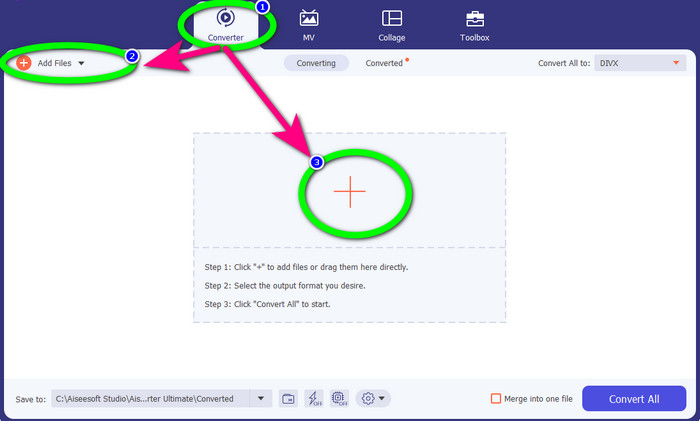
Step 2: When the interface shows up, select the Converter panel and click Add Files button or the Plus icon to add the WEBM file.
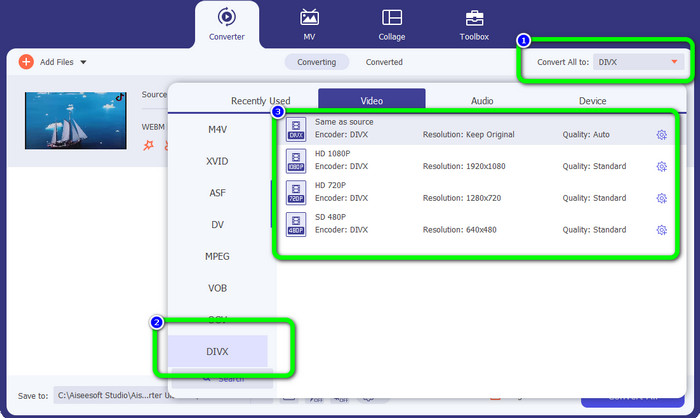
Step 3: After adding the WEBM file, click the Convert All to button. Select your desired format, which is the DIVX file format. You can also pick the quality of your video from 480p to 1080p.
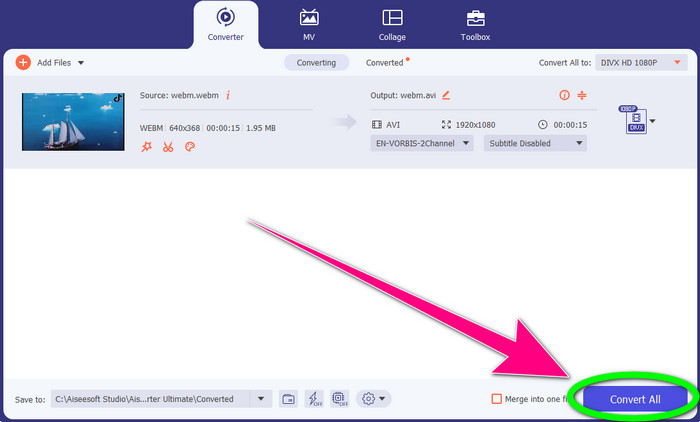
Step 4: You can finally click the Convert All button to convert the WEBM file to DIVX format.
Μέρος 2: 3 τρόποι για να μετατρέψετε το WEBM σε DIVX Online
Χρήση του WEBM.to
Are you searching for a WEBM to DIVX converter online? WEBM.to is the tool you don’t want to miss. It can convert different files using your browsers, like Google Chrome, Mozilla Firefox, Microsoft Edge, etc. It supports file formats such as MOV, FLV, M4V, TS, MT2S, and more. Like the converter above, WEB.to is easy to use because it only focuses on converting files. Lastly, your file is safe here because your file will be automatically deleted after 24 hours. However, the conversion process is slow. It also won’t perform well if you don’t have a stable internet connection. Let’s convert your WEBM file to DIVX using this online tool.
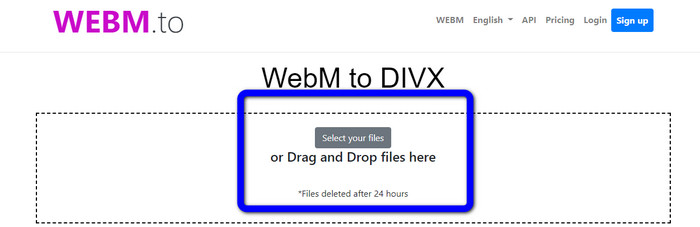
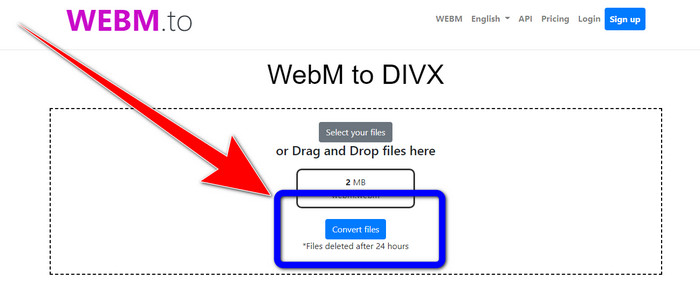
Step 1: Visit the WEBM.to website. Click the Select your files button to import your WEBM file. You can also drag your file in the box.
Step 2: Click the Convert Files button after adding the WEBM file. Wait for the process of converting the file and save your final video.
Χρησιμοποιώντας το Evano
You can also use Evano to convert WEBM to DIVX. This online tool is also reliable. It can convert different file formats, like MP4, AVI, DIVX, XVID, 3GP, FLV, VOB, MOV, etc. So, you can convert WEBM to FLV using this tool. In addition, EVANO is not just a converter but also an audio editor and optimizer, so you can do more things with this tool. But this application has a limit when using the free version. You can only convert with a maximum file size of 100Mb. It means that you must buy a subscription to get unlimited file sizes. Also, you must have a fast internet connection. It is a web-based application, and an internet connection is highly recommended. Follow the steps below to convert WEBM to DIVX using Evano.
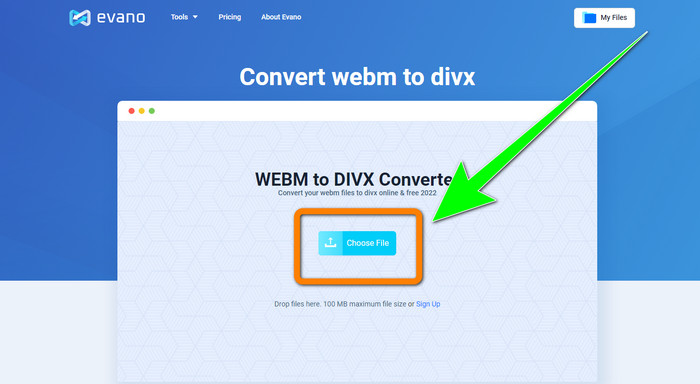
Step 1: Visit the website of Evano. Press the Choose File button to add the WEBM file.
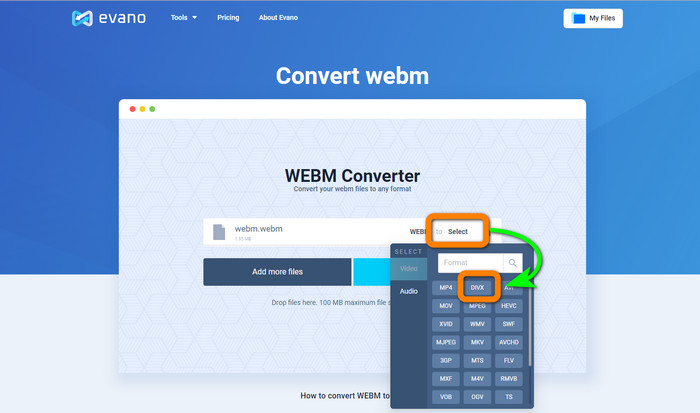
Step 2: Click the Select button to proceed to the format options. Then, select the DIVX file format.
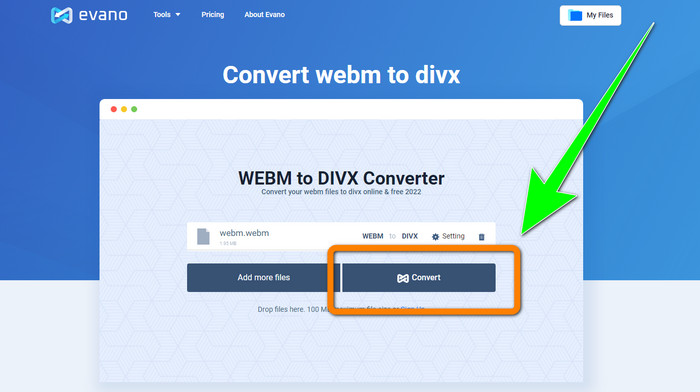
Step 3: For the final step, click the Convert button. Patiently wait for the conversion process and save the video with a DIVX file format.
Χρησιμοποιώντας το FileProInfo
FileProInfo is one of the online converters you can easily use to convert WEBM to DIVX. With the help of this online tool, you don’t need to worry about how to convert your file to other formats. You also can use this tool to convert WEBM to MKV. Moreover, it has simple methods for converting files. In addition, aside from converting, you can use this tool for plagiarism checks, complete website reviews, ping website tools, and more. However, there are times when FileProInfo is not working. Also, when it comes to the process of converting files, it is too slow. Like the other online converters, it has a maximum file size of 150MB. So, let’s proceed with converting the WEBM file to DIVX using his online tool.
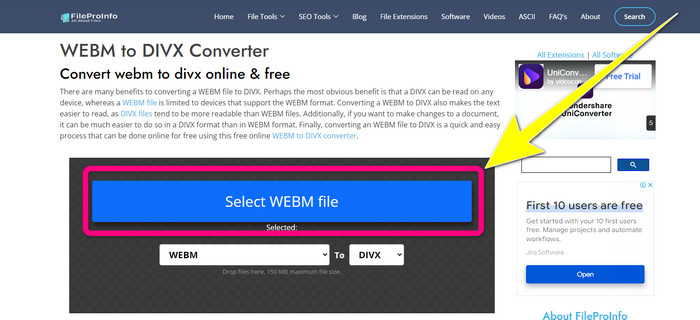
Step 1: Go to the website FileProInfo. Click the blue box to insert the WEBM file.
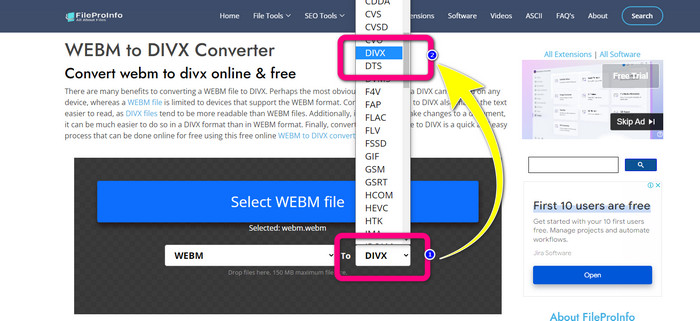
Step 2: After you insert the WEBM file, proceed to the format options and select the DIVX file format.
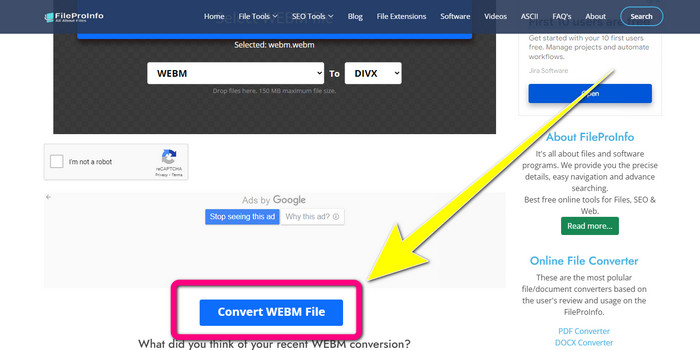
Step 3: Scroll down, and click the Convert WEBM file button.
Μέρος 3: WEBM εναντίον DIVX
| WEBM | DIVX | |
| Επέκταση αρχείου βίντεο | Για τη ροή περιεχομένου στο Διαδίκτυο χρησιμοποιείται μια μορφή πολυμέσων ανοιχτού κώδικα, χωρίς δικαιώματα δικαιωμάτων που ονομάζεται WebM. Περιλαμβάνει συμπιεσμένες ροές ήχου χρησιμοποιώντας τους κωδικοποιητές Oupus ή Vorbis και συμπιεσμένες ροές βίντεο χρησιμοποιώντας είτε το VP8 είτε το VP9. Λόγω του ελαφρού σχεδιασμού του και των δυνατοτήτων διανομής σε πραγματικό χρόνο, έχει γίνει μία από τις πιο δημοφιλείς μορφές αρχείων για ροή βίντεο στο διαδίκτυο. | Ένας κωδικοποιητής βίντεο υψηλής ποιότητας, υψηλής συμπίεσης που υποστηρίζει αναλύσεις έως και 1080 HD και συμπιέζει τα βίντεο σε ένα κλάσμα του τυπικού τους μεγέθους χωρίς να θυσιάζει μεγάλο μέρος της ποιότητάς τους. |
| Αναπτύχθηκε από | Google Inc. | DIVX Network Inc. |
| Πλεονεκτήματα | Χωρίς πιστότητα και ανοιχτού κώδικα, Υποστήριξη των περισσότερων κωδικοποιητών. | Μικρό σε μέγεθος, Δωρεάν χρήση |
| Μειονεκτήματα | Έλλειψη διαδραστικών στοιχείων | |
| Συνεργαζόμενα Προγράμματα | VLC Media Player, Mozilla Firefox, Google Chrome, Windows Media Player | XBox 360, Στερεοφωνικό αυτοκινήτου, Συσκευές αναπαραγωγής DVD, Συσκευές αναπαραγωγής Blu-ray |
Μέρος 4: Συχνές ερωτήσεις σχετικά με τη μετατροπή WEBM σε DIVX
1. Ποια είναι τα πλεονεκτήματα της μετατροπής WEBM σε DIVX;
Η μορφή αρχείου DIVX είναι πιο ευανάγνωστη και ευρέως αποδεκτή από το αρχείο WEBM. Επίσης, η μετατροπή σε αρχεία DIVX μπορεί να βοηθήσει στην ασφάλεια.
2. Ποιο είναι καλύτερο, το WEBM ή το MP4;
Όσον αφορά το μέγεθος του αρχείου βίντεο, το WEBM είναι μικρότερο από το MP4. Αλλά, όσον αφορά την ποιότητα και τη συμβατότητα, το MP4 είναι καλύτερο.
3. Το WEBM έχει ήχο;
Ναι φυσικά. Το WebM Project ανοιχτού κώδικα προωθεί το WebM, μια μορφή αρχείου κοντέινερ ψηφιακών πολυμέσων που μπορεί να χωρέσει τόσο ήχο όσο και βίντεο. Το WEBM είναι απλώς μια μορφή κοντέινερ. Ένα υποσύνολο της μορφής κοντέινερ πολυμέσων Matroska περιέχεται σε αυτό.
συμπέρασμα
These are the most excellent applications you can use to convert WEBM to DIVX with effective methods. So, what are you waiting for? Download and use Video Converter Ultimate now. It can convert your files faster and easier.
-
 Εύκολες στην εκμάθηση μέθοδοι για το πώς να μετατρέψετε το Xvid σε DivX
 Αναζητάτε την καλύτερη λύση για να μετατρέψετε το Xvid σε DivX δωρεάν; Αυτό το άρθρο θα σας βοηθήσει να λύσετε το πρόβλημά σας. Διαβάστε λοιπόν την ανάρτηση συνέχεια.
-
 Πώς να μετατρέψετε MPG σε DivX χωρίς απώλεια ποιότητας
 Ψάχνετε για μια εφαρμογή χωρίς προβλήματα που μπορείτε να χρησιμοποιήσετε για να μετατρέψετε MPG σε DivX; Αυτό το άρθρο θα σας παρέχει διάφορες αποτελεσματικές μεθόδους που πρέπει να δοκιμάσετε.
-
 Πώς να μετατρέψετε το DIVX σε 3GP σε Windows, Mac και Online
 Πώς να μετατρέψετε το DIVX σε 3GP; Αν ψάχνετε για μια απάντηση, διαβάστε αυτό το άρθρο. Θα σας δείξουμε εξαιρετικές διαδικασίες με τη βοήθεια διαφορετικών μετατροπέων.
