


 Video Converter Ultimate
 Εγγραφή οθόνης
 Επισκευή βίντεο
 Ασφαλές κατέβασμα
Εξαιρετικά κόλπα για εύκολη μετατροπή WMV σε M4V που μπορείτε να δοκιμάσετε
Are you one of the users looking for excellent and easy methods to convert your WMV to M4V? There are various converters you can find on the web. However, some of them don’t support WMV and M4V file formats. If that is your problem, this article can provide you with the easiest solution using worthy applications. You will also discover their features to get an idea of the other functions of these applications. Read the article from top to bottom to find out more essential details.

Μέρος 1: Εισαγωγή στα WMV και M4V
Μορφή αρχείου WMV
| Ονομα | WMV |
| Επέκταση αρχείου | .wmv |
| Περιγραφή | Το ακρωνύμιο WMV (Windows Media Video) σημαίνει μια ομάδα κωδικοποιητών βίντεο που κυκλοφόρησε για πρώτη φορά η Microsoft στο πλαίσιο Windows Media. Δημιουργήθηκε για πρώτη φορά για να ανταγωνιστεί τη μορφή RM σε εφαρμογές ροής στο Διαδίκτυο. Διατηρεί συμπιεσμένα αρχεία βίντεο και βοηθά ακόμη και τα Blu-ray/DVD να παρέχουν περιεχόμενο. |
| Κατηγορία αρχείων | βίντεο |
| Αναπτύχθηκε από | Microsoft |
| Συνοδευτικά Προγράμματα | VLC Media Player MPlayer Media Player Classic Windows Media Player |
| Τύπος MIME | βίντεο/x-ms-asf βίντεο/Mpeg |
| Τεχνικές λεπτομέρειες | Το περιεχόμενο πολυμέσων που έχει κωδικοποιηθεί περιέχεται σε ένα αρχείο WMV με χρήση της μορφής κοντέινερ Advanced Systems Format (ASF). Τα αρχεία ASF θα πρέπει να χρησιμοποιούν την επέκταση αρχείου.ASF αντί για την επέκταση αρχείου.WMV, παρόλο που το ASF μπορεί να περιέχει πολυμέσα σε κωδικοποιήσεις διαφορετικές από αυτές που επιτρέπει το πρότυπο αρχείου WMV. |
Μορφή αρχείου M4V
| Ονομα | M4V |
| Επέκταση αρχείου | .m4v |
| Περιγραφή | Η Apple δημιούργησε τη μορφή αρχείου M4V, μια μορφή κοντέινερ βίντεο παρόμοια με το πρότυπο MP4. Η κύρια διαφορά είναι ότι οι μορφές αρχείων M4V μπορούν να έχουν προστασία αντιγραφής DRM. Στο iTunes Store της, η Apple κωδικοποιεί αρχεία βίντεο χρησιμοποιώντας τη μορφή M4V. |
| Κατηγορία αρχείων | βίντεο |
| Αναπτύχθηκε από | Η Apple Inc. |
| Συνοδευτικά Προγράμματα | VLC Media Player KMPlayer Media Player Classic Ζουμ Player |
| Τεχνικές λεπτομέρειες | Τα αρχεία M4V μπορούν να προστατευτούν χρησιμοποιώντας την προστασία αντιγραφής FairPlay της Apple για την αποφυγή μη εξουσιοδοτημένης αναπαραγωγής. Μόνο οι υπολογιστές που έχουν εγκριθεί (μέσω του iTunes) με τον λογαριασμό που χρησιμοποιείται για την αγορά του βίντεο μπορούν να αναπαράγουν ένα αρχείο M4V που προστατεύεται από το FairPlay. |
Μέρος 2: Καλύτερος τρόπος μετατροπής WMV σε M4V για Mac και Windows
The best way to convert WMV to M4V is the FVC Video Converter Ultimate. This converter is downloadable on both Windows and Mac. It can convert 100+ video file formats, such as WMV, M4V, MP4, AVI, FLV, MKV, MOV, and more. When converting, you can convert multiple files simultaneously because this application can handle the batch conversion. Also, you will never be disappointed when it discusses the conversion process. This converter offers a high-speed conversion process, wherein you can convert files 30x faster than the average speed.
Επιπλέον, το Video Converter Ultimate έχει μια άλλη κύρια λειτουργία. Εάν ενδιαφέρεστε να μετατρέψετε τα αρχεία εικόνας σας, μπορείτε να το κάνετε.
Λειτουργίες
◆ Μετατρέψτε διαφορετικές μορφές αρχείων βίντεο, όπως M4V, WMV, FLV, AVI, MP4, MOV, VOB κ.λπ.
◆ Προσφέρει εργαλεία επεξεργασίας βίντεο, όπως βελτιωτικό βίντεο, συμπιεστή, κοπής, τρίμερ, αντιστροφέα κ.λπ.
◆ Δυνατότητα δημιουργίας Κολάζ.
◆ Διατίθεται η δημιουργία μουσικού βίντεο.
◆ Επιτρέπει τη μετατροπή παρτίδων.
◆ Αλλάξτε την ταχύτητα του βίντεο.
◆ Μετατρέψτε μορφές αρχείων εικόνας όπως PNG, JPG, BMP, WEBP και άλλα.
Ας μετατρέψουμε το WMV σε M4V σε Mac χρησιμοποιώντας το FVC Video Converter Ultimate. Χρησιμοποιήστε τους παρακάτω απλούς οδηγούς.
Step 1: Download and install the FVC Video Converter Ultimate on your Mac by clicking the download button below with the Mac version.
Δωρεάν ΛήψηΓια Windows 7 ή νεότεραΑσφαλής λήψη
Δωρεάν ΛήψηΓια MacOS 10.7 ή νεότεροΑσφαλής λήψη
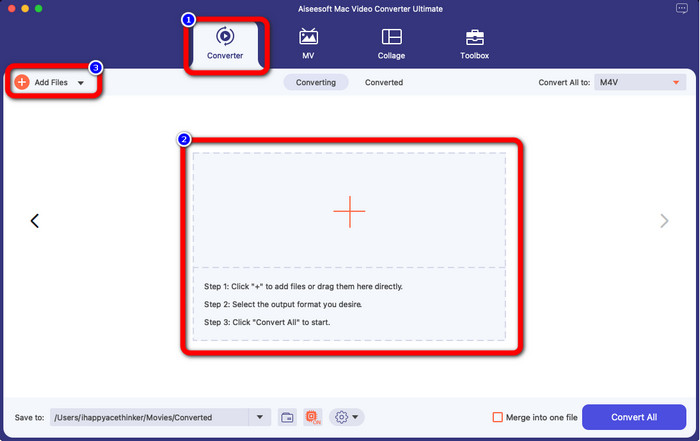
Step 2: Launch the application and select the Converter panel. Then, click the + icon or Add Files button to insert your WMV video file.
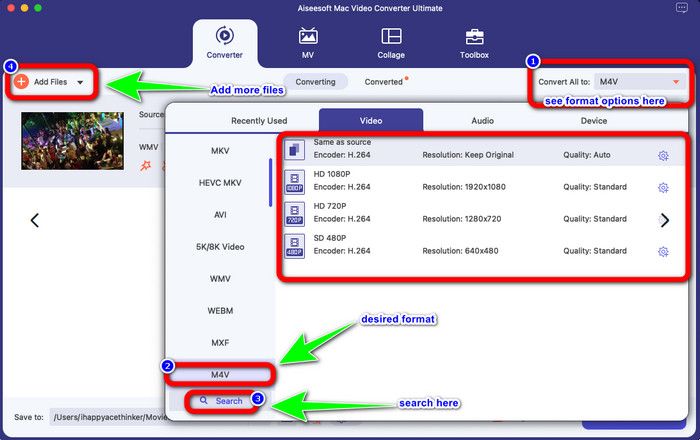
Step 3: After adding your video, click the Convert All to button to view the format options, and select the M4V file format. You can also search your desired format on the search box on the lower part of the interface. You can still click the Add Files button to add more videos to do batch conversion.
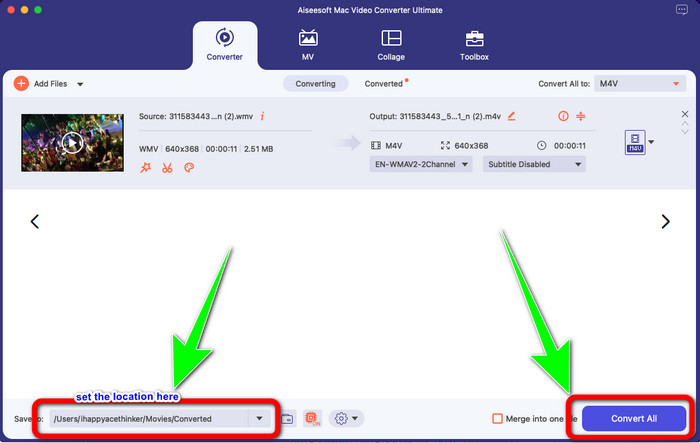
Step 4: When you select your desired file format, the M4V, you can already choose the location where you want to save your video. Then click the Convert button.
Μέρος 3: Δωρεάν τρόπος μετατροπής WMV σε M4V
To convert WMV to M4V for free, you can use Convertfiles.This online software is also capable of converting multiple files. It has easy instructions with a simple interface, which is suitable for all users. Aside from converting videos, you can also convert images, audio, presentation, and more. However, there are times when this converter doesn't perform well. It has a slow conversion process, and the ads are annoying.
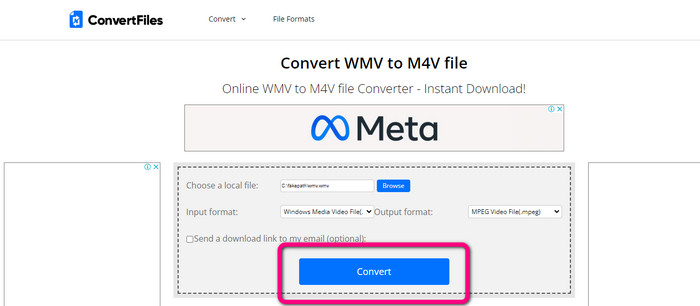
Step 1: Go to the Convertfiles website.
Step 2: Upload the WMV file format you want to convert.
Step 3: On the Output format, select the M4V file. Then click the Convert button.
Μέρος 4: Εξαιρετική μέθοδος μετατροπής WMV σε M4V Online
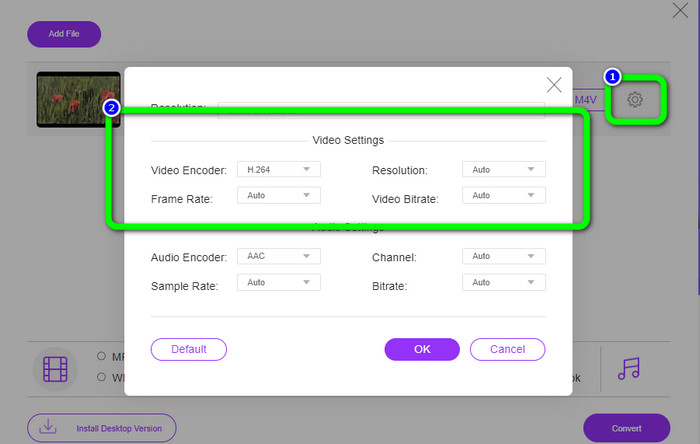
Another method to convert WMV to M4V online is to use the FVC Free Video Converter Online. With the help of this online tool, converting WMV is easy. It also converts more files like AVI, MP4, FLV, MKV, VOB, etc. Moreover, even though it is a free online converter, you don’t need to worry about the quality of your video. You can save your converted video with the original quality. Furthermore, you can also change your video's bit rate, frame rate, and resolution.
Λειτουργίες
◆ Δυνατότητα αλλαγής του ρυθμού bit, του ρυθμού καρέ και της ανάλυσης του βίντεο.
◆ Προσφέρει μετατροπή παρτίδων.
Ακολουθήστε τα παρακάτω λεπτομερή βήματα για να μετατρέψετε WMV σε M4V χρησιμοποιώντας το FVC Free Video Converter Online.
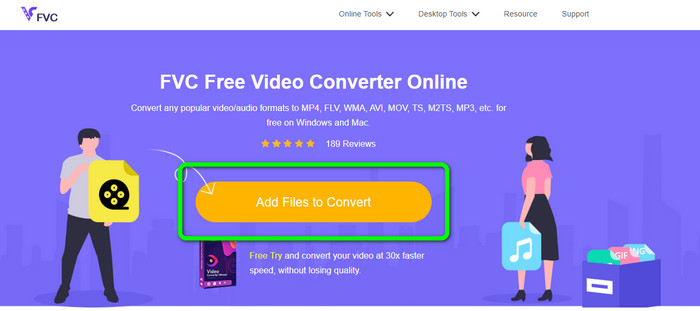
Step 1: Visit the FVC Free Video Converter Online website. Then, click the Add Files to Convert button.
Step 2: If you want to change your video’s bit rate, frame rate, and resolution, click the Settings icon. Then, press OK when you are done.
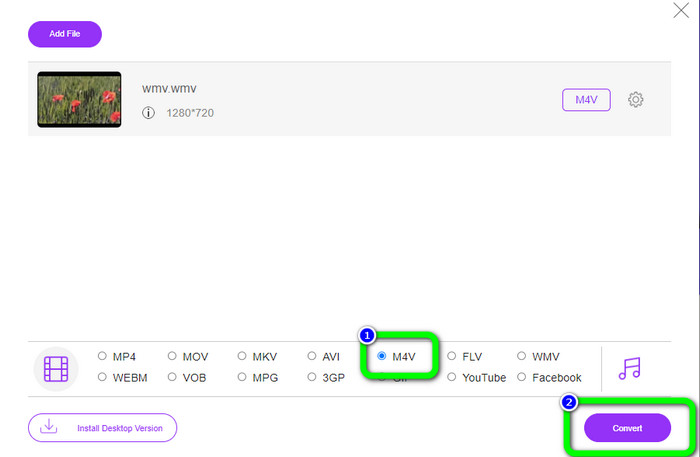
Step 3: Then, on the lower part of the interface, you will see the format options. Select the M4V file as your desired output file format, and click the Convert button to download your video.
Μέρος 5: Συχνές ερωτήσεις σχετικά με τη μετατροπή WMV σε M4V
1. Μπορούν όλες οι συσκευές να παίζουν M4V;
Unfortunately, no. Built-in player of Android devices doesn’t support M4V files. You can download a third-party M4V player that supports the M4V format or convert it to a compatible format.
2. Υπάρχει ο καλύτερος μετατροπέας για μετατροπή WMV σε M4V;
If you want the best WMV to M4V converter, you can use the FVC Free Video Converter Online. It can convert your files efficiently and effortlessly.
3. Ποιο είναι καλύτερο, M4V ή MOV;
M4V is better. If you want to play your files on a portable device, such as iPhone, iPod, or iPad, M4V is highly recommended. But in some devices, MOV is supported only. In that case, you can convert M4V to MOV.
συμπέρασμα
With all the essential information above, you can already convert WMV to M4V easily and instantly. If you prefer a fast conversion speed converter, you can use the FVC Video Converter Ultimate. Also, you can use the FVC Free Video Converter Online if you want a free online converter.
-
 Πώς να συμπιέσετε τα αρχεία M4V σε μικρότερο μέγεθος (δωρεάν & online)
 Αν ψάχνετε για έναν απλό τρόπο για να μειώσετε το μέγεθος του αρχείου M4V σας, θα πρέπει να έρθετε και να διαβάσετε αυτό το άρθρο. Εδώ θα μοιραστούμε μαζί σας τον πιο εύκολο τρόπο συμπίεσης αρχείων M4V
-
 Συγκεκριμένος οδηγός για συμμετοχή σε αρχεία M4V σε Windows και Mac δωρεάν
 Αν ψάχνετε για μια λύση για να συνδυάσετε αρχεία βίντεο M4V σε ένα, μην χάσετε ποτέ αυτό το απόσπασμα. Εδώ θα μιλήσουμε για τις δύο καλύτερες μεθόδους συνδυασμού αρχείων βίντεο M4V
-
 Γρήγορες και εύκολες συμβουλές για τη μετατροπή WMV σε MOV [Αποδεδειγμένη]
 Θέλετε να μάθετε ποιοι είναι οι καλύτεροι και εύχρηστοι μετατροπείς που μετατρέπουν WMV σε MOV; Συνεχίστε να διαβάζετε αυτό το άρθρο καθώς συζητά όλες τις πιθανές επιλογές που πρέπει να εξετάσετε
