


 Video Converter Ultimate
 Εγγραφή οθόνης
 Επισκευή βίντεο
 Ασφαλές κατέβασμα
Πλήρης οδηγός για τη μετατροπή μιας εικόνας σε ασπρόμαυρη
Η εμφάνιση των έγχρωμων εικόνων φαίνεται πως κατέστησε το ασπρόμαυρο άχρηστο. Είναι όμως πράγματι έτσι; Προφανώς, οι ασπρόμαυρες αποχρώσεις δεν έχουν εξαφανιστεί εντελώς από τη ζωή μας. Όταν οι άνθρωποι βλέπουν ασπρόμαυρες φωτογραφίες, τείνουν να εστιάζουν περισσότερο στις βασικές γραμμές των ανθρώπων και στην αίσθηση της υφής των αντικειμένων. Οι καλλιτέχνες χρησιμοποιούν συχνά το ασπρόμαυρο για να τονίσουν μια ρετρό αίσθηση σε ιστορικά ντοκιμαντέρ. Ορισμένοι σχεδιαστές επίσης επιλέγουν να μετατρέψουν μια εικόνα σε ασπρόμαυρη πριν προσθέσουν ένα ακόμη έντονο χρώμα, ώστε να αναδείξουν ένα συγκεκριμένο μέρος της εικόνας. Αν θέλεις κι εσύ οι φωτογραφίες σου να μοιάζουν σαν να έχουν ταξιδέψει στον χρόνο ή να δείχνουν πιο δραματικές, μπορείς να δοκιμάσεις τις μεθόδους που προτείνουμε σε αυτό το άρθρο για να κάνεις τις εικόνες ασπρόμαυρες. Θα παρουσιάσουμε τόσο λύσεις για υπολογιστή όσο και online επιλογές, ώστε χρήστες σε διαφορετικές πλατφόρμες να μπορούν να δοκιμάσουν.

Μέρος 1. Πώς να κάνετε μια εικόνα ασπρόμαυρη στο Photoshop
Όταν χρειάζεται να κάνουμε κάποιες τροποποιήσεις σε μια εικόνα, το πρώτο εργαλείο που μας έρχεται στο μυαλό είναι το Adobe Photoshop, ένα πρόγραμμα που έχει γίνει τόσο δημοφιλές που έχει γίνει το πρότυπο στη φωτογραφική βιομηχανία. Αυτό το πρόγραμμα έχει γίνει πρότυπο στη γραφιστική βιομηχανία και μπορεί να μας βοηθήσει να κάνουμε τις εικόνες μας να μοιάζουν με οτιδήποτε, συμπεριλαμβανομένων φυσικά και ασπρόμαυρων. Δεν έχει σημασία τι σύστημα έχετε στον υπολογιστή σας. Μπορείτε να εγκαταστήσετε το Photoshop στον υπολογιστή σας και να αρχίσετε να το χρησιμοποιείτε. Εκτός από την αλλαγή των χρωματικών τόνων, μπορούμε να το χρησιμοποιήσουμε για να προσθέσουμε περισσότερα εφέ στην εικόνα, όπως περικοπή, επιλογή, βελτίωση της ποιότητας, αφαίρεση ακαθαρσιών και ούτω καθεξής.
Εδώ θα σας δείξουμε πώς να μετατρέψετε μια εικόνα σε ασπρόμαυρη στο Photoshop. Ακολουθήστε τα παρακάτω βήματα.
Βήμα 1. Κατέβασε το Adobe Photoshop στον υπολογιστή σου. Σημείωσε ότι, αν είσαι νέος χρήστης, μπορείς πρώτα να απολαύσεις μια δωρεάν δοκιμή 7 ημερών. Ωστόσο, το Photoshop είναι ένα επί πληρωμή πρόγραμμα και θα χρειαστεί να αναβαθμίσεις τον λογαριασμό σου αν θέλεις να συνεχίσεις να χρησιμοποιείς την υπηρεσία.
Βήμα 2. Αφού το ανοίξεις, κάνε κλικ στο File > Open και διάλεξε την έγχρωμη εικόνα που θέλεις να μετατρέψεις.
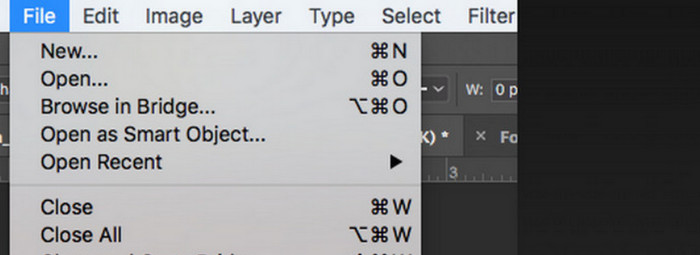
Βήμα 3. Όταν φορτωθεί η εικόνα, πήγαινε στο Window και κάνε κλικ στο Adjustments. Εκεί θα βρεις ένα εικονίδιο black-and-white. Πάτησέ το.
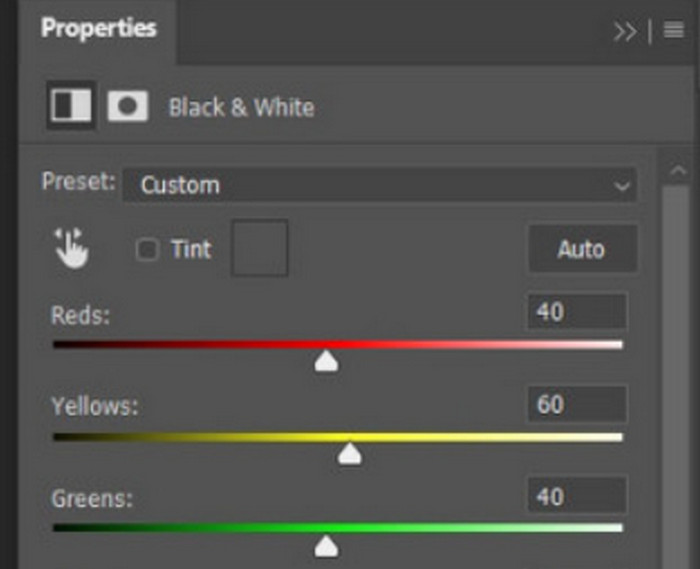
Βήμα 4. Θα ανοίξει το παράθυρο Properties. Επίλεξε Color Slider και στη συνέχεια μετακίνησε τον ρυθμιστή για να ρυθμίσεις τους γκρίζους τόνους της εικόνας σου. Αφιέρωσε λίγο χρόνο στις ρυθμίσεις, μέχρι να είσαι ικανοποιημένος με την ασπρόμαυρη εμφάνιση της φωτογραφίας.
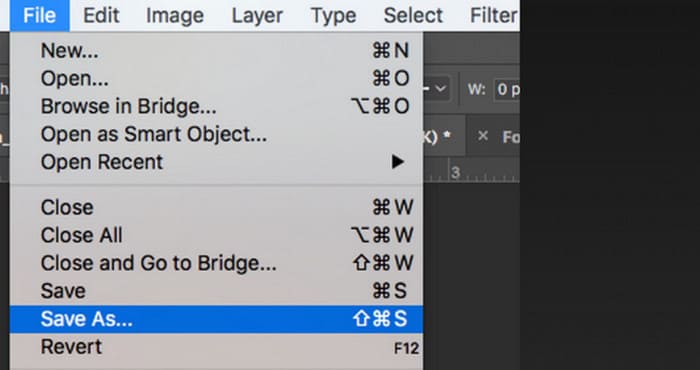
Βήμα 5. Έπειτα, κάνε κλικ στο File επάνω αριστερά και διάλεξε Save As από το αναπτυσσόμενο μενού. Στη συνέχεια, επίλεξε μια διαδρομή αποθήκευσης για τις μετατραπείσες εικόνες σου.
Αφού ολοκληρώσαμε τα παραπάνω βήματα, έχουμε μετατρέψει με επιτυχία την εικόνα σε ασπρόμαυρη. Ωστόσο, κατά τη διάρκεια της λειτουργίας, οι χρήστες μπορεί να διαπιστώσουν ότι η διεπαφή του Photoshop είναι πολύ περίπλοκη και ορισμένα κουμπιά δεν είναι εύκολο να βρεθούν. Παρά τις πλήρεις λειτουργίες, ο αρχάριος σχεδόν δεν μπορεί να χρησιμοποιήσει το Photoshop. Συχνά χρειαζόμαστε πολύ χρόνο για να μάθουμε και να εξασκηθούμε ώστε να εξοικειωθούμε με τον τρόπο που λειτουργεί το λογισμικό αργά. Αν δεν θέλετε να περιπλανιέστε και θέλετε να πάτε κατευθείαν στο θέμα και να αρχίσετε να κάνετε την εικόνα ασπρόμαυρη αμέσως, διαβάστε παρακάτω για να βρείτε μια πιο απλή λύση.
Μέρος 2. Μετατροπή εικόνας σε ασπρόμαυρη στο διαδίκτυο
Ορισμένα διαδικτυακά εργαλεία αποτελούν σίγουρα καλύτερη επιλογή για τη μετατροπή μιας έγχρωμης εικόνας σε ασπρόμαυρη από το κάπως δυσκίνητο Adobe Photoshop. Δεν απαιτούν να εκτελέσουμε τα βήματα εγκατάστασης και λήψης και μπορούν να χρησιμοποιηθούν απευθείας στο πρόγραμμα περιήγησης. Εδώ, σας προτείνουμε να δοκιμάσετε το Pixelied Photo Editor, το οποίο μπορεί να προσαρμόσει τους χρωματικούς τόνους σε ασπρόμαυρους και προς το παρόν υποστηρίζει τη μεταφόρτωση εικόνων σε μορφές όπως JPG, PNG, SVG κ.ο.κ. Αυτός ο διαδικτυακός βοηθός διαθέτει επίσης μερικές καλές ενότητες περικοπής και επεξεργασίας εικόνων που μπορούν να μας βοηθήσουν να κάνουμε τα έργα μας πιο όμορφα.
Δείτε πώς μπορείτε να κάνετε μια φωτογραφία ασπρόμαυρη με το Pixelied Photo Editor.
Βήμα 1. Μετάβαση στον ιστότοπο του Pixelied Image to Black and White Converter. Κάνε κλικ στο Upload Your Image και πρόσθεσε το αρχείο που θέλεις να μετατρέψεις.
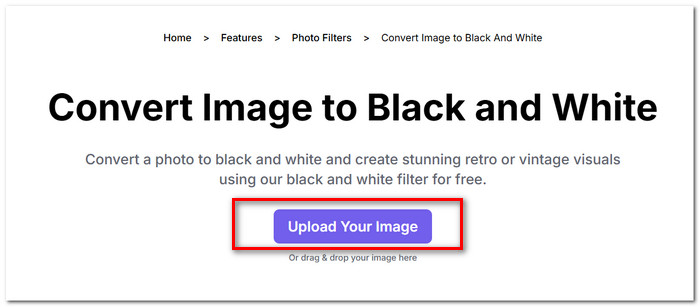
Βήμα 2. Όταν φορτωθεί η ανεβασμένη εικόνα, πήγαινε στο Edit Image > Filters. Βρες το φίλτρο Black and White και εφάρμοσέ το στην εικόνα σου.
Βήμα 3. Αφού ολοκληρωθεί η μετατροπή, κάνε κλικ στο Download για να αποθηκεύσεις την εικόνα στον υπολογιστή σου.
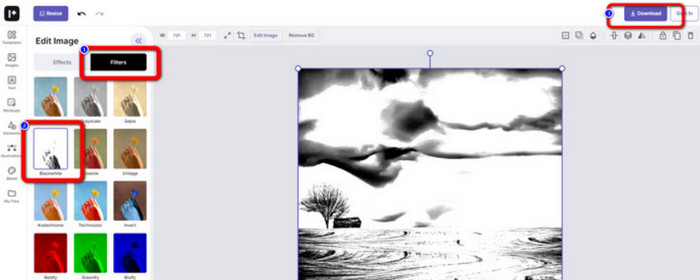
Η μετατροπή μιας εικόνας σε ασπρόμαυρη με το Pixelied γίνεται άμεσα και η διεπαφή της πλατφόρμας είναι πολύ πιο καθαρή από αυτή του Adobe Photoshop. Ωστόσο, για να εφαρμόσουν σωστά το ασπρόμαυρο φίλτρο, οι χρήστες πρέπει να πληρώσουν για να αναβαθμίσουν τον λογαριασμό τους. Η δωρεάν έκδοση αυτού του ενισχυτή χρώματος φωτογραφιών παρέχει μόνο 2 GB χώρου αποθήκευσης. Αυτά είναι τα σημεία στα οποία πρέπει να δίνουμε προσοχή όταν το χρησιμοποιούμε.
Μέρος 3. Συμβουλή μπόνους - Δημιουργήστε μια ασπρόμαυρη εικόνα πίσω σε έγχρωμη
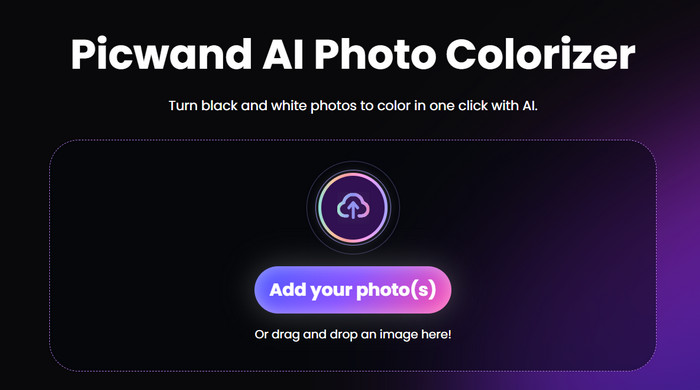
Χρωματιστής εικόνας Picwand
Τώρα γνωρίζουμε ακριβώς πώς να κάνουμε μια εικόνα ασπρόμαυρη. Αντίθετα, όμως, υπάρχει κάποιο εργαλείο που μπορεί να διορθώσει μια φωτογραφία που ήταν αρχικά ασπρόμαυρη και να επαναφέρει το χρώμα στα πρόσωπα της εικόνας; Αυτό μας οδηγεί σε έναν online επεξεργαστή φωτογραφιών, το Picwand Image Colorizer. Με την υποστήριξη της πιο πρόσφατης τεχνολογίας τεχνητής νοημοσύνης, μπορεί να χρησιμοποιεί προηγμένους αλγόριθμους για να χρωματίζει παλιές φωτογραφίες. Δεν χρειάζεται να κάνουμε πολλές λεπτομερείς και πολύπλοκες ενέργειες· με ένα μόνο κλικ, το Picwand Image Colorizer μπορεί να μετατρέπει τις ασπρόμαυρες εικόνες ξανά σε έγχρωμες.
Μέρος 4. Συχνές ερωτήσεις για τη μετατροπή μιας εικόνας σε ασπρόμαυρη
Μπορεί μια εικόνα να μετατραπεί απευθείας από έγχρωμη σε ασπρόμαυρη;
Σίγουρα. Μπορούμε να χρησιμοποιήσουμε μερικά έξυπνα εργαλεία που δεν απαιτούν χειροκίνητες ρυθμίσεις χρώματος. Αυτά τα εργαλεία θα επικαλύψουν ένα ασπρόμαυρο φίλτρο στην αρχική εικόνα.
Ποιες φωτογραφίες γίνονται καλύτερα ασπρόμαυρες;
Μια εικόνα με καθαρές γραμμές, σχήματα και περιγράμματα λειτουργεί καλύτερα όταν μετατρέπεται σε ασπρόμαυρη. Ένα ασπρόμαυρο φίλτρο επιτρέπει σε κάποιον να αγνοήσει τις ακαθαρσίες στην εικόνα και να επικεντρωθεί μόνο στις πιο πρωτότυπες γραμμές.
Ποια είναι η καλύτερη μορφή για ασπρόμαυρες φωτογραφίες;
Φυσικά, η καλύτερη επιλογή είναι το JPG, που είναι η πιο ευέλικτη μορφή και προσφέρει ισορροπία ανάμεσα στο μέγεθος και την ποιότητα της εικόνας, διασφαλίζοντας ότι το αρχείο δεν είναι υπερβολικά μεγάλο χωρίς να χάνεται υπερβολικά η ποιότητα. Αν η εικόνα σου είναι σε άλλη μορφή, μπορείς επίσης να χρησιμοποιήσεις ένα εργαλείο για να τη μετατρέψεις σε αρχείο JPG πριν την επεξεργασία και την επεξεργασία της.
συμπέρασμα
Σε αυτό το άρθρο, παρουσιάζουμε δύο τρόπους για να κάνεις τις εικόνες ασπρόμαυρες, συμπεριλαμβανομένης της χρήσης του πιο κλασικού προγράμματος επεξεργασίας φωτογραφιών, του Photoshop, καθώς και της δοκιμής ενός online επεξεργαστή. Το Adobe Photoshop ολοκληρώνει την εργασία με τη μεγαλύτερη λεπτότητα, αλλά η συνδρομή είναι ακριβή και η χρήση του περίπλοκη. Οι άπειροι χρήστες μπορούν να επιλέξουν το Pixelied, το οποίο διαθέτει πολύ πιο φιλική προς τους αρχάριους διεπαφή.
-
 Πώς να αλλάξετε χρώμα στο Photoshop | 2025 Περιεκτικός Οδηγός
 Θέλετε να ανεβάσετε τη δημιουργικότητά σας στο επόμενο επίπεδο μαθαίνοντας πώς να αλλάζετε το χρώμα φόντου στο Photoshop; Αυτό το άρθρο έχει όλα όσα πρέπει να γνωρίζετε. Διαβάστε το τώρα!
-
 Πώς να αφαιρέσετε το φόντο από την εικόνα χρησιμοποιώντας το GIMP
 Ξεκινήστε με το GIMP και τη διαδικασία βήμα προς βήμα αφαίρεσης φόντου από εικόνες. Ανακαλύψτε αποτελεσματικούς τρόπους για να δημιουργήσετε διαφανείς εικόνες χρησιμοποιώντας το GIMP σήμερα!
-
 Πώς να αφαιρέσετε το φόντο από την εικόνα: Εργαλεία χωρίς προβλήματα
 Ανακαλύψτε έξι εργαλεία για να αφαιρέσετε το φόντο από οποιαδήποτε εικόνα χωρίς κόπο. Πείτε αντίο στην περίπλοκη επεξεργασία και διαγράψτε εύκολα τα φόντο των εικόνων σήμερα!
