


 Video Converter Ultimate
 Εγγραφή οθόνης
 Επισκευή βίντεο
Ανακαλύψτε τρόπους αναπαραγωγής αρχείων MKV στο PS4
Not Only Xbox One S supports playback of movies. Now PS4 is trying to cope up with the trend. With the use of USB cable and via DLNA PS4 can now play MKV, MP4, AVI, and a lot more. This means MKV is part of the files you can play. To see a list of the full formats supported, visit the official website of PS4. Furthermore, you wouldn't keep on reading this article if you're not interested in playing an MKV file to PS4. Keep it going, as you progress you will discover ways on how you can play MKV on PS4.

Μέρος 1. Μπορούν να αναπαραχθούν όλα τα αρχεία MKV στο PS4;
Μπορώ να παίξω αρχεία MKV στο PS4; Σίγουρα μπορείς. Η μορφή αρχείου MKV υποστηρίζεται από το PS4. Αλλά δεν μπορούν να αναπαραχθούν σωστά όλα τα αρχεία MKV. Μπορεί να αντιμετωπίσετε αποτυχία στο να το παίξετε. Αυτό συμβαίνει επειδή πρέπει να πληροίτε τα πρότυπα που έχει ορίσει το PS4. Ως επί το πλείστον, υποστηρίζονται H.264/MPEG-4 AVC. Οι ίδιοι κανόνες ισχύουν αν πρόκειται να αναπαράγετε αρχεία MKV από μονάδα USB. Εν τω μεταξύ για ήχο MP3, AAC LC, AC-3 υποστηρίζονται. Οι περισσότερες από αυτές τις μορφές είναι μορφές Dolby Digital. Εάν πιστεύετε ότι πληροίτε το πρότυπο, μπορείτε να προχωρήσετε στα βήματα για το πώς να παίξετε απευθείας το MKV στο PS4.
Step 1. Download and install DivX Media Server and launch the player. Then enable the sharing on your computer.
Step 2. Upload or import the MKV file to the server.
Step 3. Prior moving to the next step, make sure both the computer and PS4 are connected under the same Wi-Fi network. Next download and install the DivX media player on your PS4. Afterwards, open the media player app of the Ps4 and choose DivX media server from the list of devices that will appear.
Step 4. Finally, look for Video then tick the video you want to play and start streaming it.
Μέρος 2. Οδηγός βήμα προς βήμα σχετικά με τον τρόπο αναπαραγωγής MKV στο PS4 από USB
Εν τω μεταξύ, εάν χρησιμοποιείτε αποθηκευτικό χώρο USB, βεβαιωθείτε ότι έχει μορφοποίηση FAT ή exFAT, διαφορετικά δεν θα εντοπιστεί. Εάν πιστεύετε ότι είστε έτοιμοι και η μονάδα flash είναι συμβατή, ανατρέξτε στον παρακάτω οδηγό βήμα προς βήμα.
Step 1. Turn on PS4 and insert the USB. Go to the main Menu. Now, select Video and keep looking for your USB Drive name.
Step 2. Once you see the list of the file name, click on Display All to see the entire list of files you saved on your USB. Copy the file and transfer it to the PS4.
Step 3. Finally, make sure you still have enough storage to complete the transfer.
Μέρος 3. Εναλλακτικός τρόπος αναπαραγωγής MKV στο PS4 μέσω διακομιστή Plex
Aside from the DivX there is also an alternative player that you can use to play MKV on PS4. There is a streaming media server named Plex. This media server allows you to stream high-quality videos, music, TV shows, and podcasts from your computer. Although some people experience problems in playing some MKV files, you can still use it as an alternative. Meanwhile, if you really feel like using Plex and play the incompatible file you should consider converting the video. Some converters are capable of turning your MKV files into Plex supported format. By adjusting the video codec, frame rate, bitrate and other parameters, it is possible. Is there a tool that is capable of doing that? Yes there is, you can try Video Converter Ultimate. Yes, this tool is capable of doing that. Try using it to solve this problem.
Step 1. Download and install Video converter Ultimate on your PC.
Δωρεάν ΛήψηΓια Windows 7 ή νεότεραΑσφαλής λήψη
Δωρεάν ΛήψηΓια MacOS 10.7 ή νεότεροΑσφαλής λήψη
Step 2. Add the files that you want to convert by clicking Add files or simply drag and drop the file in the interface.
Step 3. Afterwards, choose the format that is supported by Plex by clicking Convert to All dropdown.
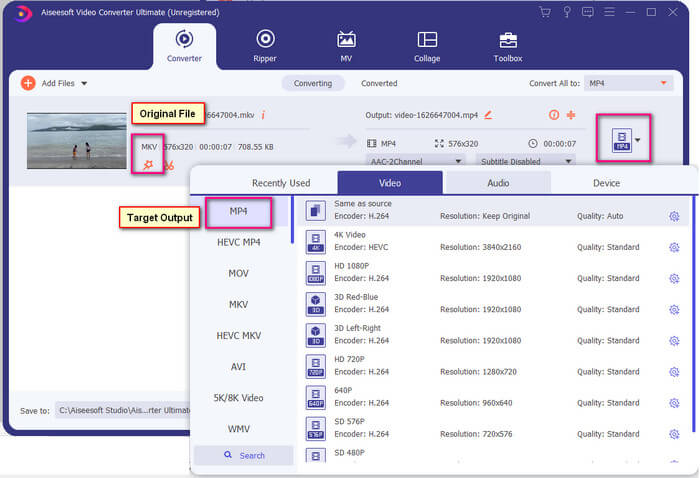
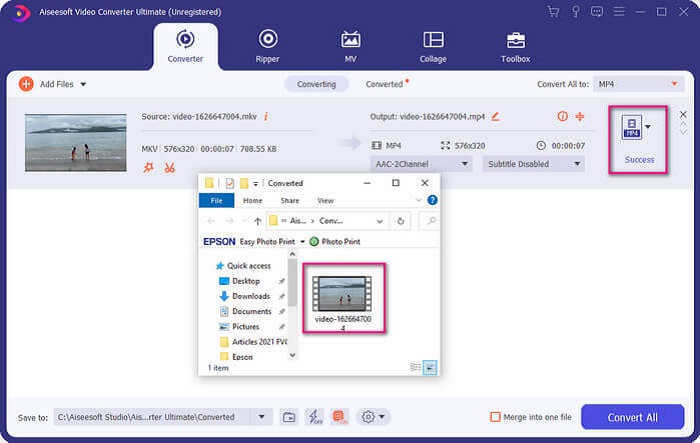
Step 4. Once format is set, click the Convert All button to start the process of conversion. Once the conversion is done, the folder where the file is saved will pop-up.
Υπάρχουν περισσότερα με τον μετατροπέα βίντεο Ultimate. Μπορείτε να ελέγξετε τη λίστα με τα πλεονεκτήματα και τα μειονεκτήματα παρακάτω για να γνωρίσετε άλλα καλά χαρακτηριστικά που προσφέρει.
● Αυτό το εργαλείο πραγματοποιεί μετατροπές μόλις τρία δευτερόλεπτα.
● Διαθέτει τεχνολογία επιτάχυνσης που μπορεί να βελτιώσει το αρχείο που έχει μετατραπεί.
● Υποστηρίζει ποιότητα HD.
● Διαθέτει δυνατότητες επεξεργασίας όπως η προσθήκη φίλτρων και βασικών εφέ.
● Μπορείτε να προσαρμόσετε τους υπότιτλους και το κομμάτι ήχου.
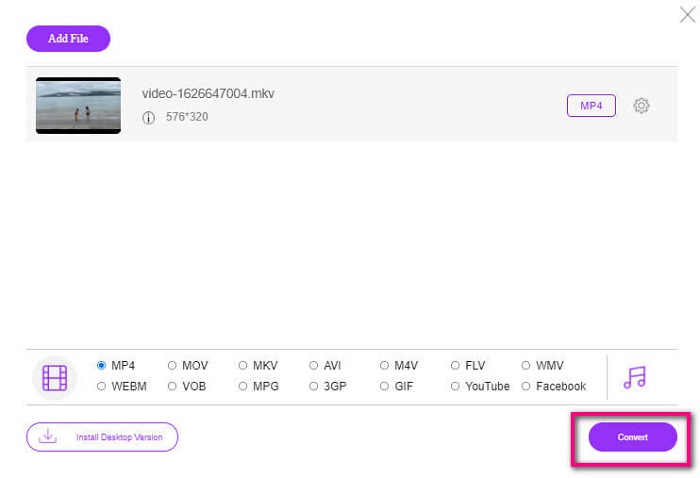
In any case that you are looking for a free converter, you can also consider FVC Free Online Video Converter. It may not be as good as the Ultimate Video Converter, it is to still cope up with it. Certainly, it can convert the file and make it compatible with Plex or DivX. All you have to do is…
Step 1. Launch the tool by visiting the official page in the description.
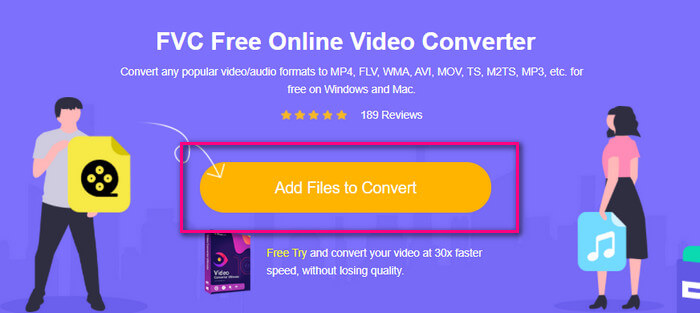
Step 2. Upload the video by clicking Add Files to Convert.
Step 3. Change the format by highlighting the circle below.
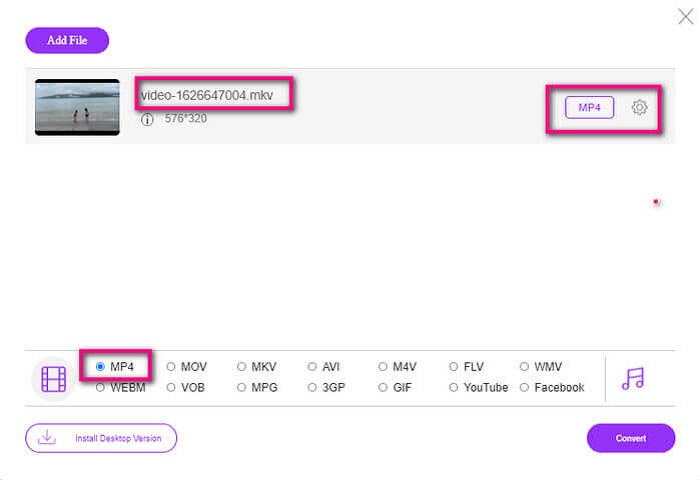
Step 4. Finally, click the Convert button and select the file location where you want the file to be saved. From there click Okay. You can click the Folder icon to see the converted file.
Further Reading
Play MKV in Windows Media Player
Μέρος 4. Περισσότερες πληροφορίες σχετικά με την αναπαραγωγή αρχείων MKV στο PS4
Πόσο κοστίζει ένα PS4;
Η λιανική τιμή της αγοράς είναι 399,99 USD στις Ηνωμένες Πολιτείες και στον Καναδά είναι 399,99 CAD. Οι τιμές μπορεί να διαφέρουν ανάλογα με τη λιανική τιμή στη χώρα σας.
Υπάρχει δυνατότητα αναπαραγωγής CC ή Close Caption MKV στο PS4;
Yes there is. It is in the Accessibility Settings. The path is, go to your PS4 Settings, Accessibility and then select Display Closed Captions. From there click Options to activate the closed caption.
Εάν το PS4 υποστηρίζει MKV, γιατί δεν παίζονται τα αρχεία μου;
Όπως αναφέρθηκε παραπάνω, πρέπει να βεβαιωθείτε ότι το αρχείο MKV πληροί τα πρότυπα της συσκευής αναπαραγωγής που χρησιμοποιείτε. Απλά πρέπει να ελέγξετε την απαίτηση του PS4 ή άλλου διακομιστή ροής πολυμέσων. Οι περισσότεροι διακομιστές πολυμέσων διαθέτουν επίσης ταξινόμηση για την αναπαραγωγή αρχείων MKV.
Ποιες είναι οι μορφές που υποστηρίζονται από το PS4;
Υπάρχουν πολλές μορφές αρχείων που υποστηρίζει το PS4. Αλλά θα παρατηρήσετε ότι οι περισσότερες μορφές είναι ασυμπίεστες και διατηρούν ένα μεγάλο αρχείο. Αν και υποστηρίζει και τα ασυμπίεστα όπως το Mp4. Εν τω μεταξύ, εδώ είναι η λίστα των μορφών για τις οποίες μιλάμε: MKV, AVI, MPEG-2 PS, MPEG-2 TS, AVCHD και XAVC και MP4.
συμπέρασμα
Συμπερασματικά, υπάρχουν πολλοί τρόποι με τους οποίους μπορείτε άμεσα ή έμμεσα να αναπαράγετε αρχεία MKV στο PS4. Αυτά που αναφέρονται είναι τα πιο συχνά χρησιμοποιούμενα μέσα. Ο DivX Stream Server και το Plex είναι μερικές μόνο εναλλακτικές που μπορείτε να χρησιμοποιήσετε. Συνιστάται ιδιαίτερα να μετατρέψετε το αρχείο για να αποφύγετε την ταλαιπωρία και την υπερβολική διαδικασία.
-
 [Λύθηκε] Το πρόγραμμα αναπαραγωγής VLC δεν παίζει MKV, πώς να το διορθώσετε
 Το VLC player υποστηρίζει αρχεία MKV; Γιατί δεν θα παίξει το VLC MKV; Αυτή η ανάρτηση μοιράζεται 4 χρήσιμες συμβουλές για να διορθώσετε το πρόγραμμα αναπαραγωγής VLC δεν θα αναπαράγει αρχεία MKV.
-
 Πώς να παίξετε αρχεία MKV στο iPad 2025
 Πώς να παίξετε αρχεία MKV στο iPad 2; Μπορώ να μετατρέψω το MKV σε MP4 για αναπαραγωγή στο iPad Pro / Air / 2; Αυτή η ανάρτηση μοιράζεται 2 εύκολους τρόπους αναπαραγωγής MKV σε iPad.
-
 Πώς να κατεβάσετε το MKV Codec στο Windows Media Player για ομαλή αναπαραγωγή
 Δεν είναι δυνατή η αναπαραγωγή βίντεο MKV στο Windows Media Player; Μπορείτε να κατεβάσετε δωρεάν τον κωδικοποιητή MKV για το Windows Media Player. Αντίθετα, μετατρέψτε το MKV για να το παίξετε στο Windows Media Player.
