


 Video Converter Ultimate
 Εγγραφή οθόνης
 Επισκευή βίντεο
Τι σημαίνει AVI και πώς να το παίξετε σε επιτραπέζιους και κινητές συσκευές
Μία από τις γνωστές μη συμπιεσμένες μορφές είναι το AVI. Χρησιμοποιείται πιο συχνά για συγχρονισμένη αναπαραγωγή βίντεο και ήχου. Αν θέλετε να μάθετε περισσότερα για το AVI, τότε πρέπει να συνεχίσετε να διαβάζετε. Σκοπός αυτού του άρθρου είναι να μάθετε τι είναι το AVI και ποιος είναι ο πρόγραμμα αναπαραγωγής πολυμέσων που υποστηρίζει αυτόν τον τύπο αρχείου. Συνεχίστε να διαβάζετε παρακάτω για να έχετε περισσότερες ιδέες σχετικά με τη μορφή και τους διαθέσιμους media players.

Μέρος 1. Τι είναι ένα αρχείο AVI
Το AVI παρουσιάστηκε στην αγορά στα τέλη του 1992 από τη Microsoft. Η ερμηνεία του ονόματος AVI είναι Audio Video Interleave (Εμπλοκή Ήχου και Βίντεο). Είναι ένα από τα πιο δημοφιλή δοχεία αρχείων λόγω της απλότητας του και της συμβατότητάς του με όλες τις διαφορετικές πλατφόρμες. Έτσι, αν θέλετε να εγγράψετε ή να κατεβάσετε ένα βίντεο ή ήχο σε μορφή AVI, να περιμένετε ότι θα είναι μεγάλο σε μέγεθος επειδή είναι μη συμπιεσμένο. Για να έχετε περισσότερες ιδέες, ακολουθούν μερικά από τα πλεονεκτήματα και τα μειονεκτήματα της μορφής.
Πλεονεκτήματα
- Είναι ένα πολυλειτουργικό κοντέινερ αρχείων που μπορεί να περιέχει οποιοδήποτε αρχείο.
- Μορφή που χρησιμοποιείται ευρέως για ταινίες μικρού μήκους, προωθητικές ενέργειες και διαφημίσεις. Λόγω της ποιότητας που παρέχει.
- Τα ποιοτικά καταστήματα AVI είναι εξαιρετικά.
- Δεν θα χρειαστείτε ένα συγκεκριμένο υλικό ή λογισμικό μόνο για την αναπαραγωγή αρχείων AVI επειδή είναι απεριόριστο.
- Συμπιέστε εύκολα τα αρχεία AVI επειδή υποστηρίζει διαφορετικούς κωδικοποιητές όπως DivX, XviD, MPEG-1, MPEG-4 και άλλα.
Μειονεκτήματα
- Εάν συμπιέζετε το αρχείο AVI πέρα από το όριο, υπάρχει πιθανότητα το αρχείο 4k, HD ή 1080 να μειώσει την ποιότητα.
- Τα AVI δεν είναι συμπιεσμένα, επομένως περιμένετε μεγάλο μέγεθος αρχείου εάν χρησιμοποιείτε αυτόν τον τύπο μορφής.
- Εάν χρησιμοποιείτε κωδικοποιητές μέσω Διαδικτύου για τη συμπίεση του AVI, θυμηθείτε ότι οι ίδιοι κωδικοποιητές πρέπει να είναι εγκατεστημένοι στη μονάδα δίσκου σας. Η εγκατάσταση κωδικοποιητών είναι πολύ απλή, αλλά είναι λίγο τρομακτικό να επιλέξετε κωδικοποιητή επειδή ορισμένοι είναι αναξιόπιστοι και ανασφαλείς. Προσέξτε λοιπόν αν κατεβάσετε ένα.
Τώρα που ξέρετε σε τι αφορά η μορφή, ήρθε η κατάλληλη στιγμή να μάθετε πώς να αναπαράγετε αρχεία AVI στον υπολογιστή σας. Όλα τα εργαλεία που αναφέρονται παρακάτω είναι από τους καλύτερους media players που πιθανόν να έχετε ήδη συναντήσει ή όχι κατά την αναζήτηση στο διαδίκτυο. Κάθε πρόγραμμα αναπαραγωγής AVI περιλαμβάνει περιγραφή και βήματα, οπότε διαβάστε προσεκτικά για να μάθετε ποιο είναι το καλύτερο.
Μέρος 2. Τρόπος αναπαραγωγής αρχείων AVI σε Mac και Windows Media Player
1. Δωρεάν πρόγραμμα αναπαραγωγής βίντεο FVC
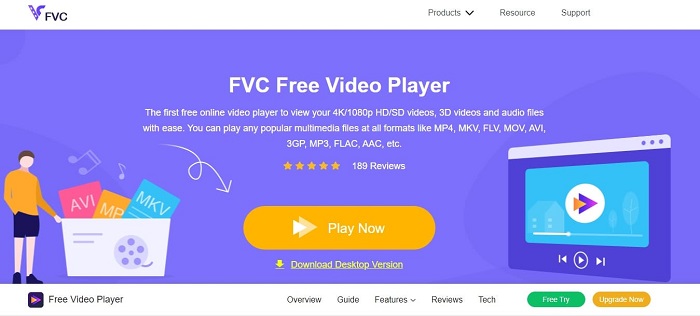
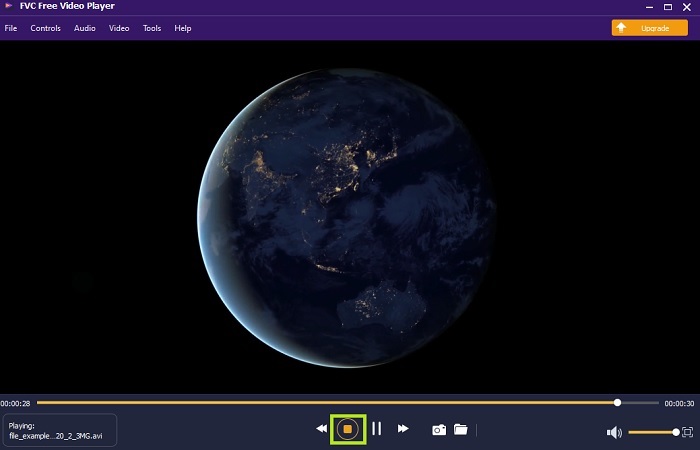
Χρησιμοποιήστε αυτό το FVC Free Video Player για να παρακολουθήσετε οποιαδήποτε μορφή βίντεο μέσω διαδικτύου. Σε αντίθεση με άλλα media players που αναφέρονται παρακάτω, αυτό το εργαλείο δεν χρειάζεται πρόσθετα αρχεία για να λειτουργήσει. Έτσι, αν έχετε σύνδεση στο διαδίκτυο, μπορείτε να παρακολουθείτε οπουδήποτε και οποτεδήποτε. Επιπλέον, προσφέρει υψηλή ποιότητα και δεν παρουσιάζει προβλήματα (bugs) στην αναπαραγωγή αρχείων AVI. Αλλά θυμηθείτε ότι αν διακοπεί η σύνδεσή σας στο διαδίκτυο, το εργαλείο θα κάνει φόρτωση ή παύση για λίγο. Κάτι πολύ συνηθισμένο, γιατί εξαρτάται από το διαδίκτυο. Μπορείτε επίσης να αναπαράγετε εδώ και DVDs, αν θέλετε. Δεν χρειάζεται πια να αναρωτιέστε πώς να ανοίξετε αρχεία AVI για να τα δείτε, αρκεί να ακολουθήσετε τα παρακάτω βήματα που παρέχονται ειδικά για εσάς.
Βήμα 1. Κάντε κλικ σε αυτό το υπερσύνδεσμο για να μεταβείτε στην κεντρική ιστοσελίδα του AVI video player.
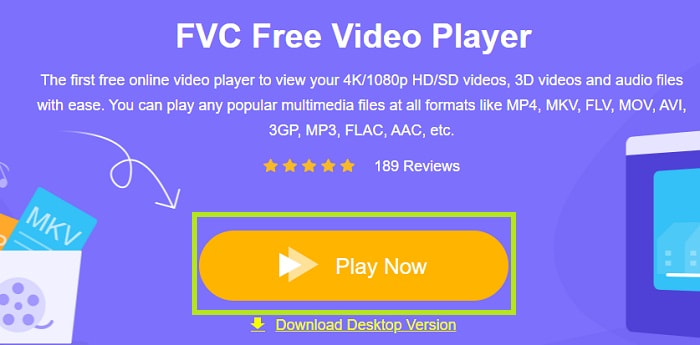
Βήμα 2. Κάντε κλικ στο Play Now για να εκκινήσετε τον online AVI player.
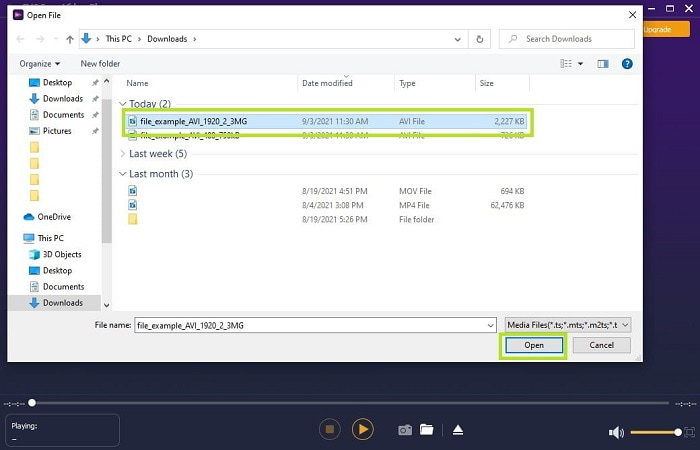
Βήμα 3. Έπειτα κάντε κλικ στο Open File και επιλέξτε το βίντεο AVI που θέλετε να παρακολουθήσετε. Αφού το επιλέξετε, κάντε κλικ στο Open.
Βήμα 4. Περιμένετε για λίγα δευτερόλεπτα ώστε να ξεκινήσει η αναπαραγωγή του βίντεο AVI και voilà, παίζει πλέον. Στη διεπαφή μπορείτε επίσης να κάνετε δωρεάν στιγμιότυπο οθόνης κατά την παρακολούθηση, αν το θέλετε.
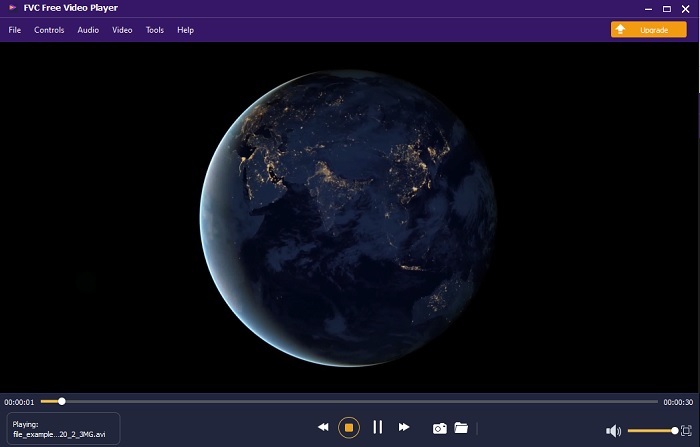
Βήμα 5. Κι αν θέλετε να τερματίσετε το βίντεο, απλά κάντε κλικ στο κουμπί σε σχήμα τετραγώνου για να το σταματήσετε. Επαναλάβετε το ίδιο βήμα αν θέλετε να αναπαράγετε ένα άλλο βίντεο AVI ή άλλη μορφή.
Πλεονεκτήματα
- Δεν χρειάζεται επιπλέον αρχείο για την εκκίνηση του εργαλείου.
- Είναι πιο αποτελεσματικό από τα άλλα εργαλεία παρακάτω.
- Παρέχει 3d vibes εάν παρακολουθείτε βίντεο 4k.
Μειονεκτήματα
- Εξαρτάται από το Διαδίκτυο, οπότε αν δεν έχετε internet, δεν μπορείτε να έχετε πρόσβαση σε αυτό.
- Ορισμένες σημαντικές λειτουργίες του premium δεν είναι ορατές εδώ.
2. Windows Media Player
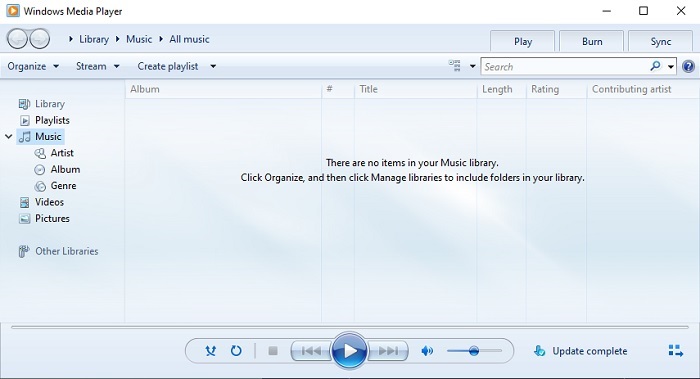
Αν θέλετε να μάθετε πώς να αναπαράγετε αρχεία AVI στα Windows 10, μπορείτε να χρησιμοποιήσετε αυτόν τον προεπιλεγμένο media player που έχει αναπτυχθεί από τη Microsoft για χρήστες Windows. Ωστόσο, υπάρχουν περιπτώσεις όπου θα χρειαστεί να κατεβάσετε έναν επιπλέον κωδικοποιητή (codec) μόνο και μόνο για να παίξετε AVI σε αυτό το πρόγραμμα αναπαραγωγής. Κάτι που είναι λίγο μπελάς και μερικές φορές ενοχλητικό, γιατί η εύρεση του σωστού codec μπορεί να σας δυσκολέψει αρκετά. Άρα να περιμένετε δοκιμές και λάθη αν συμβεί αυτό, και κάποιες φορές να κατεβάζετε λανθασμένους codecs. Παρόλα αυτά, δεν χρειάζεται να ανησυχείτε, γιατί είναι πολύ απλό να κατεβάσετε codecs στον υπολογιστή σας.
Πλεονεκτήματα
- Ενσωματωμένο πρόγραμμα αναπαραγωγής πολυμέσων για Windows.
- Υποστηρίζει σχεδόν όλες τις μορφές.
- Εύχρηστος.
Μειονεκτήματα
- Σε ορισμένες περιπτώσεις, θα χρειαστεί να κάνετε λήψη πρόσθετου κωδικοποιητή που δεν υποστηρίζει αυτό το εργαλείο.
- Δεν παρέχει ροή μέσω αργών συνδέσεων DSL.
3. VLC Media Player
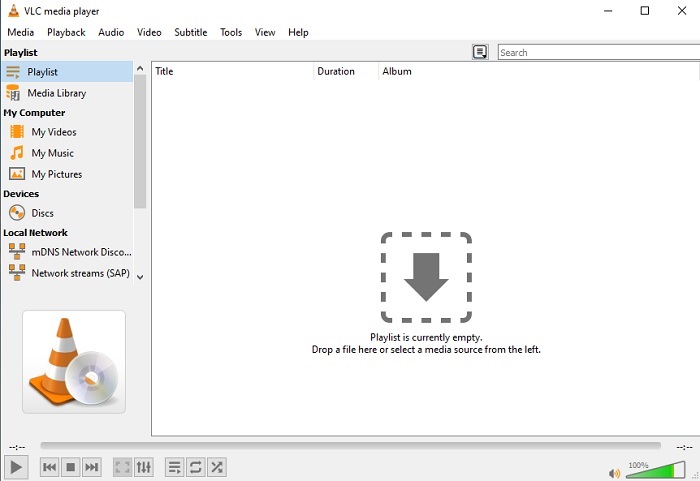
Αυτός ο media player δεν απαιτεί να κατεβούν πρόσθετοι codecs για να αναπαράγει αρχεία AVI. Αν ίσως αναρωτιέστε πώς να εκτελέσετε ένα αρχείο AVI με ευκολία, τότε το VLC Media Player μπορεί να είναι η απάντηση. Αυτός ο πρόγραμμα αναπαραγωγής βοηθά εκατομμύρια χρήστες παγκοσμίως να παίζουν τα αρχεία πολυμέσων τους απλώς ανοίγοντάς τα και αναπαράγοντάς τα εδώ. Παρά το γεγονός ότι εκατομμύρια χρήστες εμπιστεύονται αυτό το εργαλείο, υπάρχουν μερικά σφάλματα (bugs) και ορισμένα αρχεία δεν υποστηρίζονται από αυτό το λογισμικό. Να περιμένετε μερικά σφάλματα, αλλά δεν χρειάζεται να ανησυχείτε, γιατί συμβαίνουν πολύ σπάνια.
Πλεονεκτήματα
- Ένα από τα καλύτερα media player για όλες τις πλατφόρμες.
- Μπορεί να παίξει βίντεο ακόμα κι αν δεν έχει ολοκληρωθεί ακόμα για λήψη. Όχι όμως ολόκληρο το βίντεο.
- Ευέλικτο σε όλες τις μορφές.
Μειονεκτήματα
- Τις περισσότερες φορές υπάρχουν κάποια μικρά σφάλματα που μπορεί να συναντήσετε κατά τη χρήση του VLC.
- Δυσκολεύεται επίσης να παίξει ορισμένες μορφές βίντεο λόγω των κωδικοποιητών.
Μέρος 3. Πώς να παρακολουθήσετε αρχεία AVI στο iPhone
Οι media players που αναφέρθηκαν παραπάνω δεν είναι προσβάσιμοι από τις κινητές σας συσκευές. Υπάρχει όμως τρόπος να παίξετε AVI σε iPhone ή iPod. Επιπλέον, γνωρίζουμε ότι τα αρχεία AVI είναι μεγάλα. Έτσι, αν τα μεταφέρετε στο τηλέφωνό σας, είναι σίγουρο ότι θα καταλάβουν το μεγαλύτερο μέρος του διαθέσιμου χώρου. Αντί να μεταφέρετε το αρχικό αρχείο AVI, θα πρέπει να το μετατρέψετε σε μια νέα μορφή που να είναι αναπαράξιμη αλλά χωρίς να χάσει την ποιότητά του. Μετατρέψτε το AVI στη σωστή μορφή με τη βοήθεια του Video Converter Ultimate. Για περισσότερες λεπτομέρειες σχετικά με το πώς να κάνετε τη μετατροπή, πηγαίνετε σε αυτό το link.
Μέρος 4. Συχνές ερωτήσεις σχετικά με το AVI
Ποιο είναι καλύτερο, AVI ή MP4;
Το AVI είναι καλύτερο σε ποιότητα αλλά μη συμπιεσμένο, ενώ τα αρχεία MP4 καταλαμβάνουν λιγότερο χώρο αλλά έχουν επίσης καλή ποιότητα. Αν θέλετε να μάθετε περισσότερα σχετικά με το ποιες είναι οι διαφορές και ποιο είναι καλύτερο, πρέπει να κάνετε κλικ στο AVI vs MP4.
Πώς να μετατρέψετε το AVI σε MP4;
Η μετατροπή είναι ο καλύτερος τρόπος να μειώσετε το μέγεθος του αρχείου σας και να το αλλάξετε σε άλλη μορφή. Και ο καλύτερος τρόπος για να μετατρέψετε AVI σε MP4 παρουσιάζεται εδώ σε αυτό το άρθρο. Θα σας διδάξει τα βήματα της μετατροπής και ποια είναι τα διαφορετικά εργαλεία που μπορείτε να χρησιμοποιήσετε για να μετατρέψετε.
Μπορεί το QuickTime να παίξει AVI;
Αν και το QuickTime media player υποστηρίζει διαφορετικές μορφές, υπάρχουν ορισμένα προβλήματα κατά την αναπαραγωγή του AVI στην προεπιλεγμένη συσκευή αναπαραγωγής Mac. Λόγω του ιδιόκτητου που έχει η Microsoft. Επομένως, για να μάθετε ποια είναι η καλύτερη εναλλακτική για το QuickTime, πρέπει να διαβάσετε αυτό το άρθρο και να επιλέξετε ποια είναι η καλύτερη εναλλακτική.
Τι γίνεται αν το αρχείο AVI δεν ανοίγει;
Υπάρχουν ορισμένοι λόγοι για τους οποίους τα αρχεία AVI δεν ανοίγουν. Το πρώτο οφείλεται στο γεγονός ότι το αρχείο είναι ημιτελές, εκτός από το ότι επειδή δεν είναι συμπιεσμένο μπορεί να χαθεί κάποιο αρχείο. Δεύτερον, η μορφή AVI δεν υποστηρίζεται στο τοπικό πρόγραμμα αναπαραγωγής πολυμέσων ή στο πρόγραμμα αναπαραγωγής τρίτων. Τρίτον, θεωρήστε το νεκρό, ειδικά αν το συμπιέσετε πάρα πολύ που μπορεί να μετατραπεί σε άπαιχτο. Τέλος, ο κωδικοποιητής είναι λάθος, επομένως εάν συμπιέζετε το AVI με διαφορετικούς κωδικοποιητές ταυτόχρονα, αυτό το πρόβλημα είναι κοινό.
συμπέρασμα
Συνοψίζοντας, το AVI χρησιμοποιείται από πολλούς χρήστες σε όλο το διαδίκτυο. Ωστόσο, το ίδιο το αρχείο είναι μη συμπιεσμένο, οπότε καλό είναι να είστε προετοιμασμένοι να έχετε πολύ χώρο στον δίσκο σας αν εγγράφετε, κατεβάζετε ή μεταφέρετε αρχεία AVI. Από σήμερα, δεν χρειάζεται πια να ρωτάτε τι είναι η μορφή AVI, χάρη στις παραπάνω πληροφορίες και στο πού μπορείτε να την αναπαράγετε. Μη διστάσετε να χρησιμοποιήσετε το FVC Free Video Player, επειδή είναι open-source και μπορεί να το χρησιμοποιήσει οποιοσδήποτε έχει πρόσβαση στο διαδίκτυο. Μπορείτε όμως επίσης να προτιμήσετε την premium έκδοση του εργαλείου, η οποία υποστηρίζει περισσότερες μορφές από τη δωρεάν έκδοση και διαθέτει επίσης πολλές λειτουργίες. Αν θέλετε να τη δοκιμάσετε, κάντε κλικ στο κουμπί λήψης για να την εγκαταστήσετε στον υπολογιστή σας.
-
 Κορυφαία 5 καλύτερα εναλλακτικά Windows Media Player για κινητά Android
 Εφόσον δεν μπορείτε να κάνετε λήψη του Windows Media Player για Android, θα πρέπει να διαβάσετε αυτό το άρθρο και να μάθετε για τις 5 καλύτερες εναλλακτικές λύσεις για το Windows Media Player.
-
 Τα 5 καλύτερα προγράμματα αναπαραγωγής βίντεο για iPhone που δεν πρέπει να χάσετε το 2025
 Για να αναπαράγετε βίντεο σε όλες τις μορφές και να έχετε καλύτερη εμπειρία προβολής στο iPhone σας, θα πρέπει να διαβάσετε αυτό το άρθρο και να μάθετε για τα καλύτερα 5 προγράμματα αναπαραγωγής βίντεο για iPhone 12/11/X/8/7/6.
-
 Εξαιρετικός οδηγός για τον τρόπο αναπαραγωγής αρχείων MOV σε κινητές συσκευές Android
 Αντιμετωπίζετε πρόβλημα γιατί τα αρχεία MOV δεν αναπαράγονται στο android media player σας; Στη συνέχεια, διαβάστε αυτό το άρθρο, θα σας προσφέρει 2 διαφορετικές μεθόδους για να διορθώσετε αρχεία MOV και να τα κάνετε αναπαραγωγή.
