


 Video Converter Ultimate
 Εγγραφή οθόνης
 Επισκευή βίντεο
Μάθετε τους καλύτερους μετατροπείς βίντεο σε MP3 σε Web, Desktop και Κινητά τηλέφωνα
Η μουσική είναι μία από τις καλύτερες μορφές ψυχαγωγίας που μπορεί να μας προσφέρει ο κόσμος. Για να στηρίξουμε την αγάπη μας για τη μουσική, ιδιαίτερα για τον καλλιτέχνη που ακούμε κάθε μέρα. Σε ορισμένες περιπτώσεις, θα υπάρξει μια στιγμή που θα θέλεις απεγνωσμένα να ακούσεις την αγαπημένη σου μουσική αλλά δεν υπάρχει σύνδεση στο διαδίκτυο. Μην ανησυχείς, μπορείς να σωθείς κατεβάζοντας το μουσικό βίντεο. Όμως το μέγεθος αρχείου του μουσικού βίντεο που κατεβάζεις είναι πολύ μεγαλύτερο από αυτό ενός απλού αρχείου ήχου. Για να λύσουμε αυτό το ζήτημα, ας εξετάσουμε διάφορα εργαλεία που μπορείς να χρησιμοποιήσεις για να μετατρέψεις βίντεο σε μορφή MP3 ώστε να εξοικονομήσεις χώρο. Μπορείς επίσης να βασιστείς σε αυτό το άρθρο, γιατί παρέχει ισχυρά στοιχεία για να λυθεί αυτή η περίπτωση, οπότε κράτα τον ρυθμό και ας ξεκινήσουμε.

Μέρος 1. Καλύτερος μετατροπέας βίντεο σε MP3 για Windows & Mac με γράφημα σύγκρισης
Δωρεάν μετατροπέας MP3 FVC
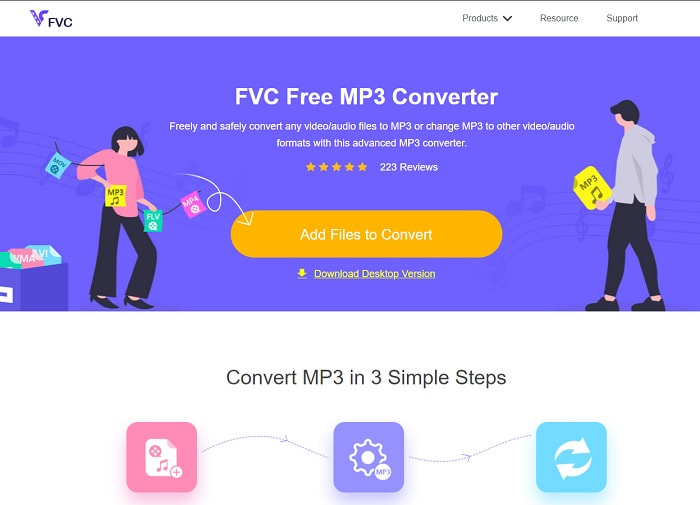
Αν αναζητάς έναν δωρεάν μετατροπέα βίντεο σε MP3, τότε το FVC Free MP3 Converter σου προσφέρει ακριβώς αυτό. Αν και αυτό το εργαλείο παρέχει πολλές λειτουργίες παρόμοιες με τους μετατροπείς για κινητό και άλλους διαδικτυακούς μετατροπείς, εξακολουθεί να κυριαρχεί ως «βασιλιάς» των μετατροπέων στο διαδίκτυο, προσφέροντας γρήγορη και ακριβή μετατροπή. Ωστόσο, αυτό το εργαλείο υποστηρίζει μια σχετικά μικρή γκάμα μορφών, κάτι που ίσως περιορίσει τις δυνατότητές σου για ελεύθερη μετατροπή. Παρ’ όλα αυτά, παραμένει ένας αρκετά καλός μετατροπέας. Για να μάθεις περισσότερα για το εργαλείο, συνέχισε διαβάζοντας τα παρακάτω βήματα σχετικά με το πώς να το χρησιμοποιήσεις.
Βήμα 1. Κάνε κλικ στον υπερσύνδεσμο πιο πάνω που οδηγεί στο βασικό διαδικτυακό εργαλείο.
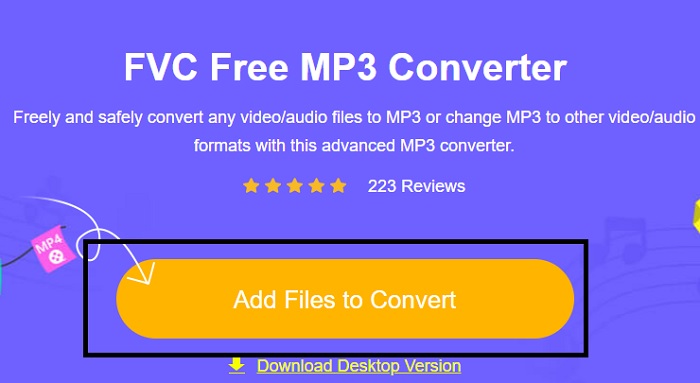
Βήμα 2. Στη συνέχεια, κάνε κλικ στο Add Files to Convert για να ανοίξεις και να εκκινήσεις το εργαλείο.
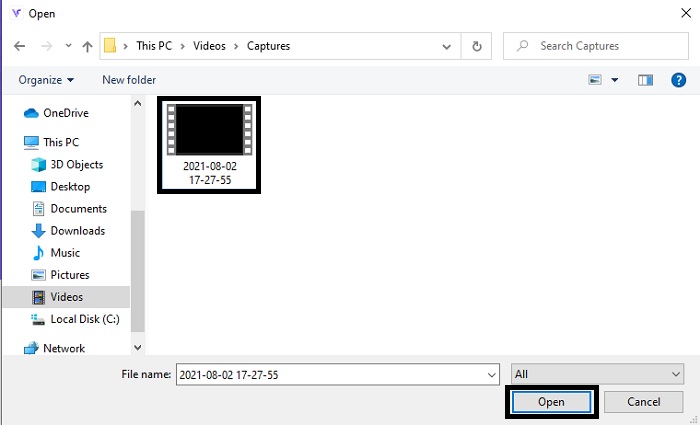
Βήμα 3. Εντόπισε το αρχείο βίντεο που θέλεις να μετατρέψεις και κάνε κλικ στο open για να το εισαγάγεις.
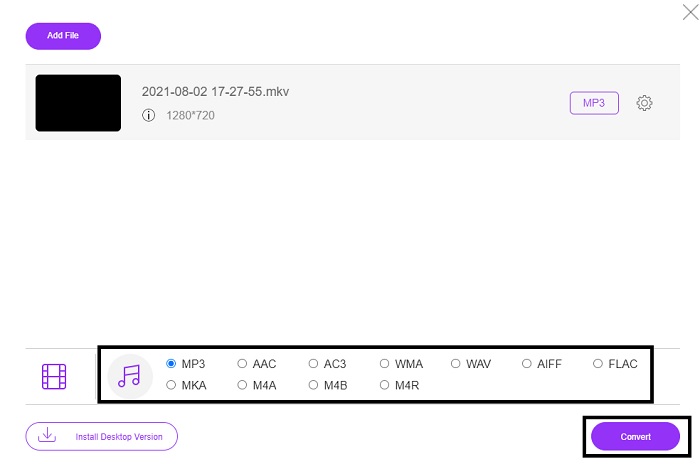
Βήμα 4. Εδώ επίλεξε σε ποια μορφή ήχου θέλεις να γίνει η μετατροπή. Όταν είσαι έτοιμος να ξεκινήσει η μετατροπή, κάνε κλικ στο Convert.
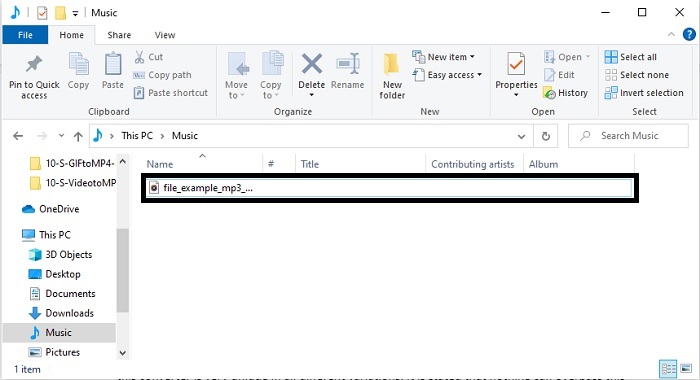
Βήμα 5. Αν θέλεις να ακούσεις το μετατρεπόμενο αρχείο, μπορείς να κάνεις κλικ σε αυτόν τον folder ώστε να εμφανιστεί στην οθόνη ο φάκελος με το αρχείο.
FVC Video Converter Ultimate
Αν το πρώτο εργαλείο δεν σου δίνει τη μετατροπή που θέλεις, τότε μπορείς να χρησιμοποιήσεις το FVC Video Converter Ultimate, έναν διαχρονικά αγαπημένο μετατροπέα. Σε αντίθεση με κάθε μετατροπέα που έχεις χρησιμοποιήσει ή όχι, αυτός ο μετατροπέας είναι μοναδικός σε όλες του τις παραλλαγές. Αναφέρεται ότι τίποτα δεν μπορεί να ξεπεράσει αυτό το εργαλείο στη διαδικασία μετατροπής, επεξεργασίας, δημιουργίας, βελτίωσης κ.λπ. Ίσως όμως σκέφτεσαι ότι αυτό το εργαλείο δεν είναι φιλικό προς τον χρήστη, αλλά κάνεις λάθος. Είναι πραγματικά πολύ εύκολο στη χρήση, και ακόμη κι αν δεν είσαι επαγγελματίας στη μετατροπή, μπορείς και πάλι να καταφέρεις να δημιουργήσεις ένα εντυπωσιακό αποτέλεσμα. Έτσι, όπως ειπώθηκε, ας εξετάσουμε πώς να μετατρέψεις βίντεο σε MP3 με τη βοήθεια του καλύτερου μετατροπέα που μπορείς να ζητήσεις.
Βήμα 1. Πρώτα απ’ όλα, κατέβασε αυτό το εργαλείο για υπολογιστή στον δίσκο σου. Τροποποίησε τις ρυθμίσεις εγκατάστασης αν θέλεις και κάνε κλικ στο finish για να αποθηκεύσεις τις αλλαγές.
Δωρεάν ΛήψηΓια Windows 7 ή νεότεραΑσφαλής λήψη
Δωρεάν ΛήψηΓια MacOS 10.7 ή νεότεροΑσφαλής λήψη
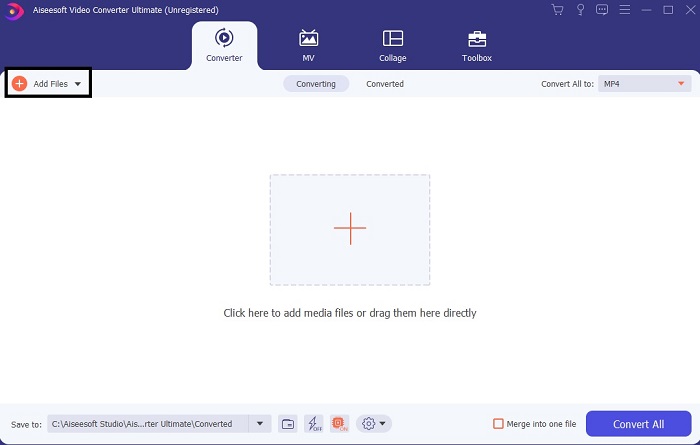
Βήμα 2. Μια τέτοια διεπαφή θα εμφανιστεί στην οθόνη σου. Πάτησε το Add Files ή το σύμβολο συν για να εισαγάγεις το αρχείο στη διεπαφή.
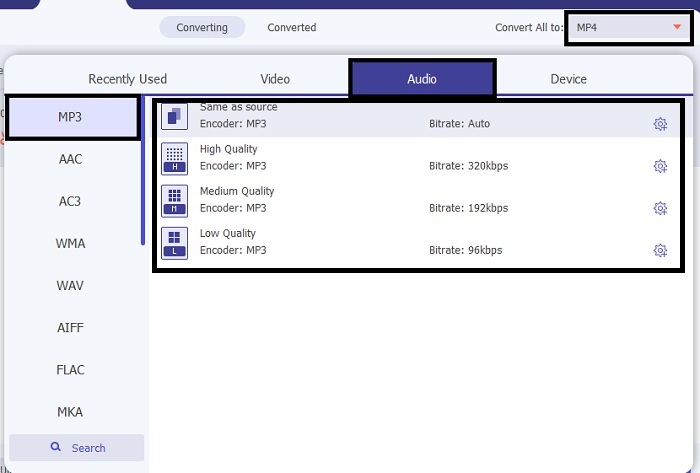
Βήμα 3. Αφού επιλέξεις το αρχείο που θέλεις να μετατραπεί, κάνε κλικ στο drop-down μενού δίπλα στο Convert All to και διάλεξε ανάμεσα σε περισσότερες από 500 μορφές.
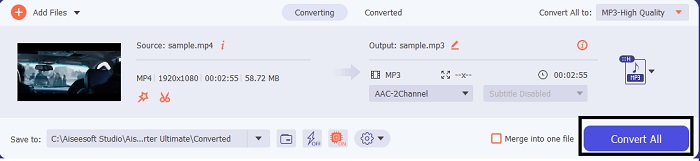
Βήμα 4. Έπειτα κάνε κλικ στο Convert All για να ξεκινήσει η μετατροπή βίντεο σε MP3.
Βήμα 5. Όταν όλα ολοκληρωθούν, ένας διαχειριστής αρχείων θα εμφανιστεί στην οθόνη σου. Κάνε κλικ στο αρχείο που μετέτρεψες για να το ακούσεις και να το απολαύσεις.
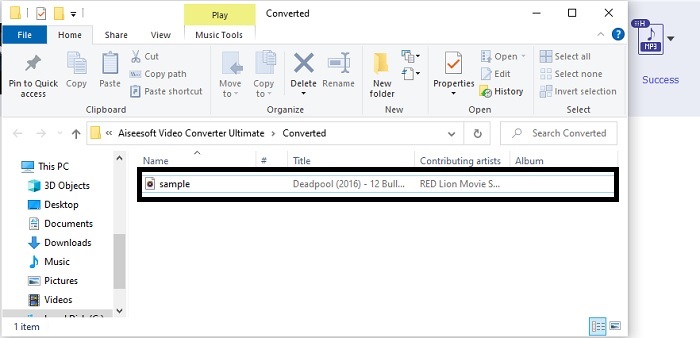
Πρόσθετα βήματα για να ενισχύσετε τον ήχο σας πριν από τη μετατροπή με τη βοήθεια του FVC Video Converter Ultimate
Επεξεργάσου τον ήχο με μία από τις λειτουργίες του FVC Video Converter Ultimate. Πριν μετατρέψεις το αρχείο βίντεο, είναι καλύτερο να βελτιώσεις τον ήχο ώστε αργότερα να μπορείς να τον ακούς ακόμα καλύτερα. Για να μάθεις πώς να το κάνεις, πρέπει να ακολουθήσεις τη διαδικασία βήμα προς βήμα σχετικά με το πώς να ενισχύσεις τον ήχο με το Volume Booster.
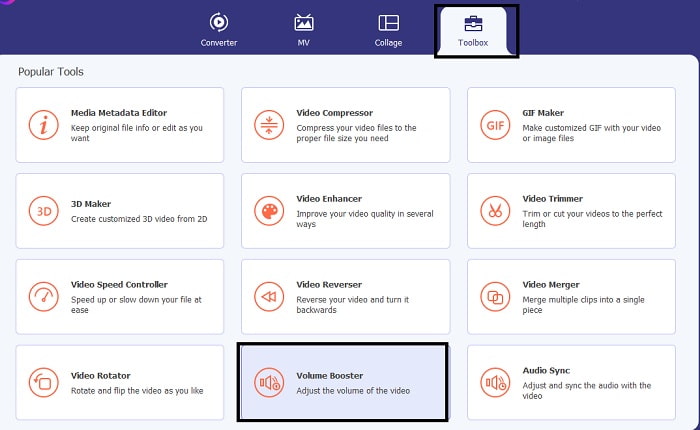
Βήμα 1. Αν έχεις ήδη εγκαταστήσει το εργαλείο, πήγαινε στη Toolbar και κάνε κλικ στο Volume Booster.
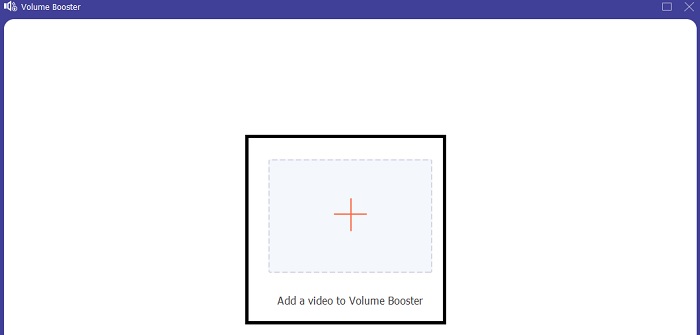
Βήμα 2. Επίλεξε το αρχείο βίντεο που θέλεις να βελτιωθεί και κάνε κλικ στο Open για να το εισαγάγεις.
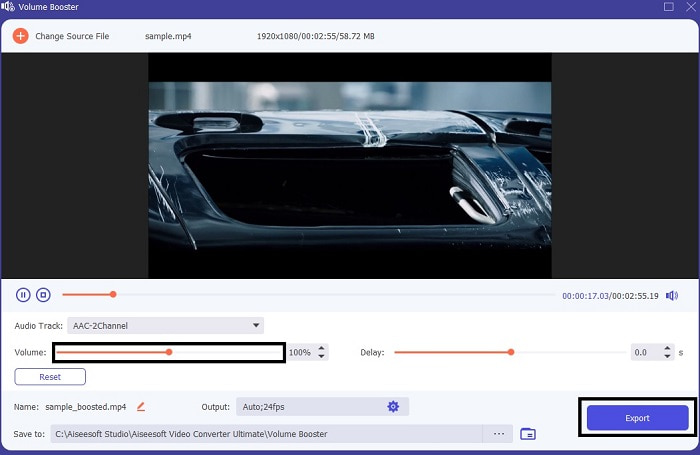
Βήμα 3. Ρύθμισε τα volume slides σύμφωνα με τις προτιμήσεις σου. Έπειτα κάνε κλικ στο εικονίδιο cog και άλλαξε τις ρυθμίσεις εξόδου· όταν τελειώσεις, κάνε κλικ στο OK για να αποθηκεύσεις τις αλλαγές. Κάνε κλικ στο export για να αποθηκεύσεις το τελικό αποτέλεσμα και απόλαυσέ το.
Σύγκριση του FVC Free Video Converter και του Video Converter Ultimate
Αν και και τα δύο εργαλεία δίνουν αυτό που χρειάζεστε γιατί είναι τα καλύτερα στη δική τους ειδικότητα. Το να αποφασίσετε τι να χρησιμοποιήσετε μπορεί να σας δυσκολέψει. Αλλά για να διευθετηθεί αυτή η υπόθεση, εδώ είναι το γράφημα σύγκρισης μεταξύ των δύο εργαλείων. Ας διερευνήσουμε τις αδυναμίες και τα δυνατά τους σημεία ως μεμονωμένα εργαλεία.
| Χαρακτηριστικά | Δωρεάν μετατροπέας MP3 FVC | Video Converter Ultimate |
| Μετατροπή ήχου |  | |
| Λειτουργίες επεξεργασίας |  | |
| Εύκολη λήψη ή πρόσβαση | | |
| Φιλικό προς το χρήστη | | |
| Υποστηρίζεται πρόγραμμα | Εργαλείο που βασίζεται στο Web | Εργαλείο που βασίζεται στην επιφάνεια εργασίας |
| Διαθέσιμο Λογισμικό | Σε όλα τα λογισμικά | Σε όλα τα λογισμικά |
| Εύρος τιμών | Το δωρεάν διαδικτυακό του εργαλείο | Για 1 μήνα: $25.00 Για ένα έτος: $31.20 Για άδεια ζωής: $55.20 |
Μέρος 2. Εφαρμογές βίντεο σε MP3 για συσκευές iPhone και Android
1. Μετατροπέας βίντεο σε MP3
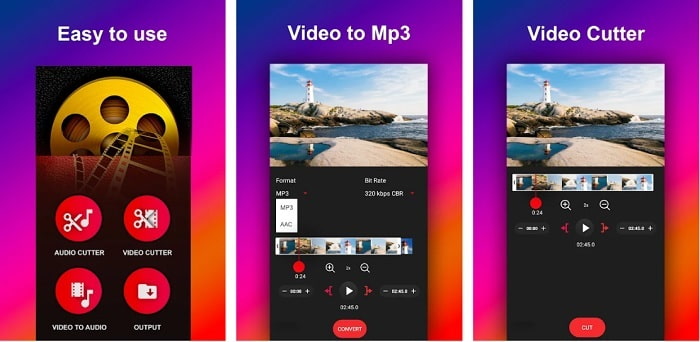
Αν αναζητάς μετατροπέα βίντεο σε MP3 για Android, ίσως θέλεις να δοκιμάσεις το Video to MP3 Converter. Αυτό το εργαλείο έχει σχεδιαστεί ειδικά για τη μετατροπή οποιουδήποτε αρχείου πολυμέσων σε μορφή MP3 ή AAC. Μπορείς επίσης να αλλάξεις το bitrate και να κάνεις περικοπή μέσα από αυτό το εργαλείο. Παρά το γεγονός ότι προσφέρει υψηλής ποιότητας αποτέλεσμα, το αρχείο που μετατρέπεις δεν αποθηκεύεται απευθείας στον κατάλογο μουσικής, κάτι που είναι κάπως ενοχλητικό, γιατί αντί να το ακούσεις αμέσως, πρέπει να το εντοπίσεις μετά τη διαδικασία μετατροπής.
2. MP4 σε MP3 - Μετατροπή βίντεο σε ήχο, αποκοπή ήχων κλήσης
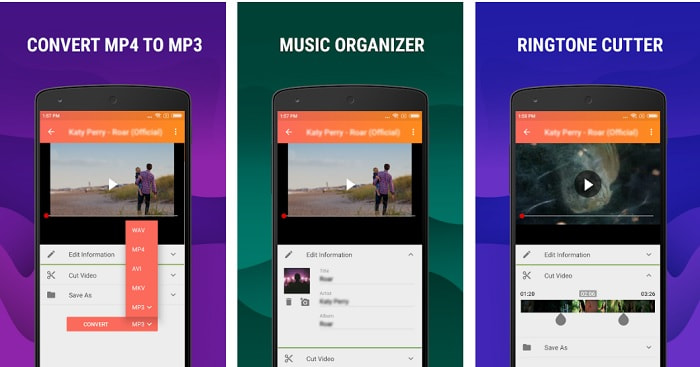
Αν και το πρώτο εργαλείο σε αυτή τη λίστα παρέχει τη μετατροπή σε MP3 που θέλεις, το MP4 to MP3 - Convert Video to Audio, Cut Ringtones μπορεί σε κάποιο βαθμό να το ξεπεράσει. Πρόκειται επίσης για εργαλείο μόνο για χρήστες Android, οπότε αν είσαι χρήστης iOS δεν μπορείς να χρησιμοποιήσεις αυτήν την εφαρμογή. Ωστόσο, η βαθμολογία αυτού του εργαλείου είναι 4,0 αστέρια στο Play Store και ο αριθμός των χρηστών που το χρησιμοποιούν είναι πολύ χαμηλός. Όλοι έχουν το ίδιο παράπονο: ότι μετά τη μετατροπή μέσα από την εφαρμογή, το αρχείο δεν μπορεί να βρεθεί, όπως συμβαίνει και με το πρώτο εργαλείο. Παρ’ όλα αυτά, μερικοί χρήστες εξακολουθούν να το χρησιμοποιούν ως τον προσωπικό τους μετατροπέα MP3, επειδή μπορείς να μετατρέπεις πολλά αρχεία ταυτόχρονα.
Σχετικά:
3. Ο μετατροπέας ήχου
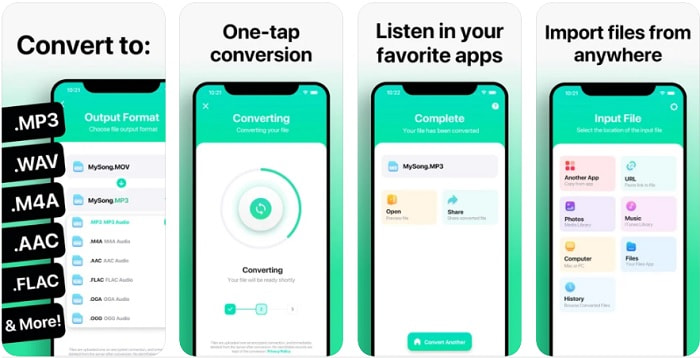
Αν είσαι χρήστης iOS, ίσως σκέφτεσαι ότι δεν μπορείς να κάνεις μετατροπή ήχου στο τηλέφωνό σου με ισχυρή διαδικασία μετατροπής. Κάνεις όμως λάθος, γιατί το The Audio Converter προσφέρει την καλύτερη διαδικασία μετατροπής και ακόμη περισσότερα. Η μετατροπή βίντεο σε MP3 σε iPhone είναι εύκολη με τη βοήθεια αυτού του εργαλείου. Το μειονέκτημα όμως είναι ότι στη δωρεάν έκδοση υπάρχει όριο μεγέθους αρχείου. Έτσι, αν θέλεις να μετατρέψεις μεγαλύτερο αρχείο, πρέπει να πληρώσεις συνδρομή. Σε ορισμένες περιπτώσεις, αν θέλεις να ακυρώσεις τη συνδρομή, δεν υπάρχει κουμπί ακύρωσης για να τη σταματήσεις. Να είσαι προσεκτικός με αυτό το εργαλείο, γιατί μπορεί να υπάρξει ανεπιθύμητη χρέωση στην κάρτα σου αν χρησιμοποιήσεις αυτήν τη μέθοδο πληρωμής.
Μέρος 3. Διάγραμμα σύγκρισης
| Χαρακτηριστικά | Δωρεάν μετατροπέας MP3 FVC | FVC Video Converter Ultimate | Μετατροπέας βίντεο σε MP3 | MP4 σε MP3 – Μετατροπή βίντεο σε ήχο, αποκοπή ήχων κλήσης | Ο μετατροπέας ήχου |
| Μετατροπέας ήχου | | | | | |
| Υποστηρίζει μορφές | MP3, AAC, AC3, WMA, WAV, AIFF, FLAC, MKA, M4A, M4B, M4R | Διαθέσιμη μορφή πολυμέσων 500+ | MP3 & AAC | MP3 | MP3 & AAC |
| Προσβασιμότητα του εργαλείου | Εργαλείο που βασίζεται στο Web | Εργαλείο που βασίζεται στην επιφάνεια εργασίας | Εφαρμογή που βασίζεται σε τηλέφωνο Android | Εφαρμογή που βασίζεται σε τηλέφωνο Android | Εφαρμογή που βασίζεται σε τηλέφωνα iOS |
| Εύρος τιμών | Το δωρεάν διαδικτυακό του εργαλείο | Για 1 μήνα: $25.00 Για ένα έτος: $31.20 Για άδεια ζωής: $55.20 | Δωρεάν εφαρμογή Android με δυνατότητα λήψης | $6,49 – $19,99 ανά τεμάχιο | Premium Pass$3.99 Πάσο διάρκειας ζωής$6.99 |
Μέρος 4. Συχνές ερωτήσεις σχετικά με το βίντεο σε MP3
Γιατί δεν είναι δυνατή η αναπαραγωγή των βίντεό μου στον υπολογιστή μου;
Υπάρχει πιθανότητα η μορφή βίντεο να μην υποστηρίζεται από το προεπιλεγμένο πρόγραμμα αναπαραγωγής πολυμέσων σου. Σε αυτή την περίπτωση, ίσως θελήσεις να χρησιμοποιήσεις το FVC Free Video Player για να αναπαράγεις το βίντεό σου. Υποστηρίζει πάνω από 200 γνωστές μορφές, ώστε να μπορείς να δεις οποιοδήποτε βίντεο εδώ χωρίς να ανησυχείς ότι δεν θα αναπαραχθεί.
Είναι το MP3 η καλύτερη μορφή ήχου;
Παρόλο που το MP3 είναι γνωστό ως η παγκόσμια μορφή ήχου επειδή χρησιμοποιείται παντού για αναπαραγωγή, εγγραφή και αποθήκευση αρχείων ήχου, υπάρχει μια καλύτερη μορφή ήχου από το MP3 και αυτή είναι το AAC. Παρότι αυτό το εργαλείο είναι καλύτερο, εξακολουθεί να έχει μεγαλύτερο μέγεθος αρχείου από το MP3, αλλά δεν χρειάζεται να ανησυχείς, καθώς δεν είναι τόσο μεγάλο όσο το AVI. Για να μετατρέψεις αρχεία MP3, μπορείς να χρησιμοποιήσεις αυτόν τον μετατροπέα MP3 σε AAC μέσω web αντί για οποιοδήποτε μη ασφαλές εργαλείο με χαμηλή συμπίεση.
Ποιο είναι το μειονέκτημα του ήχου;
Τα αρχεία ήχου είναι πολύ μικρότερα από τα αρχεία βίντεο, αλλά είναι λιγότερο διαδραστικά, ειδικά επειδή δεν προσφέρουν οπτικό περιεχόμενο στο κοινό. Έτσι, αν κάνεις podcast, καλό είναι να επιλέξεις τον καλύτερο εγγραφέα ήχου και αυτός είναι ο FVC Screen Recorder. Αυτό το εργαλείο προσφέρει κορυφαίες δυνατότητες επεξεργασίας της ηχογράφησής σου και υποστηρίζει πολύ περισσότερες μορφές ήχου από άλλα εργαλεία που μπορείς να κατεβάσεις ή να χρησιμοποιήσεις online. Αν η ηχογράφηση είναι το πρόβλημά σου, τότε υπάρχει μόνο μία λύση, και αυτή είναι ο FVC Screen Recorder. Κάνε κλικ εδώ για να βρεις πιο επαγγελματικούς εγγραφείς MP3.
συμπέρασμα
Και τώρα που φτάσαμε στο τέλος αυτού του άρθρου, το προηγούμενο πρόβλημα έχει πλέον λυθεί. Αν και τώρα θα πάρουμε χωριστούς δρόμους και θα αφήσουμε αυτήν την υπόθεση σε εσένα. Η αναζήτηση θα τελειώσει όταν επιλέξεις το ιδανικό εργαλείο στο οποίο μπορείς να βασιστείς, όπως το FVC Video Converter Ultimate. Κάθε φορά που χρησιμοποιείς αυτό το εργαλείο μπορείς πάντα να περιμένεις γρήγορη, αξιόπιστη και ασφαλή διαδικασία μετατροπής. Επίσης, αν συναντήσεις κάποιο πρόβλημα στον ήχο σου και θελήσεις να τον βελτιώσεις, μπορείς να το κάνεις κι αυτό. Επιπλέον, ελπίζουμε να συνεχίσεις να «ερευνάς» το FVC Video Converter Ultimate, καθώς αυτό το εργαλείο προσφέρει την πιο ποιοτική μετατροπή. Με τη βοήθεια των ακριβών αποδείξεων που παρουσιάσαμε αποκλειστικά για εσένα. Αν τώρα είσαι ικανοποιημένος, ας πούμε ότι η υπόθεση έκλεισε.
-
 [2021] Κορυφαίοι 6 δωρεάν και διαδικτυακοί τρόποι για να μετατρέψετε το M2TS σε MP3
 Μπορεί ένα αρχείο M2TS να μετατραπεί σε MP3; Σε αυτήν την ανάρτηση, παραθέτουμε τους 6 καλύτερους δωρεάν και διαδικτυακούς τρόπους για να σας βοηθήσουμε να μετατρέψετε M2TS σε MP3, AAC, AIFF και περισσότερες μορφές ήχου.
-
 4 100% Μέθοδοι εργασίας για τη μετατροπή αρχείων βίντεο FLV σε μορφή MP3
 Πώς να μετατρέψετε ένα FLV σε αρχείο MP3; Το μόνο που χρειάζεται να κάνετε είναι να διαβάσετε προσεκτικά αυτό το άρθρο, να βρείτε την αγαπημένη σας μέθοδο και να ακολουθήσετε τον αναλυτικό οδηγό μας για να πάρετε αυτό που θέλετε.
-
 Κορυφαίες 4 μέθοδοι μετατροπής OGG σε MP3 χωρίς απώλεια ποιότητας
 Πώς να μετατρέψετε τα αρχεία OGG σε μορφή MP3 για ακρόαση σε υπολογιστή ή κινητή συσκευή; Εδώ μοιραζόμαστε 5 ευκολότερους τρόπους για να το κάνετε σε επιτραπέζιο ή διαδικτυακό.
