


 Video Converter Ultimate
 Εγγραφή οθόνης
 Επισκευή βίντεο
Μάθετε τη μετατροπή MTS σε WMV με διαφορετικούς τρόπους

Μέρος 1. Το καλύτερο εργαλείο που μετατρέπει το MTS σε WMV Online
Οι περισσότεροι από εμάς προτιμάμε να μην ασχολούμαστε με δυσκολίες, γι' αυτό και δεν θέλουμε να εγκαθιστούμε κάποιο πρόγραμμα μετατροπής. Γι' αυτό αναζητούν έναν online μετατροπέα που θα μπορούσε να μετατρέπει τους τύπους αρχείων τους. Το FVC Free Video Converter Online είναι ένας διαδικτυακός μετατροπέας βίντεο που είναι απολύτως δωρεάν. Παρόλο που το πρόγραμμα αυτό διατίθεται δωρεάν, δεν χρειάζεται να ανησυχείτε για την ποιότητα, γιατί το FVC Free Video Converter δεν κάνει καμία παραχώρηση στην ποιότητα κατά τη μετατροπή.
Βήμα 1: Για να ξεκινήσετε, κάντε κλικ σε αυτό το link και θα μεταφερθείτε στον ιστότοπο. Από εκεί, κάντε κλικ στο κουμπί Add Files to Convert για να κατεβάσετε τον εκκινητή· στη συνέχεια θα χρειαστεί να ανεβάσετε τα αρχεία που θέλετε να μετατρέψετε.
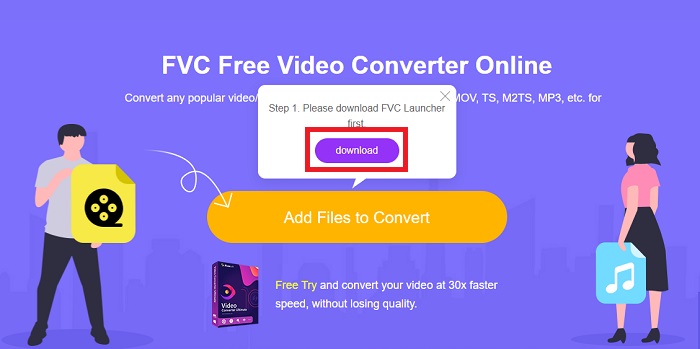
Βήμα 2: Στη συνέχεια, μπορείτε πλέον να πατήσετε ξανά το κουμπί για να ανεβάσετε το αρχείο βίντεο. Όλες οι διαθέσιμες μορφές θα εμφανιστούν στο κάτω μέρος· επιλέξτε τη μορφή WMV ανάμεσα στις υπόλοιπες.
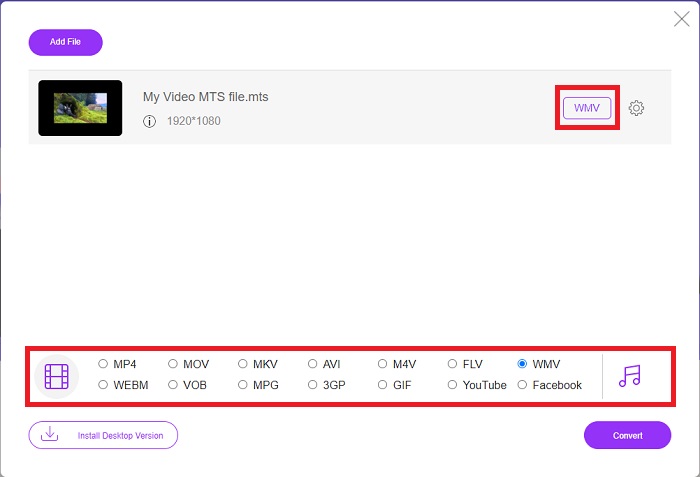
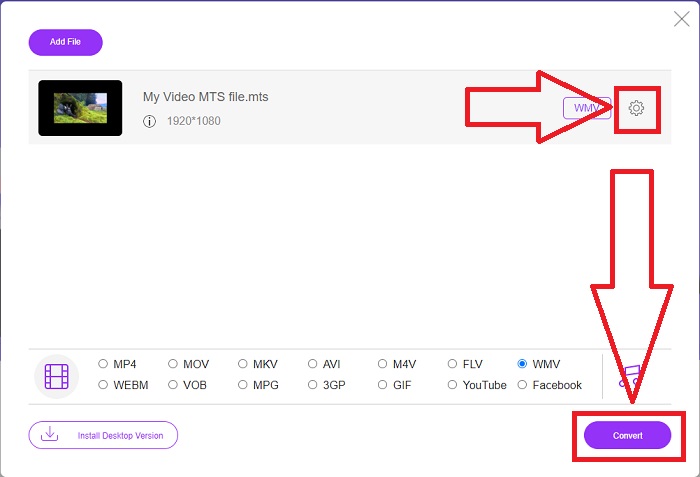
Βήμα 3: Οι επιπλέον επιλογές παραμένουν διαθέσιμες. Κάντε κλικ στο εικονίδιο με το γρανάζι και θα εμφανιστούν όλες οι ρυθμίσεις που μπορείτε να εφαρμόσετε στο βίντεό σας. Απλώς κάντε κλικ στο OK μόλις επιλέξετε ήδη μια μορφή για να αποθηκεύσετε τις αλλαγές και έπειτα πατήστε Convert για να ξεκινήσει τελικά η μετατροπή.
Μέρος 2. Πώς να μετατρέψετε το MTS σε WMV με τον καλύτερο μετατροπέα εκτός σύνδεσης
Όταν επιλέγουμε έναν μετατροπέα, πρέπει να λάβουμε υπόψη την απλότητα, καθώς δεν θέλουμε ένα ακριβό εργαλείο που να είναι δύσχρηστο. Είμαστε στην ευχάριστη θέση να σας παρουσιάσουμε το Video Converter Ultimate και τη διεπαφή χρήστη του. Αυτός ο μετατροπέας διαθέτει την πιο απλή διεπαφή και, ακριβώς επειδή είναι λιτός, είναι και ο πιο εύκολος στη χρήση. Επιπλέον, μπορείτε πολύ γρήγορα να προσθέσετε τα αρχεία σας και να δείτε τους υποστηριζόμενους τύπους αρχείων. Υπάρχουν εδώ κι άλλες δυνατότητες στις οποίες μπορείτε να βασιστείτε, οι οποίες θα κάνουν την εμπειρία επεξεργασίας σας πιο άνετη. Αν θέλετε να τον χρησιμοποιήσετε οι ίδιοι στην πράξη, ακολουθήστε αυτά τα απλά βήματα:
Βήμα 1: Πρώτα πρέπει να εγκαταστήσετε το ίδιο το λογισμικό. Για να το κάνετε αυτό, κατεβάστε το αρχείο .exe κάνοντας κλικ στο κουμπί Free Download παρακάτω για Windows ή Mac. Περιμένετε να ολοκληρωθεί η λήψη και ανοίξτε το αρχείο για να ξεκινήσει η διαδικασία εγκατάστασης. Κάντε κλικ στο Start Now και, τέλος, εκκινήστε το πρόγραμμα.
Δωρεάν ΛήψηΓια Windows 7 ή νεότεραΑσφαλής λήψη
Δωρεάν ΛήψηΓια MacOS 10.7 ή νεότεροΑσφαλής λήψη
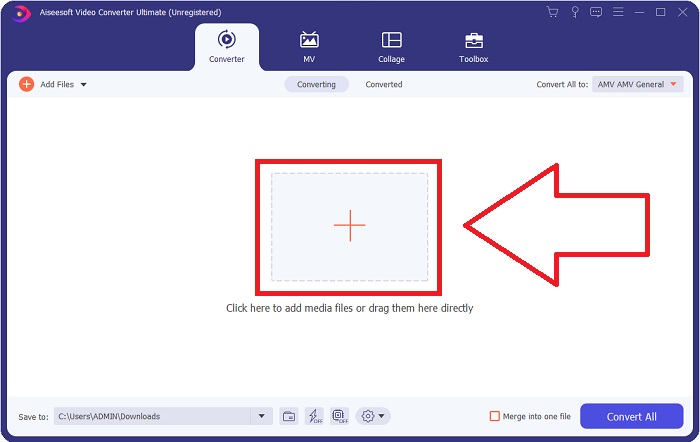
Βήμα 2: Μόλις ανοίξει, θα εμφανιστεί μια διεπαφή με ένα κουμπί + στο κέντρο. Κάντε κλικ σε αυτό για να ανεβάσετε το αρχείο βίντεο MTS που θέλετε να μετατρέψετε ή απλώς σύρετε και αφήστε το αρχείο για πιο γρήγορη χρήση.
Βήμα 3: Αν η διαδικασία ολοκληρωθεί με επιτυχία και μόλις το αρχείο εμφανιστεί στη διεπαφή, στη δεξιά του πλευρά θα δείτε τη μορφή στην οποία βρίσκεται αυτή τη στιγμή το βίντεό σας. Κάντε κλικ στο βέλος του αναπτυσσόμενου μενού και θα εμφανιστούν όλες οι διαθέσιμες μορφές. Κυλήστε προς τα κάτω και επιλέξτε WMV ή απλώς πληκτρολογήστε το στο πεδίο αναζήτησης. Επιπλέον, μπορείτε να επιλέξετε από το δεξί τμήμα της καρτέλας ποια ποιότητα θέλετε.
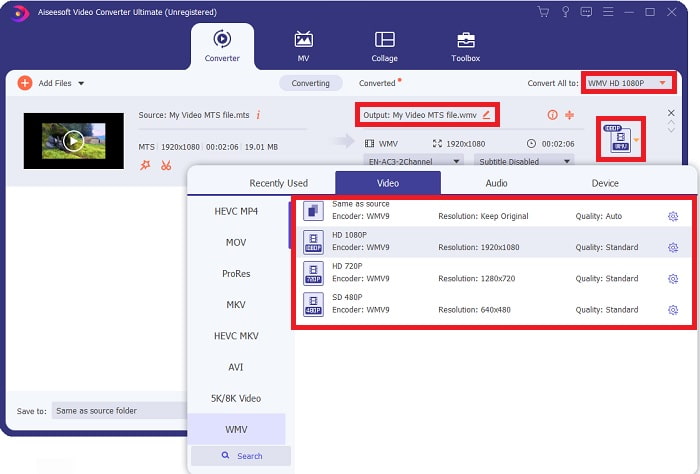
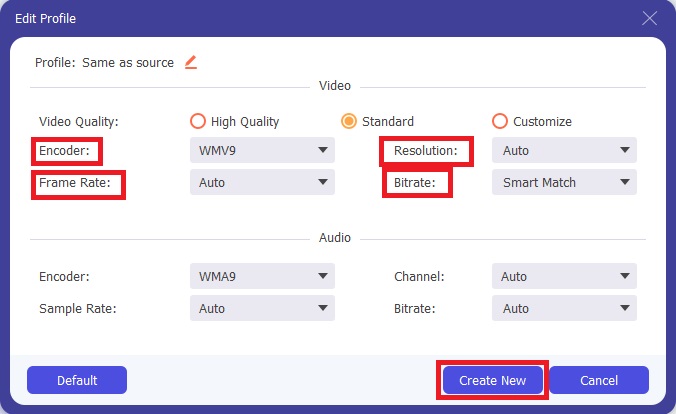
Βήμα 4: Για περισσότερες επιλογές, κάντε κλικ στο εικονίδιο με το γρανάζι που βρίσκεται δεξιά από την ποιότητα βίντεο που επιλέξατε. Από εκεί μπορείτε να επεξεργαστείτε περαιτέρω το βίντεό σας, όπως την ανάλυση, τον ρυθμό καρέ, το bitrate και πολλά άλλα. Απλώς κάντε κλικ στο κουμπί Create New όταν ολοκληρώσετε τις ρυθμίσεις.
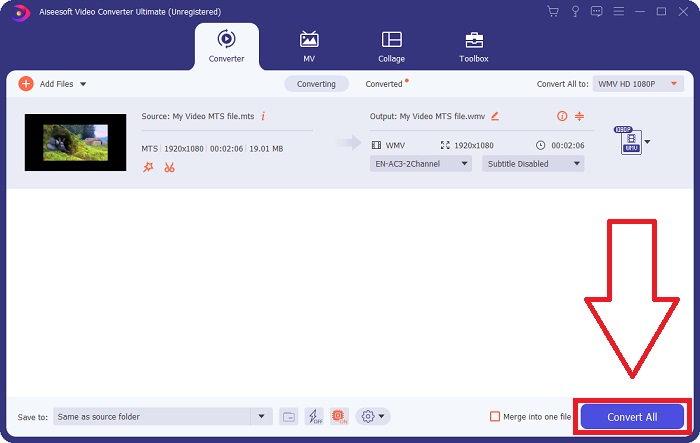
Βήμα 5: Αν έχουν γίνει όλες οι απαραίτητες ρυθμίσεις, κάντε κλικ στο κουμπί Convert All που βρίσκεται στην κάτω δεξιά γωνία για να ξεκινήσει κανονικά η μετατροπή και περιμένετε να ολοκληρωθεί.
Μέρος 3. Εκτεταμένες γνώσεις για το MTS VS. WMV
| Επέκταση αρχείου | .μτσ | .wmv |
| Περιγραφή | Το Advanced Video Coding High Definition (AVCHD) είναι μια μορφή βίντεο που χρησιμοποιεί την επέκταση ονόματος αρχείου MTS ως όνομα αρχείου. Ορισμένες μάρκες βιντεοκάμερων, όπως η JVC, η Sony, η Canon και η Sanyo, χρησιμοποιούν τη μορφή βίντεο HD MPEG και αποθηκεύουν τα αρχεία τους με την επέκταση ονόματος αρχείου .mts. | Ως μέρος του πλαισίου Windows Media της Microsoft, το WMV (Windows Media Video) περιλαμβάνει διάφορους κωδικοποιητές βίντεο και μορφές κωδικοποίησης. Στην αρχή, σκοπός του είναι να ανταγωνιστεί τη μορφή RM σε εφαρμογές ροής στο διαδίκτυο. Χρησιμοποιώντας την τεχνολογία WMV, τα βίντεο μπορούν να αποθηκευτούν, να συμπιεστούν και να παραδοθούν σε Blu-ray/DVD. |
| Συνοδευτικά Προγράμματα | ◆ Roxio Creator NXT Pro 7 ◆ Μπλέντερ ◆ VLC Media Player ◆ Apple Final Cut Pro X | ◆ VLC Media Player ◆ MPlayer ◆ Media Player Classic ◆ Windows Media Player |
| Αναπτύχθηκε από | Sony/Panasonic | Microsoft |
| Τύπος αρχείου | Βίντεο/mp2t | Βίντεο/x-ms-asf |
Μέρος 4. Συχνές ερωτήσεις σχετικά με τη μετατροπή MTS σε WMV
Ποιος παίκτης μπορεί να παίξει το αρχείο MTS;
Αν έχετε ένα βίντεο MTS, μπορείτε να το επεξεργαστείτε με το λογισμικό που συνοδεύει τις HD βιντεοκάμερες Sony και Panasonic ή μπορείτε να χρησιμοποιήσετε ένα από τα παρακάτω προγράμματα: το Blender, για να συνδυάσετε δύο ή περισσότερα στοιχεία (multi‑platform), το MAGIX Vegas, ένα πακέτο λογισμικού που σας επιτρέπει να δημιουργείτε διάφορα είδη οπτικών εφέ (Windows), και το CyberLink PowerDirector, ένα πρόγραμμα επεξεργασίας βίντεο (Windows, Mac, Android).
Τα αρχεία MTS έχουν ήχο;
Διάφοροι παράγοντες μπορούν να προκαλέσουν απώλεια ήχου σε αρχεία MTS. Το πιο συνηθισμένο είναι ότι δεν επετράπη να ολοκληρωθεί η διαδικασία συμμόρφωσης, με αποτέλεσμα να μην υπάρχει ήχος ή να κοπεί ο ήχος και να μην αντιγραφεί ολόκληρη η δομή του φακέλου (σε αντίθεση μόνο με τα αρχεία πολυμέσων) από την κάρτα μνήμης.
Ποια είναι η χρήση του WMV;
Η Microsoft εισήγαγε τη μορφή αρχείου WMV ως μια σειρά από video codecs στο Windows Media Player. Το WMV είναι συντομογραφία του 'Windows Media Video', μια συμπιεσμένη μορφή κοντέινερ βίντεο που αναπτύχθηκε για χρήση με το πλαίσιο εργασίας Windows Media. Για την πώληση βιντεοπεριεχομένου online ή μέσω HD DVD και δίσκων Blu‑ray, τα αρχεία βίντεο WMV είναι η καταλληλότερη μορφή. Για να αναπαράγετε αρχεία WMV, κάντε κλικ εδώ για να μάθετε για ορισμένους χρήσιμους WMV players.
συμπέρασμα
Όλοι οι μετατροπείς που αναφέρονται παραπάνω είναι αξιόπιστα και συνιστώμενα εργαλεία για τη μετατροπή του MTS σε WMV. Το Video Converter Ultimate και το Free Video Converter Ultimate είναι οι δύο καλύτεροι μετατροπείς που είναι ασύγκριτοι με άλλα διαδικτυακά εργαλεία και λογισμικό. Διαθέτει διάφορα είδη επιλεγμένων εργαλείων που προσφέρει και τις πολυάριθμες μορφές βίντεο που υποστηρίζει.
-
 [Δωρεάν & Διαδικτυακά] 5 Μέθοδοι Μετατροπής M2TS σε MP4
 Θέλετε να μετατρέψετε το βίντεο από βιντεοκάμερα HD σε κοινό MP4; Εδώ είναι 5 απλοί και δωρεάν τρόποι για να αλλάξετε το αρχείο M2TS σε MP4 σε Windows και Mac.
-
 Πώς να μετατρέψετε το M2TS σε MKV δωρεάν και online
 Θέλετε να μετατρέψετε το M2TS σε MKV διατηρώντας παράλληλα την αρχική ποιότητα; Αυτή η ανάρτηση σας δείχνει δωρεάν και online μεθόδους για να αλλάξετε χωρίς απώλειες το M2TS σε MKV.
-
 [2021] Κορυφαίοι 6 δωρεάν και διαδικτυακοί τρόποι για να μετατρέψετε το M2TS σε MP3
 Μπορεί ένα αρχείο M2TS να μετατραπεί σε MP3; Σε αυτήν την ανάρτηση, παραθέτουμε τους 6 καλύτερους δωρεάν και διαδικτυακούς τρόπους για να σας βοηθήσουμε να μετατρέψετε M2TS σε MP3, AAC, AIFF και περισσότερες μορφές ήχου.
