


 Video Converter Ultimate
 Εγγραφή οθόνης
 Επισκευή βίντεο
 Ασφαλές κατέβασμα
Κορυφαίες 4 αποτελεσματικές μέθοδοι για τη μετατροπή TS σε 3GP
Το άρθρο επικεντρώνεται στο πώς να μετατρέψετε TS σε 3GP. Στις μέρες μας, τα κινητά τηλέφωνα είναι πολύ δημοφιλή. Είναι ένας από τους πιο συνηθισμένους τρόπους για να παρακολουθείτε τα αγαπημένα σας βίντεο. Ωστόσο, δυστυχώς, υπάρχουν φορές που το αρχείο TS δεν υποστηρίζεται από τα κινητά τηλέφωνα. Η δημοφιλής μορφή που μπορείτε να χρησιμοποιήσετε για να δείτε βίντεο στο τηλέφωνο είναι η μορφή αρχείου 3GP. Έτσι, η μόνη λύση είναι να μετατρέψετε το αρχείο TS σε μορφή 3GP. Αν συμβαίνει αυτό, το άρθρο αυτό μπορεί να καλύψει τις ανάγκες σας. Διαβάστε το για να μάθετε πώς να μετατρέψετε TS σε 3GP.

Μέρος 1: Δωρεάν Εφαρμογές με δυνατότητα λήψης για Μετατροπή TS σε 3GP
Video Converter Ultimate
Αν θέλετε μια δωρεάν εφαρμογή που μπορείτε να κατεβάσετε στα Windows και στο Mac σας για να μετατρέψετε TS σε 3GP με ευκολία, το Video Converter Ultimate είναι για εσάς. Το λογισμικό αυτό σάς επιτρέπει να μετατρέπετε TS σε 3GP εύκολα και γρήγορα. Επιπλέον, σας δίνει τη δυνατότητα να μετατρέπετε πολλά αρχεία με ένα μόνο κλικ. Επίσης, μπορείτε να μετατρέπετε τα αρχεία σας γρήγορα, επειδή το Video Converter Ultimate διαθέτει εξαιρετικά γρήγορη διαδικασία μετατροπής, έως και 30 φορές ταχύτερη από άλλους μετατροπείς. Όλοι οι χρήστες μπορούν να χρησιμοποιήσουν αυτή την εφαρμογή, καθώς έχει φιλικό περιβάλλον εργασίας και απλές μεθόδους. Ακόμη, αυτός ο μετατροπέας έχει περισσότερες λειτουργίες απ’ όσες φαντάζεστε. Μπορεί επίσης να μετατρέπει μορφές αρχείων εικόνας, όπως JPG, PNG, BMP, TIFF και άλλες. Επιπλέον, αν θέλετε να περιστρέψετε το βίντεό σας, μπορείτε και πάλι να βασιστείτε σε αυτή την εφαρμογή. Μπορείτε να αναστρέψετε το βίντεό σας οριζόντια και κατακόρυφα. Δείτε τις παρακάτω λεπτομέρειες για να ανακαλύψετε περισσότερες λειτουργίες.
Λειτουργίες
◆ Μετατρέψτε μορφές βίντεο, όπως MP4, M4V, 3GP, FLV, AVI, MOV, MKV και άλλα.
◆ Αξιόπιστο στη δημιουργία ενός υπέροχου κολάζ.
◆ Προσφέρει διαδικασία μετατροπής παρτίδων.
◆ Ο δημιουργός μουσικού βίντεο είναι διαθέσιμος.
◆ Μπορεί να ρυθμίσει την ταχύτητα βίντεο από 0,125x έως 8x ταχύτερα.
◆ Προσφέρει εργαλεία επεξεργασίας, όπως ενισχυτή βίντεο, συμπιεστή, συγχώνευση, περικοπή κ.λπ.
Πλεονεκτήματα
- Επίσης καλός στη μετατροπή αρχείων εικόνας.
- Δεν χρειάζεται σύνδεση στο διαδίκτυο.
- Ιδανικό για αρχάριους και έχει μια απλή διεπαφή.
- Έχει τη δυνατότητα προσαρμογής 3D βίντεο από 2D.
Μειονεκτήματα
- Αγοράστε την pro έκδοση για να απολαύσετε εξαιρετικές δυνατότητες.
Για να μετατρέψουμε TS σε μορφή αρχείου 3GP, ας χρησιμοποιήσουμε το Video Converter Ultimate ακολουθώντας τα αναλυτικά βήματα παρακάτω.
Βήμα 1: Κάντε κλικ στο κουμπί λήψης παρακάτω, για να κατεβάσετε δωρεάν το Video Converter Ultimate στα Windows ή στο Mac σας. Στη συνέχεια, εγκαταστήστε το και εκτελέστε τον μετατροπέα.
Δωρεάν ΛήψηΓια Windows 7 ή νεότεραΑσφαλής λήψη
Δωρεάν ΛήψηΓια MacOS 10.7 ή νεότεροΑσφαλής λήψη
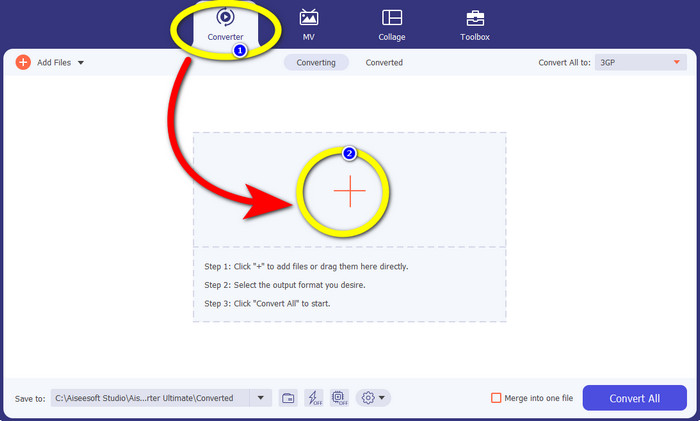
Βήμα 2: Επιλέξτε την καρτέλα Converter και κάντε κλικ στο σύμβολο + για να εισαγάγετε το αρχείο TS που θέλετε να μετατρέψετε σε μορφή 3GP.
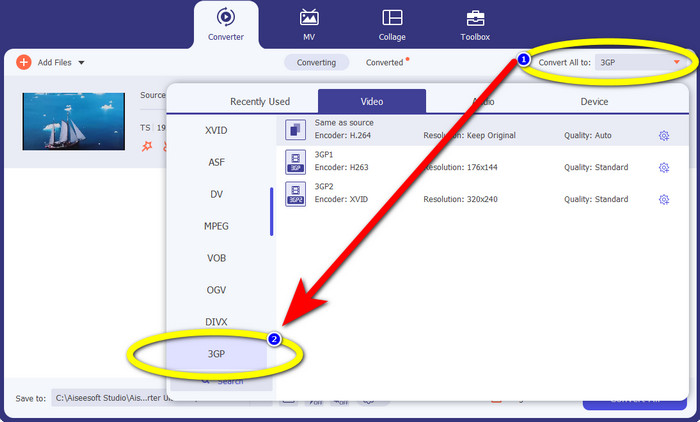
Βήμα 3: Αφού εισαγάγετε το αρχείο TS, κάντε κλικ στο κουμπί Convert all to. Θα εμφανιστούν οι επιλογές μορφής και στη συνέχεια κάντε κλικ στη μορφή αρχείου 3GP.
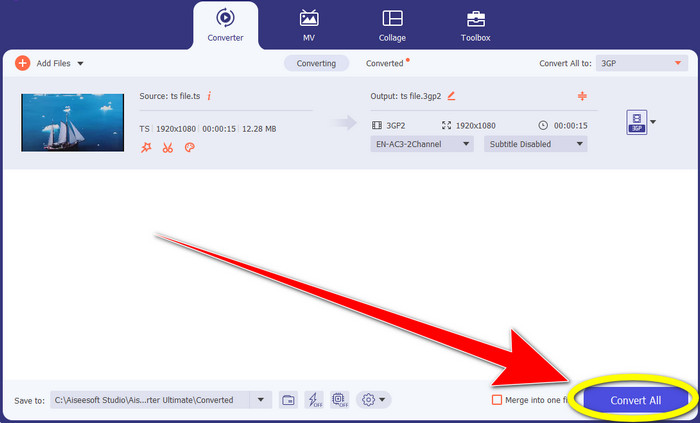
Βήμα 4: Για το τελευταίο βήμα, κάντε κλικ στο κουμπί Convert All. Η διαδικασία μετατροπής διαρκεί μόνο λίγα δευτερόλεπτα και στη συνέχεια μπορείτε να αποθηκεύσετε το τελικό βίντεο στα Windows ή στο Mac σας.
Μετατροπέας βίντεο HitPaw
Ένα ακόμη δωρεάν εργαλείο για λήψη, για να μετατρέψετε TS σε 3GP, είναι το HitPaw Video Converter. Αυτός ο μετατροπέας είναι επίσης εξαιρετικός για τη μετατροπή διαφόρων αρχείων, όπως MKV, M4V, VOB, WEBM, FLV, XVID, M2TS, TS, 3GP και άλλα. Επιπλέον, μπορείτε εύκολα να μετατρέπετε μορφές ήχου με αυτό το εργαλείο. Διαθέτει επίσης πολλά εργαλεία επεξεργασίας, όπως αποκοπή, συγχώνευση, περικοπή & περιστροφή, υδατογράφημα, ταχύτητα, φίλτρο κ.λπ. Επιπλέον, το HitPaw Video Converter σάς επιτρέπει να κατεβάζετε βίντεο από 1000+ ιστότοπους, όπως YouTube, Bili Bili, Facebook κ.ά. Ωστόσο, παρόλο που είναι μια εφαρμογή δωρεάν λήψης, οι δυνατότητές της είναι περιορισμένες, επομένως πρέπει να αγοράσετε την εφαρμογή για πλήρη χρήση. Επίσης, η διαδικασία λήψης και εγκατάστασής της στα Windows και στο Mac είναι περίπλοκη και απαιτεί πολλά βήματα. Ακολουθήστε τα παρακάτω βήματα αν θέλετε να χρησιμοποιήσετε το HitPaw Video Converter για να μετατρέψετε TS σε 3GP.
Βήμα 1: Κατεβάστε το HitPaw Video Converter στα Windows ή στο Mac σας. Ακολουθήστε τη διαδικασία εγκατάστασης και ανοίξτε το.
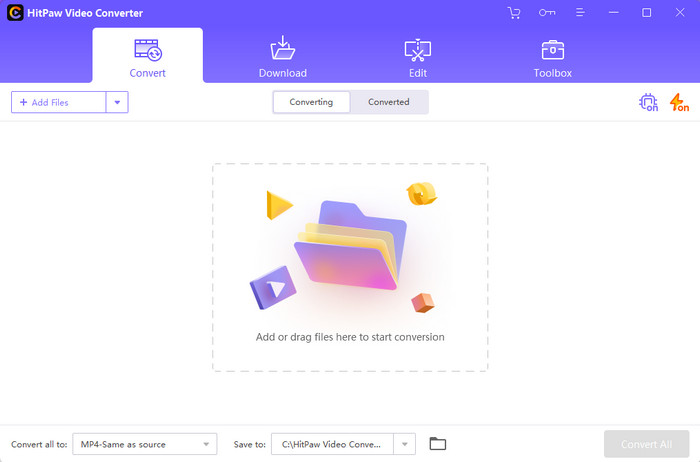
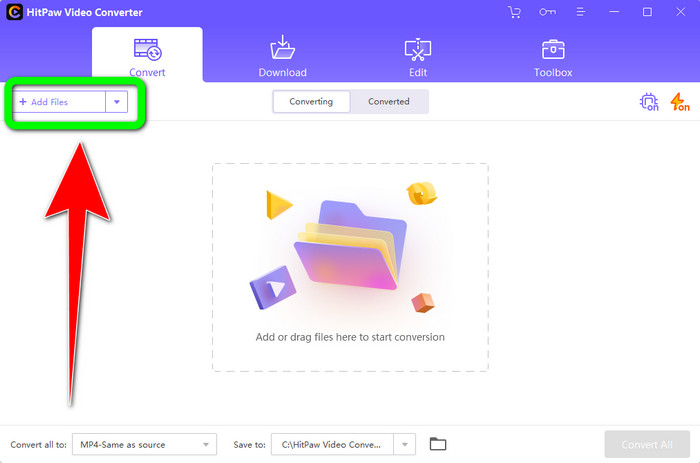
Βήμα 2: Κάντε κλικ στο κουμπί Add Files για να ανεβάσετε το αρχείο TS.
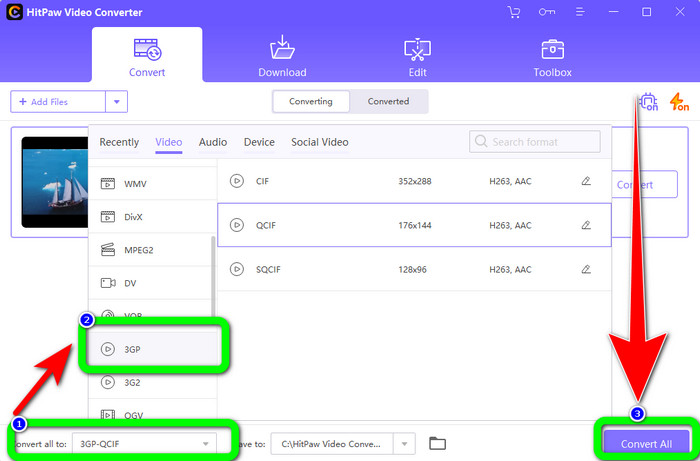
Βήμα 3: Κάντε κλικ στο κουμπί Convert All to. Στη συνέχεια, θα εμφανιστούν στην οθόνη οι επιλογές μορφής. Επιλέξτε τη μορφή αρχείου 3GP και κάντε κλικ στο κουμπί Convert All για να μετατρέψετε και να αποθηκεύσετε τελικά το βίντεό σας.
Μέρος 2: Καταπληκτικοί διαδικτυακοί μετατροπείς TS σε 3GP
FVC Free Video Converter Online
Όσον αφορά τους online μετατροπείς, υπάρχει το FVC Free Video Converter Online. Η εφαρμογή αυτή μπορεί να μετατρέψει TS σε 3GP εύκολα και ομαλά. Μπορεί επίσης να σας βοηθήσει να μετατρέψετε περισσότερα αρχεία, όπως MP4, AVI, WMA, TS, M2TS, XVID, FLV και άλλα. Επιπλέον, αυτός ο μετατροπέας είναι απλός στη χρήση και κατάλληλος για όλους τους χρήστες. Μπορείτε, επίσης, να χρησιμοποιήσετε αυτό το δωρεάν online λογισμικό τόσο σε Windows όσο και σε Mac. Είναι διαθέσιμο σχεδόν σε όλους τους φυλλομετρητές, όπως Google, Mozilla Firefox, Microsoft Edge κ.ά. Ακολουθήστε αυτά τα απλά βήματα για να μετατρέψετε αρχεία TS σε μορφή 3GP χρησιμοποιώντας το FVC Free Video Converter Online.
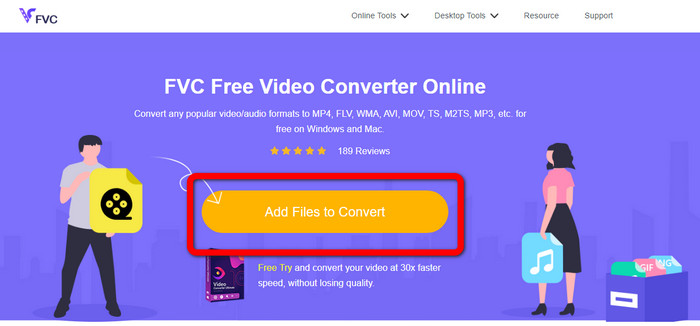
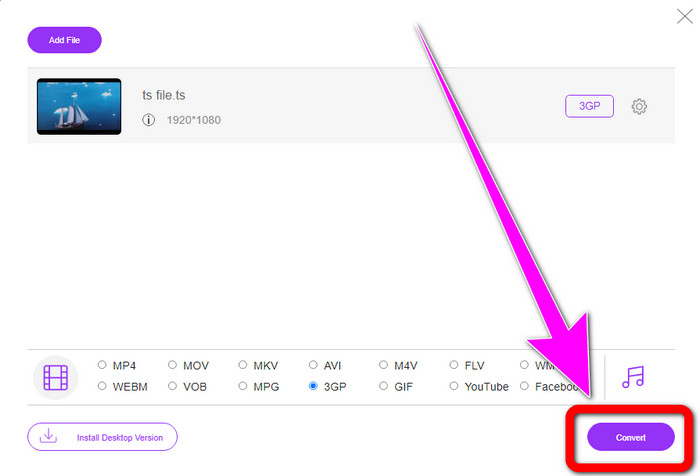
Βήμα 1: Μεταβείτε στον ιστότοπο του FVC Free Video Converter Online. Κάντε κλικ στο πορτοκαλί πλαίσιο στο κέντρο για να ανεβάσετε το αρχείο TS.
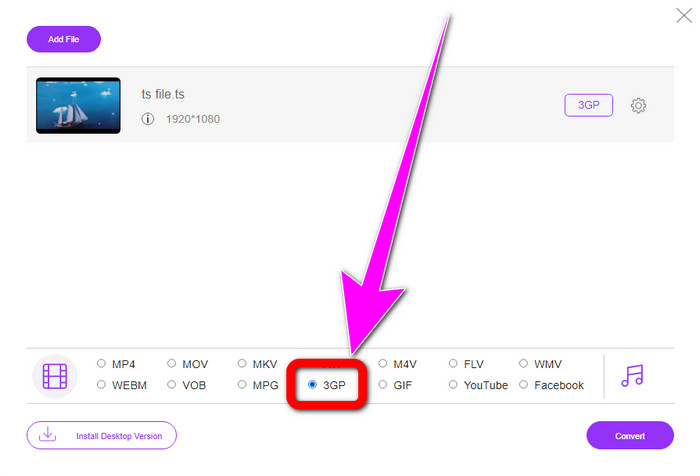
Βήμα 2: Αφού ανεβάσετε το αρχείο TS, θα δείτε πολλές επιλογές μορφών στο κάτω μέρος της διεπαφής. Έπειτα, επιλέξτε την επιθυμητή μορφή αρχείου, δηλαδή τη μορφή 3GP.
Βήμα 3: Όταν τελειώσετε με την επιλογή της μορφής 3GP, κάντε κλικ στο κουμπί Convert. Στη συνέχεια, κατεβάστε και αποθηκεύστε το τελικό βίντεό σας.
Μετατροπή
Το Convertio είναι ένα ακόμη online εργαλείο για τη μετατροπή TS σε 3GP. Όπως και οι παραπάνω εφαρμογές, αυτός ο μετατροπέας είναι εύκολος στη χρήση, καθώς απαιτούνται μόνο τρία κλικ για να μετατρέψετε διάφορα αρχεία, όπως MOV, AVI, FLV, MKV, MPG, MP4 και άλλα. Εκτός από τη μετατροπή βίντεο, το Convertio είναι επίσης μετατροπέας ήχου, εγγράφων και παρουσιάσεων. Ωστόσο, έχει ένα μειονέκτημα, ειδικά όταν χρησιμοποιείτε τη δωρεάν έκδοση του εργαλείου. Διαθέτει μέγιστο μέγεθος αρχείου 100 Mb, επομένως δεν μπορείτε να μετατρέπετε απεριόριστα αρχεία. Πρέπει να χρησιμοποιήσετε την επί πληρωμή έκδοση για να απολαύσετε κορυφαίες επιδόσεις από αυτή την εφαρμογή. Προχωρήστε στα παρακάτω βήματα για να μετατρέψετε TS σε μορφή 3GP.
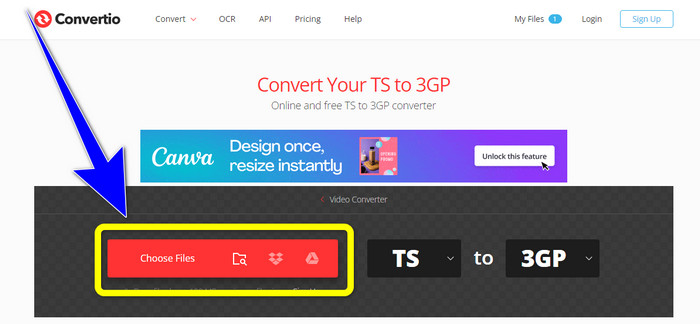
Βήμα 1: Επισκεφτείτε τον ιστότοπο του Convertio. Στη συνέχεια, κάντε κλικ στο κουμπί Choose Files για να εισαγάγετε το αρχείο TS.
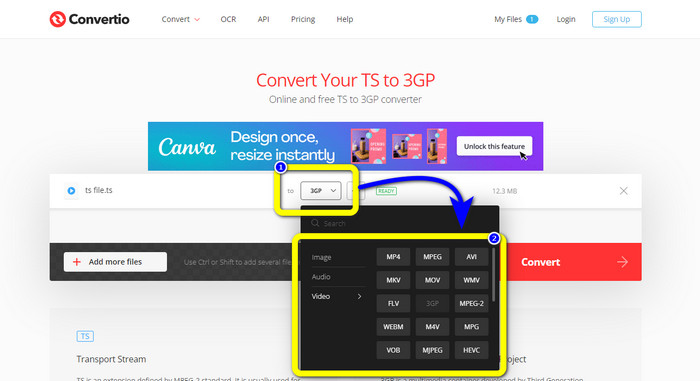
Βήμα 2: Κάντε κλικ στις επιλογές μορφής και επιλέξτε τη μορφή αρχείου 3GP.
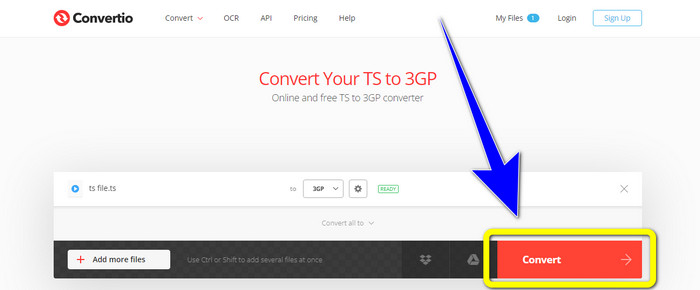
Βήμα 3: Για το τελευταίο βήμα, πατήστε το κουμπί convert. Περιμένετε να ολοκληρωθεί η διαδικασία και μετά αποθηκεύστε το αρχείο εξόδου. Μπορείτε επίσης να χρησιμοποιήσετε αυτό το εργαλείο για να μετατρέψετε TS σε FLV.
Μέρος 3: TS εναντίον 3GP
| Αρχείο | TS | 3GP |
| Επέκταση αρχείου | .τσ | .3gp |
| Περιγραφή | Η προδιαγραφή MPEG-2 ορίζει το TS ως επέκταση. Συνήθως, χρησιμοποιείται για μετάδοση, ροή πολυμέσων στο Διαδίκτυο και αποθήκευση μουσικής και βίντεο σε DVD. Όταν παρουσιάζεται σφάλμα μετάδοσης δεδομένων, οι στοιχειώδεις ροές αυτού του κοντέινερ πολυμέσων αποθηκεύονται σε μια μορφή που επιτρέπει γρήγορη αναπαραγωγή και συγχρονισμό ήχου/βίντεο. | Για τηλέφωνα που βασίζονται σε GSM (Global System for Mobile Communications), το Third Generation Partnership Project δημιούργησε το κοντέινερ πολυμέσων 3GP το 1998. Το κοντέινερ είναι τέλειο για κινητά τηλέφωνα επειδή χρησιμοποιεί λιγότερα δεδομένα, εύρος ζώνης και αποθήκευση. Είναι ένα κοινό κοντέινερ για αρχεία MMS (Υπηρεσία Μηνυμάτων Πολυμέσων). |
| Αναπτύχθηκε από | Η ομάδα ειδικών κινούμενων εικόνων | Σχέδιο Συνεργασίας Τρίτης Γενιάς |
| Συνοδευτικά Προγράμματα | QuickTime Player, Windows Movies και TV VLC Media Player | Windows Meda Player, VLC Media Player |
Μέρος 4: Συχνές ερωτήσεις σχετικά με τη μετατροπή TS σε 3GP
Είναι το TS καλύτερο από το MP4;
Και τα δύο αρχεία MP4 και TS έχουν την ίδια ποιότητα βίντεο. Η κύρια διάκριση μεταξύ των αρχείων TS και MP4 είναι ότι τα αρχεία TS είναι επίπεδα, αλλά τα αρχεία MP4 ξεκινούν με ένα ευρετήριο. Από την άλλη πλευρά, τα κομμάτια βίντεο μέσα στα αρχεία είναι πανομοιότυπα. Επομένως, τα αρχεία TS, M2TS και MP4 έχουν όλα την ίδια ποιότητα βίντεο.
Μπορώ να ανεβάσω αρχεία TS στο YouTube;
Δυστυχώς, όχι. Μπορείτε να ανεβάσετε αρχεία TS στο Facebook αλλά όχι στο YouTube. Το καλύτερο πρόγραμμα για το άνοιγμα αρχείων TS είναι το VLC Media Player.
Τι είναι τα MPEG TS και PS;
Το TS είναι Transport Stream, που χρησιμοποιείται για εφαρμογές επικοινωνίας και μετάδοσης. Το PS είναι Program Stream, το οποίο μπορεί να χρησιμοποιηθεί για εφαρμογές αποθήκευσης, όπως τα DVD.
συμπέρασμα
Αυτές είναι οι τέσσερις κορυφαίες και αποτελεσματικές μέθοδοι για να μετατρέψετε TS σε 3GP. Ωστόσο, ορισμένες εφαρμογές μπορούν να χρησιμοποιηθούν πλήρως μόνο αν αποκτήσετε την επί πληρωμή έκδοση. Αν θέλετε έναν δωρεάν μετατροπέα χωρίς περιορισμούς, χρησιμοποιήστε το FVC Free Video Converter Online.
-
 TS to GIF: Πώς να μετατρέψετε το αρχείο TS σε κινούμενα GIF
 Μάθετε πώς μπορείτε να αλλάξετε τα αρχεία TS σε μορφή GIF με τη βοήθεια αυτής της εγγραφής. Η παρακάτω λίστα δείχνει διαφορετικές ιδέες σχετικά με το TS και το GIF και τον τρόπο μετατροπής του TS σε GIF.
-
 Πώς να μετατρέψετε το DIVX σε 3GP σε Windows, Mac και Online
 Πώς να μετατρέψετε το DIVX σε 3GP; Αν ψάχνετε για μια απάντηση, διαβάστε αυτό το άρθρο. Θα σας δείξουμε εξαιρετικές διαδικασίες με τη βοήθεια διαφορετικών μετατροπέων.
-
 4 καλύτεροι τρόποι για να μετατρέψετε SWF σε 3GP σε Windows, Mac και Online
 Εδώ είναι οι πιο χρήσιμες μέθοδοι για τη μετατροπή SWF σε 3GP άμεσα. Επίσης, αυτή η ανάρτηση θα σας δείξει μερικά αποτελεσματικά εργαλεία Windows και Online που μπορείτε να χρησιμοποιήσετε.
