


 Video Converter Ultimate
 Εγγραφή οθόνης
 Επισκευή βίντεο
 Ασφαλές κατέβασμα
Εκπληκτικές προσεγγίσεις για δωρεάν μετατροπή TS σε DIVX
Η μορφή αρχείου TS χρησιμοποιείται συχνά για τη μετάδοση HDTV. Ωστόσο, αν θέλετε να αναπαράγετε το βίντεό σας σε φορητές συσκευές, πρέπει να το μετατρέψετε σε άλλες μορφές αρχείων, όπως AVI, MPEG, WMV, DIVX, MP4 κ.λπ. Όταν γίνεται λόγος για μετατροπή, μπορείτε να βασιστείτε σε αυτό το άρθρο. Θα σας δείξουμε πώς να μετατρέψετε TS σε DIVX δωρεάν και σε άλλες μορφές αρχείων. Επίσης, θα σας παρουσιάσουμε μετατροπείς που μπορείτε να κατεβάσετε και να χρησιμοποιήσετε εκτός σύνδεσης. Αν είστε έτοιμοι, ας συνεχίσουμε με την ανάγνωση αυτού του άρθρου.

Μέρος 1: Μετατροπή TS σε DIVX χωρίς απώλεια ποιότητας
Μπορείτε να κατεβάσετε το Video Converter Ultimate για να μετατρέψετε TS σε DIVX. Αυτό το εργαλείο έχει εξαιρετικά γρήγορη ταχύτητα μετατροπής, 30 φορές ταχύτερη από τη μέση ταχύτητα. Προσφέρει επίσης διαδικασία μαζικής μετατροπής, όπου μπορείτε να μετατρέψετε πολλά αρχεία με ένα μόνο κλικ. Με αυτόν τον τρόπο μπορείτε να μετατρέψετε πολλαπλά αρχεία σε σύντομο χρονικό διάστημα. Επιπλέον, υποστηρίζει πάνω από 1000 μορφές βίντεο, όπως AVI, WMV, FLV, MP4, M4V, TS, MTS και πολλά άλλα. Η εφαρμογή διασφαλίζει ότι η ποιότητα του βίντεό σας δεν θα αλλάξει μετά τη μετατροπή του αρχείου TS. Επίσης, χάρη στο διαισθητικό περιβάλλον εργασίας και τις απλές μεθόδους, μπορείτε να μετατρέπετε αρχεία εύκολα και γρήγορα. Μπορείτε, επιπλέον, να χρησιμοποιήσετε αυτόν τον μετατροπέα σε Windows και Mac, γεγονός που τον καθιστά διαθέσιμο τόσο για χρήστες Windows όσο και Mac.
Επιπλέον, δεν γνωρίζετε ότι το FVC Video Converter Ultimate μπορεί να κάνει περισσότερα εκτός από τη μετατροπή; Για πρόσθετες πληροφορίες, έχει περισσότερες εξαιρετικές δυνατότητες από ό,τι φαντάζεστε. Εάν θέλετε να βελτιώσετε το βίντεό σας TS, βασίζεστε σε αυτήν την εφαρμογή. Αυτό το εργαλείο προσφέρει μια εργαλειοθήκη για τη βελτίωση των βίντεό σας, όπως τη χρήση ενός ενισχυτή βίντεο για να αλλάξετε την ανάλυση και τη φωτεινότητα του βίντεό σας. Μπορείτε επίσης να διορθώσετε το χρώμα του βίντεο για να το κάνετε πιο ευχάριστο στους θεατές σας. Επίσης, μπορείτε να δημιουργήσετε ένα μουσικό βίντεο με αυτό το εργαλείο. Μπορείτε να χρησιμοποιήσετε δωρεάν θέματα για να κάνετε το μουσικό σας βίντεο μοναδικό και ελκυστικό. Αυτές είναι μερικές εξαιρετικές δυνατότητες που μπορείτε να απολαύσετε χρησιμοποιώντας το Video Converter Ultimate.
Λειτουργίες
◆ Μπορεί να μετατρέψει πολλές μορφές αρχείων βίντεο, όπως M4V, MP4, SWF, WMV, AVI, TS, FLV και 1000+ ακόμη.
◆ Διατίθεται η δημιουργία μουσικού βίντεο με προσβάσιμα θέματα.
◆ Δυνατότητα δημιουργίας Κολάζ. Προσφέρει επίσης δωρεάν πρότυπα και φίλτρα.
◆ Παρέχει μια εργαλειοθήκη για τη βελτίωση του βίντεο, όπως ενισχυτή βίντεο, κοπτικό, περιστροφικό κ.λπ.
Μπορείτε να ακολουθήσετε τους παρακάτω λεπτομερείς οδηγούς για να μετατρέψετε το αρχείο TS σε DIVX και σε άλλες μορφές. Επίσης, θα σας δείξουμε κάποιες διαδικασίες για να επεξεργαστείτε τα βίντεό σας πιο απλά.
Βήμα 1: Κατεβάστε και εγκαταστήστε το Video Converter Ultimate στα Windows ή στο Mac σας. Κάντε κλικ στο κουμπί Download για Windows αν είστε χρήστης Windows. Έπειτα κάντε κλικ στην έκδοση για Mac αν χρησιμοποιείτε Mac.
Δωρεάν ΛήψηΓια Windows 7 ή νεότεραΑσφαλής λήψη
Δωρεάν ΛήψηΓια MacOS 10.7 ή νεότεροΑσφαλής λήψη
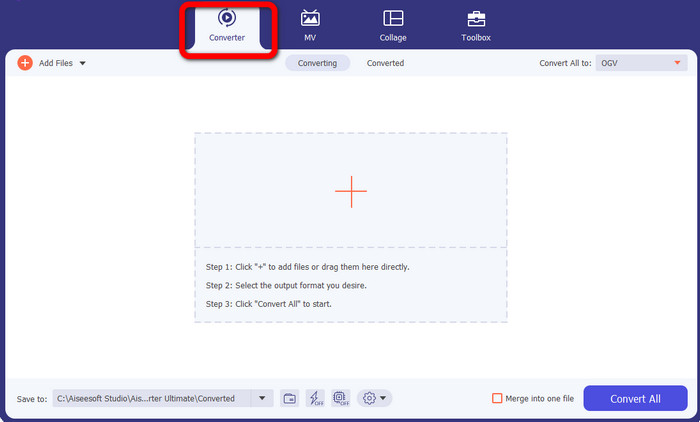
Βήμα 2: Αφού ολοκληρωθεί η λήψη της εφαρμογής, εκκινήστε την. Επιλέξτε το κουμπί Converter ανάμεσα στις τέσσερις επιλογές στο επάνω μέρος του περιβάλλοντος εργασίας.
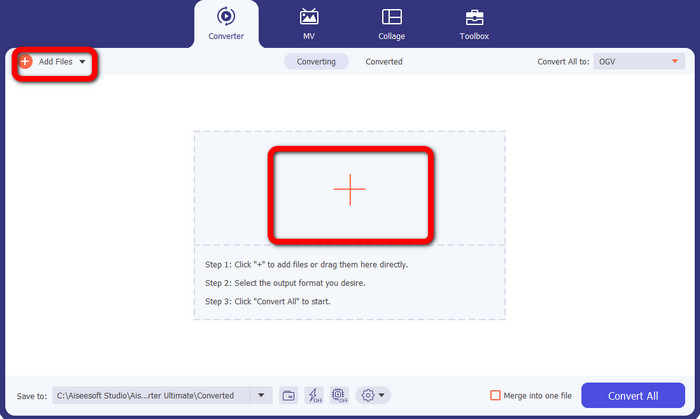
Βήμα 3: Αφού επιλέξετε την επιλογή Converter, κάντε κλικ στο κουμπί με το σύμβολο Plus για να προσθέσετε το αρχείο TS που θέλετε να μετατρέψετε. Μπορείτε επίσης να κάνετε κλικ στο κουμπί Add Files για να προσθέσετε το αρχείο βίντεο.
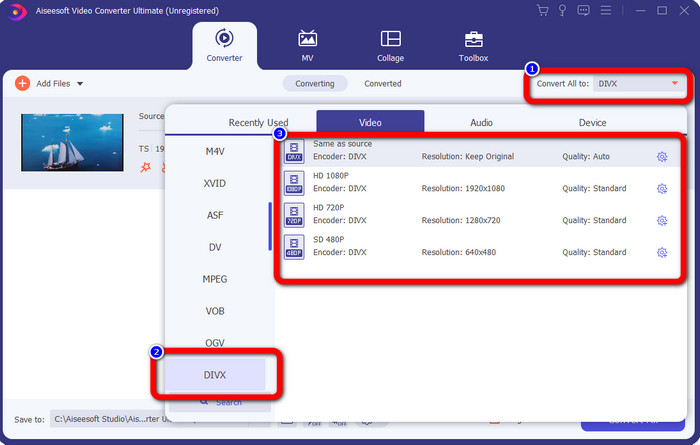
Βήμα 4: Μεταβείτε στο κουμπί Convert All to αφού επιλέξετε το βίντεο TS. Αφού κάνετε κλικ, οι επιλογές μορφής θα εμφανιστούν στην οθόνη σας. Επιλέξτε τη μορφή αρχείου DIVX. Μπορείτε επίσης να επιλέξετε την επιθυμητή ανάλυση από 480p έως 1080p.
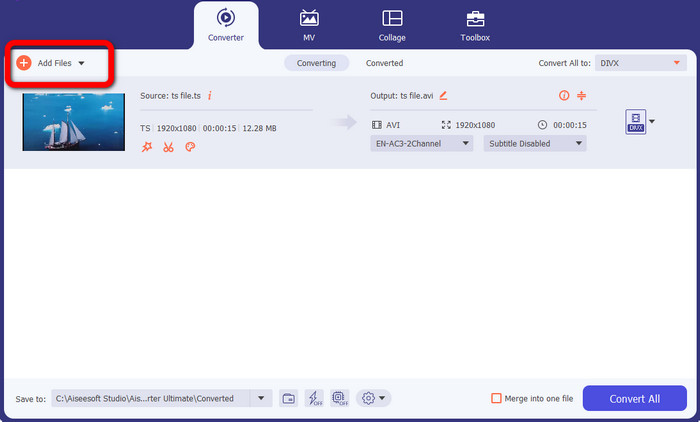
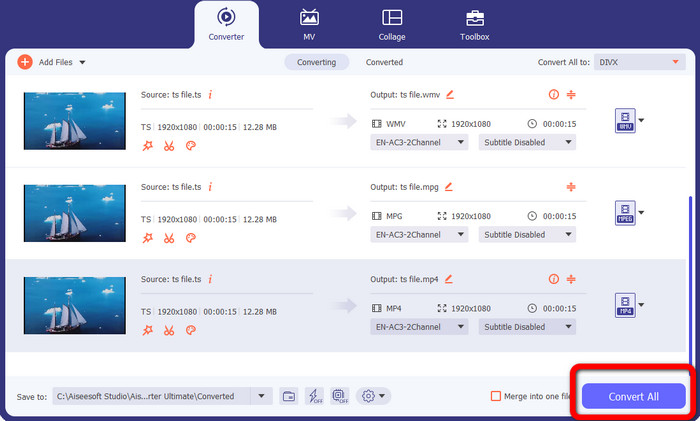
Βήμα 5: Αυτό το εργαλείο προσφέρει μαζική μετατροπή. Επομένως, κάντε κλικ στο κουμπί Add Files στην επάνω αριστερή γωνία του περιβάλλοντος εργασίας για να μετατρέψετε το βίντεο TS σας σε άλλες μορφές, όπως AVI, MPEG, WMV και MP4.
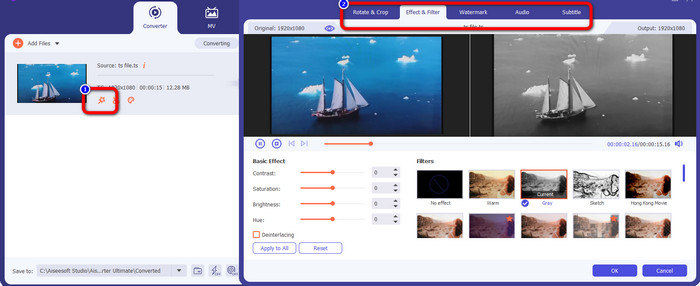
Βήμα 6: Αν θέλετε να επεξεργαστείτε το βίντεό σας, κάντε κλικ στο εικονίδιο Edit. Στη συνέχεια, μπορείτε να επεξεργαστείτε το βίντεο προσθέτοντας εφέ και φίλτρα, περιστρέφοντας και περικόπτοντας το βίντεο και πολλά άλλα. Μετά από αυτό, κάντε κλικ στο OK.
Βήμα 7: Αφού προσθέσετε αρχεία και τα αλλάξετε στις επιθυμητές μορφές, κάντε κλικ στο κουμπί Convert All. Περιμένετε τη γρήγορη διαδικασία μετατροπής και κατεβάστε τα αρχεία σας στη συσκευή σας.
Μέρος 2: Δωρεάν μετατροπέας για μετατροπή TS σε DIVX
Μπορείτε να κατεβάσετε το FVC Free TS Converter αν θέλετε έναν δωρεάν μετατροπέα. Μπορείτε να μετατρέψετε δωρεάν βίντεο TS σε οποιαδήποτε μορφή βίντεο, συμπεριλαμβανομένων των DIVX, AVI, MP4, WMV και MPEG. Είτε είστε επαγγελματίας είτε αρχάριος, σας βοηθά να μετατρέπετε βίντεο TS σε βίντεο HD και ήχο χωρίς απώλειες χωρίς να θυσιάζεται η υψηλή ποιότητα. Επιπλέον, αυτός ο μετατροπέας TS προσφέρει και μαζική μετατροπή, που σημαίνει ότι μπορείτε να ανεβάσετε πολλά αρχεία και να τα μετατρέψετε ταυτόχρονα. Έχει ταχύτητα μετατροπής 10 φορές ταχύτερη από άλλους μετατροπείς, ώστε να μην χρειάζεται να ξοδεύετε πολύ χρόνο για να μετατρέψετε πολλά αρχεία. Επίσης, μπορείτε να μετατρέψετε βίντεο TS σε μορφές ήχου όπως MP3, AAC, AIFF, ALAC, FLAC και WAV.
Επιπλέον, μπορείτε επίσης να επεξεργαστείτε τα βίντεο TS σε αυτήν την εφαρμογή. Το FVC Free TS Converter σάς δίνει επίσης πρόσβαση σε ένα ισχυρό πρόγραμμα επεξεργασίας βίντεο, πέρα από τις δυνατότητες μετατροπής. Είναι εύκολο στη χρήση για να επεξεργαστείτε και να τροποποιήσετε τα δικά σας αρχεία TS. Μπορείτε να επιλέξετε ένα μοναδικό θέμα για κάθε βίντεο, όπως γενέθλια, οικογένεια, αθλητισμό και ακόμη και περιστάσεις όπως το Halloween. Η αλλαγή του τίτλου, του δημιουργού ή της διάρκειας των βίντεο δεν αποτελεί πλέον πρόκληση, χάρη στο FVC Free TS Converter. Λοιπόν, χωρίς άλλη καθυστέρηση, ας ξεκινήσουμε να μετατρέπουμε το αρχείο TS σας σε άλλες μορφές όπως DIVX, WMV, AVI, MP4, MPEG και AVI.
Βήμα 1: Κατεβάστε το FVC Free TS Converter στον υπολογιστή σας με Windows ή στο Mac κάνοντας κλικ στο κουμπί Download παρακάτω.
Δωρεάν ΛήψηΓια Windows 7 ή νεότεραΑσφαλής Λήψη
Δωρεάν ΛήψηΓια MacOS 10.7 ή νεότεροΑσφαλής Λήψη
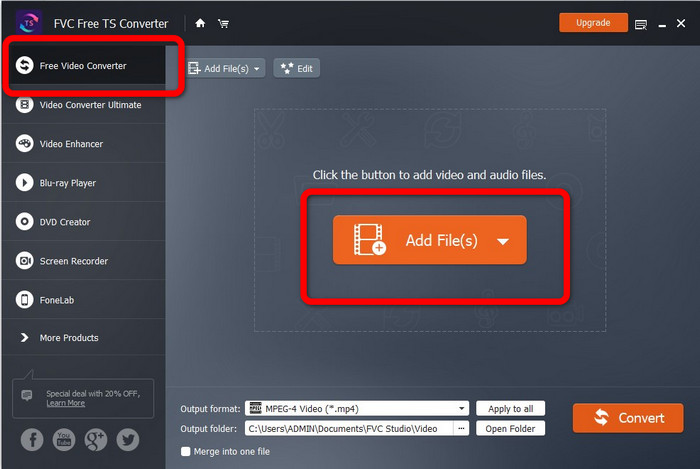
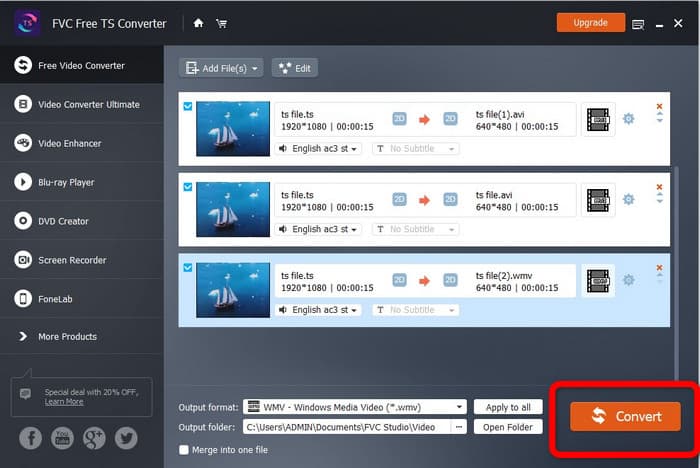
Βήμα 2: Εκκινήστε την εφαρμογή. Επιλέξτε το κουμπί Free Video Converter στην κύρια οθόνη και κάντε κλικ στο Add Files για να ανεβάσετε το αρχείο TS.
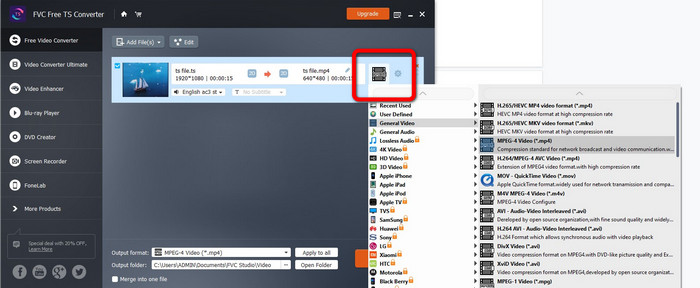
Βήμα 3: Κάντε κλικ στις επιλογές μορφής και επιλέξτε την επιθυμητή έξοδο, όπως DIVX, WMV, MPEG, AVI, MP4 και AVI. Επιτρέπεται η μαζική μετατροπή ώστε να μετατρέπετε πολλαπλά αρχεία ταυτόχρονα.
Βήμα 4: Αφού προσθέσετε όλα τα αρχεία, μπορείτε να τα μετατρέψετε με ένα μόνο κλικ, πατώντας το κουμπί Convert. Στη συνέχεια, μπορείτε ήδη να αποθηκεύσετε τα βίντεό σας σε διαφορετικές μορφές αρχείων. Μπορείτε επίσης να χρησιμοποιήσετε αυτό το λογισμικό για να μετατρέψετε WebM σε DIVX.
Μέρος 3: Συχνές ερωτήσεις σχετικά με τη μετατροπή TS σε DIVX
Μπορώ να μετονομάσω το TS σε MP4;
Δεν αρκεί απλώς να μετονομάσετε την κατάληξη των αρχείων TS σε 'mp4' ή σε άλλη μορφή βίντεο για να πραγματοποιήσετε τη μετατροπή μορφής βίντεο. Αυτό δεν θα αλλάξει τη μορφή του αρχείου. Πώς μπορεί να μετατραπεί ένα βίντεο TS σε MP4; Ένας πιο αξιόπιστος τρόπος για να μετατρέψετε TS σε MP4 είναι να χρησιμοποιήσετε το FVC Free TS Converter. Αυτός ο μετατροπέας μπορεί εύκολα να μετατρέψει το αρχείο TS σας σε MP4.
Ποιο είναι καλύτερο, TS ή MP4;
Τόσο τα αρχεία MP4 όσο και τα αρχεία TS έχουν την ίδια ποιότητα βίντεο. Η βασική διαφορά μεταξύ αρχείων TS και MP4 είναι ότι τα αρχεία TS είναι επίπεδα, ενώ τα αρχεία MP4 αρχίζουν με έναν δείκτη (index). Η ποιότητα βίντεο των αρχείων TS, M2TS και MP4 είναι η ίδια, καθώς τα video bits μέσα σε κάθε αρχείο είναι κατά τα άλλα πανομοιότυπα. Κάντε κλικ εδώ για να δείτε πώς να μετατρέψετε TS σε MP4.
Πώς μπορώ να μετατρέψω γρήγορα το TS σε DIVX;
Εάν θέλετε έναν γρήγορο μετατροπέα βίντεο, μπορείτε να χρησιμοποιήσετε το Video Converter Ultimate. Αυτή η εφαρμογή με δυνατότητα λήψης προσφέρει μια εξαιρετικά γρήγορη διαδικασία μετατροπής, η οποία είναι 30 φορές ταχύτερη.
συμπέρασμα
Όπως φαίνεται παραπάνω, αυτές είναι εντυπωσιακές μέθοδοι για να μετατρέψετε TS σε DIVX δωρεάν. Αυτά τα εργαλεία είναι και εξαιρετικά και χρήσιμα. Λοιπόν, τι περιμένετε; Χρησιμοποιήστε το Video Converter Ultimate και το FVC Free TS Converter για να μετατρέψετε πολλαπλά αρχεία.
-
 Πώς να μετατρέψετε MPG σε DivX χωρίς απώλεια ποιότητας
 Ψάχνετε για μια εφαρμογή χωρίς προβλήματα που μπορείτε να χρησιμοποιήσετε για να μετατρέψετε MPG σε DivX; Αυτό το άρθρο θα σας παρέχει διάφορες αποτελεσματικές μεθόδους που πρέπει να δοκιμάσετε.
-
 Πώς να μετατρέψετε το DIVX σε 3GP σε Windows, Mac και Online
 Πώς να μετατρέψετε το DIVX σε 3GP; Αν ψάχνετε για μια απάντηση, διαβάστε αυτό το άρθρο. Θα σας δείξουμε εξαιρετικές διαδικασίες με τη βοήθεια διαφορετικών μετατροπέων.
-
 Μετατρέψτε το VOB σε DIVX με τους καλύτερους τρόπους χρησιμοποιώντας εξαιρετικά εργαλεία
 Αυτό το άρθρο θα σας παρουσιάσει έναν εξαιρετικό μετατροπέα VOB σε DIVX που μπορείτε να χρησιμοποιήσετε. Μη χάσετε αυτήν την ευκαιρία και μάθετε αυτές τις πιο εύκολες μεθόδους για να μετατρέψετε VOB σε DIVX.
