


 Video Converter Ultimate
 Εγγραφή οθόνης
 Επισκευή βίντεο
 Ασφαλές κατέβασμα
Πώς να μετατρέψετε τα αρχεία TS σε μορφή FLV χωρίς απώλεια ποιότητας
This guide focuses on how to μετατρέψετε TS σε FLV. Γενικά μιλώντας, υπάρχουν δύο είδη μορφών βίντεο: οι ευρέως χρησιμοποιούμενες και οι υπόλοιπες. Το FLV είναι μία από τις ευρέως χρησιμοποιούμενες μορφές βίντεο που έχουν αναπτυχθεί για το διαδίκτυο, ενώ το TS ανήκει στη δεύτερη κατηγορία. Το TS, που σημαίνει Video Transport Stream, χρησιμοποιείται για την αποθήκευση δεδομένων βίντεο MPEG-2. Συχνά τα συναντάμε σε DVD. Πάμε λοιπόν να ξεκινήσουμε τώρα το ταξίδι μας.

Μέρος 1: Κορυφαίοι 3 εύκολοι τρόποι μετατροπής TS σε FLV στην επιφάνεια εργασίας
Τρόπος 1: Μετατροπή TS σε FLV με δωρεάν μετατροπέα FLV
Όπως υποδηλώνει το όνομά του, το FVC Free FLV Converter είναι ακριβώς ο μετατροπέας FLV που χρειάζεστε για να μετατρέψετε TS σε FLV, ώστε να μπορείτε να παρακολουθείτε τα αρχεία σας ή να τα μοιράζεστε στα κοινωνικά δίκτυα. Είναι εντελώς δωρεάν στη χρήση, χωρίς υδατογραφήματα ή άλλους περιορισμούς. Μάλιστα προσφέρει ορισμένες λειτουργίες που συνήθως βρίσκετε μόνο σε επί πληρωμή λογισμικό.
Κύρια χαρακτηριστικά του Best FLV Converter
- 1. Μετατρέψτε εύκολα μεταξύ FLV και άλλων μορφών βίντεο.
- 2. Προστατέψτε την ποιότητα βίντεο και ήχου κατά τη μετατροπή.
- 3. Ομαδική διαχείριση πολλαπλών αρχείων βίντεο TS ταυτόχρονα.
Δωρεάν λήψηΓια Windows 7 ή νεότεραΑσφαλές κατέβασμα
Δωρεάν λήψηΓια MacOS 10.7 ή νεότεροΑσφαλές κατέβασμα
Πώς να μετατρέψετε αρχεία TS σε FLV δωρεάν
Βήμα 1: Εισαγωγή αρχείων TS
Εκκινήστε τον καλύτερο μετατροπέα FLV αφού τον εγκαταστήσετε στον υπολογιστή σας. Στη συνέχεια, κάντε κλικ στο κουμπί Προσθήκη αρχείων για εισαγωγή όλων των αρχείων TS από το DVD ή τον υπολογιστή σας. Στη συνέχεια, τα βίντεο θα εμφανιστούν στην περιοχή της βιβλιοθήκης.

Βήμα 2: Ορισμός μορφής εξόδου
Αν χρειάζεται να επεξεργαστείτε τα βίντεο, κάντε κλικ στο κουμπί Edit για να ανοίξετε το παράθυρο επεξεργασίας βίντεο. Αν όχι, μεταβείτε στο κάτω μέρος, κάντε κλικ και ανοίξτε την επιλογή Output format. Έπειτα αναζητήστε FLV στην καρτέλα General Video και επιλέξτε το.

Βήμα 3: Μετατροπή TS σε FLV
Στη συνέχεια, ορίστε έναν συγκεκριμένο φάκελο για την αποθήκευση των αρχείων FLV πατώντας το κουμπί Browse. Τέλος, κάντε κλικ στο κουμπί Convert στην κάτω δεξιά γωνία για να ξεκινήσετε τη μετατροπή TS σε FLV.

Τρόπος 2: Πώς να μετατρέψετε TS σε FLV με VLC
Το VLC είναι ένας άλλος τρόπος για να μετατρέψετε το TS σε FLV δωρεάν, καθώς είναι ένα έργο ανοιχτού κώδικα. Είναι διαθέσιμο σε υπολογιστή, Mac και Linux. Το κόστος είναι προφανώς. Η ποιότητα εξόδου δεν είναι πολύ καλή και η διαδικασία είναι πολύπλοκη. Εάν δεν σας πειράζει, ακολουθήστε τα παρακάτω βήματα.
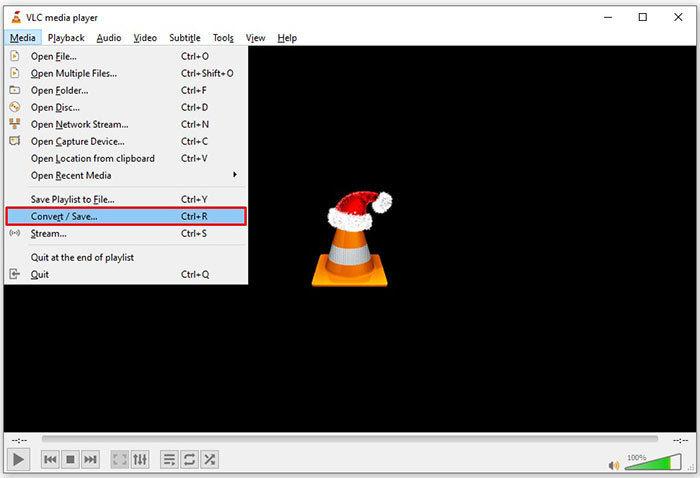
Βήμα 1: Ανοίξτε το VLC, κάντε κλικ στο μενού Media και επιλέξτε Convert/Save. Θα εμφανιστεί το παράθυρο ανοίγματος πολυμέσων.
Βήμα 2: Κάντε κλικ στο κουμπί Add και προσθέστε ένα αρχείο TS στο VLC. Πατήστε το κουμπί Convert/Save για να προχωρήσετε.
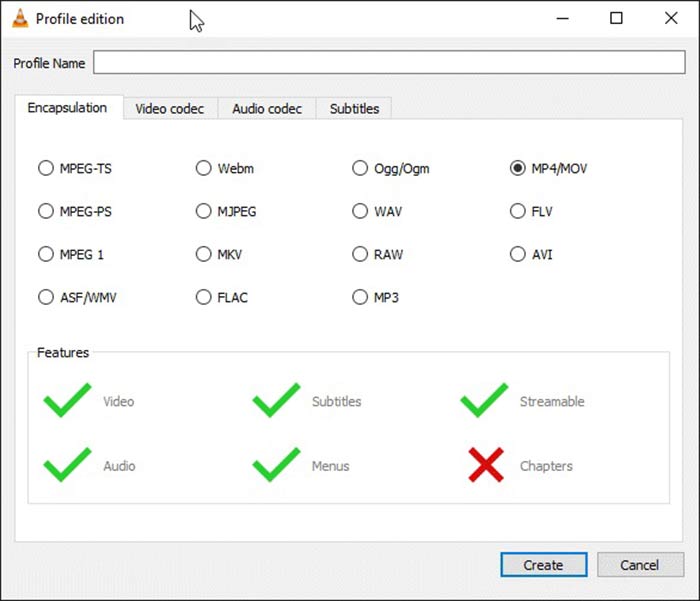
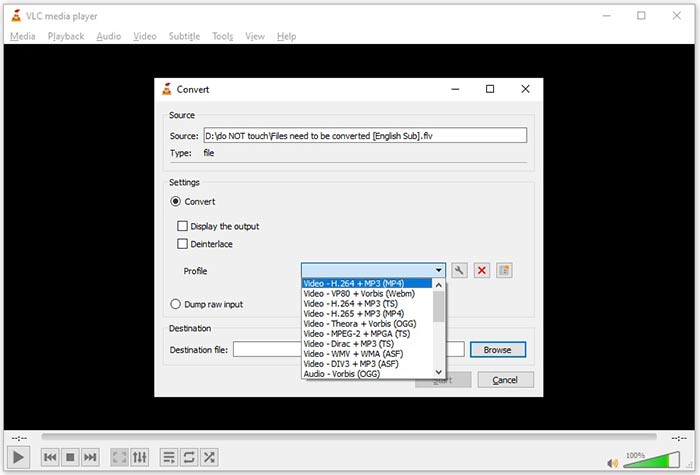
Βήμα 3: Ανοίξτε την επιλογή Profile και επιλέξτε τη μορφή εξόδου. Αν δεν μπορείτε να βρείτε το FLV στο Profile, κάντε κλικ στο κουμπί Profile Edit, εισαγάγετε FLV στο πεδίο Profile Name, επιλέξτε FLV και κάντε κλικ στο Create. Έπειτα επιλέξτε FLV από το Profile.
Βήμα 4: Πατήστε το κουμπί Browse για να ορίσετε τον φάκελο προορισμού και κάντε κλικ στο κουμπί Start.
Τρόπος 3: Πώς να μετατρέψετε TS σε FLV μέσω FormatFactory
Το FormatFactory είναι ένα δωρεάν πρόγραμμα μετατροπής αρχείων για υπολογιστές. Σας επιτρέπει να μετατρέψετε αρχεία TS σε FLV χωρίς να πληρώσετε ούτε δεκάρα. Ωστόσο, υποστηρίζει μόνο απώλεια μετατροπής. Αυτό σημαίνει ότι η ποιότητα του βίντεό σας θα μειωθεί. Επιπλέον, δεν είναι διαθέσιμο σε Mac ή Linux.
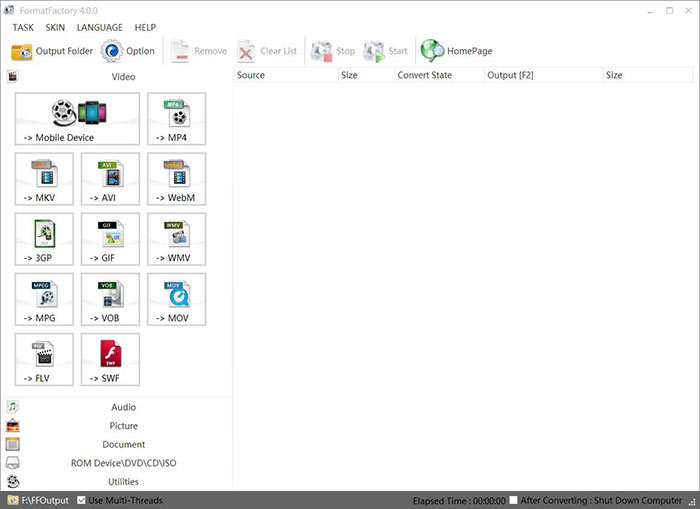
Βήμα 1: Εκκινήστε τον δωρεάν μετατροπέα TS σε FLV, μεταβείτε στην ενότητα Video και επιλέξτε FLV.
Βήμα 2: Κάντε κλικ στο κουμπί Add File και εισαγάγετε τα αρχεία βίντεο TS από τον υπολογιστή σας. Πατήστε OK για να το επιβεβαιώσετε.
Βήμα 3: Στη συνέχεια, κάντε κλικ στο κουμπί Start για να ξεκινήσει η μετατροπή TS σε FLV στον υπολογιστή. Θα πάρει λίγη ώρα, καθώς το δωρεάν πρόγραμμα είναι αρκετά αργό. Όταν ολοκληρωθεί, μπορείτε να μεταβείτε στον κατάλογο κάτω από την ενότητα Output για να βρείτε τα αρχεία FLV.
Μέρος 2: Πώς να μετατρέψετε TS σε FLV Online
Το VLC και άλλα λογισμικά μετατροπής βίντεο απαιτούν εγκατάσταση στον σκληρό σας δίσκο. Αυτό καταλαμβάνει χώρο στη μνήμη του συστήματος. Ίσως αναρωτιέστε αν μπορείτε να μετατρέψετε TS σε FLV χωρίς εγκατάσταση λογισμικού. Η απάντηση είναι το FVC Free Online Video Converter. Λειτουργεί online και είναι δωρεάν. Αν και δεν προσφέρει πρόσθετες λειτουργίες, είναι αρκετό για να καλύψει τις βασικές σας ανάγκες μετατροπής βίντεο.
Βήμα 1: Ανοίξτε τη σελίδα https://www.free-videoconverter.net/free-online-video-converter/ σε έναν φυλλομετρητή και κάντε κλικ στο κουμπί Add Files to Convert για να γίνει λήψη του launcher.

Βήμα 2: Μόλις ολοκληρωθεί η λήψη, ο launcher θα εμφανιστεί. Κάντε κλικ στο κουμπί Add File για να ανεβάσετε τα αρχεία TS. Αυτή η web εφαρμογή υποστηρίζει μαζική μετατροπή. Μεταβείτε στο κάτω μέρος και επιλέξτε FLV στο κάτω μέρος.

Βήμα 3: Όταν είστε έτοιμοι, κάντε κλικ στο κουμπί Convert για να ξεκινήσει η μετατροπή TS σε FLV. Η εφαρμογή λειτουργεί γρήγορα, αλλά ο πραγματικός χρόνος καθορίζεται από τη σύνδεσή σας στο διαδίκτυο. Περιμένετε να ολοκληρωθεί η μετατροπή και κατεβάστε τα αρχεία FLV εξόδου.
Μην το χάσετε:
- • Αναλυτικός οδηγός για το πώς να μετατρέψετε το TS σε MP4
- • Πώς να μετατρέψετε το αρχείο TS σε MP3, AIFF, ALAC, FLAC και περισσότερες μορφές ήχου σε Windows / Mac
Μέρος 3: Συχνές ερωτήσεις σχετικά με τη μετατροπή TS σε FLV
Γιατί δεν μπορώ να μετατρέψω το TS σε άλλες μορφές;
Το TS είναι η μορφή αρχείου βίντεο για DVD. Τα περισσότερα εμπορικά DVD είναι κρυπτογραφημένα και προστατεύονται από πνευματικά δικαιώματα. Αυτό σας εμποδίζει επίσης να μετατρέψετε αρχεία TS εάν δεν διαθέτετε το κατάλληλο λογισμικό μετατροπής βίντεο.
Μπορώ να ανοίξω TS στο Windows Media Player;
Το Windows Media Player δεν μπορεί να ανοίξει αρχεία DVD ή TS, επομένως δεν μπορείτε να παίξετε TS σε WMP. Εναλλακτικά, μπορείτε να χρησιμοποιήσετε ένα πρόγραμμα αναπαραγωγής βίντεο τρίτου μέρους, όπως το VLC. Ή πρέπει να εγκαταστήσετε επιπλέον πακέτο κωδικοποιητή για WMP.
Πώς να παρακολουθήσετε αρχεία TS;
Μόνο λίγα προγράμματα αναπαραγωγής πολυμέσων υποστηρίζουν αρχεία TS, όπως το VLC. Οι ενσωματωμένες συσκευές αναπαραγωγής πολυμέσων σε PC και Mac, Windows Media Player και QuickTime Player, δεν είναι συμβατές με TS. Ένας άλλος τρόπος για να παρακολουθήσετε αρχεία TS είναι να τα εγγράψετε σε DVD.
συμπέρασμα
Τώρα, θα πρέπει να μάθετε τουλάχιστον τέσσερις τρόπους μετατροπής αρχείων TS σε βίντεο FLV για κοινή χρήση στο διαδίκτυο ή αναπαραγωγή σε ψηφιακές συσκευές. Ως μορφή βίντεο για ταινίες DVD, το TS δεν χρησιμοποιείται ευρέως σε υπολογιστές ή κινητές συσκευές. Είναι λογικό ότι τα περισσότερα προγράμματα αναπαραγωγής πολυμέσων δεν μπορούν να το ανοίξουν. Μετατροπέας FVC Free FLV; Ωστόσο, σας βοηθά να αλλάξετε εύκολα το TS σε FLV. Περισσότερες ερωτήσεις? Παρακαλώ γράψτε τα κάτω από αυτήν την ανάρτηση και θα σας απαντήσουμε.
-
 3 εύκολα βήματα για την εγγραφή αρχείων _TS αρχείων / φακέλων σε DVD σε Mac / Windows
 Πώς μπορώ να μετατρέψω και να εγγράψω αρχεία TS σε δίσκο DVD; Αυτός ο αναλυτικός οδηγός θα σας δείξει πώς να αντιγράψετε αρχεία TS και φακέλους σε DVD σε Windows / Mac, ώστε να μπορείτε να παρακολουθείτε αρχεία TS σε συσκευή αναπαραγωγής DVD ή τηλεόραση.
-
 6 εύκολοι τρόποι μετατροπής TS σε AVI / MKV / MOV / WMV σε Windows / Mac
 Θέλετε να μετατρέψετε γρήγορα αρχεία TS σε AVI / MKV / MOV / WMV; Αυτό το άρθρο εμφανίζει μετατροπείς βίντεο στο διαδίκτυο και εκτός σύνδεσης με πλήρη οδηγό. Ίσως μπορείτε να αποκτήσετε τον καλύτερο δωρεάν μετατροπέα TS εδώ.
-
 Συμπίεση αρχείων βίντεο TS - Πώς να συμπιέσετε αρχεία TS σε μικρότερα μεγέθη
 Όταν θέλετε να αποθηκεύσετε αρχεία βίντεο TS υψηλής ευκρίνειας στις συσκευές σας, θα πρέπει να μάθετε περισσότερα σχετικά με τον τρόπο συμπίεσης αρχείων βίντεο TS σε μικρότερα μεγέθη από αυτό το άρθρο.
