


 Video Converter Ultimate
 Εγγραφή οθόνης
 Επισκευή βίντεο
2 από τους καλύτερους μετατροπείς DivX: Πώς να μετατρέψετε το DivX σε FLV σε Windows και υπολογιστή
Το DivX είναι ένα από τα πρώτα ιδιόκτητα δοχεία ταινιών σε DVD. Αυτή η μορφή συμπίεσης βοηθά στην αποθήκευση βίντεο υψηλής ποιότητας χωρίς να απαιτείται μεγάλη χωρητικότητα αποθήκευσης. Παρόλο που τα αρχεία DivX είναι φιλικά ως προς τον χώρο, θα χρειαστείτε ακόμη να εγκαταστήσετε έναν συγκεκριμένο κωδικοποιητή για να τα αναπαράγετε. Ωστόσο, μπορούμε να το αποφύγουμε αυτό μετατρέποντας το αρχείο σε FLV ή σε άλλες υποστηριζόμενες μορφές. Θέλετε να μάθετε πώς να μετατρέψετε DivX σε FLV; Τότε διαβάστε παρακάτω όλες τις λεπτομέρειες και αποφασίστε ποιον μετατροπέα μπορείτε να χρησιμοποιήσετε, ώστε να ταιριάζει καλύτερα σε εσάς.

Μέρος 1. Μετατροπή DivX σε FLV με το FVC Video Converter Ultimate
Αυτός ο εξαιρετικός μετατροπέας DivX διαθέτει το καλύτερο περιβάλλον εργασίας και τη καλύτερη διαδικασία απόδοσης σε σύγκριση με άλλους μετατροπείς. Ο FVC Video Converter Ultimate έγινε ο κυρίαρχος μετατροπέας που μπορείτε να κατεβάσετε σε Windows ή Mac. Η μετατροπή αρχείων έγινε ευκολότερη και ταχύτερη με τη βοήθεια αυτού του μετατροπέα, της επιτάχυνσης υλικού και της γρήγορης μετατροπής του. Σε αντίθεση με τα εργαλεία που μπορείτε να κατεβάσετε ή να χρησιμοποιήσετε online, αυτό είναι το πιο ελαφρύ αλλά και πανίσχυρο. Επίσης, μπορείτε να μετατρέψετε τα DivX σας σε FLV, MP4, MOV, AVI, MKV και πάνω από 200 ακόμη μορφές. Λοιπόν, τώρα, θέλετε να μάθετε πώς να χρησιμοποιήσετε αυτό το εργαλείο; Τότε ακολουθήστε τα παρακάτω βήματα.
Βήματα για το πώς να μετατρέψετε DivX σε FLV με τη βοήθεια του FVC Video Converter Ultimate:
Βήμα 1. Κατεβάστε το FVC Video Converter Ultimate στον υπολογιστή σας κάνοντας κλικ στο κουμπί λήψης παρακάτω. Μόλις κατεβάσετε το αρχείο, κάντε κλικ σε αυτό για να το εγκαταστήσετε και να το ρυθμίσετε γρήγορα.
Δωρεάν ΛήψηΓια Windows 7 ή νεότεραΑσφαλής λήψη
Δωρεάν ΛήψηΓια MacOS 10.7 ή νεότεροΑσφαλής λήψη
Βήμα 2. Πατήστε το κουμπί + για να εισαγάγετε το αρχείο ή, αν το αρχείο που θέλετε να μετατρέψετε είναι περισσότερα από δύο, σας προτείνουμε να το σύρετε-αφήσετε στην επιφάνεια εργασίας του προγράμματος.
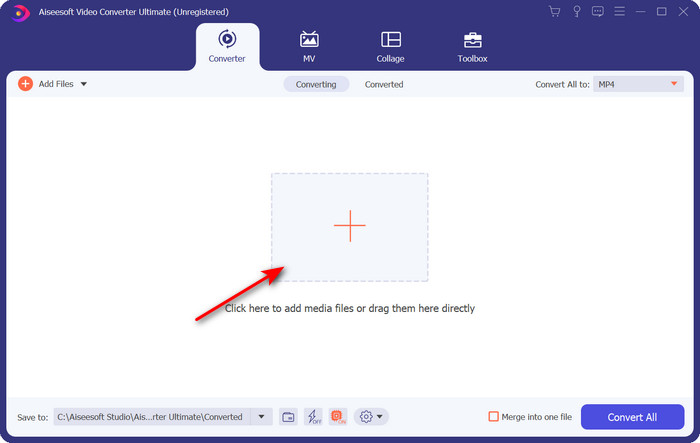
Βήμα 3. Αλλάξτε το DivX σας σε FLV κάνοντας κλικ στο κουμπί drop-down.
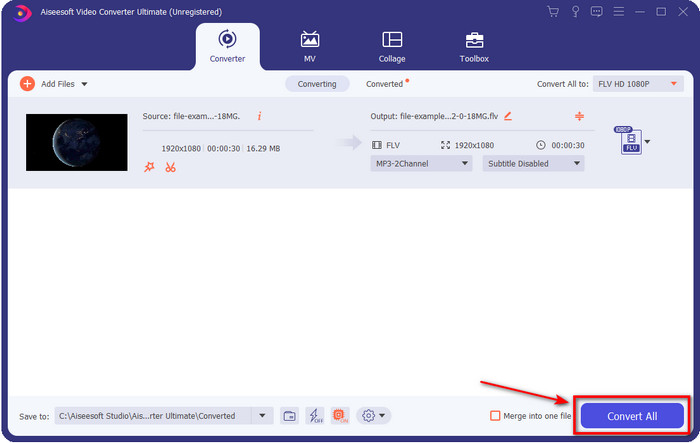
Αν θέλετε να ενώσετε τα αρχεία DivX σας και να τα συγχωνεύσετε σε ένα, τότε τσεκάρετε το πλαίσιο για να συνδεθούν όλα τα αρχεία DivX μετά τη μετατροπή.
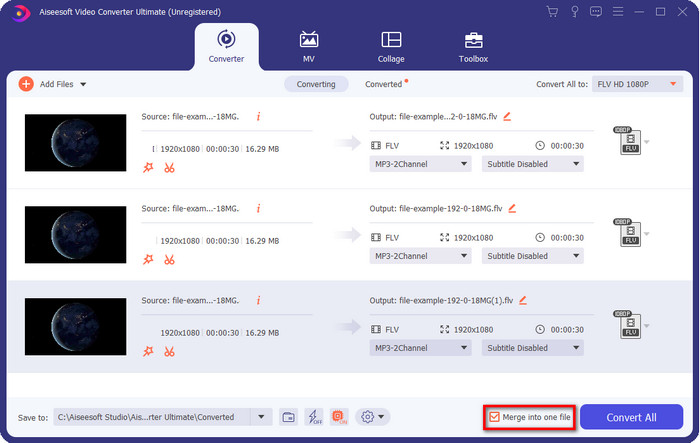
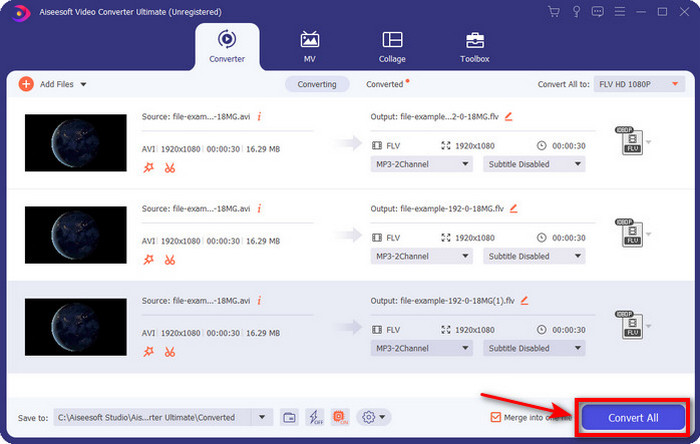
Βήμα 4. Για να ξεκινήσει η μετατροπή, κάντε κλικ στο Convert All. Δεν χρειάζεται να περιμένετε, γιατί η διαδικασία θα διαρκέσει λιγότερο από ένα λεπτό. Μετά τη διαδικασία, ο φάκελος θα εμφανιστεί στην οθόνη σας με το μετατρεμμένο αρχείο .flv.
Πλεονεκτήματα
- Μετατρέψτε το DivX σε FLV με 30 φορές πιο γρήγορα σε σύγκριση με τους άλλους μετατροπείς online και offline.
- Διατίθεται σε όλα τα λειτουργικά συστήματα όπως Windows & Mac.
- Διατίθενται προηγμένες λειτουργίες επεξεργασίας βίντεο.
- Μετατρέψτε όσα αρχεία θέλετε με τη βοήθεια της ομαδικής μετατροπής.
Μειονεκτήματα
- Πρέπει να αγοραστεί και να εγκατασταθεί στον υπολογιστή σας.
Μέρος 2. Μετατρέψτε το DivX σε FLV με το FVC Free Video Converter Online
Αν αναζητάτε μια online λύση για να λύσετε το πρόβλημα μετατροπής DivX, τότε χρησιμοποιήστε το FVC Free Video Converter Online. Αυτό το διαδικτυακό εργαλείο υποστηρίζει έναν μεσαίο αριθμό μορφών, είναι συμβατό με όλες τις μηχανές αναζήτησης και είναι δωρεάν. Παρόλο που αυτός ο μετατροπέας είναι διαθέσιμος online, δεν θα χρειαστεί να ανησυχείτε για ενοχλητικές διαφημίσεις στη διεπαφή του ιστότοπου. Αν θεωρείτε ότι αυτή η online λύση είναι η καλύτερη βοήθεια, ακολουθήστε τα αναλυτικά βήματα παρακάτω.
Βήματα για το πώς να μετατρέψετε DivX σε FLV με τη βοήθεια του FVC Free Video Converter Online:
Βήμα 1. Πρώτα, πατήστε αυτόν τον σύνδεσμο για να ανοίξετε τον ιστότοπο του online μετατροπέα.
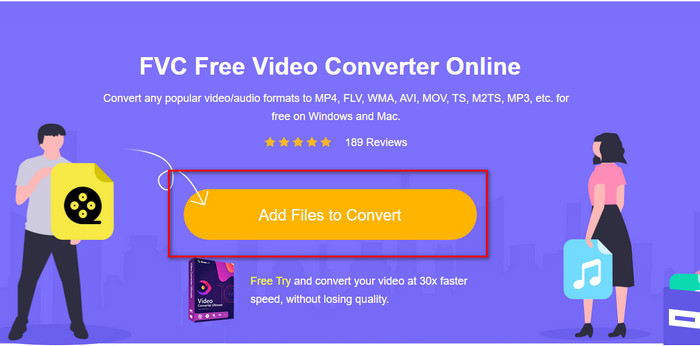
Βήμα 2. Στη συνέχεια, πατήστε το κουμπί Add Files to Convert και επιτρέψτε στο εργαλείο να ανοίξει. Επιλέξτε το αρχείο από τον φάκελο και πατήστε Open.
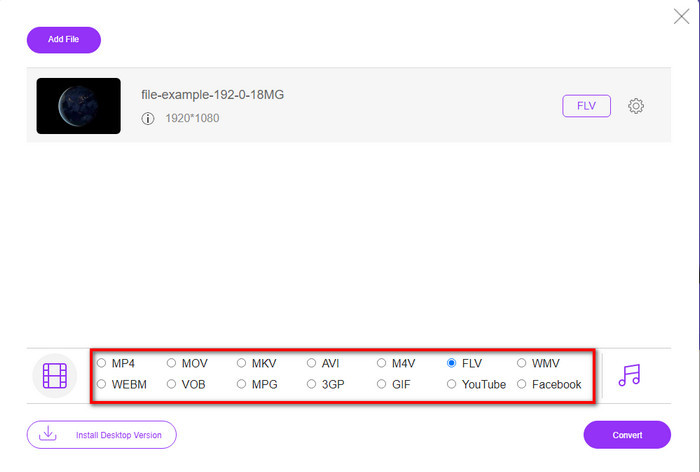
Βήμα 3. Επιλέξτε τη μορφή FLV ή κάποια άλλη διαθέσιμη μορφή παρακάτω.
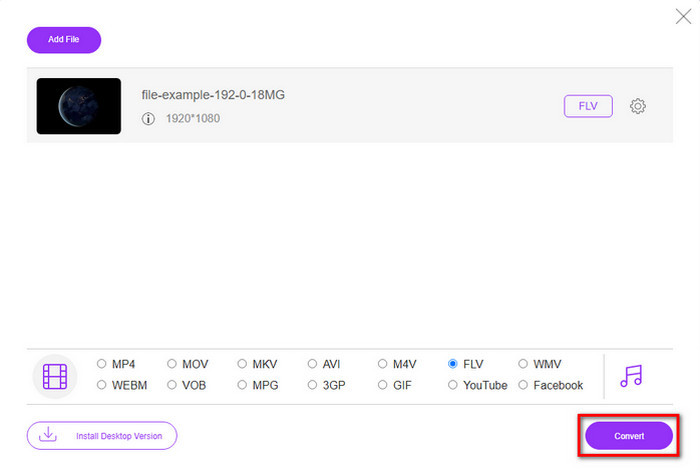
Βήμα 4. Μόλις τελειώσετε, κάντε κλικ στο Convert για να ξεκινήσει η διαδικασία μετατροπής.
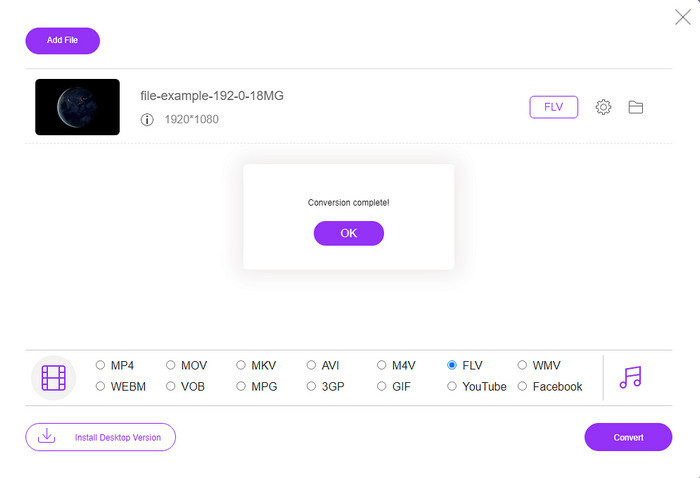
Βήμα 5. Η μετατροπή ολοκληρώνεται και θα εμφανιστεί στην οθόνη σας μαζί με τον φάκελο και το αρχείο.
Πλεονεκτήματα
- Δεν χρειάζεται να κάνετε λήψη του λογισμικού στη μονάδα δίσκου σας.
- Χωρίς κακόβουλο λογισμικό και χωρίς ενοχλητικές διαφημίσεις στη διεπαφή.
- Απεριόριστη πρόσβαση σε διαδικτυακούς μετατροπείς σε οποιονδήποτε.
Μειονεκτήματα
- Υποστηρίζει περιορισμένες μορφές και κωδικοποιητές για μετατροπή.
- Δεν διαθέτει προηγμένες δυνατότητες όπως το FVC Video Converter Ultimate.
Μέρος 3. DivX εναντίον FLV
DivX
Το Digital Video Express, συντομογραφία για το DivX, είναι η καλύτερη μορφή για ροές βίντεο υψηλής συμπίεσης και DVD με ελάχιστες αλλαγές ποιότητας. Αυτός ο κωδικοποιητής λειτουργεί σχεδόν όπως το MPEG-4, αλλά η κύρια διαφορά είναι ότι είναι ιδιόκτητο. Επιπλέον, δεν μπορείτε να αναπαράγετε ένα βίντεο .divx χωρίς την κατάλληλη βοήθεια κατάλληλου λογισμικού. Αντί να το παίζετε σωστά στα Windows ή στο Mac σας, ακόμα και σε smartphone, θα λαμβάνετε μόνο ειδοποιήσεις ότι αυτή η μορφή δεν υποστηρίζεται. Αν και η μορφή είναι λίγο ενοχλητική στη χρήση, εξακολουθεί να σας βοηθά να εξοικονομήσετε εύρος ζώνης και χώρο στη μονάδα δίσκου σας.
FLV
Ωστόσο, το FLV ή το Flash Video είναι η κορυφαία επιλογή μορφής που χρησιμοποιείται περισσότερο στην HTML 5. Αυτή η μορφή λειτουργεί διαφορετικά από το DivX, επειδή αυτή η μορφή χρησιμοποιεί την υποστήριξη του Adobe Air και του Flash Player για την αποτελεσματική διανομή του αρχείου πολυμέσων στον Ιστό. Επίσης, αυτή ήταν η μακρά τυπική μορφή για την ενσωμάτωση βίντεο σε πλατφόρμες κοινής χρήσης βίντεο που περιέχουν αρχεία πολυμέσων. Αν και το FLV είναι καλύτερο από το DivX, αν μιλάμε για συμπίεση του αρχείου, το DivX είναι μικρότερο σε μέγεθος από το FLV. Αλλά αν θέλετε να διανείμετε το αρχείο σας online πιο γρήγορα, η επέκταση του αρχείου σας θα πρέπει να είναι .flv.
Μέρος 4. Συχνές ερωτήσεις σχετικά με τη μετατροπή DivX σε FLV
Μετά τη μετατροπή του DivX, αλλάζει η ποιότητά του;
Αν και τα αρχεία DivX είναι σε μορφή παλιάς έκδοσης, μπορεί να αποθηκεύσει βίντεο υψηλής ποιότητας συμπιεσμένα σε μικρά μεγέθη. Έτσι, μετά τη μετατροπή του DivX σε FLV, MP4, MOV, AVI ή οποιαδήποτε άλλη μορφή, η ποιότητα του βίντεο DivX δεν πρέπει να αλλάξει. Ωστόσο, εάν χρησιμοποιείτε λάθος εργαλείο που δεν υποστηρίζει έξοδο υψηλής ποιότητας, περιμένετε απώλεια ποιότητας. Αλλά μπορούμε να το αποφύγουμε χρησιμοποιώντας τα εργαλεία που είναι διαθέσιμα παραπάνω.
Γιατί δεν μπορώ να αναπαράγω αρχεία DivX στο Windows Media Player;
Παρόλο που τα αρχεία DivX έγιναν δημοφιλή στο διαδίκτυο, η αναπαραγωγή τους στο Windows Media Player είναι δυνατή αν κατεβάσετε το σωστό codec. Αλλά αν δεν θέλετε να μπείτε σε αυτή τη διαδικασία, διαβάστε αυτό το άρθρο και γνωρίστε τους 5 DivX players που μπορείτε να χρησιμοποιήσετε για να αναπαραγάγετε αυτό το αρχείο.
Η μετατροπή αρχείων DivX απαιτεί χρόνο;
Λοιπόν, εξαρτάται από το μέγεθος του αρχείου DivX σας. Σε όλες τις περιπτώσεις, όσο μεγαλύτερο είναι το αρχείο DivX, τόσο περισσότερο θα περιμένετε να ολοκληρωθεί η μετατροπή του. Ας υποθέσουμε ότι χρησιμοποιείτε ένα εργαλείο με επιτάχυνση υλικού και γρήγορη μετατροπή. Σε αυτήν την περίπτωση, είστε τυχεροί γιατί δεν θα χρειαστεί να περιμένετε ή να ξοδέψετε πολύ χρόνο περιμένοντας να μετατρέψετε το αρχείο.
συμπέρασμα
Συνολικά, οι λεπτομερείς πληροφορίες που αναφέρθηκαν παραπάνω μας βοηθούν να κατανοήσουμε γιατί πρέπει να μετατρέψουμε DivX σε FLV. Η χρήση του καλύτερου εργαλείου για να παραχθεί το καλύτερο αποτέλεσμα είναι απαραίτητη για να αποφύγετε οποιαδήποτε ταλαιπωρία. Καθώς ψάξαμε στο διαδίκτυο, βρήκαμε τον καλύτερο μετατροπέα που μπορείτε να χρησιμοποιήσετε online ή offline. Επιπλέον, αν θέλετε να χρησιμοποιήσετε το FVC Free Video Converter Online ως online λύση σας, τότε πρέπει να κάνετε κλικ στον σύνδεσμο. Ωστόσο, αν θέλετε να έχετε το πιο εξαιρετικό τελικό αποτέλεσμα που υποστηρίζει περισσότερες από 200 μορφές και διαθέτει ειδικές λειτουργίες, τότε πρέπει να κατεβάσετε τον FVC Video Converter Ultimate.
-
 4 τρόποι για να μετατρέψετε το DivX σε MOV δωρεάν [Online & Offline]
 Αντιμετωπίζετε τους περιορισμούς ενός DivX ή δεν έχετε τις συσκευές αναπαραγωγής πολυμέσων για πρόσβαση σε βίντεο σε αυτήν τη μορφή; Εάν θέλετε να το μετατρέψετε σε μορφή MOV, συνεχίστε να διαβάζετε αυτό το άρθρο για να καλύψετε τα κενά.
-
 Εξαιρετική προσέγγιση για τη μετατροπή M2TS σε FLV Online & Offline
 Έχετε προσπαθήσει ποτέ να μετατρέψετε το M2TS σε FLV σε διαφορετική πλατφόρμα; Διαβάστε αυτό το άρθρο για να μάθετε περισσότερα σχετικά με το καλύτερο εύχρηστο διαδικτυακό εργαλείο και λογισμικό που θα πρέπει να εξετάσετε τη μετατροπή του M2TS σε FLV.
-
 Ο καλύτερος μετατροπέας 3GP σε FLV για χρήση στη μετατροπή 3GP σε FLV [2022]
 Έχετε προσπαθήσει ποτέ να μετατρέψετε 3GP σε FLV, αλλά δεν ξέρετε τι είδους μετατροπέα θα χρησιμοποιήσετε; Διαβάστε αυτό το άρθρο για να μάθετε όλες τις λεπτομέρειες σχετικά με τη μετατροπή 3GP σε FLV.
