


 Video Converter Ultimate
 Εγγραφή οθόνης
 Επισκευή βίντεο
Πλεονεκτικές μέθοδοι για να μετατρέψετε εύκολα το DV σε FLV
Το αρχείο DV είναι ένα αρχείο που περιέχει ψηφιακό βίντεο. Η ανάλυσή μας σε αρχεία DV έχει δείξει ότι το Digital Video είναι μία χρήση αυτής της μορφής. Δεν έχουμε εξηγήσει πλήρως ακόμη τι ακριβώς περιέχουν αυτά τα αρχεία ή πώς τα χρησιμοποιούν οι χρήστες, αλλά η ομάδα μας επεξεργάζεται χιλιάδες διαφορετικούς τύπους αρχείων. Αν έχετε πληροφορίες σχετικά με αυτή τη μορφή, θα χαρούμε πολύ να τις ακούσουμε. Ωστόσο, η κατάληξη αρχείου .flv αντιστοιχεί σε αρχεία FLV (Flash Video). Οι χρήστες μπορούν να χρησιμοποιήσουν το Adobe Flash Player ή το Adobe Air για να κάνουν ροή (streaming) ήχου και βίντεο μέσω διαδικτύου με χρήση FLV. Τα αρχεία FLV κωδικοποιούν τα δεδομένα τους με τον ίδιο τρόπο όπως τα αρχεία SWF. Για να λυθεί το ζήτημα της μορφής βίντεο DV, οι χρήστες είναι πιο πιθανό να τη μετατρέψουν σε μορφή FLV, η οποία είναι συμβατή με ένα ευρύ φάσμα προγραμμάτων αναπαραγωγής πολυμέσων. Επομένως, αν αναζητάτε εργαλεία που μπορούν να μετατρέψουν DV σε FLV, συνεχίστε να διαβάζετε αυτό το άρθρο.

Μέρος 1. Ο καλύτερος τρόπος για να μετατρέψετε DV σε FLV εκτός σύνδεσης
Το Video Converter Ultimate είναι ένα από τα εξαιρετικά προγράμματα που μπορούν να σας βοηθήσουν να μετατρέψετε τη μορφή βίντεο DV σε FLV. Με το σύστημα υπερ-ταχείας επιτάχυνσης που διαθέτει, μπορείτε να μετατρέψετε DV σε FLV μέσα σε ένα δευτερόλεπτο, κάτι που άλλα εργαλεία δεν μπορούν να ξεπεράσουν. Χάρη σε αυτό το λογισμικό, δεν θα χρειάζεται να ανησυχείτε για τη μετατροπή DV σε άλλες μορφές, επειδή υποστηρίζει ποικιλία μορφών που ίσως ούτε φαντάζεστε, όπως MP4, MOV, 3GP, FLV, WMV, WEBM, MPEG κ.ά. Πέρα από τη μετατροπή αρχείων, αυτό το πρόγραμμα διαθέτει και άλλα ενσωματωμένα εργαλεία: μπορεί να περικόψει, να βελτιώσει, να συγχωνεύσει, να επιταχύνει και προσφέρει και άλλα χρήσιμα εργαλεία που μπορούν να αναβαθμίσουν το βίντεό σας στο επόμενο επίπεδο.

Video Converter Ultimate
6.357.200+ λήψεις- Υποστηρίζει πάνω από 1000 διαφορετικές μορφές βίντεο και ήχου.
- Μετατρέψτε 30 φορές πιο γρήγορα από άλλους μετατροπείς.
- Μπορεί να μετατρέψει βίντεο σε ποιότητα έως 4K HD.
- Προσφέρει πολλά άλλα επιλεγμένα εργαλεία που βοηθούν στη βελτίωση του βίντεό σας.
- Δεν απαιτεί βαρύ υλικό συντήρησης για να λειτουργήσει.
Δωρεάν ΛήψηΓια Windows 7 ή νεότεραΑσφαλής λήψη
Δωρεάν ΛήψηΓια MacOS 10.7 ή νεότεροΑσφαλής λήψη
Βήμα 1: Κατεβάστε το λογισμικό κάνοντας κλικ στο κουμπί Free Download που βρίσκεται παραπάνω. Στη συνέχεια, πρέπει να εγκαταστήσετε το πρόγραμμα στον υπολογιστή σας και να το εκκινήσετε κάνοντας κλικ στο Start Now μόλις ολοκληρωθεί η εγκατάσταση.
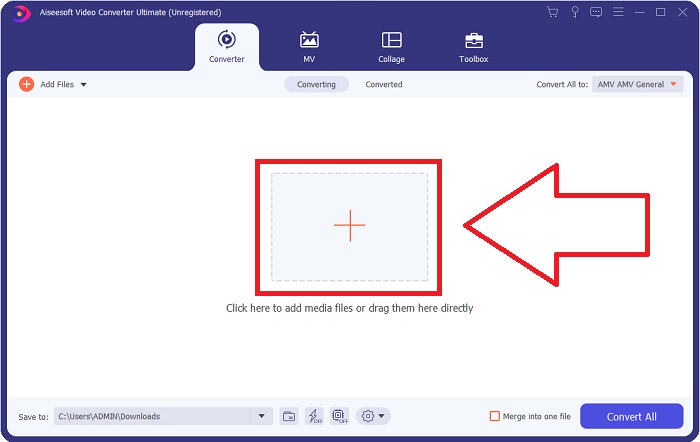
Βήμα 2: Έπειτα, θα εμφανιστεί ένα παράθυρο στην οθόνη σας. Το λογισμικό θα εμφανίσει τη λειτουργία Converter. Για να εισαγάγετε ένα αρχείο από τον υπολογιστή σας, κάντε κλικ στο κουμπί + στο κέντρο ή απλώς σύρετε οποιοδήποτε αρχείο βίντεο μορφής DV στο κέντρο.
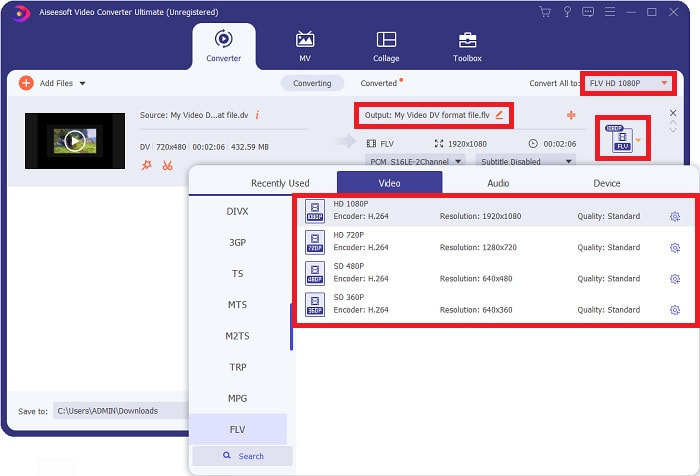
Βήμα 3: Βρίσκεστε στη μέση της διαδικασίας. Κάντε κλικ στο εικονίδιο επιλογής μορφής ακριβώς δίπλα στην έξοδο του βίντεό σας και επιλέξτε μορφή βίντεο FLV. Στη συνέχεια, μπορείτε επίσης να επιλέξετε τις διαφορετικές ποιότητες βίντεο που προσφέρει το λογισμικό.
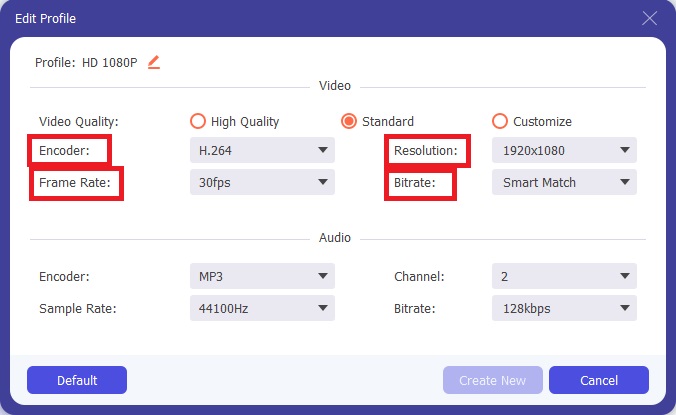
Βήμα 4: Λίγη προσπάθεια ακόμα για να τελειώσετε. Όταν όλες οι διαθέσιμες ποιότητες βίντεο δεν ικανοποιούν τις ανάγκες σας, μπορείτε να προσαρμόσετε την ποιότητα του τελικού βίντεο κάνοντας κλικ στο εικονίδιο με το γρανάζι, δίπλα στην επιλογή ποιότητας βίντεο.
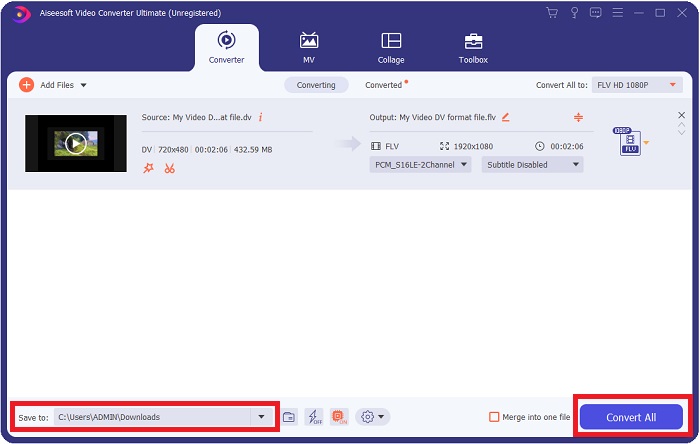
Βήμα 5: Τώρα που πλησιάζετε στο τέλος, μεταβείτε στο πεδίο Save to στην άλλη γωνία για να επιλέξετε τη θέση όπου θα αποθηκευτεί το μετατρεπόμενο αρχείο σας. Μπορείτε πλέον να μετατρέψετε το αρχείο κάνοντας κλικ στο κουμπί Convert All που βρίσκεται στην κάτω δεξιά γωνία της οθόνης.
Μέρος 2. Πώς να μετατρέψετε DV σε FLV Online
Το διαδίκτυο διαθέτει και παρουσιάζει διάφορα διαδικτυακά εργαλεία που μπορούν να σας βοηθήσουν να μετατρέψετε DV σε FLV. Ωστόσο, αυτό το online εργαλείο με την ονομασία Free Video Converter Online διαφέρει από τα άλλα χάρη στην ταχύτατη διαδικασία μετατροπής, επειδή μπορεί να μετατρέψει ένα αρχείο μέσα σε ένα δευτερόλεπτο. Υποστηρίζει επίσης μορφές όπως MP4, FLV, MOV, M4A, TS, WMV, ASF, VOB, AAC, WMA και πολλές ακόμη. Μπορεί, επίσης, να μετατρέπει βίντεο σε βίντεο HD χωρίς απώλεια ποιότητας. Αυτό το δωρεάν εργαλείο μετατροπής βίντεο είναι γνωστό για τις δυνατότητες μετατροπής του, επιτρέποντας στους χρήστες να ρυθμίζουν λεπτομερώς τα βίντεό τους χωρίς κόπο. Ας δούμε τώρα όλα τα βήματα που θα σας βοηθήσουν να χρησιμοποιήσετε αυτόν τον online μετατροπέα.
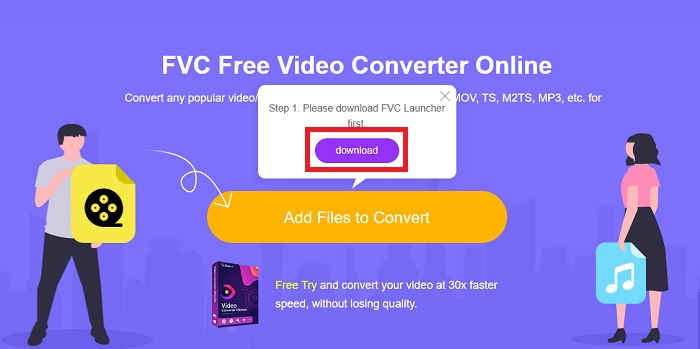
Βήμα 1: Για να αποκτήσετε πρόσβαση στην κεντρική σελίδα αυτού του online εργαλείου, κάντε κλικ σε αυτόν τον σύνδεσμο και προχωρήστε. Κάντε κλικ στο κουμπί Add Files to Convert στην κύρια οθόνη του υπολογιστή σας για να κατεβάσετε τον εκκινητή που θα σας επιτρέψει να χρησιμοποιήσετε αυτό το online εργαλείο. Έπειτα, κάντε ξανά κλικ σε αυτό για να προχωρήσετε στο ανέβασμα ενός αρχείου.
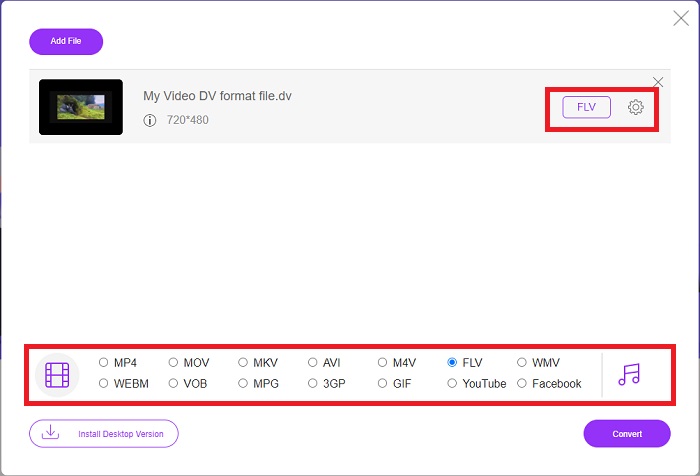
Βήμα 2: Τώρα που έχετε ένα αρχείο που θέλετε να μετατρέψετε, πρέπει να επιλέξετε τη μορφή βίντεο FLV από την επιλογή μορφών βίντεο στο κάτω μέρος της οθόνης σας. Μπορείτε επίσης να προσαρμόσετε ορισμένες προδιαγραφές του βίντεό σας αλλάζοντας ρυθμίσεις όπως η ανάλυση, ο ρυθμός καρέ κ.λπ., κάνοντας κλικ στο εικονίδιο με το γρανάζι.
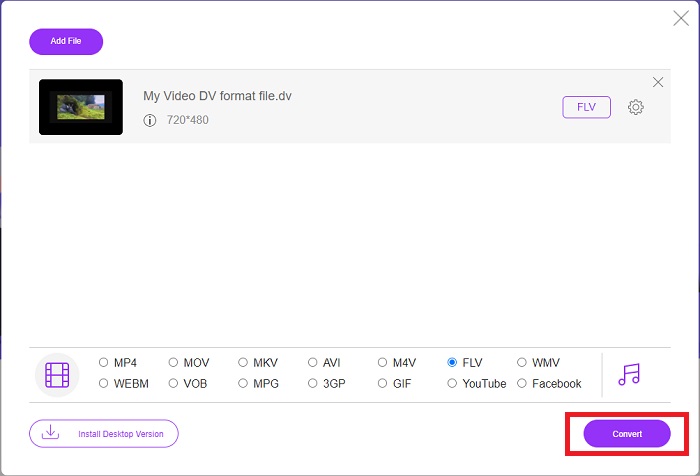
Βήμα 3: Έπειτα, μπορείτε πλέον να μετατρέψετε το αρχείο κάνοντας κλικ στο κουμπί Convert που βρίσκεται στην κάτω αριστερή πλευρά του παραθύρου.
Μέρος 3. Διάγραμμα σύγκρισης: DV Vs. FLV
Ένα αρχείο ψηφιακού βίντεο (DV) δημιουργείται από μια ψηφιακή κάμερα και αποθηκεύεται στην ακατέργαστη μορφή που χρησιμοποιούν πάντα οι χρήστες. Ένα αρχείο ψηφιακού βίντεο (DV) περιλαμβάνει μπλοκ ψηφιακής διεπαφής (DIF), το καθένα από τα οποία περιέχει 80 byte. Ο ήχος, το βίντεο και τα μεταδεδομένα μπορούν να συμπεριληφθούν σε μπλοκ DIF. Τα μπλοκ DIF μπορούν να αποθηκευτούν ως αρχεία υπολογιστή στην ακατέργαστη μορφή τους ή ως μορφές αρχείων τυλιγμένα γύρω τους—πολλαπλασιάζοντας τα μπλοκ σε ακολουθίες 150 μπλοκ. Ένα καρέ βίντεο μπορεί να περιέχει έως και δέκα ή δώδεκα ακολουθίες.
Ωστόσο, υπηρεσίες ροής βίντεο όπως το YouTube, το Hulu και το Vevo χρησιμοποιούν τη μορφή Flash Video της Adobe Systems για τα online βίντεό τους. Το Adobe Flash Player (συμπεριλαμβανομένων των προσθηκών για προγράμματα περιήγησης) και λογισμικό τρίτων μπορούν να διαβάσουν και να αναπαράγουν αρχεία FLV σε σχεδόν κάθε λειτουργικό σύστημα (εκτός από το iOS). Τα iPhone και οι συσκευές Android μπορούν να αναπαράγουν αρχεία FLV χρησιμοποιώντας λογισμικό ανοικτού κώδικα και συγκεκριμένους browsers. Το Flash εξακολουθεί να αποτελεί πρόβλημα για το iOS. Τα αρχεία FLV μπορούν να προβληθούν μόνο σε λογισμικό αναπαραγωγής FLV, ενώ οι χρήστες μπορούν να χρησιμοποιήσουν λογισμικό καταγραφής οθόνης και εγγραφής για να καταγράφουν βίντεο FLV.
| Επέκταση αρχείου | DV (.dv) | FLV (.flv) |
| Ονομα αρχείου | Ψηφιακό βίντεο | Αρχείο βίντεο Flash |
| Αναπτύχθηκε από | Παραγωγοί πολλαπλών βιντεοκάμερων | Adobe System Incorporated |
| Πλεονεκτήματα | ◆ Ένα τυπικό Mini DV έχει χωρητικότητα 19,5 GB, που είναι περίπου, 25 σεντς ανά GB αποθηκευτικού χώρου. ◆ Διαισθητική μετατροπή HD σε τυπικό ◆ Οι ταινίες είναι εύκολες στην επισήμανση και ιδανικές για μακροχρόνια αποθήκευση. | Όταν πρόκειται για τη δημιουργία δυναμικών και διαδραστικών ιστοσελίδων, το Adobe Flash μπορεί να είναι ένα τεράστιο πλεονέκτημα. Η διαδικασία είναι απλή, αλλά τα αποτελέσματα μπορεί να είναι σημαντικά. Στην ακμή του, το Flash χρησιμοποιήθηκε ευρέως και για απλά βιντεοπαιχνίδια. |
| Μειονεκτήματα | ◆ Απαιτείται σύνδεση firewire (οι περισσότεροι υπολογιστές στοκ δεν το διαθέτουν). ◆ Η ποιότητα μιας εγγραφής μειώνεται με κάθε επόμενο πέρασμα. ◆ Ηχογραφεί μόνο για 60 έως 90 λεπτά κάθε φορά. | Είναι ένα μειονέκτημα ότι το FLV έχει μειωθεί σε δημοτικότητα με τα χρόνια. Η δημιουργία περιεχομένου FLV μπορεί να διαρκέσει πολύ και να κοστίσει πολλά χρήματα. Επιπλέον, οι χρήστες δεν μπορούν να δουν περιεχόμενο Flash σε συσκευές iOS, περιορίζοντας σοβαρά την ικανότητά του να προσελκύει νέους οπαδούς. |
| Προγράμματα που υποστηρίζουν το αρχείο | ◆ VLC Media Player | ◆ RealPlayer ◆ Apple QuickTime Player ◆ VLC Media Player ◆ MPlayer |
Μέρος 4. Συχνές ερωτήσεις σχετικά με τη μετατροπή DV σε FLV
Τι ανάλυση είναι το DV;
Με το DV, η τυπική ανάλυση καταγράφει 720 οριζόντια pixel και 480 πλεγμένες γραμμές σε χώρες που χρησιμοποιούν ηλεκτρικό ρεύμα 60 Hz και 576 γραμμές με ηλεκτρικό ρεύμα 50 Hz. Μια έκδοση ψηφιακού βίντεο υψηλής ευκρίνειας (HDV) είναι επίσημο πρότυπο HDV και το DVCPRO HD της Panasonic είναι ένα παράδειγμα τέτοιας μορφής (βλ. HDV και DVCPRO).
Είναι το βίντεο DV interlaced;
Υπάρχουν πάντα πολλά πλάνα DV στο κάτω μέρος πρώτα. Μπορεί να εμφανιστούν πρώτα άλλα πλάνα. Ερμηνεύστε το εισαγόμενο κλιπ ξανά με ενεργοποιημένο το διαχωρισμό πεδίων, κατεβάστε πρώτα (αρχείο > ερμηνεία λήψεων > κεντρικό) για να δείτε αν είναι συμπλεγμένο. Στη συνέχεια, στο παράθυρο του έργου, χρησιμοποιήστε τη συντόμευση Alt-double-click για πρόσβαση σε αυτό. Χρησιμοποιήστε τα πλήκτρα page up/Dn για να περιηγηθείτε στο βίντεο. Η διασύνδεση προκύπτει εάν το βίντεο αλλάζει κάθε φορά που πατάτε το κουμπί αναπαραγωγής. Μια σπασμωδική κίνηση υποδεικνύει ότι η σειρά πεδίου είναι λανθασμένη και το βίντεο θα πρέπει να ερμηνευτεί εκ νέου χρησιμοποιώντας την άλλη σειρά πεδίου.
Είναι το FLV κατάλληλη μορφή βίντεο;
Το Adobe Flash Player αποθηκεύει αρχεία βίντεο σε μορφή FLV. Όλες οι πλατφόρμες βίντεο και τα προγράμματα περιήγησης το δέχονται ως μία από τις υποστηριζόμενες μορφές βίντεο. Οι διαδικτυακές πλατφόρμες ροής βίντεο όπως το YouTube επωφελούνται από τη χρήση της μορφής FLV. Λόγω του μικρού μεγέθους τους, η λήψη τους είναι γρήγορη και απλή.
συμπέρασμα
Συνοψίζοντας όλα όσα αναφέρθηκαν, θα παρατηρήσετε ότι οι καλύτεροι μετατροπείς που προτείνει αυτό το άρθρο είναι το λογισμικό Video Converter Ultimate και το online εργαλείο Free Video Converter Online. Εφόσον αυτοί οι δύο μετατροπείς μπορούν να ξεπεράσουν τους υπόλοιπους, διαθέτουν επαγγελματικά πρόσθετα εργαλεία και ένα φιλικό προς τον χρήστη περιβάλλον εργασίας.
-
 Καλύτερη στρατηγική για το πώς να μετατρέψετε το αρχείο DV σε μορφή AVI με λεπτομερή βήματα
 Θέλετε να μετατρέψετε το αρχείο DV σας σε AVI; Στη συνέχεια, διαβάστε αυτό το άρθρο για να μάθετε το μοναδικό εργαλείο που μπορείτε να χρησιμοποιήσετε για τη μετατροπή και ένα πρόγραμμα αναπαραγωγής πολυμέσων για την αναπαραγωγή του DV σας στον υπολογιστή ή στο Mac σας.
-
 Κορυφαίοι 2 τρόποι για το πώς να μετατρέψετε αρχεία DV σε MOV δωρεάν στην επιφάνεια εργασίας και στο Διαδίκτυο
 Έχετε πρόβλημα με τη μετατροπή των αρχείων DV σε MOV στο Mac σας; Εάν αυτό είναι το πρόβλημά σας, τότε μπορούμε να το λύσουμε μαζί αν διαβάσουμε αυτό το άρθρο.
-
 MP4 έως FLV | Κορυφαίοι 3 δωρεάν μετατροπείς (Online / Mac / Windows)
 Αυτή η ανάρτηση είναι ο αναλυτικός οδηγός για τη μετατροπή MP4 σε FLV. Μπορείτε να πάρετε τους 3 πρώτους δωρεάν μετατροπείς για να αλλάξετε MP4 σε FLV online, σε υπολογιστή με Windows ή Mac με ευκολία.
