


 Video Converter Ultimate
 Εγγραφή οθόνης
 Επισκευή βίντεο
2 Προτεινόμενοι μετατροπείς που χρησιμοποιούνται για την αλλαγή του F4V σε FLV με εκπαιδευτικά προγράμματα
Το Adobe Flash Player υποστηρίζει τα F4V και FLV ως δοχεία αναπαραγωγής πολυμέσων για ροή περιεχομένου από το διαδίκτυο. Αν και η μορφή βασίζεται στην Adobe, αυτά τα δύο αρχεία διαφέρουν σε πολλά σημεία. Για παράδειγμα, τα δεδομένα που κωδικοποιούνται σε FLV δεν είναι ίδια με του F4V, επειδή το FLV έχει ομοιότητα με το SWF. Επιπλέον, αν θέλετε να μετατρέψετε F4V σε FLV και να έχετε έναν κωδικοποιητή παρόμοιο με SWF, τότε διαβάστε αυτό το άρθρο για να μάθετε περισσότερα.

Μέρος 1. 2 του Πιο Επιλεγμένου Μετατροπέα για Μετατροπή F4V σε FLV
1η Επιλογή. FVC Video Converter Ultimate
Το FVC Video Converter Ultimate είναι ο ιδιαίτερα προτεινόμενος μετατροπέας F4V σε FLV που μπορείτε να κατεβάσετε σε Windows ή Mac. Αυτό το εργαλείο διαθέτει την πιο γρήγορη και αξιόπιστη διαδικασία μετατροπής που θα συναντήσετε ποτέ, και ήδη ικανοποιεί εκατομμύρια χρήστες. Επιπλέον, η μετατροπή μορφών δεν είναι το μοναδικό δυνατό σημείο αυτού του εργαλείου. Μαντέψτε τι; Μπορείτε επίσης να κάνετε επεξεργασία εδώ, όπως να κόψετε το βίντεο, να συγχωνεύσετε, να ενισχύσετε τον ήχο, να περικόψετε και άλλα. Αν θέλετε έναν μοναδικό μετατροπέα που θα καλύψει τις ανάγκες σας, τότε αυτός είναι ο κατάλληλος. Οι παρακάτω λεπτομέρειες είναι τα βήματα για να μετατρέψετε τα αρχεία F4V σε μορφή FLV μέσα σε λίγα λεπτά.
Πώς να μετατρέψετε F4V σε FLV με τη βοήθεια του FVC Video Converter Ultimate:
Βήμα 1. Για να κατεβάσετε το λογισμικό στον δίσκο του υπολογιστή σας, κάντε κλικ στο κουμπί λήψης.
Δωρεάν ΛήψηΓια Windows 7 ή νεότεραΑσφαλής λήψη
Δωρεάν ΛήψηΓια MacOS 10.7 ή νεότεροΑσφαλής λήψη
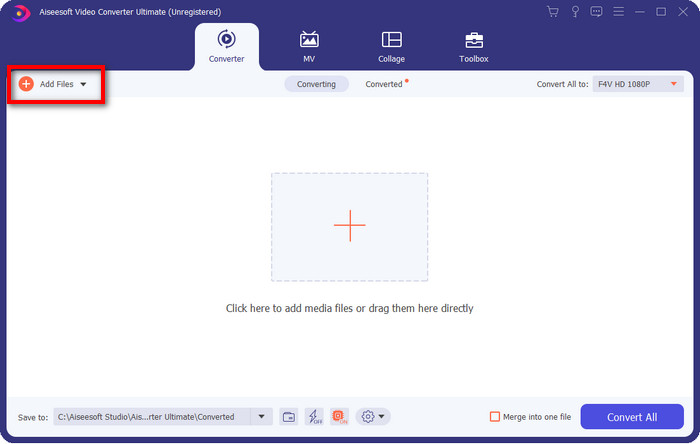
Βήμα 2. Κάντε κλικ στο λογισμικό για να το ανοίξετε, εισαγάγετε το αρχείο κάνοντας κλικ στο Add Files στο επάνω δεξί μέρος της διεπαφής και πατήστε Open μόλις επιλέξετε το αρχείο F4V που θέλετε να μετατρέψετε.
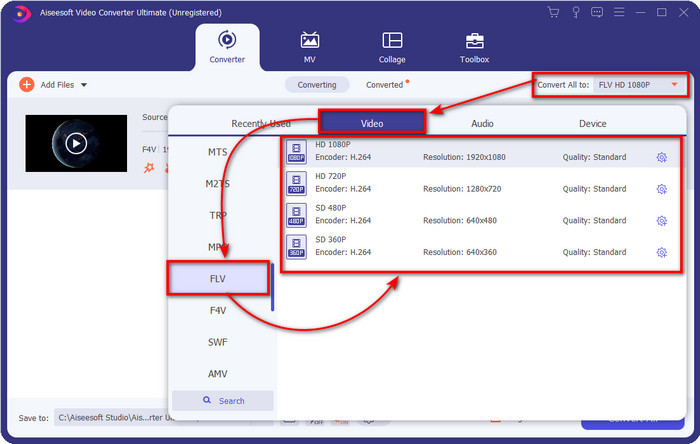
Βήμα 3. Πατήστε το κουμπί Convert All to και αλλάξτε τη μορφή σε FLV.
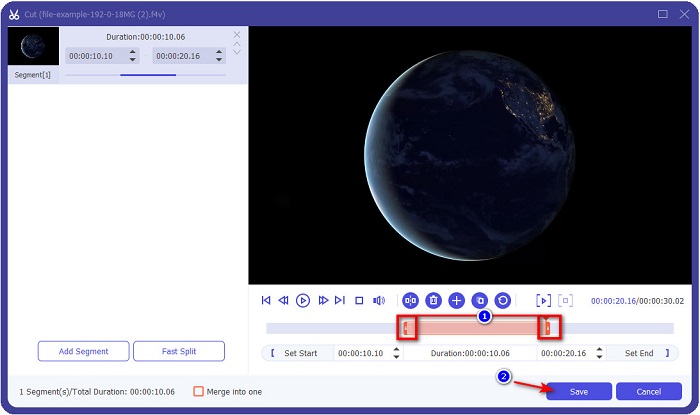
Θέλετε να κάνετε το βίντεο πιο σύντομο; Αν ναι, κάντε κλικ στο εικονίδιο με το ψαλίδι. Ρυθμίστε τη λαβή σύμφωνα με τη διάρκεια που θέλετε να έχει το βίντεο και στη συνέχεια κάντε κλικ στο Save για να αποθηκεύσετε τις αλλαγές.
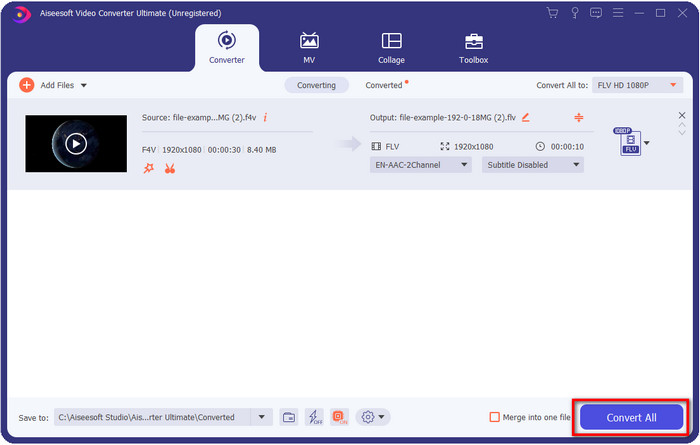
Βήμα 4. Για να αλλάξετε από F4V σε FLV, κάντε κλικ στο Convert All και η διαδικασία θα ξεκινήσει άμεσα. Θα εμφανιστεί ένας φάκελος του υπολογιστή όπου βρίσκεται το αρχείο σας.
Πλεονεκτήματα
- Μετατρέπει αβίαστα πολλαπλά F4V σε FLV, AVI, MOV, MKV και 200+ ακόμη μορφές.
- Η επιτάχυνση υλικού και η γρήγορη μετατροπή είναι διαθέσιμες εδώ για να κάνουν τη μετατροπή πιο γρήγορη.
- Είναι διαθέσιμο σε όλα τα Windows & macOS.
- Οι εξαιρετικές δυνατότητες επεξεργασίας βίντεο για να κάνετε το βίντεό σας να φαίνεται εκπληκτικό βρίσκονται στην Εργαλειοθήκη.
Μειονεκτήματα
- Πρέπει να το αγοράσετε για να μπορέσετε να το χρησιμοποιήσετε.
- Η λήψη του μετατροπέα στην επιφάνεια εργασίας είναι απαραίτητη.
2η Επιλογή. FVC Free Video Converter Online
Το FVC Free Video Converter Online σάς βοηθά να ολοκληρώσετε τη διαδικασία μετατροπής διαδικτυακά. Αυτό το εργαλείο είναι διαθέσιμο σε όλους τους browsers για να μετατρέψετε F4V σε FLV online χωρίς περιορισμούς. Ωστόσο, δεν μπορείτε να κάνετε μαζική μετατροπή εδώ, επειδή δεν υποστηρίζεται. Παρ’ όλα αυτά, μπορείτε να πετύχετε τη μορφή που θέλετε να μετατρέψετε με αυτόν τον online μετατροπέα. Θέλετε να μάθετε πώς; Τότε ακολουθήστε τα παρακάτω βήματα.
Πώς να μετατρέψετε F4V σε FLV με τη βοήθεια του FVC Free Video Converter Online:
Βήμα 1. Για να ανοίξετε το διαδικτυακό εργαλείο, πρέπει να κάνετε κλικ σε αυτόν τον σύνδεσμο.
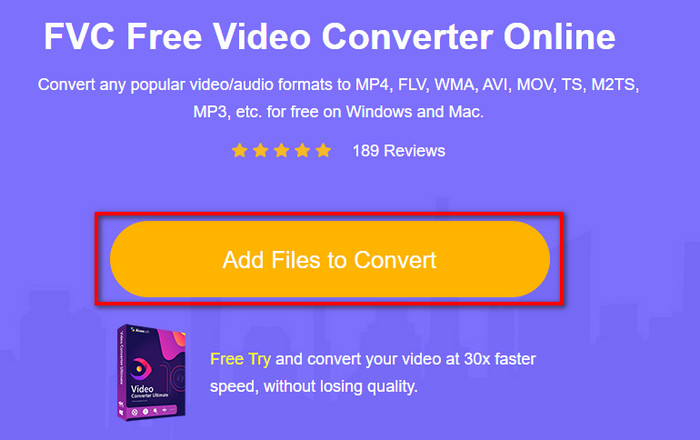
Βήμα 2. Στο κύριο περιβάλλον του online μετατροπέα, κάντε κλικ στο κουμπί Add Files to Convert. Βρείτε το αρχείο F4V στον φάκελο που θα εμφανιστεί και πατήστε Open.
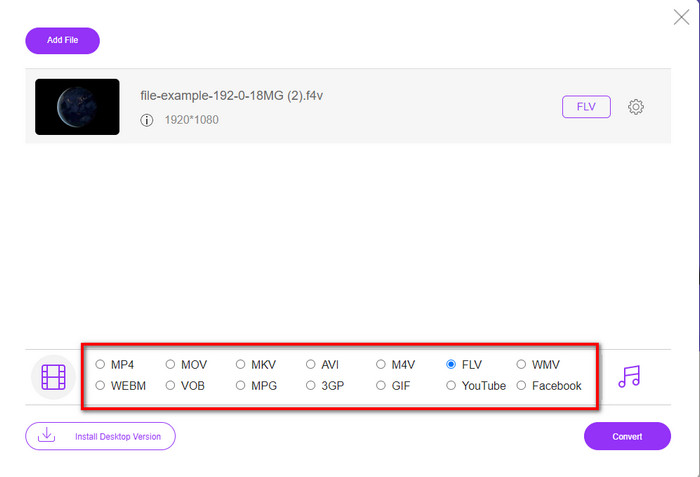
Βήμα 3. Στο κάτω μέρος, υπάρχουν πολλές μορφές που μπορείτε να επιλέξετε· κάντε κλικ στο FLV.
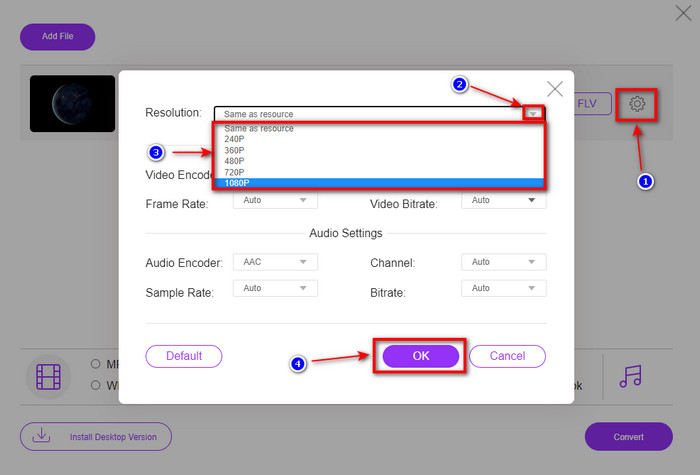
Θέλετε να αλλάξετε την ανάλυση του βίντεο; Τότε κάντε κλικ στο εικονίδιο γραναζιού, πατήστε το drop-down και επιλέξτε την ποιότητα βίντεο.
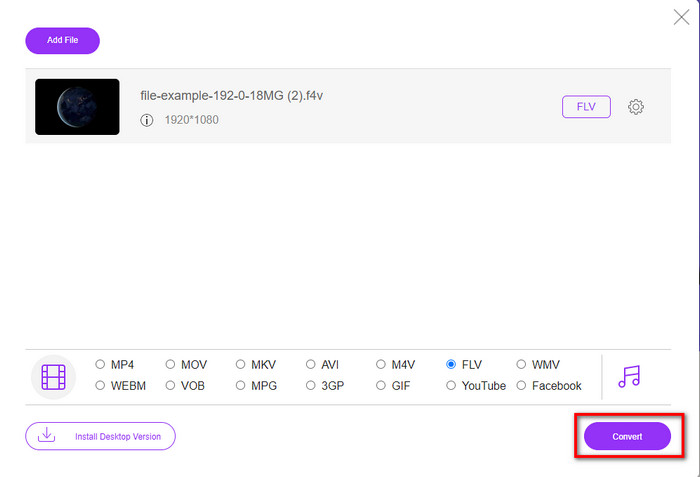
Βήμα 4. Ξεκινήστε τη διαδικασία μετατροπής από F4V σε FLV κάνοντας κλικ στο Convert.
Πλεονεκτήματα
- Διατίθεται σε όλα τα προγράμματα περιήγησης ιστού που έχετε.
- Δωρεάν και εύχρηστος διαδικτυακός μετατροπέας.
- Χωρίς κακόβουλο λογισμικό και χωρίς διαφημίσεις στον κύριο ιστότοπο.
Μειονεκτήματα
- Η σύνδεση στο Διαδίκτυο είναι απαραίτητη.
- Δεν υποστηρίζει λειτουργίες επεξεργασίας βίντεο όπως το FVC Video Converter Ultimate.
Μέρος 2. F4V εναντίον FLV: Ποια από τις μορφές είναι η καλύτερη
Όπως αναφέρθηκε στην αρχή, αυτές οι δύο μορφές είναι κοντέινερ της Adobe που μπορείτε να χρησιμοποιήσετε για να τις διανείμετε στον Ιστό. Αλλά τώρα, ας συγκρίνουμε τις διαφορές μεταξύ των δύο μορφών διαβάζοντας τις παρακάτω λεπτομέρειες.
Η μορφή F4V είναι ένα κοντέινερ Quicktime όπως η μορφή MP4. Είναι μια βασική μορφή αρχείου πολυμέσων ISO για ροή βίντεο μέσω Διαδικτύου. Επίσης, αυτή η μορφή είναι μια αναβαθμισμένη έκδοση του FLV. Ωστόσο, υπάρχουν πολλά προβλήματα στην κωδικοποίηση βίντεο και ήχου που είναι σε FLV. Επιπλέον, δεν μπορείτε να δημιουργήσετε μια ιστοσελίδα HTML όπως μπορεί να κάνει το FLV για εσάς.
Το FLV είναι αρχεία που έχουν σχεδόν την ίδια δομή με το SWF. Αυτή η μορφή υποστηρίζεται περισσότερο στο Adobe Flash Player και στα περισσότερα HTML 5. Υποστηρίζει συμπίεση βίντεο και ήχου όπως οι κωδικοποιητές Sorenson Spark ή VP6. Επιπλέον, εάν σκέφτεστε να κατεβάσετε ένα βίντεο στον Ιστό, αυτή η μορφή είναι η καλύτερη επιλογή. Σε αντίθεση με το F4V, εάν θέλετε να δημιουργήσετε HTML στην ιστοσελίδα σας, αυτή είναι η μορφή για εσάς.
Θα ήταν καλύτερο να μετατρέψετε το F4V σε FLV, επειδή τα οφέλη που θα έχετε στο FLV που δεν είναι διαθέσιμα στο F4V. Αν και λέγεται ότι το F4V είναι η νέα έκδοση του FLV, η μοναδικότητα του FLV είναι μοναδική που το F4V δεν μπορεί να αντιγράψει από πολλές απόψεις.
Μέρος 3. Συχνές ερωτήσεις σχετικά με τη μετατροπή F4V σε FLV
Πώς μπορώ να παίξω βίντεο F4V;
Με τη βοήθεια ενός ισχυρού media player μπορείτε να το κάνετε χωρίς καμία δυσκολία, και το καλύτερο παράδειγμα είναι το Aiseesoft Blu-ray Player. Ακολουθήστε αυτά τα απλά βήματα για να μάθετε πώς να αναπαράγετε αρχεία F4V. Πρώτα κατεβάστε το λογισμικό στην επιφάνεια εργασίας σας και εκκινήστε το. Ανεβάστε το αρχείο στο εργαλείο κάνοντας κλικ στο Open File. Μετά τη φόρτωση, το αρχείο θα αναπαραχθεί αυτόματα.
Ποιό είναι καλύτερο? F4V ή MOV;
Εξαρτάται από τον σκοπό για τον οποίο θέλετε να το χρησιμοποιήσετε. Για παράδειγμα, το F4V είναι εξαιρετικό για τη διανομή αρχείων πολυμέσων στο διαδίκτυο χωρίς απώλεια ποιότητας. Ωστόσο, αν θέλετε να επεξεργαστείτε βίντεο σε Mac, προτιμήστε το MOV. Άρα, αν θέλετε να επεξεργαστείτε τα F4V βίντεό σας σε Mac, πρέπει να μάθετε πώς να μετατρέψετε F4V σε MOV.
Το F4V περιέχει έξοδο υψηλής ποιότητας;
Τα αρχεία F4V μπορεί να περιέχουν ποιότητα βίντεο 1080 ή 720, αλλά το μέγεθος του αρχείου θα παραμείνει ελάχιστο.
συμπέρασμα
Τώρα που μάθαμε πώς να αλλάζουμε F4V σε FLV με τη βοήθεια των μετατροπέων, είναι η κατάλληλη στιγμή να επιλέξετε τον αξιόπιστο μετατροπέα σας με βάση τις αξιολογήσεις. Αν θέλετε να ζήσετε μια δωρεάν online διαδικασία μετατροπής, πρέπει να χρησιμοποιήσετε το FVC Free Video Converter Online. Όμως αυτό το διαδικτυακό εργαλείο δεν μπορεί να ξεπεράσει τον απόλυτο μετατροπέα που αναφέραμε στην αρχή. Χωρίς να χρειάζεται περαιτέρω παρουσίαση, προτιμάμε να χρησιμοποιήσουμε το FVC Video Converter Ultimate, καθώς κάνει τη δουλειά της μετατροπής εύκολα και γρηγορότερα. Αυτός ο εντυπωσιακός μετατροπέας είναι μοναδικός και εντυπωσιάζει πολλούς χρήστες με τις ξεχωριστές λειτουργίες του. Έτσι, τώρα μπορούμε να πούμε ότι βρισκόμαστε ένα βήμα πιο κοντά στην επιτυχία με τη βοήθεια αυτών των εργαλείων.
-
 4 νεότεροι διαδικτυακοί και εκτός σύνδεσης μετατροπείς για μετατροπή F4V σε μορφή AVI
 Δεν έχετε ιδέα τι μετατροπέα πρέπει να χρησιμοποιήσετε για να μετατρέψετε το F4V σε AVI ή σε οποιαδήποτε άλλη μορφή βίντεο; Στη συνέχεια, διαβάστε αυτό το άρθρο καθώς μαθαίνουμε πώς να κάνετε μετατροπή με το διαθέσιμο εργαλείο.
-
 Πώς να μετατρέψετε το F4V σε MOV χωρίς απώλεια ποιότητας [Επίλυση]
 Εάν δυσκολεύεστε να αναγνωρίσετε ορισμένες μορφές βίντεο όπως το F4V. Διαβάστε αυτό το άρθρο για να μάθετε περισσότερα σχετικά με τη μορφή βίντεο F4V και MOV και μάθετε πώς να μετατρέπετε το F4V σε MOV χρησιμοποιώντας διαφορετικές μεθόδους.
-
 Μετατρέψτε το TRP σε FLV με τις ευκολότερες μεθόδους εκτός σύνδεσης και μέσω διαδικτύου
 Θέλετε να μετατρέψετε το αρχείο βίντεο TRP σε FLV γρήγορα και χωρίς καμία ταλαιπωρία; Διαβάστε αυτό το άρθρο για να σας παρέχουμε το καλύτερο λογισμικό και την καλύτερη ηλεκτρονική υπηρεσία που ταιριάζει καλύτερα στην κατάσταση.
