


 Video Converter Ultimate
 Εγγραφή οθόνης
 Επισκευή βίντεο
2 από τους καλύτερους μετατροπείς M4V σε FLV για Windows/Mac/Online
Ένα δοχείο βίντεο και ήχου που δημιουργήθηκε κυρίως για χρήση σε κάθε Apple iTunes, M4V. Αυτή η μορφή προστατεύεται από σύστημα DRM ώστε να αποφεύγονται ζητήματα πνευματικών δικαιωμάτων. Σε αυτή την περίπτωση, το αρχείο είναι δύσκολο να αναπαραχθεί αν δεν έχετε λογαριασμό στο iTunes με τα απαραίτητα διαπιστευτήρια. Έτσι, αν θέλετε να παρακολουθήσετε τα βίντεο στον υπολογιστή ή στο Android τηλέφωνό σας, είναι απαραίτητο να τα μετατρέψετε σε αναπαράξιμο FLV. Για να μάθετε πώς να μετατρέψετε M4V σε FLV, διαβάστε αυτό το άρθρο και αποκτήστε μια συνοπτική ιδέα για τα M4V και FLV.

Μέρος 1. 1η επιλογή για τη μετατροπή M4V σε FLV σε Mac & PC
Είναι ο πιο αποδοτικός μετατροπέας που θα σας αρέσει να χρησιμοποιείτε, ειδικά αν μετατρέπετε M4V σε FLV σε Mac ή PC. Το FVC Video Converter Ultimate είναι ο κορυφαίος μετατροπέας στον οποίο ήδη βασίζονται πολλοί χρήστες. Επιπλέον, αν θέλετε ένα πολυχρηστικό εργαλείο που προσφέρει εντυπωσιακό αποτέλεσμα, αυτό είναι απαραίτητο. Επίσης, μπορείτε να μετατρέψετε εδώ οποιοδήποτε αρχείο πολυμέσων και να ορίσετε την ποιότητα σε SD, HD, 1080 ακόμα και βίντεο 4K. Μην περιμένετε τίποτα λιγότερο αν κατεβάσετε αυτό το εργαλείο στον δίσκο σας, γιατί όπως λέει και το όνομά του είναι “ultimate”. Επιπλέον, ακολουθήστε το παρακάτω εγχειρίδιο αν θέλετε να βιώσετε τη μέγιστη δυνατότητα μετατροπής αυτού του εργαλείου.
Πώς να Μετατρέψετε M4V σε FLV με τη Βοήθεια του FVC Video Converter Ultimate:
Βήμα 1. Κάντε κλικ στο κουμπί λήψης παρακάτω, επιλέξτε ποιο λειτουργικό σύστημα χρησιμοποιείτε αυτή τη στιγμή. Μετά τη λήψη, κάντε κλικ στην Εγκατάσταση και θα εμφανιστεί μια οθόνη καλωσορίσματος, στη συνέχεια πατήστε Start Now.
Δωρεάν ΛήψηΓια Windows 7 ή νεότεραΑσφαλής λήψη
Δωρεάν ΛήψηΓια MacOS 10.7 ή νεότεροΑσφαλής λήψη
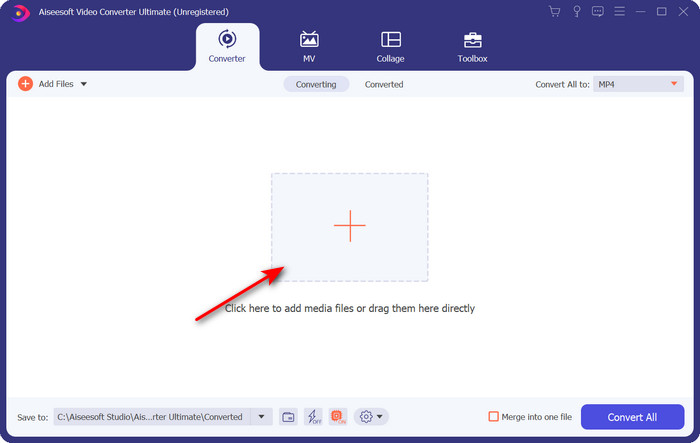
Βήμα 2. Εκκινήστε το εργαλείο, κάντε κλικ στο σύμβολο + στο κέντρο της διεπαφής και επιλέξτε το αρχείο .m4 από τον φάκελο που θα εμφανιστεί, κάντε κλικ σε αυτό και πατήστε Open.
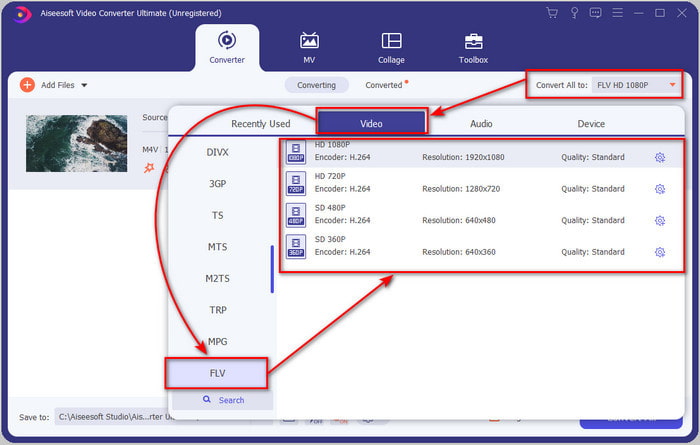
Βήμα 3. Μόλις το αρχείο .m4v βρεθεί στη διεπαφή, κάντε κλικ στο Convert All to και βρείτε τη μορφή FLV.
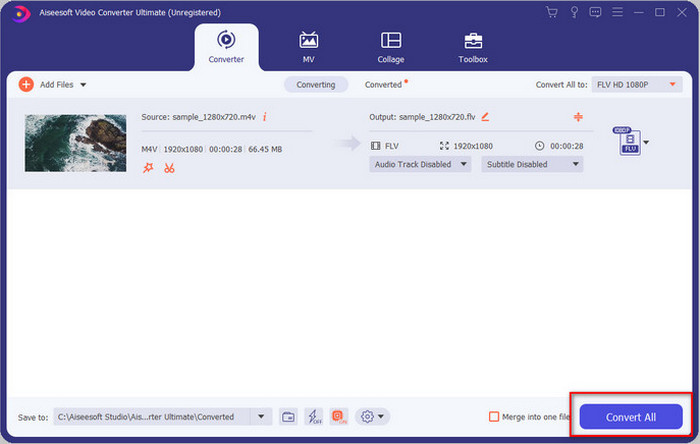
Βήμα 4. Προχωρήστε και κάντε κλικ στο Convert All για να ξεκινήσει η μετατροπή του M4V σε FLV.
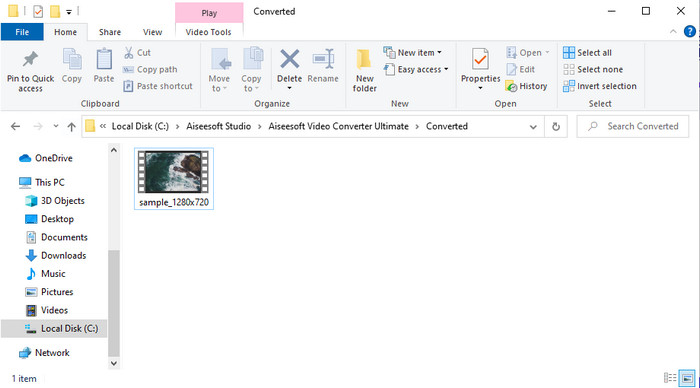
Βήμα 5. Η μετατροπή του αρχείου θα διαρκέσει λιγότερο από ένα λεπτό λόγω της γρήγορης διαδικασίας μετατροπής που προσφέρει αυτό το εργαλείο. Ένας φάκελος θα εμφανίσει το μετατρεμμένο σας αρχείο· κάντε κλικ στο αρχείο για να το παρακολουθήσετε ή να το διαμοιράσετε διαδικτυακά.
Πλεονεκτήματα
- Η γρήγορη μετατροπή και η επιτάχυνση υλικού είναι διαθέσιμα για την καλύτερη εμπειρία.
- Διατίθεται σε όλες τις πλατφόρμες όπως PC ή Mac.
- Εδώ μπορείτε να κάνετε την επεξεργασία βίντεο για να τα κάνετε εξαιρετικά.
Μειονεκτήματα
- Πληρωμή πριν από τη χρήση, αλλά η τιμή του είναι προσιτή.
- Κάντε λήψη του λογισμικού πριν από τη χρήση.
Μέρος 2. 2η Επιλογή για τη Μετατροπή M4V σε FLV δωρεάν μέσω Διαδικτύου
Η μετατροπή των αρχείων σας online μπορεί να εκτελεστεί αποτελεσματικά αν χρησιμοποιήσετε ένα κατάλληλο εργαλείο για να μετατρέψετε M4V σε FLV online με τη βοήθεια του FVC Free Video Converter Online. Αυτό το online εργαλείο είναι ο καλύτερος μετατροπέας που μπορείτε να έχετε πρόσβαση σε όλους τους web browsers, εφόσον διαθέτετε σύνδεση στο διαδίκτυο. Επίσης, μπορείτε να μετατρέψετε εδώ χωρίς όριο μεγέθους, αλλά δεν μπορείτε να εκτελέσετε μαζική μετατροπή. Παρόλο που το online λογισμικό είναι εξαιρετικό, απαιτείται σταθερή σύνδεση στο ίντερνετ, οπότε αν δεν έχετε, τότε δεν είναι επιλογή, όπως και άλλοι διαθέσιμοι web converters. Όμως, αν έχετε σύνδεση στο διαδίκτυο και θέλετε να ζήσετε μια άρτια, δωρεάν online μετατροπή, πρέπει να ακολουθήσετε τα παρακάτω βήματα.
Πώς να Μετατρέψετε M4V σε FLV με τη Βοήθεια του FVC Free Video Converter Online:
Βήμα 1. Πατήστε αυτόν τον σύνδεσμο για να μεταβείτε στον δωρεάν online μετατροπέα που σας παρέχει το FVC.
Βήμα 2. Στη διαδικτυακή διεπαφή, κάντε κλικ στο Add Files to Convert για να κατεβάσετε το πρόγραμμα εγκατάστασης. Μόλις ολοκληρωθεί η λήψη του προγράμματος εγκατάστασης, πατήστε ξανά το Add Files to Convert και σε έναν φάκελο, μετά επιλέξτε το αρχείο M4V.
Κατεβάστε την έκδοση για υπολογιστή για μαζική μετατροπή αρχείων.
Βήμα 3. Μια νέα διαδικτυακή διεπαφή θα εμφανιστεί· στο κάτω μέρος επιλέξτε τη μορφή FLV κάνοντας κλικ σε αυτή.
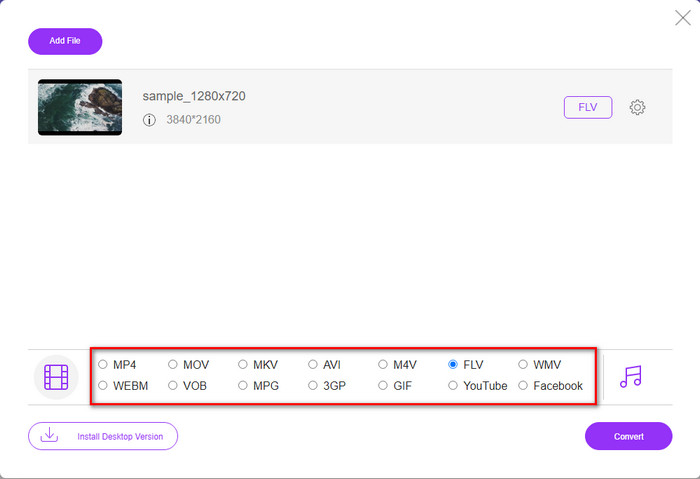
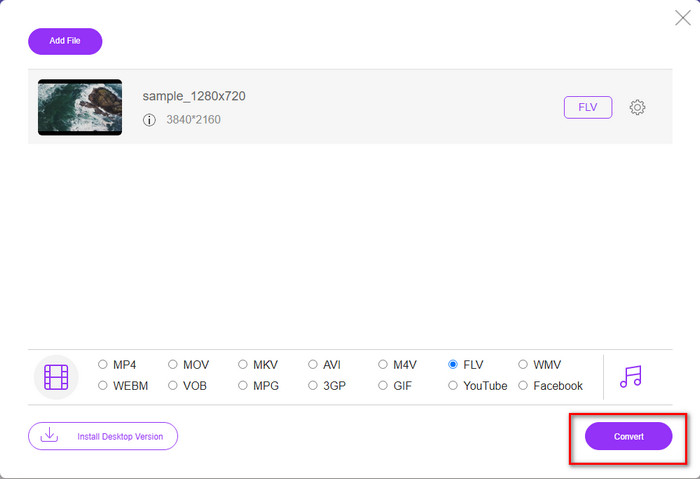
Βήμα 4. Για να ξεκινήσετε τη δωρεάν μετατροπή M4V σε FLV, κάντε κλικ στο Convert.
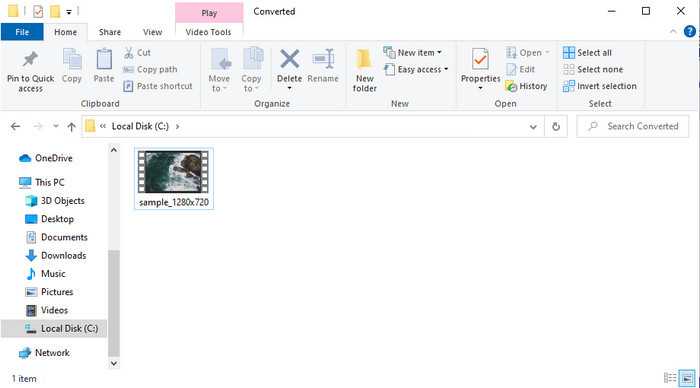
Βήμα 5. Μετά τη μετατροπή, ένας φάκελος θα εμφανιστεί στη διεπαφή· κάντε κλικ στο αρχείο για να το αναπαράγετε στον τοπικό media player σας.
Πλεονεκτήματα
- Δωρεάν και συμβατό σε όλα τα προγράμματα περιήγησης ιστού.
- Απεριόριστο μέγεθος αρχείου και μετατροπή.
- Ασφαλές και χωρίς διαφημίσεις στο κύριο εργαλείο ιστού.
Μειονεκτήματα
- Χρειάζεται σύνδεση στο διαδίκτυο για να χρησιμοποιήσετε το εργαλείο.
- Λιγότερο υποστηριζόμενη μορφή για μεταφόρτωση και μετατροπή.
Μέρος 3. Διαφορές μεταξύ μορφών M4V και FLV
Το M4V αποθηκεύει την υψηλότερη ποιότητα βίντεο που έχετε λάβει στο κατάστημα Apple iTunes. Αυτή η μορφή είναι παρόμοια με το MP4 επειδή χρησιμοποιούν τον κωδικοποιητή MPEG-4 ως συμπιεστή. Αλλά τα βίντεο M4V προστατεύονται από την προστασία πνευματικών δικαιωμάτων Apple FairPlay DRM. Επομένως, η αναπαραγωγή βίντεο σε αυτήν τη μορφή είναι δύσκολη, επειδή δεν θα παίξει αμέσως εάν τα τοποθετήσετε σε μια συσκευή αναπαραγωγής πολυμέσων εκτός από το iTunes ή το Quicktime Player. Μπορείτε να αποκτήσετε πρόσβαση σε μη προστατευμένα αρχεία M4V στη συσκευή αναπαραγωγής πολυμέσων αλλάζοντας την επέκταση αρχείου σε .mp4.
Αντίθετα, το FLV χρησιμοποιείται για τη μεταφορά δεδομένων βίντεο και ήχου μέσω του Ιστού όσο το δυνατόν γρηγορότερα. Το Flash Video είναι η πιο ευνοϊκή μορφή που υπάρχει σε κάθε ιστότοπο HTML 5. Ωστόσο, αυτή η μορφή διακόπηκε επειδή το Adobe Flash είχε ήδη αποσυρθεί. Ωστόσο, μπορείτε ακόμα να το παίξετε στα πρόσθετα του προγράμματος αναπαραγωγής πολυμέσων που χρειάζεστε μόλις το κατεβάσετε ή το μετατρέψετε.
M4V εναντίον FLV
Το M4V έχει αναπτυχθεί από την Apple, η οποία χρησιμοποιεί επίσης MPEG 4. Τα αρχεία M4V χρησιμοποιούνται συχνά για την αποθήκευση των βίντεο που έχουν ληφθεί από το Apple iTunes store, όπως μουσικά βίντεο, τηλεοπτικά επεισόδια κ.λπ. Μπορεί να βρείτε ορισμένα αρχεία M4V με προστασία αντιγραφής, καθώς χρησιμοποιεί Προστασία πνευματικών δικαιωμάτων FairPlay DRM της Apple.
Το Adobe Flash Player χρησιμοποίησε το FLV για την παράδοση περιεχομένου βίντεο όπως ταινίες και τηλεοπτικές εκπομπές. Σήμερα, η Adobe δεν αναπτύσσει πλέον τη συσκευή αναπαραγωγής και συνιστά στους χρήστες να την απεγκαταστήσουν για λόγους ασφαλείας. Ωστόσο, μπορείτε να χρησιμοποιήσετε τη μορφή FLV σε πολλά προγράμματα που δεν είναι Adobe/Macromedia.
Μέρος 4. Συχνές ερωτήσεις σχετικά με τη μετατροπή M4V σε FLV
Ποιό είναι καλύτερο; MP4 ή M4V;
Εάν θέλετε να προστατεύσετε το αρχείο σας, τότε το M4V είναι η μορφή που πρέπει να χρησιμοποιήσετε γιατί είναι διαθέσιμη μόνο στα Apples και προστατεύεται. Αλλά ας υποθέσουμε ότι θέλετε μια μορφή συμβατή με όλες τις συσκευές αναπαραγωγής πολυμέσων, το πρόγραμμα επεξεργασίας και άλλα. Σε αυτήν την περίπτωση, το MP4 είναι η καθολική μορφή πολυμέσων που θα θέλατε να χρησιμοποιήσετε.
Μπορώ να παίξω M4V σε VLC;
Το VLC είναι δωρεάν για χρήση και συμβατό με όλες τις πλατφόρμες· επίσης, μπορεί να αναπαράγει σχεδόν όλες τις μορφές πολυμέσων. Ωστόσο, το προστατευμένο M4V δεν μπορεί να αναπαραχθεί εδώ επειδή είναι κρυπτογραφημένο. Έτσι, αν θέλετε να παρακολουθήσετε .m4v στο VLC, είναι απαραίτητο να μετατρέψετε το αρχείο M4V σε MP4 ή AVI.
Χάνω την ποιότητα μετά τη μετατροπή του M4V;
Μετά τη μετατροπή του M4V, η ποιότητά του θα πρέπει να διατηρεί τον τυπικό ρυθμό της αρχικής ποιότητας M4V. Ωστόσο, ορισμένοι μετατροπείς δεν υποστηρίζουν τη μετατροπή του βίντεο σε HD, 1080 ή 4k. Επομένως, καλύτερα να επιλέξετε το τέλειο εργαλείο και όχι το εντάξει εργαλείο που θα καλύψει τις ανάγκες σας στη μετατροπή χωρίς να χάσει την ποιότητά του.
συμπέρασμα
Συνολικά, τα δύο online και offline εργαλεία που παρουσιάζονται εδώ είναι προορισμένα για εξαιρετικά αποτελέσματα, ειδικά αν θέλετε να μετατρέψετε M4V σε FLV. Επίσης, αποκτήσαμε γνώσεις για τις δύο μορφές, το M4V και το FLV. Αν και η τροποποίηση του M4V είναι αναγκαία για να μπορέσετε να παρακολουθήσετε το προστατευμένο αρχείο, η επιλογή του κατάλληλου εργαλείου για την κατάλληλη δουλειά είναι δύσκολη. Γι' αυτό παρουσιάζουμε δύο εργαλεία που μπορείτε να χρησιμοποιήσετε για να μετατρέψετε τη μορφή δωρεάν, χρησιμοποιώντας το FVC Free Video Converter Online. Ή, μπορείτε να ζήσετε νέες διαστάσεις στη μετατροπή χρησιμοποιώντας το FVC Video Converter Ultimate. Λοιπόν, τι περιμένετε αν θέλετε να παρακολουθήσετε τα M4V σας δωρεάν; Επιλέξτε ένα από τα παραπάνω εργαλεία, ακολουθήστε τα γρήγορα και εύκολα βήματα που παρουσιάστηκαν και, voilà, απολαύστε το βίντεο.
-
 [Οδηγός] Πώς να μετατρέψετε βίντεο M4V σε κινούμενα GIF σε Windows/Mac
 Εάν θέλετε να δημιουργήσετε κινούμενα αρχεία GIF από τα αγαπημένα σας βίντεο M4V, μπορείτε να μάθετε για 2 εύκολους και αποτελεσματικούς τρόπους μετατροπής βίντεο M4V σε GIF με προσαρμοσμένες ρυθμίσεις.
-
 3 Πρόγραμμα μετατροπέα βίντεο που χρησιμοποιείται για τη μετατροπή του iTunes M4V σε AVI σε Mac
 Δεν έχετε ιδέα πώς να μετατρέψετε το MKV σε μορφή AVI; Καθώς συνεχίζουμε να διαβάζουμε αυτό το άρθρο, θα γνωρίζουμε τα 3 εργαλεία που μπορούν να σας βοηθήσουν να μετατρέψετε αυτήν τη μορφή αρχείου.
-
 Δωρεάν μετατροπέας M4V σε MOV – Πώς να μετατρέψετε M4V σε MOV
 Εάν το πρόγραμμα αναπαραγωγής πολυμέσων σας δεν υποστηρίζει M4V, δυσκολευτήκατε ποτέ να παρακολουθήσετε μια ταινία στο iPhone σας; Το κύριο θέμα αυτού του άρθρου είναι η μετατροπή του σε αρχείο βίντεο MOV.

