


 Video Converter Ultimate
 Εγγραφή οθόνης
 Επισκευή βίντεο
5 γρήγοροι και εύκολοι τρόποι για να μετατρέψετε το MKV σε FLV δωρεάν [Online & Offline]
Δεν μπορείτε να μοιραστείτε τα αρχεία MKV σας στο διαδίκτυο επειδή το μέγεθος του αρχείου είναι πολύ μεγάλο; Γιατί να μην τα μετατρέψετε αντί να τα συμπιέσετε και να ρισκάρετε απώλεια ποιότητας; Το πρόβλημα λύνεται αν διαβάσετε τις παρακάτω λεπτομέρειες πριν τα στείλετε. Δεν χρειάζεται να ξοδέψετε μία ώρα διαβάζοντας αυτό το άρθρο, οπότε χωρίς περισσότερη καθυστέρηση, ας δούμε τους έξι μετατροπείς που μπορείτε να χρησιμοποιήσετε για να μετατρέψετε MKV σε FLV.

Μέρος 1. Κορυφή της γραμμής Καλύτερος μετατροπέας MKV σε FLV σε λήψη
Το FVC Video Converter Ultimate μπορεί να σας βοηθήσει να αλλάξετε MKV σε FLV εύκολα και αποτελεσματικά, χωρίς καμία δυσκολία. Αυτός ο εκπληκτικός μετατροπέας διαφέρει πολύ από τους μετατροπείς σε αυτή τη λίστα ή από άλλους μετατροπείς που ήδη χρησιμοποιείτε ή όχι. Είναι ο κορυφαίος κωδικοποιητής και αποκωδικοποιητής που μπορείτε να κατεβάσετε στον υπολογιστή σας με Windows ή Mac, και λειτουργεί άψογα εκτός σύνδεσης, ακόμη κι αν δεν έχετε ένα ισχυρό desktop.

FVC Video Converter Ultimate
4.987.355+ λήψεις- Μετατρέψτε το MKV σε FLV, AVI, MP4, MOV ή σε 200+ μορφές διαθέσιμες σε Windows και Mac.
- Κάντε τη μορφή MKV σας συμβατή με όλους τους επιτραπέζιους υπολογιστές και τις συσκευές.
- Μπορεί να πραγματοποιήσει μετατροπή ομαδικών για τις μορφές σας MKV ή άλλες μορφές.
- Ασφαλής μετατροπέας για χρήση από οποιονδήποτε.
- Υποστηρίζει έξοδο υψηλής ευκρίνειας και ακόμη και ποιότητα βίντεο έως 4k.
Δωρεάν ΛήψηΓια Windows 7 ή νεότεραΑσφαλής λήψη
Δωρεάν ΛήψηΓια MacOS 10.7 ή νεότεροΑσφαλής λήψη
Βήματα για το πώς να μετατρέψετε MKV σε FLV με το FVC Video Converter Ultimate
Βήμα 1. Κατεβάστε την εφαρμογή στον δίσκο σας και ακολουθήστε τη διαδικασία εγκατάστασης.
Δωρεάν ΛήψηΓια Windows 7 ή νεότεραΑσφαλής λήψη
Δωρεάν ΛήψηΓια MacOS 10.7 ή νεότεροΑσφαλής λήψη
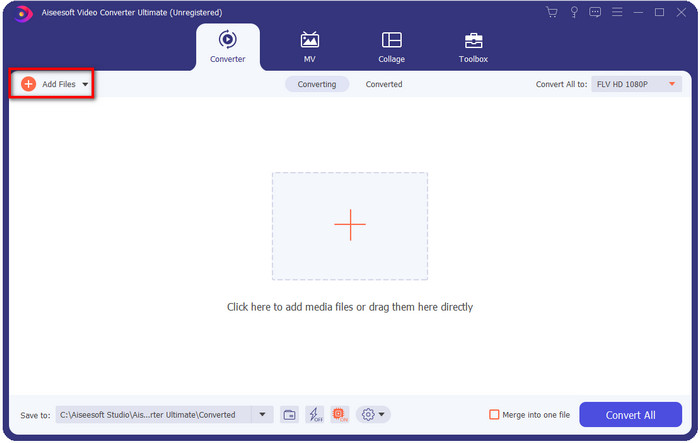
Βήμα 2. Μετά την εγκατάσταση, ανοίξτε την εφαρμογή για να προσθέσετε τα αρχεία MKV· μπορείτε να σύρετε και να αφήσετε το αρχείο στη διεπαφή ή να κάνετε κλικ στο κουμπί Add Files.
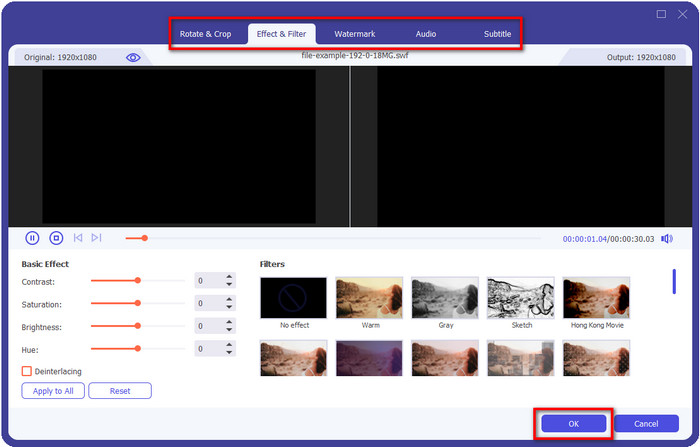
Αν θέλετε να επεξεργαστείτε τα αρχεία MKV πριν από τη μετατροπή, μπορείτε να κάνετε κλικ στο κουμπί με το ραβδί για να προσθέσετε «μαγεία» στο αποτέλεσμα, όπως Εφέ, Περικοπή, Προσθήκη Υποτίτλων και άλλα. Για να αποθηκεύσετε τα εφέ που προσθέσατε στο βίντεο, κάντε κλικ στο OK.
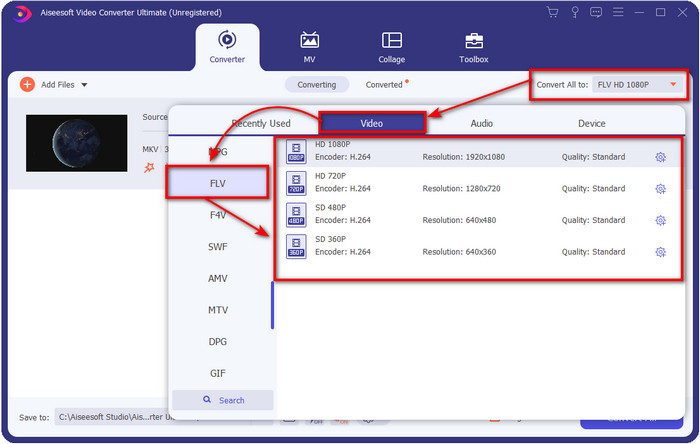
Βήμα 3. Κάντε κλικ στο κουμπί drop-down και επιλέξτε τη μορφή FLV από τη λίστα ρυθμίσεων.
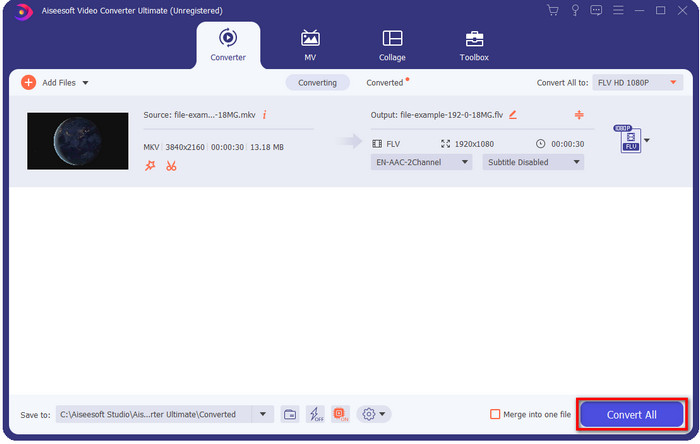
Βήμα 4. Κάντε κλικ στο κουμπί Convert All για να ξεκινήσετε να αλλάζετε MKV σε FLV δωρεάν. Μετά τη διαδικασία θα εμφανιστεί ένας φάκελος με το νέο αρχείο FLV.
Μέρος 2. 4 Καλύτερος μετατροπέας MKV σε FLV που βασίζεται στο Web
1. Δωρεάν μετατροπέας βίντεο FVC Online
Το FVC Free Video Converter Online διαθέτει έναν απλό αλλά εντυπωσιακό δωρεάν online μετατροπέα MKV σε FLV, διαθέσιμο σε όλους τους browsers. Υποστηρίζει επίσης έναν μεσαίας κλίμακας αριθμό μορφών από τις οποίες μπορείτε να επιλέξετε και να κάνετε upload. Αν και το εργαλείο εξαρτάται από το διαδίκτυο, η μετατροπή και η αποστολή του αρχείου εδώ είναι πιο εύκολη και γρήγορη. Θέλετε να μάθετε πώς να το χρησιμοποιήσετε; Τότε ακολουθήστε τα παρακάτω βήματα.
Πλεονεκτήματα
- Είναι διαθέσιμο για χρήση από οποιονδήποτε διαθέτει Διαδίκτυο.
- Φιλική προς το χρήστη και κατανοητή διεπαφή.
- Κανένας περιορισμός για το μέγεθος του αρχείου.
- Προηγμένες ρυθμίσεις για βίντεο και ήχο.
Μειονεκτήματα
- Μορφή μεσαίας κλίμακας.
Βήμα 1. Για να ανοίξετε τον online μετατροπέα, κάντε κλικ σε αυτό το link.
Βήμα 2. Πατήστε το κουμπί Add Files to Convert για να προσθέσετε το αρχείο από τον φάκελο του υπολογιστή σας και στη συνέχεια κάντε κλικ στο Open.
Κατεβάστε την έκδοση για υπολογιστή για μαζική μετατροπή αρχείων.
Παρόλο που δεν μπορείτε να επεξεργαστείτε βίντεο εδώ, μπορείτε να αλλάξετε τις ρυθμίσεις βίντεο και ήχου κάνοντας κλικ στο κουμπί με το γρανάζι.
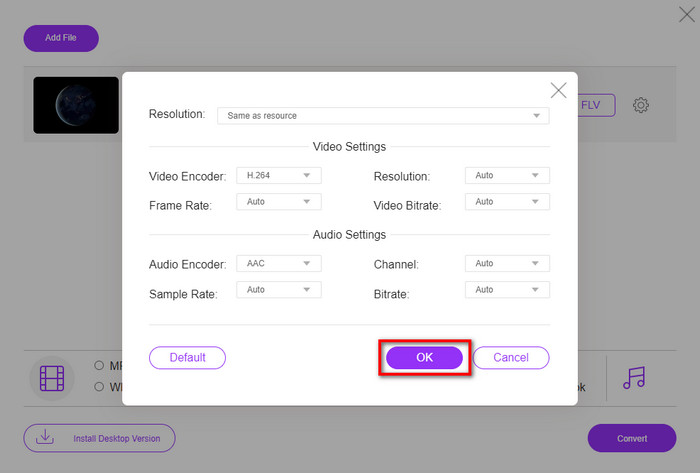
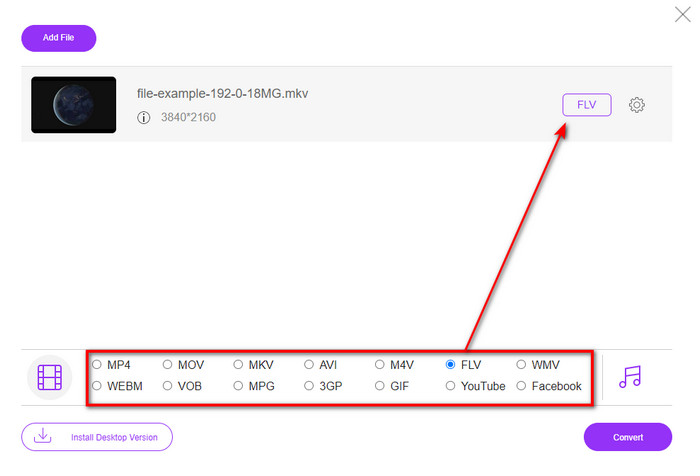
Βήμα 3. Επιλέξτε τη μορφή FLV από τη λίστα ρυθμίσεων.
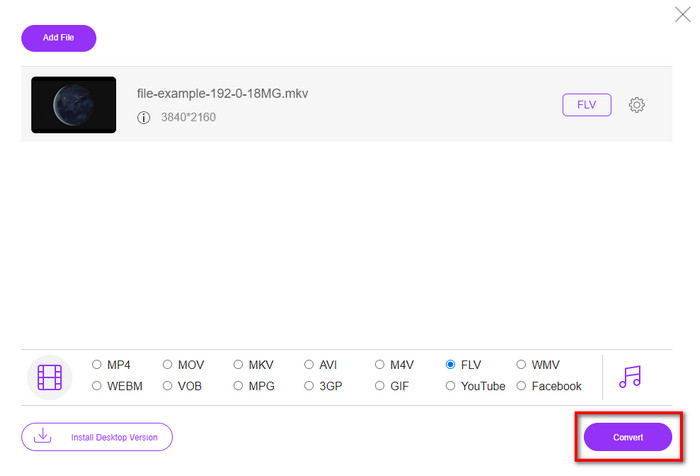
Βήμα 4. Κάντε κλικ στο Convert για να ξεκινήσει η διαδικασία μετατροπής.
2. Mconverter
Ένας από τους πιο ασφαλείς online μετατροπείς MKV σε FLV που μπορείτε να χρησιμοποιήσετε είναι το Mconverter. Εκτός από τη μετατροπή μορφών βίντεο και ήχου, μπορείτε επίσης να μετατρέψετε εικόνες, αρχεία αρχειοθέτησης, έγγραφα και ακόμη περισσότερους τύπους πολυμέσων. Αν και αυτός ο μετατροπέας είναι δωρεάν, υπάρχει όριο για κάθε αρχείο που μπορείτε να εισαγάγετε.
Πλεονεκτήματα
- Μετατρέψτε βίντεο, ήχο, έγγραφα και πολλά άλλα στο διαδίκτυο.
- Υποστηρίζει πολλαπλές μετατροπές.
- Εύχρηστος.
Μειονεκτήματα
- Το μέγεθος του αρχείου δεν πρέπει να υπερβαίνει τα 200MB.
- Ορισμένες διαφημίσεις κατά τη μετατροπή του αρχείου.
Βήμα 1. Ανοίξτε το Mconverter στον browser σας, σύρετε το αρχείο .mkv και αφήστε το μέσα στο πλαίσιο.
Βήμα 2. Κάντε κλικ στη μορφή FLV και η διαδικασία θα ξεκινήσει αυτόματα.
Βήμα 3. Όταν ολοκληρωθεί, θα γίνει αυτόματα λήψη του αρχείου στον δίσκο σας.
3. Freeconvert.com
Το Freeconvert.com θα σας βοηθήσει να μετατρέψετε MKV σε FLV online δωρεάν. Αυτός ο web μετατροπέας διαθέτει μια εύκολη στην κατανόηση διεπαφή, που μπορεί να χρησιμοποιήσει οποιοσδήποτε. Ωστόσο, αυτός ο online μετατροπέας υποστηρίζει έναν μικρής κλίμακας αριθμό μορφών για να επιλέξετε, και υπάρχουν πολλές διαφημίσεις στη διεπαφή.
Βήμα 1. Αναζητήστε το Freeconvert.com στη μηχανή αναζήτησής σας.
Βήμα 2. Κάντε κλικ στο Choose File για να ανεβάσετε το αρχείο .mkv από τον φάκελο του υπολογιστή σας, πατήστε το κουμπί drop-down και επιλέξτε τη μορφή FLV.
Βήμα 3. Κάντε κλικ στο Convert FLV για να ξεκινήσει η μετατροπή και, για να το κατεβάσετε, πατήστε Download FLV.
Πλεονεκτήματα
- Ένας δωρεάν διαδικτυακός μετατροπέας που μπορείτε να χρησιμοποιήσετε.
- Ασφαλής και απλός μετατροπέας Ιστού.
- Υποστηρίζει ένα αρχείο 1 GB για μετατροπή.
Μειονεκτήματα
- Υποστηρίζει μια μορφή μικρής κλίμακας.
- Η διαδικασία μετατροπής και λήψης θα πάρει πολύ χρόνο.
4. Movavi Online Video Converter
Το Movavi Online Video Converter είναι ένας από τους προτεινόμενους μετατροπείς για να μετατρέψετε MKV σε FLV online. Είναι η δωρεάν web έκδοση του Movavi Video Converter, που χρησιμοποιείται από πολλούς χρήστες σε ολόκληρο τον ιστό λόγω της αποτελεσματικότητας που προσφέρει και της επαγγελματικής εμφάνισής του.
Βήμα 1. Ανοίξτε τον αγαπημένο σας browser και αναζητήστε τον ιστότοπο της Movavi.
Βήμα 2. Πατήστε +Add Your Media για να προσθέσετε το αρχείο που θέλετε να μετατρέψετε. Κάντε κλικ στο κουμπί drop-down και πατήστε Video· βρείτε τη μορφή FLV και κάντε κλικ επάνω της.
Βήμα 3. Πατήστε Convert για να ξεκινήσει η διαδικασία μετατροπής.
Πλεονεκτήματα
- Δεν υπάρχει διεπαφή ιστού για διαφημίσεις.
- Απλός μετατροπέας μπορεί να χρησιμοποιήσει ο καθένας.
- Υποστηρίζει μορφή μεσαίας κλίμακας.
Μειονεκτήματα
- Η διαδικασία μετατροπής μορφής απαιτεί περισσότερο χρόνο.
- Εξαρτάται από το Διαδίκτυο όπως και οι άλλοι μετατροπείς Ιστού.
Μέρος 3. Διάγραμμα σύγκρισης
| Χαρακτηριστικά | FVC Video Converter Ultimate | FVC Free Video Converter Online | Mconverter | Freeconvert.com | Movavi Online Video Converter |
| Δυνατότητες μετατροπής μορφής |  | | | | |
| Εξαρτάται από το Διαδίκτυο |  | | | | |
| Μαζική μετατροπή | | | | | |
| Προηγμένες δυνατότητες επεξεργασίας | | | | | |
| Διαθέσιμες πλατφόρμες | Εργαλείο που βασίζεται στην επιφάνεια εργασίας | Εργαλείο που βασίζεται στο Web | Εργαλείο που βασίζεται στο Web | Εργαλείο που βασίζεται στο Web | Εργαλείο που βασίζεται στο Web |
MKV εναντίον FLV
Η μορφή κοντέινερ πολυμέσων Matroska, που κυκλοφόρησε το 2002, είναι μια μορφή ανοιχτού κώδικα που μπορεί να περιλαμβάνει έναν αριθμό κομματιών βίντεο, ήχου, εικόνας και υπότιτλων. Έτσι, μπορείτε να το χρησιμοποιήσετε για να αποθηκεύετε εύκολα σύντομα βίντεο κλιπ, τηλεοπτικές εκπομπές και ταινίες. Είναι αρκετά δημοφιλές για την υπογραφή των θαυμαστών anime.
Το Adobe Flash Player χρησιμοποίησε το FLV για την παράδοση περιεχομένου βίντεο όπως ταινίες και τηλεοπτικές εκπομπές. Σήμερα, η Adobe δεν αναπτύσσει πλέον τη συσκευή αναπαραγωγής και συνιστά στους χρήστες να την απεγκαταστήσουν για λόγους ασφαλείας. Ωστόσο, μπορείτε να χρησιμοποιήσετε τη μορφή FLV σε πολλά προγράμματα που δεν είναι Adobe/Macromedia.
Μέρος 4. Συχνές ερωτήσεις σχετικά με τη μετατροπή MKV σε FLV
Γιατί τα αρχεία MKV είναι πολύ μεγάλα;
Υπάρχουν δύο κύριοι λόγοι για τους οποίους τα αρχεία MKV είναι τόσο μεγάλα. Ο πρώτος λόγος είναι ότι αυτή η μορφή μπορεί να περιέχει απεριόριστο περιεχόμενο και στοιχεία βίντεο, ήχου, μεταδεδομένων σε ένα μόνο αρχείο. Ο δεύτερος λόγος είναι ότι αν το βίντεό σας είναι μεγάλης διάρκειας, τότε είναι αναμενόμενο το μέγεθος αυτού του αρχείου να αυξηθεί. Ωστόσο, μπορείτε να συμπιέσετε το αρχείο MKV με τη βοήθεια αυτού του συμπιεστή MKV που μπορείτε να χρησιμοποιήσετε. Αν όμως θέλετε έναν πιο εύκολο τρόπο, θα πρέπει να εξετάσετε το ενδεχόμενο να μετατρέψετε τα αρχεία MKV σε MP4, AVI, MOV, FLV κ.λπ.
Είναι το MKV καλύτερο από το AVI;
Τα MKV και AVI είναι σχεδόν παρόμοιες μορφές, καθώς μπορούν να περιέχουν βίντεο υψηλής ευκρίνειας και μεγάλα μεγέθη αρχείων. Ωστόσο, αυτά τα containers έχουν διαφορετικούς σκοπούς και δομές που τα κάνουν μοναδικά. Για παράδειγμα, η μορφή AVI είναι μια μη συμπιεσμένη μορφή που μπορεί να περιέχει ακατέργαστο βίντεο, ιδανική για αναπαραγωγή. Είναι επίσης η βάση για την ανάπτυξη του αρχείου MKV. Παρόλο που τα αρχεία MKV διαθέτουν συμπίεση, το περιεχόμενο και τα στοιχεία τους είναι πολύ περισσότερα από όσα μπορεί να διαχειριστεί ένα AVI. Έτσι, αν θέλετε να διατηρήσετε την υψηλή ποιότητα των βίντεό σας, προτιμήστε τη μορφή MKV. Αλλά αν θέλετε συμβατότητα, τότε η λύση είναι το AVI. Αν θέλετε να μάθετε πώς να μετατρέψετε MKV σε AVI, κάντε κλικ σε αυτό το link.
Χειρίζεται το Handbrake τη μετατροπή MKV σε FLV;
Το Handbrake μπορεί να χειριστεί αυτήν τη δουλειά, αλλά αυτός ο μετατροπέας δεν υποστηρίζει προγράμματα macOS και Windows που δεν αναφέρονται στο 10 παραπάνω.
συμπέρασμα
Κλείνοντας, πλέον γνωρίζετε πώς να μετατρέψετε MKV σε FLV online και offline. Αυτά τα εργαλεία δεν επιλέχθηκαν τυχαία, αλλά τα διαλέξαμε σύμφωνα με τις προτιμήσεις των χρηστών. Καθώς αναζητήσαμε και ερευνήσαμε, ανακαλύψαμε ότι αυτά τα έξι εργαλεία αποδίδουν άριστα στη δουλειά τους ως μετατροπείς. Ωστόσο, το FVC Video Converter Ultimate ξεπέρασε τις προσδοκίες μας ως μετατροπέας. Θέλετε να μάθετε και τις υπόλοιπες δυνατότητες αυτού του εκπληκτικού μετατροπέα; Τότε τι περιμένετε; Πρέπει να το κατεβάσετε τώρα.
-
 MKV σε MOV - Πώς να μετατρέψετε το MKV σε MOV
 Πώς μπορώ να μετατρέψω το MKV σε MOV σε Mac; Μπορεί το iMovie να διαβάσει το MKV; Τι σημαίνει η μορφή MOV; Αυτή η ανάρτηση περιγράφει 2 απλούς τρόπους για να σας βοηθήσει να μετατρέψετε MKV σε MOV με δωρεάν online και επαγγελματικούς μετατροπείς βίντεο.
-
 Πώς να μετατρέψετε βίντεο MKV σε κινούμενα GIF χωρίς Photoshop/FFmpeg
 Μετά τη λήψη και την παρακολούθηση ταινιών MKV στον υπολογιστή σας, μπορεί να θέλετε να μοιραστείτε μερικές υπέροχες στιγμές με φίλους ή στο Διαδίκτυο ως GIF. Σε αυτό το άρθρο, μπορείτε να μάθετε για τους 2 ευκολότερους τρόπους μετατροπής του MKV σε GIF.
-
 Συμβουλές και κόλπα για το πώς να μετατρέψετε αρχεία MKV σε MP3 [2025]
 Αντιμετωπίζετε πρόβλημα στην επιλογή του κατάλληλου μετατροπέα για MKV σε MP3; Στη συνέχεια, συνεχίστε να διαβάζετε αυτήν την ανάρτηση καθώς παρουσιάσαμε διαφορετικές λύσεις για ένα πρόβλημα.

