


 Εγγραφή οθόνης
 Επισκευή βίντεο
 Ασφαλές κατέβασμα
Πώς να αφαιρέσετε το φόντο από τα GIF χρησιμοποιώντας αποτελεσματικά προγράμματα
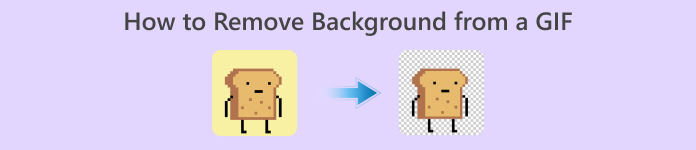
Το GIF είναι η συντομογραφία του Graphics Interchange Format και χρησιμοποιείται ευρέως στις διαδικτυακές επικοινωνίες, όπως στην ανταλλαγή μηνυμάτων ή ακόμα και στα σχόλια σε αναρτήσεις. Η αφαίρεση φόντου από GIF ή εικόνες μπορεί να είναι δύσκολη, εκτός αν έχετε προγράμματα λογισμικού που είναι φτιαγμένα ειδικά γι’ αυτού του είδους την εργασία! Λόγω της δημοτικότητάς του, όλο και περισσότεροι χρήστες ενδιαφέρονται για το πώς να επεξεργάζονται και να δημιουργούν τα δικά τους GIF. Ευτυχώς, συγκεντρώσαμε αξιόπιστα και εύχρηστα online προγράμματα που μπορούν να βοηθήσουν τους χρήστες να αφαιρέσουν το φόντο από GIF.
Συνιστάται: FVC Free Background Remover
Το FVC Free Background Remover είναι ένα χρήσιμο εργαλείο όταν πρόκειται για την αφαίρεση φόντου από τις φωτογραφίες σας. Χρησιμοποιεί τεχνητή νοημοσύνη για να εντοπίζει και να αναγνωρίζει το πρόσωπο μέσα στη φωτογραφία. Επιπλέον, το εργαλείο είναι διαθέσιμο σε Windows/Mac. Συνολικά, είναι ένα πρακτικό και αξιόπιστο εργαλείο που μπορείτε να χρησιμοποιείτε οποτεδήποτε και οπουδήποτε.
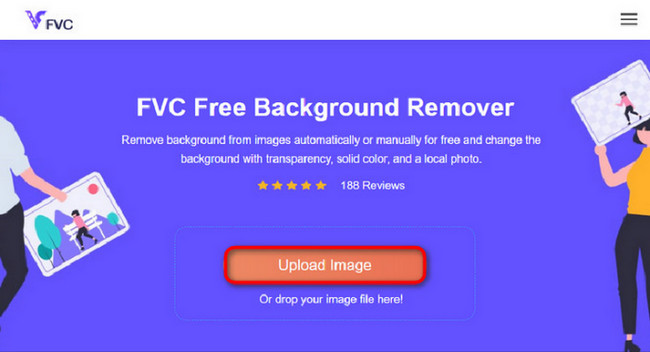
Βήμα 1. Μεταφόρτωση εικόνας/GIF
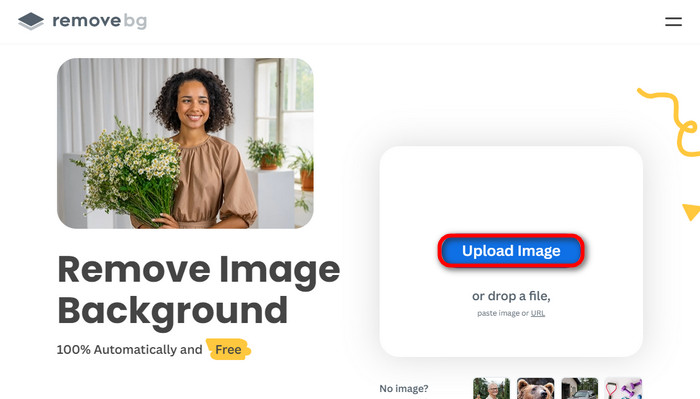
Το πρώτο βήμα είναι να ανοίξετε τον browser στον υπολογιστή σας. Αφού ανοίξετε το online πρόγραμμα, θα δείτε την επιλογή να ανεβάσετε την εικόνα σας. Κάντε κλικ στο Upload Image για να προσθέσετε το GIF από το οποίο θέλετε να αφαιρέσετε το φόντο.
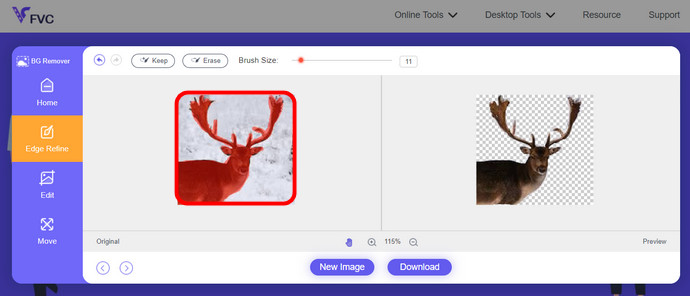
Βήμα 2. Επεξεργασία εικόνας
Μετά τη μεταφόρτωση, μπορείτε πλέον να αφαιρέσετε τυχόν ανακριβείς επισημάνσεις που αφαιρέθηκαν από την αναγνώριση AI. Απλώς κάντε κλικ και σύρετε το ποντίκι σας και κάντε το σύμφωνα με τις προτιμήσεις σας.
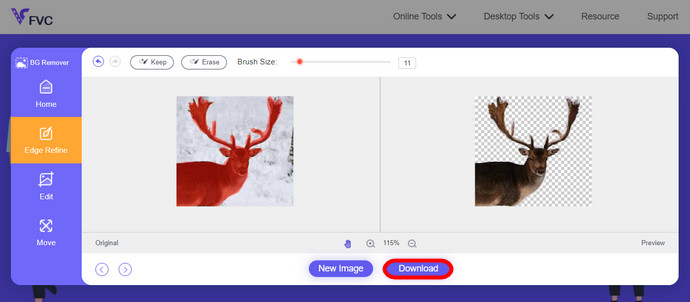
Βήμα 3. Λήψη επεξεργασμένης εικόνας
Τέλος, κάντε κλικ στο κουμπί Download. Τώρα έχετε αφαιρέσει με επιτυχία το φόντο από την εικόνα σας.
Μέρος 1. Καταργήστε το φόντο GIF χρησιμοποιώντας το EZGIF.com
Αυτό το διαδικτυακό λογισμικό είναι ένα λογισμικό επεξεργασίας και μετατροπής φωτογραφιών/gif. Μπορεί να επεξεργαστεί και να μετατρέψει GIF, PNG, WEBP, IMG και πολλές άλλες μορφές. Εδώ, μπορείτε να επεξεργαστείτε το GIF σας με το λογισμικό επεξεργασίας που συνοδεύει το λογισμικό.
Βήμα 1. Είσοδος στον ιστότοπο
Για να χρησιμοποιήσετε αυτό το online εργαλείο, ανοίξτε τον browser σας και πληκτρολογήστε τον σύνδεσμο. Αμέσως σας προσφέρονται επιλογές ανάλογα με τις ανάγκες σας. Αυτός ο ιστότοπος σάς δίνει τη δυνατότητα να αφαιρέσετε το φόντο από το GIF σας. Κάντε κλικ στο Effects για να ξεκινήσετε.
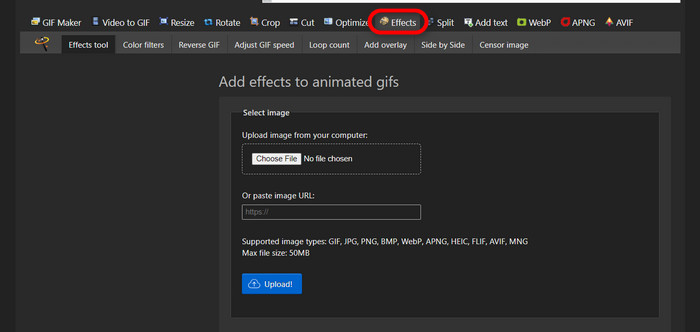
Βήμα 2. Επιλογή και μεταφόρτωση εικόνας/GIF
Τώρα, επιλέξτε το αρχείο της επιλογής σας για μεταφόρτωση. Κάντε κλικ στο Choose Files, βρείτε το στον αντίστοιχο φάκελο και πατήστε Upload για να ανεβάσετε το επιλεγμένο αρχείο.
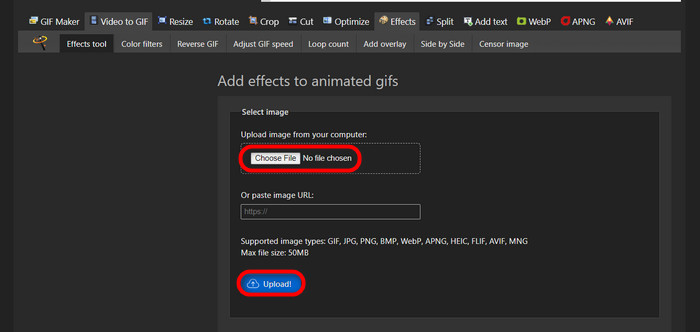
Βήμα 3. Επεξεργασία εικόνας
Αφού γίνει η μεταφόρτωση, βρίσκεστε κοντά στο στάδιο της αφαίρεσης φόντου από το GIF σας ή στο να κάνετε το φόντο του GIF σας μαύρο. Τώρα, κάντε κλικ στο grayscale για να σκουρύνετε το φόντο.
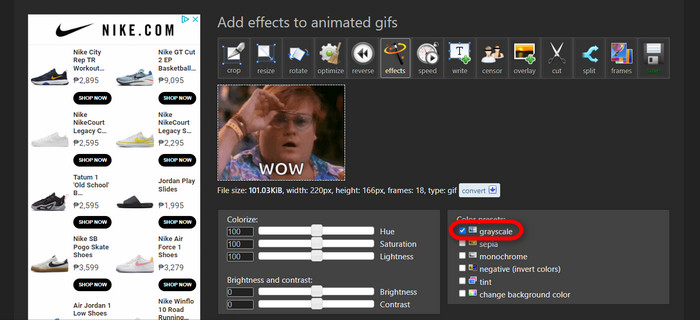
Βήμα 4. Προεπισκόπηση και μετατροπή εικόνας/GIF
Αφού προσθέσετε εφέ, αλλάξετε μέγεθος και περικόψετε το νέο GIF σας, κάντε κλικ στο Apply Selected και θα εμφανιστεί μια προεπισκόπηση του επεξεργασμένου GIF. Έπειτα, κάντε κλικ στο κουμπί convert για να κατεβάσετε το αρχείο σας.
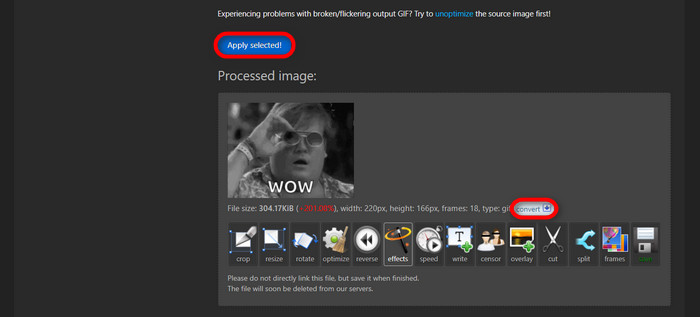
Μέρος 2. Δημιουργήστε ένα GIF χωρίς φόντο στο Remove.bg
Αυτός ο ιστότοπος έχει επίσης σχεδιαστεί για να αφαιρεί οποιοδήποτε φόντο από οποιαδήποτε φωτογραφία. Εδώ, σας δίνει την επιλογή να επεξεργαστείτε ακόμα τη φωτογραφία φόντου που αφαιρέσατε αυτόματα. Τροφοδοτείται με ένα επιδέξιο AI που μπορεί να αναγνωρίσει το κύριο θέμα και να αφαιρέσει άψογα το φόντο του.
Βήμα 1. Μεταφόρτωση εικόνας/GIF
Ας ξεκινήσουμε ανεβάζοντας την εικόνα μας. Ανοίξτε το online λογισμικό στον browser σας όταν βρεθείτε στη σελίδα. Στη συνέχεια, κάντε κλικ στο Upload Image.
Βήμα 2. Έλεγχος και επεξεργασία εικόνας
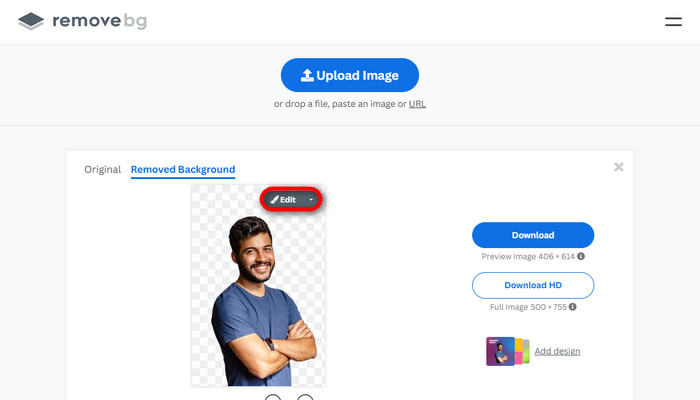
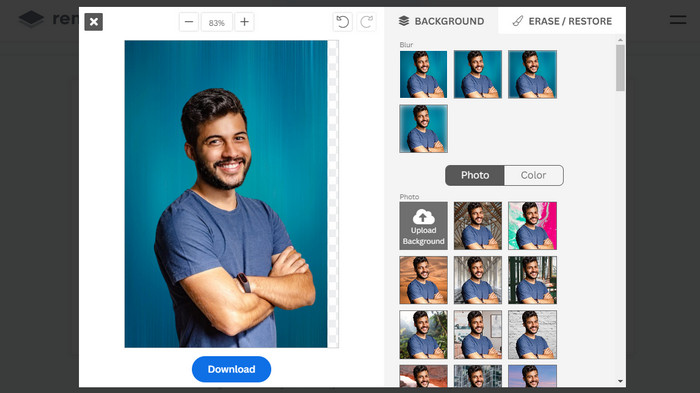
Μόλις ανέβει η εικόνα σας, η φωτογραφία σας θα πρέπει ήδη να έχει το φόντο της αφαιρεμένο αυτόματα, αλλά μπορείτε ακόμα να την επεξεργαστείτε. Μπορείτε να δείτε την αρχική φωτογραφία κάνοντας κλικ στο κουμπί Original δίπλα στο κουμπί Removed Background. Οι χρήστες μπορούν να βάλουν μαύρο φόντο στην εικόνα τους εύκολα με αυτό το λογισμικό.
Βήμα 3. Λήψη επεξεργασμένης εικόνας
Σε αυτό το σημείο έχετε ολοκληρώσει την επεξεργασία και μπορείτε τώρα να κατεβάσετε την εικόνα σας. Απλώς κάντε κλικ στο κουμπί Download κάτω από τη φωτογραφία σας.
Μέρος 3. Χρησιμοποιήστε το GIFMagic στην αφαίρεση φόντου GIF
Στο GIFMagic, ειδικά εφέ, προσθήκη κειμένου, κινούμενα σχέδια και πολλά άλλα! Όλα αυτά είναι δυνατά χρησιμοποιώντας αυτό το διαδικτυακό πρόγραμμα. Τα GIF είναι εύκολο να δουλέψουν όταν πρόκειται για επεξεργασία σε αυτό το λογισμικό!
Βήμα 1. Μεταφόρτωση εικόνας/GIF
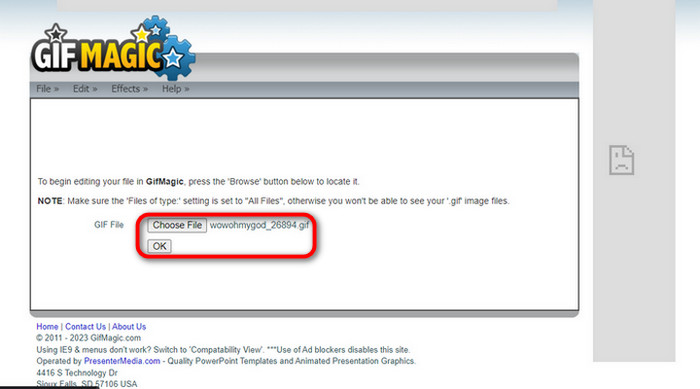
Αφού συνδεθείτε, ο ιστότοπος σάς επιτρέπει να ανεβάσετε το επιλεγμένο αρχείο στο λογισμικό. Μπορείτε να ανεβάσετε αρχεία .gif ή .img που είναι χρήσιμα για άλλους χρήστες. Για να επιλέξετε το αρχείο σας, κάντε κλικ στο Upload και, αφού το επιλέξετε, κάντε κλικ στο κουμπί OK.
Βήμα 2. Επεξεργασία εικόνας
Μόλις μπείτε στη σελίδα, θα δείτε τα κουμπιά Edit και Effects δίπλα στο κουμπί File. Το αρχείο σας μπορεί να επεξεργαστεί σε αυτήν την ενότητα, οπότε κάντε τη «μαγεία» σας και απολαύστε την επεξεργασία.
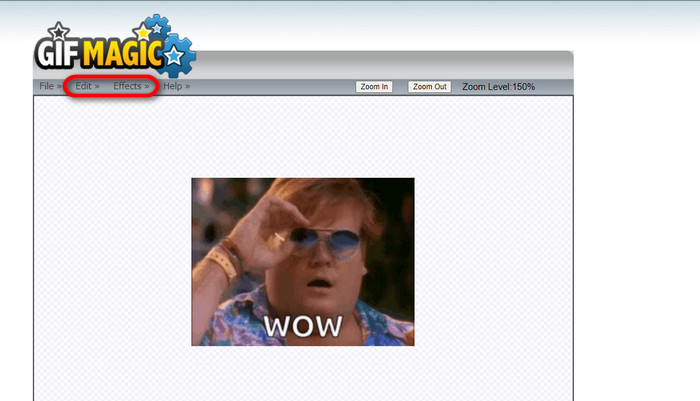
Βήμα 3. Λήψη επεξεργασμένου GIF
Αφού κάνετε το GIF σας με διαφανές φόντο, απλώς κάντε κλικ στο κουμπί File και ύστερα στο Save. Έτοιμο! Ολοκληρώθηκε και κατέβηκε.
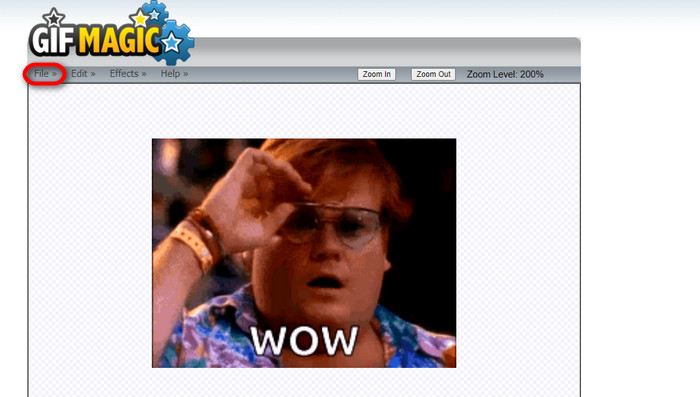
Μέρος 4. Κάντε το φόντο του GIF διαφανές χρησιμοποιώντας το LunaPic
Το LunaPic είναι ένα δωρεάν διαδικτυακό εργαλείο που μπορεί να αφαιρέσει τα GIF φόντου στο διαδίκτυο. Μπορεί να αξιολογήσει και να επεξεργαστεί PNG, GIF, JPG, JPEG και πολλούς άλλους τύπους εικόνων. Είναι ένα καλά γειωμένο λογισμικό που χρησιμοποιείται για επεξεργασία σε πολλές πλατφόρμες.
Βήμα 1. Μεταφόρτωση εικόνας/GIF
Αφού μπείτε στον ιστότοπο από τον προεπιλεγμένο browser ή οποιονδήποτε browser της επιλογής σας, ανεβάστε το αρχείο .img ή .gif στον ιστότοπο. Απλώς κάντε κλικ στο κουμπί Upload.
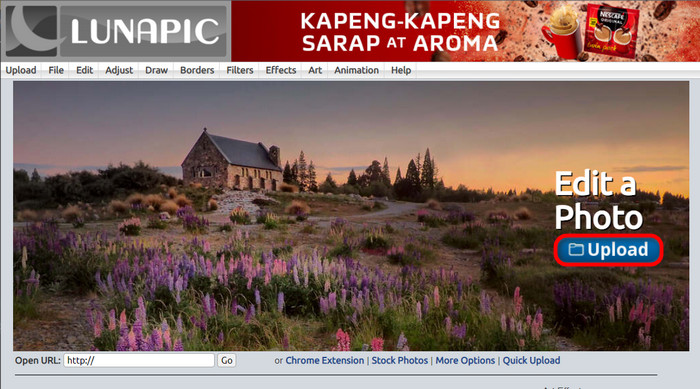
Βήμα 2. Επεξεργασία εικόνας/GIF
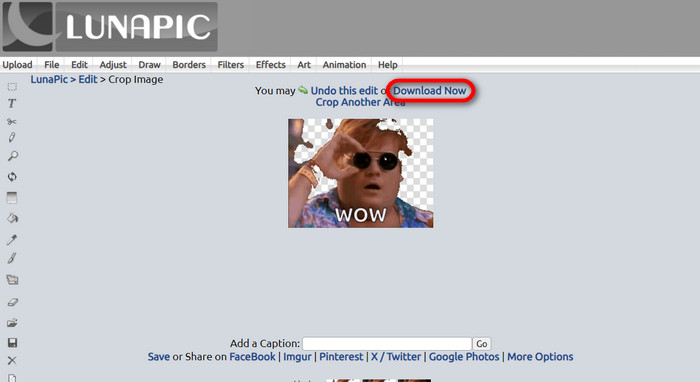
Στη συνέχεια, μπορείτε να επεξεργαστείτε το αρχείο σας και να κάνετε το φόντο του GIF διαφανές κάνοντας κλικ στο Edit και έπειτα στο κουμπί εργαλείου Crop Image. Ξεκινήστε την περικοπή του φόντου της εικόνας.
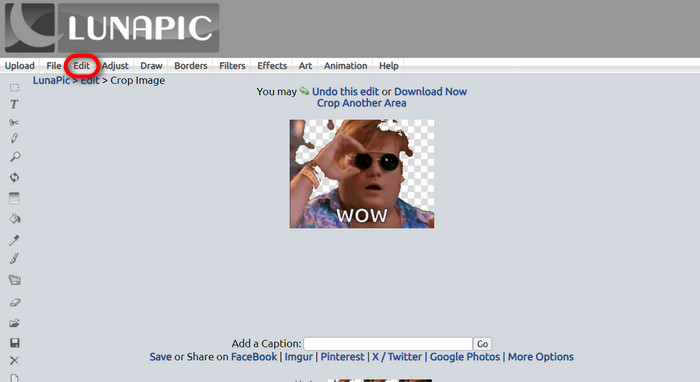
Βήμα 3. Λήψη επεξεργασμένου GIF
Αφού περικόψετε το φόντο ή αν προσπαθήσατε να βάλετε λευκό φόντο στο GIF, μπορείτε τώρα να κάνετε κλικ στο κουμπί Download now! για να αποθηκεύσετε το επεξεργασμένο αρχείο σας!
Περαιτέρω ανάγνωση:
4 καλύτεροι τρόποι για να αφαιρέσετε το υδατογράφημα από ένα GIF [Online & Offline]
Αποκαλύπτοντας κορυφαία εργαλεία για υπολογιστή, online και κινητές συσκευές

Video Converter Ultimate
345+ λήψεις- Απολαύστε την παρακολούθηση των βίντεό σας χωρίς αυτά τα ενοχλητικά υδατογραφήματα που μπλοκάρουν το περιεχόμενό σας.
- Δημιουργήστε βίντεο καλής ποιότητας με υψηλή ανάλυση για καλύτερη προβολή.
- Σας επιτρέπει να αφαιρέσετε οποιοδήποτε υδατογράφημα από οποιονδήποτε τύπο βίντεο.
- Σας παρέχει αμέτρητες μορφές για να μετατρέψετε το αρχείο σας σε.
Δωρεάν λήψηΓια Windows 7 ή νεότεραΑσφαλής λήψη
Δωρεάν λήψηΓια MacOS 10.7 ή νεότεροΑσφαλής λήψη
Μέρος 5. Συχνές ερωτήσεις σχετικά με την αφαίρεση φόντου
Μπορώ να μετατρέψω ένα κινούμενο PNG σε GIF;
Ναι, είναι δυνατή η μετατροπή PNG σε GIF. Ωστόσο, υπάρχουν διάφοροι τύποι δεδομένων που μπορούν να μετατραπούν σε διάφορες μορφές, αρκεί να έχετε το σωστό πρόγραμμα.
Μπορώ να αλλάξω το χρώμα του φόντου GIF μου αφού το αφαιρέσω;
Φυσικά, υπάρχουν πολλά προγράμματα που προσφέρουν αυτό το είδος εργασίας. Δοκιμάστε το FVC Background Remover για εύκολη αφαίρεση φόντου.
Μπορώ να κάνω ένα φόντο GIF διαφανές σε χρώμα;
Όχι, το χρώμα δεν έχει τέτοια δυνατότητα. Αλλά μπορείτε να αναζητήσετε άλλα προγράμματα που προσφέρουν αυτού του είδους τη δουλειά.
Τι είναι ένα κινούμενο GIF με διαφάνεια;
Ένα κινούμενο GIF με διαφάνεια είναι μια εικόνα που εμφανίζει μόνο ένα συγκεκριμένο μέρος της εικόνας μόλις τοποθετηθεί σε έναν συγκεκριμένο ιστότοπο. Μπορεί να έχει πολλές εικόνες που εμφανίζονται εάν τοποθετηθούν σε άλλο ιστότοπο.
Το GIF επιτρέπει τη διαφάνεια;
Ναι, αλλά όχι πλήρως διαφανές. Υποστηρίζει μόνο διαφάνεια 1 bit.
συμπέρασμα
Υπάρχει πλέον μεγάλη σημασία και ζήτηση για προγράμματα που μπορούν να επεξεργάζονται GIF, όπως αυτά που αναφέρθηκαν παραπάνω. Η περικοπή, η επεξεργασία, η δημιουργία επιπέδων και η διαγραφή είναι πλέον όλα εφικτά με λίγα μόνο κλικ. Οι χρήστες πλέον καινοτομούν και σκέφτονται πράγματα που δεν έχουν ξαναγίνει, όπως το να φτιάξουν ένα GIF με λευκό φόντο. Τέτοιου είδους χρήστες είναι ο λόγος για τον οποίο δημιουργούνται τόσο ισχυρά προγράμματα, όπως το FVC Background Remover.
-
 Επιλέξτε το καλύτερο GIF Cropper Online και Offline για Περικοπή GIF [2023]
 Η επιλογή του καλύτερου εργαλείου περικοπής είναι απαραίτητη όσο αυτή η δυνατότητα στους κατασκευαστές GIF είναι διαθέσιμη. Ποια είναι λοιπόν η καλύτερη επιλογή σας για την περικοπή αρχείων και πώς να τη χρησιμοποιήσετε;
-
 Μάθετε 4 τρόπους για το πώς να δημιουργείτε GIF από εικόνες [Online & Offline]
 Θέλετε να μάθετε πώς να δημιουργείτε GIF από τη συλλογή των εικόνων σας; Στη συνέχεια, κάντε κλικ σε αυτόν τον σύνδεσμο και διαβάστε τα ακόλουθα παραδείγματα
-
 Επαναλάβετε το GIF με το καλύτερο Animated GIF Looper σε Windows & Mac
 Θέλετε να μάθετε το μυστικό για το καλύτερο loop GIF και να φτιάξετε ένα; Αν ναι, είστε στο σωστό μέρος. Μάθετε πώς να δημιουργείτε έναν βρόχο με τον καλύτερο διαθέσιμο βρόχο.
