


 Video Converter Ultimate
 Εγγραφή οθόνης
 Επισκευή βίντεο
Ο καλύτερος μετατροπέας MPG σε GIF για μετατροπή MPG σε GIF [ Έκδοση χωρίς κόστος και Premium]
Ο καλύτερος τρόπος για να εκφράσετε τα συναισθήματά σας στους αγαπημένους σας είναι να δημιουργήσετε ένα μήνυμα με νόημα. Θέλετε όμως να μάθετε τι είναι πολύ καλύτερο να εκφράσετε με διαφορετικό τρόπο; Μπορείτε να χρησιμοποιήσετε ένα GIF. Γνωστές και ως Graphics Interchange Format, αυτές είναι οι εικόνες που στέλνετε αλλά έχουν αναβαθμιστεί. Αυτές οι κινούμενες εικόνες δημιουργούνται για να εκφράσουν απλώς τα συναισθήματά σας προς κάποιον άμεσα ή έμμεσα. Γνωρίζατε ότι οι περισσότερες από τις εφαρμογές ανταλλαγής μηνυμάτων υποστηρίζουν GIF καθώς και το ενσωματωμένο messenger μας; Αλλά σε ορισμένες παλιές εκδόσεις του τηλεφώνου, δεν παρέχει αυτήν τη μορφή. Αν και το GIF είναι διασκεδαστικό, δεν θα σας προσφέρει όλη την ώρα το συναίσθημα που θέλετε να εκφράσετε.
Λοιπόν, είστε εδώ για να μάθετε ποιος είναι ο καλύτερος τρόπος να αλλάξετε τη μορφή του αρχείου σας από MPG σε GIF. Δεν είναι συναρπαστικό να δημιουργείτε το δικό σας GIF; Αντί να ψάχνετε τι πρέπει να χρησιμοποιήσετε, γιατί δεν δοκιμάζετε να δημιουργήσετε το δικό σας GIF προσθέτοντάς του την προσωπική σας πινελιά; Ο καλύτερος τρόπος για να μάθετε πώς να το κάνετε είναι να διαβάσετε αυτό το άρθρο, γιατί παρέχει επαρκείς πληροφορίες, βήματα και εργαλεία για τη δουλειά. Λοιπόν, χωρίς άλλη καθυστέρηση, ας προχωρήσουμε στις σημαντικές λεπτομέρειες αυτού του άρθρου. Συνεχίστε την ανάγνωση για να μάθετε περισσότερα σχετικά με αυτές τις λίστες μετατροπέων.

Μέρος 1. 4 Το καλύτερο εργαλείο για τη μετατροπή MPG σε μορφή GIF PC ή Mac
1. FVC Video Converter Ultimate
Αν θέλετε να μοιραστείτε το χιουμοριστικό σας μήνυμα χωρίς να πληκτρολογείτε πολλές λεπτομέρειες, τότε αυτό το εργαλείο θα σας βοηθήσει. Αυτό το εργαλείο σάς δίνει τη δυνατότητα να μετατρέπετε mpg σε κινούμενο gif και αναπτύχθηκε από την FVC. Το FVC Video Converter Ultimate επιτρέπει στον χρήστη να μετατρέπει οποιονδήποτε τύπο μορφής σε μια αναπαράξιμη μορφή που μπορεί να θέλει να χρησιμοποιήσει. Ίσως αναρωτιέστε γιατί να επιλέξετε αυτό το εργαλείο. Έχει κάτι ιδιαίτερο; Ναι, αυτό το εργαλείο είναι πολυχρηστικό. Μπορεί να είναι ο πιο αξιόπιστος ripper σας, δημιουργός mv, εργαλείο για κολάζ και πολλά ακόμα. Αυτό σημαίνει ότι αυτό το εργαλείο μπορεί να κάνει περισσότερα από όσα προσφέρουν άλλα. Ένα ακόμη εντυπωσιακό χαρακτηριστικό του είναι η Υπερταχεία (Ultrafast) μετατροπή του, που μετατρέπει το βίντεό σας σε ελάχιστο χρόνο με τη βοήθειά του. Για να μάθετε πώς να χρησιμοποιείτε αυτό το εργαλείο, ακολουθήστε προσεκτικά τα παρακάτω βήματα ώστε να πετύχετε μια επιτυχημένη μετατροπή με την ποιότητα μορφής που θέλετε.
Βήμα 1. Εγκαταστήστε το εργαλείο στον υπολογιστή σας (PC ή Mac). Ακολουθήστε τις οδηγίες μετά την εγκατάσταση και κάντε κλικ στο Τέλος (finish) για να ξεκινήσει το εργαλείο.
Δωρεάν ΛήψηΓια Windows 7 ή νεότεραΑσφαλής λήψη
Δωρεάν ΛήψηΓια MacOS 10.7 ή νεότεροΑσφαλής λήψη
Βήμα 2. Μετά την ολοκλήρωση όλης της διαδικασίας εγκατάστασης, ένα μικρό παράθυρο διεπαφής σαν αυτό θα εμφανιστεί στην οθόνη σας.
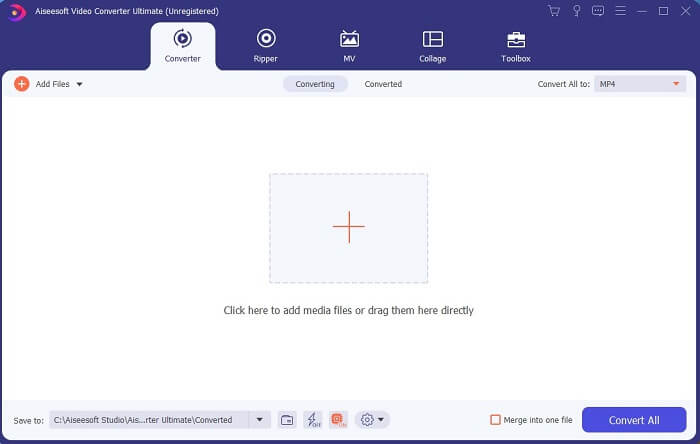
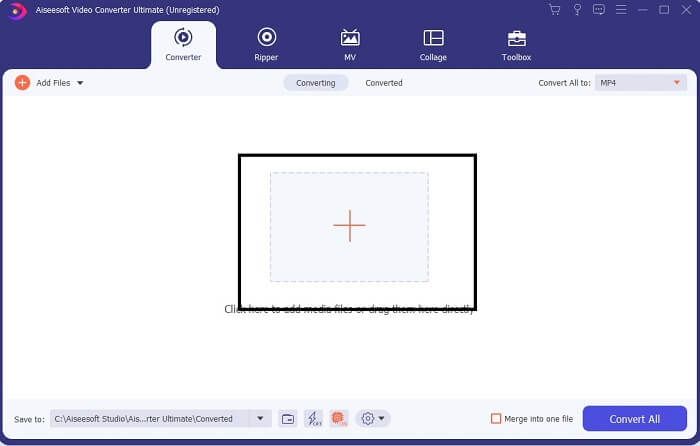
Βήμα 3. Κάντε κλικ στο σύμβολο συν για να προσθέσετε το αρχείο και πατήστε Άνοιγμα (open) για να ξεκινήσει η μετατροπή ή, απλά, μπορείτε να κάνετε drag-and-drop το αρχείο βίντεο μέσα στο εργαλείο. Η διάρκεια ή το μέγεθος του βίντεο δεν παίζει κανέναν ρόλο.
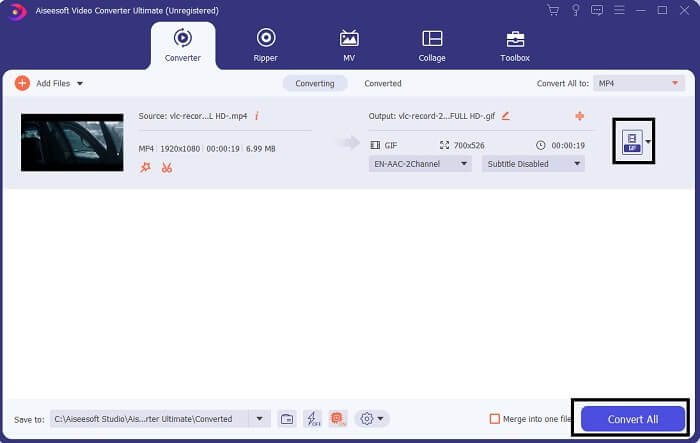
Βήμα 4. Κάντε κλικ στο κουμπί drop-down στο επάνω δεξί μέρος της διεπαφής, κάντε κύλιση προς τα κάτω και επιλέξτε τη μορφή GIF. Διαλέξτε την ανάλυση που θέλετε· μπορεί να είναι Large, Medium ή Small. Αν όλα είναι έτοιμα, κάντε κλικ στο Convert All για να ξεκινήσει η μετατροπή.
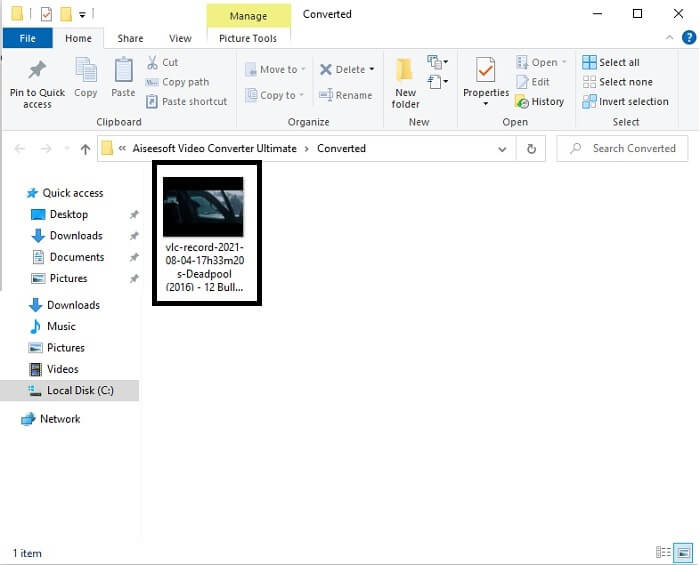
Βήμα 5. Μετά τη μετατροπή, θα ανοίξει ένα παράθυρο διαχείρισης αρχείων που θα σας δείξει το τελικό αποτέλεσμα και πλέον μπορείτε να απολαύσετε το αρχείο σας σε μορφή GIF. Μπορείτε όμως επίσης να μετατρέψετε ένα αρχείο .gif σε .mpg ακολουθώντας τα ίδια βήματα, απλώς αλλάζοντας τη μορφή.
2. Δωρεάν Online Video Converter FVC
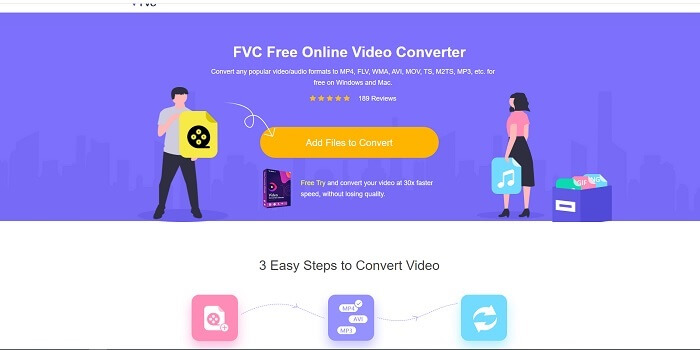
Ίσως σκέφτεστε, αν δεν έχετε χρήματα, μπορώ να συνεχίσω να έχω την ίδια μετατροπή με την πρώτη; Η απάντηση είναι ένα μεγάλο λίπος ΝΑΙ. Η FVC παρέχει πάντα την καλύτερη εμπειρία για τους πελάτες της που δεν έχουν χρήματα αλλά και για όσους θέλουν να δοκιμάσουν το εργαλείο τους. Ωστόσο, αυτό το εργαλείο κάνει μόνο απλή μετατροπή, επομένως μην περιμένετε πάρα πολλά, όπως μπορεί να προσφέρει η έκδοση premium. Και δεν μπορεί να μετατρέψει πολλαπλές μορφές βίντεο και ήχου με ταχύτερο τρόπο.
Ωστόσο, η διαδικασία μετατροπής που προσφέρει είναι πολύ καλύτερη από εκείνη άλλων επί πληρωμή ή δωρεάν μετατροπέων. Το FVC Free Online Video Converter είναι εδώ για να σας σώσει την ημέρα. Όπως λέει και το όνομά του, είναι ένα δωρεάν online εργαλείο που σας επιτρέπει να μετατρέπετε αρχεία στο μέγιστο επίπεδο. Σε αντίθεση με άλλους μετατροπείς, αυτό το εργαλείο δεν έχει διαφημίσεις ή κακόβουλο λογισμικό, δεν απαιτεί εγγραφή, σύνδεση ή τα προσωπικά σας στοιχεία πριν το χρησιμοποιήσετε. Αν ψάχνετε για έναν απλό μετατροπέα, τότε αυτό είναι το κατάλληλο εργαλείο για εσάς. Ακολουθήστε αυτά τα βήματα για να μάθετε πώς λειτουργεί ως μετατροπέας.
Βήμα 1. Μεταβείτε στον επίσημο ιστότοπο κάνοντας κλικ σε αυτόν τον σύνδεσμο.
Βήμα 2. Η ιστοσελίδα θα πρέπει να φαίνεται κάπως έτσι. Έπειτα κάντε κλικ στο Add Files to Convert για να εκκινήσετε αυτό το online εργαλείο.
Κατεβάστε την έκδοση για υπολογιστή για μαζική μετατροπή αρχείων.
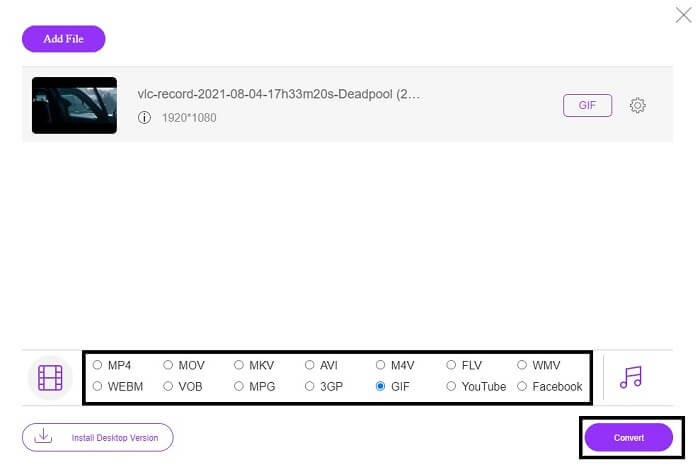
Βήμα 3. Επιλέξτε το βίντεο που θέλετε να μετατρέψετε. Αφού διαλέξετε το βίντεο, επιλέξτε τη μορφή αρχείου GIF. Για επιπλέον επιλογές, μπορείτε να διαλέξετε και άλλες μορφές βίντεο και ήχου, μπορείτε να τις εξερευνήσετε αργότερα αν θέλετε.
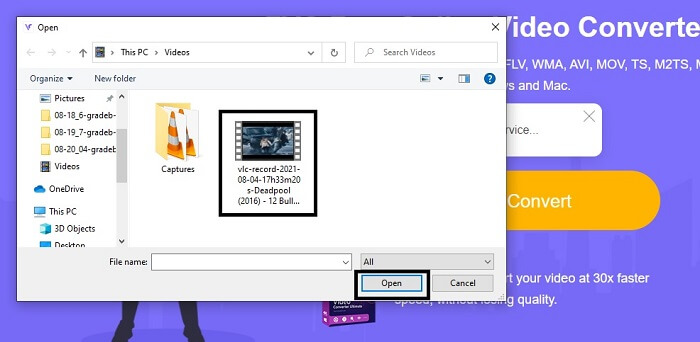
Βήμα 4. Επιλέξτε πού θέλετε να αποθηκευτεί το τελικό αρχείο. Όταν όλα είναι έτοιμα, κάντε κλικ στο Convert για να ξεκινήσει η μετατροπή. Θα χρειαστεί μόνο μερικά δευτερόλεπτα για να ολοκληρωθεί.
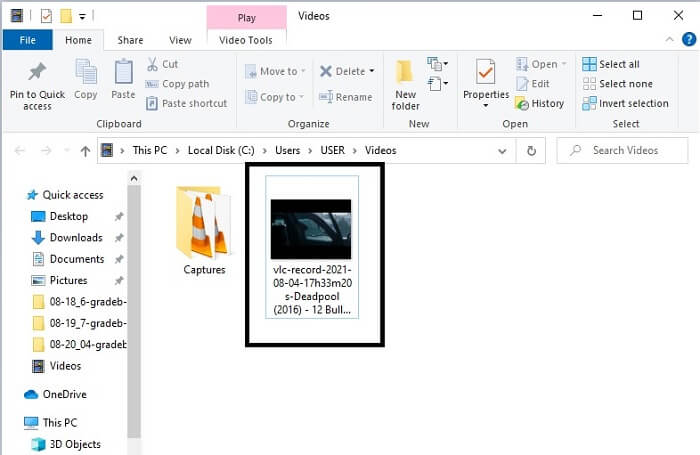
Βήμα 5. Για να ελέγξετε την επιτυχημένη μετατροπή, μπορείτε να εντοπίσετε το μετατραπέν αρχείο GIF στον διαχειριστή αρχείων ή στον explorer σας. Κάντε κλικ πάνω του και απολαύστε το.
3. VLC Media Player
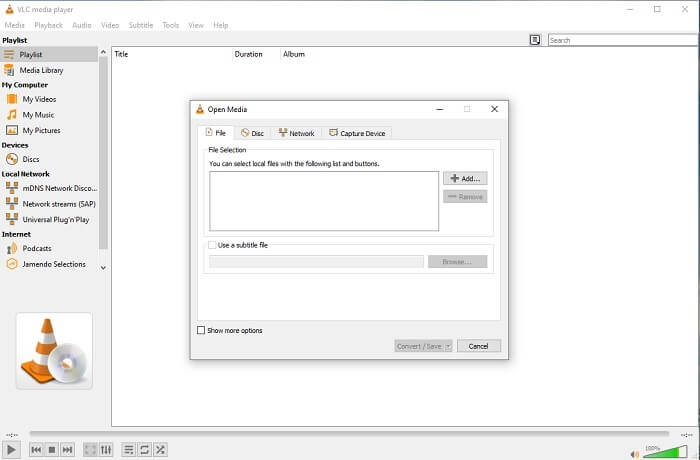
Αυτό το εργαλείο είναι γνωστό ως ένα από τα πιο ισχυρά προγράμματα αναπαραγωγής πολυμέσων. Αλλά γνωρίζατε ότι ο VLC player μπορεί επίσης να μετατρέψει MPG σε GIF; Ωστόσο, οι μορφές που υποστηρίζει για μετατροπή είναι πολύ περιορισμένες και αφορούν μόνο τις πιο γνωστές μορφές. Παρά το γεγονός ότι είναι ευρέως γνωστό ως ο καλύτερος media player, η λειτουργία μετατροπής του δεν είναι η καλύτερη επιλογή για εσάς. Αν θέλετε καλύτερο μετατροπέα, πρέπει να επιλέξετε το online εργαλείο πιο πάνω αντί για αυτό. Αν όμως θέλετε απλώς να παρακολουθήσετε βίντεο, τότε το VLC Media Player είναι η ιδανική επιλογή, γιατί το άλλο εργαλείο δεν λειτουργεί ως πρόγραμμα αναπαραγωγής βίντεο· ο κύριος σκοπός του είναι η μετατροπή.
4. Ζαμζάρ
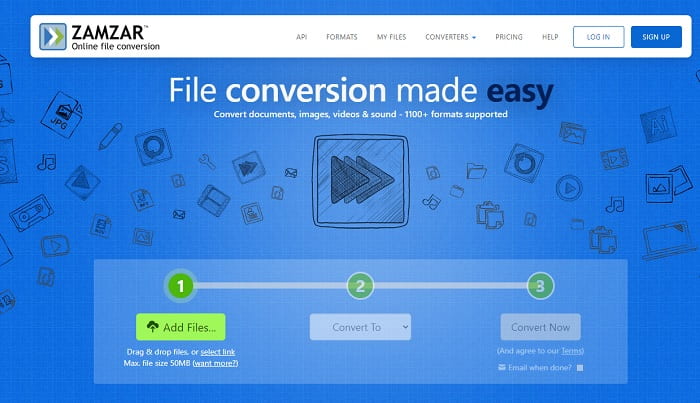
Ένα άλλο διαδικτυακό εργαλείο που παρέχει εξαιρετική μετατροπή είναι το Zamzar. Όπως κάθε άλλος διαδικτυακός μετατροπέας, μοιράζονται την ίδια διεπαφή και επίσης παρέχει οδηγίες επί τόπου για το πώς να το μετατρέψετε. Αλλά η διαδικασία μετατροπής και λήψης είναι διαφορετική. Αν και η δωρεάν έκδοση, μπορείτε να μετατρέψετε μόνο το μέγιστο μέγεθος αρχείου 50 MB. Γιατί αφού μετατρέψεις το βίντεο πρέπει να περάσεις στη φάση της λήψης του. Είναι μεγάλη ταλαιπωρία για όσους αφήνουν τη μετατροπή τους και απλώς περιμένουν να παιχτεί το προϊόν.
Μέρος 2. Διάγραμμα σύγκρισης
| Χαρακτηριστικό εργαλείου | FVC Video Converter Ultimate | Δωρεάν διαδικτυακός μετατροπέας FVC | VLC Media player | Ζαμάρ |
| Μετατροπέας |  | | | |
| Εργαλείο επεξεργασίας | |  | | |
| Ισχυρός μετατροπέας | | | | |
| Απαιτείται εγγραφή | | | | |
| Πλατφόρμες | Εφαρμογή που βασίζεται σε επιτραπέζιους υπολογιστές | Εφαρμογή βασισμένη στον ιστό | Εφαρμογή που βασίζεται σε επιτραπέζιους υπολογιστές | Εφαρμογή βασισμένη στον ιστό |
| Εύρος τιμών | $25.00 1 Μήνας/1 Τ.Κ $55.20 Εφάπαξ αγορά για 1 Η/Υ $119.00 Lifetime 5 Τ.Κ | Είναι ένα δωρεάν διαδικτυακό εργαλείο | Είναι ένα δωρεάν διαδικτυακό εργαλείο | Δωρεάν online εργαλείο Παρέχει όμως και μηνιαίο ασφάλιστρο. Για τα βασικά: $9 Για τους επαγγελματίες: $16 Για επιχειρήσεις: $25 |
MPG vs. GIF
Κατασκευασμένο από το Moving Picture Experts Group (MPEG), το MPG είναι μια κοινή μορφή ψηφιακού βίντεο για την αποθήκευση πληροφοριών βίντεο, ήχου και μεταδεδομένων. Είναι πολύ χρήσιμο όταν δημιουργείτε ταινίες για κοινή χρήση στο Διαδίκτυο. Αυτά τα αρχεία σε MPG συνήθως περιέχουν συμπίεση βίντεο/ήχου MPEG-1 ή MPEG-2.
Το GIF είναι μια κοινή μορφή εικόνας για γραφικά Ιστού. Εκτός από την αποθήκευση μικρών εικόνων και εικόνων που περιέχουν κείμενο, το GIF μπορεί επίσης να περιέχει και να εμφανίζει βασικά κινούμενα σχέδια σε ιστότοπους. Είναι μια μορφή χωρίς απώλειες και η συμπίεση GIF δεν υποβαθμίζει τη διαύγεια της εικόνας.
Μέρος 3. Συχνές ερωτήσεις σχετικά με το MPG σε GIF
Υπάρχει τρόπος να χρησιμοποιήσετε το Photoshop και να μετατρέψετε το βίντεο σε GIF;
Ναι, μπορείτε να μετατρέψετε MPG σε GIF με το Photoshop. Αλλά όχι μόνο αρχεία σε μορφή MPG· μπορείτε να επιλέξετε και άλλες μορφές και να τις μετατρέψετε σε GIF. Ένα ακόμη ειδικό χαρακτηριστικό του είναι ότι μπορείτε επίσης να βελτιώσετε το GIF για να γίνει ακόμη καλύτερο. Κάντε κλικ εδώ για να μάθετε πώς να μετατρέψετε MP4 σε GIF.
Ποιο είναι το καλύτερο εργαλείο εγγραφής οθόνης για εγγραφή GIF;
Το καλύτερο εργαλείο εγγραφής οθόνης που μπορείτε να χρησιμοποιήσετε για αυτή τη δουλειά είναι το FVC Screen Recorder. Το εργαλείο αυτό δεν είναι μόνο ιδανικό για εγγραφή βίντεο. Διαθέτει επίσης ενσωματωμένο ηχογράφο ήχου και εγγραφέα παιχνιδιών για πολύ καλύτερη εμπειρία στο gaming. Ωστόσο, για να το χρησιμοποιήσετε απαιτείται πληρωμή. Μη στενοχωριέστε, γιατί διαθέτει και ένα online εργαλείο που μπορεί να κάνει την εγγραφή.
Γιατί δημιουργήθηκε το GIF;
Η μορφή GIF δημιουργήθηκε για να εμφανίζει μια εικόνα εξοικονομώντας ταυτόχρονα χώρο αποθήκευσης. Δημιουργός του GIF είναι ο Steve Wilhite, Αμερικανός επιστήμονας υπολογιστών, με τη βοήθεια του τεχνολογικού κολοσσού CompuServe στα τέλη του 1987. Κάντε κλικ εδώ για να μάθετε περισσότερες πληροφορίες σχετικά με τα GIF.
συμπέρασμα
Επιτέλους, τώρα που ξέρετε πώς να φτιάξετε ένα GIF στον εαυτό σας, καλύτερα να το δοκιμάσετε και να απολαύσετε. Απλά χρησιμοποιώντας αυτό το εύκολο εργαλείο, μπορείτε να κάνετε τη διαφορά. Αντί να κάνετε αναζήτηση στον ιστό, είστε πλέον πιστοποιημένος κατασκευαστής GIF. Επίσης, μπορείτε τώρα να εκφράσετε τα συναισθήματά σας με τον δικό σας τρόπο με την προσωπική σας πινελιά και τεχνογνωσία που αναπτύχθηκε μόνο διαβάζοντας αυτό το άρθρο. Ελπίζουμε ότι μπορείτε να απολαύσετε τη ζωή ενός καλύτερου GIF που δημιουργείτε και να μοιραστείτε το καλύτερο GIF σας στον κόσμο.
-
 [Οδηγός] Πώς να μετατρέψετε βίντεο M4V σε κινούμενα GIF σε Windows/Mac
 Εάν θέλετε να δημιουργήσετε κινούμενα αρχεία GIF από τα αγαπημένα σας βίντεο M4V, μπορείτε να μάθετε για 2 εύκολους και αποτελεσματικούς τρόπους μετατροπής βίντεο M4V σε GIF με προσαρμοσμένες ρυθμίσεις.
-
 WebM σε GIF - 3 Δωρεάν μετατροπείς WebM σε GIF για τη δημιουργία των δικών σας GIF
 Είναι το WebM GIF; Πώς να μετατρέψετε ένα βίντεο σε GIF; Υπάρχει δωρεάν μετατροπέας WebM σε GIF; Αυτή η ανάρτηση μοιράζεται 3 δωρεάν τρόπους για να σας βοηθήσει να μετατρέψετε το WebM σε GIF.
-
 Πώς να μετατρέψετε βίντεο MKV σε κινούμενα GIF χωρίς Photoshop/FFmpeg
 Μετά τη λήψη και την παρακολούθηση ταινιών MKV στον υπολογιστή σας, μπορεί να θέλετε να μοιραστείτε μερικές υπέροχες στιγμές με φίλους ή στο Διαδίκτυο ως GIF. Σε αυτό το άρθρο, μπορείτε να μάθετε για τους 2 ευκολότερους τρόπους μετατροπής του MKV σε GIF.

