


 Video Converter Ultimate
 Εγγραφή οθόνης
 Επισκευή βίντεο
 Ασφαλές κατέβασμα
Πώς να μετατρέψετε BMP σε PNG και JPG Χρησιμοποιώντας Online και Offline μετατροπείς
Η μορφή Bitmap ή BMP δεν είναι ιδανική για έγχρωμες εικόνες με μίξεις ή διαβαθμίσεις. Στις μέρες μας δεν θα δείτε πολλές φωτογραφίες σε αυτή τη μορφή. Τεχνικά μιλώντας, το BMP είναι μια παρωχημένη μορφή με σχεδόν καθόλου συμπίεση. Επομένως, αν θέλετε να ανοίγετε εικόνες BMP χωρίς περιορισμούς, πρέπει να μετατρέψετε τα BMP σε ευρέως χρησιμοποιούμενες μορφές εικόνας. Μπορείτε να μετατρέψετε ανάμεσα σε διάφορες μορφές εικόνας με πολλούς τρόπους. Σε αυτή την ανάρτηση θα παρουσιάσουμε τις πιο απλές και άμεσες μεθόδους. Αν, λοιπόν, θέλετε να μάθετε πώς να μετατρέψετε BMP σε JPG ή PNG, διαβάστε αυτή την ανάρτηση. Θα σας παρουσιάσουμε αξιόλογους μετατροπείς εικόνας που μπορούν να σας βοηθήσουν.

Μέρος 1. BMP έναντι JPG έναντι PNG
| Μορφή αρχείου | BMP | JPG | PNG |
| Επέκταση ονόματος αρχείου | .bmp | .jpg | .png |
| Αναπτύχθηκε από | Microsoft | Ένωση Επαγγελματιών Φωτογράφων | Ομάδα Ανάπτυξης PNG |
| Περιγραφή | ΕΝΑ BMP Το αρχείο είναι σύντομο για το bitmap και προφέρεται bump. Η Microsoft δημιούργησε τη μορφή αρχείου BMP για το λειτουργικό της σύστημα Windows. Είναι η διατήρηση της ανάλυσης των ψηφιακών εικόνων σε διάφορες οθόνες και gadget. Μπορούν να αποθηκευτούν τόσο έγχρωμες όσο και ασπρόμαυρες δισδιάστατες φωτογραφίες. Τα αρχεία BMP δεν είναι πλέον συμβατά μόνο με συσκευές που βασίζονται σε Windows στη σύγχρονη εποχή. Είναι πλέον συμβατά με μεγάλο αριθμό συσκευών Mac και Android. | ο JPG Η μορφή αρχείου εικόνας είναι η πιο αποτελεσματική για τη συμπίεση εικόνας. Οι χρήστες χρησιμοποιούν ευρέως αρχεία JPG. Αναφέρεται επίσης ως αρχεία JPEG ή JPG. Το Joint Experts Group είναι το πλήρες όνομα του JPEG. Επιπλέον, η πλειοψηφία των εικόνων bitmap έχουν την επέκταση αρχείου.jpg. Ο πρωταρχικός στόχος είναι να γίνουν τα αρχεία μικρότερα σε μέγεθος. Δεδομένου ότι το JPG είναι μια μορφή με απώλειες, η υπερβολική συμπίεση έχει αντίκτυπο στην ποιότητα των εικόνων. | Φορητά γραφικά δικτύου, α PNG επέκταση για την οικογένεια ράστερ, που εκτελεί συμπίεση χωρίς απώλειες. Αναπτύχθηκε για να αντικαταστήσει το GIF, το Graphics Interchange Format, και δεν είναι κατοχυρωμένο με δίπλωμα ευρεσιτεχνίας. Μπορούν να βασίζονται σε μια παλέτα και συνήθως σε εικόνες σε κλίμακα του γκρι που προσφέρουν διαφάνεια. Το PNG είναι συμπίεση χωρίς απώλειες. Υπονοεί ότι διατηρεί πληροφορίες, λεπτομέρειες και ποιότητα. |
Μέρος 2. Διαδικτυακές μέθοδοι μετατροπής BMP σε JPG/PNG
Μετατρέψτε το BMP σε JPG/PNG χρησιμοποιώντας το Free Image Converter FVC
Για να μετατρέψετε BMP σε JPG δωρεάν online, μπορείτε να χρησιμοποιήσετε το FVC Free Image Converter. Αυτό το διαδικτυακό εργαλείο προσφέρει την πιο απλή διαδικασία για τη μετατροπή BMP σε PNG ή JPG. Χάρη στο διαισθητικό του περιβάλλον, μπορούν να το χρησιμοποιήσουν τόσο προχωρημένοι όσο και μη επαγγελματίες χρήστες. Μπορείτε να μετατρέψετε εικόνες σε μόλις τρία βήματα. Επιπλέον, μπορείτε να ανεβάσετε εικόνες σε διάφορες μορφές αρχείων. Υποστηρίζει μορφές εισόδου όπως PNG, JPG, BMP, GIF, TIFF και άλλες. Επίσης, ο μετατροπέας αρχείων εικόνας FVC υποστηρίζει ομαδική μετατροπή (batch). Σας επιτρέπει να μετατρέπετε πολλές εικόνες ταυτόχρονα. Αυτό είναι πολύ πιο αποδοτικό και πρακτικό από άλλους μετατροπείς εικόνας στην αγορά. Είναι βολικό για όλους τους χρήστες, καθώς μπορείτε να μετατρέπετε 40 αρχεία εικόνας ταυτόχρονα.
Το FVC Free Image Converter εγγυάται μια εικόνα υψηλής ποιότητας. Μετά τη μετατροπή, η εικόνα θα εξακολουθεί να είναι ίδια με την αρχική. Επιπλέον, δεν θα βλέπετε ενοχλητικές διαφημίσεις στην οθόνη σας, ακόμα κι αν πρόκειται για διαδικτυακό μετατροπέα εικόνας. Με αυτόν τον τρόπο, μπορείτε να εστιάσετε περισσότερο στη μετατροπή των εικόνων σας. Αυτός ο μετατροπέας είναι διαθέσιμος σε όλα σχεδόν τα προγράμματα περιήγησης. Περιλαμβάνει Chrome, Safari, Edge, Firefox και άλλα. Μπορείτε να ακολουθήσετε τα παρακάτω απλά βήματα για να μετατρέψετε το BMP σε μορφή JPG και PNG.
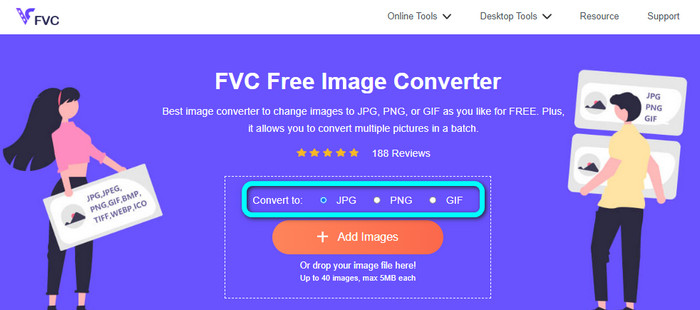
Βήμα 1: Ανοίξτε τον περιηγητή σας και επισκεφτείτε τον ιστότοπο FVC Free Image Converter. Βρείτε την επιλογή Convert to και επιλέξτε τη μορφή που θέλετε. Μπορείτε να κάνετε κλικ στο JPG ή στο PNG.
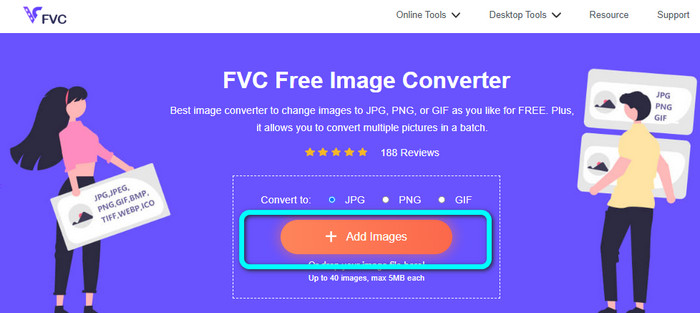
Βήμα 2: Προσθέστε την εικόνα BMP κάνοντας κλικ στο κουμπί Add Images. Τα αρχεία του υπολογιστή σας θα εμφανιστούν στην οθόνη. Επιλέξτε το αρχείο εικόνας BMP που θέλετε να μετατρέψετε.
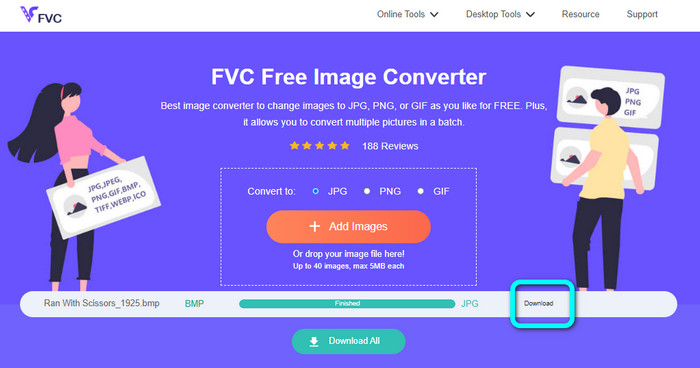
Βήμα 3: Μετά το ανέβασμα, η φωτογραφία θα μετατραπεί αυτόματα. Έτσι, για το τελευταίο βήμα, κάντε κλικ στο κουμπί Download για να αποθηκεύσετε την εικόνα σας στον υπολογιστή σας.
Μετατρέψτε το BMP σε JPG/PNG χρησιμοποιώντας το Convertio
Το Convertio είναι ένα ακόμη διαδικτυακό εργαλείο για να μετατρέψετε BMP σε JPG ή PNG. Είναι ένας μετατροπέας αρχείων που σας επιτρέπει να μετατρέπετε διάφορες μορφές. Περιλαμβάνει BMP, JPG, PNG, GIF, SVG και άλλα. Με τη βοήθεια αυτού του εργαλείου, η μετατροπή πολλών εικόνων είναι εύκολη. Προσφέρει επίσης διαδικασία ομαδικής μετατροπής. Έτσι, μπορείτε να μετατρέψετε BMP σε JPG κατά παρτίδες για να εξοικονομήσετε περισσότερο χρόνο. Επιπλέον, το Convertio εγγυάται το απόρρητό σας. Μετά τη μετατροπή των εικόνων σας, διαγράφει αυτόματα τα δεδομένα σας μετά από 24 ώρες. Επίσης, μπορείτε να έχετε πρόσβαση σε αυτόν τον μετατροπέα από διάφορους περιηγητές. Μπορείτε να τον χρησιμοποιήσετε σε Google, Mozilla, Edge κ.λπ.
Ωστόσο, το Convertio έχει μειονεκτήματα. Μπορείτε να ανεβάσετε μόνο μια εικόνα έως 100 MB. Εάν θέλετε να ανεβάσετε απεριόριστο μέγεθος αρχείου, αγοράστε ένα πρόγραμμα συνδρομής. Χρειάζεστε επίσης σύνδεση στο Διαδίκτυο για να λειτουργήσετε αυτόν τον μετατροπέα.
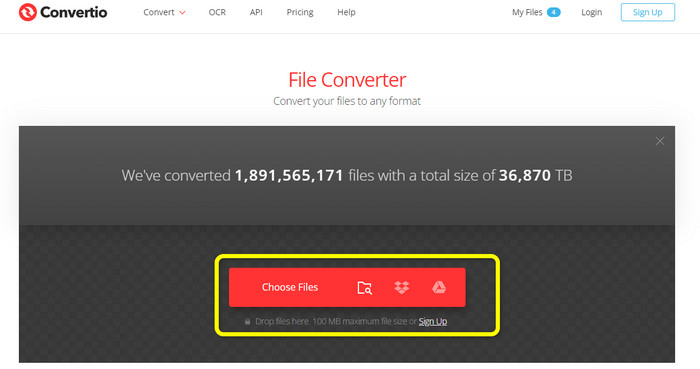
Βήμα 1: Επισκεφτείτε τον ιστότοπο Convertio. Κάντε κλικ στο κουμπί Choose Files για να προσθέσετε το αρχείο εικόνας BMP.
Βήμα 2: Επιλέξτε τη μορφή αρχείου JPG ή PNG από τις διαθέσιμες επιλογές μορφής. Αν θέλετε να προσθέσετε περισσότερες εικόνες, κάντε κλικ στο κουμπί Add more files.
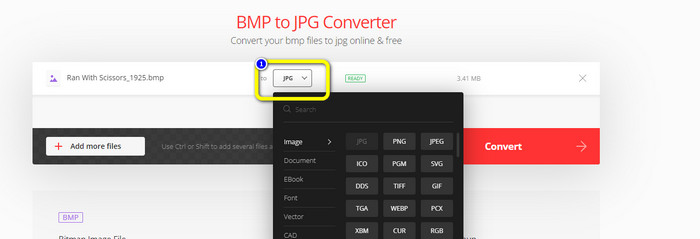
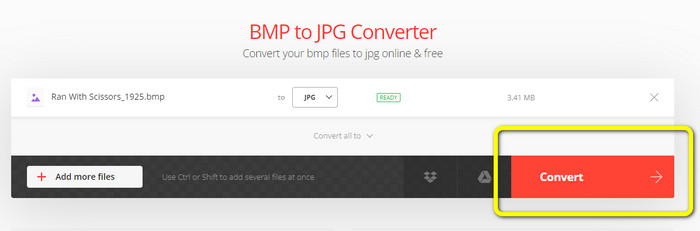
Βήμα 3: Αφού επιλέξετε τη μορφή αρχείου που θέλετε, κάντε κλικ στο κουμπί Convert. Περιμένετε να ολοκληρωθεί η διαδικασία μετατροπής και κατεβάστε τις εικόνες στον υπολογιστή σας.
Μέρος 3. Μέθοδοι εκτός σύνδεσης για τη μετατροπή BMP σε JPG/PNG
Μπορείτε επίσης να χρησιμοποιήσετε το Video Converter Ultimate για να μετατρέψετε BMP σε JPG. Αυτός ο offline μετατροπέας έχει μια κατανοητή διαδικασία μετατροπής. Διαθέτει επίσης διαισθητικό περιβάλλον, κάτι που τον κάνει κατάλληλο για όλους τους χρήστες, ειδικά για αρχάριους. Το Video Converter Ultimate προσφέρει ομαδική μετατροπή. Αυτό σημαίνει ότι μπορείτε να μετατρέπετε πολλαπλές εικόνες ταυτόχρονα. Προσφέρει επίσης γρήγορη διαδικασία μετατροπής. Με αυτό το χαρακτηριστικό, μπορείτε να μετατρέπετε πολλά αρχεία άμεσα. Επιπλέον, υποστηρίζει διάφορες μορφές εικόνας. Περιλαμβάνει JPG, BMP, PNG, GIF, TIFF και άλλες. Εκτός από τη μετατροπή, μπορείτε επίσης να αλλάξετε την ποιότητα της φωτογραφίας σας από τις ρυθμίσεις εξόδου. Με αυτόν τον τρόπο μπορείτε να προσαρμόσετε την ποιότητα της εικόνας ανάλογα με τις προτιμήσεις σας. Επιπλέον, μπορείτε να χρησιμοποιήσετε αυτόν τον μετατροπέα, που κατεβαίνει τοπικά, τόσο σε Mac όσο και σε Windows. Ακολουθήστε τις παρακάτω οδηγίες για να μετατρέψετε το αρχείο BMP σε μορφή JPG ή PNG.
Βήμα 1: Κατεβάστε το Video Converter Ultimate σε Mac ή Windows. Εκκινήστε το πρόγραμμα μετά την εγκατάσταση. Σας παρέχουμε επίσης τον μετατροπέα κάνοντας κλικ στο κουμπί Download παρακάτω.
Δωρεάν ΛήψηΓια Windows 7 ή νεότεραΑσφαλής λήψη
Δωρεάν ΛήψηΓια MacOS 10.7 ή νεότεροΑσφαλής λήψη
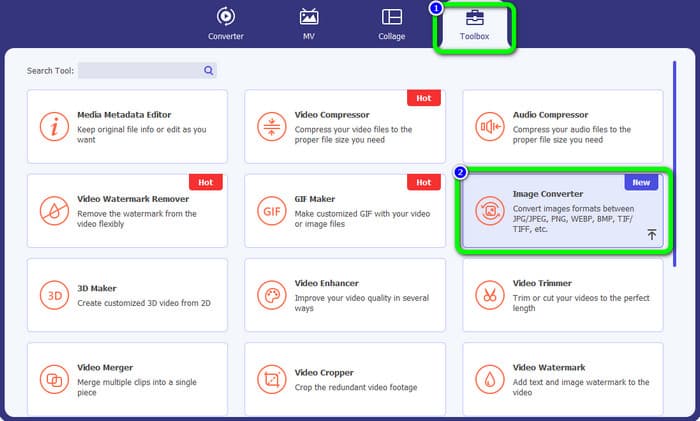
Βήμα 2: Μεταβείτε στον πίνακα Toolbox και επιλέξτε το εργαλείο Image Converter. Θα εμφανιστεί ένα νέο παράθυρο.
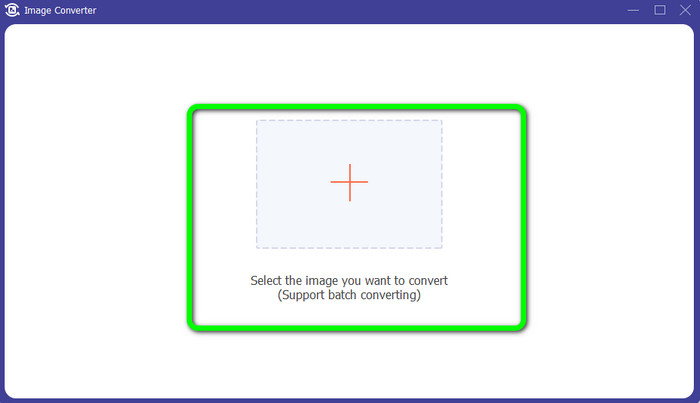
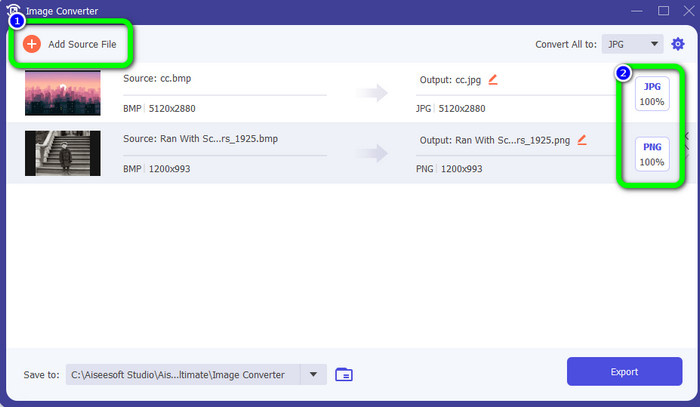
Βήμα 3: Κάντε κλικ στο σύμβολο Plus . Στη συνέχεια, επιλέξτε από το φάκελο αρχείων σας τη φωτογραφία BMP που θέλετε να μετατρέψετε.
Βήμα 4: Κάντε κλικ στο κουμπί Add Source File για να προσθέσετε περισσότερα αρχεία. Έπειτα, μεταβείτε στην επιλογή μορφής για να διαλέξετε την επιθυμητή μορφή εξόδου. Μπορείτε να επιλέξετε τις μορφές PNG και JPG.
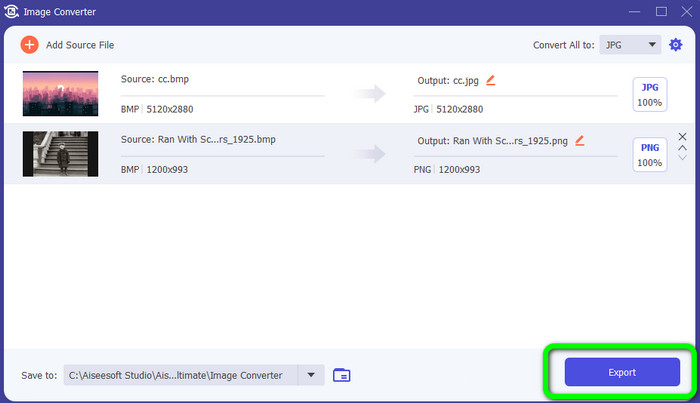
Βήμα 5: Για το τελευταίο βήμα, κάντε κλικ στο κουμπί Export. Περιμένετε να ολοκληρωθεί η διαδικασία μετατροπής. Έπειτα, ανοίξτε τις μετατραπείσες εικόνες από τον φάκελό σας.
Μέρος 4. Συχνές ερωτήσεις σχετικά με τη μετατροπή BMP σε JPG/PNG
1. Πώς γίνεται η μαζική μετατροπή BMP σε PNG;
Αν θέλετε να κάνετε ομαδική μετατροπή, χρησιμοποιήστε το FVC Free Image Converter. Πρώτα, επιλέξτε τη μορφή PNG από την επιλογή Convert to. Στη συνέχεια, απλώς κάντε κλικ στο κουμπί Add Images. Μπορείτε να προσθέσετε πολλαπλά αρχεία εικόνας. Σας επιτρέπει να ανεβάζετε έως και 40 εικόνες ταυτόχρονα. Μετά τη διαδικασία ανεβάσματος, το εργαλείο θα μετατρέψει αυτόματα τα αρχεία εικόνας σας. Για να ολοκληρώσετε τη διαδικασία, κάντε κλικ στο κουμπί Download All για να τα αποθηκεύσετε στον υπολογιστή σας.
2. Μπορεί ένα αρχείο BMP να κινηθεί;
Δυστυχώς όχι. Η κινούμενη εικόνα συχνά δεν είναι συμβατή με αρχεία BMP. Αντί να χρησιμοποιείτε Flash, σκεφτείτε να χρησιμοποιήσετε τη μορφή αρχείου GIF. Μπορεί να δημιουργήσει σύντομα, απλά κινούμενα σχέδια που μπορούν να κοινοποιηθούν και να αποθηκευτούν.
3. Ποιο είναι μεγαλύτερο, αρχείο BMP ή αρχείο JPEG;
Ένα BMP θα είναι μεγαλύτερο με συγκρίσιμες φωτογραφίες. Αλλά ένα BMP μπορεί να είναι μόνο 4 GB λόγω περιορισμών μεγέθους. Το μέγεθος ενός JPEG είναι απεριόριστο. Για παράδειγμα, ορισμένες δορυφορικές εικόνες είναι διαθέσιμες σε μορφή JPEG.
συμπέρασμα
Επειδή ένα αρχείο BMP έχει μεγαλύτερο μέγεθος, είναι απαραίτητο να το μετατρέψετε σε άλλες μορφές όπως JPG και PNG. Είναι ευχάριστο ότι αυτό το άρθρο παρείχε εξαιρετικές μεθόδους για να μετατρέψετε BMP σε μορφές JPG και PNG. Αν όμως προτιμάτε έναν εύκολο και δωρεάν τρόπο για να μετατρέπετε εικόνες, χρησιμοποιήστε το FVC Free Image Converter.
-
 Πλήρης κλίμακα Τρόποι μετατροπής JPG σε PNG Online και Offline
 Αναζητάτε χρήσιμες μεθόδους για να μετατρέψετε μορφή αρχείου JPG σε PNG; Αυτός ο οδηγός έχει την απάντηση που χρειάζεστε. Για να ανακαλύψετε αυτές τις μεθόδους, διαβάστε το άρθρο
-
 Αποτελεσματική μετατροπή JPEG σε JPG [Παρατίθενται πέντε μέθοδοι]
 Ελάτε και λάβετε τα πιο απλά μαθήματα για τη μετατροπή μορφής αρχείου εικόνας JPEG σε JPG. Κάντε κλικ σε αυτόν τον οδηγό και ξεκινήστε να μαθαίνετε τις μεθόδους που προτιμάτε
-
 Κορυφαία 5 κορυφαία σεμινάρια για γρήγορη μετατροπή PNG σε JPG
 Εάν πρέπει να μετατρέψετε το αρχείο PNG σε μορφή JPG, μπορείτε να μάθετε τους καλύτερους τρόπους εδώ. Θα μάθετε επίσης τη διαφορά μεταξύ των μορφών αρχείων PNG και JPG
