


 Video Converter Ultimate
 Εγγραφή οθόνης
 Επισκευή βίντεο
 Ασφαλές κατέβασμα
Οι καλύτεροι τρόποι για να μετατρέψετε το HEIC σε JPG στο Android χρησιμοποιώντας εφαρμογές και διαδικτυακά χωρίς κόπο
Καθώς η Apple υιοθετεί τη νέα μορφή εικόνας HEIC, το Android δεν μπορεί να την υποστηρίξει εγγενώς, επειδή του λείπουν τα κατάλληλα codecs για το HEIC. Ακόμα κι αν χρησιμοποιείτε την πιο πρόσφατη έκδοση τηλεφώνου Android, η μορφή HEIC δεν είναι ορατή σε αυτήν τη συσκευή. Εφόσον η μορφή δεν είναι συμβατή με το Android, η καλύτερη προσέγγιση είναι να τη μετατρέψετε σε μια μορφή εικόνας συμβατή με όλες τις συσκευές, δηλαδή σε JPEG. Έτσι, αν λάβετε ένα αρχείο και θέλετε να μετατρέψετε HEIC σε JPG στο Android για να το δείτε, τότε πρέπει να διαβάσετε τις παρακάτω λεπτομέρειες που προσθέτουμε σε αυτό το κείμενο, καθώς κάναμε την έρευνα για εσάς ώστε η διαδικασία να γίνει πιο εύκολη και πιο αποδοτική από ποτέ.

Μέρος 1. Πώς να μετατρέψετε το αρχείο HEIC σε JPG στο Android χρησιμοποιώντας εφαρμογές για κινητά
Dropbox
Το Dropbox σάς προσφέρει τον καλύτερο τρόπο διανομής και αποστολής αρχείων σε αποθήκευση cloud αντί για την τοπική σας αποθήκευση, ώστε να μπορείτε να τα μοιράζεστε με οποιονδήποτε. Με έναν μετατροπέα HEIC σε JPG στο Android όπως αυτός, η μετατροπή της μορφής HEIC σε JPEG έγινε εύκολη και πρακτική. Παρόλο που μπορεί να μετατρέψει τη μορφή εικόνας σε JPEG, συνήθως δεν αντιμετωπίζει τα ίδια προβλήματα με άλλους μετατροπείς που χρειάζονται περίπλοκη διαδικασία για να ολοκληρώσουν τη μετατροπή.
Επειδή αλλάζει αυτόματα τη μορφή σε συμβατή μορφή μετά την κοινή χρήση της. Θέλετε να μάθετε πώς να μετατρέψετε τη μορφή σε JPEG; Στη συνέχεια, ακολουθήστε τα παρακάτω βήματα για να μάθετε πώς να το κάνετε.
Βήμα 1. Κατεβάστε και ανοίξτε την εφαρμογή Dropbox στη συσκευή Android σας. Έπειτα, κάντε εγγραφή πριν τη χρησιμοποιήσετε, αλλά αν ήδη διαθέτετε λογαριασμό Dropbox, απλώς συνδεθείτε εδώ.
Βήμα 2. Πατήστε στο Camera Uploads και επιλέξτε το αρχείο HEIC που έχετε στο τηλέφωνό σας.
Βήμα 3. Πατήστε στο Save HEIC Photos και επιλέξτε τη μορφή JPG για να το αποθηκεύσετε με αυτόν τον τύπο επέκτασης. Περιμένετε να ολοκληρωθεί η διαδικασία και μπορείτε να ελέγξετε στην Έκθεση (Gallery) ότι η εικόνα είναι πλέον σε αυτή τη μορφή.
Δωρεάν μετατροπέας HEIC σε JPG – Μετατροπή HEIC σε JPEG
Το HEIC to JPG Free Converter είναι μία από τις καλύτερες εφαρμογές μετατροπής HEIC σε JPG στο Android, που μπορεί να σας βοηθήσει να μετατρέψετε τη μορφή HEIC σε συμβατή μορφή. Με αυτή την εφαρμογή, μπορείτε να μετατρέψετε το αρχείο HEIC σε JPEG χωρίς να ανησυχείτε για απώλεια ποιότητας και μεταδεδομένων που είναι συνημμένα σε αυτό. Σε αντίθεση με το Dropbox, όπου θα χρειαστεί να συνδεθείτε, με αυτή την εφαρμογή δεν χρειάζεται σύνδεση, οπότε υπάρχει λιγότερη ταλαιπωρία, καθώς μπορείτε να μετατρέψετε απευθείας το HEIC χωρίς login.
Αν και δεν θα χρειαστεί να συνδεθείτε ενώ χρησιμοποιείτε την εφαρμογή, θα παρατηρήσετε ότι οι αναδυόμενες διαφημίσεις θα εμφανίζονται στο τηλέφωνό σας εάν τη χρησιμοποιείτε. Εάν αυτό δεν είναι πρόβλημα για εσάς, ακολουθήστε τα παρακάτω βήματα για να μάθετε πώς να το χρησιμοποιήσετε.
Βήμα 1. Αναζητήστε το HEIC to JPG Free Converter στο Play Store, εγκαταστήστε το και ανοίξτε την εφαρμογή για να συνεχίσετε στη χρήση της.
Βήμα 2. Πατήστε Open File και βρείτε την εικόνα HEIC στη φορητή συσκευή σας, έπειτα πατήστε Select to για να την ανεβάσετε στον μετατροπέα.
Βήμα 3. Στην επιλογή Convert to, διαλέξτε τη μορφή JPG από τη λίστα και πατήστε Convert για να ξεκινήσει η μετατροπή του αρχείου HEIC.
Μέρος 2. Ο πιο επαγγελματικός τρόπος για τη μαζική μετατροπή HEIC σε JPG Android Online
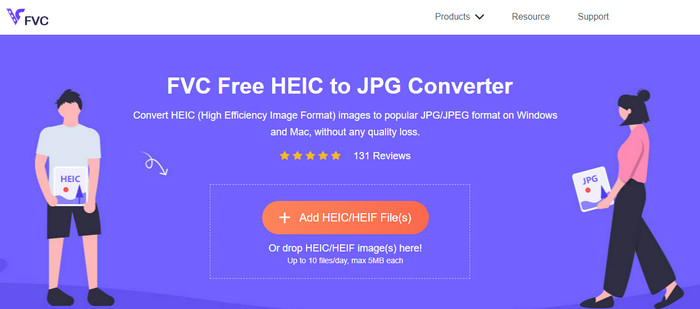
Χρειάζεται να μάθετε πώς να μετατρέψετε το αρχείο HEIC σε JPG στο Android χωρίς τη βοήθεια κάποιας εφαρμογής που απαιτεί λήψη; Τότε, χωρίς αμφιβολία, το FVC Free HEIC to JPG Converter είναι το διαδικτυακό εργαλείο που θα χρειαστείτε. Για μια εργασία σαν αυτή, θα χρειαστείτε ένα επαγγελματικό εργαλείο, ειδικά αν θέλετε να μετατρέψετε παρτίδα αρχείων HEIC σε JPEG χωρίς απώλεια ποιότητας, και ακριβώς αυτό προσφέρει αυτό το online εργαλείο.
Σε αντίθεση με τις εφαρμογές που αναφέραμε παραπάνω, με αυτό, δεν θα χρειαστεί να κάνετε λήψη πρόσθετων δεδομένων για να μπορέσετε να τα χρησιμοποιήσετε και δεν θα χρειαστεί καν να συνδεθείτε. Αντί να κάνετε λήψη της εφαρμογής στο Android σας και να περιμένετε τη διαδικασία εγκατάστασης , γιατί δεν δοκιμάζετε να χρησιμοποιήσετε αυτό το εργαλείο ιστού αμέσως; Εάν αυτό το διαδικτυακό εργαλείο τράβηξε την προσοχή σας, πρέπει να διαβάσετε τις παρακάτω λεπτομέρειες. Για να μάθετε πώς ένα επαγγελματικό εργαλείο Ιστού μετατρέπει το HEIC σε JPG στο Android σας online και δωρεάν.
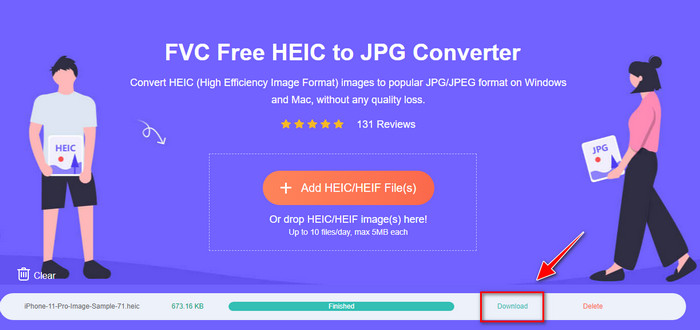
Βήμα 1. Για να ανοίξετε το επαγγελματικό διαδικτυακό εργαλείο, πρέπει να κάνετε κλικ σε αυτό το link, και θα ανοίξει μια νέα καρτέλα στον φυλλομετρητή σας.
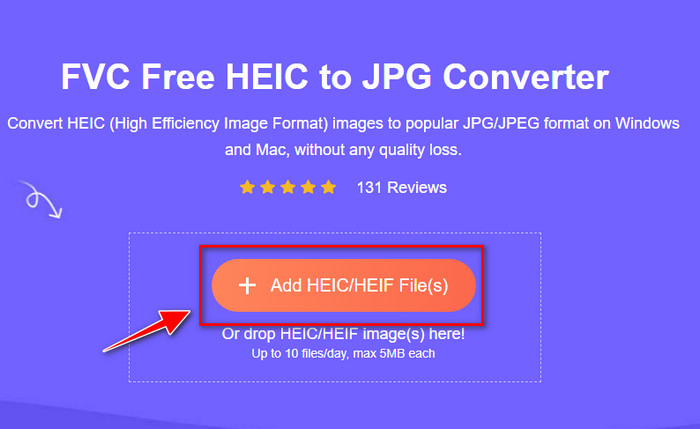
Βήμα 2. Όσο βρίσκεστε στο διαδικτυακό εργαλείο, πατήστε στο Add HEIC/HEIF File και ανεβάστε εδώ το αρχείο HEIC. Μπορείτε επίσης να ανεβάσετε περισσότερα αρχεία HEIC και να τα μετατρέψετε όλα σε JPEG ταυτόχρονα.
Βήμα 3. Περιμένετε να ολοκληρωθεί η μετατροπή και, όταν η γραμμή προόδου φτάσει στο τέλος, μπορείτε να αποθηκεύσετε τα αρχεία HEIC που έχετε ανεβάσει πατώντας το κουμπί Download. Το αρχείο θα αποθηκευτεί αυτόματα στον φάκελο λήψεων και μπορείτε να το ελέγξετε για να δείτε την εικόνα σε μορφή JPEG.
Μέρος 3. Συχνές ερωτήσεις σχετικά με τη μετατροπή HEIC σε JPG στο Android
Μπορεί το Google Android Pie να προβάλει το αρχείο HEIC;
Ναι, μπορείτε εύκολα να δείτε την εικόνα HEIC εδώ. Αυτή η 16η έκδοση του Android διαθέτει επίσημα τους κωδικοποιητές HEIC για να προβάλετε την εικόνα χωρίς να τη μετατρέψετε σε JPEG ή PNG. Έτσι, εάν το Android σας είναι σε αυτήν την έκδοση, δεν θα χρειαστεί να μετατρέψετε τη μορφή σε JPEG ή PNG για να το προβάλετε και είναι έτοιμο να λάβει την εικόνα HEIC.
Γιατί δεν μπορώ να μετατρέψω το HEIC σε JPG στο Android;
Αρχικά, πρέπει να ελέγξετε τον μετατροπέα που χρησιμοποιείτε στο Android σας εάν υποστηρίζει τη μετατροπή του HEIC σε JPG. Αν και ορισμένες εφαρμογές λένε ότι υποστηρίζουν τη μετατροπή HEIC, οι περισσότερες από αυτές είναι clickbait. Για να αποφύγετε αυτό να συμβεί, πρέπει να διαβάσετε τις κριτικές σχετικά με αυτά για να δείτε αν υποστηρίζουν το HEIC και αν μπορεί να μετατρέψει τη μορφή εικόνας σε JPG.
Γιατί το HEIC έγινε δημοφιλές σε συσκευές iOS;
Το HEIC έγινε δημοφιλές στις συσκευές iOS λόγω της συμπίεσης που προσφέρει στην εικόνα και του λεπτομερούς συνδυασμού χρωμάτων, που είναι κατά πολύ καλύτερος από αυτόν του JPEG. Αν η φωτογραφία σας είναι σε αυτή τη μορφή, είναι εμφανές ότι το μέγεθος αρχείου είναι μικρότερο και καλύτερα βελτιστοποιημένο σε σχέση με μια εικόνα JPEG. Αυτός είναι ένας από τους λόγους που έγινε τόσο δημοφιλές στις συσκευές iOS.
συμπέρασμα
Αυτό το άρθρο παρουσιάζει τους καλύτερους μετατροπείς HEIC σε JPG για Android· όλοι είναι προσβάσιμοι από τις φορητές σας συσκευές. Παρόλο που μπορούν να σας βοηθήσουν να μετατρέψετε τη μορφή στο Android, τα δυνατά και αδύνατα σημεία τους είναι αυτά που τους διαφοροποιούν μεταξύ τους. Αν θέλετε να χρησιμοποιήσετε τον επαγγελματικό μετατροπέα στο Android για να μετατρέψετε το αρχείο HEIC σε JPG, τότε προτείνουμε να χρησιμοποιήσετε το FVC Free HEIC to JPG Converter. Αν και λειτουργεί μέσω web, είναι σαφώς ανώτερο από τις άλλες προαναφερθείσες εφαρμογές. Αν θέλετε να δοκιμάσετε το διαδικτυακό εργαλείο στη συσκευή Android που διαθέτετε, υπάρχουν βήματα παραπάνω· μπορείτε να τα δείτε και να τα ακολουθήσετε προσεκτικά για να το κάνετε αποτελεσματικά.
-
 Μετατρέψτε το HEIC σε PDF χρησιμοποιώντας τους κορυφαίους 4 βελτιωμένους τρόπους το 2022
 Για να μάθετε περισσότερες πληροφορίες σχετικά με τον καλύτερο μετατροπέα HEIC σε PDF, μπορείτε να κάνετε λήψη αυτού του 2022. Μπορείτε να διαβάσετε αυτό το άρθρο καθώς δώσαμε μια κριτική για αυτούς.
-
 Ο καλύτερος δωρεάν και επί πληρωμή μετατροπέας HEIC που πρέπει να γνωρίζετε [Ενημερώθηκε 2022]
 Θέλετε να μάθετε τι είναι ο μετατροπέας HEIC; Εάν ναι, περιλαμβάνουμε τους 5 κορυφαίους δωρεάν και επί πληρωμή μετατροπείς HEIC που μπορείτε να χρησιμοποιήσετε για να αλλάξετε τη μορφή HEIC.
-
 HEIC έναντι JPG |Ποια είναι καλύτερη μορφή εικόνας για χρήση
 Η μάχη μεταξύ HEIC και JPG έγινε πιο βαθιά, αλλά ποια από τις δύο είναι η καλύτερη μορφή εικόνας; Για να απαντήσετε στις απορίες σας, διαβάστε αυτό το άρθρο.
