


 Video Converter Ultimate
 Εγγραφή οθόνης
 Επισκευή βίντεο
 Ασφαλές κατέβασμα
Μια εξαιρετική εφαρμογή για αλλαγή μεγέθους εικόνας - FastStone Photo Resizer
Η αναζήτηση για ένα εργαλείο αλλαγής μεγέθους φωτογραφιών στο διαδίκτυο είναι εύκολη. Ιδιαίτερα σήμερα, υπάρχουν πολλά προγράμματα επεξεργασίας φωτογραφιών διαθέσιμα online. Όταν πρόκειται για αλλαγή μεγέθους και μετατροπή εικόνων, μπορείτε να βρείτε πολλά εξαιρετικά εργαλεία, τόσο online όσο και offline. Αν όμως δυσκολεύεστε να διαλέξετε κάποιο, θα σας βοηθήσουμε να επιλέξετε. Το FastStone είναι μια πλατφόρμα επεξεργασίας εικόνων που μπορείτε να χρησιμοποιήσετε για να αλλάξετε το μέγεθος των φωτογραφιών σας. Και σε αυτήν την ανάρτηση, θα σας δώσουμε όλες τις λεπτομέρειες για το FastStone και για το πώς να χρησιμοποιήσετε το FastStone photo resizer.

Μέρος 1. Ανασκόπηση του FastStone Photo Resizer
Το FastStone Photo Resizer είναι μια εφαρμογή επεξεργασίας εικόνας που πρέπει να χρησιμοποιήσετε. Μπορείτε να το χρησιμοποιήσετε στην επιφάνεια εργασίας των Windows και να το κατεβάσετε εύκολα. Επιπλέον, διαθέτει ένα καθαρό και εύχρηστο περιβάλλον εργασίας, καθιστώντας το ένα φιλικό προς το χρήστη εργαλείο. Το FastStone Photo Resizer υποστηρίζει διάφορες μορφές εικόνας, όπως JPEG, BMP, PNG, TIFF και GIF. Περιέχει επίσης πολλές δυνατότητες επεξεργασίας που μπορείτε να χρησιμοποιήσετε για μετατροπή, μετονομασία, περικοπή, προσθήκη κειμένου, αλλαγή χρώματος, προσθήκη υδατογραφήματος και άλλα.
Επιπλέον, προσφέρει μαζική επεξεργασία, όπου μπορείτε να επεξεργαστείτε ταυτόχρονα δύο ή περισσότερες εικόνες. Και αν θέλετε να κάνετε προεπισκόπηση της μετατροπής που κάνετε, το FastStone σάς δίνει τη δυνατότητα να το κάνετε αυτό. Μπορείτε να κάνετε λήψη του FastStone image resizer δωρεάν στον υπολογιστή σας με Windows, αλλά πρέπει να αγοράσετε την εφαρμογή για να χρησιμοποιήσετε τις ρητές λειτουργίες της. Ακολουθήστε το παρακάτω σεμινάριο εάν θέλετε να μάθετε πώς να αλλάξετε το μέγεθος των εικόνων χρησιμοποιώντας το FastStone.
Πλεονεκτήματα
- Προσφέρει μια ποικιλία λειτουργιών και εργαλείων επεξεργασίας.
- Έχει χαμηλή τιμή.
- Έχει μια απλή διεπαφή χρήστη.
- Έχει μια εύκολη διαδικασία κοινής χρήσης αρχείων.
Μειονεκτήματα
- Έχει μόνο περιορισμένη δυνατότητα υποστήριξης και βοήθειας.
- Δεν είναι δωρεάν στη χρήση.
- Διατίθεται μόνο σε λογισμικό Windows
Πώς να χρησιμοποιήσετε το FastStone Photo Resizer για να αλλάξετε το μέγεθος των εικόνων:
Βήμα 1. Πρώτα, κατεβάστε και εγκαταστήστε το FastStone Photo Resizer στον υπολογιστή σας με Windows. Αφού εγκαταστήσετε την εφαρμογή, εκτελέστε την στον υπολογιστή σας. Έπειτα, στην κύρια διεπαφή της εφαρμογής, πατήστε το κουμπί Batch Convert στο Menu για να ανεβάσετε την εικόνα που θέλετε να αλλάξετε μέγεθος.
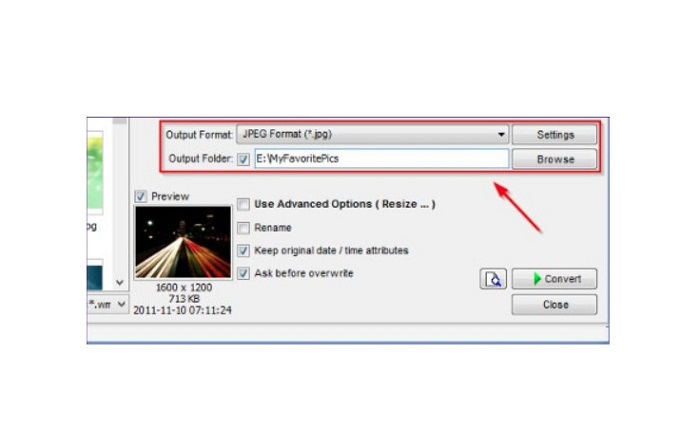
Βήμα 2. Αφού εισαγάγετε την εικόνα ή τις εικόνες σας, θα εμφανιστούν στη διεπαφή. Στη συνέχεια, κάντε κλικ στο Output Format drop-down arrow για να επιλέξετε τη μορφή αρχείου εξόδου που θέλετε. Και για να επιλέξετε τον φάκελο προορισμού του αποτελέσματος, πατήστε το κουμπί Browse δίπλα στο Output Folder.
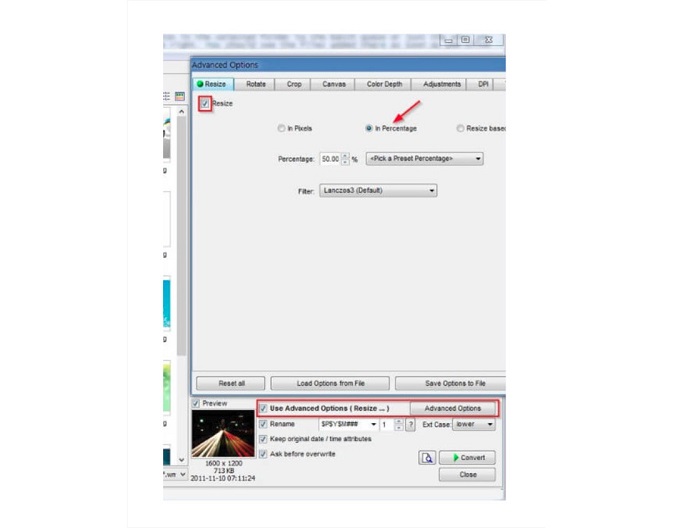
Βήμα 3. Έπειτα, κάντε κλικ στο Advanced Options και θα εμφανιστεί μια νέα καρτέλα. Στην καρτέλα Resize, επιλέξτε την επιλογή In Percentage για να αλλάξετε το μέγεθος της εικόνας με βάση ποσοστό. Μπορείτε να επιλέξετε ένα φίλτρο κάνοντας κλικ στο drop-down arrow δίπλα στο Filter.
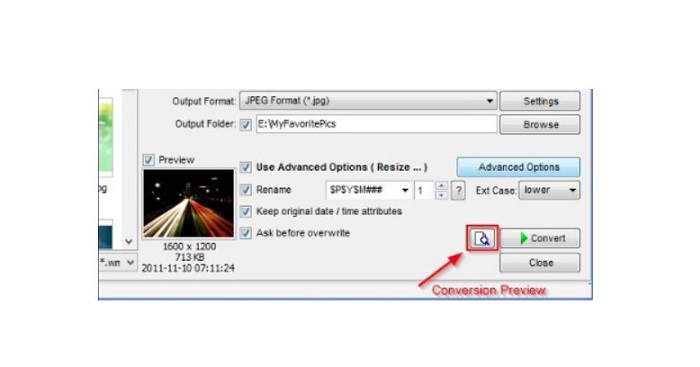
Βήμα 4. Στη συνέχεια, μπορείτε να κάνετε προεπισκόπηση της εικόνας σας και να τη συγκρίνετε με το αρχικό αρχείο, πατώντας το εικονίδιο Preview δίπλα στο κουμπί Convert.
Βήμα 5. Τέλος, πατήστε το κουμπί Convert για να ξεκινήσει η διαδικασία αλλαγής μεγέθους. Θα μετατρέψει επίσης το αρχείο εικόνας σας στη μορφή που επιλέξατε στο προηγούμενο βήμα. Αφού το FastStone αλλάξει το μέγεθος της εικόνας σας, θα εμφανιστεί ένα νέο παράθυρο όπου θα δείτε την εικόνα εξόδου και τα μεγέθη τους.
Και αυτό είναι το τέλος του σεμιναρίου FastStone Photo Resizer. Ακολουθώντας τα παραπάνω βήματα, μπορείτε εύκολα να αλλάξετε το μέγεθος της εικόνας σας χρησιμοποιώντας το FastStone.
Μέρος 2. Εναλλακτικές λύσεις για το FastStone Photo Resizer
Το FastStone Photo Resizer είναι προσβάσιμο μόνο σε επιτραπέζιους υπολογιστές Windows. Και ένα άλλο μειονέκτημα είναι ότι πρέπει να αγοράσετε την εφαρμογή πριν αποκτήσετε πρόσβαση στις άλλες λειτουργίες επεξεργασίας της. Επομένως, εάν προτιμάτε να χρησιμοποιείτε μια εφαρμογή περικοπής βίντεο διαθέσιμη σε συσκευές Windows, Mac ή Linux και διαθέσιμη στο διαδίκτυο, διαβάστε προσεκτικά αυτήν την ενότητα.
FVC Free Image Upscaler
Το FVC Free Image Upscaler είναι μια από τις πιο δημοφιλείς εφαρμογές αλλαγής μεγέθους εικόνων που είναι προσβάσιμες online και σε όλους τους browsers, όπως Google, Firefox και Safari. Αυτό το online εργαλείο μπορεί επίσης να σας βοηθήσει με τις θολές εικόνες σας. Αν έχετε μια θολή ή χαμηλής ποιότητας φωτογραφία, μπορείτε να χρησιμοποιήσετε αυτό το εργαλείο για να την αποθολώσετε και να βελτιώσετε την ποιότητά της. Επιπλέον, μπορείτε να μεγεθύνετε την εικόνα σας κατά 2x, 4x, 6x και 8x. Αυτό που εντυπωσιάζει στο FVC Free Image Upscaler είναι ότι χρησιμοποιεί τεχνολογία τεχνητής νοημοσύνης, η οποία εντοπίζει αυτόματα τα θολά τμήματα της εικόνας σας και τα βελτιώνει.
Επιπλέον, υποστηρίζει όλες τις μορφές εικόνας, όπως PNG, JPG, JPEG και BMP. Επίσης, δεν χρειάζεται να εγγραφείτε ή να συνδεθείτε για λογαριασμό για να χρησιμοποιήσετε αυτό το εργαλείο. Και αν θέλετε να ελέγξετε την προεπισκόπηση της εξόδου σας πριν την αποθηκεύσετε, μπορείτε να το κάνετε ενώ χρησιμοποιείτε αυτήν την εφαρμογή. Επιπλέον, είναι ασφαλές στη χρήση και βολικό στη χρήση. Και παρά το γεγονός ότι είναι μια εφαρμογή που εξαρτάται από το Διαδίκτυο, έχει μια γρήγορη διεπαφή επεξεργασίας όπου δεν θα δυσκολευτείτε να ανεβάσετε εικόνες για να αλλάξετε το μέγεθος.
Βήμα 1. Ανοίξτε τον browser σας και πληκτρολογήστε FVC Free Image Upscaler στο πεδίο αναζήτησης. Πατήστε τον παρεχόμενο σύνδεσμο για να μεταβείτε απευθείας στην κεντρική σελίδα.
Βήμα 2. Εκκινήστε το πρόγραμμα στον υπολογιστή σας, πατώντας το κουμπί Upload Photo. Αφού ανοίξει η εφαρμογή, κάντε κλικ στο κουμπί Upload Photo για να ανεβάσετε την εικόνα που θέλετε να αλλάξετε μέγεθος ή να αποθολώσετε.
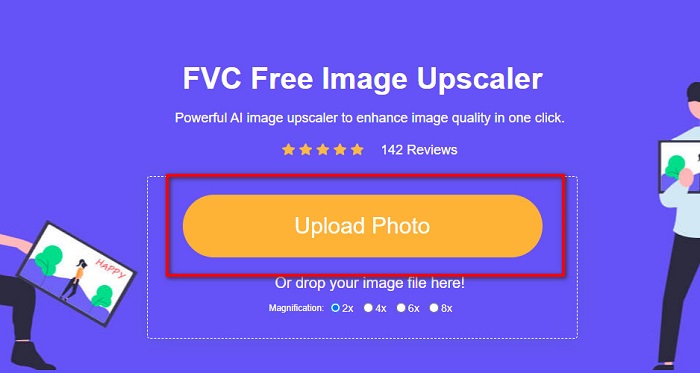
Βήμα 3. Στη συνέχεια, θα δείτε τις διαθέσιμες προρυθμίσεις μεγέθυνσης. Μπορείτε να επιλέξετε μεταξύ 2x, 4x, 6x, ή 8x.
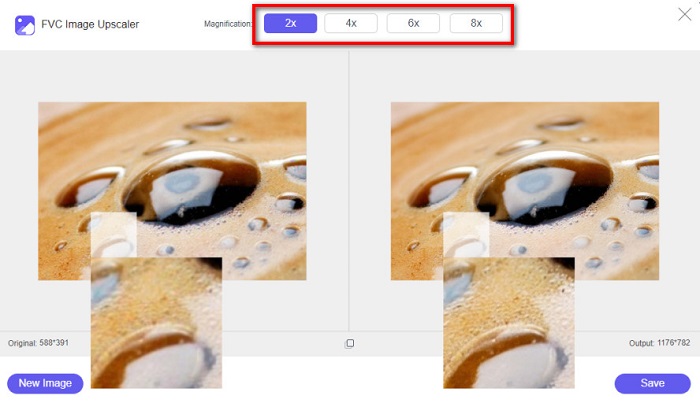
Βήμα 4. Μετακινήστε τον κέρσορα για να δείτε την προεπισκόπηση της εικόνας σας. Κι αν είστε ικανοποιημένοι με το αποτέλεσμα, πατήστε το κουμπί Save στην κάτω δεξιά γωνία της διεπαφής.
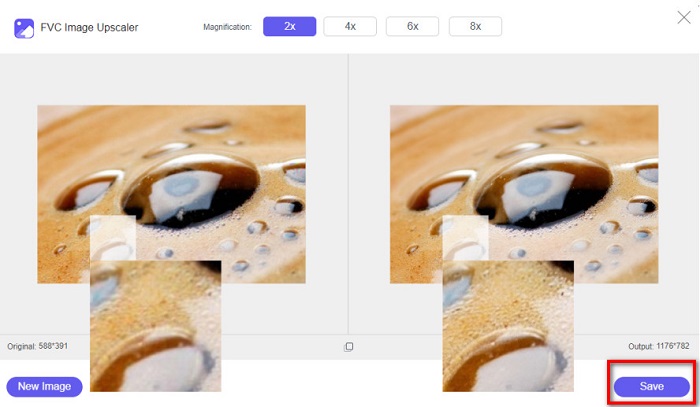
Image Resizer.com
Ένα ακόμη εξαιρετικό online εργαλείο αλλαγής μεγέθους εικόνων που μπορείτε να χρησιμοποιήσετε είναι το Image Resizer.com. Το Image Resizer.com σάς επιτρέπει να αλλάξετε το μέγεθος της εικόνας σας προσαρμόζοντας τις διαστάσεις της. Επιπλέον, διαθέτει λειτουργία για περικοπή ή περιστροφή της φωτογραφίας. Είναι επίσης ένα εργαλείο φιλικό προς αρχάριους, επειδή έχει μια εύχρηστη διεπαφή. Ωστόσο, περιέχει πολλές ενοχλητικές διαφημίσεις που μπορεί να σας αποσπούν την προσοχή.
Βήμα 1. Στον browser σας, αναζητήστε το Image Resizer.com. Και στην κύρια διεπαφή χρήστη, κάντε κλικ στο κουμπί Select Image για να ανεβάσετε τη φωτογραφία που θέλετε να αλλάξετε μέγεθος.
Βήμα 2. Στην επόμενη διεπαφή, μπορείτε να αλλάξετε τις διαστάσεις της εικόνας σας με βάση συγκεκριμένες διαστάσεις ή ποσοστό. Έπειτα, πληκτρολογήστε το Width and Height που προτιμάτε για την εικόνα σας.
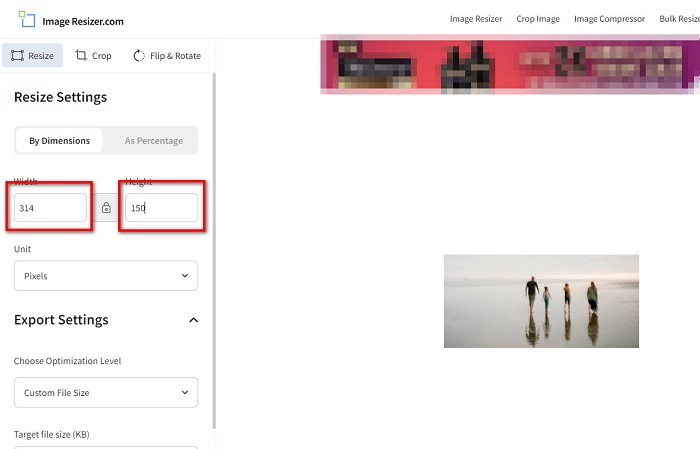
Βήμα 3. Όταν ολοκληρώσετε την αλλαγή μεγέθους της εικόνας σας, πατήστε το κουμπί Resize Image για να ολοκληρωθεί η διαδικασία.
Μέρος 3. Συχνές ερωτήσεις σχετικά με το FastStone Photo Resizer
Πόσο κοστίζει το FastStone Photo Resizer;
Μπορείτε να αγοράσετε την πλήρη έκδοση του FastStone Photo Resizer για $19.95 (Lifetime License)
Είναι δωρεάν το πρόγραμμα προβολής FastStone;
Το FastStone Image Viewer είναι ένα πρόγραμμα προβολής εικόνων που χρησιμοποιείται για τα Microsoft Windows. Μπορείτε να χρησιμοποιήσετε το FastStone Image Viewer δωρεάν και χωρίς χρέωση.
Το FastStone Photo Resizer καταστρέφει την ποιότητα της φωτογραφίας;
Όχι. Όταν βελτιστοποιείτε την εικόνα σας χρησιμοποιώντας το FastStone Photo Resizer, δεν θα χάσετε την ποιότητα της εικόνας σας.
συμπέρασμα
Το FastStone Photo Resizer είναι μια εξαιρετική εφαρμογή αν θέλετε να αλλάξετε το μέγεθος της εικόνας σας σε έναν υπολογιστή με Windows. Επιπλέον, διαθέτει πολλές λειτουργίες επεξεργασίας και είναι επίσης ένα εργαλείο φιλικό προς τον χρήστη. Αν όμως αναρωτιέστε αν υπάρχει FastStone Photo Resizer για Mac, η απάντηση είναι ότι δεν υπάρχει. Επομένως, αν θέλετε ένα εργαλείο αλλαγής μεγέθους φωτογραφιών που να είναι διαθέσιμο σε όλες τις πλατφόρμες, χρησιμοποιήστε τώρα το FVC Free Image Upscaler.
-
 Πλήρης οδηγός του Imglarger – Λύση για σχεδιαστές φωτογραφιών
 Το Imglarger είναι ένα από τα πιο εξέχοντα εργαλεία λύσης εικόνας. Κάντε κλικ σε αυτήν τη σελίδα για να μάθετε τις πλήρεις περιγραφές, τα πλεονεκτήματα και τα μειονεκτήματα, την τιμή και τις εναλλακτικές λύσεις του Imglarger.
-
 Καλύτερη εφαρμογή Photo Resizer Online, Offline, Android και iPhone
 Ποιες είναι οι καλύτερες εφαρμογές αλλαγής μεγέθους φωτογραφιών; Κάντε κλικ στη σελίδα για να μάθετε τις κορυφαίες πέντε πιο ισχυρές εφαρμογές αλλαγής μεγέθους φωτογραφιών που μπορείτε να χρησιμοποιήσετε για να βελτιώσετε ή να αλλάξετε το μέγεθος του αρχείου σας.
-
 6 τρόποι για να επαναπροσδιορίσετε μια εικόνα στον Ιστό και εκτός σύνδεσης [100% Working]
 Με το σεμινάριο που προσθέτουμε εδώ, μπορείτε πλέον εύκολα να αλλάξετε το μέγεθος μιας εικόνας με βάση το μέγεθος που προτιμάτε. Μάθετε πώς να το κάνετε εδώ!
